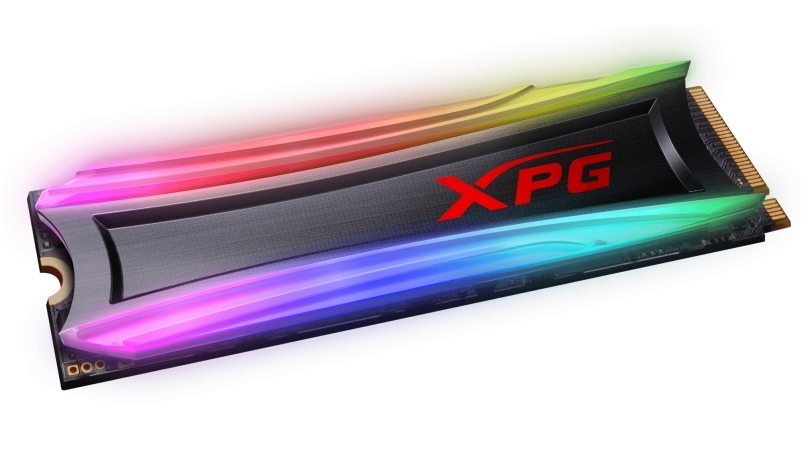
The ADATA XPG Spectrix S40G RGB 512 GB is a high-end SSD especially for gamers and performance-oriented users with adjustable RGB illumination. The XPG Spectrix S40G RGB is based on a powerful Realtek controller and reaches very high sequential speeds of up to 3500 MB/s (read) and 1900 MB/s (write) thanks to the PCIe Gen3x4 interface. Together with an equally impressive performance of max. 240,000 IOPS (write), the XPG Spectrix S40G RGB series offers performance at the highest level.
The ADATA XPG Spectrix S40G RGB 512 GB is a high-end SSD especially for gamers and performance-oriented users with adjustable RGB illumination. The XPG Spectrix S40G RGB is based on a powerful Realtek controller and reaches very high sequential speeds of up to 3500 MB/s (read) and 1900 MB/s (write) thanks to the PCIe Gen3x4 interface. Together with an equally impressive performance of max. 240,000 IOPS (write), the XPG Spectrix S40G RGB series offers performance at the highest level.
in 1 offers
The lowest price for ADATA XPG SPECTRIX S40G 1TB RGB M.2 NVMe SSD AS40G-1TT-C right now is $249.00 at Harvey Norman.
The all-time low was $99.00 on 11 Oct 2025 — today's price is 152% above the lowest ever. It has been notably cheaper before — worth setting a price alert.
Prices last updated 10 July 2026.
ADATA XPG SPECTRIX S40G 1TB RGB M.2 NVMe SSD AS40G-1TT-C
The ADATA XPG Spectrix S40G RGB 512 GB is a high-end SSD especially for gamers and performance-oriented users with adjustable RGB illumination. The XPG Spectrix S40G RGB is based on a powerful Realtek controller and reaches very high sequential speeds of up to 3500 MB/s (read) and 1900 MB/s (write) thanks to the PCIe Gen3x4 interface. Together with an equally impressive performance of max. 240,000 IOPS (write), the XPG Spectrix S40G RGB series offers performance at the highest level.
The ADATA XPG Spectrix S40G RGB 512 GB is a high-end SSD especially for gamers and performance-oriented users with adjustable RGB illumination. The XPG Spectrix S40G RGB is based on a powerful Realtek controller and reaches very high sequential speeds of up to 3500 MB/s (read) and 1900 MB/s (write) thanks to the PCIe Gen3x4 interface. Together with an equally impressive performance of max. 240,000 IOPS (write), the XPG Spectrix S40G RGB series offers performance at the highest level.
Last updated at 10/07/2026 09:55:48
Adata Xpg S40G Rgb 1TB Pci-e m.2 Ssd
originally posted on neweggbusiness.com
Dead drive in 10 min flat. Steps to dead drive. 1. Installed the drive second m.2 slot on gaming laptop 2. Started to copy games folder from another m.2 drive in the same laptop (185GB steam games folder on second drive) 3. Middle of copy job, the operation stops.. reason is drive is not responding.. 4. The RGB light have stopped. A quick touch on heat sink, almost burns my hand. check with temperature gun and it sitting at 96 degree Celsius 5. Shutdown and wait for it cool down. Reboot the PC, it comes back but again any large copy operations kills the drive. 6. check online, looks like I am not the only who has experienced this behavior. 7. Check the idle temperature on this drive and my temperature gun shows it is sitting at 70 degree celius when idle. ... MoreDead drive in 10 min flat. Steps to dead drive. 1. Installed the drive second m.2 slot on gaming laptop 2. Started to copy games folder from another m.2 drive in the same laptop (185GB steam games folder on second drive) 3. Middle of copy job, the operation stops.. reason is drive is not responding.. 4. The RGB light have stopped. A quick touch on heat sink, almost burns my hand. check with temperature gun and it sitting at 96 degree Celsius 5. Shutdown and wait for it cool down. Reboot the PC, it comes back but again any large copy operations kills the drive. 6. check online, looks like I am not the only who has experienced this behavior. 7. Check the idle temperature on this drive and my temperature gun shows it is sitting at 70 degree celius when idle. Conclusion: Buyer beware.. The light maybe cool, but this is product has poor designed thermal setup which should have never been released to market by Adata. I guessing the business manager likely overrode the engineering telling him we need to reduce the thermal on this thing. End result. I have now sitting on useless product and will have to wait another 5 days for different SSD, and ofcourse all the effort to return this unit. My trust in Adata produts is officially dead after I had positive experience with their SX8200 Pro. Unlikely I am going ever recommend Adata based on this flawed product.
originally posted on newegg.com
For the price these are good drives with a good capacity to performance ratio. Have not noticed any overheating issues, the RGB cover seems to make use of the metal in the middle as a decent heat spreader. My Asus x570 board does not seem to recognize the drives in the RGB control, however, the rainbow effect is not too bright to take away from the overall color effect I have. Will check and see if ADATA has drivers or software for RGB control later and update. The other posters have had the smaller drives, I have 2 of the 1 TB drives and the read speed is around 3400 each. The ADATA site said "up to" 3500, and I imagine that is for the 2tb drive. Due to the way SSD data is handled, the larger drives would be faster than smaller drives. I did not raid them, as I'm ... MoreFor the price these are good drives with a good capacity to performance ratio. Have not noticed any overheating issues, the RGB cover seems to make use of the metal in the middle as a decent heat spreader. My Asus x570 board does not seem to recognize the drives in the RGB control, however, the rainbow effect is not too bright to take away from the overall color effect I have. Will check and see if ADATA has drivers or software for RGB control later and update. The other posters have had the smaller drives, I have 2 of the 1 TB drives and the read speed is around 3400 each. The ADATA site said "up to" 3500, and I imagine that is for the 2tb drive. Due to the way SSD data is handled, the larger drives would be faster than smaller drives. I did not raid them, as I'm using a ramdisk for faster game loading anyway. No sense making a system more complicated than necessary just to save a couple seconds loading up the ramdisk.
originally posted on https://www.mightyape.co.nz
No matter what these sticks will not run at the advertised speeds. Took into shop, told that might possibly be MOBO requiring update. Unfortunately the uneducated technician failed to see I already was. Checked the QVL list of the MOBO in which this is on it. Absolutely no reason it should not manage these advertised overclock settings.
| SSD form factor | M.2 |
| SSD capacity | 1000 GB |
| Interface | PCI Express 3.0 |
| Memory type | 3D TLC |
| NVMe | Y |
Adata Xpg S40G Rgb 1TB Pci-e m.2 Ssd
Dead drive in 10 min flat. Steps to dead drive. 1. Installed the drive second m.2 slot on gaming laptop 2. Started to copy games folder from another m.2 drive in the same laptop (185GB steam games folder on second drive) 3. Middle of copy job, the operation stops.. reason is drive is not responding.. 4. The RGB light have stopped. A quick touch on heat sink, almost burns my hand. check with temperature gun and it sitting at 96 degree Celsius 5. Shutdown and wait for it cool down. Reboot the PC, it comes back but again any large copy operations kills the drive. 6. check online, looks like I am not the only who has experienced this behavior. 7. Check the idle temperature on this drive and my temperature gun shows it is sitting at 70 degree celius when idle. ... MoreDead drive in 10 min flat. Steps to dead drive. 1. Installed the drive second m.2 slot on gaming laptop 2. Started to copy games folder from another m.2 drive in the same laptop (185GB steam games folder on second drive) 3. Middle of copy job, the operation stops.. reason is drive is not responding.. 4. The RGB light have stopped. A quick touch on heat sink, almost burns my hand. check with temperature gun and it sitting at 96 degree Celsius 5. Shutdown and wait for it cool down. Reboot the PC, it comes back but again any large copy operations kills the drive. 6. check online, looks like I am not the only who has experienced this behavior. 7. Check the idle temperature on this drive and my temperature gun shows it is sitting at 70 degree celius when idle. Conclusion: Buyer beware.. The light maybe cool, but this is product has poor designed thermal setup which should have never been released to market by Adata. I guessing the business manager likely overrode the engineering telling him we need to reduce the thermal on this thing. End result. I have now sitting on useless product and will have to wait another 5 days for different SSD, and ofcourse all the effort to return this unit. My trust in Adata produts is officially dead after I had positive experience with their SX8200 Pro. Unlikely I am going ever recommend Adata based on this flawed product.
For the price these are good drives with a good capacity to performance ratio. Have not noticed any overheating issues, the RGB cover seems to make use of the metal in the middle as a decent heat spreader. My Asus x570 board does not seem to recognize the drives in the RGB control, however, the rainbow effect is not too bright to take away from the overall color effect I have. Will check and see if ADATA has drivers or software for RGB control later and update. The other posters have had the smaller drives, I have 2 of the 1 TB drives and the read speed is around 3400 each. The ADATA site said "up to" 3500, and I imagine that is for the 2tb drive. Due to the way SSD data is handled, the larger drives would be faster than smaller drives. I did not raid them, as I'm ... MoreFor the price these are good drives with a good capacity to performance ratio. Have not noticed any overheating issues, the RGB cover seems to make use of the metal in the middle as a decent heat spreader. My Asus x570 board does not seem to recognize the drives in the RGB control, however, the rainbow effect is not too bright to take away from the overall color effect I have. Will check and see if ADATA has drivers or software for RGB control later and update. The other posters have had the smaller drives, I have 2 of the 1 TB drives and the read speed is around 3400 each. The ADATA site said "up to" 3500, and I imagine that is for the 2tb drive. Due to the way SSD data is handled, the larger drives would be faster than smaller drives. I did not raid them, as I'm using a ramdisk for faster game loading anyway. No sense making a system more complicated than necessary just to save a couple seconds loading up the ramdisk.
No matter what these sticks will not run at the advertised speeds. Took into shop, told that might possibly be MOBO requiring update. Unfortunately the uneducated technician failed to see I already was. Checked the QVL list of the MOBO in which this is on it. Absolutely no reason it should not manage these advertised overclock settings.
I chose a small capacity NVME because I prefer to keep my system drive separate from drives for other uses. System runs Fedora 34 at present, and when it's time to step up to the next version, having the OS on a separate drive means that I can be sure that the rest of my data will remain untouched. This drive is fast enough that on my system (AMD 5950X, Asus TUF Gaming X570-PRO (WiFi 6) mobo) start-up is blazing fast. Haven't bench marked performance at this point--and may never, because, who cares what the actual numbers are? I'm happy with what I can see. :-) RGB colors are rich and saturated, and bright enough that I couldn't get a shot inside the case easily. Either the colors on the Spectrix get blown out (as above) or the colors are fine but the motherboard in ... MoreI chose a small capacity NVME because I prefer to keep my system drive separate from drives for other uses. System runs Fedora 34 at present, and when it's time to step up to the next version, having the OS on a separate drive means that I can be sure that the rest of my data will remain untouched. This drive is fast enough that on my system (AMD 5950X, Asus TUF Gaming X570-PRO (WiFi 6) mobo) start-up is blazing fast. Haven't bench marked performance at this point--and may never, because, who cares what the actual numbers are? I'm happy with what I can see. :-) RGB colors are rich and saturated, and bright enough that I couldn't get a shot inside the case easily. Either the colors on the Spectrix get blown out (as above) or the colors are fine but the motherboard in the background is too dark to see. Color control, thanks to OpenRGB, is easy.
I would recommend this nvme drive, ssd and nvme prices are dropping considerably vs 1 or 2 years ago. There's no reason to be buying harddrives unless you have an older motherboard or need cheap, raw storage and nothing else. Temps on this nvme drive are actually better than the other one that I have the motherboard heatsink attached to. So maybe ppl complaining about temps are stressing the drive a bit too much or lost out on the silicon lottery? idk. Anyway, this is basically an adata sx8100 with rgb. read/write is identical so it really only comes down to which of the two are cheaper to make a decision. Or if you don't like lights on your storage devices which is understandable...
While it did perform ALMOST as expected (slower write speeds than expected, seems to be a common issue), I have had a few issues with this little device. The main issue (and big one) for me being that it tends to corrupt the Windows installation if the PC hasn't been ran for a while. That part never fails. I have two that I was using. One for my personal build, and another for a PC I had built for a buddy of mine. Same thing happened for both of them. Another issues I'd been having is it really isn't compatible with any RGB software. It just sits at one stationary color if I used Asus' AURA Sync, and I couldn't get Corsair's iCue to work with it at all.
I have to say ADATA makes some of the best performing low-budget PC parts that money can buy, and this SSD does not fall sort of my expectations. I am getting the highest speeds that my board can support, which is 3500MB/s not megabits, megabytes. This little demon of a SSD loads up plenty of games that I have almost instantly into memory (Which is ADATA as well, and again does not disappoint.) Very good price, easy to install, looks cool, and performs great. The only issue I had with mine was the RGB software not working with the SSD. My board is manufactured by Dell, and I have had compatibility issues with other RGB software as well, so I do not think it is the software or device itself.
Write speeds no where near advertised.. actually 3x slower than claimed speeds. Read speeds are fine and as claimed. One of the slowest PCIE ssd drives for writing I have ever used. Even drives from years back are faster. Also be very careful you have room to fit as the lights on top make it 3x the normal size of other drives in thickness. It's cheap because it's not good quality basically, that's why you get 4TB of TLC flash for less than any other drive on the market. If you are just using it for gaming and nothing else, that will be fine as the read speeds are great, and 1000 for write (rather than the claimed 3000) is perfectly fine for writing game data as it downloads. if you are using it for massive file transfers then it's the worst choice out there, and the ... MoreWrite speeds no where near advertised.. actually 3x slower than claimed speeds. Read speeds are fine and as claimed. One of the slowest PCIE ssd drives for writing I have ever used. Even drives from years back are faster. Also be very careful you have room to fit as the lights on top make it 3x the normal size of other drives in thickness. It's cheap because it's not good quality basically, that's why you get 4TB of TLC flash for less than any other drive on the market. If you are just using it for gaming and nothing else, that will be fine as the read speeds are great, and 1000 for write (rather than the claimed 3000) is perfectly fine for writing game data as it downloads. if you are using it for massive file transfers then it's the worst choice out there, and the Adata advertising claims are pure falsehood. Avoid.
Purchased to run in my brothers pc as he has outgrown his 1tb ssd for steam games, purchased this for iots nvme and rgb aura sync.When it arrived and I installed it, it didnt want to sync with the rest of the Aura sync pc, so I did a bios update/aura sync update to see if thats the issue, it was now.Installed Adata's rgb software and then it started working with Asus's Aura sync profile...Speeds are great, had no other issues.Price is great, RGB is average (miniman LED's in the device so isnt as good as something like G.Skill ram), speeds are great.I would use this in my own pc, but my Crosshair VIII covers all the M.2 slots with heatsinks so this wouldnt work in my casePurchase this if your M.2 slot isnt covered with a heatsink!!
very good. nice RGB lighting. only prob is it doesnt save ur lighting u set it to so u have to open the app each time u turn on ur PC to redo the settings. default is plain red and i want it on rainbow to match the rest of the RGB in my system. but thats down to the app rather than the SSD as no options on their to save ur profile. several prifiles built in but all the same and u cant change the profile settings.
| SSD form factor | M.2 |
| SSD capacity | 1000 GB |
| Interface | PCI Express 3.0 |
| Memory type | 3D TLC |
| NVMe | Y |

