Asus Hyper M.2 X16 Card V2
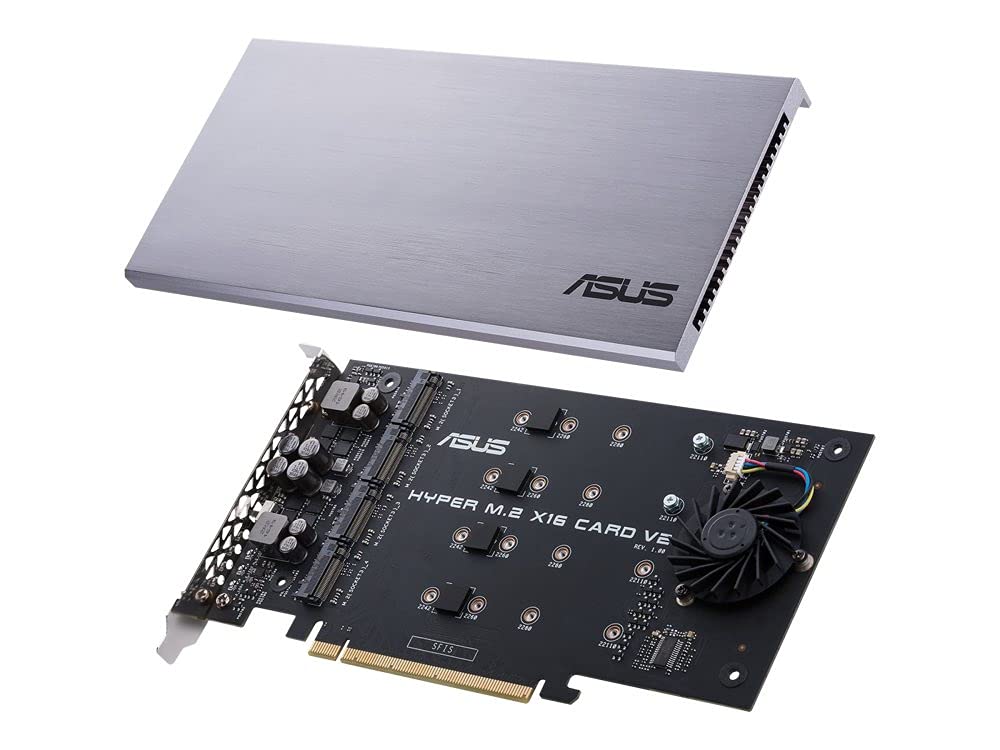
Power-up your RAID New two-phase power solution with up to 14 Watt output supports the latest NVMe drives Large heatsink reduces M.2 SSD temperatures for unthrottled transfer speeds and enhanced reliability Support for up to four PCIe 3.0 M.2 drives with transfer bandwidth up to 128Gbps Intel VROC technology and AMD Ryzen Threadripper support enables creation of bootable NVMe RAID arrays using CPU PCIe lanes RAID on CPU Hyper M.2 x 16 card V2 is compatible with Intel Virtual RAID on CPU (VROC) and the AMD Ryzen Threadripper platform for NVMe RAID support. Unused CPU PCle lanes can be assigned to storage allowing you to create a bootable RAID array with multiple M.2 SSDs. Design for unthrottled transfer speed The ASUS Hyper M.2 x16 V2 card provides four M.2 slots to let you expand your system with high-performance SSD storage. Designed for the latest generation of NVMe drives the card features an upgraded power supply that provides up to 14W of power per drive as well as a large heatsink and active fan to ensure drives stay cool for optimum performance. One card 4X the bandwidth Hyper M.2 x16 is designed specifically for Intel Virtual RAID on CPU (VROC) and the AMD Ryzen Threadripper platform for NVMe RAID support and features four M.2 slots providing up to 128 Gbps of bandwidth per card.
Power-up your RAID New two-phase power solution with up to 14 Watt output supports the latest NVMe drives Large heatsink reduces M.2 SSD temperatures for unthrottled transfer speeds and enhanced reliability Support for up to four PCIe 3.0 M.2 drives with transfer bandwidth up to 128Gbps Intel VROC technology and AMD Ryzen Threadripper support enables creation of bootable NVMe RAID arrays using CPU PCIe lanes RAID on CPU Hyper M.2 x 16 card V2 is compatible with Intel Virtual RAID on CPU (VROC) and the AMD Ryzen Threadripper platform for NVMe RAID support. Unused CPU PCle lanes can be assigned to storage allowing you to create a bootable RAID array with multiple M.2 SSDs. Design for unthrottled transfer speed The ASUS Hyper M.2 x16 V2 card provides four M.2 slots to let you expand your system with high-performance SSD storage. Designed for the latest generation of NVMe drives the card features an upgraded power supply that provides up to 14W of power per drive as well as a large heatsink and active fan to ensure drives stay cool for optimum performance. One card 4X the bandwidth Hyper M.2 x16 is designed specifically for Intel Virtual RAID on CPU (VROC) and the AMD Ryzen Threadripper platform for NVMe RAID support and features four M.2 slots providing up to 128 Gbps of bandwidth per card.
Power-up your RAID New two-phase power solution with up to 14 Watt output supports the latest NVMe drives Large heatsink reduces M.2 SSD temperatures for unthrottled transfer speeds and enhanced reliability Support for up to four PCIe 3.0 M.2 drives with transfer bandwidth up to 128Gbps Intel VROC technology and AMD Ryzen Threadripper support enables creation of bootable NVMe RAID arrays using CPU PCIe lanes RAID on CPU Hyper M.2 x 16 card V2 is compatible with Intel Virtual RAID on CPU (VROC) and the AMD Ryzen Threadripper platform for NVMe RAID support. Unused CPU PCle lanes can be assigned to storage allowing you to create a bootable RAID array with multiple M.2 SSDs. Design for unthrottled transfer speed The ASUS Hyper M.2 x16 V2 card provides four M.2 slots to let you expand your system with high-performance SSD storage. Designed for the latest generation of NVMe drives the card features an upgraded power supply that provides up to 14W of power per drive as well as a large heatsink and active fan to ensure drives stay cool for optimum performance. One card 4X the bandwidth Hyper M.2 x16 is designed specifically for Intel Virtual RAID on CPU (VROC) and the AMD Ryzen Threadripper platform for NVMe RAID support and features four M.2 slots providing up to 128 Gbps of bandwidth per card.
Power-up your RAID New two-phase power solution with up to 14 Watt output supports the latest NVMe drives Large heatsink reduces M.2 SSD temperatures for unthrottled transfer speeds and enhanced reliability Support for up to four PCIe 3.0 M.2 drives with transfer bandwidth up to 128Gbps Intel VROC technology and AMD Ryzen Threadripper support enables creation of bootable NVMe RAID arrays using CPU PCIe lanes RAID on CPU Hyper M.2 x 16 card V2 is compatible with Intel Virtual RAID on CPU (VROC) and the AMD Ryzen Threadripper platform for NVMe RAID support. Unused CPU PCle lanes can be assigned to storage allowing you to create a bootable RAID array with multiple M.2 SSDs. Design for unthrottled transfer speed The ASUS Hyper M.2 x16 V2 card provides four M.2 slots to let you expand your system with high-performance SSD storage. Designed for the latest generation of NVMe drives the card features an upgraded power supply that provides up to 14W of power per drive as well as a large heatsink and active fan to ensure drives stay cool for optimum performance. One card 4X the bandwidth Hyper M.2 x16 is designed specifically for Intel Virtual RAID on CPU (VROC) and the AMD Ryzen Threadripper platform for NVMe RAID support and features four M.2 slots providing up to 128 Gbps of bandwidth per card.
in 3 offers
The lowest price for Asus Hyper M.2 X16 Card V2 right now is $73.34 at Playthek.com, compared across 3 retailers.
The all-time low was $63.99 on 30 Sept 2024 — today's price is 15% above the lowest ever. That's a little above the best price we've seen.
Prices last updated 6 Sept 2026.
Last updated at 06/09/2026 09:01:31
ASUS Hyper M.2 x16 Card v2 4 x M.2 Socket 3 PCIe 4 x M.2 NVMe SSD Expansion Card 90MC06P0-M0EAY0 Desktop Laptop
Affiliate Disclosure: We may receive a small commission for purchases made through this link at no extra cost to you. This helps support our site. Thank you!
ASUS HYPER M.2 X16 CARD V2 - Interface Adapters - M.2 - Expansion Slot to M.2 - M.2 Card - 128 Gbps - PCIe 3.0 x16
Free delivery
ASUS Hyper M.2 x16 Card v2 4 x M.2 Socket 3
Delivery between 12–15 Sept $29
originally posted on bhphotovideo.com
Requires bifurcation and works in 8x PCI-E slot (16x physical) with 2 drives in slot 1 - 2. Before I turned on bifurcation in the motherboard bios (was set to auto initially), only 1 drive was visible. After setting it to on, both drives were shown.PCB bends a little bit on on 4 corners where you screw down the heat-sink. Fan is too loud for my home desktop setup so I just shut it off with the switch on the back. I will typically be using these drives for storage and light reads so I won't need the fan. There is enough case fan airflow to keep it cool enough for my usage.
originally posted on digitec.ch
Beware - this probably won't work in your system. Save your money and buy one for a single M.2Even Intel i9 processors have 24 PCI lanes.Most decent GPUs use 16 of them - leaving 8.On my MSI motherboard that is 1 x 4 and 4 x 1. You need 4 lanes for EACH M.2 you add - so put four M.2 in and you need 16 lanes. Unless you remove or downgrade the GPU to an x4 slot, you won't have an x16 slot for these drives.
originally posted on bhphotovideo.com
I can use only one M.2 with my Dell optiplex 7010, i7 motherboard because not supporting two M.2 at same time. I bought total three M.2 but only using one. Two are taking rest and sleeping. Thanks.
| Ports & interfaces | |
| Number of M.2 (M) slots | 1 |
| Expansion card standard | PCIe 3.0 |
| Output interface | M.2 |
| Host interface | PCIe |

ASUS Hyper M.2 x16 Card v2 4 x M.2 Socket 3 PCIe 4 x M.2 NVMe SSD Expansion Card 90MC06P0-M0EAY0 Desktop Laptop
Affiliate Disclosure: We may receive a small commission for purchases made through this link at no extra cost to you. This helps support our site. Thank you!
ASUS HYPER M.2 X16 CARD V2 - Interface Adapters - M.2 - Expansion Slot to M.2 - M.2 Card - 128 Gbps - PCIe 3.0 x16
Free delivery
ASUS Hyper M.2 x16 Card v2 4 x M.2 Socket 3
Delivery between 12–15 Sept $29
Requires bifurcation and works in 8x PCI-E slot (16x physical) with 2 drives in slot 1 - 2. Before I turned on bifurcation in the motherboard bios (was set to auto initially), only 1 drive was visible. After setting it to on, both drives were shown.PCB bends a little bit on on 4 corners where you screw down the heat-sink. Fan is too loud for my home desktop setup so I just shut it off with the switch on the back. I will typically be using these drives for storage and light reads so I won't need the fan. There is enough case fan airflow to keep it cool enough for my usage.
Beware - this probably won't work in your system. Save your money and buy one for a single M.2Even Intel i9 processors have 24 PCI lanes.Most decent GPUs use 16 of them - leaving 8.On my MSI motherboard that is 1 x 4 and 4 x 1. You need 4 lanes for EACH M.2 you add - so put four M.2 in and you need 16 lanes. Unless you remove or downgrade the GPU to an x4 slot, you won't have an x16 slot for these drives.
I can use only one M.2 with my Dell optiplex 7010, i7 motherboard because not supporting two M.2 at same time. I bought total three M.2 but only using one. Two are taking rest and sleeping. Thanks.
While I have a motherboard with 2 NVME slots (1 occupied), installing another would have required removing the GFX card and soundcard to shift the heatsink plating. Plus, I wanted to have more than 2 drives, so this card provided the perfect solution.It is absolutely worth paying the extra cash than lower priced adapters for the cooling fan, heatsink and plating this one offers. Just make sure before you buy this, that your system can support this as it requires:A x16 PCI-Express 3.0 slot, and your BIOS needs to support Hyper M2 x16 mode if it is an Intel system (PCIe RAID Mode on an AMD system). If you have an ASUS BIOS like me, you can check this by going into the BIOS, pressing F7 for advanced mode, then going to the advanced section, then CPU Storage ... MoreWhile I have a motherboard with 2 NVME slots (1 occupied), installing another would have required removing the GFX card and soundcard to shift the heatsink plating. Plus, I wanted to have more than 2 drives, so this card provided the perfect solution.It is absolutely worth paying the extra cash than lower priced adapters for the cooling fan, heatsink and plating this one offers. Just make sure before you buy this, that your system can support this as it requires:A x16 PCI-Express 3.0 slot, and your BIOS needs to support Hyper M2 x16 mode if it is an Intel system (PCIe RAID Mode on an AMD system). If you have an ASUS BIOS like me, you can check this by going into the BIOS, pressing F7 for advanced mode, then going to the advanced section, then CPU Storage Configuration, and going to one of your PCI-Express slots to see if the Hyper M2 x16 option is available.There are mounting bolts for all 4 slots, though I found they were all hidden away in various bits of the box, so make sure to look carefully before discarding/storing it away!Worth noting as well that this card is for generation 3 NVME drives, so do not get this if you plan on buying generation 4 NVME drives, as you will not get the extra speed from the extra premium you would be paying for. At the time of this review, for a drive that offers the best between capacity, speed and value for money, I would highly recommend the Sabrent 2TB Rocket NVME M.2 2280 which comes in at around £240. It benchmarks at around 90% of the speeds of its Samsung EVO 2TB counterpart (but costs around £440) comes with a 5-year warranty, and links you to free drive cloning software should you need it.As a final note, while you can use NVME drives in a RAID setup, due to the latency caused by RAID drivers, you lose upwards of 40% of the speed gains you would otherwise enjoy than if you ran these drives all separately.
I really like this card, but check your motherboard for bifurcation support and # of additional M.2 slots allowed at the ASUS site. Memory needs to support the PCIe Interface i.e. (Samsung 1TB 970 EVO Plus). For my ASUS motherboard, this card needed to be in the first 16X slot. My graphics card was moved to the third PCI slot. I bought two Samsung 970 EVO Plus SSD, and moved my M2-2 SSD card to this board but needed to leave the 2nd M.2 slot open on this card. BIOS setting instructions from ASUS were not clear at all. I now have 5 non-raid SSD cards and I am very happy. The card also supports RAID if INTEL M.2 SSDs are used. Research was required to find the proper setup because the included documentation was weak.
A fantastic product for increasing the number of nvme drives. But it is important to understand how to set it up properly. It occupies a 16x slot, but your motherboard needs to allow bifurcation. Mine only allows 4x4x8x, so this means I can only use three drives in here. Works great for me.
I used this card to update a circa 2011 home-built desktop machine with an NVMe SSD. The machine has a fast four-core AMD processor and 8 GB of RAM, so while not as fast as the best stuff you can buy today either in terms of processing speed or memory bandwidth, it's plenty fast enough and was worth an improvement in disk throughput.This card looks very well designed and well made, it's easy to install and provides connectors for four NVEe devices.I did have to leave one of the old SATA SSDs in the machine for booting, because the BIOS doesn't know about NVMe devices.I restored Arch Linux from my backups to the new configuration, did a little bit of tweaking (e.g., partition UUIDs changed) and the machine came up. The machine feels quite a bit faster. Well ... MoreI used this card to update a circa 2011 home-built desktop machine with an NVMe SSD. The machine has a fast four-core AMD processor and 8 GB of RAM, so while not as fast as the best stuff you can buy today either in terms of processing speed or memory bandwidth, it's plenty fast enough and was worth an improvement in disk throughput.This card looks very well designed and well made, it's easy to install and provides connectors for four NVEe devices.I did have to leave one of the old SATA SSDs in the machine for booting, because the BIOS doesn't know about NVMe devices.I restored Arch Linux from my backups to the new configuration, did a little bit of tweaking (e.g., partition UUIDs changed) and the machine came up. The machine feels quite a bit faster. Well worth $100 for this card and the new (250 GB) SSD.
I'm running an ASROCK AB350 Pro4 Motherboard that is supposed to work with this card according to the ASUS website however the card does not work. I tried flashing the bios to the latest version and changing the PCI lanes to 8x2 and still the card would not be recognized. Garbage product with garbage documentation. They are probably hoping users will get frustrated and upgrade to an ASUS motherboard to make it work...
Solid build. Only concern is the tiny fan but the whole metal shroud acts like a heat sink any way so not concerned about heat. Fan is not too noisy but may irritate some - my GFX card fan is noiser so overrides it. There is a switch to turn off the fan. Fits into one slot only (16 lanes for 4 NVMEs, 8 lanes for 2 NVMEs).Make sure your motherboard has an updated BIOS that supports bifurcation (4x/4x/4x/4x for 16 lane slots, x4/x4 for 8 lane slots) and all should be good.
This card has a huge aluminum heatsink and even a little fan (that you can turn off). Unfortunately this huge heat sink makes it extremely hard to fit is next to a GPU (typical scenario) and especially to push the release tab on the PCIe connector.Would be great if it worked. But I tried it in two different PCs, ca 2017 and ca 2020 (Intel and AMD Ryzen) and in neither one did my SSD show up. A PCEe-x4 card finally worked.
| Ports & interfaces | |
| Number of M.2 (M) slots | 1 |
| Expansion card standard | PCIe 3.0 |
| Output interface | M.2 |
| Host interface | PCIe |