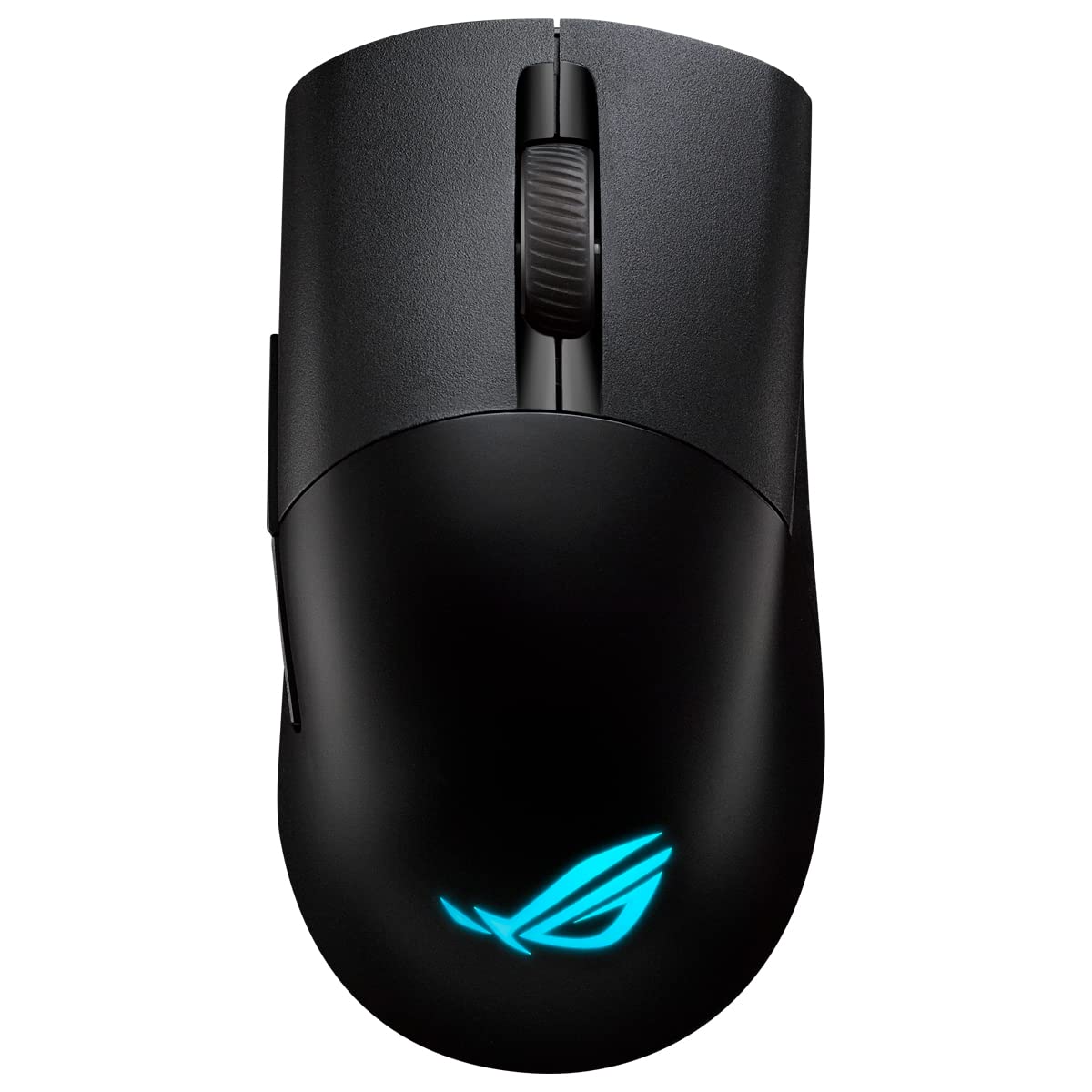
Tri-mode connectivity with dual-wireless 2.4 GHz and Bluetooth LE, plus wired USB. Specially tuned ROG 16,000 dpi, 400 ips optical sensor and 1000 Hz polling rate. Optimized for FPS games, ergonomic design is based on input from esports pros. ROG exclusive push-fit switch socket to vary click force and extend the lifespan of the mouse. ROG Micro Switches for consistent click force and 70-million-click lifespan. Honeycomb inner structure results in a lightweight 79 gram design.
Tri-mode connectivity with dual-wireless 2.4 GHz and Bluetooth LE, plus wired USB. Specially tuned ROG 16,000 dpi, 400 ips optical sensor and 1000 Hz polling rate. Optimized for FPS games, ergonomic design is based on input from esports pros. ROG exclusive push-fit switch socket to vary click force and extend the lifespan of the mouse. ROG Micro Switches for consistent click force and 70-million-click lifespan. Honeycomb inner structure results in a lightweight 79 gram design.
in 1 offers
The lowest price for Asus ROG Keris Wireless Gaming Mouse right now is $99.39 at microless.com.
The all-time low was $84.11 on 28 June 2025 — today's price is 18% above the lowest ever. That's a little above the best price we've seen.
Prices last updated 2 Oct 2026.
Asus ROG Keris Wireless Gaming Mouse
Tri-mode connectivity with dual-wireless 2.4 GHz and Bluetooth LE, plus wired USB. Specially tuned ROG 16,000 dpi, 400 ips optical sensor and 1000 Hz polling rate. Optimized for FPS games, ergonomic design is based on input from esports pros. ROG exclusive push-fit switch socket to vary click force and extend the lifespan of the mouse. ROG Micro Switches for consistent click force and 70-million-click lifespan. Honeycomb inner structure results in a lightweight 79 gram design.
Tri-mode connectivity with dual-wireless 2.4 GHz and Bluetooth LE, plus wired USB. Specially tuned ROG 16,000 dpi, 400 ips optical sensor and 1000 Hz polling rate. Optimized for FPS games, ergonomic design is based on input from esports pros. ROG exclusive push-fit switch socket to vary click force and extend the lifespan of the mouse. ROG Micro Switches for consistent click force and 70-million-click lifespan. Honeycomb inner structure results in a lightweight 79 gram design.
Last updated at 02/10/2026 05:17:03
ASUS ROG Keris Wireless Lightweight Gaming Mouse,16,000 DPI Sensor, Push-fit Switch Sockets, Swappable Side Buttons, ROG Omni Mouse Feet, ROG Paracord
Delivery between 8–14 Oct $33.37
originally posted on influenster.com
Worth every penny for a beautiful design and awesome build quality there is never a comparison with ASUS ROG, this mouse is so confortable with a light weight for long heavy work days in the office or long gaming hours plus the battery life is awesome.
originally posted on microcenter.com
So I’ve stuck by Asus, and thankfully I’ve stayed with it. Purchased this mouse for my flow13 gaming laptop. I need a Bluetooth setup, and it’s been amazing and more. Using the Asus Crate to change up the color patterns is also a good add. Battery last a long time. I would buy over and over again.
originally posted on staples.ca
I liked the customizable color options with my Asus computer. I find it lags once in awhile, but I'm using it wireless, so that could be why. Overall it's fairly responsive. You get extra pieces for the side buttons and the clickers as well as the sliders underneath. The side buttons can be swapped out for pink or a dark silvery color. You can use this mouse while it is plugged in charging, which was important to me. You're able to customize many of the settings. I'm sure I'll find the settings that work better for me, but I've only had the mouse for a month and I'm still figuring different things out. I use it mainly as an everyday mouse, but I've done some light gaming with it and find it's pretty good at what it does. I have smaller hands and find it very ... MoreI liked the customizable color options with my Asus computer. I find it lags once in awhile, but I'm using it wireless, so that could be why. Overall it's fairly responsive. You get extra pieces for the side buttons and the clickers as well as the sliders underneath. The side buttons can be swapped out for pink or a dark silvery color. You can use this mouse while it is plugged in charging, which was important to me. You're able to customize many of the settings. I'm sure I'll find the settings that work better for me, but I've only had the mouse for a month and I'm still figuring different things out. I use it mainly as an everyday mouse, but I've done some light gaming with it and find it's pretty good at what it does. I have smaller hands and find it very comfortable. Someone with an average medium hand would find it comfortable as well. You can connect it with bluetooth, wireless (with the included dongle), or wired. I bought it on sale, so i think it was worth the price. I'm not sure if i would buy it full price, but it is a good mouse in my opinion. The multi colored lights are a fun bonus.
| Sensor Type | Optical |
| dpi | 16,000 |
| Scroll Type | Scroll Wheel |
| Polling Rate | 1000 Hz |
| Acceleration | 40 g / 400 ips |
ASUS ROG Keris Wireless Lightweight Gaming Mouse,16,000 DPI Sensor, Push-fit Switch Sockets, Swappable Side Buttons, ROG Omni Mouse Feet, ROG Paracord
Delivery between 8–14 Oct $33.37
Worth every penny for a beautiful design and awesome build quality there is never a comparison with ASUS ROG, this mouse is so confortable with a light weight for long heavy work days in the office or long gaming hours plus the battery life is awesome.
So I’ve stuck by Asus, and thankfully I’ve stayed with it. Purchased this mouse for my flow13 gaming laptop. I need a Bluetooth setup, and it’s been amazing and more. Using the Asus Crate to change up the color patterns is also a good add. Battery last a long time. I would buy over and over again.
I liked the customizable color options with my Asus computer. I find it lags once in awhile, but I'm using it wireless, so that could be why. Overall it's fairly responsive. You get extra pieces for the side buttons and the clickers as well as the sliders underneath. The side buttons can be swapped out for pink or a dark silvery color. You can use this mouse while it is plugged in charging, which was important to me. You're able to customize many of the settings. I'm sure I'll find the settings that work better for me, but I've only had the mouse for a month and I'm still figuring different things out. I use it mainly as an everyday mouse, but I've done some light gaming with it and find it's pretty good at what it does. I have smaller hands and find it very ... MoreI liked the customizable color options with my Asus computer. I find it lags once in awhile, but I'm using it wireless, so that could be why. Overall it's fairly responsive. You get extra pieces for the side buttons and the clickers as well as the sliders underneath. The side buttons can be swapped out for pink or a dark silvery color. You can use this mouse while it is plugged in charging, which was important to me. You're able to customize many of the settings. I'm sure I'll find the settings that work better for me, but I've only had the mouse for a month and I'm still figuring different things out. I use it mainly as an everyday mouse, but I've done some light gaming with it and find it's pretty good at what it does. I have smaller hands and find it very comfortable. Someone with an average medium hand would find it comfortable as well. You can connect it with bluetooth, wireless (with the included dongle), or wired. I bought it on sale, so i think it was worth the price. I'm not sure if i would buy it full price, but it is a good mouse in my opinion. The multi colored lights are a fun bonus.
I wasn't too sure going in if I would like this mouse but after using it, I'm impressed. It feels good and moves very smooth and fluid. So far battery lasts very well too.
Finding a gaming mouse (i.e., High polling rate) in this price category might seem easy, but when you add the features of Tri-mode connectivity, the options are limited.ROG Keris wireless mouse is very light, responsive and ergonomic for me with medium sized hand (although not the most ergonomic mouse I have used).I like the option of push-fit switches and it comes with two sets of switches which I used the Omron ones since they were more silent.(and also comes with 2 pairs of different colors for the side buttons and 2 sets of extra mouse feet)Also the AURA Sync RGB can be customized for the front and bottom of the mouse separately (via Aura creator app)
Overall it's not a bad mouse, just I wouldn't have bought it if I hadn't been forced because it came with the 3080 as part of a Shuffle bundle. Most of the pros listed are really minor in the grand scheme of things. I've had my G502 for years with no problems and while my G903 doesn't actually have a dongle storage, it's dongle just sits in the USB-A port and doesn't cause any problems with transporting the laptop. The Aura Creator connectivity was a nice thing but unless your rocking an ASUS system this won't be of much advantage. In the end, since I wasn't looking for a new mouse, it didn't impress me to the point where I want to replace ones I've been using for years. Sorry ASUS, I love ya, but you got to tell your vendors to stop forcing things onto customers ... MoreOverall it's not a bad mouse, just I wouldn't have bought it if I hadn't been forced because it came with the 3080 as part of a Shuffle bundle. Most of the pros listed are really minor in the grand scheme of things. I've had my G502 for years with no problems and while my G903 doesn't actually have a dongle storage, it's dongle just sits in the USB-A port and doesn't cause any problems with transporting the laptop. The Aura Creator connectivity was a nice thing but unless your rocking an ASUS system this won't be of much advantage. In the end, since I wasn't looking for a new mouse, it didn't impress me to the point where I want to replace ones I've been using for years. Sorry ASUS, I love ya, but you got to tell your vendors to stop forcing things onto customers that don't want.
I have tried gaming mice from various brands and decided to give the ROG Keris a try. I think it's safe to say that I have been blown away by it and it's by far the best gaming mouse I have ever purchased.It's a quite small mouse, which fits in the palm just PERFECTLY. I can imagine this will be different depending on the size of your hand, however it fits me perfectly.M1/M2 click are just perfect with zero pre-travel.The tracking is perfect, it glides well and it has a really sleek design.I have nothing bad to say about it, I'll be enjoying this mouse for the coming years!
I bought this mouse for my work from home setup. I use a Zephyrus g14 and have been so happy with this laptop I wanted to buy a mouse from Asus. After receiving and trying to pair the mouse with blue tooth and 2.4ghz connection it doesn't work. Blue Tooth has never worked and 2.4ghz connection works for minutes at a time before trying to pair again. I have uninstalled and reinstalled drivers. Went through the setup process 10 times and it still fails. This wireless mouse only works when connected by a wire.
This mouse to me is a jack of all traits mouse and performs every one amazingly. Good sensor, lightweight, wireless with multiple connectivity, good shape, replaceable switches, RGB, type c cable for charging and wired play. Honestly the perfect gaming mouse.
It suits my purposes very well. I use it for photo editing and gaming, among other things. It uses standard wireless receiver, which stows nicely when not in use. It also uses Bluetooth, which I use most times. (Aura sync lighting too)Overall, nice mouse.
| Sensor Type | Optical |
| dpi | 16,000 |
| Scroll Type | Scroll Wheel |
| Polling Rate | 1000 Hz |
| Acceleration | 40 g / 400 ips |