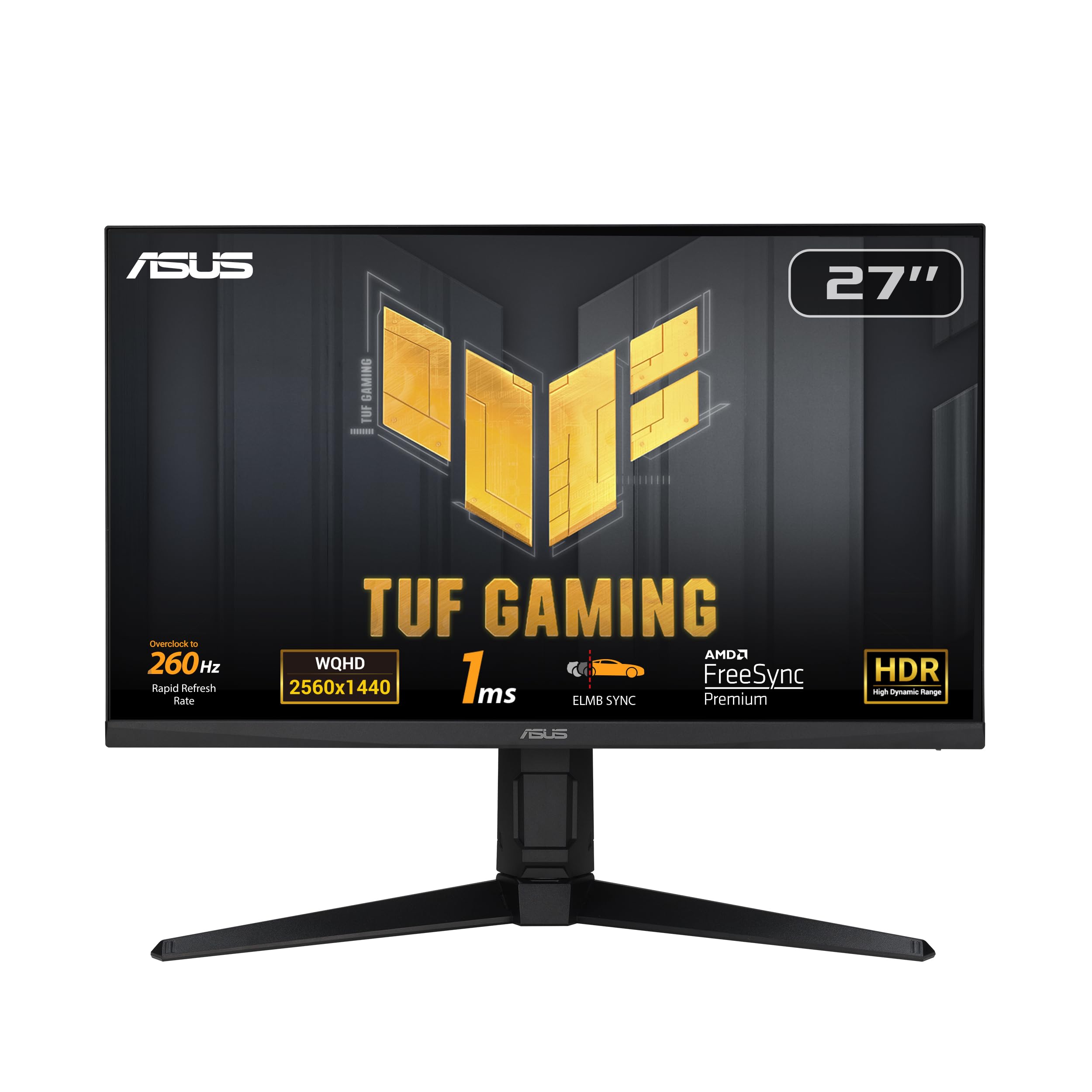
TUF Gaming VG27AQ features WQHD (2560 x 1440) panel that delivers up to 77% more onscreen desktop space than standard Full HD (1920 x 1080) displays. IPS technology gives you superior images with outstanding colors thanks to 99% sRGB color gamut and an astounding 1,000:1 contrast ratio. Wide 178-degree viewing angles ensure minimal distortion and color shift even when you’re viewing from extreme positions.
TUF Gaming VG27AQ features WQHD (2560 x 1440) panel that delivers up to 77% more onscreen desktop space than standard Full HD (1920 x 1080) displays. IPS technology gives you superior images with outstanding colors thanks to 99% sRGB color gamut and an astounding 1,000:1 contrast ratio. Wide 178-degree viewing angles ensure minimal distortion and color shift even when you’re viewing from extreme positions.
in 3 offers
last seen 30 Oct 2026
The lowest price we last saw for Asus TUF VG27AQ 27" 165Hz WQHD HDR10 IPS G-Sync Compatible Gaming Monitor was $553.00 at Ubuy Australia, compared across 3 retailers (last seen 30 Oct 2026). Prices may have changed since.
The all-time low we recorded was $339.00 on 17 Nov 2023.
Prices last updated 30 Oct 2026.
Asus TUF VG27AQ 27" 165Hz WQHD HDR10 IPS G-Sync Compatible Gaming Monitor
TUF Gaming VG27AQ features WQHD (2560 x 1440) panel that delivers up to 77% more onscreen desktop space than standard Full HD (1920 x 1080) displays. IPS technology gives you superior images with outstanding colors thanks to 99% sRGB color gamut and an astounding 1,000:1 contrast ratio. Wide 178-degree viewing angles ensure minimal distortion and color shift even when you’re viewing from extreme positions.
TUF Gaming VG27AQ features WQHD (2560 x 1440) panel that delivers up to 77% more onscreen desktop space than standard Full HD (1920 x 1080) displays. IPS technology gives you superior images with outstanding colors thanks to 99% sRGB color gamut and an astounding 1,000:1 contrast ratio. Wide 178-degree viewing angles ensure minimal distortion and color shift even when you’re viewing from extreme positions.
Last updated at 30/10/2026 09:22:40
ASUS TUF Gaming 27" 1440P HDR Gaming Monitor (VG27AQ) - QHD (2560 x 1440), 165Hz (Supports 144Hz), 1ms, Extreme Low Motion Blur, Speaker, G-SYNC
Delivery between 3–7 Nov $41
ASUS VG27AQ TUF Gaming 27" 2K HDR Gaming Monitor, WQHD , 165Hz
Delivery $28.43
Asus VG27AQ 27 IPS 2K 2560x1440 Monitor
Free delivery between Sat – Wed
originally posted on bhphotovideo.com
I have had the monitor for about two weeks now. Shipping time was great - only took one day to arrive on the east coast. Like all Asus products, the monitor is packaged very well and it is easy to assemble. No dead pixels, the monitor has thin bezels. I mostly use this monitor for gaming and it is great for fast paced FPS games like Apex and COD. I was able to overclock to 165 Hz with no issues. Coming from an Asus 25 2k 60 Hz monitor this is a big upgrade for gaming. It would have been nice to have a USB 3.0 port in the I/O, but I understand Asus usually reserves those premium features for their ROG brand. The TUF Gaming series is a great middle ground for those that want value and performance without spending an arm and a leg on a ROG monitor. Highly recommend ... MoreI have had the monitor for about two weeks now. Shipping time was great - only took one day to arrive on the east coast. Like all Asus products, the monitor is packaged very well and it is easy to assemble. No dead pixels, the monitor has thin bezels. I mostly use this monitor for gaming and it is great for fast paced FPS games like Apex and COD. I was able to overclock to 165 Hz with no issues. Coming from an Asus 25 2k 60 Hz monitor this is a big upgrade for gaming. It would have been nice to have a USB 3.0 port in the I/O, but I understand Asus usually reserves those premium features for their ROG brand. The TUF Gaming series is a great middle ground for those that want value and performance without spending an arm and a leg on a ROG monitor. Highly recommend especially if you can get it on sale.
originally posted on newegg.com
If you're planning to use the default stand then I'm sure it's fine. The picture is great, although I am of the opinion that it isn't particularly difficult to find crisp picture on monitors anymore. BUT BE AWARE that if you plan to use any type of mount, it will be the EXTREMELY obnoxious to install. There is a decorative hood that prevents you from using the thumb screw in a VESA mount, and depending on the mount you have, the thumb screw may not have a low enough profile to fit (I am very fortunate my was). I have a smaller desk and because of that use a clamp stand to give myself as much desk space as possible. Every other monitor I've encountered, and all of my friends monitors (I asked) have free clearance over the thumb screw. It's a flat monitor, why on ... MoreIf you're planning to use the default stand then I'm sure it's fine. The picture is great, although I am of the opinion that it isn't particularly difficult to find crisp picture on monitors anymore. BUT BE AWARE that if you plan to use any type of mount, it will be the EXTREMELY obnoxious to install. There is a decorative hood that prevents you from using the thumb screw in a VESA mount, and depending on the mount you have, the thumb screw may not have a low enough profile to fit (I am very fortunate my was). I have a smaller desk and because of that use a clamp stand to give myself as much desk space as possible. Every other monitor I've encountered, and all of my friends monitors (I asked) have free clearance over the thumb screw. It's a flat monitor, why on earth does it need a triangular hood on the back that you'll never see? It just has to be to discourage you from using another stand, which I think is silly. If you use multiple monitors be ready to be delicately balancing the monitor while trying to screw in tiny screws into the back of a very slim, fragile monitor with thin bezels. I was obligated to buy this with a GPU bundle, if I wasn't, I would've returned it and tried another monitor. They must be having a hard time selling them, and I can definitely see why, this is asinine.
originally posted on asus.com
-A great buy for the price.-Great for gaming, particularly retro gaming. Note that response time and input response time are TOTALLY different. The input response time is 10ms; however, 10ms is a good thing, it's one of the lowest input response times available!-Colour accuracy can be improved using custom colour profiles in Windows-Lots of ports: 1 VGA, 2 HDMI, and 1 DisplayPort-The stand is fantastic, easily adjustable up and down, tilt, pivot, and 2-way rotation between landscape and portrait (one of the top reviewers on here claimed that they couldn't rotate the screen, which is not true at all).-Pretty good for web browsing and reading, but white backgrounds really make the bad viewing angles stand outExcellent monitor for 1440p gaming!
| Hardware Interface | DisplayPort, HDMI |
| Scanner Resolution | FHD 1080p |
| Standing screen display size | 68.47 Centimeters |
| Display Type | LED |
| Viewing angle | 178 Degrees |
ASUS TUF Gaming 27" 1440P HDR Gaming Monitor (VG27AQ) - QHD (2560 x 1440), 165Hz (Supports 144Hz), 1ms, Extreme Low Motion Blur, Speaker, G-SYNC
Delivery between 3–7 Nov $41
ASUS VG27AQ TUF Gaming 27" 2K HDR Gaming Monitor, WQHD , 165Hz
Delivery $28.43
Asus VG27AQ 27 IPS 2K 2560x1440 Monitor
Free delivery between Sat – Wed
I have had the monitor for about two weeks now. Shipping time was great - only took one day to arrive on the east coast. Like all Asus products, the monitor is packaged very well and it is easy to assemble. No dead pixels, the monitor has thin bezels. I mostly use this monitor for gaming and it is great for fast paced FPS games like Apex and COD. I was able to overclock to 165 Hz with no issues. Coming from an Asus 25 2k 60 Hz monitor this is a big upgrade for gaming. It would have been nice to have a USB 3.0 port in the I/O, but I understand Asus usually reserves those premium features for their ROG brand. The TUF Gaming series is a great middle ground for those that want value and performance without spending an arm and a leg on a ROG monitor. Highly recommend ... MoreI have had the monitor for about two weeks now. Shipping time was great - only took one day to arrive on the east coast. Like all Asus products, the monitor is packaged very well and it is easy to assemble. No dead pixels, the monitor has thin bezels. I mostly use this monitor for gaming and it is great for fast paced FPS games like Apex and COD. I was able to overclock to 165 Hz with no issues. Coming from an Asus 25 2k 60 Hz monitor this is a big upgrade for gaming. It would have been nice to have a USB 3.0 port in the I/O, but I understand Asus usually reserves those premium features for their ROG brand. The TUF Gaming series is a great middle ground for those that want value and performance without spending an arm and a leg on a ROG monitor. Highly recommend especially if you can get it on sale.
If you're planning to use the default stand then I'm sure it's fine. The picture is great, although I am of the opinion that it isn't particularly difficult to find crisp picture on monitors anymore. BUT BE AWARE that if you plan to use any type of mount, it will be the EXTREMELY obnoxious to install. There is a decorative hood that prevents you from using the thumb screw in a VESA mount, and depending on the mount you have, the thumb screw may not have a low enough profile to fit (I am very fortunate my was). I have a smaller desk and because of that use a clamp stand to give myself as much desk space as possible. Every other monitor I've encountered, and all of my friends monitors (I asked) have free clearance over the thumb screw. It's a flat monitor, why on ... MoreIf you're planning to use the default stand then I'm sure it's fine. The picture is great, although I am of the opinion that it isn't particularly difficult to find crisp picture on monitors anymore. BUT BE AWARE that if you plan to use any type of mount, it will be the EXTREMELY obnoxious to install. There is a decorative hood that prevents you from using the thumb screw in a VESA mount, and depending on the mount you have, the thumb screw may not have a low enough profile to fit (I am very fortunate my was). I have a smaller desk and because of that use a clamp stand to give myself as much desk space as possible. Every other monitor I've encountered, and all of my friends monitors (I asked) have free clearance over the thumb screw. It's a flat monitor, why on earth does it need a triangular hood on the back that you'll never see? It just has to be to discourage you from using another stand, which I think is silly. If you use multiple monitors be ready to be delicately balancing the monitor while trying to screw in tiny screws into the back of a very slim, fragile monitor with thin bezels. I was obligated to buy this with a GPU bundle, if I wasn't, I would've returned it and tried another monitor. They must be having a hard time selling them, and I can definitely see why, this is asinine.
-A great buy for the price.-Great for gaming, particularly retro gaming. Note that response time and input response time are TOTALLY different. The input response time is 10ms; however, 10ms is a good thing, it's one of the lowest input response times available!-Colour accuracy can be improved using custom colour profiles in Windows-Lots of ports: 1 VGA, 2 HDMI, and 1 DisplayPort-The stand is fantastic, easily adjustable up and down, tilt, pivot, and 2-way rotation between landscape and portrait (one of the top reviewers on here claimed that they couldn't rotate the screen, which is not true at all).-Pretty good for web browsing and reading, but white backgrounds really make the bad viewing angles stand outExcellent monitor for 1440p gaming!
I picked this monitor up yesterday and was impressed with its speed and quality of motion response, but some things didn't work right. It took me a while to realise that there are caveats around its capabilitiesBefore I go on, not everyone sees colors equally, and what looks good to one person can look mediocre to another. Everything I describe is subjective to myself only.Physically my panel itself has no bad pixels (0 dead, 0 bright, 0 faulty color). The stand is solid with easy height adjustment through about 6" of range, and a slightly stiff (that's a good thing) swivel rotation far enough that the sides of the panel hit the wall behind it if rotated too far. Vertical tilt offers perfectly acceptable range for desktop use. There's nothing to fault here ... MoreI picked this monitor up yesterday and was impressed with its speed and quality of motion response, but some things didn't work right. It took me a while to realise that there are caveats around its capabilitiesBefore I go on, not everyone sees colors equally, and what looks good to one person can look mediocre to another. Everything I describe is subjective to myself only.Physically my panel itself has no bad pixels (0 dead, 0 bright, 0 faulty color). The stand is solid with easy height adjustment through about 6" of range, and a slightly stiff (that's a good thing) swivel rotation far enough that the sides of the panel hit the wall behind it if rotated too far. Vertical tilt offers perfectly acceptable range for desktop use. There's nothing to fault here really.This is a native 144Hz panel, that with overclocking enabled via the monitor menu button, will support up to a 155Hz refresh rate. At these rates, only 8bpc colors are supported. If you want to enable 10bpc, then you need to drop to 120Hz.At 144/155Hz, the picture quality is amazing. Colors are bright and vibrant. Motion precision with a lack of blur in games in instantly noticeable. Everything just looks so amazingly crisp and smooth with near zero ghosting that I could observe. There are monitors with higher refresh rates, but only one other offers the 1ms response times of this monitor (AORUS AD27QD which I suspect may be the same panel type?)The various color modes that the monitor offers are either exceptionally bright and vivid, or distorted as befits the mode they're aimed at. The sRGB mode offers an "unenhanced" neutral mode, where whatever color settings you set in Windows isn't being enhanced by the monitor again into high contrast and overly bright saturated colors.Next let's talk about HDR Support:First thing you MUST do is enable HDR support within the Windows 10 Display options, or the HDR mode on the monitor menu will activate.HDR is only supported at 120Hz Refresh Rates (and possibly lower rates too, but I didn't check yet). If you set your screen refresh rate in Windows to anything higher, then the HDR mode in the monitor menu will become greyed out, and it will drop back to one of the non-HDR modes. I suspect that the panel is emulating HDR10 via 8bit+FRC (basically 8-bit with color cycling changes to give the appearance of in-between shades), although I can't seem to find that stated anywhere explicitly.HDR mode appears almost identical to sRGB, in that if you're used to the overly bright and saturated colors of the non-HDR modes, then everything can look a bit washed out. The way to "fix this" for me was to get into the nVidia control panel in the Adjust desktop color settings window, and slide up the "Digital Vibrance" to 65% and drop the Brightness to 45%, and then everything looked way more like what I like to see (meaning, what I prefer, not necessarily correct). This same advice goes for the sRGB mode at refresh rates above 120Hz.The built-in speakers work, and that's about all I can say. They do the job when you have no other sound options, but who buys a monitor for quality sound anyway?In Summary: Fantastic build physically with all the physical adjustment ranges you could wish for in typical desktop use. Colors are bright and vivid if somewhat over-saturated in the various display profile modes, but that appears to be intentional of course. Motion clarity is exceptional, truly top notch. It'll do a very good approximation of HDR10 at 120Hz which was the best mode for me once I understood I needed to fiddle with the nVidia sliders a bit.All up I'd give it 4.5/5 stars, if only because it won't do HDR at 144Hz. Very, very happy otherwise.
This monitor is beautiful, and thankfully it has no dead pixels and the backlight glow isn't bad. The pixel quality is excellent, the color representation is excellent, the full ergonomics are great. This monitor has it all. I used other websites to recommend the settings, but overall I changed very little other than some basic color calibration. Playing games I see no ghosting, or stuttering, or any weird effects. This is the smoothest image I've seen yet. I was worried because a friend had a viewsonic and he had some significant overshooting. But this monitor is sooo smooth. Just make sure to set your Windows refresh rate to match the monitor's.Compared to my Asus laptop, the blacks are blacker, which is nice. IPS monitors are infamous for the blacks, but this ... MoreThis monitor is beautiful, and thankfully it has no dead pixels and the backlight glow isn't bad. The pixel quality is excellent, the color representation is excellent, the full ergonomics are great. This monitor has it all. I used other websites to recommend the settings, but overall I changed very little other than some basic color calibration. Playing games I see no ghosting, or stuttering, or any weird effects. This is the smoothest image I've seen yet. I was worried because a friend had a viewsonic and he had some significant overshooting. But this monitor is sooo smooth. Just make sure to set your Windows refresh rate to match the monitor's.Compared to my Asus laptop, the blacks are blacker, which is nice. IPS monitors are infamous for the blacks, but this monitor is surprisingly dark. Other websites have confirmed this as well, and I noticed the difference. It doesn't compete with VA panels, but I'm not a fan of them.I only have one complaint about this monitor: it's bright. I primarily am on the computer at night in a dark room. Without using dark mode on every app and website, pure white backgrounds are not fun on the eyes. In games, I don't have this problem, but writing in Google Docs requires a squint. So I downloaded a screen dimming app to solve the problem. Just wish the monitor had lower brightness settings.
Great all rounder at a very reasonable price (bought for 383 CHF - 40 CHF cashback). IPS panel with good colors, good viewing angles, fast refresh rate and g-sync. OSD is easy to control via joystick. Built-in speakers are obviously not great but they exist, which is convenient. I tested it with RTX 3080 and the 2013 Tomb Raider benchmark and it held a steady 165 FPS.My biggest issue is with its height adjustability, which is really miniscule. Even placed on top of the thickest book I had lying around (good extra 6cm) it doesn't reach the height of my other monitor, Lenovo ThinkVision P27.Other downsides include:- no usb connections whatsoever (but I guess they had to save the money somewhere to offer this kind of panel at this price)- my panel has two dead ... MoreGreat all rounder at a very reasonable price (bought for 383 CHF - 40 CHF cashback). IPS panel with good colors, good viewing angles, fast refresh rate and g-sync. OSD is easy to control via joystick. Built-in speakers are obviously not great but they exist, which is convenient. I tested it with RTX 3080 and the 2013 Tomb Raider benchmark and it held a steady 165 FPS.My biggest issue is with its height adjustability, which is really miniscule. Even placed on top of the thickest book I had lying around (good extra 6cm) it doesn't reach the height of my other monitor, Lenovo ThinkVision P27.Other downsides include:- no usb connections whatsoever (but I guess they had to save the money somewhere to offer this kind of panel at this price)- my panel has two dead pixels (but that's normal even in more expensive panels. They are high on the screen, and at this pixel density they're quite small, so I didn't bother trying to replace it)- it's slow to come out of sleep, takes several secondsNote: If you want to take full advantage of the monitor features, remember to enable g-sync in Nvidia control panel, use DisplayPort instead of HDMI, enable overclocking in OSD (start by pressing the joystick, not the buttons), and set the screen refresh rate to 165Hz in Windows display settings (it defaults to 60Hz).
Let me start off by saying this is a great monitor for 1440p 144 hz gaming. The only issue is there, as others have mentioned, a lot of defective ones that have made it to the shelves. I am currently on my third monitor after roughly a month. I have put the issues I've had experienced with each monitor.1. First monitor had pixels dying.2. Second monitor dead on opening. Only produced a gray screen with a constant loud buzzing noise.3. Current monitor has an odd flickering effect when using displayport. HDMI is fine. Thinking it must be some kind of driver issue.I have thoroughly enjoyed gaming on this but it took a while to get everything sorted out. I wouldn't be surprised if my current one dies as well. Definitely buy the two year warranty on this to ... MoreLet me start off by saying this is a great monitor for 1440p 144 hz gaming. The only issue is there, as others have mentioned, a lot of defective ones that have made it to the shelves. I am currently on my third monitor after roughly a month. I have put the issues I've had experienced with each monitor.1. First monitor had pixels dying.2. Second monitor dead on opening. Only produced a gray screen with a constant loud buzzing noise.3. Current monitor has an odd flickering effect when using displayport. HDMI is fine. Thinking it must be some kind of driver issue.I have thoroughly enjoyed gaming on this but it took a while to get everything sorted out. I wouldn't be surprised if my current one dies as well. Definitely buy the two year warranty on this to protect yourself from being out ~400 bucks within a couple months.
First impressions - this monitor is beautiful, with a minimal bezel around the sides, large screen, and highly adjustable stand. It is also extremely light weight, particularly compared to the 20 Dell from 2000 it replaced even being much larger.The stand allows adjustment all the way down (the bottom of the monitor almost touches your desk), giving a wide range of height. Additionally you can rotate it 90 degrees clockwise or counter-clockwise to get a vertical screen if you want.After plugging it in I was impressed with the refresh rate and clarity - moving from 60Hz to 165Hz was a monumental improvement and definitely shows even when just using standard Windows applications.My first issue came up after trying to use high refresh rate with HDMI at anything ... MoreFirst impressions - this monitor is beautiful, with a minimal bezel around the sides, large screen, and highly adjustable stand. It is also extremely light weight, particularly compared to the 20 Dell from 2000 it replaced even being much larger.The stand allows adjustment all the way down (the bottom of the monitor almost touches your desk), giving a wide range of height. Additionally you can rotate it 90 degrees clockwise or counter-clockwise to get a vertical screen if you want.After plugging it in I was impressed with the refresh rate and clarity - moving from 60Hz to 165Hz was a monumental improvement and definitely shows even when just using standard Windows applications.My first issue came up after trying to use high refresh rate with HDMI at anything over 100Hz, the monitor would occasionally go completely black for 1-2 seconds before coming back on. I did not see this when using DisplayPort. After playing with various settings (disabling G-Sync, etc.) I resigned to simply lowering the refresh rate to 100Hz and living with that.However, the nail in the coffin would be what I noticed after walking away to have lunch and coming back later; my monitors had fallen asleep while I ate, and when I woke them up my old Dell monitor came on instantly, but it took a good 5-10 seconds before the Asus monitors lit back up. Not only that, Windows detected them as disconnected and reconnected which caused flickering as it adjusted to the newly connected monitor registering. Apparently this is a commonly known issue with these monitors as they support a deep sleep option that cannot be disabled! Every time they sleep they take forever to wake from this deep sleep and it is very frustrating.
Very disappointed in the VG27A gaming monitor. I feel like I went back 10 years in time with this monitor. There's not much to offer with this product. No usb ports, no Bluetooth capabilities, no remote. I tried using settings that others have recommended but the quality of this product is pretty abysmal. I don't know where the money I spent is going. Well, except the stand it comes with. The only thing that seems worth it is the stand. I am surprised at how many websites recommended this monitor for gaming. Unless this is the type of monitor you get for this price point I honestly don't see what others see. Fortunately, I will be able to return this product after owning it for less than 24 hours and only having it out of the box for 1 hour. No I would not recommend ... MoreVery disappointed in the VG27A gaming monitor. I feel like I went back 10 years in time with this monitor. There's not much to offer with this product. No usb ports, no Bluetooth capabilities, no remote. I tried using settings that others have recommended but the quality of this product is pretty abysmal. I don't know where the money I spent is going. Well, except the stand it comes with. The only thing that seems worth it is the stand. I am surprised at how many websites recommended this monitor for gaming. Unless this is the type of monitor you get for this price point I honestly don't see what others see. Fortunately, I will be able to return this product after owning it for less than 24 hours and only having it out of the box for 1 hour. No I would not recommend this to anyone.
For reference:Previously i owned an ASUS MG279Q for several years. Its a 1440p 144hz IPS 27 inch. Very similar in specs to this model.Then i owned an AlienWare 34'' ultrawide 120hz 1440p ips for 2 years.This monitor regarding its screen performance is better than the ASUS in every way. The down grade ASUS made to get this monitor cheaper was to remove the internal power supply and equip it with a power brick. Its not terribly large and not offensive.lThe alienware had more features and the colors appeared to be more lifelike and true. But at $900 i could buy 2 of these ASUS TUF models and still have money left over. And that is what i did. I sold my Alienware and picked up 2 of these.
| Hardware Interface | DisplayPort, HDMI |
| Scanner Resolution | FHD 1080p |
| Standing screen display size | 68.47 Centimeters |
| Display Type | LED |
| Viewing angle | 178 Degrees |

