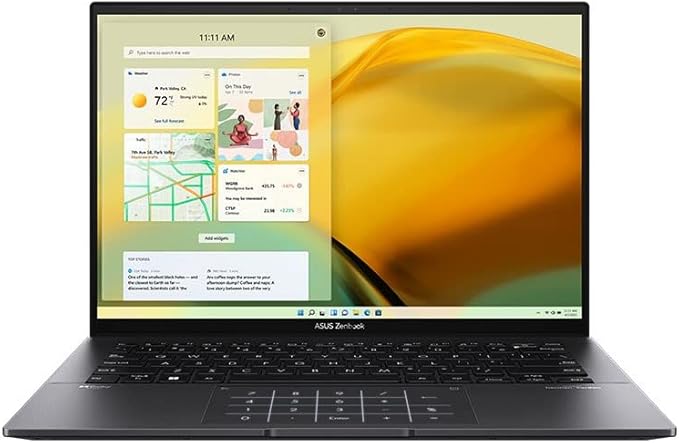
Zenbook 14 OLED (UM3402)|Laptops For Home|ASUS Australia
Zenbook 14 OLED (UM3402)|Laptops For Home|ASUS Australia
in 4 offers
The lowest price for Asus ZenBook 14 14' OLED Ryzen 5 5625U 8GB 512GB Notebook right now is $1,280.00 at Device Deal, compared across 4 retailers.
The all-time low was $806.30 on 7 June 2026 — today's price is 59% above the lowest ever. It has been notably cheaper before — worth setting a price alert.
Prices last updated 4 Aug 2026.
Asus ZenBook 14 14' OLED Ryzen 5 5625U 8GB 512GB Notebook
Zenbook 14 OLED (UM3402)|Laptops For Home|ASUS Australia
Zenbook 14 OLED (UM3402)|Laptops For Home|ASUS Australia
Last updated at 04/08/2026 11:48:03
"ASUS ZenBook 14 OLED 14"90Hz Laptop R5-5625U 8GB 512GB W11H"
Delivery $11.99
ASUS UM3402YA-KM069W Zenbook Noteook 14" WQXGA OLED R5-5625U 8GB 512GB PCIE W11H NumPad
Delivery between 6–11 Aug $18.85
Asus UM3402YA-KM069W ZENBOOK 14 R5 14" OLED 512G 8G W11
Free delivery by Thu
Asus Zenbook 14 OLED
Delivery $21
originally posted on bestbuy.com
The Zenbook 14 OLED (UX3402, 12th Gen Intel) is a very nice laptop that has great features but also has some limitations. The features of this laptop are as follows: • An Evo platform core i5-1240p processor 1.7 GHz (12M cache, up to 4.4 GHz, 4P+8E cores) • 8 GB of RAM • 256 GB SSD • a 14" 2880x1800 OLED 90 Hz Display (2.8K) • a 75Wh Lithium Ion Battery. • a Harmon Kardon Dolby Atmos Audio System • ASUS AI Noise-cancelling audio for clear speech • 180 degree Lay-flat ErgoLift Hinge • US military-grade durability. • Left side has a 10 GB/Second USB 3.0 port. • Right side has: charging and backlight indicators, a microSD slot, 2 Thunderbolt(TM) 4 ports for display/power delivery port, a 3.5mm Combo Audio Jack, and an HDMI 2.0b port. This laptop weighs in a 3.06 lbs. ... MoreThe Zenbook 14 OLED (UX3402, 12th Gen Intel) is a very nice laptop that has great features but also has some limitations. The features of this laptop are as follows: • An Evo platform core i5-1240p processor 1.7 GHz (12M cache, up to 4.4 GHz, 4P+8E cores) • 8 GB of RAM • 256 GB SSD • a 14" 2880x1800 OLED 90 Hz Display (2.8K) • a 75Wh Lithium Ion Battery. • a Harmon Kardon Dolby Atmos Audio System • ASUS AI Noise-cancelling audio for clear speech • 180 degree Lay-flat ErgoLift Hinge • US military-grade durability. • Left side has a 10 GB/Second USB 3.0 port. • Right side has: charging and backlight indicators, a microSD slot, 2 Thunderbolt(TM) 4 ports for display/power delivery port, a 3.5mm Combo Audio Jack, and an HDMI 2.0b port. This laptop weighs in a 3.06 lbs. and is 0.67" thin, making it highly portable. The included power supply is a 65W type-C AC Adapter and works in either of the thunderbolt ports. This model has windows 11 Home preinstalled. This Zenbook laptop has all of the typical WIFI and Bluetooth features one would expect in a system. The chicklet keyboard is nice and types well. The Harmon Kardon sound system sounds wonderful and is a really nice feature of this laptop. The included 2.8K OLED display is gorgeous and easy on the eyes. It would be a fantastic option in this series to have a touchscreen option available as that would make this an extremely awesome system, albeit at a high price point. The included thunderbolt ports along with the HMDI port makes for a useful set of external monitor options. I tested with my home setup that includes a USB - C based multiport display adapter and this laptop was able to drive primary laptop display and the 3 external monitors that I have connected to it at their recommended resolutions (main Screen 2880 x 1800, 2x 24"at 1920x 1200, and a 27" 4k monitor 3840 X 2160). I added a 4th external monitor via the HDMI port and was not able to drive this monitor with the other 3 - which is what I expected to happen but I had to give it a shot (on my home system this monitor is run via a USB based DisplayLink adapter). The most unique feature of this laptop is a special feature of the very large - some might say massive - 3" x 5" trackpad (my SurfaceBook's track pad is slightly larger than 4" x 3" for a much larger device as a comparison). When triggered this feature turns the trackpad into a keypad for quick data entry - this keypad can be activated in two ways - clicking and holds for a short press, on the upper right activates the key pad for what ever app you have open and also deactivates the keypad functionality once you are done with it. If you slide right from the upper left corner not only do you activate the keypad, but you also open the calculator app within the operating system. This upper left area can also be used to toggle the brightness of this keypad functionality between two brightness levels. Overall, I find that this device fits well for anyone who needs basic office automation functionality, along with some light picture and video editing capabilities along with portability. This could be professionals who are on the go, or students, or even parents who have a need for computing on the go. This is a very nice device and it would suit a large number of users and use cases. The only improvement I could wish for would be a touchscreen, but that would likely increase the price tag a bit.
originally posted on bestbuy.com
It's unclear how such a new laptop which is already a great value at $750 was discounted to $500 mere months after release, but it made me purchase it. 8GB soldered RAM is the only thing that i don't like on the spec sheet, but it's still enough for 90% of my tasks, only photo editing in Lightroom requires more in my use cases, but i can do small batch editing to get around that. If there was the same model with 16GB ram for $150 or so more I would blindingly buy that instead. fan noise is not as bad as i expected. Yes, it does get loud under load but as does any laptop. Given there is only 1 fan inside, it needs to spin way faster to get enough airflow compared to a dual fan system. Even then, at its loudest it sounds like my 4-year-old gaming laptop idling with 2 ... MoreIt's unclear how such a new laptop which is already a great value at $750 was discounted to $500 mere months after release, but it made me purchase it. 8GB soldered RAM is the only thing that i don't like on the spec sheet, but it's still enough for 90% of my tasks, only photo editing in Lightroom requires more in my use cases, but i can do small batch editing to get around that. If there was the same model with 16GB ram for $150 or so more I would blindingly buy that instead. fan noise is not as bad as i expected. Yes, it does get loud under load but as does any laptop. Given there is only 1 fan inside, it needs to spin way faster to get enough airflow compared to a dual fan system. Even then, at its loudest it sounds like my 4-year-old gaming laptop idling with 2 fans (Dell 7577 w/ i-7-7700H). Still if one doesn't like fan noise (like me) just run the system in Whisper mode (see fan profile settings in My ASUS app), and the fans are practically inaudible. It's hard to perceive any performance difference is general tasks. I practically never heard the fans but slightly slower performance in very demanding tasks. I attached Cine bench results for reference. Pros: - As one would expect, OLED is gorgeous and will not disappoint. - Great keyboard for my taste. (Coming from Dell Inspiron keyboards, this was a treat to type on.) - Nifty number pad feature which does come in handy for me as my work sometimes requires me to do number crunching. The trackpad can still be used as a mouse pointer while the numpad is active and it can differentiate between you typing numbers and trying to move the mouse. If one is used to touch clicking, then sometimes you might type a number instead of clicking but just after using it for a few days I'm comfortable with it. Numpad can be toggled on/off pretty easily too and can be fully disabled via My ASUS app if needed. - Quick toggles for killing mic and camera are helpful. -The i5 12th gen is way faster than i7 from last gen, which is great to see. - Whisper mode (My ASUS app fan-profile setting) still maintains decent performance for productivity tasks so please use that if fan noise is a big deal for you. -Upgradable SSD to PCIe Gen-4. (Gen-3 installed but given the cost i can't complain). - 2 X Thunderbolt 4 for future e-GPU expansion as prices for GPUs are currently dropping into the reasonable realm. - Weather you enable or disable the Fn lock, arrow keys always stay arrow keys unless you press and hold the Fn key to use the Home/End/Pg-Up/Pg-Dn functions. I was using 'Samsung Galaxy Book S' which switched to the secondary functions when Fn lock was engaged, and it used to drive me crazy. - I am seeing around 10-12 hours of productivity battery life when i switch the screen to 1920X1200 resolution and 60 Hz. All i care about is the OLED part, because at this size, the higher resolution and refresh rate don't add to my experience and just drain the battery. (The processor uses way too much power at idle in my experience, I just dropped the minimum processor state to 5% in the advanced power settings to see if that helps. Hopefully i can squeeze out couple more hours like that) Cons: - Bluetooth headset. details below. My biggest gripe with the computer is the Bluetooth part. one review mentioned having Bluetooth audio problem but i was hoping it might be an isolated case given the overwhelmingly positive reviews, but to my disappointment Bluetooth headphones behave "weirdly" with my laptop. I cannot find a better word to describe it because it works fine when you initially connect it and everything seems to go smoothly, but after some time the audio gets stutters, and the stutters keep getting more frequent to a point where you hear more stutter than actual audio even though the vide is playing smoothly. One way to temporarily fix it is to switch off the Bluetooth and switch back on, but stutters just start happening after an hour or so & getting worse in about 1.5 to 2 hrs. I narrowed down the problem to "Intel smart sound technology for Bluetooth audio" driver. After updating the driver though i had a new problem - If i stopped playing any audio over my Bluetooth headset for about 30 mins or so, and then try to play something, I do not get any sound over my headset even though video keeps playing. Even system sounds stop coming through. I tried switching the headset off and switching it back on again, but still no audio. Again, the temporary solution is for you to toggle system Bluetooth off and back on again. Right now, i just disabled the driver but that means i cannot use my headset's microphone for calls. They only connect as headphones with no microphone detected. Current driver version is 10.29.0.7082 so whenever a newer version is available, I will try again.
originally posted on bestbuy.com
The Asus ZenBook is definitely a compact, lightweight unit for those who don’t need a lot out of a laptop. While it has up-to-date technology, there’s nothing that makes it stand out, except for its small size and portability. Unboxing was a confusing experience. Normally, this is straightforward process, but somehow the labelling made it appear as if there was no “up” from which to open the box. Then, once the box was opened, the mechanism inside that gently lifts the laptop, to present it to the user, was slightly off, causing the laptop to become skewed, not lift, and subsequently difficult to extract. Initial setup was also strewn with difficulties that are normally not present. The power cord, for example, is much shorter than what I’m accustomed to. Whereas ... MoreThe Asus ZenBook is definitely a compact, lightweight unit for those who don’t need a lot out of a laptop. While it has up-to-date technology, there’s nothing that makes it stand out, except for its small size and portability. Unboxing was a confusing experience. Normally, this is straightforward process, but somehow the labelling made it appear as if there was no “up” from which to open the box. Then, once the box was opened, the mechanism inside that gently lifts the laptop, to present it to the user, was slightly off, causing the laptop to become skewed, not lift, and subsequently difficult to extract. Initial setup was also strewn with difficulties that are normally not present. The power cord, for example, is much shorter than what I’m accustomed to. Whereas the cord on the laptop that I’m using to write this review has lots of slack to allow me to move around the table, the cord on the Asus is stretched taut as it has no slack at all. This would require a user, during travel, to have to be located very physically near an outlet to allow for charging. Another example of a setup head-scratcher was the logging into of Microsoft. I have an existing account that I use for just this situation, but MS would not recognize it. When I tried to create a new MS account, using the same info, MS reported that my requested username was already in existence…because it is…I’m using it. While I recognize that this is an MS issue, not an Asus issue, it was a sticking point, regardless. It’s not all bad, however. The display is fantastic. I purchased an LG OLED 4K UHD television several years ago because of the display. The colors are rich, and the blacks are black. The display on this laptop rivals that television. It’s extremely clear, with fantastic color saturation, and the graphics, while nothing to write home about, do a great job of filling out the display. The combination of the touchpad and the number pad is innovative; I’ve never seen that done before. Until I became used to it, I was always second-guessing myself as to whether I had hit the correct “buttons”. Without the tactile feedback of a button being “clicked” or depressed, I needed to confirm my accuracy. Finally, the ability of the screen to be laid back until it is flat is very helpful. The size and portability of the device allows it to be easily transported anywhere, but if it’s being used for assistance, such as a YouTube tutorial, one doesn’t want to always have to sit down to view the screen, then immediately stand back up again to perform the next task. Laying the screen flat allows one to stand over the laptop and easily view the screen without the glare one would expect. As discussed before, the excellent display allows this to happen. Overall, my perception is that this is a great starter laptop with basics that can be expanded upon in future purchases. It’s compact and lightweight, meaning that it can be easily transported for some distance/time. However, once the battery is depleted, the short charging cable requires the user to be very near an open outlet. Any issues experienced during setup are the responsibility of Microsoft, not Asus, but it’s worth noting as it may change Asus’s suppliers in the future. The functionality is great, especially the display. If one is using it while amid activity, the lay-flat screen adds efficiency by allowing the user to stand over it and continue viewing, and the graphics and colors don’t wash out. There is some innovation shown here that I would suspect appears in later and/or higher-end models in the future, such as the number pad overlay onto the touchpad. It does take some getting used to, but it works. If you feel uncomfortable with, or simply don’t want to, complete transactions on your mobile device, or tablet, this is the unit for you. It’s not a gaming system, and it’s not for pure business. It’s a vanilla, middle-of-the-road device that fills the gap between mobile devices and the need for a dedicated computer.
| Battery | 75WHrs, 2S2P, 4-cell Li-ion |
| Camera | Front facing 720p HD camera |
| Card Reader | Micro SD card reader |
| Dimensions | 31.36 x 22.06 x 1.69 ~ 1.69 cm |
| Extra | Sleeve + USB-A to RJ45 gigabit ethernet adapter |
"ASUS ZenBook 14 OLED 14"90Hz Laptop R5-5625U 8GB 512GB W11H"
Delivery $11.99
ASUS UM3402YA-KM069W Zenbook Noteook 14" WQXGA OLED R5-5625U 8GB 512GB PCIE W11H NumPad
Delivery between 6–11 Aug $18.85
Asus UM3402YA-KM069W ZENBOOK 14 R5 14" OLED 512G 8G W11
Free delivery by Thu
Asus Zenbook 14 OLED
Delivery $21
The Zenbook 14 OLED (UX3402, 12th Gen Intel) is a very nice laptop that has great features but also has some limitations. The features of this laptop are as follows: • An Evo platform core i5-1240p processor 1.7 GHz (12M cache, up to 4.4 GHz, 4P+8E cores) • 8 GB of RAM • 256 GB SSD • a 14" 2880x1800 OLED 90 Hz Display (2.8K) • a 75Wh Lithium Ion Battery. • a Harmon Kardon Dolby Atmos Audio System • ASUS AI Noise-cancelling audio for clear speech • 180 degree Lay-flat ErgoLift Hinge • US military-grade durability. • Left side has a 10 GB/Second USB 3.0 port. • Right side has: charging and backlight indicators, a microSD slot, 2 Thunderbolt(TM) 4 ports for display/power delivery port, a 3.5mm Combo Audio Jack, and an HDMI 2.0b port. This laptop weighs in a 3.06 lbs. ... MoreThe Zenbook 14 OLED (UX3402, 12th Gen Intel) is a very nice laptop that has great features but also has some limitations. The features of this laptop are as follows: • An Evo platform core i5-1240p processor 1.7 GHz (12M cache, up to 4.4 GHz, 4P+8E cores) • 8 GB of RAM • 256 GB SSD • a 14" 2880x1800 OLED 90 Hz Display (2.8K) • a 75Wh Lithium Ion Battery. • a Harmon Kardon Dolby Atmos Audio System • ASUS AI Noise-cancelling audio for clear speech • 180 degree Lay-flat ErgoLift Hinge • US military-grade durability. • Left side has a 10 GB/Second USB 3.0 port. • Right side has: charging and backlight indicators, a microSD slot, 2 Thunderbolt(TM) 4 ports for display/power delivery port, a 3.5mm Combo Audio Jack, and an HDMI 2.0b port. This laptop weighs in a 3.06 lbs. and is 0.67" thin, making it highly portable. The included power supply is a 65W type-C AC Adapter and works in either of the thunderbolt ports. This model has windows 11 Home preinstalled. This Zenbook laptop has all of the typical WIFI and Bluetooth features one would expect in a system. The chicklet keyboard is nice and types well. The Harmon Kardon sound system sounds wonderful and is a really nice feature of this laptop. The included 2.8K OLED display is gorgeous and easy on the eyes. It would be a fantastic option in this series to have a touchscreen option available as that would make this an extremely awesome system, albeit at a high price point. The included thunderbolt ports along with the HMDI port makes for a useful set of external monitor options. I tested with my home setup that includes a USB - C based multiport display adapter and this laptop was able to drive primary laptop display and the 3 external monitors that I have connected to it at their recommended resolutions (main Screen 2880 x 1800, 2x 24"at 1920x 1200, and a 27" 4k monitor 3840 X 2160). I added a 4th external monitor via the HDMI port and was not able to drive this monitor with the other 3 - which is what I expected to happen but I had to give it a shot (on my home system this monitor is run via a USB based DisplayLink adapter). The most unique feature of this laptop is a special feature of the very large - some might say massive - 3" x 5" trackpad (my SurfaceBook's track pad is slightly larger than 4" x 3" for a much larger device as a comparison). When triggered this feature turns the trackpad into a keypad for quick data entry - this keypad can be activated in two ways - clicking and holds for a short press, on the upper right activates the key pad for what ever app you have open and also deactivates the keypad functionality once you are done with it. If you slide right from the upper left corner not only do you activate the keypad, but you also open the calculator app within the operating system. This upper left area can also be used to toggle the brightness of this keypad functionality between two brightness levels. Overall, I find that this device fits well for anyone who needs basic office automation functionality, along with some light picture and video editing capabilities along with portability. This could be professionals who are on the go, or students, or even parents who have a need for computing on the go. This is a very nice device and it would suit a large number of users and use cases. The only improvement I could wish for would be a touchscreen, but that would likely increase the price tag a bit.
It's unclear how such a new laptop which is already a great value at $750 was discounted to $500 mere months after release, but it made me purchase it. 8GB soldered RAM is the only thing that i don't like on the spec sheet, but it's still enough for 90% of my tasks, only photo editing in Lightroom requires more in my use cases, but i can do small batch editing to get around that. If there was the same model with 16GB ram for $150 or so more I would blindingly buy that instead. fan noise is not as bad as i expected. Yes, it does get loud under load but as does any laptop. Given there is only 1 fan inside, it needs to spin way faster to get enough airflow compared to a dual fan system. Even then, at its loudest it sounds like my 4-year-old gaming laptop idling with 2 ... MoreIt's unclear how such a new laptop which is already a great value at $750 was discounted to $500 mere months after release, but it made me purchase it. 8GB soldered RAM is the only thing that i don't like on the spec sheet, but it's still enough for 90% of my tasks, only photo editing in Lightroom requires more in my use cases, but i can do small batch editing to get around that. If there was the same model with 16GB ram for $150 or so more I would blindingly buy that instead. fan noise is not as bad as i expected. Yes, it does get loud under load but as does any laptop. Given there is only 1 fan inside, it needs to spin way faster to get enough airflow compared to a dual fan system. Even then, at its loudest it sounds like my 4-year-old gaming laptop idling with 2 fans (Dell 7577 w/ i-7-7700H). Still if one doesn't like fan noise (like me) just run the system in Whisper mode (see fan profile settings in My ASUS app), and the fans are practically inaudible. It's hard to perceive any performance difference is general tasks. I practically never heard the fans but slightly slower performance in very demanding tasks. I attached Cine bench results for reference. Pros: - As one would expect, OLED is gorgeous and will not disappoint. - Great keyboard for my taste. (Coming from Dell Inspiron keyboards, this was a treat to type on.) - Nifty number pad feature which does come in handy for me as my work sometimes requires me to do number crunching. The trackpad can still be used as a mouse pointer while the numpad is active and it can differentiate between you typing numbers and trying to move the mouse. If one is used to touch clicking, then sometimes you might type a number instead of clicking but just after using it for a few days I'm comfortable with it. Numpad can be toggled on/off pretty easily too and can be fully disabled via My ASUS app if needed. - Quick toggles for killing mic and camera are helpful. -The i5 12th gen is way faster than i7 from last gen, which is great to see. - Whisper mode (My ASUS app fan-profile setting) still maintains decent performance for productivity tasks so please use that if fan noise is a big deal for you. -Upgradable SSD to PCIe Gen-4. (Gen-3 installed but given the cost i can't complain). - 2 X Thunderbolt 4 for future e-GPU expansion as prices for GPUs are currently dropping into the reasonable realm. - Weather you enable or disable the Fn lock, arrow keys always stay arrow keys unless you press and hold the Fn key to use the Home/End/Pg-Up/Pg-Dn functions. I was using 'Samsung Galaxy Book S' which switched to the secondary functions when Fn lock was engaged, and it used to drive me crazy. - I am seeing around 10-12 hours of productivity battery life when i switch the screen to 1920X1200 resolution and 60 Hz. All i care about is the OLED part, because at this size, the higher resolution and refresh rate don't add to my experience and just drain the battery. (The processor uses way too much power at idle in my experience, I just dropped the minimum processor state to 5% in the advanced power settings to see if that helps. Hopefully i can squeeze out couple more hours like that) Cons: - Bluetooth headset. details below. My biggest gripe with the computer is the Bluetooth part. one review mentioned having Bluetooth audio problem but i was hoping it might be an isolated case given the overwhelmingly positive reviews, but to my disappointment Bluetooth headphones behave "weirdly" with my laptop. I cannot find a better word to describe it because it works fine when you initially connect it and everything seems to go smoothly, but after some time the audio gets stutters, and the stutters keep getting more frequent to a point where you hear more stutter than actual audio even though the vide is playing smoothly. One way to temporarily fix it is to switch off the Bluetooth and switch back on, but stutters just start happening after an hour or so & getting worse in about 1.5 to 2 hrs. I narrowed down the problem to "Intel smart sound technology for Bluetooth audio" driver. After updating the driver though i had a new problem - If i stopped playing any audio over my Bluetooth headset for about 30 mins or so, and then try to play something, I do not get any sound over my headset even though video keeps playing. Even system sounds stop coming through. I tried switching the headset off and switching it back on again, but still no audio. Again, the temporary solution is for you to toggle system Bluetooth off and back on again. Right now, i just disabled the driver but that means i cannot use my headset's microphone for calls. They only connect as headphones with no microphone detected. Current driver version is 10.29.0.7082 so whenever a newer version is available, I will try again.
The Asus ZenBook is definitely a compact, lightweight unit for those who don’t need a lot out of a laptop. While it has up-to-date technology, there’s nothing that makes it stand out, except for its small size and portability. Unboxing was a confusing experience. Normally, this is straightforward process, but somehow the labelling made it appear as if there was no “up” from which to open the box. Then, once the box was opened, the mechanism inside that gently lifts the laptop, to present it to the user, was slightly off, causing the laptop to become skewed, not lift, and subsequently difficult to extract. Initial setup was also strewn with difficulties that are normally not present. The power cord, for example, is much shorter than what I’m accustomed to. Whereas ... MoreThe Asus ZenBook is definitely a compact, lightweight unit for those who don’t need a lot out of a laptop. While it has up-to-date technology, there’s nothing that makes it stand out, except for its small size and portability. Unboxing was a confusing experience. Normally, this is straightforward process, but somehow the labelling made it appear as if there was no “up” from which to open the box. Then, once the box was opened, the mechanism inside that gently lifts the laptop, to present it to the user, was slightly off, causing the laptop to become skewed, not lift, and subsequently difficult to extract. Initial setup was also strewn with difficulties that are normally not present. The power cord, for example, is much shorter than what I’m accustomed to. Whereas the cord on the laptop that I’m using to write this review has lots of slack to allow me to move around the table, the cord on the Asus is stretched taut as it has no slack at all. This would require a user, during travel, to have to be located very physically near an outlet to allow for charging. Another example of a setup head-scratcher was the logging into of Microsoft. I have an existing account that I use for just this situation, but MS would not recognize it. When I tried to create a new MS account, using the same info, MS reported that my requested username was already in existence…because it is…I’m using it. While I recognize that this is an MS issue, not an Asus issue, it was a sticking point, regardless. It’s not all bad, however. The display is fantastic. I purchased an LG OLED 4K UHD television several years ago because of the display. The colors are rich, and the blacks are black. The display on this laptop rivals that television. It’s extremely clear, with fantastic color saturation, and the graphics, while nothing to write home about, do a great job of filling out the display. The combination of the touchpad and the number pad is innovative; I’ve never seen that done before. Until I became used to it, I was always second-guessing myself as to whether I had hit the correct “buttons”. Without the tactile feedback of a button being “clicked” or depressed, I needed to confirm my accuracy. Finally, the ability of the screen to be laid back until it is flat is very helpful. The size and portability of the device allows it to be easily transported anywhere, but if it’s being used for assistance, such as a YouTube tutorial, one doesn’t want to always have to sit down to view the screen, then immediately stand back up again to perform the next task. Laying the screen flat allows one to stand over the laptop and easily view the screen without the glare one would expect. As discussed before, the excellent display allows this to happen. Overall, my perception is that this is a great starter laptop with basics that can be expanded upon in future purchases. It’s compact and lightweight, meaning that it can be easily transported for some distance/time. However, once the battery is depleted, the short charging cable requires the user to be very near an open outlet. Any issues experienced during setup are the responsibility of Microsoft, not Asus, but it’s worth noting as it may change Asus’s suppliers in the future. The functionality is great, especially the display. If one is using it while amid activity, the lay-flat screen adds efficiency by allowing the user to stand over it and continue viewing, and the graphics and colors don’t wash out. There is some innovation shown here that I would suspect appears in later and/or higher-end models in the future, such as the number pad overlay onto the touchpad. It does take some getting used to, but it works. If you feel uncomfortable with, or simply don’t want to, complete transactions on your mobile device, or tablet, this is the unit for you. It’s not a gaming system, and it’s not for pure business. It’s a vanilla, middle-of-the-road device that fills the gap between mobile devices and the need for a dedicated computer.
Basically, my new ASUS notebook/laptop was a very good buy. Had a momentary heart attack, however, when the new computer didn't start for me for some strange reason about a week ago but it only happened once and has not recurred. (That shouldn't happen at all with a new computer.) I decided not to worry about it unless it happens again, in which case, I will take it straight back to the store and ask them to swap it out with a new one. So far, however, so good as this has not happened again. Except for that one odd occurrence, the new computer has performed extremely well which I expected since it has an I5 Intel processor and more than sufficient memory with a full 8GB not the standard GB of memory that a lot of new computers seem to have unless you order an ... MoreBasically, my new ASUS notebook/laptop was a very good buy. Had a momentary heart attack, however, when the new computer didn't start for me for some strange reason about a week ago but it only happened once and has not recurred. (That shouldn't happen at all with a new computer.) I decided not to worry about it unless it happens again, in which case, I will take it straight back to the store and ask them to swap it out with a new one. So far, however, so good as this has not happened again. Except for that one odd occurrence, the new computer has performed extremely well which I expected since it has an I5 Intel processor and more than sufficient memory with a full 8GB not the standard GB of memory that a lot of new computers seem to have unless you order an upgraded version of the standard configuration. It is very fast as far as uploading applications and going from one Internet site to the other, no problem with running multiple applications but I typically only run 2 or 3 max at a time. (Got the extra memory in the event that I decide to get into desktop publishing which may require more memory due to more graphics-oriented processing going on in the background.) I like the fact that this notebook is very lightweight, easy to move around, small screen but text and graphics are very easy to read. The screen came with an "anti-glare" feature. This is important as I have an eye condition which makes my eyes extremely sensitive to bright lights. Thus far, I have been very comfortable using this computer. In short, it's a very nice little computer and for almost $750, it should be! I had originally hoped to get a new computer for at least $100 less than that but the Black Friday sales right after Thanksgiving meant a lot of less expensive computers were sold out. So far, I have not been disappointed in investing a few more dollars than I'd originally intended. Since I hope to have this computer for quite a few years, I suspect I got my money's worth out of the investment. I'm still a little nervous about that initial problem but if it were not for that, and not knowing if it will happen again, I would gladly recommend this computer as worth the cost. Even without the problem, it was an expensive purchase, however, an I5 plus 8GB of memory is either "state of the art' or darn close to it. In short, this is an expensive but very nice notebook style computer. In any case, I had to purchase a new computer since my old one finally just wore out and simply would not work at all anymore, so I consider this new computer to be my Christmas (and birthday) present to myself! Overall? I'd give this one 4 out of 5 Stars.
For those in the market for a lightweight, portable laptop; might want to check this one out. This Zenbook pretty much checks off all the boxes if you're in the market for a small, yet powerful, laptop for work or personal use. As one would expect in a 14" laptop, this is very small, thin and lightweight. You can easily carry this around with one hand and easily stuff it in your backpack/tote bag without taking up too much space. After botting this laptop up, the first that might jump out at you is the screen. The OLED screen is vibrant and the colors just seem to pop on this display. Viewing Netflix or movies on this just seem to look so much nicer than on your typical laptop display. Colors seem true and vibrant without them being too washed out or over saturated. ... MoreFor those in the market for a lightweight, portable laptop; might want to check this one out. This Zenbook pretty much checks off all the boxes if you're in the market for a small, yet powerful, laptop for work or personal use. As one would expect in a 14" laptop, this is very small, thin and lightweight. You can easily carry this around with one hand and easily stuff it in your backpack/tote bag without taking up too much space. After botting this laptop up, the first that might jump out at you is the screen. The OLED screen is vibrant and the colors just seem to pop on this display. Viewing Netflix or movies on this just seem to look so much nicer than on your typical laptop display. Colors seem true and vibrant without them being too washed out or over saturated. Normally I have a black background as my wallpaper but this screen is so nice I had to find something more colorful to take advantage of it. While normally not something high on my list, the speakers on this laptop are as equally good as the screen. I rarely use the laptop speakers as I usually have a headset or earphones connected to my laptops. However, the speakers on this are surprisingly good. The speakers are downward firing but they sound pretty good. Good range on the speakers and adds a nice little touch to this laptops features. If you have the laptop on the carpet or something then the sound does get a bit muffled but, overall, really nice speakers on this laptop. As far as specs, they're quite good. Latest process from Intel, 8Gb of DDR5 RAM Wifi 6 and NVME drive. While you won't be playing any AAA games on this laptop, for the general, average consumer, this will fit the bill quite nicely I think. While there are several use cases for this laptop, I think this would be ideal for a student or maybe as a personal laptop. Size is great, power usage is pretty solid, decent specs and good screen/speakers. i think this is a great pickup for just about anything (aside from a gamer).
I purchased this device during the recent promotion in order to get the OLED screen in a 14" form factor, to gain some experience with Windows 11 and the intel i5-1240P processor, and to see whether the 8 gb RAM/250 gb SSD configuration was limiting for my uses since that clearly allowed a very favorable price point while still getting the other features. On the whole I have been satisfied. My comparison is to an LG-Gram 17" with the 10th generation Intel i7 processor and a Samsung Flex 2 Alpha with an 11th generation Intel i7. Both of the latter computers are configured with 16gb RAM and 512 gb SSDs. The screen on the Zenbook, of course, is a delight compared to other two devices, which are each very nice in their own right. It is sharper than the QLED on the ... MoreI purchased this device during the recent promotion in order to get the OLED screen in a 14" form factor, to gain some experience with Windows 11 and the intel i5-1240P processor, and to see whether the 8 gb RAM/250 gb SSD configuration was limiting for my uses since that clearly allowed a very favorable price point while still getting the other features. On the whole I have been satisfied. My comparison is to an LG-Gram 17" with the 10th generation Intel i7 processor and a Samsung Flex 2 Alpha with an 11th generation Intel i7. Both of the latter computers are configured with 16gb RAM and 512 gb SSDs. The screen on the Zenbook, of course, is a delight compared to other two devices, which are each very nice in their own right. It is sharper than the QLED on the Samsung due to its higher resolution and brighter than the good IPS screen on the LG Gram. The Windows 11 adjustments to increase scale, text, pointer, and cursor size work well to optimize sizes of things that would be too small at the screen's high native resolution. The ASUS Zenbook feels quicker than both the previous devices despite the decreased RAM and SSD size while simultaneously using multiple open browser tabs in both Explorer and Chrome, Microsoft office 365, Evernote, and a virtualized cloud-based EHR application running through Citrix Workspace. The Zenbook runs hotter than the 11th generation i7 Samsung, but cooler than the i7 10th generation in the LG-Gram. Fan noise using balanced mode is minimal. As others have noted it is higher the first couple of days while many updates are being installed in the background, but even then was not obtrusive. In balanced mode during periods of low processer use and lower fan activity Task Manage shows the processor to be running at 1.2-1.4 GHz. During more demanding work it runs around 2.8-3.8 GHz with the fan commensurately increased. The bottom of the computer is quite warm at that point. I have not tested Performance mode where the processors and fan speed would be commensurately higher. No real need for that in any normal use I have. WiFI 6 is very fast and connectivity is good, but the signal strength seems to be a little lower than on the other two devices at longer distances, maybe due to configuration of the internal antennas. Keyboard is very comfortable and roomy making it easy to type without errors.. Numeric keypad built into the mousepad is cute and works nicely while not interfering with normal mousepad functions. I wouldn't have imagine I would have much use for it, but it works so well I am starting to take advantage of it. The 3 lb. weight is not the lightest possible for this form factor, but is very comfortable to use and carry. The 14.5" screen provides a usefully larger work area than my 13.3" Samsung without a big increase of size, but the Samsung would clearly by much better for airline seat trays. Neither of them matches the comfort of working with the 17" LG Gram for things that benefit from a large amount of screen real estate, but that is a different beast entirely, so each has its ideal application. Fingerprint sensor on the keyboard power button works great and is reasonable positioned. My main use situations do not challenge battery run time. I mainly work in very well lit areas attached to AC so I am most interested in having a bright easy to read screen rather than in dimming it to maximize run time. I also keep the battery charge level to no more than 80% to maximize battery lifetime and on the Zenbook, which has a 60% setting, have been using that. When I disconnect from AC BatteryBar shows similar energy use to the other devices (running comparable progreams) and the battery in the ZenBook is as large as the one in the LG Gram and much larger than the one in the Samsung, so I am comfortable that run time will be very workable when I need to use it disconnected. Windows 11 interface is a step back from Windows 10 in usability, but, fortunately, there is a great available utility program available for download on the web, StartAllBack, that quickly restores all Windows 10 taskbar functionality and also optionally provides the Windows 7 style smart menu I prefer. The MyAsus utility that came with the computer allows nice optimization of battery charging patterns to preserve battery life and screen options to prevent OLED burn-in. I have been using the disappearing taskbar, which works fine although rarely it gets stuck in the 'on' position and needs to be corrected by restarting Windows Explorer from Task Manager. Relative to concerns that have been raised in other reviews: -- There is no creakiness of the hinges in the computer I have. -- Various updates including BIOS have gone smoothly. I have not had to long press the power button to force hard reboots, but reboots particularly after BIOS updates can be slow, so best to be patient and allow them to happen on their own. -- No Bluetooth issues with mice or headphones as of yet. -- Speaker sound is deep and rich for this size computer as pointed out by others. No static issues as of yet. Much better sound than on the LG Gram, which took a year for its speakers to 'break-in' and sound up to their capacity, but is still much poorer than the Zenbook speakers.
This is a beautiful laptop in color, design, form, and specs. Right out of the box I loved the way this machine looked with its dark slate blue colored shell. Open up that lid and be blown away with the impressive OLED screen which seems to be the main attraction for this Asus laptop. Included here is a USB-A port, 2 USB-C ports, HDMI port, audio input jack, and a micro SD card reader. In the box you will find the Asus Zenbook laptop and a laptop charger cable brick. The OLED screen has a 2880 x 1800 resolution and a 90hz refresh rate display which looks incredibly bright and is a joy to work on and also use for entertainment. The 14" OLED has the color and clarity on this portable and lightweight laptop, which are perfect for everyday multitasking duties for work ... MoreThis is a beautiful laptop in color, design, form, and specs. Right out of the box I loved the way this machine looked with its dark slate blue colored shell. Open up that lid and be blown away with the impressive OLED screen which seems to be the main attraction for this Asus laptop. Included here is a USB-A port, 2 USB-C ports, HDMI port, audio input jack, and a micro SD card reader. In the box you will find the Asus Zenbook laptop and a laptop charger cable brick. The OLED screen has a 2880 x 1800 resolution and a 90hz refresh rate display which looks incredibly bright and is a joy to work on and also use for entertainment. The 14" OLED has the color and clarity on this portable and lightweight laptop, which are perfect for everyday multitasking duties for work and play. The Intel Evo 12th gen Intel Core i5 processor is fast and responsive under various tasks and I've been impressed at its snappy response time. You'll get the 256 SSD harddrive in this compact laptop, along with Windows 11 for the operating system. 8GB of RAM seems to work ok on this machine for this price point, but I do wish it came with 16GB for prolonging my longevity with this laptop. Portable size and taking it with me on the go is a must for me. This Asus Zenbook is 3.06 pounds in weight and .67" thin. I love the backlit keyboard for working at various hours of the day and night. I really have loved the touchpad and the ability to activate the illuminated number pad as I work on spreadsheets and formulas most of my day. The illuminated number pad can be turned on or off with the touch of a virtual button and took me some getting used to, but I love having this with the compact keyboard design. Another feature that was new to me was the Pantone Validated sticker on this machine. This simply means that this computer is up to par for designers and technicians since it's been verified to have adequate color correction technology to properly simulate the full range of Pantone colors. At a price of $749.99 this is a fantastic mid-tier computer that works well for so much of what I do for work from home tasks and also personal web browsing and shopping. This machine can also be used for light gaming and it still performs well, but it isn't meant for heavy usage on gaming. I have loved using the OLED screen, Dolby Atmos, and Harmon Kardon speakers to enjoy watching streaming movies and shows. The picture and sound are fantastic in my opinion. The laptop also has a nice hinge on the clamshell which allows for a 180-degree lay-flat design and also makes typing and keyboard feel more comfortable. PRO: Color design 14" OLED screen clarity Portable and lightweight Intel Evo i5 Great price and functionality for most users CON: More RAM and larger SSD would have been nice
TLDR: This is a fantastic machine for the price, as long as you don't use it for anything RAM-intensive such as editing video or running virtual machines, or you don't intend to daily Linux on it. The good: - OLED HDPI 16:10 90Hz 14" display is the reason you would buy this over anything else, not just entry-level laptops. It really makes up for all its deficiencies below. - The design is very compact for a 14" and the blue is very stylish and stands out from a sea of grey. - The trackpad is very large and comfortable to use. - 2x USB-c ports (both can charge the laptop) and 1x USB-A make its connectivity above average for the segment. - SSD is upgradeable The bad: - 8GB of soldered RAM is all you get - that's the reason I've taken off one star. After a month of use ... MoreTLDR: This is a fantastic machine for the price, as long as you don't use it for anything RAM-intensive such as editing video or running virtual machines, or you don't intend to daily Linux on it. The good: - OLED HDPI 16:10 90Hz 14" display is the reason you would buy this over anything else, not just entry-level laptops. It really makes up for all its deficiencies below. - The design is very compact for a 14" and the blue is very stylish and stands out from a sea of grey. - The trackpad is very large and comfortable to use. - 2x USB-c ports (both can charge the laptop) and 1x USB-A make its connectivity above average for the segment. - SSD is upgradeable The bad: - 8GB of soldered RAM is all you get - that's the reason I've taken off one star. After a month of use I can say it's enough for normal office or home use, even some simple Photoshop or Illustrator. Or 10-15 browser tabs. I've even had 2 users logged in simultaneously and I was still able to work through the day without issues. It would've been great if there was an additional SODIMM for upgrades or a version with 16GB soldered. - The chassis creaks a lot when moving or opening/closing the lid - The design is such that when open, the back rests on the lid instead of the bottom. So the screen wobbles a lot when you type and is not that comfortable in the lap. - Software camera guard (that only works in Windows) - Battery life is average at best for the segment. On Balanced, watching movies nets me about 7-8 hours but for basic office work/browsing, I haven't been able to get more than 5. - Linux/ChromeOS compatibility - One of the ways to get around the RAM issue is to work in Linux or ChromeOS. Compatibility however, currently is not great. In both Ubuntu and Fedora, I couldn't get the sound out of the speakers, the fingerprint reader, and the camera guard working. Both also occasionally crash. Also, because of the size and resolution of the screen, you'll have to use fractional scaling - at least to me at 200% everything looks way too oversized. 175% would be ideal. As for ChromeOS Flex, it kept crashing at boot from the flash drive, while it works fine with all my other computers.
Generally small laptops are a bit of a mixed bag in terms of capability, construction and quality, all of which is somewhat sacrificed in the face of convenience of the smaller form factor while still carrying a premium price tag. Asus with their Zenbook line has always shied away from this perception, consistently presenting a well built small form factor laptop with premium hardware and excellent battery life. So lets break it down. When unpackaging the laptop, simply by opening the box, Asus has developed a small cardboard lift that presents the laptop to you like a gift as you raise the lid. It's a small but noticeable touch that gives you a sense of welcome to your new piece of technology. The laptop itself is shrouded in plastic and has a few stickers on it ... MoreGenerally small laptops are a bit of a mixed bag in terms of capability, construction and quality, all of which is somewhat sacrificed in the face of convenience of the smaller form factor while still carrying a premium price tag. Asus with their Zenbook line has always shied away from this perception, consistently presenting a well built small form factor laptop with premium hardware and excellent battery life. So lets break it down. When unpackaging the laptop, simply by opening the box, Asus has developed a small cardboard lift that presents the laptop to you like a gift as you raise the lid. It's a small but noticeable touch that gives you a sense of welcome to your new piece of technology. The laptop itself is shrouded in plastic and has a few stickers on it touting the quality of the display specifically due to it being an OLED. Outside of that there's a small amount of printed documentation in the box, and of course the USB-C charger hidden under a flap on the side. When removed you're really hit by the quality of the construction, smooth to the touch with reasonable heft, though nothing obscene for the size of the machine (it's only 3 lbs). The action of the hinge for the screen is smooth as expected. One thing that is noticeable, however, is that Asus has chosen to go with a plastic shell. This was likely to save weight, so I cannot entirely fault them for the choice, the plastic they did use does not feel low quality, there's no gapping or creaking and the laptop itself has almost no flex. On bootup, you're immediately hit by just how beautiful the screen is, vibrant and colorful, it's everything that the stickers and documentation proclaims that it is. At 14", the extremely high resolution (2880x1800) presents an image that is unparalleled, even if you have to use the scale slider in Windows 11 to make everything legible. The initial setup of Windows 11 is straightforward, with the only addition being the warranty registration from Asus themselves. The same goes for the bloat on the laptop, it's minimal, mostly consisting of warranty and update tracking software. Moving to a discussion of the capabilities of the laptop, it is worth noting that it ships with a 12th gen i5 which while not top of the line, is appropriate for a small form factor laptop with battery life in mind, this is paired with LPDDR5 for additional capability and of course an nVME SSD. All of these components come together to give you a well performing machine. The graphics are Intel's current generation on-chip graphics but capable of a small amount of gaming should you choose to use it in this manner, but bear in mind, this is not a gaming laptop. Applications, including Word, Excel, Photoshop and others open quickly due to the processor and SSD, however I find the 8GB of RAM to be very slightly on the anemic side in this era, but it should still be sufficient for most business and casual users. Bottom line, this is an extremely well built laptop, with price and performance to match. There's very little being sacrificed here, and provided you understand the machine that you're buying, it's arguable that those are not really sacrifices, but intentions of the platform itself. All in all, I definitely recommend it to anyone in the market for a very capable small form factor machine if you do not want to feel like you're giving up anything to have that improved mobility.
Very happy with this laptop. Pros: The screen is gorgeous! Bright, colour accurate and high refresh. Flips out 180 degrees and props up the laptop body. Very low minimum brightness available. Excellent battery life - Battery Eater Pro: 2h35m full load, 13h22m reader @ 50% brightness, 2h45m to recharge from empty Fast CPU - many cores, beats even some older gen desktop CPUs Lots of ports - eGPUs are plug and play over Thunderbolt. No problem using a GTX 1080 in an external enclosure. Good build quality and design. Metal outer case, stylish lid design, minimal deck flex and lightweight Good keyboard with 1.4mm travel, slightly cupped keys and 3 backlight levels Huge, smooth and responsive touchpad with gesture support Toggleable, backlit number pad with a gesture to ... MoreVery happy with this laptop. Pros: The screen is gorgeous! Bright, colour accurate and high refresh. Flips out 180 degrees and props up the laptop body. Very low minimum brightness available. Excellent battery life - Battery Eater Pro: 2h35m full load, 13h22m reader @ 50% brightness, 2h45m to recharge from empty Fast CPU - many cores, beats even some older gen desktop CPUs Lots of ports - eGPUs are plug and play over Thunderbolt. No problem using a GTX 1080 in an external enclosure. Good build quality and design. Metal outer case, stylish lid design, minimal deck flex and lightweight Good keyboard with 1.4mm travel, slightly cupped keys and 3 backlight levels Huge, smooth and responsive touchpad with gesture support Toggleable, backlit number pad with a gesture to open/close the calculator app. Loud and clear speakers - can get a little muddy on the low end but there is some bass Good 720p webcam and 2 microphone array - quality is not great on screen though because it's more than double the webcam res Removable SSD, WiFi card, battery under bottom cover. UEFI BIOS with device testing and cloud restore over WiFi. Cons: Soldered RAM Intel Xe graphics are weak Stock storage is rather small - but easily replaceable and can be supplemented by microSD Glossy, reflective screen Runs hot and the fan is loud in performance mode Wall wart adapter without folding prongs or ground pin Set to 60Hz and 8 bit colour out of the box Average Realtek DAC Somewhat easy to enable numberpad unintentionally The MicroSD card protrudes about 1mm from the case while inserted 1 thunderbolt port on both sides would've been nice Charging and power LED indicators are on the side, given there are indicators for webcam and microphone are disabled on the keyboard
| Battery | 75WHrs, 2S2P, 4-cell Li-ion |
| Camera | Front facing 720p HD camera |
| Card Reader | Micro SD card reader |
| Dimensions | 31.36 x 22.06 x 1.69 ~ 1.69 cm |
| Extra | Sleeve + USB-A to RJ45 gigabit ethernet adapter |

