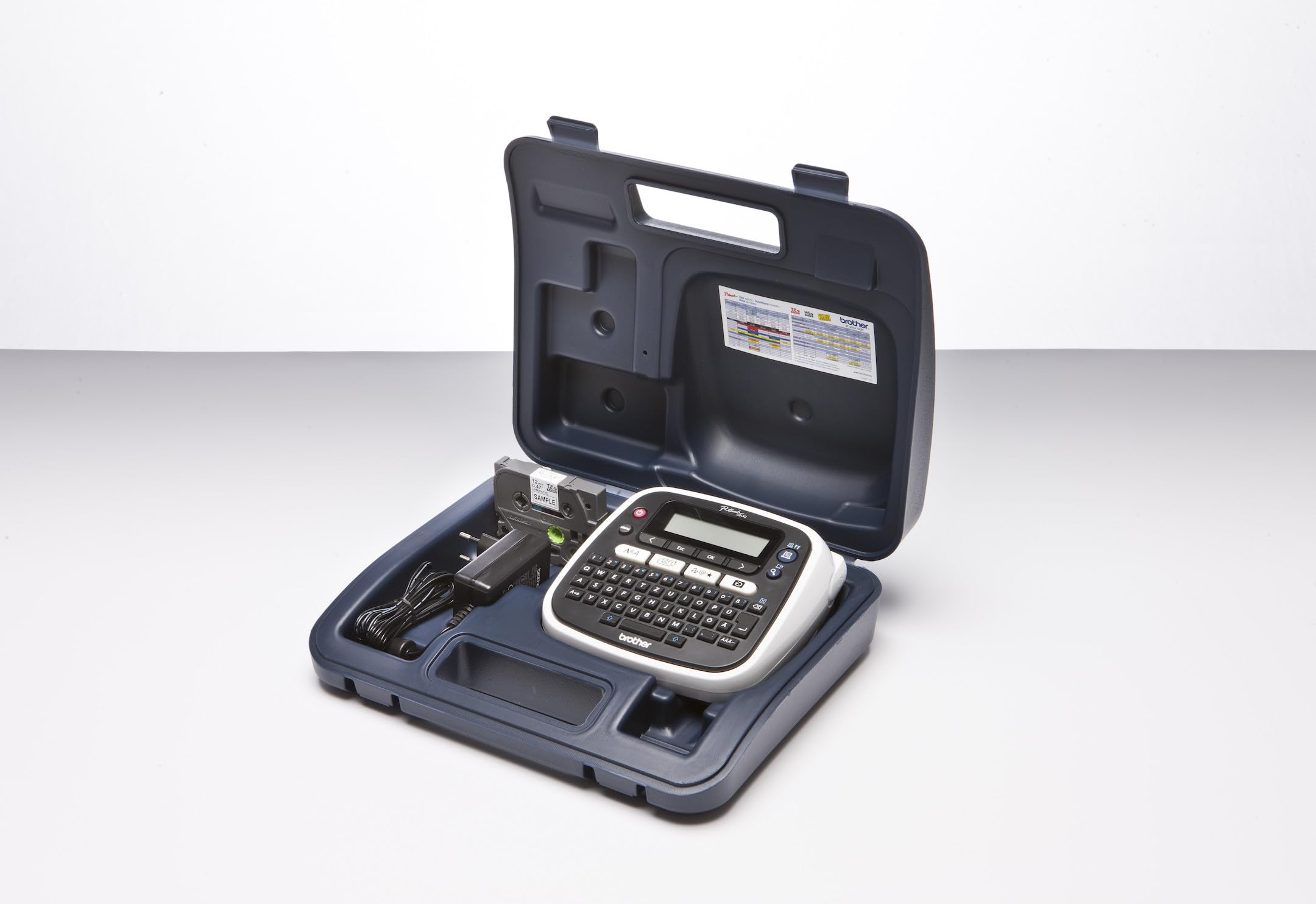
PT-D200 | LabelMakersPrinters | By Brother
PT-D200 | LabelMakersPrinters | By Brother
in 6 offers
The lowest price for Brother PT-D200 P-Touch Label Maker right now is $47.94 at MegaBuy, compared across 6 retailers.
The all-time low was $43.14 on 6 Nov 2024 — today's price is 11% above the lowest ever. That's a little above the best price we've seen.
Prices last updated 8 Sept 2026.
Brother PT-D200 P-Touch Label Maker
PT-D200 | LabelMakersPrinters | By Brother
PT-D200 | LabelMakersPrinters | By Brother
Last updated at 08/09/2026 03:11:08
[PT-D210] Brother PT-D210 Gray/White Accent Green Desktop Labeller - 3.5-12mm TZE Tape Model
7-day returns
Brother PT-D210 GRAY/WHITE ACCENT GREEN DESKTOP LABELLER - 3.5-12MM TZE TAPE MODEL 3 years Warranty
Free delivery
Brother PT-D210 GRAY/WHITE ACCENT GREEN DESKTOP LABELLER - 3.5-12MM TZE TAPE MODEL 3 years Warranty
Delivery between 10–15 Sept $16.65
Brother PT-D210 Gray/White Accent Green Desktop Labeller
BROTHER PTD210 LABELLING MACHINE Labelling Machine
Delivery between 10–15 Sept $18
PT-D210 - Brother - Drukarka etykiet; Rozdzielczosc:180dpi; 20mm/s
Delivery between 17–22 Sept $18.06
originally posted on pbtech.co.nz
Pretty much what I expected from YouTube videos and such.I love this one as there's lots of space for fat fingers and the design makes it feel like a fun toy.If you're using batteries, you need decent ones. Don't just get the cheapest AAA batteries.Eveready Super Heavy Duty aren't good enough.I just ordered the 9v AC adaptor because sometimes I'll be using it at my desk anyway.The tape it comes with is 4m and that runs out pretty fast if you're labelling a lot of stuff.The normal length is 8m but double check.There's no actual warning when you reach the end of the label tape. It's maybe 5-10cm of unusable tape.I've never had a good labelling system, so that's maybe why I love this so much.When you turn it off it'll keep whatever you've just ... MorePretty much what I expected from YouTube videos and such.I love this one as there's lots of space for fat fingers and the design makes it feel like a fun toy.If you're using batteries, you need decent ones. Don't just get the cheapest AAA batteries.Eveready Super Heavy Duty aren't good enough.I just ordered the 9v AC adaptor because sometimes I'll be using it at my desk anyway.The tape it comes with is 4m and that runs out pretty fast if you're labelling a lot of stuff.The normal length is 8m but double check.There's no actual warning when you reach the end of the label tape. It's maybe 5-10cm of unusable tape.I've never had a good labelling system, so that's maybe why I love this so much.When you turn it off it'll keep whatever you've just typed/done, so when you turn it on again it'll be there. Great when using batteries. On/Off is about 1sec.I've ordered more label tape since I ran out of it. Whatever will I do until more tape arrives?So far I've labeled:CablesStorage boxesStorage traysMy Brother Label Maker ;)My phone
originally posted on walmart.com
Absolute piracy! The thing does what its supposed to BUT refills are $20!!!! $20??? really??Also.. so much excess tape is pushed out with each print. I've adjusted the settings and STILL too much tape waste.. theres no way this isn't intentional in design.While in the store to shop for refills (which I did not buy), I picked up the DYMO label maker. It works well.. printing is just as good... MUCH less tape waste. The refills are like $5 (yes.. they are half the length of the brother refills but STILL works out to half the price).Brother is going back.
originally posted on brother.com.au
I love this labeller. Its so easy to use and made with great quality. I love the design, all the different frames, symbols etc, and the variety of tapes available. Only things that I want are a screen that is harder to scratch and to make the machine ask you to cut the bit of extra tape off before it spat out the label, so that way I don't have to get scissors and cut it by hand.
| Impact # | BRO1054 |
[PT-D210] Brother PT-D210 Gray/White Accent Green Desktop Labeller - 3.5-12mm TZE Tape Model
7-day returns
Brother PT-D210 GRAY/WHITE ACCENT GREEN DESKTOP LABELLER - 3.5-12MM TZE TAPE MODEL 3 years Warranty
Free delivery
Brother PT-D210 GRAY/WHITE ACCENT GREEN DESKTOP LABELLER - 3.5-12MM TZE TAPE MODEL 3 years Warranty
Delivery between 10–15 Sept $16.65
Brother PT-D210 Gray/White Accent Green Desktop Labeller
BROTHER PTD210 LABELLING MACHINE Labelling Machine
Delivery between 10–15 Sept $18
Pretty much what I expected from YouTube videos and such.I love this one as there's lots of space for fat fingers and the design makes it feel like a fun toy.If you're using batteries, you need decent ones. Don't just get the cheapest AAA batteries.Eveready Super Heavy Duty aren't good enough.I just ordered the 9v AC adaptor because sometimes I'll be using it at my desk anyway.The tape it comes with is 4m and that runs out pretty fast if you're labelling a lot of stuff.The normal length is 8m but double check.There's no actual warning when you reach the end of the label tape. It's maybe 5-10cm of unusable tape.I've never had a good labelling system, so that's maybe why I love this so much.When you turn it off it'll keep whatever you've just ... MorePretty much what I expected from YouTube videos and such.I love this one as there's lots of space for fat fingers and the design makes it feel like a fun toy.If you're using batteries, you need decent ones. Don't just get the cheapest AAA batteries.Eveready Super Heavy Duty aren't good enough.I just ordered the 9v AC adaptor because sometimes I'll be using it at my desk anyway.The tape it comes with is 4m and that runs out pretty fast if you're labelling a lot of stuff.The normal length is 8m but double check.There's no actual warning when you reach the end of the label tape. It's maybe 5-10cm of unusable tape.I've never had a good labelling system, so that's maybe why I love this so much.When you turn it off it'll keep whatever you've just typed/done, so when you turn it on again it'll be there. Great when using batteries. On/Off is about 1sec.I've ordered more label tape since I ran out of it. Whatever will I do until more tape arrives?So far I've labeled:CablesStorage boxesStorage traysMy Brother Label Maker ;)My phone
Absolute piracy! The thing does what its supposed to BUT refills are $20!!!! $20??? really??Also.. so much excess tape is pushed out with each print. I've adjusted the settings and STILL too much tape waste.. theres no way this isn't intentional in design.While in the store to shop for refills (which I did not buy), I picked up the DYMO label maker. It works well.. printing is just as good... MUCH less tape waste. The refills are like $5 (yes.. they are half the length of the brother refills but STILL works out to half the price).Brother is going back.
I love this labeller. Its so easy to use and made with great quality. I love the design, all the different frames, symbols etc, and the variety of tapes available. Only things that I want are a screen that is harder to scratch and to make the machine ask you to cut the bit of extra tape off before it spat out the label, so that way I don't have to get scissors and cut it by hand.
BROTHER LABEL MAKER P-Touch Model PT-D200This label maker is a handy size and is very portable if you are running it on batteries. It requires 6 AAA batteries, which are not included. This unit comes with 2 starter tape cartridges, one white and one yellow. The replacement cartridges from Brother are expensive, but are 26 ft. long so should last awhile. There are cartridges available from after-market suppliers for less money, but I can’t vouch for how well they work.There is a definite learning curve if you want to do more than make single line labels such as used on file folders. I had to do a number of test runs trying to follow the directions on the enclosed sheet of instructions. This label maker is not really good for address labels as it will only print 2 ... MoreBROTHER LABEL MAKER P-Touch Model PT-D200This label maker is a handy size and is very portable if you are running it on batteries. It requires 6 AAA batteries, which are not included. This unit comes with 2 starter tape cartridges, one white and one yellow. The replacement cartridges from Brother are expensive, but are 26 ft. long so should last awhile. There are cartridges available from after-market suppliers for less money, but I can’t vouch for how well they work.There is a definite learning curve if you want to do more than make single line labels such as used on file folders. I had to do a number of test runs trying to follow the directions on the enclosed sheet of instructions. This label maker is not really good for address labels as it will only print 2 lines. The print is pretty small if you’re printing 2 lines. It has templates available and a selection of borders and quite a lot of clipart for a little more artistic touch.My biggest complaint is the LCD screen is very faint and hard to read unless you view it from just the perfect angle. I realize that a brighter screen would eat up the battery life. I have not purchased the optional AC adapter to see if that would make the screen any brighter, but I’m pretty sure it would still be the same faint display because it is LCD, not LED which would be brighter.Bottom line, this is a handy unit for making one-line labels. I am mostly using it in my home office for file folders.
First of all I want to remind anyone who is planning to purchase the Brother PT-D200 Easy-To-Use Label Maker that you have to also purchase 6 AAA batteries. The label maker can also be used with an AC adapter. But that is an optional item and must be purchased separately. I shopped around and found that the AC adapter can be purchased at Walmart and Walmart.com for about $10. In my opinion the AC adapter is the most economical way to go. I'm not sure if this Brother PT-D200 Easy-To-Use Label Maker is their newest model. But I am disappointed that Brother did not make it to use a USB charger like so many other electronics do these days. For this reason I gave it 4 stars instead of 5.All that being said I am really impressed with this label maker. It is very sturdy ... MoreFirst of all I want to remind anyone who is planning to purchase the Brother PT-D200 Easy-To-Use Label Maker that you have to also purchase 6 AAA batteries. The label maker can also be used with an AC adapter. But that is an optional item and must be purchased separately. I shopped around and found that the AC adapter can be purchased at Walmart and Walmart.com for about $10. In my opinion the AC adapter is the most economical way to go. I'm not sure if this Brother PT-D200 Easy-To-Use Label Maker is their newest model. But I am disappointed that Brother did not make it to use a USB charger like so many other electronics do these days. For this reason I gave it 4 stars instead of 5.All that being said I am really impressed with this label maker. It is very sturdy and feels like a quality machine... not flimsy or cheap feeling in the hand. It has 14 different fonts to choose from which can be printed in small, med or large size and can print 2 lines. There are 99 different frames to choose from as well. There are hundreds of symbols and emojis as well as symbols in several different languages. You can make templates and store them in files. It's great for a small business because it makes it so easy to organize labels that you use often. This Brother PT-D200 Easy-To-Use Label Maker is like a mini computer. I am very impressed with all that it does... considering that my only other experience with a label maker was that antiquated printer where you had to turn the wheel to choose the letters.The label tapes are in the form of a cassette cartridge. The cartridges that come with it are sample size but there is ample amount of tape to practice on and make quite a few labels depending on the size you make. There is one white and one yellow. But you can purchase other colors. This label maker is perfect for scrapbookers. The tape is laminated which means that the print will never rub off or wear off and is water and grease resistant because it is protected by a plastic coating. The tape is also weather proof and temperature proof. That means that it can be used for indoor and outdoor use. Brother also sells non laminated iron on-tapes for labeling clothing and anything made of fabric.Like I said, I am really impressed with this Brother PT-D200 Easy-To-Use Label Maker and I would recommend it to family and friends.
I received this product in exchange for an honest review thru the Spark Reviewer Program. This is a very nice label maker for home and small office use. It can be used to label and organize multiple areas of your home or office, from files, to spices, to clothes. This starter set comes with the machine and two sample tape cartridges, a white tape with black print and yellow tape with black print. However, numerous options are available to label almost anything, including various tape and ink colors. They even make a cloth iron-on tape for the machine that could be used to label clothes for kids! the cartridges include the tape and the ink. There are numerous font choices, as well as small emoji like pictures and various frames to customize the labels.My main ... MoreI received this product in exchange for an honest review thru the Spark Reviewer Program. This is a very nice label maker for home and small office use. It can be used to label and organize multiple areas of your home or office, from files, to spices, to clothes. This starter set comes with the machine and two sample tape cartridges, a white tape with black print and yellow tape with black print. However, numerous options are available to label almost anything, including various tape and ink colors. They even make a cloth iron-on tape for the machine that could be used to label clothes for kids! the cartridges include the tape and the ink. There are numerous font choices, as well as small emoji like pictures and various frames to customize the labels.My main problem with this label maker seems to be power issues. It runs on 6 AAA batteries or an AC adapter. The adapter port is fairly standard looking, but we tried no less than seven adapters wee had at home (all of which fit properly in the port), but none of them powered the unit. It appears you have to buy the Brother Adapter to use this option, which is unfortunate and the main reason I took a star away. A device that needs a proprietary adapter for power that does not come with the device is not efficient. I scraped up 6 AAA batteries to test it with. I'm not sure if it is due to using older batteries, but the screen is somewhat faint, although it is legible and usable. I am leaning toward the faint screen being just because several of the batteries I used were taken out of my kid's toys so I could get the label maker tested for this review. The labels themselves are very nice. I made some labels for my kitchen canisters and they are quite nice. I am looking forward to making some to label kiddo's uniforms for school next year to decrease the amount of lost clothes.Overall, I am happy with the machine, I just really wish I could use an adapter I already have to power it instead of buying another one.
i HAVE USED BROTHER P TOUCH LABLERS (AND PRINTERS) FOR 20 YEARS AND HAVE NEVER HAD SO MUCH DIFFICULTY IN GETTING THE **** THING SET UP AND WORKING. WHY WOULD YOU SELL A BATTERY PRODUCT WITH NO BATTERIES? IT HAS SO MANY UNNECESSARY FUNCTIONS THAT THE RELATIVELY SIMPLE FUNCTIONS ARE LIKE TRYING TO PROGRAM THE SPACE STATION. AND THE BEST PART...THE REGISTRATION PROCESS. BUY A GOOD PEN.
I am a big fan of this label printer. I normally print out over 2000 labels to individually label packages and it is still going strong after thousands of labels printed. Do you device has many fonts stored and saved so you can choose from a few fonts, you can choose whether you want bold, italic, or just regular. You can change the size of the font. You are also able to save Lettering and font. Ha ha you’re able to print up to nine at a time I wish it was more but it’s still gets the job done. I highly recommend.
We have this label maker at the daycare where I work. We all use it to label things in our classrooms. At first it worked great. But, then something happened with the font size and color. We were all puzzled by it because all of the sudden it stopped printing in black and started printing in red and in a much smaller font. Eventually, I think our assistant director was able to figure out how to get the font and color changed back. But, now we can't use it at all because it keeps saying "low battery" on the screen even when brand new batteries are put in it. So, now it is just sitting in the office, unusable. I guess I'm just going to have to buy my own label maker (not this one!) because I am an infant teacher and a lot of things in my room need to be labeled.
I read some reviews on this item before buying it. I noticed that most 5-star reviews were incentivized, which was a little disappointing, as I feel that incentivized reviews were probably biased. I was debating between this and a hand held Dymo, which I have used at work and it was about the same price. But I wanted a desktop one so I took a chance and bought this one. Turned out to be a very good purchase . I am very happy with it. Went on to buy the AC adapter for $9 and a package of 6 8M-long cartridges for $15. The label maker came with two 4M-long cartridges included. Now there are labels everywhere in our homes. It did take wasting a few labels before getting used to it. But with a total of 56 meters of tape in my possession, it will probably be years before ... MoreI read some reviews on this item before buying it. I noticed that most 5-star reviews were incentivized, which was a little disappointing, as I feel that incentivized reviews were probably biased. I was debating between this and a hand held Dymo, which I have used at work and it was about the same price. But I wanted a desktop one so I took a chance and bought this one. Turned out to be a very good purchase . I am very happy with it. Went on to buy the AC adapter for $9 and a package of 6 8M-long cartridges for $15. The label maker came with two 4M-long cartridges included. Now there are labels everywhere in our homes. It did take wasting a few labels before getting used to it. But with a total of 56 meters of tape in my possession, it will probably be years before I need to buy more cartridges. Did not know how much I needed it until I got one. Great label maker for the price. highly recommend it. Also recommend buying the AC adapter so you don't have to worry about changing batteries.Also, one reviewer gave it a bad review b/c it "wastes tape". While you can say that it does waste about 3/4 inch of tape at the front end of each label, the rear end waste you can eliminate by adjusting the margin. There is also the option of running the labels together. So, if you need to make more than one labels, run them together and there will be no waste in between labels.
| Impact # | BRO1054 |

