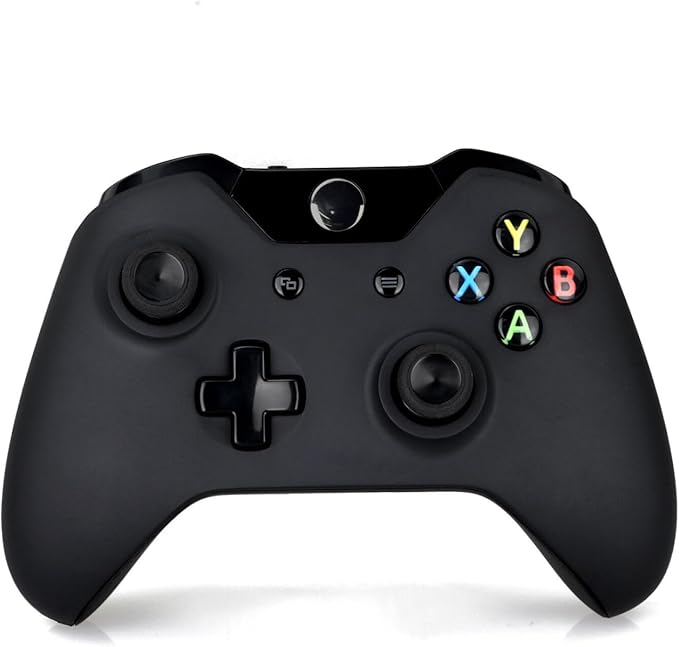
Compatible Windows PC Microsoft Xbox One Wireless Bluetooth Controller
Microsoft Xbox Wireless Controller Carbon Black Experience the modernised design of the OFFICIAL Xbox Wireless Controller, featuring sculpted surfaces and refined geometry for enhanced comfort during gameplay. Stay on target with a hybrid D-pad and textured grip on the triggers, bumpers, and back-case. Seamlessly capture and share content such as screenshots, recordings, and more with the Share button. Connect using the USB-C port for direct plug and play to console and PC. Support for AA batteries is included on the rear. Plug in any compatible headset with the 3.5mm audio jack. Use the Xbox Accessories app to remap buttons and create custom controller profiles for your favourite games. Quickly pair with, play on, and switch between devices including Xbox Series X|S, Xbox One, Windows PCs, and Android.
Microsoft Xbox Wireless Controller Carbon Black Experience the modernised design of the OFFICIAL Xbox Wireless Controller, featuring sculpted surfaces and refined geometry for enhanced comfort during gameplay. Stay on target with a hybrid D-pad and textured grip on the triggers, bumpers, and back-case. Seamlessly capture and share content such as screenshots, recordings, and more with the Share button. Connect using the USB-C port for direct plug and play to console and PC. Support for AA batteries is included on the rear. Plug in any compatible headset with the 3.5mm audio jack. Use the Xbox Accessories app to remap buttons and create custom controller profiles for your favourite games. Quickly pair with, play on, and switch between devices including Xbox Series X|S, Xbox One, Windows PCs, and Android.
Microsoft Xbox Wireless Controller Carbon Black Experience the modernised design of the OFFICIAL Xbox Wireless Controller, featuring sculpted surfaces and refined geometry for enhanced comfort during gameplay. Stay on target with a hybrid D-pad and textured grip on the triggers, bumpers, and back-case. Seamlessly capture and share content such as screenshots, recordings, and more with the Share button. Connect using the USB-C port for direct plug and play to console and PC. Support for AA batteries is included on the rear. Plug in any compatible headset with the 3.5mm audio jack. Use the Xbox Accessories app to remap buttons and create custom controller profiles for your favourite games. Quickly pair with, play on, and switch between devices including Xbox Series X|S, Xbox One, Windows PCs, and Android.
Microsoft Xbox Wireless Controller Carbon Black Experience the modernised design of the OFFICIAL Xbox Wireless Controller, featuring sculpted surfaces and refined geometry for enhanced comfort during gameplay. Stay on target with a hybrid D-pad and textured grip on the triggers, bumpers, and back-case. Seamlessly capture and share content such as screenshots, recordings, and more with the Share button. Connect using the USB-C port for direct plug and play to console and PC. Support for AA batteries is included on the rear. Plug in any compatible headset with the 3.5mm audio jack. Use the Xbox Accessories app to remap buttons and create custom controller profiles for your favourite games. Quickly pair with, play on, and switch between devices including Xbox Series X|S, Xbox One, Windows PCs, and Android.
in 3 offers
The lowest price for Compatible Windows PC Microsoft Xbox One Wireless Bluetooth Controller right now is $69.98 at Battery Mate, compared across 3 retailers.
The all-time low was $40.70 on 7 July 2025 — today's price is 72% above the lowest ever. It has been notably cheaper before — worth setting a price alert.
Prices last updated 23 June 2026.
Last updated at 23/06/2026 17:21:15
Microsoft Xbox One Compatible Wireless Bluetooth Controller for Xbox & PC by Battery Mate by Battery Mate
Delivery between 26 June – 3 July $5.95
Compatible Windows PC Microsoft Xbox One Wireless Bluetooth Controller
Free delivery between 29 June – 7 July
Generic Wireless Controller Compatible with Microsoft Xbox One
Free delivery
originally posted on influenster.com
Oh wow Microsoft has learned, from its once bulky Xbox 360 controllers. The black Xbox One wireless controller fits in your hand easily, and allows far more fun with video games. Thank you Bill Gates and team! First off I love the X buttons position, as this allows for remote turning on, without interfering with the joystick or buttons. Yes the usual buttons are the same. Yet their build quality, feels far more substantial. I’m not worried about breaking these, and considering what they’ve been handed during Madden and other games, impressive! The yellow y, the orange b, the green a, and blue X are in the circle on the right side. I like the RB/RT and LB/LT buttons being on the top. That makes gaming a cinch. Far more intuitive. These wireless devices connect every ... MoreOh wow Microsoft has learned, from its once bulky Xbox 360 controllers. The black Xbox One wireless controller fits in your hand easily, and allows far more fun with video games. Thank you Bill Gates and team! First off I love the X buttons position, as this allows for remote turning on, without interfering with the joystick or buttons. Yes the usual buttons are the same. Yet their build quality, feels far more substantial. I’m not worried about breaking these, and considering what they’ve been handed during Madden and other games, impressive! The yellow y, the orange b, the green a, and blue X are in the circle on the right side. I like the RB/RT and LB/LT buttons being on the top. That makes gaming a cinch. Far more intuitive. These wireless devices connect every single time. They also have a range of at least twenty feet. As for the batteries, Xbox has improved big time. No longer will you want rechargeable batteries, which by themselves are a headache. Instead any brand of AA batteries will be fine. I’ve had Rayovac’s from the dollar store in for several weeks now. You will get a low battery warning, but it still hasn’t happened. By far the best controller in the market, as I wasn’t that impressed with my friends elite I believe they are called. Sticking with this one, as it’s a winner in every way. Responsive and fun!
originally posted on influenster.com
The Xbox One wireless controller’s are the best yet. Finally Microsoft has beaten Sony in this aspect. The red controller has the power button in the top middle, close to the A, B, X, and Y’s. That is helpful. The directional arrow below, and the traditional RB/LB RT/LT are super. These are easy to manipulate in code heavy games. I love the bright red color. It’s not too obnoxious, but crisp and modern. Also battery life has been improved. I’ve been able to play heavily for weeks, without having to replace the AA batteries. These are easily accessed in the back. This allows you more video game time and less hassles. You will be pleased by this model, and also they are more durable than ever.
originally posted on bestbuy.com
I bought this controller to go with my new gaming PC, although I already had some DualShock 4s lying around. I was sick of having to use DS4Windows to make them play nice with my PC and wanted something with better support. I began to feel buyer's remorse right after the purchase, wasting money to solve such a minor first world problem. Luckily, those regrets mostly went away when I started using it.The first thing that comes to mind is just how much longer these controllers last compared to the DualShock 4. I can game on this controller for days without having to worry about replacing the batteries. The DualShock 4 on the other hand can barely last a full work day before it needs to be plugged in again.Also, as mentioned above the Xbox One controller generally ... MoreI bought this controller to go with my new gaming PC, although I already had some DualShock 4s lying around. I was sick of having to use DS4Windows to make them play nice with my PC and wanted something with better support. I began to feel buyer's remorse right after the purchase, wasting money to solve such a minor first world problem. Luckily, those regrets mostly went away when I started using it.The first thing that comes to mind is just how much longer these controllers last compared to the DualShock 4. I can game on this controller for days without having to worry about replacing the batteries. The DualShock 4 on the other hand can barely last a full work day before it needs to be plugged in again.Also, as mentioned above the Xbox One controller generally has better native support on the PC as a Xinput pad, where as the Dinput based DualShock will often be ignored or under-supported.The asynchronous analog sticks on the Xbox One just feel so much better for 3D games than the DualShock 4. I mean both in thumb placement and it the feel of the sticks. The DualShock 4 used to have these soft plastic sticks that would fall apart with use and become really nasty to use, but they replaced those with newer, harder plastic and it doesn't feel as good. I had to get thumb covers for the DualShock4 but don't feel so inclined to do that for the Xbox One controller. At least not yet.The DualShock 4 does have it's advantages though. The thumb pad can be really useful to add additional mouse control functionality on a PC, and the motion control can make aiming feel more natural and easy in shooters, if you take the time to configure it in DS4Windows or Steam. By comparison, the Xbox One Controller feels really safe and boring, although the haptic triggers are, I guess are a neat little addition. It adds a little to the games that support them, but not very much.In addition, the triggers feel really sharp and uncomfortable to hold compared to the DualShock 4 and even the old Xbox 360 controller. You can imagine how this would be a problem for games that require you to hold it for extended periods of time, like a racing game.While the Xbox One controller doesn't come with a rechargable battery and you'll have to buy that separately, the DualShock 4's battery is rechargeable.Also, I've been suffering temporary disconnections while using this controller, although I'm not yet certain if it's because of a failure of the controller or something else going wrong on my PC. I'll have to dock a star if I don't notice the same happening with my DualShock 4.Overall, it's a good product. Whether you choose this one over the DualShock 4 is more preference than anything else. If you care more about battery life than having a touch pad or motion control, get this. If you want those features and don't care about having to plug the controller in more often, get the DualShock 4.
| Improved ergonomic design | Maximum comfort and endless game play |
| Long distance | Wireless up to 9-10 meters (30 feet) range |
| Built for lag-free play | Best playing experience |
| Plug and play | Automatically matchs with Xbox |
| Dimension | 15 x 10 x 5.5cm (L x W x H) |
Microsoft Xbox One Compatible Wireless Bluetooth Controller for Xbox & PC by Battery Mate by Battery Mate
Delivery between 26 June – 3 July $5.95
Compatible Windows PC Microsoft Xbox One Wireless Bluetooth Controller
Free delivery between 29 June – 7 July
Generic Wireless Controller Compatible with Microsoft Xbox One
Free delivery
Oh wow Microsoft has learned, from its once bulky Xbox 360 controllers. The black Xbox One wireless controller fits in your hand easily, and allows far more fun with video games. Thank you Bill Gates and team! First off I love the X buttons position, as this allows for remote turning on, without interfering with the joystick or buttons. Yes the usual buttons are the same. Yet their build quality, feels far more substantial. I’m not worried about breaking these, and considering what they’ve been handed during Madden and other games, impressive! The yellow y, the orange b, the green a, and blue X are in the circle on the right side. I like the RB/RT and LB/LT buttons being on the top. That makes gaming a cinch. Far more intuitive. These wireless devices connect every ... MoreOh wow Microsoft has learned, from its once bulky Xbox 360 controllers. The black Xbox One wireless controller fits in your hand easily, and allows far more fun with video games. Thank you Bill Gates and team! First off I love the X buttons position, as this allows for remote turning on, without interfering with the joystick or buttons. Yes the usual buttons are the same. Yet their build quality, feels far more substantial. I’m not worried about breaking these, and considering what they’ve been handed during Madden and other games, impressive! The yellow y, the orange b, the green a, and blue X are in the circle on the right side. I like the RB/RT and LB/LT buttons being on the top. That makes gaming a cinch. Far more intuitive. These wireless devices connect every single time. They also have a range of at least twenty feet. As for the batteries, Xbox has improved big time. No longer will you want rechargeable batteries, which by themselves are a headache. Instead any brand of AA batteries will be fine. I’ve had Rayovac’s from the dollar store in for several weeks now. You will get a low battery warning, but it still hasn’t happened. By far the best controller in the market, as I wasn’t that impressed with my friends elite I believe they are called. Sticking with this one, as it’s a winner in every way. Responsive and fun!
The Xbox One wireless controller’s are the best yet. Finally Microsoft has beaten Sony in this aspect. The red controller has the power button in the top middle, close to the A, B, X, and Y’s. That is helpful. The directional arrow below, and the traditional RB/LB RT/LT are super. These are easy to manipulate in code heavy games. I love the bright red color. It’s not too obnoxious, but crisp and modern. Also battery life has been improved. I’ve been able to play heavily for weeks, without having to replace the AA batteries. These are easily accessed in the back. This allows you more video game time and less hassles. You will be pleased by this model, and also they are more durable than ever.
I bought this controller to go with my new gaming PC, although I already had some DualShock 4s lying around. I was sick of having to use DS4Windows to make them play nice with my PC and wanted something with better support. I began to feel buyer's remorse right after the purchase, wasting money to solve such a minor first world problem. Luckily, those regrets mostly went away when I started using it.The first thing that comes to mind is just how much longer these controllers last compared to the DualShock 4. I can game on this controller for days without having to worry about replacing the batteries. The DualShock 4 on the other hand can barely last a full work day before it needs to be plugged in again.Also, as mentioned above the Xbox One controller generally ... MoreI bought this controller to go with my new gaming PC, although I already had some DualShock 4s lying around. I was sick of having to use DS4Windows to make them play nice with my PC and wanted something with better support. I began to feel buyer's remorse right after the purchase, wasting money to solve such a minor first world problem. Luckily, those regrets mostly went away when I started using it.The first thing that comes to mind is just how much longer these controllers last compared to the DualShock 4. I can game on this controller for days without having to worry about replacing the batteries. The DualShock 4 on the other hand can barely last a full work day before it needs to be plugged in again.Also, as mentioned above the Xbox One controller generally has better native support on the PC as a Xinput pad, where as the Dinput based DualShock will often be ignored or under-supported.The asynchronous analog sticks on the Xbox One just feel so much better for 3D games than the DualShock 4. I mean both in thumb placement and it the feel of the sticks. The DualShock 4 used to have these soft plastic sticks that would fall apart with use and become really nasty to use, but they replaced those with newer, harder plastic and it doesn't feel as good. I had to get thumb covers for the DualShock4 but don't feel so inclined to do that for the Xbox One controller. At least not yet.The DualShock 4 does have it's advantages though. The thumb pad can be really useful to add additional mouse control functionality on a PC, and the motion control can make aiming feel more natural and easy in shooters, if you take the time to configure it in DS4Windows or Steam. By comparison, the Xbox One Controller feels really safe and boring, although the haptic triggers are, I guess are a neat little addition. It adds a little to the games that support them, but not very much.In addition, the triggers feel really sharp and uncomfortable to hold compared to the DualShock 4 and even the old Xbox 360 controller. You can imagine how this would be a problem for games that require you to hold it for extended periods of time, like a racing game.While the Xbox One controller doesn't come with a rechargable battery and you'll have to buy that separately, the DualShock 4's battery is rechargeable.Also, I've been suffering temporary disconnections while using this controller, although I'm not yet certain if it's because of a failure of the controller or something else going wrong on my PC. I'll have to dock a star if I don't notice the same happening with my DualShock 4.Overall, it's a good product. Whether you choose this one over the DualShock 4 is more preference than anything else. If you care more about battery life than having a touch pad or motion control, get this. If you want those features and don't care about having to plug the controller in more often, get the DualShock 4.
For those who want the short story: I would definitely recommend this product. But for those who want an in depth review, here it is: For someone like myself who doesn't really like the idea of a raised left analogue stick, the controller was surprisingly comfortable. It is quite large and perfectly fit into my hands. If you do have smaller hands this could be an issue but for me it was great. All of the buttons are very responsive require reasonable force to press so I have no issue with accidentally pressing any. The triggers feel great and their are rumble motors inside of them, giving you that extra bit of immersion when playing which I really appreciate (for example: it will rumble when shooting a gun or driving a car). I do, however have 2 issues with the ... MoreFor those who want the short story: I would definitely recommend this product. But for those who want an in depth review, here it is: For someone like myself who doesn't really like the idea of a raised left analogue stick, the controller was surprisingly comfortable. It is quite large and perfectly fit into my hands. If you do have smaller hands this could be an issue but for me it was great. All of the buttons are very responsive require reasonable force to press so I have no issue with accidentally pressing any. The triggers feel great and their are rumble motors inside of them, giving you that extra bit of immersion when playing which I really appreciate (for example: it will rumble when shooting a gun or driving a car). I do, however have 2 issues with the controller. The analogue sticks are a bit small for my liking but they are textured for extra grip, without being uncomfortable. Also, I feel like for the cost of the controller, there should be a rechargeable option for free. I understand that there is a Play and Charge Kit but I feel that the controller should already be rechargeable as there is nothing more infuriating than the controller running out of power during a game, especially if you haven't got any AA batteries lying around.
Microsoft has somehow improved on their already phenomenal Xbox 360 controller. This controller feels more comfortable to hold and use, as the shape of the contours, texture of the grips, and overall weight -- as well as what I'll refer to as "localized weight" -- each do their part to make holding onto this controller an absolute dream, while an apparent "tightening up" of the buttons -- most notable being the now fully-serviceable D-Pad -- along with the much-improved joysticks, featuring a texture that better adheres to the thumbs, a notable circular "lip" of sorts -- essentially a partition between the aforementioned texture and the smooth, concave, inner relief -- that helps prevent unwanted slippage, along with a slightly shrunken diameter (which I find allows ... MoreMicrosoft has somehow improved on their already phenomenal Xbox 360 controller. This controller feels more comfortable to hold and use, as the shape of the contours, texture of the grips, and overall weight -- as well as what I'll refer to as "localized weight" -- each do their part to make holding onto this controller an absolute dream, while an apparent "tightening up" of the buttons -- most notable being the now fully-serviceable D-Pad -- along with the much-improved joysticks, featuring a texture that better adheres to the thumbs, a notable circular "lip" of sorts -- essentially a partition between the aforementioned texture and the smooth, concave, inner relief -- that helps prevent unwanted slippage, along with a slightly shrunken diameter (which I find allows for more speed and accuracy + less error whilst performing the incredibly common, yet *shockingly* rarely mentioned act of moving or removing the right thumb onto or off of the right joystick and onto or off of one or more of the lettered buttons to the right of said joystick), all offer a vast improvement in usability over Microsoft's previous offerings. Oh, which reminds me;Dear Microsoft,Thank you for *once again* reducing the size of the Xbox logo-gem/button on the top-center of your incredible controller. The size of this really hasn't been an issue or, frankly, worth mentioning since you made the second generation "Halo controller" for the original Xbox, but the infuriating-albeit-hilarious enormity of this feature from the first, original Xbox controller, along with its perplexing lack of any functionality, should never be forgotten, lest we repeat the sins of our predecessors.There is one *small* -- for me at least, I'll explain -- negative about this purchase that I feel like I need to address; the included cable. Yes, the controller is a wireless controller that merely includes a cable for wired play, and yes, Microsoft earns big points for making this cable a simple micro-USB cable that is essentially universal these days, rather than the proprietary garbage they used for the Xbox 360 plug-&-play cables. But regardless, I have to mention that the included cable, the one with the Xbox logo on it, does the very frustrating connecting and disconnecting thing that old cables sometimes do, the type where connection seems to be related to the relative angle or tension of the cable, and one wrong little wiggle will send you into a cursing fit. I understand that this is a small issue, and I've since purchased a much longer, better, working micro-USB cable -- one sold as a phone charging cable -- and it works perfectly well. If there were a way to give partial stars, I'd give this more like a 4.9 out of 5...but I just can't bring myself to give a perfect rating to something that, put simply, wasn't perfect. I would still highly recommend this controller, and I'm sure that 99% of the controllers shipped will have perfectly working cables, so please feel free to take the tail-end of this review with the proverbial grain of salt.
I’ve owned many of these. The back buttons are usually the first to give out. The plastic literally breaks (it may be just me, I tend to push them in hard when moments get intense. YMMV) good news is it’s fixable if you don’t want to mess with warranty. Take screws out, open up the controller, and look at the back. You should see where the plastic broke. Get some super glue and put it back in place. If done correctly should work just fine for a while after that as long as you try to go easy on those buttons.Other thing is sometimes stick drift kicks in pretty soon (2 weeks) or a few months. Just depends on how lucky you are. I think that applies to most other controllers unfortunately regardless of brand.If you’re looking for a very cheap elite alternative and ... MoreI’ve owned many of these. The back buttons are usually the first to give out. The plastic literally breaks (it may be just me, I tend to push them in hard when moments get intense. YMMV) good news is it’s fixable if you don’t want to mess with warranty. Take screws out, open up the controller, and look at the back. You should see where the plastic broke. Get some super glue and put it back in place. If done correctly should work just fine for a while after that as long as you try to go easy on those buttons.Other thing is sometimes stick drift kicks in pretty soon (2 weeks) or a few months. Just depends on how lucky you are. I think that applies to most other controllers unfortunately regardless of brand.If you’re looking for a very cheap elite alternative and only need 2 paddle buttons this is an unbeatable value, even if you plan on them breaking down every few months.The buttons do not feel as pleasing as the Microsoft brand controllers but you get used to it and they function just the same.
I unfortunately can't recommend any Microsoft controller as they have a known defect where the bumpers will start failing. They'll eventually either stop registering inputs, or start doing inputs on their own. If you Google "Xbox One controller bumpers not responding" you'll find thousands of people complaining about this. This isn't fixed on the new model of the controller either, the one that has an eight directional d-pad. On top of this flaw, Microsoft only warranties their controllers for three months. This is unacceptably low for controllers that I've had nothing but bad luck with. They're $60 controllers, and Microsoft won't stand behind them. I've had better luck with the much cheaper Power-A controllers that are half the price. They feel substantially worse ... MoreI unfortunately can't recommend any Microsoft controller as they have a known defect where the bumpers will start failing. They'll eventually either stop registering inputs, or start doing inputs on their own. If you Google "Xbox One controller bumpers not responding" you'll find thousands of people complaining about this. This isn't fixed on the new model of the controller either, the one that has an eight directional d-pad. On top of this flaw, Microsoft only warranties their controllers for three months. This is unacceptably low for controllers that I've had nothing but bad luck with. They're $60 controllers, and Microsoft won't stand behind them. I've had better luck with the much cheaper Power-A controllers that are half the price. They feel substantially worse and do feel cheaper, but at least they don't fail in four months.
Overpriced for what it is - but what other choice do you have if you want to have a controller that is directly compatible with Windows 10 over Bluetooth? I bought this to play Sekiro on my PC when it first released. I will say, the Bluetooth works great, which is why I wanted the Xbox One controller, for that seamless PC connectivity. The latency is only very, very slight - most of the time I'd say it's comparable to being directly connected over a cable.Now here is where my issue with this controller comes into play (especially at its price point) - the build quality. On the controller I bought and picked up from the store had a bit mediocre build quality. I squeeze my controllers a lot when I get tense, and when I squeezed this thing it squeaked and creaked ... MoreOverpriced for what it is - but what other choice do you have if you want to have a controller that is directly compatible with Windows 10 over Bluetooth? I bought this to play Sekiro on my PC when it first released. I will say, the Bluetooth works great, which is why I wanted the Xbox One controller, for that seamless PC connectivity. The latency is only very, very slight - most of the time I'd say it's comparable to being directly connected over a cable.Now here is where my issue with this controller comes into play (especially at its price point) - the build quality. On the controller I bought and picked up from the store had a bit mediocre build quality. I squeeze my controllers a lot when I get tense, and when I squeezed this thing it squeaked and creaked like a floorboard. No big deal, because that's to be expected, but it did start opening up the seams of the molds more and more overtime. The other issue is with the RB bumper. This is the primary button you use in Sekiro, and I think I put in about 100 hours before the RB button just stopped working. As in stopped working, it first started glitching out around 70 hours, only working most of the time, then at 100 hours not responding at all no matter how hard you pressed it. Luckily this fell under warranty, but Microsoft made ME pay for the shipping of the controller both ways - so I effectively paid another $25 on what I already paid for this controller.I actually haven't used the replacement controller I had gotten through the warranty because it took over a MONTH to get the replacement controller. I had found the sport version of the controller on sale and bought that as well, and it had noticeably bettered build quality and I have about 300 hours or so on it and it still works as well as day one. I will say, I think my experience will be in the minority as I probably got a faulty controller initially, but that doesn't change the fact that I was disappointed with the value from this purchase - but when the controller works, it's great!
The ONLY thing I found disappointing was that they did not come in the original Microsoft packaging. Just regular cardboard boxes... Hence the 1 missing star for the review. Other than that, they did still have the peel off plastic for the buttons, and the condition is new (I can tell).Ordering 2 more for back-ups, before Microsoft discontinues them.Previously I had bought 2 new Series-X controllers, and the newest Xbox controllers are TERRIBLE.Serious latency problems- There are complaints all over the internet about that, and how they are obviously made of cheaper material.Nice to have SOLID Xbox One controllers, again.Still wish they came in the original packaging, though... Woulda been 5 stars.
| Improved ergonomic design | Maximum comfort and endless game play |
| Long distance | Wireless up to 9-10 meters (30 feet) range |
| Built for lag-free play | Best playing experience |
| Plug and play | Automatically matchs with Xbox |
| Dimension | 15 x 10 x 5.5cm (L x W x H) |