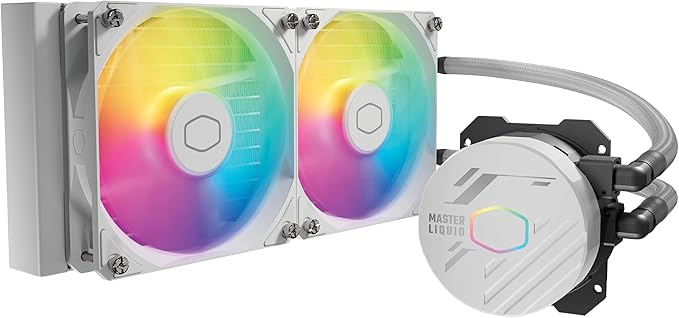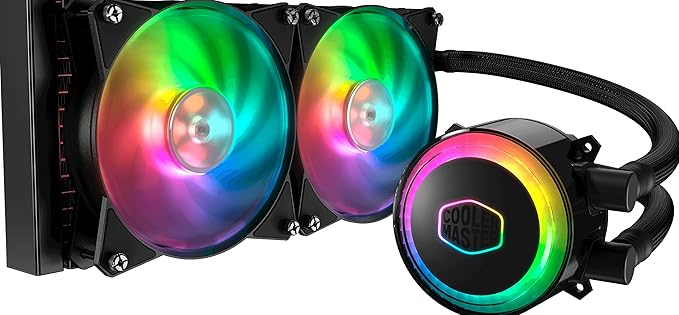
The MasterLiquid ML240R RGB All-in-One CPU liquid cooler with a low-profile dual-chamber pump surpasses its single-chamber predecessor in heat transfer. The MasterFan Air Balance fans with PWM fan control operate relatively quietly (6-30 dBA). Addressable RGB LEDs are installed on the pump and fans to allow for complete color customization, which can be controlled via the included controller or the exclusive CM Plus software. The sleeved and factory FEP tubes provide a premium look.
The MasterLiquid ML240R RGB All-in-One CPU liquid cooler with a low-profile dual-chamber pump surpasses its single-chamber predecessor in heat transfer. The MasterFan Air Balance fans with PWM fan control operate relatively quietly (6-30 dBA). Addressable RGB LEDs are installed on the pump and fans to allow for complete color customization, which can be controlled via the included controller or the exclusive CM Plus software. The sleeved and factory FEP tubes provide a premium look.
in 2 offers
The lowest price for Cooler Master MasterLiquid ML240R RGB Liquid CPU Cooler right now is $149.00 at igamecomputer.com.au, compared across 2 retailers.
The all-time low was $81.56 on 13 Oct 2024 — today's price is 83% above the lowest ever. It has been notably cheaper before — worth setting a price alert.
Prices last updated 30 Sept 2026.
Cooler Master MasterLiquid ML240R RGB Liquid CPU Cooler
The MasterLiquid ML240R RGB All-in-One CPU liquid cooler with a low-profile dual-chamber pump surpasses its single-chamber predecessor in heat transfer. The MasterFan Air Balance fans with PWM fan control operate relatively quietly (6-30 dBA). Addressable RGB LEDs are installed on the pump and fans to allow for complete color customization, which can be controlled via the included controller or the exclusive CM Plus software. The sleeved and factory FEP tubes provide a premium look.
The MasterLiquid ML240R RGB All-in-One CPU liquid cooler with a low-profile dual-chamber pump surpasses its single-chamber predecessor in heat transfer. The MasterFan Air Balance fans with PWM fan control operate relatively quietly (6-30 dBA). Addressable RGB LEDs are installed on the pump and fans to allow for complete color customization, which can be controlled via the included controller or the exclusive CM Plus software. The sleeved and factory FEP tubes provide a premium look.
Last updated at 30/09/2026 10:18:49
Cooler Master MasterLiquid ML240R RGB CPU Liquid Cooler - ARGB Lighting Sync, Premium Pump Design and Dual MF120R ARGB Fans
Affiliate Disclosure: We may receive a small commission for purchases made through this link at no extra cost to you. This helps support our site. Thank you!
Cooler Master MASTERLIQUID ML240R RGB CPU COOLER RGB | MLX-D24M-A20PCR1 | A0112
originally posted on umart.com.au
Works perfect.Keeps CPU nice and cool in a room with no air con.RGB works nice.Simple to install, I found the instructions clear and straight forward.Comes with its own controller but from that you can connect to RGB header on mobo for software control.
originally posted on umart.com.au
picked this mainly to match my case, mounting to it was really easy, a few screws. the hardest part was trying to figure out where what wire plugs into where, the little leaflet they include has only pictures and gives no indication on where to plug it into on the mobo, I had to look up youtube videos just to find where the pump and fans plugged into.once its installed properly, the RGB software is pretty clean and easy to use, and you cant hear the unit over a HDD.
originally posted on umart.com.au
This AIO cooler looks intimidating at first when you open the box and see so many wires, but following the diagram in the manual was simple when you take the time and break down the steps.The two water tubing is short and fairly rigid. I had hoped to mount the radiator on the side of case but the tubing barely reached and was under a lot of stress. I ended up mounting it at the top which was the only place I recommend. Look else where if you aim to side or front mount.Looks great when completed. Would reccomend.
| Purpose | Processor |
| Built-in fan | Y |
| Radiator | Y |
| Fan noise level min | 6 dB |
| Fan noise level max | 30 dB |

Cooler Master MasterLiquid ML240R RGB CPU Liquid Cooler - ARGB Lighting Sync, Premium Pump Design and Dual MF120R ARGB Fans
Affiliate Disclosure: We may receive a small commission for purchases made through this link at no extra cost to you. This helps support our site. Thank you!
Cooler Master MASTERLIQUID ML240R RGB CPU COOLER RGB | MLX-D24M-A20PCR1 | A0112
Works perfect.Keeps CPU nice and cool in a room with no air con.RGB works nice.Simple to install, I found the instructions clear and straight forward.Comes with its own controller but from that you can connect to RGB header on mobo for software control.
picked this mainly to match my case, mounting to it was really easy, a few screws. the hardest part was trying to figure out where what wire plugs into where, the little leaflet they include has only pictures and gives no indication on where to plug it into on the mobo, I had to look up youtube videos just to find where the pump and fans plugged into.once its installed properly, the RGB software is pretty clean and easy to use, and you cant hear the unit over a HDD.
This AIO cooler looks intimidating at first when you open the box and see so many wires, but following the diagram in the manual was simple when you take the time and break down the steps.The two water tubing is short and fairly rigid. I had hoped to mount the radiator on the side of case but the tubing barely reached and was under a lot of stress. I ended up mounting it at the top which was the only place I recommend. Look else where if you aim to side or front mount.Looks great when completed. Would reccomend.
DO NOT BUY IF YOU HAVE AN LGA 1700.This product does not include the LGA1700 bracket. Umart state in the description that it does, but I can confirm it does not. I contacted Umart support who informed me that they do not stock the model which includes the bracket and I need to contact Cooler Master directly.It has taken 30 minutes to lodge a ticket with Cooler Master because they do not have live support.
I've had this cooler for 3 years on a Ryzen 7 8 core 2700x. At first the fans were noisy until I updated the BIOS on the Aorus B450 Elite and after that the fans were very quiet indeed.I highly recommend this cooler in terms of bang for the buck and efficiency when the CPU is absolutely flat out rendering 4K video.
Pros-1. Looks good once installed. easy to install on AMD mb as you do not have to install the backplate needed for an Intel system. 2. Cools CPU well.Cons- 1. Wiring a real pain, uses different connectors than the LED controller in my case from the same company. So no way to wire this and the case fans together without purchasing adapters.2. Only way to access the buttons on the controller to change lighting modes is to: A. open the case to access it or B. leave it out of the case which is a mess with all the wires.
So I’ve never had a aio liquid cooler before, but my new build needed something a bit flash and my massive Noctua wasn’t going to fit the bill.Temps are good, not amazing but good and stable even under heavy load, so far so good. However two thing really marred my experience with this unit, the first was that the radiator fins had a number tha looked like they have been knocked and looked bent, bear in mind this was a new out of box unit. No problem no-one will see them under the fans.The second problem was with the fans, they make a distinct whirring noise that really annoyed me and it was very pronounced. Both did it and I tried many different fan speeds and setups to reduce the noise.I ended up running slow as possible on voltage.I ended up replacing them ... MoreSo I’ve never had a aio liquid cooler before, but my new build needed something a bit flash and my massive Noctua wasn’t going to fit the bill.Temps are good, not amazing but good and stable even under heavy load, so far so good. However two thing really marred my experience with this unit, the first was that the radiator fins had a number tha looked like they have been knocked and looked bent, bear in mind this was a new out of box unit. No problem no-one will see them under the fans.The second problem was with the fans, they make a distinct whirring noise that really annoyed me and it was very pronounced. Both did it and I tried many different fan speeds and setups to reduce the noise.I ended up running slow as possible on voltage.I ended up replacing them with some be quiet fans and they are super quiet in comparison with no whirring noise just air moving. These were not even expensive fans. The rgb on the originals was nice but I couldn’t stand the noise.Disappointed but has worked out I will keep it with the better fan.The rgb controller is good but software is pretty meh.
This was the first Aio that i have used and tried to install. Firstly the instructions are rubbish if you dont know to setup and install, There is no clear instruction of how to plug in into you motherboard.i spent a few hours tring to install it and also with you tube help, In the end it would not power up so i sent it back for a different version
Mounting this product in a case is a nightmare. The bracket that installs to the moverboard does not have any bolts to secure it, instead you have plastic spacers, this means if you want to install the product with your motherboard already installed you will need someone else to hold the brack in place to install the pump.
Updated from my CM huge heat-sink and fan, which idled at around 37c. With this CM ML240R my computer now idles at 27c. Running power hungry games and my temps top-out at around 37c.This bit of kit really does the job well.I have set the LED's to run in breath mode and it looks really smart.Only gripes are that the instructions could be a lot better written. Someone not done this sort of thing before would find themselves struggling.Really worth a buy.
| Purpose | Processor |
| Built-in fan | Y |
| Radiator | Y |
| Fan noise level min | 6 dB |
| Fan noise level max | 30 dB |