Last updated at 15/10/2026 09:49:06
Corsair K55 RGB Gaming Keyboard RGP0031
Affiliate Disclosure: We may receive a small commission for purchases made through this link at no extra cost to you. This helps support our site. Thank you!
Corsair Rbg Gaming Keyboard Black Keyboard - Gaming
Delivery $12.50
Corsair K55 - RGB Gaming Keyboard, Black
Delivery $95.04
originally posted on scan.co.uk
I got this keyboard when I first built my system back in 2019. I used it for a week and then put it back in the box and went back to my old one. Physically, the keyboard is very nice but it causes games to hang constantly. Tried installing iCUE to download drivers to see if that would fix it but the app is garbage and wouldnt download the driver. I also couldnt update iCUE as the download would get stuck in a loop. the app also wont fully uninstall. Recently my old keyboard broke and had to go back to this one while I look for a new keyboard - It most certainly wont be a corsair one. Research this keyboard online as I wish I had done. I'm not the only one who's had this issue with this keyboard and corsair cant seem to find a fix. Some say its a conflict with steam, ... MoreI got this keyboard when I first built my system back in 2019. I used it for a week and then put it back in the box and went back to my old one. Physically, the keyboard is very nice but it causes games to hang constantly. Tried installing iCUE to download drivers to see if that would fix it but the app is garbage and wouldnt download the driver. I also couldnt update iCUE as the download would get stuck in a loop. the app also wont fully uninstall. Recently my old keyboard broke and had to go back to this one while I look for a new keyboard - It most certainly wont be a corsair one. Research this keyboard online as I wish I had done. I'm not the only one who's had this issue with this keyboard and corsair cant seem to find a fix. Some say its a conflict with steam, others say its a conflict with ASUS motherboards. The workaround I have at the moment is to unplug the keyboard when it hangs, let the game/program load and then plug it back in. I should've sent the keyboard back but as I dont think theres anything physically wrong with the keyboard and if it doesnt conflict with the testers system I'd be at risk of more sinking more money into this KB due to shipping costs.This is not a review against Scan, scan are great and would shop with them again But I wont be buying anymore corsair products.
originally posted on walmart.com
By day, I type at a computer; by night, I game at a computer. I have been using wireless keyboards at both home and work for some years now; however, I did have a sneaking admiration for the backlit keyboard which came with my spouse's current home computer.This is a membrane-backed keyboard, not one with mechanical switches; however, the keys are very similar in shape & size to old-school typewriter keys, without requiring excessive force to depress. (I want to be able to feel my keypresses, of course, but I don't want to work as hard at it as I used to have to with electric typewriters -- which is why I don't particularly like mechanical gaming keyboards.) All of the keys you'd expect to find on a full-size keyboard are here, as well as some media-specific keys ... MoreBy day, I type at a computer; by night, I game at a computer. I have been using wireless keyboards at both home and work for some years now; however, I did have a sneaking admiration for the backlit keyboard which came with my spouse's current home computer.This is a membrane-backed keyboard, not one with mechanical switches; however, the keys are very similar in shape & size to old-school typewriter keys, without requiring excessive force to depress. (I want to be able to feel my keypresses, of course, but I don't want to work as hard at it as I used to have to with electric typewriters -- which is why I don't particularly like mechanical gaming keyboards.) All of the keys you'd expect to find on a full-size keyboard are here, as well as some media-specific keys (I use volume control a lot), and a column of gaming-specific keys to the left of the main keyboard (G1-G6, presumably for gaming macros set up by the user). There is a detachable wrist rest; however, I found it to be too hard and unsupportive to justify the extra desk space it required, so I left it off after a while.As a basic keyboard, this is plug & play via any USB port, and you can set up macros or change the backlighting without any additional software; however, the Corsair Utility Engine (CUE) software available from the manufacturer's website now supports the K55 gaming keyboard, and offers some additional customization options for this keyboard. (I tried the CUE software for a few hours, but didn't need gaming macros, and found flashing, color-changing backlighting to be too distracting, so I eventually uninstalled the CUE software.)This is apparently a lower-end gaming keyboard; however, I found it quite adequate for my mixed-use (typing, web browsing and retro gaming) needs. If you (or someone in your life) are looking for a first gaming keyboard, give the Corsair K55 a try -- you may decide that you don't need to upgrade to a fancier keyboard after all! Recommended.
originally posted on bestbuy.com
This review is based on my opinions of this keyboard for the time period that I have owned it (26 days). This review may change in the future.PROs:Lights/Macros/Media Buttons - With the use of Corsair's iCUE software you can customize the backlight colors for specific sections of this keyboard, create and assign macros to the G1-6 function keys, and use the onboard media buttons for volume and media control. The main feature that I find the most useful is that the letters/numbers on the keycaps appears white when the LEDs are off, but translucent when they are on to let the color shine through. Some other keyboards have pure translucent keycaps to where it looked solid black when the LEDs were not on.Button Sounds when Pressed - This keyboard does not make that ... MoreThis review is based on my opinions of this keyboard for the time period that I have owned it (26 days). This review may change in the future.PROs:Lights/Macros/Media Buttons - With the use of Corsair's iCUE software you can customize the backlight colors for specific sections of this keyboard, create and assign macros to the G1-6 function keys, and use the onboard media buttons for volume and media control. The main feature that I find the most useful is that the letters/numbers on the keycaps appears white when the LEDs are off, but translucent when they are on to let the color shine through. Some other keyboards have pure translucent keycaps to where it looked solid black when the LEDs were not on.Button Sounds when Pressed - This keyboard does not make that annoyingly loud clicking sound when the keys are pressed. If I had to describe the sound that the keys made when pressed, I would say that it feels like pressing a plastic cap into rubber as it makes a soft "thud" when pressed and is very pleasing to my ears.CONs:Build Quality - The entire keyboard is made of plastic and flexes a little when I have both hands on the keyboard or when slightly pressing on the open spots (i.e., areas that do not contain keys).Macro Key (G1-6) Locations - I find myself using the bottom most macro keys (G3-G6) the most due to their proximity to the W, A, S, and D keys. When I try to reach for the G1 or G2 keys, I have a tendency to press the escape (ESC) key or the tilde (~) key as those keys are a stretch for my fingers to reach.
| Number of USB 2.0 Ports | 1 |
| Keyboard description | Gaming |
| Connectivity technology | USB 2.0 Type-A |
| Special feature | Lighting |
| Compatible devices | PC |
Corsair K55 RGB Gaming Keyboard RGP0031
Affiliate Disclosure: We may receive a small commission for purchases made through this link at no extra cost to you. This helps support our site. Thank you!
Corsair Rbg Gaming Keyboard Black Keyboard - Gaming
Delivery $12.50
Corsair K55 - RGB Gaming Keyboard, Black
Delivery $95.04
I got this keyboard when I first built my system back in 2019. I used it for a week and then put it back in the box and went back to my old one. Physically, the keyboard is very nice but it causes games to hang constantly. Tried installing iCUE to download drivers to see if that would fix it but the app is garbage and wouldnt download the driver. I also couldnt update iCUE as the download would get stuck in a loop. the app also wont fully uninstall. Recently my old keyboard broke and had to go back to this one while I look for a new keyboard - It most certainly wont be a corsair one. Research this keyboard online as I wish I had done. I'm not the only one who's had this issue with this keyboard and corsair cant seem to find a fix. Some say its a conflict with steam, ... MoreI got this keyboard when I first built my system back in 2019. I used it for a week and then put it back in the box and went back to my old one. Physically, the keyboard is very nice but it causes games to hang constantly. Tried installing iCUE to download drivers to see if that would fix it but the app is garbage and wouldnt download the driver. I also couldnt update iCUE as the download would get stuck in a loop. the app also wont fully uninstall. Recently my old keyboard broke and had to go back to this one while I look for a new keyboard - It most certainly wont be a corsair one. Research this keyboard online as I wish I had done. I'm not the only one who's had this issue with this keyboard and corsair cant seem to find a fix. Some say its a conflict with steam, others say its a conflict with ASUS motherboards. The workaround I have at the moment is to unplug the keyboard when it hangs, let the game/program load and then plug it back in. I should've sent the keyboard back but as I dont think theres anything physically wrong with the keyboard and if it doesnt conflict with the testers system I'd be at risk of more sinking more money into this KB due to shipping costs.This is not a review against Scan, scan are great and would shop with them again But I wont be buying anymore corsair products.
By day, I type at a computer; by night, I game at a computer. I have been using wireless keyboards at both home and work for some years now; however, I did have a sneaking admiration for the backlit keyboard which came with my spouse's current home computer.This is a membrane-backed keyboard, not one with mechanical switches; however, the keys are very similar in shape & size to old-school typewriter keys, without requiring excessive force to depress. (I want to be able to feel my keypresses, of course, but I don't want to work as hard at it as I used to have to with electric typewriters -- which is why I don't particularly like mechanical gaming keyboards.) All of the keys you'd expect to find on a full-size keyboard are here, as well as some media-specific keys ... MoreBy day, I type at a computer; by night, I game at a computer. I have been using wireless keyboards at both home and work for some years now; however, I did have a sneaking admiration for the backlit keyboard which came with my spouse's current home computer.This is a membrane-backed keyboard, not one with mechanical switches; however, the keys are very similar in shape & size to old-school typewriter keys, without requiring excessive force to depress. (I want to be able to feel my keypresses, of course, but I don't want to work as hard at it as I used to have to with electric typewriters -- which is why I don't particularly like mechanical gaming keyboards.) All of the keys you'd expect to find on a full-size keyboard are here, as well as some media-specific keys (I use volume control a lot), and a column of gaming-specific keys to the left of the main keyboard (G1-G6, presumably for gaming macros set up by the user). There is a detachable wrist rest; however, I found it to be too hard and unsupportive to justify the extra desk space it required, so I left it off after a while.As a basic keyboard, this is plug & play via any USB port, and you can set up macros or change the backlighting without any additional software; however, the Corsair Utility Engine (CUE) software available from the manufacturer's website now supports the K55 gaming keyboard, and offers some additional customization options for this keyboard. (I tried the CUE software for a few hours, but didn't need gaming macros, and found flashing, color-changing backlighting to be too distracting, so I eventually uninstalled the CUE software.)This is apparently a lower-end gaming keyboard; however, I found it quite adequate for my mixed-use (typing, web browsing and retro gaming) needs. If you (or someone in your life) are looking for a first gaming keyboard, give the Corsair K55 a try -- you may decide that you don't need to upgrade to a fancier keyboard after all! Recommended.
This review is based on my opinions of this keyboard for the time period that I have owned it (26 days). This review may change in the future.PROs:Lights/Macros/Media Buttons - With the use of Corsair's iCUE software you can customize the backlight colors for specific sections of this keyboard, create and assign macros to the G1-6 function keys, and use the onboard media buttons for volume and media control. The main feature that I find the most useful is that the letters/numbers on the keycaps appears white when the LEDs are off, but translucent when they are on to let the color shine through. Some other keyboards have pure translucent keycaps to where it looked solid black when the LEDs were not on.Button Sounds when Pressed - This keyboard does not make that ... MoreThis review is based on my opinions of this keyboard for the time period that I have owned it (26 days). This review may change in the future.PROs:Lights/Macros/Media Buttons - With the use of Corsair's iCUE software you can customize the backlight colors for specific sections of this keyboard, create and assign macros to the G1-6 function keys, and use the onboard media buttons for volume and media control. The main feature that I find the most useful is that the letters/numbers on the keycaps appears white when the LEDs are off, but translucent when they are on to let the color shine through. Some other keyboards have pure translucent keycaps to where it looked solid black when the LEDs were not on.Button Sounds when Pressed - This keyboard does not make that annoyingly loud clicking sound when the keys are pressed. If I had to describe the sound that the keys made when pressed, I would say that it feels like pressing a plastic cap into rubber as it makes a soft "thud" when pressed and is very pleasing to my ears.CONs:Build Quality - The entire keyboard is made of plastic and flexes a little when I have both hands on the keyboard or when slightly pressing on the open spots (i.e., areas that do not contain keys).Macro Key (G1-6) Locations - I find myself using the bottom most macro keys (G3-G6) the most due to their proximity to the W, A, S, and D keys. When I try to reach for the G1 or G2 keys, I have a tendency to press the escape (ESC) key or the tilde (~) key as those keys are a stretch for my fingers to reach.
I was extremely impressed when I received this keyboard. It was in a fantastic condition for being refurbished. I genuinely though it was new. I have very specific needs for my keyboards in terms of key placement and the number pad so this keyboard was just perfect for me. I like the RGB backlighting but it was not explicitly necessary for me. My keyboard on my laptop was customizable for each individual key so I got used to that, but having the ability to quickly and easily turn it off is nice. This is the first keyboard that has volume and song choice adjustment keys so I was very excited to have those. The sound that the keys make is not obnoxious but not quiet either. I think it is just the right amount and I think in some way being able to hear it makes me ... MoreI was extremely impressed when I received this keyboard. It was in a fantastic condition for being refurbished. I genuinely though it was new. I have very specific needs for my keyboards in terms of key placement and the number pad so this keyboard was just perfect for me. I like the RGB backlighting but it was not explicitly necessary for me. My keyboard on my laptop was customizable for each individual key so I got used to that, but having the ability to quickly and easily turn it off is nice. This is the first keyboard that has volume and song choice adjustment keys so I was very excited to have those. The sound that the keys make is not obnoxious but not quiet either. I think it is just the right amount and I think in some way being able to hear it makes me think I am being more productive. The wrist portion is removable which makes it very convenient if you don't want to have that part or you have a small area for your keyboard to sit.The six "G" keys on the left are easily programmable, but I have found that my left hand defaults to those keys for "CTRL" and "Shift". It will take some time for my hand to adjust so for now I have programmed those keys to perform those functions. I can imagine gamers will not have the same problem.Overall I am extremely pleased with this purchase and have plans to get the same kind for my wife (refurbished or not) simply because of how nice this one is. I highly recommend it.
Purchased 3-16-2021 (it was one of those deal of the day things) - I paid $31.98 with tax included. I didn't want to review it right away because sometimes things break down right after you review it. Well, it's been 1-1/2 years and it's GREAT. I'm 58 and use my computer every day. I'm not a gamer. But at my age my vision is not what it used to be. The backlit keyboard is WONDERFUL. I have no trouble seeing the keys, special characters, etc. The keys are smooth. Overall comfortable. Easy to keep clean. No remorse - just genuinely pleased with this purchase.HIGHLY RECOMMEND!!!
I bought this almost a year ago as a cheaper alternative to a mechanical keyboard. Honestly it types nicely and the built in audio keys are a nice plus, but the macro keys are the reason I'm only giving it 2 stars. I think only 1 out of the 6 have ever worked for me, the rest essentially break my computer for a few seconds where I can't do anything. Then it minimizes whatever window is open and opens a microsoft office website for whatever reason. And if I'm in a game when I bump one I think the down arrow gets 'stuck' as the camera view or movement will just keep moving down and I'll have to reload the game. It's especially annoying because I accidentally press G1 instead of ESC all the time. After Googling this issue, apparently it's not uncommon and the fix is ... MoreI bought this almost a year ago as a cheaper alternative to a mechanical keyboard. Honestly it types nicely and the built in audio keys are a nice plus, but the macro keys are the reason I'm only giving it 2 stars. I think only 1 out of the 6 have ever worked for me, the rest essentially break my computer for a few seconds where I can't do anything. Then it minimizes whatever window is open and opens a microsoft office website for whatever reason. And if I'm in a game when I bump one I think the down arrow gets 'stuck' as the camera view or movement will just keep moving down and I'll have to reload the game. It's especially annoying because I accidentally press G1 instead of ESC all the time. After Googling this issue, apparently it's not uncommon and the fix is installing iCue to map the macros (which personally I'd rather not do). If the macros could be disabled I'd say this keyboard is okay for the money, but since they aren't I'd recommend getting a different model.
I have had a great experience with this keyboard for the most part. The colors are neat, the keys feel nice as I type on the keyboard. The issue is, within 2 years of purchasing, some keys no longer work. I cannot use the escape key, the volume button and other buttons at the top part of the keyboard do not work.If you are able to get this keyboard on sale or want something that looks nice but might not last more than 2 years, this would be a good choice. I have the geek squad protection plan so I am hoping to get a replacement of this product.
I had this keyboard for around 5 months, and oh man, If I only realized how bad Corsair's quality control, customer support, and software support is, I would have never bought it. The keyboard feels alright, good for a membrane keyboard. The RGB Zones were cool. I didnt download Corsair Utility Engine until 2 months after I got the keyboard, so the keyboard was working well. However, when I downloaded CUE, the problems began. I noticed my Rainbow Six Siege started freezing. Turned off CUE, game works. I'de open CUE after playing siege, since everything besides Siege worked with it on. Eventually, I downloaded a firmware update for the K55, which blue screened my computure. After recovering, I continued to use the keyboard, assuming there was some corruption in the ... MoreI had this keyboard for around 5 months, and oh man, If I only realized how bad Corsair's quality control, customer support, and software support is, I would have never bought it. The keyboard feels alright, good for a membrane keyboard. The RGB Zones were cool. I didnt download Corsair Utility Engine until 2 months after I got the keyboard, so the keyboard was working well. However, when I downloaded CUE, the problems began. I noticed my Rainbow Six Siege started freezing. Turned off CUE, game works. I'de open CUE after playing siege, since everything besides Siege worked with it on. Eventually, I downloaded a firmware update for the K55, which blue screened my computure. After recovering, I continued to use the keyboard, assuming there was some corruption in the drivers that was fixed. The keyboard was working alright, but one day the Caps lock light stopped working. The num Lock light did as well. I continued to play games, and I noticed that on Siege, Overwatch, and Battlefield 4, the game would crash randomly. I thought there was some kind of driver error in my PC, and I spent around 3 months searching for a solution. One day, someone on a steam forum brought up how their Corsair K55 would cause games to freeze, and replugging the keyboard in would unfreeze the game. I tried that, and look at that. The games unfroze, the caps lock light, and num lock light worked again. I contacted Corsair support, who took 2 weeks to get back to me, telling me they couldnt help me though I had a year warranty for the product through amazon. All I could say is, the keyboard itself is alright, but the software and Corsair's horrible quality control and software completely ruins Their products. DO NOT buy this keyboard, and honestly, I wouldn't recommend buying any corsair products. My Corsair Mouse, and headset also broke after around 2-3 months of use. They dont seem to know how to make a working, solid product.
This was the wrong keyboard for me!!! Buyer beware! I, like many others, did not read the specifications about this keyboard before buying it. Had I known that the RGB lights on this particular model ARE NOT fully addressable, I wouldn't have bought it. I fell for the, "Oh wow! An RGB keyboard at a great price!!!" trap! I didn't read the details. Tsk! Tsk!Another reason this model was was my original pick was because Best Buy has a terrible reputation of not having items in stock at their stores, forcing you to have to order items on-line instead. I despise that! I miss the days when I could drive down to the store, find the model I want, and take it home with me that same day! This was one of only a few models they actually had in stock at the store.At first ... MoreThis was the wrong keyboard for me!!! Buyer beware! I, like many others, did not read the specifications about this keyboard before buying it. Had I known that the RGB lights on this particular model ARE NOT fully addressable, I wouldn't have bought it. I fell for the, "Oh wow! An RGB keyboard at a great price!!!" trap! I didn't read the details. Tsk! Tsk!Another reason this model was was my original pick was because Best Buy has a terrible reputation of not having items in stock at their stores, forcing you to have to order items on-line instead. I despise that! I miss the days when I could drive down to the store, find the model I want, and take it home with me that same day! This was one of only a few models they actually had in stock at the store.At first glance, this looks like a great keyboard, and, if you don't care about RGB lighting, It IS a great keyboard! Well-built, programmable macro keys on the side. Keys feel great, It's not noisy when you type, and it doesn't look or feel cheap. It's good quality.If you wanted the ability to set each, individual key to its own color, then this IS NOT they right model for you!!! With this model, the keys are grouped into THREE ZONES. It does not have the option to set each key individually, so while you can do some customization, you can't do nearly as much with the lighting as you can with other, more expensive models. If you don't care about the limitted lighting features, and want your whole keyboard to be one color which you may change to your liking, then this is a great keyboard. IF, on the other hand, you want the option of doing fancing animations or run really cool lighting profiles, you'll want to pass on this model and go with a different keyboard.The K95 (Which Best Buy never seems to have in stock) comes in at a much higher price, has the same layout as this one, but DOES have fully addressable lights. There's another model, the K70, which is the one I swapped this model with, The difference is that the K70 doesn't have the macro keys on the side, but.... the function keys (or any key for that matter) could be programmed for macros. The K70 has fully addressable lights, meaning each key can be set to a unique color. Big difference! Hopefully you've found this information to be helpful.
Refurbished works and looks brand new and it is cheaper than the advertised price. This looks like the keyboard was bought brand new and someone returned it and they just put it in a box and shipped it as refurbished. There is nothing wrong with that, but refurbished usually means that it was broken and restored to working condition and this keyboard I got was still shrink wrapped and was perfectly cleaned which I doubt a Geeksquad employee would have the patience to completely clean the keyboard and reshrink wrap it. I could be wrong, but to me this just looks like a brand new keyboard that someone bought then returned without the original box. Whatever happened to the keyboard I do not care as this keyboard looks and works like a brand new K55. The keyboard is ... MoreRefurbished works and looks brand new and it is cheaper than the advertised price. This looks like the keyboard was bought brand new and someone returned it and they just put it in a box and shipped it as refurbished. There is nothing wrong with that, but refurbished usually means that it was broken and restored to working condition and this keyboard I got was still shrink wrapped and was perfectly cleaned which I doubt a Geeksquad employee would have the patience to completely clean the keyboard and reshrink wrap it. I could be wrong, but to me this just looks like a brand new keyboard that someone bought then returned without the original box. Whatever happened to the keyboard I do not care as this keyboard looks and works like a brand new K55. The keyboard is good value and if you can get one at the price of the Geeksquad refurbished price buy it immediately. I do not like mechanical keyboards( The angry noises of gamers out there shall commence) and this keyboard is the best mesh keyboard out there. It includes a wrist rest as well which many brands except Razer and a few others do not include and those keyboards are usually twice the price of this refurbished keyboard. This keyboard brand new is 50$. Why pay 50$ for a new one when this "refurbished one" is literally brand new and includes everything the brand new would include. The only con that this keyboard has is that you save money. Corsair makes good keyboards and Geeksquad does a good job at refurbishing items.
| Number of USB 2.0 Ports | 1 |
| Keyboard description | Gaming |
| Connectivity technology | USB 2.0 Type-A |
| Special feature | Lighting |
| Compatible devices | PC |
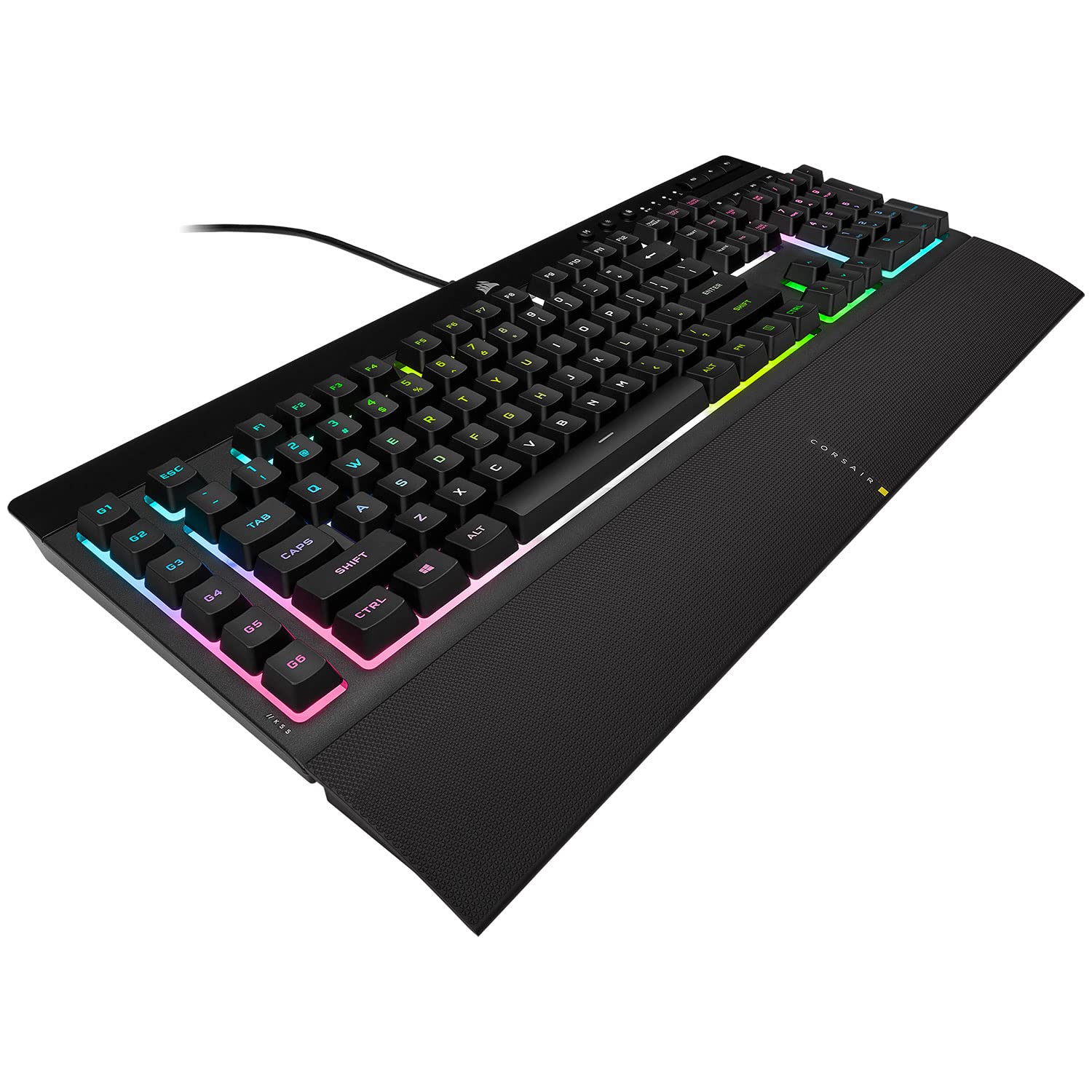
Corsair K55 RGB Gaming Keyboard
The K55 RGB keyboard is your first step towards enhanced performance. Stay one step ahead with 6 dedicated on-the-fly programmable macro keys. Multi-key anti-ghosting ensures your simultaneous key press combos are executed the way you wanted. The dedicated volume and media playback buttons enable control of all of your media without interrupting the game. Rgb backlighting and intuitive lighting modes provide expressive lighting options, all under your control. Quiet, responsive keys provide a satisfying feel. The K55 RGB gaming keyboard comes with a detachable soft rubber wrist rest to ensure additional comfort during marathon gaming sessions. Three-zone dynamic RGB backlighting with 10+ preconfigured vivid RGB lighting modes allow you to choose immersive lighting effects 6 programmable macro keys enable powerful actions, key remaps and combos Dedicated Volume and multimedia controls for direct Audio control without interrupting your game Quiet and responsive keys give a satisfying feel. Compatibility and System Requirements: Windows 10, Windows 8, Windows 7, or Windows Vista. PC with 2 USB 2.0 ports Multi-key anti-ghosting ensures the most accurate simultaneous key presses.
The K55 RGB keyboard is your first step towards enhanced performance. Stay one step ahead with 6 dedicated on-the-fly programmable macro keys. Multi-key anti-ghosting ensures your simultaneous key press combos are executed the way you wanted. The dedicated volume and media playback buttons enable control of all of your media without interrupting the game. Rgb backlighting and intuitive lighting modes provide expressive lighting options, all under your control. Quiet, responsive keys provide a satisfying feel. The K55 RGB gaming keyboard comes with a detachable soft rubber wrist rest to ensure additional comfort during marathon gaming sessions. Three-zone dynamic RGB backlighting with 10+ preconfigured vivid RGB lighting modes allow you to choose immersive lighting effects 6 programmable macro keys enable powerful actions, key remaps and combos Dedicated Volume and multimedia controls for direct Audio control without interrupting your game Quiet and responsive keys give a satisfying feel. Compatibility and System Requirements: Windows 10, Windows 8, Windows 7, or Windows Vista. PC with 2 USB 2.0 ports Multi-key anti-ghosting ensures the most accurate simultaneous key presses.
The K55 RGB keyboard is your first step towards enhanced performance. Stay one step ahead with 6 dedicated on-the-fly programmable macro keys. Multi-key anti-ghosting ensures your simultaneous key press combos are executed the way you wanted. The dedicated volume and media playback buttons enable control of all of your media without interrupting the game. Rgb backlighting and intuitive lighting modes provide expressive lighting options, all under your control. Quiet, responsive keys provide a satisfying feel. The K55 RGB gaming keyboard comes with a detachable soft rubber wrist rest to ensure additional comfort during marathon gaming sessions. Three-zone dynamic RGB backlighting with 10+ preconfigured vivid RGB lighting modes allow you to choose immersive lighting effects 6 programmable macro keys enable powerful actions, key remaps and combos Dedicated Volume and multimedia controls for direct Audio control without interrupting your game Quiet and responsive keys give a satisfying feel. Compatibility and System Requirements: Windows 10, Windows 8, Windows 7, or Windows Vista. PC with 2 USB 2.0 ports Multi-key anti-ghosting ensures the most accurate simultaneous key presses.
The K55 RGB keyboard is your first step towards enhanced performance. Stay one step ahead with 6 dedicated on-the-fly programmable macro keys. Multi-key anti-ghosting ensures your simultaneous key press combos are executed the way you wanted. The dedicated volume and media playback buttons enable control of all of your media without interrupting the game. Rgb backlighting and intuitive lighting modes provide expressive lighting options, all under your control. Quiet, responsive keys provide a satisfying feel. The K55 RGB gaming keyboard comes with a detachable soft rubber wrist rest to ensure additional comfort during marathon gaming sessions. Three-zone dynamic RGB backlighting with 10+ preconfigured vivid RGB lighting modes allow you to choose immersive lighting effects 6 programmable macro keys enable powerful actions, key remaps and combos Dedicated Volume and multimedia controls for direct Audio control without interrupting your game Quiet and responsive keys give a satisfying feel. Compatibility and System Requirements: Windows 10, Windows 8, Windows 7, or Windows Vista. PC with 2 USB 2.0 ports Multi-key anti-ghosting ensures the most accurate simultaneous key presses.
in 9 offers
The lowest price for Corsair K55 RGB Gaming Keyboard right now is $20.00 at eBay.com.au, compared across 3 retailers.
The all-time low was $19.00 on 11 Feb 2025 — today's price is 5% above the lowest ever. This is at or near its all-time low — a good time to buy.
Prices last updated 15 Oct 2026.

