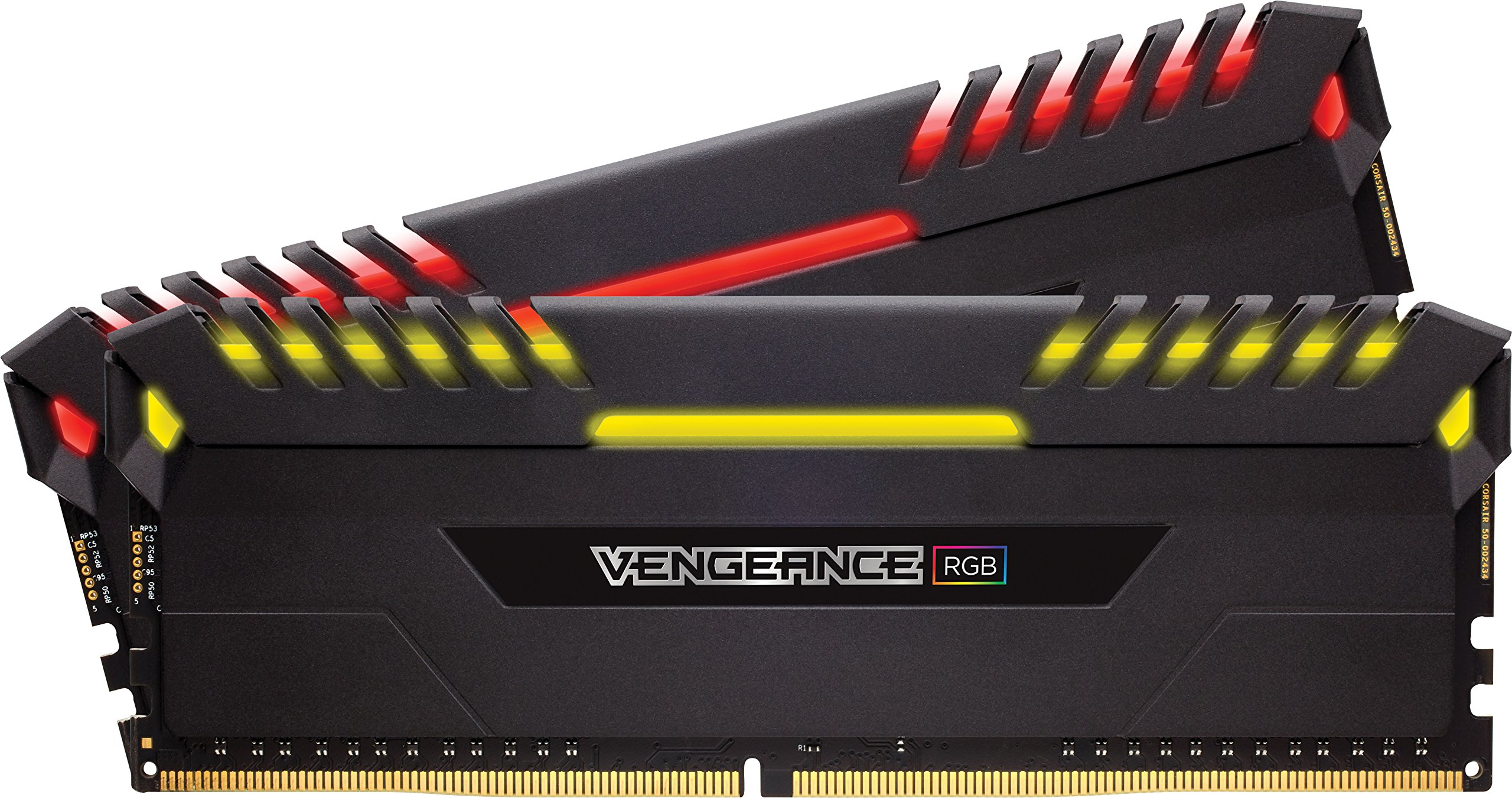
Corsair Vengeance RGB Pro SL 32GB 2x16GB DDR4 3200MHz RAM Memory Black
Illuminate your system with vivid, animated lighting from ten individually addressable, ultra-bright RGB LEDs per module. Choose from dozens of preset lighting profiles, or create your own in CORSAIR iCUE software. Just 44mm tall for wide compatibility with air coolers such as the CORSAIR A500. Optimized for maximum bandwidth and tight response times on the latest Intel and AMD DDR4 motherboards. A custom performance PCB provides the highest signal quality for the greatest level of performance and stability.
Illuminate your system with vivid, animated lighting from ten individually addressable, ultra-bright RGB LEDs per module. Choose from dozens of preset lighting profiles, or create your own in CORSAIR iCUE software. Just 44mm tall for wide compatibility with air coolers such as the CORSAIR A500. Optimized for maximum bandwidth and tight response times on the latest Intel and AMD DDR4 motherboards. A custom performance PCB provides the highest signal quality for the greatest level of performance and stability.
Illuminate your system with vivid, animated lighting from ten individually addressable, ultra-bright RGB LEDs per module. Choose from dozens of preset lighting profiles, or create your own in CORSAIR iCUE software. Just 44mm tall for wide compatibility with air coolers such as the CORSAIR A500. Optimized for maximum bandwidth and tight response times on the latest Intel and AMD DDR4 motherboards. A custom performance PCB provides the highest signal quality for the greatest level of performance and stability.
Illuminate your system with vivid, animated lighting from ten individually addressable, ultra-bright RGB LEDs per module. Choose from dozens of preset lighting profiles, or create your own in CORSAIR iCUE software. Just 44mm tall for wide compatibility with air coolers such as the CORSAIR A500. Optimized for maximum bandwidth and tight response times on the latest Intel and AMD DDR4 motherboards. A custom performance PCB provides the highest signal quality for the greatest level of performance and stability.
in 47 offers
The lowest price for Corsair Vengeance RGB Pro SL 32GB 2x16GB DDR4 3200MHz RAM Memory Black right now is $148.95 at Mwave Australia, compared across 32 retailers.
The all-time low was $125.00 on 10 Nov 2025 — today's price is 19% above the lowest ever. That's a little above the best price we've seen.
Prices last updated 31 Aug 2026.
Last updated at 31/08/2026 04:05:05
CORSAIR Vengeance RGB PRO SL 32GB (2x16GB) DDR4 Up to 3600MHz (PC4-28800) C18 1.35V Optimized for AMD Ryzen - Black
Free delivery
Affiliate Disclosure: We may receive a small commission for purchases made through this link at no extra cost to you. This helps support our site. Thank you!
Corsair Vengeance RGB PRO SL 32GB (2x 16GB) DDR4 3600MHz CL18 Desktop Memory AMD
Free delivery between 2–9 Sept
Corsair Vengeance RGB PRO SL 2x16GB 32GB DDR4 3600Mhz Memory f/AMD Gaming PC BLK
Free delivery between 3–7 Sept
Corsair Vengeance RGB PRO SL 32GB (2x16GB) DDR4 3600Mhz C18 Black Heatspreader for AMD Desktop Gaming Memory
Free delivery between 3–7 Sept
Corsair Vengeance RGB PRO SL 2x16GB 32GB DDR4 3200Mhz C16 Memory f/Gaming PC BLK
Free delivery between 3–7 Sept
Corsair 32GB(2x16GB) Vengeance RGB Pro SL DDR4 3200Mhz C16 Memory Kit - Black [CMH32GX4M2E3200C16]
Free delivery between 3–7 Sept
Corsair 32GB(2x16GB) Vengeance RGB Pro SL DDR4 3600Mhz C18 Memory Kit - Black [CMH32GX4M2D3600C18]
Free delivery between 3–7 Sept
Corsair Vengeance RGB PRO SL 2x16GB 32GB DDR4 3600Mhz C18 Memory f/Gaming PC BLK
Free delivery between 3–7 Sept
CORSAIR Vengeance RGB PRO SL 32GB (2x16GB) DDR4 3200Mhz C16 Black Heatspreader Desktop Gaming Memory
Corsair 32GB (2x16GB) CMH32GX4M2Z3600C18 Vengeance RGB Pro SL 3600MHz DDR4 RAM
originally posted on bestbuy.com
It’s been about 2 years since I got this product and I don’t make reviews for at least six months after having any product. This ram is fast and looks nice. I haven’t once seen a problem with this product since having it and none of my friends have problems with it either. I honestly would suggest it to anyone. I’m actually headed back to get a higher GB from this exact brand and color. Don’t forget to download the actual app on your computer to control the lights
originally posted on bestbuy.com
Excellent Ram for the price. The RGB feature is fully customizable and well controlled via the iCue software. I had issues with Team Group modules that didn't illuminate and T-Group blamed the motherboard but that wasn't actually true. So I opted for the Corsair Vengeance and everything is working great. Even @ C18 these are not much slower in real-world performance vs. C14 dimms and the iCue software doesn't throw Windows Event errors like other products. My Cinebench 23 scores are still way above 15k and everything runs smoothly - be it gaming or productivity.My mobo is the Gigabyte X570 Aorus Xtreme and this 16x2 kit is just what I needed. Since I 'go dark' on the mobo's RGB zones, iCue gives me all the control I need and will come in handy using their keyboard ... MoreExcellent Ram for the price. The RGB feature is fully customizable and well controlled via the iCue software. I had issues with Team Group modules that didn't illuminate and T-Group blamed the motherboard but that wasn't actually true. So I opted for the Corsair Vengeance and everything is working great. Even @ C18 these are not much slower in real-world performance vs. C14 dimms and the iCue software doesn't throw Windows Event errors like other products. My Cinebench 23 scores are still way above 15k and everything runs smoothly - be it gaming or productivity.My mobo is the Gigabyte X570 Aorus Xtreme and this 16x2 kit is just what I needed. Since I 'go dark' on the mobo's RGB zones, iCue gives me all the control I need and will come in handy using their keyboard & mice products.Highly satisfied and highly recommended when on sale!
originally posted on newegg.com
I was previously running a single stick of 2400mhz 16gb ram. Upgrading to this unfortunately wasnt super simple because I was a few (22) bios updates behind on my motherboard. After I downloaded them all to a USB stick then walked through the upgrade process (thankfully only had to actually apply like 4) I was able to gete these running at the full 3200 mhz. Be warned that as with any high speed ram, you may have to modify your memory settings to take advantage of it. I had to turn on XMP in my board, but then it auto chose the correct voltages, timing, and speed.Looks absolutely phenomenal, I love that you can change the colors, but I actually have a blacked out case, so after experimenting, I just put it back on the default, and itll be a nice surprise the next ... MoreI was previously running a single stick of 2400mhz 16gb ram. Upgrading to this unfortunately wasnt super simple because I was a few (22) bios updates behind on my motherboard. After I downloaded them all to a USB stick then walked through the upgrade process (thankfully only had to actually apply like 4) I was able to gete these running at the full 3200 mhz. Be warned that as with any high speed ram, you may have to modify your memory settings to take advantage of it. I had to turn on XMP in my board, but then it auto chose the correct voltages, timing, and speed.Looks absolutely phenomenal, I love that you can change the colors, but I actually have a blacked out case, so after experimenting, I just put it back on the default, and itll be a nice surprise the next time I open my case up. Despite having the RGB strip on the top, these werent actually as tall as I expected, I had no issues with fit.Performance I definitely notice a difference in day to day usage of memory intensive operations. I ran some benchmarks and Im getting between 20 GB/s and 21 GB/s in mixed read/write regardless of single or multi core. My old memory was clocked in at 11 GB/s, so there has been a definite improvement.All in all, I would highly recommend, and Im considering buying another 2X8GB kit to finish off my motherboard now.
| General | |
| Capacity | 32 GB: 2 x 16 GB |
| Upgrade Type | Generic |
| Width | 138 mm |
| Depth | 7.5 mm |

CORSAIR Vengeance RGB PRO SL 32GB (2x16GB) DDR4 Up to 3600MHz (PC4-28800) C18 1.35V Optimized for AMD Ryzen - Black
Free delivery
Affiliate Disclosure: We may receive a small commission for purchases made through this link at no extra cost to you. This helps support our site. Thank you!
Corsair Vengeance RGB PRO SL 32GB (2x 16GB) DDR4 3600MHz CL18 Desktop Memory AMD
Free delivery between 2–9 Sept
Corsair Vengeance RGB PRO SL 2x16GB 32GB DDR4 3600Mhz Memory f/AMD Gaming PC BLK
Free delivery between 3–7 Sept
Corsair Vengeance RGB PRO SL 32GB (2x16GB) DDR4 3600Mhz C18 Black Heatspreader for AMD Desktop Gaming Memory
Free delivery between 3–7 Sept
Corsair Vengeance RGB PRO SL 2x16GB 32GB DDR4 3200Mhz C16 Memory f/Gaming PC BLK
Free delivery between 3–7 Sept
It’s been about 2 years since I got this product and I don’t make reviews for at least six months after having any product. This ram is fast and looks nice. I haven’t once seen a problem with this product since having it and none of my friends have problems with it either. I honestly would suggest it to anyone. I’m actually headed back to get a higher GB from this exact brand and color. Don’t forget to download the actual app on your computer to control the lights
Excellent Ram for the price. The RGB feature is fully customizable and well controlled via the iCue software. I had issues with Team Group modules that didn't illuminate and T-Group blamed the motherboard but that wasn't actually true. So I opted for the Corsair Vengeance and everything is working great. Even @ C18 these are not much slower in real-world performance vs. C14 dimms and the iCue software doesn't throw Windows Event errors like other products. My Cinebench 23 scores are still way above 15k and everything runs smoothly - be it gaming or productivity.My mobo is the Gigabyte X570 Aorus Xtreme and this 16x2 kit is just what I needed. Since I 'go dark' on the mobo's RGB zones, iCue gives me all the control I need and will come in handy using their keyboard ... MoreExcellent Ram for the price. The RGB feature is fully customizable and well controlled via the iCue software. I had issues with Team Group modules that didn't illuminate and T-Group blamed the motherboard but that wasn't actually true. So I opted for the Corsair Vengeance and everything is working great. Even @ C18 these are not much slower in real-world performance vs. C14 dimms and the iCue software doesn't throw Windows Event errors like other products. My Cinebench 23 scores are still way above 15k and everything runs smoothly - be it gaming or productivity.My mobo is the Gigabyte X570 Aorus Xtreme and this 16x2 kit is just what I needed. Since I 'go dark' on the mobo's RGB zones, iCue gives me all the control I need and will come in handy using their keyboard & mice products.Highly satisfied and highly recommended when on sale!
I was previously running a single stick of 2400mhz 16gb ram. Upgrading to this unfortunately wasnt super simple because I was a few (22) bios updates behind on my motherboard. After I downloaded them all to a USB stick then walked through the upgrade process (thankfully only had to actually apply like 4) I was able to gete these running at the full 3200 mhz. Be warned that as with any high speed ram, you may have to modify your memory settings to take advantage of it. I had to turn on XMP in my board, but then it auto chose the correct voltages, timing, and speed.Looks absolutely phenomenal, I love that you can change the colors, but I actually have a blacked out case, so after experimenting, I just put it back on the default, and itll be a nice surprise the next ... MoreI was previously running a single stick of 2400mhz 16gb ram. Upgrading to this unfortunately wasnt super simple because I was a few (22) bios updates behind on my motherboard. After I downloaded them all to a USB stick then walked through the upgrade process (thankfully only had to actually apply like 4) I was able to gete these running at the full 3200 mhz. Be warned that as with any high speed ram, you may have to modify your memory settings to take advantage of it. I had to turn on XMP in my board, but then it auto chose the correct voltages, timing, and speed.Looks absolutely phenomenal, I love that you can change the colors, but I actually have a blacked out case, so after experimenting, I just put it back on the default, and itll be a nice surprise the next time I open my case up. Despite having the RGB strip on the top, these werent actually as tall as I expected, I had no issues with fit.Performance I definitely notice a difference in day to day usage of memory intensive operations. I ran some benchmarks and Im getting between 20 GB/s and 21 GB/s in mixed read/write regardless of single or multi core. My old memory was clocked in at 11 GB/s, so there has been a definite improvement.All in all, I would highly recommend, and Im considering buying another 2X8GB kit to finish off my motherboard now.
Honestly it has been a LONG time since I was in the custom PC game. I've mostly been work PCs and laptops but when I was invited to review this RAM it kind of reignited my passion (so maybe one of the cons of this memory should be that I am now going to be spending a bunch more money on NewEgg again). I went through some wedding rules with my computer and parts (something borrowed, making the LEDs blue, the RAM being new) and honestly I kind of went down a rabbit hole and got lost in the testing so this review took me a bit longer even though the review itself will be short and succinct.The Corsair iCUE software is honestly pretty great. I've been building PCs since the first hardware monitoring software started and was basically just a temperature sensor that kept ... MoreHonestly it has been a LONG time since I was in the custom PC game. I've mostly been work PCs and laptops but when I was invited to review this RAM it kind of reignited my passion (so maybe one of the cons of this memory should be that I am now going to be spending a bunch more money on NewEgg again). I went through some wedding rules with my computer and parts (something borrowed, making the LEDs blue, the RAM being new) and honestly I kind of went down a rabbit hole and got lost in the testing so this review took me a bit longer even though the review itself will be short and succinct.The Corsair iCUE software is honestly pretty great. I've been building PCs since the first hardware monitoring software started and was basically just a temperature sensor that kept a little icon in the taskbar with your temps (all kinds of options like...farenheit or celsius) and this is just so amazing. I can't imagine what it would be like with a full desk of icue compatible corsair gear. The lights in this RAM is bright and easy to see and even though it's pretty tall I've had much taller heatsinks on RAM and it never caused me an issue.No errors on the RAM and very fast. When I go for my next crazy build PC I'll definitely go for this RAM...though I'll go for more than 16GB because reasons (I just like to see the large number in system info).If you're looking for RAM you can NOT go wrong with these Corsair sticks.
When I put this memory into my system, I was not expecting the RGB to be as bright as it was. With the overall subtle aesthetic of the sticks themselves, I was expecting a bit more of a subdued light, but this memory commands presence inside a system. The iCUE software that is used to control the RGB lighting and effects on this RAM, as well as other Corsair products, is one of the best lighting softwares available. While it is quite large, taking up just over 1GB of disk space for just this memory, it offers plenty of lighting customization options, it actually works, and it doesn't constantly crash the system like some softwares that shall not be named here. In my experience, iCUE has generally behaved itself and is one of the few softwares I typically allow to ... MoreWhen I put this memory into my system, I was not expecting the RGB to be as bright as it was. With the overall subtle aesthetic of the sticks themselves, I was expecting a bit more of a subdued light, but this memory commands presence inside a system. The iCUE software that is used to control the RGB lighting and effects on this RAM, as well as other Corsair products, is one of the best lighting softwares available. While it is quite large, taking up just over 1GB of disk space for just this memory, it offers plenty of lighting customization options, it actually works, and it doesn't constantly crash the system like some softwares that shall not be named here. In my experience, iCUE has generally behaved itself and is one of the few softwares I typically allow to run in the background on my systems. That being said though, one of my favorite options with this memory is being able to set a lighting effect that will play when iCUE is not running. Now for my complaints, of which there are two. First, this memory is not very low-profile. I understand that the lighting takes up a fair bit of space and I have no problem with that; but I feel that marketing this memory as compact is slightly misleading. Sure, it may be lower profile than some memory, but it definitely isn't small enough to fit under something like a Hyper 212 Evo; however, huge props for listing a height dimension. The second complaint I have about this memory regards turning off the RGB when putting the computer to sleep. When you put the computer to sleep, iCUE is suspended, software lighting stops, and the RAM defaults to the hardware lighting effect. The way to turn off the RGB lighting on sleep is to set the hardware lighting effect to a static color of black (0, 0, 0). There are hardware limitations that cause this problem, but I would love for a better solution. Overall, this is good memory with a subtle yet impactful design that is controlled with the iCUE software that is strides ahead of many other lighting softwares. I would not hesitate to put this memory in future systems.
There's a problem and I've seen Corsair respond to concerns so I thought I'd try. I removed my G-Skill memory (a 32 gig kit at 3600 in dual channel) even though it worked very well because I wanted to fill all four slots and maintain my brand on most everything. I choose Corsair Vengeance RGB Pro as most of my system is Corsair: CPU AIO, 9 RGB fans, Commander Pro, and switched to the 5000x case when I installed the 2 32 gig kits of Vengeance at 3600. With that change, the System goes into a loop, tries to power up-shuts off-repeats. I reseated the ram, there was no change. If it does manage to post, I can't set memory speed to 3600 as it crashes instantly and displays 'memory management issue'. I set memory to 2200 and the system would post. As a test, I reinstalled ... MoreThere's a problem and I've seen Corsair respond to concerns so I thought I'd try. I removed my G-Skill memory (a 32 gig kit at 3600 in dual channel) even though it worked very well because I wanted to fill all four slots and maintain my brand on most everything. I choose Corsair Vengeance RGB Pro as most of my system is Corsair: CPU AIO, 9 RGB fans, Commander Pro, and switched to the 5000x case when I installed the 2 32 gig kits of Vengeance at 3600. With that change, the System goes into a loop, tries to power up-shuts off-repeats. I reseated the ram, there was no change. If it does manage to post, I can't set memory speed to 3600 as it crashes instantly and displays 'memory management issue'. I set memory to 2200 and the system would post. As a test, I reinstalled my G-Skill memory and the system operates in great fashion with half the memory at the proper 3600 setting. To continue my testing, I reinstalled the 2 kits of Corsair Ram and enabled DOCP. Power on loop resumed and after 3 attempts to post, I shut the system down and reinstalled my GSkill ram. I kind of forgot about the problem as I can't return the memory to BestBuy as I've waited too long. I've never dealt with return electronics/computer parts before as I've never had an issue. BUT, I have $200+ of ram sitting here I can't use. I would like to use it as I like Corsair equipment. I've owned the ram for 4 months, but it didn't work correctly from day 1. I recently saw it carries a lifetime warranty, so I thought I'd ask. I know things happen and I am not discouraged about Corsair equipment in the slightest. Can Corsair help me out with some guidance on what I should do moving forward? BTW, my motherboard is an ASUS Crosshair VIII Hero (Wi-Fi) and can support up to 128 gig of ram at 4600 MHz. Thanks for reading my long post. Once rectified, I'd be more than happy to submit another review or amend this review.
They work but if using these on an Asus z590 board you may not like them, I know I didn't.I have a ROG Maximus XIII Hero (Wi-Fi) and these are only somewhat compatible. First, they tap out at just under 3GHz, found them stable at 2966Mhz. Second, the corsair software conflicts with the Aura Sync. They will sync at first but then after 8-10 hours the lighting just freezes and you have to relaunch the Aura software and reset them.I kept this RAM for another system that is older and bought a 128GB Kingston Fury RAM kit for my ROG Maximus XIII Hero. The lighting did not need software as the Corsair did. When I installed the sticks, the Kingston LEDs just worked out of the box. They do not light up as pretty as the Corsair does but they perform better with my system. ... MoreThey work but if using these on an Asus z590 board you may not like them, I know I didn't.I have a ROG Maximus XIII Hero (Wi-Fi) and these are only somewhat compatible. First, they tap out at just under 3GHz, found them stable at 2966Mhz. Second, the corsair software conflicts with the Aura Sync. They will sync at first but then after 8-10 hours the lighting just freezes and you have to relaunch the Aura software and reset them.I kept this RAM for another system that is older and bought a 128GB Kingston Fury RAM kit for my ROG Maximus XIII Hero. The lighting did not need software as the Corsair did. When I installed the sticks, the Kingston LEDs just worked out of the box. They do not light up as pretty as the Corsair does but they perform better with my system. I did look up compatibility through Kingston's website before buying my new RAM, specs have changed for Intel users over the years. I recall a time when all RAM was made for Intel and you had to research before getting RAM for AMD. That is not the case anymore.Overall I am very impressed with Corsairs LED lighting options. For the system, I kept this RAM for, I'm going to build a media center computer with it. If you haven't looked at the lighting options from Corsair I would highly recommend you do that. They have some amazing lighting effects for movies that will illuminate the wall behind your wall display to make movies come to life, casting the colors displayed on screen to extend the scene. Watch the video they have on movies and check out the tiki torch scene and how the fire effect flickers beyond the tv to your walls like it is in the room you're in. I just love what they are doing and am planning to build a eco system for my entertainment room, it should be epic.
Corsair Vengeance Ram is great so not much to say about it. Works flawlessly on a X570 board with a RYZEN 9 5900X. Runs perfectly and looks great. Only caution I would tell a buyer is if your not running other corsair RGB products you will need Icue to control this and if its your only RGB part that needs Icue you will be running another program that requires resources to operate so keep that in mind in my build I am using all Corsair RGB so no big deal but keep that in mind if your not. All profiles on the ram work great on my Asrock bios dont forget to set XMP profiles when your installing to get the 3600 speed.
I bought two of these (total of 64 gb) for an AmD 5950x build. I really like the RBG lights, especially when if you turn your room lights off, your pc will be glowing. The cards are very easy to install as long as they are facing the right way on your motherboard(just something to pay attention to. I would recommend these ram cards, my pc feels lighting fast. Also, really good for the price. Especially, I am a first time pc builder.
I got this as part of an overhaul of my son’s PC after I went in his room one day to look at something on it. It was in severe shape!!! Every last place where air might have come in or out was caked with dust and animal hair! I asked him later how long he’s had that PC and he said ‘5 or 6 years’. So I asked when was the last time you opened it up and sprayed out the dust, and he said ‘Never. I didn’t know i was supposed to.’ I ended up replacing everything except for the processor!
| General | |
| Capacity | 32 GB: 2 x 16 GB |
| Upgrade Type | Generic |
| Width | 138 mm |
| Depth | 7.5 mm |