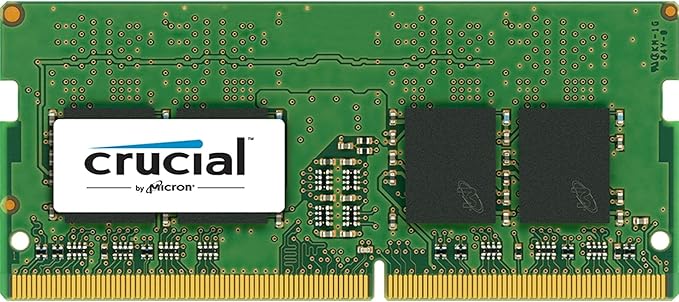
Crucial 16GB Kit (8GBx2) DDR4 2400 MT/s
Increased speed. Increased battery life. High memory capacity. For your next-generation laptop. In a world of constant technological change, components that are more than five years old always need to be modernised. And at the age of seven, DDR3 memory is quite old. Laptops have much greater potential. Since the introduction of DDR3 memory technology in 2007, processor capacity has doubled and SSD throughput and graphics card frame rates have increased dramatically. The only limiting factor so far has been memory. Crucial DDR4 SODIMMs also overcome this bottleneck, so that nothing stands in the way of a new standard in performance. More energy efficiency Increased battery life thanks to lower power consumption. Crucial DDR4 SODIMMs operate at 1.2 V, whereas standard DDR3 memory components use 1.5 V. This corresponds to a reduction of about 20%. Crucial DDR4 SODIMMs, however, have even more efficiency features that enable an overall reduction in power consumption of up to 40%.
Increased speed. Increased battery life. High memory capacity. For your next-generation laptop. In a world of constant technological change, components that are more than five years old always need to be modernised. And at the age of seven, DDR3 memory is quite old. Laptops have much greater potential. Since the introduction of DDR3 memory technology in 2007, processor capacity has doubled and SSD throughput and graphics card frame rates have increased dramatically. The only limiting factor so far has been memory. Crucial DDR4 SODIMMs also overcome this bottleneck, so that nothing stands in the way of a new standard in performance. More energy efficiency Increased battery life thanks to lower power consumption. Crucial DDR4 SODIMMs operate at 1.2 V, whereas standard DDR3 memory components use 1.5 V. This corresponds to a reduction of about 20%. Crucial DDR4 SODIMMs, however, have even more efficiency features that enable an overall reduction in power consumption of up to 40%.
Increased speed. Increased battery life. High memory capacity. For your next-generation laptop. In a world of constant technological change, components that are more than five years old always need to be modernised. And at the age of seven, DDR3 memory is quite old. Laptops have much greater potential. Since the introduction of DDR3 memory technology in 2007, processor capacity has doubled and SSD throughput and graphics card frame rates have increased dramatically. The only limiting factor so far has been memory. Crucial DDR4 SODIMMs also overcome this bottleneck, so that nothing stands in the way of a new standard in performance. More energy efficiency Increased battery life thanks to lower power consumption. Crucial DDR4 SODIMMs operate at 1.2 V, whereas standard DDR3 memory components use 1.5 V. This corresponds to a reduction of about 20%. Crucial DDR4 SODIMMs, however, have even more efficiency features that enable an overall reduction in power consumption of up to 40%.
Increased speed. Increased battery life. High memory capacity. For your next-generation laptop. In a world of constant technological change, components that are more than five years old always need to be modernised. And at the age of seven, DDR3 memory is quite old. Laptops have much greater potential. Since the introduction of DDR3 memory technology in 2007, processor capacity has doubled and SSD throughput and graphics card frame rates have increased dramatically. The only limiting factor so far has been memory. Crucial DDR4 SODIMMs also overcome this bottleneck, so that nothing stands in the way of a new standard in performance. More energy efficiency Increased battery life thanks to lower power consumption. Crucial DDR4 SODIMMs operate at 1.2 V, whereas standard DDR3 memory components use 1.5 V. This corresponds to a reduction of about 20%. Crucial DDR4 SODIMMs, however, have even more efficiency features that enable an overall reduction in power consumption of up to 40%.
in 3 offers
The lowest price for Crucial 16GB Kit (8GBx2) DDR4 2400 MT/s right now is $106.00 at Clove Technology, compared across 3 retailers.
The all-time low was $105.00 on 17 Mar 2026 — today's price is 1% above the lowest ever. This is at or near its all-time low — a good time to buy.
Prices last updated 15 May 2026.
Last updated at 15/05/2026 19:40:32
Crucial 16GB Kit (8GBx2) DDR4 2400 MT/s (PC4-19200) SODIMM 260-Pin Memory CT2K8G4SFS824A,Green
Affiliate Disclosure: We may receive a small commission for purchases made through this link at no extra cost to you. This helps support our site. Thank you!
Crucial 16GB (2x8GB) DDR4 2400 SODIMM 1.2V memory module 2400 MHz
Crucial 16 Gb Kit (8 G Bx2), 260 Pin Sodimm, Ddr4 Pc4 19200,
Free delivery between 26–29 May
originally posted on lazada.com.ph
Item arrived in good condition. It took a while in fiddling around with my old 2017 iMac. You need to remove reinstall the ram from the original slots, and have the old ram on the new slots. A bit of trial and error. But it finally worked all 40 appeared. Finally!
originally posted on shopee.ph
Best Feature:Very GoodPerformance:Great PerformanceProduct Quality:Best QualityWell pack With plastic bubble good for protection. The item is perfect no defect. Best Buy. Recommendable store if you're looking for Memory RAM. Great store.
originally posted on shopee.com.my
Performance:Very goodOriginal item. Delivery was fast. Item was properly packed and secured with thick bubble wrap. Seller also very helpful. Very happy with my purchase. Definitely will repeat order. Well recommended seller. 👍👍👍
| General | |
| Capacity | 16 GB: 2 x 8 GB |
| Upgrade Type | Generic |
| Memory | |
| Type | DRAM memory kit |
Crucial 16GB Kit (8GBx2) DDR4 2400 MT/s (PC4-19200) SODIMM 260-Pin Memory CT2K8G4SFS824A,Green
Affiliate Disclosure: We may receive a small commission for purchases made through this link at no extra cost to you. This helps support our site. Thank you!
Crucial 16GB (2x8GB) DDR4 2400 SODIMM 1.2V memory module 2400 MHz
Crucial 16 Gb Kit (8 G Bx2), 260 Pin Sodimm, Ddr4 Pc4 19200,
Free delivery between 26–29 May
Item arrived in good condition. It took a while in fiddling around with my old 2017 iMac. You need to remove reinstall the ram from the original slots, and have the old ram on the new slots. A bit of trial and error. But it finally worked all 40 appeared. Finally!
Best Feature:Very GoodPerformance:Great PerformanceProduct Quality:Best QualityWell pack With plastic bubble good for protection. The item is perfect no defect. Best Buy. Recommendable store if you're looking for Memory RAM. Great store.
Performance:Very goodOriginal item. Delivery was fast. Item was properly packed and secured with thick bubble wrap. Seller also very helpful. Very happy with my purchase. Definitely will repeat order. Well recommended seller. 👍👍👍
I upgrade and repair computers as a hobby. I purchased four of these memory modules to upgrade an older HPZ240 to 64GB of RAM. The computer is more robust and applications load much faster. Don't get me wrong, I also installed a 2TB Crucial NVME drive and that's where a majority of the speed improvements came from. However, the additional memory did play a significant role in overall system performance and stability.
As per manufacture's website: Crucial 8GB DDR4-2400 UDIMM CT8G4DFD824A Specs: DDR4 PC4-19200 • CL=17 • Dual Ranked • x8 based • Unbuffered • NON-ECC • DDR4-2400 • 1.2V • 1024Meg x 64 • Memory's sticker labels product as CT8G4DFD824A. After closer inspection, the chips and circuitry on the board of RAM are slightly different than my original 8GB stick of the same model which is a dual ranked. Also, the only sticker on this chip is the label itself, no other "warranty void" stickers on the chip. I install the RAM and run CPU-Z for chip information. It lists the following information: module manufactured by Crucial Technology, DRAM manufactured by Micron Technology, and part number CT8G4DFD824A but it is a single ranked chip. My original chip shows up as dual ranked in ... MoreAs per manufacture's website: Crucial 8GB DDR4-2400 UDIMM CT8G4DFD824A Specs: DDR4 PC4-19200 • CL=17 • Dual Ranked • x8 based • Unbuffered • NON-ECC • DDR4-2400 • 1.2V • 1024Meg x 64 • Memory's sticker labels product as CT8G4DFD824A. After closer inspection, the chips and circuitry on the board of RAM are slightly different than my original 8GB stick of the same model which is a dual ranked. Also, the only sticker on this chip is the label itself, no other "warranty void" stickers on the chip. I install the RAM and run CPU-Z for chip information. It lists the following information: module manufactured by Crucial Technology, DRAM manufactured by Micron Technology, and part number CT8G4DFD824A but it is a single ranked chip. My original chip shows up as dual ranked in CPU-Z. The first RAM I received from the seller was labeled as CT8G4SFD824A 8GB DDR4-2400 UDIMM 1.2V CL17 on the sticker. As per the manufacturer's website, CT8G4SFD824A is a SODIMM chip. I cannot confirm whether this is an issue of manufacturer defect by mislabeling chips or if this is actually a counterfeit chip but the specs are not as they are advertised by the maker so I feel that a 1 egg rating is in order.
My HP desktop has been running slowly, and with a total of 12GB RAM, one 8GB, and one 4GB module I found that almost all of the RAM was being used. I would also end up with Registry errors and problems waking the machine from sleep or not going to sleep.At the price offered for a 16GB module, I found it worthwhile to purchase two to upgrade my system.What a difference! The computer is much faster, the screens don't hang up and problems like I've had are no longer there.The Crucial memory modules made all the difference in the world.
I installed this on an old laptop running Windows 10 because it just seemed to be dragging. Even installing system updates seemed to take way too much time. Little did I know that the old drive was almost ready to go when I ordered this SSD drive. The old drive totally died while I was waiting for the new drive to arrive. I also installed more ram, doubling what was there. Now it boots up really fast. I'm a happy camper.
I bought an Lenovo Flex 14 2-in-1 Convertible Laptop, 14 Inch FHD, Touchscreen, AMD Ryzen 5 3500U Processor, Radeon Vega 8 Graphics, 8GB DDR4 RAM, 256GB NVMe SSD, Win 10, during Prime Day(s), at a great price. However, 4GB of RAM goes to the graphics, leaving 4GB to the OS. While violating my Lenovo warranty, I put this Crucial 16GB in after removing the 10 little screws on the bottom of the laptop (all 10 screws are visible). Pop the silver radiator in the center, and replace the 4GB with the Crucial 16GB, (the graphic 4GB is soldered). I have this on Win10/Ubuntu dual-boot. I don't miss that ThinkPad mousey thing between the G & H keys, as the touchpad is the very first one I actually like?!? I did a LOT of research picking this Crucial 16GB, and still it was a ... MoreI bought an Lenovo Flex 14 2-in-1 Convertible Laptop, 14 Inch FHD, Touchscreen, AMD Ryzen 5 3500U Processor, Radeon Vega 8 Graphics, 8GB DDR4 RAM, 256GB NVMe SSD, Win 10, during Prime Day(s), at a great price. However, 4GB of RAM goes to the graphics, leaving 4GB to the OS. While violating my Lenovo warranty, I put this Crucial 16GB in after removing the 10 little screws on the bottom of the laptop (all 10 screws are visible). Pop the silver radiator in the center, and replace the 4GB with the Crucial 16GB, (the graphic 4GB is soldered). I have this on Win10/Ubuntu dual-boot. I don't miss that ThinkPad mousey thing between the G & H keys, as the touchpad is the very first one I actually like?!? I did a LOT of research picking this Crucial 16GB, and still it was a Monte Carlo assessment. This RAM took a memory starve lemon and transformed it into the most powerful platform I have personally owned.
After purchasing a Dell Inspiron 13 5000-5379, I noticed the 8GB of installed memory was sometimes getting maxed out. Luckily, the computer has two slots and came with only one full, so adding another 8GB was an easy, cost effective solution: Shut down the computer, remove the small Phillips screws on the bottom, use a bone tool to unsnap the panel. Making sure you dont have a static charge with a wrist-strap or are grounded, slip the module into the empty slot. Voila! 16GB were shown after restart.Now the computer runs quicker and has plenty of room to run multiple programs.Thank you B&H for a competitive deal and fast delivery.
| General | |
| Capacity | 16 GB: 2 x 8 GB |
| Upgrade Type | Generic |
| Memory | |
| Type | DRAM memory kit |

