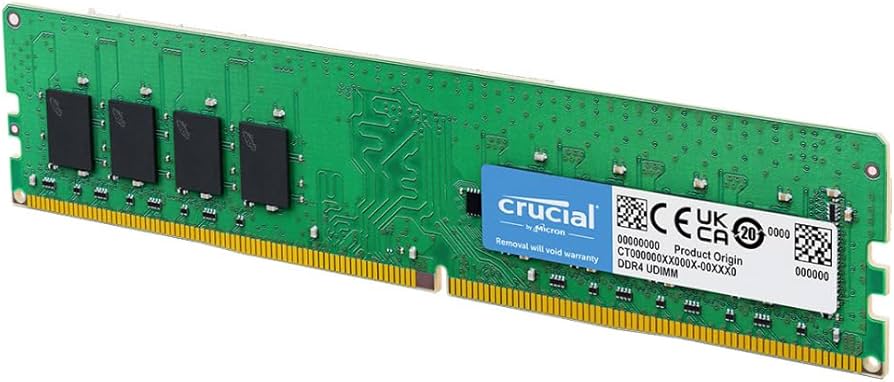
Crucial Pro 32GB DDR4 Desktop Memory PC4-25600 3200MHz Life WTY
When plug-and-play performance is crucial, go pro. Designed to help your DDR4 system run faster and smoother, Crucial DDR4 Pro desktop memory is one of the easiest and most affordable ways to improve performance without the fuss of overclocking, latency tuning, die chasing, and LEDs. Load programs faster, increase responsiveness and run data-intensive applications with ease while increasing your desktop's multitasking capabilities with Intel XMP 2.0 support for performance recovery and a low-profile aluminium heat spreader for heat dissipation Low-profile, satin black heat spreader Dissipate module heat even in smaller PCs and enhance your gaming rig with for a sleek, modern look with our integrated satin black aluminum heat spreader. Supports Intel XMP 2.0 Achieve easy performance recovery on CPUs that suppress rated memory speeds with Intel XMP 2.0 turned on in the UEFI/BIOS settings2. Get the full value of your investment without overpaying for performance. No-fuss memory for gaming rigs Boost in-game frame rates and eliminate screen tears. Enhance gaming rigs with our sleek heat spreader without the fuss of chasing B/E-die, LEDs or the risks associated with overclocking speeds and tuning latency. Improved productivity for creatives and professionals With Crucial DDR4 Pro memory, improve system speeds to render faster and multitask with ease, even with multiple browser tabs open. Micron quality and reliability As one of only three global memory manufacturers, and with 45 years of memory expertise, Micron delivers cutting-edge engineering and superior component and module-level testing for all Crucial DRAM products. Unique relationships Crucial works with top-tier CPU and motherboard vendors to ensure quality and compatibility in every module.
When plug-and-play performance is crucial, go pro. Designed to help your DDR4 system run faster and smoother, Crucial DDR4 Pro desktop memory is one of the easiest and most affordable ways to improve performance without the fuss of overclocking, latency tuning, die chasing, and LEDs. Load programs faster, increase responsiveness and run data-intensive applications with ease while increasing your desktop's multitasking capabilities with Intel XMP 2.0 support for performance recovery and a low-profile aluminium heat spreader for heat dissipation Low-profile, satin black heat spreader Dissipate module heat even in smaller PCs and enhance your gaming rig with for a sleek, modern look with our integrated satin black aluminum heat spreader. Supports Intel XMP 2.0 Achieve easy performance recovery on CPUs that suppress rated memory speeds with Intel XMP 2.0 turned on in the UEFI/BIOS settings2. Get the full value of your investment without overpaying for performance. No-fuss memory for gaming rigs Boost in-game frame rates and eliminate screen tears. Enhance gaming rigs with our sleek heat spreader without the fuss of chasing B/E-die, LEDs or the risks associated with overclocking speeds and tuning latency. Improved productivity for creatives and professionals With Crucial DDR4 Pro memory, improve system speeds to render faster and multitask with ease, even with multiple browser tabs open. Micron quality and reliability As one of only three global memory manufacturers, and with 45 years of memory expertise, Micron delivers cutting-edge engineering and superior component and module-level testing for all Crucial DRAM products. Unique relationships Crucial works with top-tier CPU and motherboard vendors to ensure quality and compatibility in every module.
When plug-and-play performance is crucial, go pro. Designed to help your DDR4 system run faster and smoother, Crucial DDR4 Pro desktop memory is one of the easiest and most affordable ways to improve performance without the fuss of overclocking, latency tuning, die chasing, and LEDs. Load programs faster, increase responsiveness and run data-intensive applications with ease while increasing your desktop's multitasking capabilities with Intel XMP 2.0 support for performance recovery and a low-profile aluminium heat spreader for heat dissipation Low-profile, satin black heat spreader Dissipate module heat even in smaller PCs and enhance your gaming rig with for a sleek, modern look with our integrated satin black aluminum heat spreader. Supports Intel XMP 2.0 Achieve easy performance recovery on CPUs that suppress rated memory speeds with Intel XMP 2.0 turned on in the UEFI/BIOS settings2. Get the full value of your investment without overpaying for performance. No-fuss memory for gaming rigs Boost in-game frame rates and eliminate screen tears. Enhance gaming rigs with our sleek heat spreader without the fuss of chasing B/E-die, LEDs or the risks associated with overclocking speeds and tuning latency. Improved productivity for creatives and professionals With Crucial DDR4 Pro memory, improve system speeds to render faster and multitask with ease, even with multiple browser tabs open. Micron quality and reliability As one of only three global memory manufacturers, and with 45 years of memory expertise, Micron delivers cutting-edge engineering and superior component and module-level testing for all Crucial DRAM products. Unique relationships Crucial works with top-tier CPU and motherboard vendors to ensure quality and compatibility in every module.
When plug-and-play performance is crucial, go pro. Designed to help your DDR4 system run faster and smoother, Crucial DDR4 Pro desktop memory is one of the easiest and most affordable ways to improve performance without the fuss of overclocking, latency tuning, die chasing, and LEDs. Load programs faster, increase responsiveness and run data-intensive applications with ease while increasing your desktop's multitasking capabilities with Intel XMP 2.0 support for performance recovery and a low-profile aluminium heat spreader for heat dissipation Low-profile, satin black heat spreader Dissipate module heat even in smaller PCs and enhance your gaming rig with for a sleek, modern look with our integrated satin black aluminum heat spreader. Supports Intel XMP 2.0 Achieve easy performance recovery on CPUs that suppress rated memory speeds with Intel XMP 2.0 turned on in the UEFI/BIOS settings2. Get the full value of your investment without overpaying for performance. No-fuss memory for gaming rigs Boost in-game frame rates and eliminate screen tears. Enhance gaming rigs with our sleek heat spreader without the fuss of chasing B/E-die, LEDs or the risks associated with overclocking speeds and tuning latency. Improved productivity for creatives and professionals With Crucial DDR4 Pro memory, improve system speeds to render faster and multitask with ease, even with multiple browser tabs open. Micron quality and reliability As one of only three global memory manufacturers, and with 45 years of memory expertise, Micron delivers cutting-edge engineering and superior component and module-level testing for all Crucial DRAM products. Unique relationships Crucial works with top-tier CPU and motherboard vendors to ensure quality and compatibility in every module.
in 3 offers
The lowest price for Crucial Pro 32GB DDR4 Desktop Memory PC4-25600 3200MHz Life WTY right now is $378.00 at Best IT Services Perth, compared across 3 retailers.
The all-time low was $90.00 on 3 Mar 2026 — today's price is 320% above the lowest ever. It has been notably cheaper before — worth setting a price alert.
Prices last updated 24 July 2026.
Last updated at 24/07/2026 01:43:32
Crucial Pro 32GB DDR4-3200 UDIMM CL22 (16Gbit)
Affiliate Disclosure: We may receive a small commission for purchases made through this link at no extra cost to you. This helps support our site. Thank you!
Crucial Pro 32GB (2x16GB) DDR4 UDIMM 3200MHz CL22 Black Heat Spreader Support Intel XMP AMD Ryzen Desktop PC Gaming Memory
Delivery by 31 July $15
Crucial Pro Ddr4 Udimm 3200Mhz Cl22 Gaming Memory, 32 GB by SimplyWholesale.com.au
Free delivery
originally posted on bestbuy.com
RAM memory, as a buffer memory, is one of the most important elements of a PC. Virtually any task we run involves the use of RAM, so it is good to have a memory fast enough and with the capacity that allows us to run most applications and tasks simultaneously without any inconvenience.I have a PC with a Ryzen 7 5800X CPU (3.9GHz), 2x M.2 SSDs of 1TB each, a RT3070 GPU. I used to use 2x 8Gb DDR4 RAM modules at 3200MHz, but I switched to these Crucial 2x 16Gb DDR4 RAM modules at 3200MHz. With this change I have been able to give my PC a break because in the last year I have started to edit videos in 4k quality. Likewise when playing virtually any game, the performance is very good, the FPS improve a bit however it feels stable and fluid, there are no pauses or ... MoreRAM memory, as a buffer memory, is one of the most important elements of a PC. Virtually any task we run involves the use of RAM, so it is good to have a memory fast enough and with the capacity that allows us to run most applications and tasks simultaneously without any inconvenience.I have a PC with a Ryzen 7 5800X CPU (3.9GHz), 2x M.2 SSDs of 1TB each, a RT3070 GPU. I used to use 2x 8Gb DDR4 RAM modules at 3200MHz, but I switched to these Crucial 2x 16Gb DDR4 RAM modules at 3200MHz. With this change I have been able to give my PC a break because in the last year I have started to edit videos in 4k quality. Likewise when playing virtually any game, the performance is very good, the FPS improve a bit however it feels stable and fluid, there are no pauses or frozen screen, actually everything runs very well and fast.Having the editing program open (DaVinci Resolve) rendering a 4k video, playing multimedia content on two different platforms, several internet pages and folders open, it barely used 14.3GB of RAM and there was more than 17GB available, pretty good for video editing and multitasking. Playing some video games and having several applications open as well, there was practically no problem, and in terms of video editing and playing vidogames at the same time, the RAM will not be the problem, the GPU may be, in my case I usually edit and render videos practically running the least amount of applications, I always prefer my work to look good without possible errors.Something that is important to mention is that there is the possibility that the motherboard may not be configured to use the 3200 MHz (RAM speed), I recommend confirming in the BIOS of the motherboard where the RAM is installed, that the XMP profile is activated if your motherboard allows it, since activating this profile will take full advantage of the RAM.The reality is that although the latency is relatively high, 22 in this case, the memories work quite well, in my case I have them installed in dual channel (usually are the second and fourth RAM memory slot on the motherboard) and everything works very well, no blue screens or similar errors. The design is simple, nothing aesthetic or RGB lights, but this is understandable considering that the price of memory is accessible, they have recently dropped in price so it seems to me a fair price.In summary, if you want to increase the RAM memory of your PC, either because it is a little slow because the current RAM is not enough, or because you want to run more demanding applications or play higher quality games on your PC, I consider these Crucial 32GB memories are a good choice, I can recommend them.
originally posted on bestbuy.com
The Crucial Pro is a pretty easy choice to make for those looking to upgrade their hardware all without breaking the bank. And while there are no pretty RGB lighting options, these two sticks are a powerhouse to be reckoned with. The crucial pro is a perfect choice and easy fit for anyone using PCie 4 or 5. And while i have not personally tested this on the gen 3s i have read that it will work on that board. The Crucial sticks are very easy to install and at 32 gigs combined between the two this allows for additional memory slots to be freed up. Read and write speed is amazingly fast at a stock clock speed of 3200mhz. This truly requires no overclocking as load times between scene is done within seconds rather than minutes. You can expect smoother and more ... MoreThe Crucial Pro is a pretty easy choice to make for those looking to upgrade their hardware all without breaking the bank. And while there are no pretty RGB lighting options, these two sticks are a powerhouse to be reckoned with. The crucial pro is a perfect choice and easy fit for anyone using PCie 4 or 5. And while i have not personally tested this on the gen 3s i have read that it will work on that board. The Crucial sticks are very easy to install and at 32 gigs combined between the two this allows for additional memory slots to be freed up. Read and write speed is amazingly fast at a stock clock speed of 3200mhz. This truly requires no overclocking as load times between scene is done within seconds rather than minutes. You can expect smoother and more importantly steadier frame rates while gaming high pace games. If your a gamer looking for a upgrade and truly don't care for looks then this is simply an easy buy as the speeds are more than enough for anything your going to throw at it. If your new to the PC building world and your wondering whats the difference between these sticks and a set of $300 ones, not much honestly. The more expensive sticks are going to have RGB lighting and offer slightly more overclock however at 32 gigs at 3200mhz there is nothing in the gaming world at this point that i can think that would require more power and speed. If you truly don't care about lighting and looks then do yourself a favor and buy these sticks of RAM. They will be able to easily handle AAA gaming with the right set up.
originally posted on bestbuy.com
I work from home daily and have been for over 15 years. My current computer, a Lenovo ThinkCentre M920 Tower is from 2019 and came with 16GB of RAM. 16GB used to be on the medium to high end of how much RAM to have, but depending on what your tasks are in 2023 it may be more likely to be the minimum amount of RAM you want. In my case, increasing from 16GB made my work day productivity increase as well as just simply enjoy having a computer that seems to be faster than it was.The RAM itself comes packaged as two module sticks, each at 16GB each. My current computer was a total of 16GB in a pair of 8GB sticks. The packaging is easy to get into (no need to even break out the scissors. As for installation, it’s pretty easy! You open up your computer, find the current ... MoreI work from home daily and have been for over 15 years. My current computer, a Lenovo ThinkCentre M920 Tower is from 2019 and came with 16GB of RAM. 16GB used to be on the medium to high end of how much RAM to have, but depending on what your tasks are in 2023 it may be more likely to be the minimum amount of RAM you want. In my case, increasing from 16GB made my work day productivity increase as well as just simply enjoy having a computer that seems to be faster than it was.The RAM itself comes packaged as two module sticks, each at 16GB each. My current computer was a total of 16GB in a pair of 8GB sticks. The packaging is easy to get into (no need to even break out the scissors. As for installation, it’s pretty easy! You open up your computer, find the current RAM sticks (if you’re replacing) and swap them with the new ones.Your computer may have 2 slots or 4 slots for memory. In my case, once I opened my computer I saw I had four slots, only 2 of which were occupied, so I increased my total memory instead of swapping (NOTE: Check your speeds. You can combine sticks of different speeds, but the higher speed will throttle to the same speed as the slower one). Each ram slot has a clip on either end. To remove RAM, you just pull back each clip and the stick will pop out slightly and you just pull it out. To insert the new one, you line it up with the clips open and evenly push the stick in, until it pops into place with the clips closing. Do note this DOES take a significant amount of force – more than you’d think.At that point you just turn your computer back on and everything should just work. Replacing RAM is one of the easiest modifications you can make to improve your computer experience. NOTE: Every computer is different and some may require an additional step in your BIOS, so I would highly encourage you to look up your computer, even though it is a simple process regardless.After turning my computer back on, I instantly noticed a difference in the speed in which programs opened. To give you an idea of what my typical work environment looks like, I usually have both Chrome and Firefox open with at least 3 tabs in each, Spotify, Slack, QuickBooks, Discord, Zoom, and an Office product open at any given time in addition to various other programs.You can see in my attached screenshot I’m utilizing roughly 12 GB of RAM at any given time, but note that this quickly fluctuates as you open things and as you open more intensive things, such as websites with embedded videos, etc. With the additional 32GB of RAM, I’m not hitting any point where opening something new runs the risk of slowing down anything.I’ve not talked about games, since I don’t really play games on my work computer, but this would work just fine for a casual gamer looking to expand their memory, too! This memory has built in heat-sinks, so it helps to dissipate the heat generate better than RAM without.All said, if you’re currently at 16GB or less RAM and you feel that the overall “snappiness” of your computing experience could be smoother and faster, you simply cannot go wrong with this. It’s easy to install and just plain works!
| General | |
| Capacity | 32 GB |
| Upgrade Type | Generic |
| Width | 133.3 mm |
| Depth | 6.9 mm |
Crucial Pro 32GB DDR4-3200 UDIMM CL22 (16Gbit)
Affiliate Disclosure: We may receive a small commission for purchases made through this link at no extra cost to you. This helps support our site. Thank you!
Crucial Pro 32GB (2x16GB) DDR4 UDIMM 3200MHz CL22 Black Heat Spreader Support Intel XMP AMD Ryzen Desktop PC Gaming Memory
Delivery by 31 July $15
Crucial Pro Ddr4 Udimm 3200Mhz Cl22 Gaming Memory, 32 GB by SimplyWholesale.com.au
Free delivery
RAM memory, as a buffer memory, is one of the most important elements of a PC. Virtually any task we run involves the use of RAM, so it is good to have a memory fast enough and with the capacity that allows us to run most applications and tasks simultaneously without any inconvenience.I have a PC with a Ryzen 7 5800X CPU (3.9GHz), 2x M.2 SSDs of 1TB each, a RT3070 GPU. I used to use 2x 8Gb DDR4 RAM modules at 3200MHz, but I switched to these Crucial 2x 16Gb DDR4 RAM modules at 3200MHz. With this change I have been able to give my PC a break because in the last year I have started to edit videos in 4k quality. Likewise when playing virtually any game, the performance is very good, the FPS improve a bit however it feels stable and fluid, there are no pauses or ... MoreRAM memory, as a buffer memory, is one of the most important elements of a PC. Virtually any task we run involves the use of RAM, so it is good to have a memory fast enough and with the capacity that allows us to run most applications and tasks simultaneously without any inconvenience.I have a PC with a Ryzen 7 5800X CPU (3.9GHz), 2x M.2 SSDs of 1TB each, a RT3070 GPU. I used to use 2x 8Gb DDR4 RAM modules at 3200MHz, but I switched to these Crucial 2x 16Gb DDR4 RAM modules at 3200MHz. With this change I have been able to give my PC a break because in the last year I have started to edit videos in 4k quality. Likewise when playing virtually any game, the performance is very good, the FPS improve a bit however it feels stable and fluid, there are no pauses or frozen screen, actually everything runs very well and fast.Having the editing program open (DaVinci Resolve) rendering a 4k video, playing multimedia content on two different platforms, several internet pages and folders open, it barely used 14.3GB of RAM and there was more than 17GB available, pretty good for video editing and multitasking. Playing some video games and having several applications open as well, there was practically no problem, and in terms of video editing and playing vidogames at the same time, the RAM will not be the problem, the GPU may be, in my case I usually edit and render videos practically running the least amount of applications, I always prefer my work to look good without possible errors.Something that is important to mention is that there is the possibility that the motherboard may not be configured to use the 3200 MHz (RAM speed), I recommend confirming in the BIOS of the motherboard where the RAM is installed, that the XMP profile is activated if your motherboard allows it, since activating this profile will take full advantage of the RAM.The reality is that although the latency is relatively high, 22 in this case, the memories work quite well, in my case I have them installed in dual channel (usually are the second and fourth RAM memory slot on the motherboard) and everything works very well, no blue screens or similar errors. The design is simple, nothing aesthetic or RGB lights, but this is understandable considering that the price of memory is accessible, they have recently dropped in price so it seems to me a fair price.In summary, if you want to increase the RAM memory of your PC, either because it is a little slow because the current RAM is not enough, or because you want to run more demanding applications or play higher quality games on your PC, I consider these Crucial 32GB memories are a good choice, I can recommend them.
The Crucial Pro is a pretty easy choice to make for those looking to upgrade their hardware all without breaking the bank. And while there are no pretty RGB lighting options, these two sticks are a powerhouse to be reckoned with. The crucial pro is a perfect choice and easy fit for anyone using PCie 4 or 5. And while i have not personally tested this on the gen 3s i have read that it will work on that board. The Crucial sticks are very easy to install and at 32 gigs combined between the two this allows for additional memory slots to be freed up. Read and write speed is amazingly fast at a stock clock speed of 3200mhz. This truly requires no overclocking as load times between scene is done within seconds rather than minutes. You can expect smoother and more ... MoreThe Crucial Pro is a pretty easy choice to make for those looking to upgrade their hardware all without breaking the bank. And while there are no pretty RGB lighting options, these two sticks are a powerhouse to be reckoned with. The crucial pro is a perfect choice and easy fit for anyone using PCie 4 or 5. And while i have not personally tested this on the gen 3s i have read that it will work on that board. The Crucial sticks are very easy to install and at 32 gigs combined between the two this allows for additional memory slots to be freed up. Read and write speed is amazingly fast at a stock clock speed of 3200mhz. This truly requires no overclocking as load times between scene is done within seconds rather than minutes. You can expect smoother and more importantly steadier frame rates while gaming high pace games. If your a gamer looking for a upgrade and truly don't care for looks then this is simply an easy buy as the speeds are more than enough for anything your going to throw at it. If your new to the PC building world and your wondering whats the difference between these sticks and a set of $300 ones, not much honestly. The more expensive sticks are going to have RGB lighting and offer slightly more overclock however at 32 gigs at 3200mhz there is nothing in the gaming world at this point that i can think that would require more power and speed. If you truly don't care about lighting and looks then do yourself a favor and buy these sticks of RAM. They will be able to easily handle AAA gaming with the right set up.
I work from home daily and have been for over 15 years. My current computer, a Lenovo ThinkCentre M920 Tower is from 2019 and came with 16GB of RAM. 16GB used to be on the medium to high end of how much RAM to have, but depending on what your tasks are in 2023 it may be more likely to be the minimum amount of RAM you want. In my case, increasing from 16GB made my work day productivity increase as well as just simply enjoy having a computer that seems to be faster than it was.The RAM itself comes packaged as two module sticks, each at 16GB each. My current computer was a total of 16GB in a pair of 8GB sticks. The packaging is easy to get into (no need to even break out the scissors. As for installation, it’s pretty easy! You open up your computer, find the current ... MoreI work from home daily and have been for over 15 years. My current computer, a Lenovo ThinkCentre M920 Tower is from 2019 and came with 16GB of RAM. 16GB used to be on the medium to high end of how much RAM to have, but depending on what your tasks are in 2023 it may be more likely to be the minimum amount of RAM you want. In my case, increasing from 16GB made my work day productivity increase as well as just simply enjoy having a computer that seems to be faster than it was.The RAM itself comes packaged as two module sticks, each at 16GB each. My current computer was a total of 16GB in a pair of 8GB sticks. The packaging is easy to get into (no need to even break out the scissors. As for installation, it’s pretty easy! You open up your computer, find the current RAM sticks (if you’re replacing) and swap them with the new ones.Your computer may have 2 slots or 4 slots for memory. In my case, once I opened my computer I saw I had four slots, only 2 of which were occupied, so I increased my total memory instead of swapping (NOTE: Check your speeds. You can combine sticks of different speeds, but the higher speed will throttle to the same speed as the slower one). Each ram slot has a clip on either end. To remove RAM, you just pull back each clip and the stick will pop out slightly and you just pull it out. To insert the new one, you line it up with the clips open and evenly push the stick in, until it pops into place with the clips closing. Do note this DOES take a significant amount of force – more than you’d think.At that point you just turn your computer back on and everything should just work. Replacing RAM is one of the easiest modifications you can make to improve your computer experience. NOTE: Every computer is different and some may require an additional step in your BIOS, so I would highly encourage you to look up your computer, even though it is a simple process regardless.After turning my computer back on, I instantly noticed a difference in the speed in which programs opened. To give you an idea of what my typical work environment looks like, I usually have both Chrome and Firefox open with at least 3 tabs in each, Spotify, Slack, QuickBooks, Discord, Zoom, and an Office product open at any given time in addition to various other programs.You can see in my attached screenshot I’m utilizing roughly 12 GB of RAM at any given time, but note that this quickly fluctuates as you open things and as you open more intensive things, such as websites with embedded videos, etc. With the additional 32GB of RAM, I’m not hitting any point where opening something new runs the risk of slowing down anything.I’ve not talked about games, since I don’t really play games on my work computer, but this would work just fine for a casual gamer looking to expand their memory, too! This memory has built in heat-sinks, so it helps to dissipate the heat generate better than RAM without.All said, if you’re currently at 16GB or less RAM and you feel that the overall “snappiness” of your computing experience could be smoother and faster, you simply cannot go wrong with this. It’s easy to install and just plain works!
I got the Crucial DDR4 Pro 32GB (2 x 16GB) 3200MT/s memory module upgrade kit today. I’ve been looking forward to upgrading my Ryzen 7 desktop which is currently running 16GB (2 x 8GB) 2666MT/s, as it’s been showing its age in the last few months. I’ll be replacing this PC with a new model in a few weeks, but this will be my backup PC as it is set up with many programs that I currently use. As I migrate to the new PC, this will then get delegated to an arcade machine, which will still benefit from the memory upgrade. That said, here’s what I’ve encountered so far.I opened up the old PC and it was the perfect time to dust the old girl out. I had a vacuum running to catch the dust as it escaped the case and a can of spray air getting all the dust bunnies to become ... MoreI got the Crucial DDR4 Pro 32GB (2 x 16GB) 3200MT/s memory module upgrade kit today. I’ve been looking forward to upgrading my Ryzen 7 desktop which is currently running 16GB (2 x 8GB) 2666MT/s, as it’s been showing its age in the last few months. I’ll be replacing this PC with a new model in a few weeks, but this will be my backup PC as it is set up with many programs that I currently use. As I migrate to the new PC, this will then get delegated to an arcade machine, which will still benefit from the memory upgrade. That said, here’s what I’ve encountered so far.I opened up the old PC and it was the perfect time to dust the old girl out. I had a vacuum running to catch the dust as it escaped the case and a can of spray air getting all the dust bunnies to become airborne. I then reached behind the removable half chassis and popped out the old ram modules. Unfortunately for me, getting the new ones in the same way just didn’t work with my hands, so I unscrewed the four chassis screws and opened the panel as little as possible. I was then able to pop in the 32GB module kit and I thought…tada. I reinstalled the panel and it was ready to fire up.I pressed the power button and waited for Windows 11 to show its splash screen and login. Nope, this PC had something else in mind, like giving me the I can’t load Windows so do you want to restore or try to reload again? I did that a few times and then I decided to check bios and see if it saw the new memory. I started the PC again and went through all the trying to load screens and got to the Windows 11 restore options. I picked open UEFI, and it had the option to open BIOS. I picked system info, and the memory was there. I didn’t do anything else. I just picked to power down the unit. Then I waited a bit to fully power it down, next was to pull the plug for an hour or so, but for whatever reason, Windows 11 ran and opened up to the login screen. Maybe it just needs a full restart after the ram is installed. Whatever the reason, it wasn’t the Crucial module’s fault, just my configuration, and my PC. I’ve run it for the last 24 hours and slept with it running as well as powering it down a few times including when I updated my graphics driver. I can say the PC is running much faster and better. My videos and music are on an external drive, and I was getting a huge lag when I would first open a music program and a skip or two on some songs when I was playing them. The lag is now gone, the music library opens right up, and I’ve only had one pause/skip in all the music I’ve listened to over the last few days. In fact, it feels like every program is snappier, faster, and without lag. Even this word processor that would stall occasionally is working great.Lastly, I was happy with Crucial’s ability to let me see if this PC could take the upgrade and in fact, it’s the perfect kit as 32GB is the largest this motherboard will accept. So being this PC is a few years old, it’s due for a replacement, but not quite ready to be stored in the attic with its older buddies. I’d recommend this kit to anyone with a 2-3-year-old desktop that can support it. You’ll probably be able to extend its life a bit longer. If I had to, I would be fine with using this as my daily PC for the near future.Update: I’ve had a few BSOD when I was running Windows Insider updates, but I’ve turned that off and I’ll be back to normal after the next major update. Since turning it off, the BSOD’s have gone, but I’ve had three in the last two days after installing the ram kit. I can’t say that is what’s causing it since I still have an insider copy of Windows running, but the timing isn’t great. I won’t change my 5-star rating, but just FYI to anyone interested.
Microsoft Windows will always be a memory hog. The more RAM the better and this kit is a no-brainer for making every aspect of your computing experience better. What I love most about this RAM kit is that it comes with a heat sink and sure that’s useful to keep the temperature of the memory lower but the most useful feature is that your fingers no longer get stabbed when installing the RAM.After installing the RAM in a variety of different Intel desktops, I caution that If you have a Dell Inspiron 3910 with an Intel Core i5-12400 12th Gen you’ll need to skip this RAM kit as it’s not compatible. All attempts to use the RAM with this combination result in the Dell unable to boot. I reached out to Dell tech support who shrugged at the problem saying they only support ... MoreMicrosoft Windows will always be a memory hog. The more RAM the better and this kit is a no-brainer for making every aspect of your computing experience better. What I love most about this RAM kit is that it comes with a heat sink and sure that’s useful to keep the temperature of the memory lower but the most useful feature is that your fingers no longer get stabbed when installing the RAM.After installing the RAM in a variety of different Intel desktops, I caution that If you have a Dell Inspiron 3910 with an Intel Core i5-12400 12th Gen you’ll need to skip this RAM kit as it’s not compatible. All attempts to use the RAM with this combination result in the Dell unable to boot. I reached out to Dell tech support who shrugged at the problem saying they only support RAM purchased directly from them. Crucial tech support has been unable to offer up any reasons that this won’t work other than to assure me that it should. The tech specs for the RAM, the motherboard and chipset documentation all say it should work as well. “Should work” and “actually work” are not the same thing so in my case it’s good I didn’t really need the extra RAM in the Inspiron 3910 and that this kit ended up in one of my older gaming rigs.Overall I love it when technology just works and more RAM for windows always works.
Currently have 64 gb installed on my workstation PC and about to cap my system with another 64gb next week. I have them installed on an ASRock B550 Taichi Razer edition mobo with an 850-watt Razer Katana psu. Im running an absurd overclock stable at 4000mhz at 1.35 volts. It's hard to believe, i know, but its real, and im extremely happy with this RAM. Drawback tho is my timings are a tad high, but the performance boost is very good anyway. I am definitely looking forward to installing the othe 64gb. Current Build: AMD Ryzen 9 5900x WITH A Mild 200 MHZ OC. ASRock Taichi B550 Razer Edition motherboard. Razer Katana 850 psu. Razer Hanbo 240 water block. Crucial 64gb ddr4 3200 mhz ram oc'd @ 4000mhz at 1.35v. MSI Ventus X3 RTX 3060 12gb oc'd @ 350core / 1350mem. 427.9 ... MoreCurrently have 64 gb installed on my workstation PC and about to cap my system with another 64gb next week. I have them installed on an ASRock B550 Taichi Razer edition mobo with an 850-watt Razer Katana psu. Im running an absurd overclock stable at 4000mhz at 1.35 volts. It's hard to believe, i know, but its real, and im extremely happy with this RAM. Drawback tho is my timings are a tad high, but the performance boost is very good anyway. I am definitely looking forward to installing the othe 64gb. Current Build: AMD Ryzen 9 5900x WITH A Mild 200 MHZ OC. ASRock Taichi B550 Razer Edition motherboard. Razer Katana 850 psu. Razer Hanbo 240 water block. Crucial 64gb ddr4 3200 mhz ram oc'd @ 4000mhz at 1.35v. MSI Ventus X3 RTX 3060 12gb oc'd @ 350core / 1350mem. 427.9 GB/s. Stock is 360 GB/S. 240gb WD blue ssd. 1TB SAMSUNG 990 ssd with heatsink. 1tb WD black 770 ssd. 1TB WD black Hdd. USING MAIWO Pci express x16 ssd expansion card. Razer Tomahawk ATX tower. Windows pro for workstations OS........ it's a Beast....... cinebench score 19,989.
We're starting to reach a point where "16 gigabytes of memory is plenty" no longer really rings true. For those of us who heavily multitask, or like to run games with browser windows and discord running on second or third screens, it's not hard to start feeling the effects. I have a machine that I've been meaning to upgrade, and the opportunity to try Crucial's 32GB 3200MHz kit came at an opportune time.Physically, the modules look nice, with a satin black finish on the heat spreaders. Nice for a blackout build or if you just want something basic without all the RGB.3200MHz isn't the fastest RAM on the block, but it's a great middle ground and sort of a "sweet spot" for 8th-12th gen Intel chips.This memory is single-rank with JEDEC profiles that match the XMP ... MoreWe're starting to reach a point where "16 gigabytes of memory is plenty" no longer really rings true. For those of us who heavily multitask, or like to run games with browser windows and discord running on second or third screens, it's not hard to start feeling the effects. I have a machine that I've been meaning to upgrade, and the opportunity to try Crucial's 32GB 3200MHz kit came at an opportune time.Physically, the modules look nice, with a satin black finish on the heat spreaders. Nice for a blackout build or if you just want something basic without all the RGB.3200MHz isn't the fastest RAM on the block, but it's a great middle ground and sort of a "sweet spot" for 8th-12th gen Intel chips.This memory is single-rank with JEDEC profiles that match the XMP profile of 1600MHz with timings at 22-22-22 and 1.2v of power draw. This means if you happen to be running an older system that relies on JEDEC profiles (without XMP support), these chips will still run full speed.Now, the timings themselves aren't fantastic, but still plenty good for most applications. I wouldn't expect this of every set of modules, but I managed to get these running stable with 16-18-18 timings at 1.32v. There's a lot of room to play with as far as overclocking options if that's something that you're into.Crucial has a fantastic product here for anyone with an older system without XMP or someone who wants a good budget option.
This 32gb (2x16gb) DDR4 memory kit from Crucial is a budget friendly, no frills memory for people who just want it to work well and aren’t interested in RGB lights, huge heat spreaders, or extreme overclocking.In the package are the two memory sticks. They have a basic heat spreader on them to help with thermal control, and support XMP 2.0 if your motherboard does. Swap out your previous RAM for them and you are ready to go, super simple installation as all memory typically is.Booting up, my older HP OMEN gaming PC picked up the new memory without issue and the system now shows 32GB, an upgrade from my previous 16GB. Now, here is the great part, especially for users who have older PCs or PCs that don’t support XMP overclocking. Memory has different speed and ... MoreThis 32gb (2x16gb) DDR4 memory kit from Crucial is a budget friendly, no frills memory for people who just want it to work well and aren’t interested in RGB lights, huge heat spreaders, or extreme overclocking.In the package are the two memory sticks. They have a basic heat spreader on them to help with thermal control, and support XMP 2.0 if your motherboard does. Swap out your previous RAM for them and you are ready to go, super simple installation as all memory typically is.Booting up, my older HP OMEN gaming PC picked up the new memory without issue and the system now shows 32GB, an upgrade from my previous 16GB. Now, here is the great part, especially for users who have older PCs or PCs that don’t support XMP overclocking. Memory has different speed and performance values that it shares with the system, and these values dictate how fast the memory will be clocked without overclocking. One of these is JDEC, and the other is XMP. Much of the memory on the market will advertise “3200” or similar speeds, but will only report a slower 2666 to the motherboard with the JDEC timings. The 3200 or higher speeds are reserved only for XMP motherboards. Sadly, this HP only uses JDEC timings, so most of the memory on the market only will operate at 2666mhz (1333x2). However, this memory kit, I am happy to say, reports a speed of 3200mhz (1600x2) for JDEC timings!! This is very exciting as you will actually get the performance you paid for.Overall, this is a solid memory kit and the proper JDEC speed reporting makes it a great one for older systems or systems that don’t support XMP.
The Crucial Pro 32GB (2x16GB) DDR4-3200 UDIMM CL22 RAM Kit is a great RAM upgrade kit that has worked very well for me. I have come to really love the Crucial brand because of its reliability and compatibility with all of the systems I have used it in. I recently purchased this same RAM in the 16GB (2x8GB) kit to upgrade the RAM in my main work computer, and I really liked the results so I was very confident that this 32GB (2x16GB) kit was going to live up to my high expectations as well.My main work computer previously had only a single stick of 8GB RAM before I upgraded it with the previously mentioned 16GB (2x8GB) kit. Prior to the upgrade, I had a lot of issues with the PC whenever I was trying to multitask with multiple windows and programs running at once. ... MoreThe Crucial Pro 32GB (2x16GB) DDR4-3200 UDIMM CL22 RAM Kit is a great RAM upgrade kit that has worked very well for me. I have come to really love the Crucial brand because of its reliability and compatibility with all of the systems I have used it in. I recently purchased this same RAM in the 16GB (2x8GB) kit to upgrade the RAM in my main work computer, and I really liked the results so I was very confident that this 32GB (2x16GB) kit was going to live up to my high expectations as well.My main work computer previously had only a single stick of 8GB RAM before I upgraded it with the previously mentioned 16GB (2x8GB) kit. Prior to the upgrade, I had a lot of issues with the PC whenever I was trying to multitask with multiple windows and programs running at once. Once I upgraded, the issues I was experiencing dropped dramatically but it still felt like there was room for a little more improvement which is why I decided to upgrade to this 32GB (2x16GB) kit. So far, I am very happy with the results since I am not experiencing any of the issues I used to experience. I even used the other upgrade kit that is the exact same as this RAM kit but in a smaller capacity in my co-worker’s system and there haven’t been any issues.In summary, I am very happy with the Crucial Pro 32GB (2x16GB) DDR4-3200 UDIMM CL22 RAM Kit and if you are looking to upgrade the RAM in your system for a smoother experience when multitasking or running data-intensive applications, I highly recommend this particular set of Crucial memory.
I currently have an entry level gaming desktop that only came with 8 gig of ram. While the computer worked fine doing simple task or closing everything and playing a game, it really needed more ram. Crucial has been around for a while and I think its a pretty solid brand with good build quaility. This ram is no different and is setup for gaming. So this is perfect for my entry level gaming computer. Installing the memory was very easy (don't pay someone to do this, as it takes a few minutes). I did install but only 16gig showed up. I thought there was something wrong with the second stick, but after double checking I realized I did not fully click the ram in. Once done my computer recognized both sticks of ram automatically.On to the memory, once installed it ... MoreI currently have an entry level gaming desktop that only came with 8 gig of ram. While the computer worked fine doing simple task or closing everything and playing a game, it really needed more ram. Crucial has been around for a while and I think its a pretty solid brand with good build quaility. This ram is no different and is setup for gaming. So this is perfect for my entry level gaming computer. Installing the memory was very easy (don't pay someone to do this, as it takes a few minutes). I did install but only 16gig showed up. I thought there was something wrong with the second stick, but after double checking I realized I did not fully click the ram in. Once done my computer recognized both sticks of ram automatically.On to the memory, once installed it really made my computer more stable and better for games. Only having 8gig I was somewhat limited on what I could do, so I had to pick if I wanted to close webbrowers to play a game. This new memory I can leave the webbrowers open (lots of tabs) and play a game with no issues! My game even played smoother and seemed like this made a huge difference. When not gaming the memory is more than sufficient for office documents, internet browsing, or running other pc applications. I can now run pretty much everything at the same time without being limited to 8gigs of ram.I really wish I would have done this sooner as it really did make my desktop PC experience much better. I would recommend getting this memory if it will work with your computer. I did remove the 8gig from my computer because the speeds where different. Something to keep in mind when updating your computer. Some computers you might also need to enter into the bios to reconfigure for the ram, my computer had no issue though.
| General | |
| Capacity | 32 GB |
| Upgrade Type | Generic |
| Width | 133.3 mm |
| Depth | 6.9 mm |