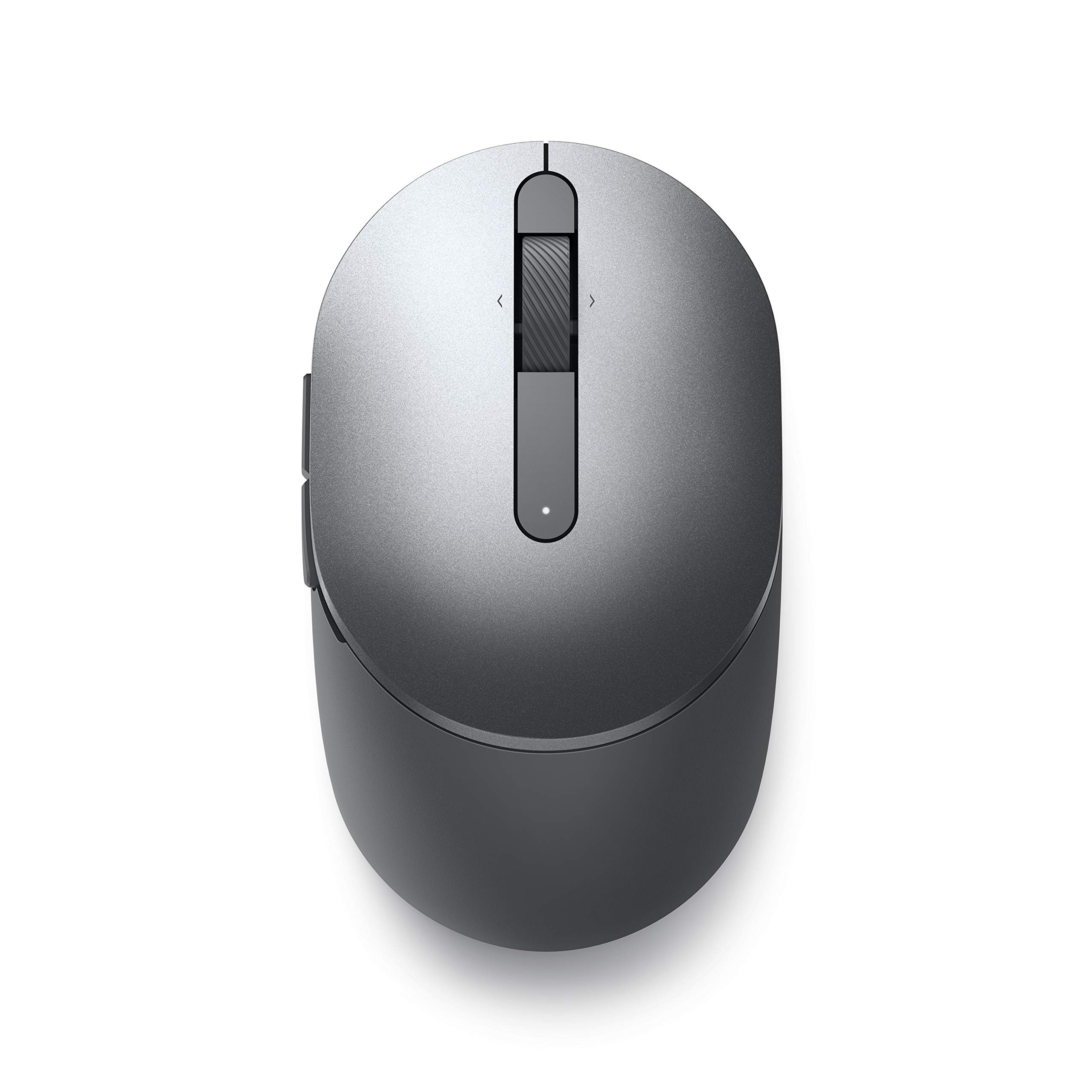
The dual-mode connectivity incorporates a 2.4GHz wireless and a Bluetooth 5.0 connection so you can pair and connect to almost any PC via your preferred mode.
The dual-mode connectivity incorporates a 2.4GHz wireless and a Bluetooth 5.0 connection so you can pair and connect to almost any PC via your preferred mode.
in 22 offers
The lowest price for Dell Mobile Pro Wireless Mouse - MS5120W - RCT03 right now is , compared across 17 retailers.
Dell Mobile Pro Wireless Mouse - MS5120W - RCT03
The dual-mode connectivity incorporates a 2.4GHz wireless and a Bluetooth 5.0 connection so you can pair and connect to almost any PC via your preferred mode.
The dual-mode connectivity incorporates a 2.4GHz wireless and a Bluetooth 5.0 connection so you can pair and connect to almost any PC via your preferred mode.
The all-time low was $24.99 on 18 Sept 2026. That's the lowest price we've ever tracked — a great time to buy.
Prices last updated 18 Sept 2026.
Last updated at 18/09/2026 22:21:37
Dell Mobile Pro Wireless Mouse MS5120W Titan Grey
Affiliate Disclosure: We may receive a small commission for purchases made through this link at no extra cost to you. This helps support our site. Thank you!
[MS5120W-BLK-EXG] Dell Mobile Pro Wireless Mouse - MS5120W - Black 12 Mth Wty (Refurbished)
[MS5120W-BLK-OB] Dell Mobile Pro Wireless Mouse - MS5120W - Black (Open Box)
Dell MS5120W Wireless Pro Plus Compact Mouse - BLACK, 3YR
Delivery between Wed – Fri $16
DELL Travel Mouse MS5120W Titan Gray
Delivery between Wed – Fri $16
Dell Mobile Pro MS5120W Wireless Mouse 2.4 GHz, Bluetooth 5.0, 1600 dpi, Optical, 7 buttons, AA battery, Swift Pair, Titan grey
Delivery between 24 Sept – 3 Oct $12
Dell Mobile Pro Wireless Mouse MS5120W
Delivery between 22–30 Sept $10.67
Dell Travel Mouse MS5120W - Black - Wireless - 2.40 GHz - 1600 dpi - Scroll Wheel
14-day returns
Dell MS5120W 570-ABEJ Travel Mouse - Titan Gray
Delivery $10
Dell MS5120W Travel Mouse - Black
Free delivery
originally posted on dell.com
I bought this to go with my 2023 15" XPS laptop. It is a full sized mouse, which might put off some, but doesn't bother me. The link with the laptop is made either by (1) a USB-A dongle (stored inside the mouse) or (2) Bluetooth. I chose the Bluetooth, which happens to be built into the laptop, the link-up was straightforward. Since then the mouse has worked perfectly. The mouse is generally good quality, in terms of click and movement sensitivity. There is no case or pouch. An on-off switch saves the battery. Even though the laptop has a large trackpad, I prefer the mouse.
originally posted on dell.com
The Dell Mobile Pro Wireless Mouse - MS5120W is a top-notch choice for professionals seeking a reliable, feature-rich mouse that offers excellent value. Its ergonomic design, precise tracking, long battery life, and versatile connectivity options make it a standout product in its category. Whether you're a traveling professional, a remote worker, or someone who appreciates efficiency and productivity in your tech gadgets, the MS5120W is likely to meet, if not exceed, your expectations.
originally posted on verkkokauppa.com
The Dell mouse has exceeded my expectations in terms of precision and comfort. Its ergonomic design fits perfectly in my hand, delivering a seamless experience during prolonged usage. The response time is remarkable, enhancing my productivity and gaming sessions. Furthermore, the sleek design and top-notch build quality give it a premium feel. Hats off to Dell for creating a mouse that truly enhances navigation and makes everyday tasks a breeze!

Dell Mobile Pro Wireless Mouse MS5120W Titan Grey
Affiliate Disclosure: We may receive a small commission for purchases made through this link at no extra cost to you. This helps support our site. Thank you!
[MS5120W-BLK-EXG] Dell Mobile Pro Wireless Mouse - MS5120W - Black 12 Mth Wty (Refurbished)
[MS5120W-BLK-OB] Dell Mobile Pro Wireless Mouse - MS5120W - Black (Open Box)
Dell MS5120W Wireless Pro Plus Compact Mouse - BLACK, 3YR
Delivery between Wed – Fri $16
DELL Travel Mouse MS5120W Titan Gray
Delivery between Wed – Fri $16
I bought this to go with my 2023 15" XPS laptop. It is a full sized mouse, which might put off some, but doesn't bother me. The link with the laptop is made either by (1) a USB-A dongle (stored inside the mouse) or (2) Bluetooth. I chose the Bluetooth, which happens to be built into the laptop, the link-up was straightforward. Since then the mouse has worked perfectly. The mouse is generally good quality, in terms of click and movement sensitivity. There is no case or pouch. An on-off switch saves the battery. Even though the laptop has a large trackpad, I prefer the mouse.
The Dell Mobile Pro Wireless Mouse - MS5120W is a top-notch choice for professionals seeking a reliable, feature-rich mouse that offers excellent value. Its ergonomic design, precise tracking, long battery life, and versatile connectivity options make it a standout product in its category. Whether you're a traveling professional, a remote worker, or someone who appreciates efficiency and productivity in your tech gadgets, the MS5120W is likely to meet, if not exceed, your expectations.
The Dell mouse has exceeded my expectations in terms of precision and comfort. Its ergonomic design fits perfectly in my hand, delivering a seamless experience during prolonged usage. The response time is remarkable, enhancing my productivity and gaming sessions. Furthermore, the sleek design and top-notch build quality give it a premium feel. Hats off to Dell for creating a mouse that truly enhances navigation and makes everyday tasks a breeze!
I've been using this Dell Mobile Pro Wireless Mouse for over a week now and I am thankful for it! Using the mouse on the laptop can be a headache. This mouse makes it easier for me to navigate through the laptop. It's a good size not too small not too large. It is completely black. The top where your navigating fingers are is very smooth and the sides where your other fingers rest has a nice comfortable texture. It glides easily and immediately shows the curser as soon as you move the mouse. The usb drive needs to be inserted into the laptop or computer before it will work. The usb is hidden inside of the mouse and needs to be taken out and inserted into your computer. There's a small tab to pull that will easily open the mouse. After the tab is removed and you ... MoreI've been using this Dell Mobile Pro Wireless Mouse for over a week now and I am thankful for it! Using the mouse on the laptop can be a headache. This mouse makes it easier for me to navigate through the laptop. It's a good size not too small not too large. It is completely black. The top where your navigating fingers are is very smooth and the sides where your other fingers rest has a nice comfortable texture. It glides easily and immediately shows the curser as soon as you move the mouse. The usb drive needs to be inserted into the laptop or computer before it will work. The usb is hidden inside of the mouse and needs to be taken out and inserted into your computer. There's a small tab to pull that will easily open the mouse. After the tab is removed and you still need to get inside, you just insert a fingernail or something to easily pop it open. A battery needs to be Inserted into the mouse before it will work. The battery came in the box with the mouse. It uses a AA battery. The power on and off button is located on the bottom of the mouse. There a tiny light which will indicate if it is on. There are 2 small buttons on the left side. I didn't know what these were but after using it a while I've realized they take me backwards and forward to the pages I've visited on websites. Overall I love this mouse and would get another if I needed to.
This is a fantastic little mouse! It's hard to find a mouse that is not only reliable, but has all the features that you want, without the crazy price tag. I haven't yet tested out the wireless dongle because the bluetooth connection works so well. There is absolutely no noticeable lag whatsoever, I often forget that it's connected via bluetooth. The Dell Peripheral Manager app lets you reassign both axes of the mouse wheel, as well as the 2 side buttons. You can also use it to set the DPI, because there is no button on the mouse. Also, this mouse works great on any surface. I am currently using it on a glass table and it's had no problems tracking. It feels great in the hand, and the mousewheel and buttons give you all the satisfying tactile feedback (clicks & ... MoreThis is a fantastic little mouse! It's hard to find a mouse that is not only reliable, but has all the features that you want, without the crazy price tag. I haven't yet tested out the wireless dongle because the bluetooth connection works so well. There is absolutely no noticeable lag whatsoever, I often forget that it's connected via bluetooth. The Dell Peripheral Manager app lets you reassign both axes of the mouse wheel, as well as the 2 side buttons. You can also use it to set the DPI, because there is no button on the mouse. Also, this mouse works great on any surface. I am currently using it on a glass table and it's had no problems tracking. It feels great in the hand, and the mousewheel and buttons give you all the satisfying tactile feedback (clicks & resistance).
When I ordered my xps 13 - which I love, Dell recommended this mouse stating it was designed for my laptop. Or works perfectly with it or something like that. I wasn't familiar with the ports on this new laptop. I never heard of Thunderbolt 4 and thought I better get this mouse that was specific for my laptop. My laptop only has Thunderbolt and C-type ports. This mouse has an old USB style connection. Definitely not a good match for this new laptop. I had to purchase an adapter, so now the wifi connection sticks out of the laptop 1.25 inches, instead of 1/8 of an inch. Perhaps worse is that the mouse feels cheap and responds poorly. I already have a much nicer and less expensive logitech mouse that also has a USB connection. I'm not even using the Dell mouse now. ... MoreWhen I ordered my xps 13 - which I love, Dell recommended this mouse stating it was designed for my laptop. Or works perfectly with it or something like that. I wasn't familiar with the ports on this new laptop. I never heard of Thunderbolt 4 and thought I better get this mouse that was specific for my laptop. My laptop only has Thunderbolt and C-type ports. This mouse has an old USB style connection. Definitely not a good match for this new laptop. I had to purchase an adapter, so now the wifi connection sticks out of the laptop 1.25 inches, instead of 1/8 of an inch. Perhaps worse is that the mouse feels cheap and responds poorly. I already have a much nicer and less expensive logitech mouse that also has a USB connection. I'm not even using the Dell mouse now. Instead of sending me this review, it would have been better for all of us if you would send me a Dell mouse with a C-type connection or refund my money.
Bought this to replace a 10+ year old Dell Bluetooth mouse which had repeatedly failed due to rusting on the negative (black) wire from the battery terminals to the electronics. I had made several repairs over the years by cutting out the rusty wire and re-soldering a fresh piece - which then rusted and eventually I ran out of wire! Why did they use steel wire instead of copper??? The new mouse is OK so far, although it seems to take ages to re-connect when the laptop comes out of sleep or hibernation. I usually have to switch to the mouse pad on the laptop for a minute or 2.
Comfortable to use, connected using Bluetooth at first attempt and has stayed connected. I am dubious about the three year battery life stated but we will see. The Dell peripheral software that comes with it makes it easy to program functions for 5 of the buttons (other than right and left click) and gives you general and app specific choices. A bit pricey for a simple mouse but it has proved to be a quality device so far.
The shape could be described as retro, and fits the hand well enough for an ambidextrous mouse. Switched it on in Bluetooth mode and it paired up with my (Dell) laptop very easily. The two main buttons can be swapped for left handed use. The three functions of the wheel (press, left, right) and the two side buttons can be customised for a wide range of functions. Construction is simple with the cover retained by magnets, giving simple access to the battery (a single AA cell) and a hidey hole for the USB adaptor. It may be too easy to lose the cover. A battery life of 15 months is claimed. I'll know more about that in a year or so. I would prefer a more ergonomic shape for intensive use, specifically left handed for me, but for general use and not too many hours a ... MoreThe shape could be described as retro, and fits the hand well enough for an ambidextrous mouse. Switched it on in Bluetooth mode and it paired up with my (Dell) laptop very easily. The two main buttons can be swapped for left handed use. The three functions of the wheel (press, left, right) and the two side buttons can be customised for a wide range of functions. Construction is simple with the cover retained by magnets, giving simple access to the battery (a single AA cell) and a hidey hole for the USB adaptor. It may be too easy to lose the cover. A battery life of 15 months is claimed. I'll know more about that in a year or so. I would prefer a more ergonomic shape for intensive use, specifically left handed for me, but for general use and not too many hours a day it will be OK. I'd also like to be able to programme the functions of all the buttons, including the main two. It helps that it was on offer at half price, bringing it down to the cost of many very basic mice. I might get another and play with the shape a bit - not much of my equipment remains as bought.
I purchased the lightweight Bluetooth mouse for my laptop. My purpose was to free up more USB ports which I was always seem to run short of. The mouse is not only Bluetooth but also dual purpose and plugged in as well. I’m very happy with the mouse and I’m highly recommending it.