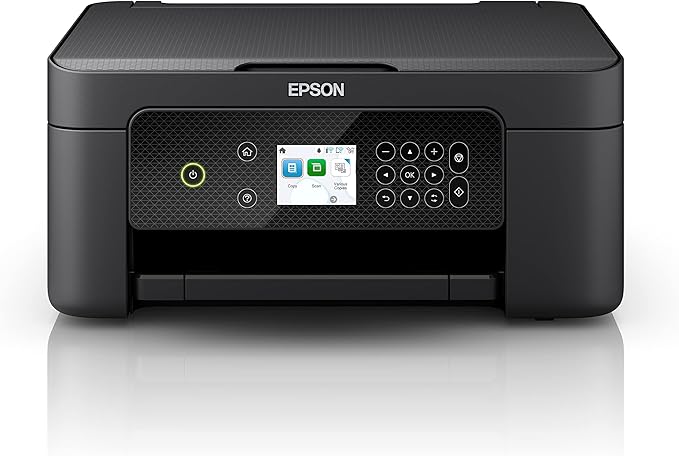
Epson Expression Home XP-4200
A multifunctional is really an all-in-one device; it is both a scanner and a printer, and often even has a fax function. So effectively it’s a copier, but one that has the scanning and printing functions available separately. All this is a great advantage when you have limited office space. Moreover, you will be able to work faster and more efficiently by using the device’s convenient special functions.
A multifunctional is really an all-in-one device; it is both a scanner and a printer, and often even has a fax function. So effectively it’s a copier, but one that has the scanning and printing functions available separately. All this is a great advantage when you have limited office space. Moreover, you will be able to work faster and more efficiently by using the device’s convenient special functions.
A multifunctional is really an all-in-one device; it is both a scanner and a printer, and often even has a fax function. So effectively it’s a copier, but one that has the scanning and printing functions available separately. All this is a great advantage when you have limited office space. Moreover, you will be able to work faster and more efficiently by using the device’s convenient special functions.
A multifunctional is really an all-in-one device; it is both a scanner and a printer, and often even has a fax function. So effectively it’s a copier, but one that has the scanning and printing functions available separately. All this is a great advantage when you have limited office space. Moreover, you will be able to work faster and more efficiently by using the device’s convenient special functions.
in 21 offers
The lowest price for Epson Expression Home XP-4200 right now is $98.77 at TechForGood Australia, compared across 14 retailers.
The all-time low was $75.51 on 29 Sept 2026 — today's price is 31% above the lowest ever. It has been notably cheaper before — worth setting a price alert.
Prices last updated 14 Oct 2026.
Last updated at 14/10/2026 04:45:00
Epson Expression Home XP-4200 3-in-1 Ink Multifunction Printer, Scanner, Copier, WiFi, 1440dpi, Duplex, 2.4 Inch Display, DIN A4, incl. 3 Months
Affiliate Disclosure: We may receive a small commission for purchases made through this link at no extra cost to you. This helps support our site. Thank you!
EPSON XP-4200 – Multifunction Inkjet Colour Wireless Printer
Free delivery
Epson Expression Home XP-4200 Printer
Delivery $30
Epson XP-4200 Expression Home Print/Copy/Scan/WiFi 4 Color Multifunction Printer C11CK65501 XP4200
Delivery between 17–25 Oct $10
Epson XP4200 Inkjet MFP - brisbanetonersupplies.com.au
Epson XP4200 Inkjet MFP
Delivery between 19–27 Oct $25
Epson Expression Home XP-4200 A4 Colour Multifunction Printer (C11CK65501)
Epson Expression Home XP-4200 Colour Multifunction Printer C11CK65501
Delivery $22
Epson Expression Home XP-4200 A4 Colour Multifunction
Delivery between 16–21 Oct $20
Epson XP4200 Inkjet MFP
Delivery $17
originally posted on epson.com.au
After being very disappointed by my previous (non Epson) printer, the reviews lead me to this make an model. While the display is unecessary for my purposes, the machine itself is solid and has a far better printing margin. The double-sided printing is also a boon for the type of printing I need when it is necessary. The obvious maintenance system and the fact that you can replace individual ink cartridges is a great bonus for me as I usually deplete one colour and have always hated the tricolour way of needing to remove the whole spectrum.Setup was very straight forward though took a little longer than intended as it wanted to run a firmware update both on the printer and the computer installer.The weirdest thing was when it printed a nozzle test to "align" and ... MoreAfter being very disappointed by my previous (non Epson) printer, the reviews lead me to this make an model. While the display is unecessary for my purposes, the machine itself is solid and has a far better printing margin. The double-sided printing is also a boon for the type of printing I need when it is necessary. The obvious maintenance system and the fact that you can replace individual ink cartridges is a great bonus for me as I usually deplete one colour and have always hated the tricolour way of needing to remove the whole spectrum.Setup was very straight forward though took a little longer than intended as it wanted to run a firmware update both on the printer and the computer installer.The weirdest thing was when it printed a nozzle test to "align" and then did not proceed with any info in scanning it to allow the machine to align the cartridges. maybe I misunderstood.System is now ready to serve the house and the weird printing requirements from us all
originally posted on bestbuy.com
Epson includes starter ink cartridges, so you can begin printing right away. Still, you should pick up extra color cartridges immediately. After 14 color photos on 4×6 paper, two letter-sized borderless photos, and two color documents, the yellow cartridge was empty, while cyan and magenta were very low. As usual, black lasts a long time.The Epson Expression Home XP-4200 is an attractive, affordable printer that can deliver good value, depending on your needs. As the name suggests, Epson designed it for home use where you aren’t printing in high volume.The print speed would feel slow in an office, but that might not be a problem at home where you’re not on the clock.The print, copy, and scan features all offer good quality. Unless you have a critical eye for ... MoreEpson includes starter ink cartridges, so you can begin printing right away. Still, you should pick up extra color cartridges immediately. After 14 color photos on 4×6 paper, two letter-sized borderless photos, and two color documents, the yellow cartridge was empty, while cyan and magenta were very low. As usual, black lasts a long time.The Epson Expression Home XP-4200 is an attractive, affordable printer that can deliver good value, depending on your needs. As the name suggests, Epson designed it for home use where you aren’t printing in high volume.The print speed would feel slow in an office, but that might not be a problem at home where you’re not on the clock.The print, copy, and scan features all offer good quality. Unless you have a critical eye for color, the photo quality will satisfy your urge to share physical prints with family and friends.
originally posted on bestbuy.com
So far so good because I haven’t had it but about two weeks. I'll start by saying the Wi-Fi connection was relatively easy to set up. Haven’t had a paper jam. The colors are OK for printing pictures. Put one of its best features is the LCD screen that can be flipped up or down for your preferred view. And I've heard a lot about the price of the ink cartridges but I've checked around and they're about the same as everybody else. The scanner does a good job and works well with whatever computer you’re using. I manually set it up but it comes with a download app that helps you Connect to your phone and computer fairly easy. And all I would say I would recommend this to anyone. And you know Shaquille O'Neal recommends it it's gotta be good.
| Brand | Epson |
| Ink Type | Inkjet |
| Colour Output | Colour |
| Wireless | Yes |
| With Scanner | Yes |

Epson Expression Home XP-4200 3-in-1 Ink Multifunction Printer, Scanner, Copier, WiFi, 1440dpi, Duplex, 2.4 Inch Display, DIN A4, incl. 3 Months
Affiliate Disclosure: We may receive a small commission for purchases made through this link at no extra cost to you. This helps support our site. Thank you!
EPSON XP-4200 – Multifunction Inkjet Colour Wireless Printer
Free delivery
Epson Expression Home XP-4200 Printer
Delivery $30
Epson XP-4200 Expression Home Print/Copy/Scan/WiFi 4 Color Multifunction Printer C11CK65501 XP4200
Delivery between 17–25 Oct $10
Epson XP4200 Inkjet MFP - brisbanetonersupplies.com.au
After being very disappointed by my previous (non Epson) printer, the reviews lead me to this make an model. While the display is unecessary for my purposes, the machine itself is solid and has a far better printing margin. The double-sided printing is also a boon for the type of printing I need when it is necessary. The obvious maintenance system and the fact that you can replace individual ink cartridges is a great bonus for me as I usually deplete one colour and have always hated the tricolour way of needing to remove the whole spectrum.Setup was very straight forward though took a little longer than intended as it wanted to run a firmware update both on the printer and the computer installer.The weirdest thing was when it printed a nozzle test to "align" and ... MoreAfter being very disappointed by my previous (non Epson) printer, the reviews lead me to this make an model. While the display is unecessary for my purposes, the machine itself is solid and has a far better printing margin. The double-sided printing is also a boon for the type of printing I need when it is necessary. The obvious maintenance system and the fact that you can replace individual ink cartridges is a great bonus for me as I usually deplete one colour and have always hated the tricolour way of needing to remove the whole spectrum.Setup was very straight forward though took a little longer than intended as it wanted to run a firmware update both on the printer and the computer installer.The weirdest thing was when it printed a nozzle test to "align" and then did not proceed with any info in scanning it to allow the machine to align the cartridges. maybe I misunderstood.System is now ready to serve the house and the weird printing requirements from us all
Epson includes starter ink cartridges, so you can begin printing right away. Still, you should pick up extra color cartridges immediately. After 14 color photos on 4×6 paper, two letter-sized borderless photos, and two color documents, the yellow cartridge was empty, while cyan and magenta were very low. As usual, black lasts a long time.The Epson Expression Home XP-4200 is an attractive, affordable printer that can deliver good value, depending on your needs. As the name suggests, Epson designed it for home use where you aren’t printing in high volume.The print speed would feel slow in an office, but that might not be a problem at home where you’re not on the clock.The print, copy, and scan features all offer good quality. Unless you have a critical eye for ... MoreEpson includes starter ink cartridges, so you can begin printing right away. Still, you should pick up extra color cartridges immediately. After 14 color photos on 4×6 paper, two letter-sized borderless photos, and two color documents, the yellow cartridge was empty, while cyan and magenta were very low. As usual, black lasts a long time.The Epson Expression Home XP-4200 is an attractive, affordable printer that can deliver good value, depending on your needs. As the name suggests, Epson designed it for home use where you aren’t printing in high volume.The print speed would feel slow in an office, but that might not be a problem at home where you’re not on the clock.The print, copy, and scan features all offer good quality. Unless you have a critical eye for color, the photo quality will satisfy your urge to share physical prints with family and friends.
So far so good because I haven’t had it but about two weeks. I'll start by saying the Wi-Fi connection was relatively easy to set up. Haven’t had a paper jam. The colors are OK for printing pictures. Put one of its best features is the LCD screen that can be flipped up or down for your preferred view. And I've heard a lot about the price of the ink cartridges but I've checked around and they're about the same as everybody else. The scanner does a good job and works well with whatever computer you’re using. I manually set it up but it comes with a download app that helps you Connect to your phone and computer fairly easy. And all I would say I would recommend this to anyone. And you know Shaquille O'Neal recommends it it's gotta be good.
My previous ancient printer was an Epson so I chose what seemed to be the nearest modern replacement.It is wi-fi only but prints, copies and scans.It came very well packed and secured but if a return had become necessary after unpacking, I realised that there would be no chance whatsoever of returning it in original condition due to the multiplicity of tapes stuck all over the machine's innards to secure the components.The various trays and flaps seem very flimsy and the paper tray sticks out of the back at a 45 degree angle and is on display all the time and liable to collect dust on the paper if not used for a while.Setting up the wi-fi connection to my laptop was very easy by following the instructions but when adding other devices (laptops and mobiles) I ... MoreMy previous ancient printer was an Epson so I chose what seemed to be the nearest modern replacement.It is wi-fi only but prints, copies and scans.It came very well packed and secured but if a return had become necessary after unpacking, I realised that there would be no chance whatsoever of returning it in original condition due to the multiplicity of tapes stuck all over the machine's innards to secure the components.The various trays and flaps seem very flimsy and the paper tray sticks out of the back at a 45 degree angle and is on display all the time and liable to collect dust on the paper if not used for a while.Setting up the wi-fi connection to my laptop was very easy by following the instructions but when adding other devices (laptops and mobiles) I got into all sorts of problems as the instructions weren't as clear. Eventually I abandoned the instructions, did what seemed natural and was successful.Initial ink loading took forever but the test printing was very good. The next day I needed to print something in anger but although the display said 'printing' it was actually only chuntering away with no output as though it was initialising the ink all over again. I waited ages to no effect so eventually I tried a few reboots and it worked. I'm yet to try it again so far.Like most epson products it is delivered with tiny setup ink cartriges so best to buy replacements very quickly.As a home multi functional device that isn't over worked I'm pleased with it so far.
For a budget all-in-one, I'm really impressed with this printer. My last few printers have been higher end Epson photo AIOs and they have served me pretty well, but when my last one quit on me (after close to 10 years!), money was a little tight and I just needed the basics. I was skeptical of a printer costing less than half the price of my last 3, but I simply didn't need all the bells and whistles and I urgently needed to print stuff!I had this delivered same-day from my local store to save me a trip ($10 well spent for me!), and setup went MOSTLY smooth. I'll elaborate. I hate wireless connections for things that don't ever move and this is why. My previous printer used a wired ethernet connection which this printer does not have and I have long since lost a ... MoreFor a budget all-in-one, I'm really impressed with this printer. My last few printers have been higher end Epson photo AIOs and they have served me pretty well, but when my last one quit on me (after close to 10 years!), money was a little tight and I just needed the basics. I was skeptical of a printer costing less than half the price of my last 3, but I simply didn't need all the bells and whistles and I urgently needed to print stuff!I had this delivered same-day from my local store to save me a trip ($10 well spent for me!), and setup went MOSTLY smooth. I'll elaborate. I hate wireless connections for things that don't ever move and this is why. My previous printer used a wired ethernet connection which this printer does not have and I have long since lost a super-long USB cable I'd used with printers in the past, so I was stuck with Wi-fi for now. I got connected great and everything worked at first, but I kept losing connection. The answer is - don't turn the printer off. It goes into standby and stays connected, and since I quit turning it off, it has worked every time I've printed for the last couple weeks with no problems. The downside of this is that every time my power goes out (which happens every week or two around here), I expect the printer to stop working and I'm going to have to reconnect it to my Wi-fi. I'm not a fan of USB to be honest (wiggle it, it's broken, wiggle again, it's fixed), but I WILL be getting a long USB cable to keep the printer hard-wired. I think it IS possible to set up a static IP address and blah-blah-blah but who really wants to go down that rabbit hole? I don't have that kind of time. That is just stuff to keep IT people employed. For myself at home, I'd rather just buy a long cable.I don't really like the rear tray paper loading. It's going to sit there gathering dust and will pretty much require pulling the paper out if I want to put a dust cover on the printer (if you have a cat, you will understand...), but it works.Those are really my only complaints though. I seldom print photos these days, and while I used to print CDs/DVDs a lot, I don't feel the need to pay extra for a printer that will do that anymore. I haven't tried printing any photos with this printer, but from what I've seen, I think it would do a sufficient job with the 4 inks rather than the 6 that I'm used to. Quality of text printouts is excellent if you tweak the settings a little. I've been very pleased with the print quality overall.As long as it stays connected, this is a great little printer. If I find myself really NEEDING the features of a fancier printer, I'll upgrade and maybe move this one to my workshop, but it's doing everything I need it to do right now and for the price paid, I'm very happy with it. One kind of quirky thing that I actually really like - my old printer would automatically extend the output tray when I would print something. In my tight quarters in my house, this kind of got in the way. This printer requires you to pull the output tray out manually, so when I print, my pages just spit out onto the floor. That might be an issue for some, but I actually like it. No tray to push back in to keep my girlfriend from running into it when she walks by the printer! If I'm printing more than one page, I'll gladly pull out the tray to catch the sheets, but often I'm only printing a single page (recipes and lists!) and I actually don't mind picking it up off of the floor, due to our space constraints. I'm also really pleased to see automatic double sided printing in a printer at this price point. I can do without a lot of bells and whistles, but that is a required feature for me.I have not tried the scanner yet. I need a scanner about twice a year usually, but when I need it - I need it. I haven't seen a scanner that wouldn't do everything I need since the early 90's (does anyone remember greyscale or dithered monotone "hand scanners"? Yep, I used 'em), so I'm confident that it will serve my needs.As long as you can keep a reliable connection, this printer is excellent for every-day home use and I've been very pleased with the print quality. This is not meant for large documents or office use, but when you just need to occasionally print/scan a document or two, this thing is a clear winner. I paid the same price for printers years ago that wouldn't do half of what this printer does. It's a great home unit that will serve most people very well.
I bought this printer in August 2023. I chose it for the price convenience and also for the fact that it allows double sided printing without the need of manually turn the pages.I have used it in several occasions and at the beginning found no issue whatsoever. With time, though, I have noticed more and more paper jams. I have owned several Epson printers in the past and never had a problem. With this one, if I leave paper in the tray, it is almost certain that it will jam when printing either one sided or double sided. It is becoming very frustrating to be honest.All together, the quality of print, the speed and the features offered are ok. But this, unfortunately, at least for me, does not outweighs the paper jamming constantly.
The Expression XP-4200 from Epson was a bit of a pleasant surprise (the printer looks really nice out of the box) and bit of a disappointment at the same time.As per disappointment, when I tried printing a photo OF THE PRINTER that I took (printed on regular inkjet paper), the colors were disappointing. I cannot say whether or not the output would have been better on "Epson Specialty Paper" because none of that was included in what I was shipped to evaluate it here with. I do know on other color printers I own (inkjet and laser, even from another Epson) the colors are definitely more vivid on standard paper.Before that, I was set up for disappointment as I followed through the installation procedure: First it prompts me to scan a QR code to download the ... MoreThe Expression XP-4200 from Epson was a bit of a pleasant surprise (the printer looks really nice out of the box) and bit of a disappointment at the same time.As per disappointment, when I tried printing a photo OF THE PRINTER that I took (printed on regular inkjet paper), the colors were disappointing. I cannot say whether or not the output would have been better on "Epson Specialty Paper" because none of that was included in what I was shipped to evaluate it here with. I do know on other color printers I own (inkjet and laser, even from another Epson) the colors are definitely more vivid on standard paper.Before that, I was set up for disappointment as I followed through the installation procedure: First it prompts me to scan a QR code to download the printer's app, I follow through, but while the app can see my other Epson printer, it cannot see this one. It's worth noting at this point I had not yet been given the option to set up the printer on WiFi, so that may be why the app couldn't find the printer (but it's the one controlling the order of things). Next, the prompts on the screen for the initialization are poorly written, for example, it prompts with "Initialization Starts. Install the Ink Cartridge for Setup that came with the printer"-- and what got me there is that the words "Initialization Starts" do not sound like something meant for me (the end user) to read, but rather a step that the design folks were to follow. Next, I have to wait 6 minutes for the printer to initialize, and I'm wondering (1) every time I change the ink is it going to be 6 minutes, or (2) if not, instead could they have done some of the initialization at the factory? Then there is an information screen after the initialization which not only seems unnecessary, it seems -- I'll say, poorly worded: It says "Initialization complete. Move on to print quality adjustments"- and like the "Initialization Starts" screen the "Move on" (which seems rude) sounds like instructions for the programmer more so than something I should be reading-- it should just take me to print quality adjustments without having me "move on" by pressing ok. Finally, initialization completes, I'm at the main menu, and it *still* hasn't connected me to WiFi which one would've thought would be part of initialization. I was able to go to settings and set up WiFI, though, and it connected fine.Besides Photos, I tried out printing a PDF file and maybe I'm just used to laser quality but I thought the text looked relatively poor quality, it's not smooth. It does print text quickly which is nice (unlike photos which took many minutes a page), and it does print on both sides of the page (which will save you paper).
After reading the reviews, I thought that I'd found a quality basic printer, but this was not the case. It worked beautifully for the use of printing about ten pages, then started making a truly dreadful noise and jamming the paper. I tried every remedy suggested by the manufacturer several times-even taking 'time outs' to prevent user exasperation error, but to no avail. On this last try before abandonment, it started feeding multiple sheets (oh yes, I fanned them first) and making taunting printing noises (but nary a drop of ink except for what was smeared on the edges).Words cannot convey my frustration. It's TAX SEASON! I don't use a printer often and of course the 15 day return limit has passed, so I've got this $127 plastic doorstop (I bought extra ink). I ... MoreAfter reading the reviews, I thought that I'd found a quality basic printer, but this was not the case. It worked beautifully for the use of printing about ten pages, then started making a truly dreadful noise and jamming the paper. I tried every remedy suggested by the manufacturer several times-even taking 'time outs' to prevent user exasperation error, but to no avail. On this last try before abandonment, it started feeding multiple sheets (oh yes, I fanned them first) and making taunting printing noises (but nary a drop of ink except for what was smeared on the edges).Words cannot convey my frustration. It's TAX SEASON! I don't use a printer often and of course the 15 day return limit has passed, so I've got this $127 plastic doorstop (I bought extra ink). I will likely try my skill as a place-kicker if I can find my steel-toed boots. I highly recommend ANY OTHER BRAND at this point.
DO NOT BUY THIS PRINTER. I have no idea how it has so many positive reviews, but you'd do good to go read the more honest/accurate reviews for the very similar models on other stores' websites (i.e the Epson XP4205).I bought two of these, one for me and one for my boyfriend. I don't know what's worse - the hours of sleep I've lost having to physically manage this thing through every single page (I'm currently writing this at 1:18am when I have class at 8am, after every print job has been jamming) or the HUNDREDS OF DOLLARS (seriously) that I've spent on ink in the two months that I've had this printer. It eats ink cartridges like potato chips. When one cartridge is out, it refuses to print anything at all, so you're forced to change it. Several times, I've clicked ... MoreDO NOT BUY THIS PRINTER. I have no idea how it has so many positive reviews, but you'd do good to go read the more honest/accurate reviews for the very similar models on other stores' websites (i.e the Epson XP4205).I bought two of these, one for me and one for my boyfriend. I don't know what's worse - the hours of sleep I've lost having to physically manage this thing through every single page (I'm currently writing this at 1:18am when I have class at 8am, after every print job has been jamming) or the HUNDREDS OF DOLLARS (seriously) that I've spent on ink in the two months that I've had this printer. It eats ink cartridges like potato chips. When one cartridge is out, it refuses to print anything at all, so you're forced to change it. Several times, I've clicked through the low ink warnings and had it just go back to printing normally, so I think it's lying and making me change ink cartridges earlier (so Epson gets more money).Every print job that I printed jammed, until I read a small insignificant note about fanning the paper before you put it in (that's stupid, and some still jam). Every time you change ink cartridges, it jams the next page (EVERY SINGLE TIME). It often jams or screws up trying to print double sided. I primarily use it to print lecture slides for school. I need to check every print job for pages it didn't print, missing double sided pages, etc. Also, it prints blurry, poor quality and off colors so the images are barely readable. It is so slow that my roommate commented to me on how it sounds, because she could hear it plodding along at a snail's pace.Mine isn't a fluke, because my boyfriend's is also absolute junk. He wanted his to print his photos and he can't even get it to print half the time. When he does, it prints the entire photo yellow, or entirely pink, etc then tells him his ink is out. It prints garbage quality.I'm shocked. My parents have had the same Epson for like 10 years and it's great. I no longer trust Epson.
Worst printer I have ever owned. Hands down. We bought it as an emergency as my kid needed to print a report and our other printer died. I didnt do any research, just went with a relatively inexpensive Epson. The printing quality is seriously trash. No matter how much troubleshooting and maintenance I perform, the printouts are always poor. And for some reason, the associated software keeps will not revert to default settings. We printed once on 4x6 paper and now the machine is eternally set to print that size. Also, the ink isn't sold in stores which I didn't know until I went to Staples to buy replacement cartridges. This also burns through them really quickly. Im ready to throw this out the window. Avoid this at all costs. It is truly trash.
| Brand | Epson |
| Ink Type | Inkjet |
| Colour Output | Colour |
| Wireless | Yes |
| With Scanner | Yes |


