Last updated at 22/08/2026 18:41:58
GIGABYTE - Z790 AORUS ELITE AX Socket LGA 1700 Intel Z790 ATX DDR5 Wi-Fi 6E Motherboard - Black - Z790 AORUS ELITE AX
Delivery $151.75
GIGABYTE Z790 AORUS ELITE AX LGA 1700 Intel Z790 ATX Motherboard with DDR5, Quad M.2, PCIe 5.0, USB 3.2 Gen2X2 Type-C, Intel WiFi 6E, 2.5GbE LAN, Q-Fl
Delivery $88
Matična ploča GIGABYTE Z790 Aorus Elite AX socket 1700 DDR5 HDMI DP Wi-Fi 6E BT 5.3 ATX
Delivery $8.13
Z790 AORUS Elite AX LGA 1700 ATX Motherboard, Support Intel Core 14th/13th/12th Gen, DDR5, 16+1+2 Power Phase, 4X M.2, PCIe 5.0, USB-C 3.2, WIFI6E, 2.
Delivery between 29 Aug – 1 Sept $29
Gigabyte Z790 Aorus Elite AX D5 LGA 1700 ATX Motherboard (GA-Z790-AORUS-ELITE-AX)
Gigabyte Z790 Aorus Elite AX D5 LGA 1700 ATX Motherboard (GA-Z790-AORUS-ELITE-AX)
30-day returns
GIGABYTE Z790 AORUS Elite AX LGA 1700 ATX Motherboard,Support Intel Core 14th/13th/12th Gen,DDR5,16+1+2 Power Phase,4X M.2,PCIe 5.0,USB-C
Delivery between 27–31 Aug $35.88
originally posted on pbtech.co.nz
I connect the optical S/PDIF output of this motherboard to a CYP DC2 coaxial/toslink audio converter, and connect coaxial digital output from this converter to the coaxial output to the DAC component of my HiFi system (DAC, integrated amplifier, and a pair of speakers). I use the aforesaid connection to my HiFi system to hear classical music from YouTube. The sound quality is very good, not second to the Azimuth audio card in my previous desk top PC at all.At the same time, I connect the analogy audio output from this motherboard to my pair of Bose computer speakers, the sound quality is again very good.I connect this motherboard to a 24 inch Dell Business monitor, Epson printer, TP link router, Bose computer speakers, USB hub for connection with wireless keyboard ... MoreI connect the optical S/PDIF output of this motherboard to a CYP DC2 coaxial/toslink audio converter, and connect coaxial digital output from this converter to the coaxial output to the DAC component of my HiFi system (DAC, integrated amplifier, and a pair of speakers). I use the aforesaid connection to my HiFi system to hear classical music from YouTube. The sound quality is very good, not second to the Azimuth audio card in my previous desk top PC at all.At the same time, I connect the analogy audio output from this motherboard to my pair of Bose computer speakers, the sound quality is again very good.I connect this motherboard to a 24 inch Dell Business monitor, Epson printer, TP link router, Bose computer speakers, USB hub for connection with wireless keyboard and wireless mouse. The resulting home PC desktop computer works perfectly well.Conclusively speaking, as there is no motherboard today with coaxial digital output, this motherboard with a CYP DC2 coaxial/toslink audio converter serves very well as an alternative to build up an ideal home PC desktop for audiophiles. Hope that this advice is helpful to those looking forward for an audiophilic motherboard.
originally posted on scan.co.uk
Moved from Asus z390 and for one, the bios is horrific. Hardly makes sense. installed and all went OK, except the pc won't shut down. Troubleshot everything extensively for days and just came across more and more issues other people were having with this and the z690 variant. Have RMA'd in favour of a different board.
originally posted on microcenter.com
Excellent build quality, fit and finish. Disappointed. Using.GSkill Trident Z5 RGB 32GB (2 x 16GB) DDR5-6400. Enabling XMP 1 profile, causes an infinite restart loop. Thank God for clear CMOS button on the I/O panel. 5 attempts to run xmp, before and after latest BIOS F6B released 10/20/22. I do recommend this board. Garbage xmp doesn't work initially and claims to support better dd5 performance. Verified memory is on QVL for Gigabyte and Gskill.
| RAM | DDR5 |
| Memory Speed | 7600 MHz |
| Wireless Type | 802.11ax |
| Number of USB 2.0 Ports | 2 |
| CPU socket | LGA 1700 |
GIGABYTE - Z790 AORUS ELITE AX Socket LGA 1700 Intel Z790 ATX DDR5 Wi-Fi 6E Motherboard - Black - Z790 AORUS ELITE AX
Delivery $151.75
GIGABYTE Z790 AORUS ELITE AX LGA 1700 Intel Z790 ATX Motherboard with DDR5, Quad M.2, PCIe 5.0, USB 3.2 Gen2X2 Type-C, Intel WiFi 6E, 2.5GbE LAN, Q-Fl
Delivery $88
Matična ploča GIGABYTE Z790 Aorus Elite AX socket 1700 DDR5 HDMI DP Wi-Fi 6E BT 5.3 ATX
Delivery $8.13
Z790 AORUS Elite AX LGA 1700 ATX Motherboard, Support Intel Core 14th/13th/12th Gen, DDR5, 16+1+2 Power Phase, 4X M.2, PCIe 5.0, USB-C 3.2, WIFI6E, 2.
Delivery between 29 Aug – 1 Sept $29
Gigabyte Z790 Aorus Elite AX D5 LGA 1700 ATX Motherboard (GA-Z790-AORUS-ELITE-AX)
I connect the optical S/PDIF output of this motherboard to a CYP DC2 coaxial/toslink audio converter, and connect coaxial digital output from this converter to the coaxial output to the DAC component of my HiFi system (DAC, integrated amplifier, and a pair of speakers). I use the aforesaid connection to my HiFi system to hear classical music from YouTube. The sound quality is very good, not second to the Azimuth audio card in my previous desk top PC at all.At the same time, I connect the analogy audio output from this motherboard to my pair of Bose computer speakers, the sound quality is again very good.I connect this motherboard to a 24 inch Dell Business monitor, Epson printer, TP link router, Bose computer speakers, USB hub for connection with wireless keyboard ... MoreI connect the optical S/PDIF output of this motherboard to a CYP DC2 coaxial/toslink audio converter, and connect coaxial digital output from this converter to the coaxial output to the DAC component of my HiFi system (DAC, integrated amplifier, and a pair of speakers). I use the aforesaid connection to my HiFi system to hear classical music from YouTube. The sound quality is very good, not second to the Azimuth audio card in my previous desk top PC at all.At the same time, I connect the analogy audio output from this motherboard to my pair of Bose computer speakers, the sound quality is again very good.I connect this motherboard to a 24 inch Dell Business monitor, Epson printer, TP link router, Bose computer speakers, USB hub for connection with wireless keyboard and wireless mouse. The resulting home PC desktop computer works perfectly well.Conclusively speaking, as there is no motherboard today with coaxial digital output, this motherboard with a CYP DC2 coaxial/toslink audio converter serves very well as an alternative to build up an ideal home PC desktop for audiophiles. Hope that this advice is helpful to those looking forward for an audiophilic motherboard.
Moved from Asus z390 and for one, the bios is horrific. Hardly makes sense. installed and all went OK, except the pc won't shut down. Troubleshot everything extensively for days and just came across more and more issues other people were having with this and the z690 variant. Have RMA'd in favour of a different board.
Excellent build quality, fit and finish. Disappointed. Using.GSkill Trident Z5 RGB 32GB (2 x 16GB) DDR5-6400. Enabling XMP 1 profile, causes an infinite restart loop. Thank God for clear CMOS button on the I/O panel. 5 attempts to run xmp, before and after latest BIOS F6B released 10/20/22. I do recommend this board. Garbage xmp doesn't work initially and claims to support better dd5 performance. Verified memory is on QVL for Gigabyte and Gskill.
Bought this motherboard for a new system upgrade for my i9 13900k, the board is built very nicely and looks really high quality but that's where the positives end. The BIOS is extremely buggy and mostly ignores whatever you set. Want to set custom memory timings? Nope. Want to set your own DRAM frequency outside of XMP? Nope, won't post. The issues just continue on as you look further into the bios.My previous motherboard was a Z390 Maximus Xtreme and I was able to run 4000 MHz memory at 15-15-15-28. With the Gigabyte Z790 I wasn't even able to post into 4000 MHz. I really don't recommend this board.
This is a great all around motherboard. It supports high end DDR 5 and has some easy overclocking features.Update the BIOS before installing Windows 11. Then make sure you install motherboard drivers from Gigabyte before using Windows 11 otherwise you will get crash after crash at some point.Overclock stable first before enabling memory integrity.Make sure to enable XMP first then save then enable Low Latency and High Bandwidth. Then you should see your proper DDR5 Speeds with 2 sticks. 4 sticks will not scale as far as I know.
I had a gigabyte board before and I was hesitant to grab this one as I had a bad experience. As it was the only z790 available I took the chance. Very happy I did. Great board. Great features. The software is worlds better form gigabyte. The only downside is that there is no MB error code led.
Pros: Loving the IO heatsink/shield. Love the number of ports, and the M2 slots. Love the design and the board is clearly labelled. No problems when setting it up, and it all fit snugly.Cons: Not to my knowledge, so far everything has been fully functional.
Finally at long last I have a system that is up and running and no instability issues like the 7950X AMD I tried to build first. That system couldn't even stay stable on idle so I gave up.On the first try everything went smooth except for trying to activate windows during the install, I could not get online and had to revert to "how to install Windows 11 without internet" for a solution. For whatever reason the ethernet didn't have a driver.Once I got Windows 11 working and updated I installed my games and no bsod/random reboot like on the X670E mobo. Download went smooth and played some games like RDR2 which bsod on the AMD side played smooth as butter with my 13900K and MSI Gaming Trio 4090.The Gskill 32G DDR-6800 works fine even in XMP mode. I did see a ... MoreFinally at long last I have a system that is up and running and no instability issues like the 7950X AMD I tried to build first. That system couldn't even stay stable on idle so I gave up.On the first try everything went smooth except for trying to activate windows during the install, I could not get online and had to revert to "how to install Windows 11 without internet" for a solution. For whatever reason the ethernet didn't have a driver.Once I got Windows 11 working and updated I installed my games and no bsod/random reboot like on the X670E mobo. Download went smooth and played some games like RDR2 which bsod on the AMD side played smooth as butter with my 13900K and MSI Gaming Trio 4090.The Gskill 32G DDR-6800 works fine even in XMP mode. I did see a minor annoyance but not enough to return it, the logo by the heatsink is rather poor as I can barely see it working. Maybe it's defective? Who cares, it's working and that's what I care about. Haven't OC yet, maybe later on.Get this board if you want a rock solid board that just works.
Quite a heavy E-ATX board, installed in Hyte Y90. So many ports. Space for five NVMe SSDs running full 4x PCIe 4.0 lanes under dedicated thermal pads. Tons of USB ports. Excellent interface for overclocking and memory XMP is stable following the QVL. Slotted an i9-13900k and DDR5-6400 CL32 TridentZ which both get insane performance. Very powerful WiFi/Bluetooth antenna, supports crystal clear audio on my Sony WH-1000XM4 from a relatively significant distance. Not to mention the 10GbE onboard NIC (This was the key feature that helped me make the decision). If you can fit this into your case, hard to beat the feature level for the price.
I switched from MSI to Gigabyte. First gigabyte product I've had. Everything worked perfectly on initial setup. DDR5 6400/CL32 RAM was properly recognized when I enabled XMP. Everything is on automatic and everything works. I had to enable ERP because one of my USB devices remained on when the computer was off. ERP fixed that. Also to note: If you use the bottom m.2 slot, it disables the bottom 2 SATA slots, and vice versa. Not a problem for me.
| RAM | DDR5 |
| Memory Speed | 7600 MHz |
| Wireless Type | 802.11ax |
| Number of USB 2.0 Ports | 2 |
| CPU socket | LGA 1700 |
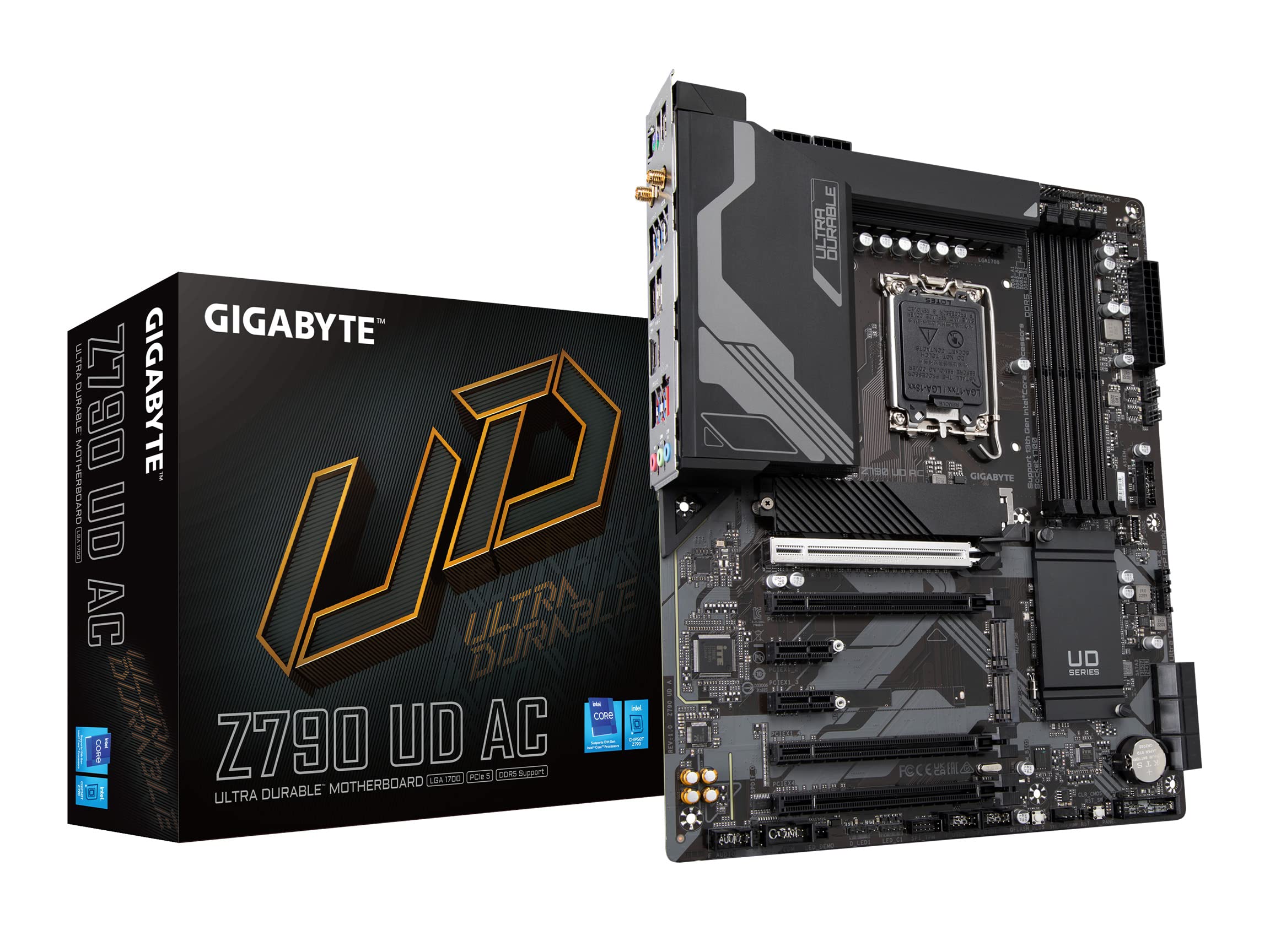
Gigabyte Z790 AORUS Elite AX LGA 1700 ATX Motherboard
Z790 AORUS ELITE AX (rev. 1.0) Support | Motherboard - GIGABYTE Global
Z790 AORUS ELITE AX (rev. 1.0) Support | Motherboard - GIGABYTE Global
Z790 AORUS ELITE AX (rev. 1.0) Support | Motherboard - GIGABYTE Global
Z790 AORUS ELITE AX (rev. 1.0) Support | Motherboard - GIGABYTE Global
in 7 offers
The lowest price for Gigabyte Z790 AORUS Elite AX LGA 1700 ATX Motherboard right now is $265.09 at Big Apple Buddy, compared across 7 retailers.
The all-time low was $261.04 on 27 June 2026 — today's price is 2% above the lowest ever. This is at or near its all-time low — a good time to buy.
Prices last updated 22 Aug 2026.

