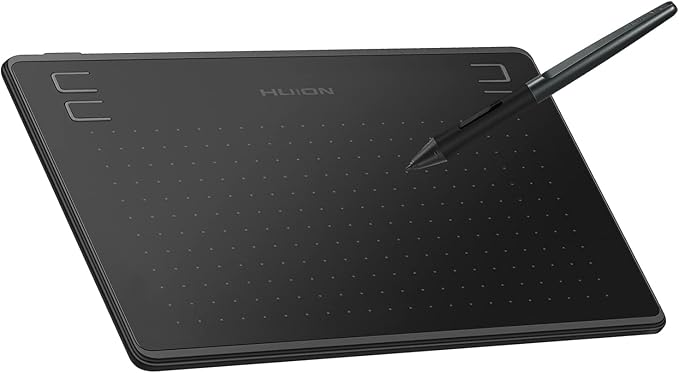
Huion Inspiroy Q11K V2 Wireless Graphic Drawing Tablet
Q11K V2 Drawing Tablet for Laptop & Graphic Pad
Q11K V2 Drawing Tablet for Laptop & Graphic Pad
Q11K V2 Drawing Tablet for Laptop & Graphic Pad
Q11K V2 Drawing Tablet for Laptop & Graphic Pad
in 5 offers
The lowest price for Huion Inspiroy Q11K V2 Wireless Graphic Drawing Tablet right now is $72.45 at re-markt, compared across 5 retailers.
The all-time low was $44.06 on 26 Dec 2024 — today's price is 64% above the lowest ever. It has been notably cheaper before — worth setting a price alert.
Prices last updated 7 Oct 2026.
Last updated at 07/10/2026 02:31:56
HUION Q11K V2 wireless graphics tablet 11 inch 8192 pressure levels tilt available custom keys compatible with Windows and macOS
Delivery $66.67
Huion Inspiroy Q11K V2 Wireless Graphic Drawing Tablet
Delivery $9.95
Huion Inspiroy Q11k V2 Wireless Graphic Drawing Tablet
Free delivery
Affiliate Disclosure: We may receive a small commission for purchases made through this link at no extra cost to you. This helps support our site. Thank you!
Huion Inspiroy Q11K V2 Wireless Graphic Drawing Tablet
Delivery between 13–16 Oct $8.95
Huion Inspiroy Q11K V2 Wireless Graphic Drawing Tablet
Delivery $9.95
originally posted on ebay.com
Its design is clean and nice, and the ability to connect the tablet to a wireless USB makes it even easier to use, and less cables to worry about. This is a fantastic feature! The Huion Tablet driver program is easy to understand, and if you're left-handed, it's smooth and easy to change the settings. The only feature I miss here, is that the program tells you after you have rotated it, that the same aslo applies to the buttons. Anyway, this is a great product, and I don't regret buying it.
originally posted on ebay.com
This is a review of the Huion Q11K V1. The drawing surface is smooth but very lightly textured, so it doesn't feel like drawing on glass, but also not like drawing on bristol board. The pen, the PF150, is very nice - it's light, tip-heavy (as opposed to tail-heavy), and the barrel buttons are easy to press but don't get in the way. The pen stand/holder is flawed. It has a nice heavy mental base with a rubber pad on the bottom, but the part that actually touches the pen is poorly shaped: only a small portion actually touches the pen when held vertically, causing it to jiggle freely in the base and potentially toppling out if you're the kind of person who bangs into their desk occasionally - the same problem exists when it's holding the pen horizontally, the "cradle" ... MoreThis is a review of the Huion Q11K V1. The drawing surface is smooth but very lightly textured, so it doesn't feel like drawing on glass, but also not like drawing on bristol board. The pen, the PF150, is very nice - it's light, tip-heavy (as opposed to tail-heavy), and the barrel buttons are easy to press but don't get in the way. The pen stand/holder is flawed. It has a nice heavy mental base with a rubber pad on the bottom, but the part that actually touches the pen is poorly shaped: only a small portion actually touches the pen when held vertically, causing it to jiggle freely in the base and potentially toppling out if you're the kind of person who bangs into their desk occasionally - the same problem exists when it's holding the pen horizontally, the "cradle" is just poorly shaped, partially because it's bidirectional but the pen is tapered, so it just rocks back and forth on the stand. Charging is easy and straightforward, I just wish it didn't require two separate cables to charge the tablet and the pen. It's also kind of odd in that for the pen, there's a red LED that shuts *off* when the pen is done charging, and the tablet has a red LED that turns white when it's done charging. The drawing area is huge, about 11x7, but it's not really all usable space, because if you want to draw naturally, you'll have to adjust the tablet in the driver to correct the aspect ratio to match your monitor, which removes some of the active area. Still larger than the vast majority of tablets. The buttons are fine, I don't really use them. The on/off switch on the left side of the tablet is a bit odd in that to turn the tablet ON, you have to slide the switch towards you, the opposite of what I would have expected, but perhaps that's just me. The driver for this tablet is Huion's "new" (as of the tail end of 2018) driver software which is pretty and usable and surprisingly non-buggy. It just works. The tablet pressure curve adjustment feature leaves something to be desired though, because it only allows you to adjust the curve by means of a vertical slider, making the curve more convex or concave depending on its position - it does not allow you to adjust the curve itself manually. The tablet works in both wired and wireless modes, I've been using it exclusively in wireless mode because it's simply more comfortable, and thus far it works well. There are occasional instances where the wireless connection seems to hitch, but then it goes away after a second and I typically don't see it again until the next time I draw. All in all, this is in my opinion as good a tablet as you're likely to get for $100, so if that's your price range, go for it (or get the Q11K V2 which has pen tilt support).
originally posted on ebay.com
This product was really easy to install and I had no problems getting it set up with the shortcut keys and driver installation. I'm very happy with what I got for the price and is definitely a purchase I didn't regret making. It flows very smoothly and naturally and I have really enjoyed using this tablet. The work space is very nice and the shortcut keys have made it a lot easier for certain commands. I highly recommend this product for anyone looking for an affordable tablet with what this tablet has.
| Express Keys | 8 Customizable hard keys |
| Net Weight | 880g |
| Dimensions | 390 x 223 x 11mm |
| OS Support | Windows 7 or later, macOS 10.11 or later |
| Interface Support | Micro USB |
HUION Q11K V2 wireless graphics tablet 11 inch 8192 pressure levels tilt available custom keys compatible with Windows and macOS
Delivery $66.67
Huion Inspiroy Q11K V2 Wireless Graphic Drawing Tablet
Delivery $9.95
Huion Inspiroy Q11k V2 Wireless Graphic Drawing Tablet
Free delivery
Affiliate Disclosure: We may receive a small commission for purchases made through this link at no extra cost to you. This helps support our site. Thank you!
Huion Inspiroy Q11K V2 Wireless Graphic Drawing Tablet
Delivery between 13–16 Oct $8.95
Huion Inspiroy Q11K V2 Wireless Graphic Drawing Tablet
Delivery $9.95
Its design is clean and nice, and the ability to connect the tablet to a wireless USB makes it even easier to use, and less cables to worry about. This is a fantastic feature! The Huion Tablet driver program is easy to understand, and if you're left-handed, it's smooth and easy to change the settings. The only feature I miss here, is that the program tells you after you have rotated it, that the same aslo applies to the buttons. Anyway, this is a great product, and I don't regret buying it.
This is a review of the Huion Q11K V1. The drawing surface is smooth but very lightly textured, so it doesn't feel like drawing on glass, but also not like drawing on bristol board. The pen, the PF150, is very nice - it's light, tip-heavy (as opposed to tail-heavy), and the barrel buttons are easy to press but don't get in the way. The pen stand/holder is flawed. It has a nice heavy mental base with a rubber pad on the bottom, but the part that actually touches the pen is poorly shaped: only a small portion actually touches the pen when held vertically, causing it to jiggle freely in the base and potentially toppling out if you're the kind of person who bangs into their desk occasionally - the same problem exists when it's holding the pen horizontally, the "cradle" ... MoreThis is a review of the Huion Q11K V1. The drawing surface is smooth but very lightly textured, so it doesn't feel like drawing on glass, but also not like drawing on bristol board. The pen, the PF150, is very nice - it's light, tip-heavy (as opposed to tail-heavy), and the barrel buttons are easy to press but don't get in the way. The pen stand/holder is flawed. It has a nice heavy mental base with a rubber pad on the bottom, but the part that actually touches the pen is poorly shaped: only a small portion actually touches the pen when held vertically, causing it to jiggle freely in the base and potentially toppling out if you're the kind of person who bangs into their desk occasionally - the same problem exists when it's holding the pen horizontally, the "cradle" is just poorly shaped, partially because it's bidirectional but the pen is tapered, so it just rocks back and forth on the stand. Charging is easy and straightforward, I just wish it didn't require two separate cables to charge the tablet and the pen. It's also kind of odd in that for the pen, there's a red LED that shuts *off* when the pen is done charging, and the tablet has a red LED that turns white when it's done charging. The drawing area is huge, about 11x7, but it's not really all usable space, because if you want to draw naturally, you'll have to adjust the tablet in the driver to correct the aspect ratio to match your monitor, which removes some of the active area. Still larger than the vast majority of tablets. The buttons are fine, I don't really use them. The on/off switch on the left side of the tablet is a bit odd in that to turn the tablet ON, you have to slide the switch towards you, the opposite of what I would have expected, but perhaps that's just me. The driver for this tablet is Huion's "new" (as of the tail end of 2018) driver software which is pretty and usable and surprisingly non-buggy. It just works. The tablet pressure curve adjustment feature leaves something to be desired though, because it only allows you to adjust the curve by means of a vertical slider, making the curve more convex or concave depending on its position - it does not allow you to adjust the curve itself manually. The tablet works in both wired and wireless modes, I've been using it exclusively in wireless mode because it's simply more comfortable, and thus far it works well. There are occasional instances where the wireless connection seems to hitch, but then it goes away after a second and I typically don't see it again until the next time I draw. All in all, this is in my opinion as good a tablet as you're likely to get for $100, so if that's your price range, go for it (or get the Q11K V2 which has pen tilt support).
This product was really easy to install and I had no problems getting it set up with the shortcut keys and driver installation. I'm very happy with what I got for the price and is definitely a purchase I didn't regret making. It flows very smoothly and naturally and I have really enjoyed using this tablet. The work space is very nice and the shortcut keys have made it a lot easier for certain commands. I highly recommend this product for anyone looking for an affordable tablet with what this tablet has.
This drawing tablet is great. It is easy to install and use. The cost of other tablets makes them prohibitive, but this tablet is a wonderful addition for the money. I would not hesitate to recommend this product. It works with Krita flawlessly. You can't beat that!
No Lag in all drawing apps, photo, illustrator, corel, gimp, sketchbook, & manga/ easy to learn & eraser is set 2 second button even tho there's no eraser on the pen stylus. waaay better than front runner (WACOM) with the HUUGE Pricetag! really!!!
My first graphics tablet and I had never heard of Huion but did a bit of research and went for it for the top end features for less money. Great value for the money compared to other more expensive tablets, this is so natural to the touch, light weight strokes are just that and the heavier pressure the pen flows like a real brush. The multi angle of the pen is also a great bonus as you never really lose control and the programmable buttons and interface are so easy to use and setup. The WiFi feature just makes it so much more comfortable to use. Very happy I went with this tablet.
It's a great tablet and it's really sensitive. I'm a beginner and it's my first tablet so I got the hang of using it quickly. The only thing that I didn't like is because I spent hours trying to get the pen to work but it was actually the tablet. I can't use it wirelessly which quite suck but using the cord did make the pen work. I use a Windows 7 by the way.
Just picked this product up. Its an excellent graphics tablet for its price, and a first rate one for a budding digital artist. Several of the questions asked as part of this review did not apply, so I was forced to answer no rather than give false positives to the review. This is the first tablet and pen Ive owned. I am a complete novice when it comes to drawing , or painting digitally. Theres is a steep learning curve, and this tools simplicity makes the learning easier - I can concentrate on the process without needlessly worrying about the tool operation. Recommended for beginners, and I would guess it would be handy for intermediate and advanced users too.
It is my first time trying a Huion tablet, I got it as my birthday present from my gf, I have to say I'm really happy about how it feels and the obtained workflow, the size is big as my keyboard which I adore (I was used to work in a small tablet for years). The pen is light weight, the tablet's surface is smooth to the hand and with the included glove it just gets better and better. The pen holder feels good and looks good on my desk and I can't wait to explore more about it. I only have Pros to talk about this tablet, it is perfect to anyone wanting to upgrade from a small tablet, It feels like the next level. Thanks Huion
I was looking for something to replace my Wacom which was now too small. I'd read various reviews, this looked like a good alternative so took a chance and I'm glad I did! It's a great price for a product which has everything I need and is quick & easy to set up. I would not hesitate to recommend it to anyone who uses Adobe/Graphics programs on a regular basis or a CAD/CAM program either?
| Express Keys | 8 Customizable hard keys |
| Net Weight | 880g |
| Dimensions | 390 x 223 x 11mm |
| OS Support | Windows 7 or later, macOS 10.11 or later |
| Interface Support | Micro USB |