Last updated at 03/09/2026 07:05:39
Razer Huntsman Mini Lin, bk | RZ03-03391900-R3G1
Free delivery
Razer Huntsman Mini Gaming Keyboard German Black
Delivery $29.49
Razer Huntsman Mini Red Switch - Compact 60% Gaming Keyboard with Fast Linear Opto-Mechanical Switches PBT Keycaps Detachable USB-C Cable QWERTZ DE
Delivery between 7–11 Sept $35.88
originally posted on bestbuy.com
The Razer Huntsman Mini Analog is a mighty little 60% keyboard. 60% keyboards eschew all but the most necessary keys, hiding the more advanced functions behind Fn modifiers. These means 2 things: these are the smallest full sized key keyboards by far, and these require chords of keys to accomplish many normal functions that you might be used to. Is this keyboard for you? Are Razer’s analog switches any good? Read on!Essentially Razer’s analogue keys feel like a mechanical “red” style switch. This suits their analog nature quite well. What exactly is an analog key switch? Well, it’s a switch that responds not with a simple on or off, but a range of activation. For instance, the Huntsman lets you set two distinct actions for various depths of a press, or even to ... MoreThe Razer Huntsman Mini Analog is a mighty little 60% keyboard. 60% keyboards eschew all but the most necessary keys, hiding the more advanced functions behind Fn modifiers. These means 2 things: these are the smallest full sized key keyboards by far, and these require chords of keys to accomplish many normal functions that you might be used to. Is this keyboard for you? Are Razer’s analog switches any good? Read on!Essentially Razer’s analogue keys feel like a mechanical “red” style switch. This suits their analog nature quite well. What exactly is an analog key switch? Well, it’s a switch that responds not with a simple on or off, but a range of activation. For instance, the Huntsman lets you set two distinct actions for various depths of a press, or even to bind the WASD quad to the left joystick on a controller (which works surprisingly well). This is a huge differentiator for Razer, as optical analog keys are still a pretty unique feature.So in practice what does this 60% bring to the market vs others? Well, having owned a few 60% keyboards, I can tell you, I can’t get used to the Fn key’s location. I find 60% keyboards practically unusable because of it, as I use a lot of keys and combos in daily use. The allure of a 60% keyboard is the amount of desk space you can save, which is naturally ergonomic. Sure a TKL brings a lot of those benefits with very little compromise, there’s nothing smaller than a 60% keyboard. The ability to remap the Fn to another key is paramount to me for usability. The good news is you can remap the Fn key to caps lock, which is the perfect use of caps lock. You get a nice wide key, and it’s off hand of many of the functions (as most are associated on the right hand).Speaking of, I love that the arrow keys are aligned with IJKL. Some other 60% I’ve had move them one key to the right and I find that awkward to align. Being able to hold caps lock and use the arrow keys from home row is so natural and quite easy for me. I’m a software engineer, so being able to use arrow keys + Alt to navigate by words is huge, and this keyboard aligns very well with that. PGUP/PGDN and Home/End are were things get a bit dicey (moving all the way to ] for Home), but the core keys are very accessible and I’m sure I’ll adjust quickly. It is surprising how fast you adjust to having most of your functions on home row - which is the beauty of a 60%.Now, the keys, like stated before, are similar to mechanical Red in feel. The keycaps are PBT, which provides an excellent feel and durability. These won’t shine or look greasy in a month or two. Backlighting is superb - with per key control and layers. Honestly, I feel like it looks great in Razer Green, but obviously RGB per key is here.Software to configure these features is surprisingly good. Razer Synapse was once kind of a joke, but it’s come a long way, and its ability to configure hardware is on par with other manufacturers. It no longer supports MacOS, so keep that in mind if you’re a Mac user. I have a KVM setup, and I can easily configure the keyboard in Windows, and have a majority of settings carry over. I like knowing that key assignments are hardware and not software based (for instance the Caps Lock assignment I talked about carried over perfectly) is comforting and shows the level of maturity Razer brings to the table these days.So back to the real differentiator on this keyboard: Analog switches. Are they worth the premium? I think that’s a relative question. While you can emulate (very easily) the left hand joystick to the WASD cluster, keep in mind, this requires a soft touch. Overall the analog control is an interesting idea. I used it to play Dark Souls 3 and Elden Ring, and I was surprised at how easy it was to modulate the keys. That said, it was an adjustment. In games like Flight Simulator, it does bring a degree of control you won’t get from a standard keyboard. This does beg the question, why not just buy a controller, because the keys aren’t quite as intuitive.Finally, is it worth the extra cost over the Hunstman Mini non-analog? I think that’s up to you. The analog switches bring a very unique feel and unique capability. Having that option of both dual function and analog joystick is a nice to have. Overall the key feel and capabilities are unique. The execution of the keyboard is top notch, and I’m a huge fan of what Razer has done with this keyboard. Highly recommended.
originally posted on bestbuy.com
The Razer Huntsman Mini is a top-notch illuminated portable gaming keyboard. It offers outstanding performance and visually appealing RGB backlit keys that can be illuminated in a nearly infinite array of lighted patterns and effects.Right out of the box I noticed two things. The first being how compact this keyboard is. Even next to a 14-inch laptop keyboard (pictured), the small form factor is very noticeable. The second thing I noticed is how solid the construction feels. The Huntsman is made of aluminum and does not feel flimsy whatsoever. In fact, it feels like it can easily withstand multiple hours of punishing gameplay. The keys have a nice amount of travel and typing is substantially better than most laptop keyboards. A premium braided USB-C to USB-A cable ... MoreThe Razer Huntsman Mini is a top-notch illuminated portable gaming keyboard. It offers outstanding performance and visually appealing RGB backlit keys that can be illuminated in a nearly infinite array of lighted patterns and effects.Right out of the box I noticed two things. The first being how compact this keyboard is. Even next to a 14-inch laptop keyboard (pictured), the small form factor is very noticeable. The second thing I noticed is how solid the construction feels. The Huntsman is made of aluminum and does not feel flimsy whatsoever. In fact, it feels like it can easily withstand multiple hours of punishing gameplay. The keys have a nice amount of travel and typing is substantially better than most laptop keyboards. A premium braided USB-C to USB-A cable is included in the box.Even though it is compact, then keys are standard size. This is because the small factor was achieved by eliminating the function keys and the numeric pad. The missing functions are assigned to other keys and can be accessed using the function key. I typed this review on this keyboard and found the experience to be quite easy. The only dedicated keys I found myself initially missing were the directional arrows and the home and end keys, but I quickly adjusted to using a mouse to get around the screen.Most keys can be reprogrammed using the Razer Synapse software. The software is not required to use the keyboard, but is necessary to change the key mapping. Many functions can be accessed without using the software but using the software allows many more layers of control and customization.This keyboard is beautifully illuminated and looks especially nice in low light. Each key is individually illuminated and each can be configured individually up and down the color wheel. Several lighting presets can be selected via key press, but many, many more lighting options are available using the software. I found the Synapse software application very easy to use to customize and control the functions.If you need a top performing compact gaming keyboard because space is limited or for travel, then look no further than the Razer Huntsman Mini. If you prefer a standard size keyboard, then I recommend you look at one of the larger Razer models. I am going to use this keyboard at a secondary computer station where space is somewhat limited. It is also going to be my new travel keyboard, as its compact size will make it perfect to put in a bag and take on the go
originally posted on bestbuy.com
When it comes to keyboards there's a lot of personal preference to them. Key height, key travel, and key feedback are all things that can vary greatly between them but is more subjective in regards to what's better. Having said that, I'll do my best to keep this review more about the objective features and functionality.The latter, arguably also most importantly, is where we'll start. In this regard, it meets all expectations of a higher end keyboard. The keys are responsive and fast and there's almost a clarity when typing with it. Best I can describe it is that each keystroke is just smooth and it has no issues keeping up when typing fast. And even though there's a bit of key travel, there's no need to pound them into the ground. In fact, because of the type of ... MoreWhen it comes to keyboards there's a lot of personal preference to them. Key height, key travel, and key feedback are all things that can vary greatly between them but is more subjective in regards to what's better. Having said that, I'll do my best to keep this review more about the objective features and functionality.The latter, arguably also most importantly, is where we'll start. In this regard, it meets all expectations of a higher end keyboard. The keys are responsive and fast and there's almost a clarity when typing with it. Best I can describe it is that each keystroke is just smooth and it has no issues keeping up when typing fast. And even though there's a bit of key travel, there's no need to pound them into the ground. In fact, because of the type of switches these keyboards use, the keys can almost act like the triggers on a game console controller.That takes us to one of the coolest features of this keyboard. It doesn't take much travel at all for the analog optical switch to register a keystroke. And because of that and the way the optical sensors work, using the Razer software, you can actually set each key to have 2 different commands, 1 for a light touch with little travel and the other when pressing it further down. This may not be a big deal for everyday use, and can take some getting used to, but for gaming this is an amazing feature. For example, one key can control different rates of fire in a shooter, or whether you move fast or slow in the game.Speaking of the Razer software, called Synapse, that is another invaluable feature with this keyboard. Best of all though the software works across many of the Razer devices. This is actually my 5th Razer device, I have 2 other keyboards and 2 mice (disclaimer, I like Razer devices so much that I bought a second duplicate keyboard/mouse set to use at my work office), and I can control the settings on all of them with Razer Synapse.Another great feature is that this keyboard has on-board memory. Straight out of the box it already has several lighting effects preloaded on it, so you can change it up or turn it off without ever having to download Synapse. But if you do download it, you can also take advantage of the on-board memory and store different keyboard profiles. This can come in handy, like if you use it for gaming at home and then also take it to the office to use for work!And traveling it does well. Just the fact it's a small keyboard makes that easier, and might even be a reason why you'd consider buying a 60% sized keyboard. It is a wired keyboard, but they made the cable detachable, and that makes traveling with it so much easier. And honestly, the packaging is simple enough that if you don't have a dedicated case, you can use it for that purpose instead of throwing it out and it barely takes up any more space than the keyboard itself, and again, makes it really easy to travel with. Finally, the build quality is excellent and solid and just feels like it can easily handle any abuse from moving around.The few things to note with this keyboard, because it's small, you're not going to get a lot of the features of a larger keyboard. That's obviously a given, but if you absolutely depend on having a 10-key, then this wouldn't be for you. If you like a 'clicky' style keyboard, then this isn't really for you either.Overall, if it fits your keyboard style preferences, I honestly can't think of any negatives with this keyboard. I've been a fan of Razer products for some time now and they continue to not only meet, but exceed my expectations and I can't recommend this keyboard highly enough.
| Built-in memory | Y |
| Device interface | USB |
| Hot keys | Y |
| Island-style keyboard | Y |
| Keyboard form factor | 60% |
Razer Huntsman Mini Lin, bk | RZ03-03391900-R3G1
Free delivery
Razer Huntsman Mini Gaming Keyboard German Black
Delivery $29.49
Razer Huntsman Mini Red Switch - Compact 60% Gaming Keyboard with Fast Linear Opto-Mechanical Switches PBT Keycaps Detachable USB-C Cable QWERTZ DE
Delivery between 7–11 Sept $35.88
The Razer Huntsman Mini Analog is a mighty little 60% keyboard. 60% keyboards eschew all but the most necessary keys, hiding the more advanced functions behind Fn modifiers. These means 2 things: these are the smallest full sized key keyboards by far, and these require chords of keys to accomplish many normal functions that you might be used to. Is this keyboard for you? Are Razer’s analog switches any good? Read on!Essentially Razer’s analogue keys feel like a mechanical “red” style switch. This suits their analog nature quite well. What exactly is an analog key switch? Well, it’s a switch that responds not with a simple on or off, but a range of activation. For instance, the Huntsman lets you set two distinct actions for various depths of a press, or even to ... MoreThe Razer Huntsman Mini Analog is a mighty little 60% keyboard. 60% keyboards eschew all but the most necessary keys, hiding the more advanced functions behind Fn modifiers. These means 2 things: these are the smallest full sized key keyboards by far, and these require chords of keys to accomplish many normal functions that you might be used to. Is this keyboard for you? Are Razer’s analog switches any good? Read on!Essentially Razer’s analogue keys feel like a mechanical “red” style switch. This suits their analog nature quite well. What exactly is an analog key switch? Well, it’s a switch that responds not with a simple on or off, but a range of activation. For instance, the Huntsman lets you set two distinct actions for various depths of a press, or even to bind the WASD quad to the left joystick on a controller (which works surprisingly well). This is a huge differentiator for Razer, as optical analog keys are still a pretty unique feature.So in practice what does this 60% bring to the market vs others? Well, having owned a few 60% keyboards, I can tell you, I can’t get used to the Fn key’s location. I find 60% keyboards practically unusable because of it, as I use a lot of keys and combos in daily use. The allure of a 60% keyboard is the amount of desk space you can save, which is naturally ergonomic. Sure a TKL brings a lot of those benefits with very little compromise, there’s nothing smaller than a 60% keyboard. The ability to remap the Fn to another key is paramount to me for usability. The good news is you can remap the Fn key to caps lock, which is the perfect use of caps lock. You get a nice wide key, and it’s off hand of many of the functions (as most are associated on the right hand).Speaking of, I love that the arrow keys are aligned with IJKL. Some other 60% I’ve had move them one key to the right and I find that awkward to align. Being able to hold caps lock and use the arrow keys from home row is so natural and quite easy for me. I’m a software engineer, so being able to use arrow keys + Alt to navigate by words is huge, and this keyboard aligns very well with that. PGUP/PGDN and Home/End are were things get a bit dicey (moving all the way to ] for Home), but the core keys are very accessible and I’m sure I’ll adjust quickly. It is surprising how fast you adjust to having most of your functions on home row - which is the beauty of a 60%.Now, the keys, like stated before, are similar to mechanical Red in feel. The keycaps are PBT, which provides an excellent feel and durability. These won’t shine or look greasy in a month or two. Backlighting is superb - with per key control and layers. Honestly, I feel like it looks great in Razer Green, but obviously RGB per key is here.Software to configure these features is surprisingly good. Razer Synapse was once kind of a joke, but it’s come a long way, and its ability to configure hardware is on par with other manufacturers. It no longer supports MacOS, so keep that in mind if you’re a Mac user. I have a KVM setup, and I can easily configure the keyboard in Windows, and have a majority of settings carry over. I like knowing that key assignments are hardware and not software based (for instance the Caps Lock assignment I talked about carried over perfectly) is comforting and shows the level of maturity Razer brings to the table these days.So back to the real differentiator on this keyboard: Analog switches. Are they worth the premium? I think that’s a relative question. While you can emulate (very easily) the left hand joystick to the WASD cluster, keep in mind, this requires a soft touch. Overall the analog control is an interesting idea. I used it to play Dark Souls 3 and Elden Ring, and I was surprised at how easy it was to modulate the keys. That said, it was an adjustment. In games like Flight Simulator, it does bring a degree of control you won’t get from a standard keyboard. This does beg the question, why not just buy a controller, because the keys aren’t quite as intuitive.Finally, is it worth the extra cost over the Hunstman Mini non-analog? I think that’s up to you. The analog switches bring a very unique feel and unique capability. Having that option of both dual function and analog joystick is a nice to have. Overall the key feel and capabilities are unique. The execution of the keyboard is top notch, and I’m a huge fan of what Razer has done with this keyboard. Highly recommended.
The Razer Huntsman Mini is a top-notch illuminated portable gaming keyboard. It offers outstanding performance and visually appealing RGB backlit keys that can be illuminated in a nearly infinite array of lighted patterns and effects.Right out of the box I noticed two things. The first being how compact this keyboard is. Even next to a 14-inch laptop keyboard (pictured), the small form factor is very noticeable. The second thing I noticed is how solid the construction feels. The Huntsman is made of aluminum and does not feel flimsy whatsoever. In fact, it feels like it can easily withstand multiple hours of punishing gameplay. The keys have a nice amount of travel and typing is substantially better than most laptop keyboards. A premium braided USB-C to USB-A cable ... MoreThe Razer Huntsman Mini is a top-notch illuminated portable gaming keyboard. It offers outstanding performance and visually appealing RGB backlit keys that can be illuminated in a nearly infinite array of lighted patterns and effects.Right out of the box I noticed two things. The first being how compact this keyboard is. Even next to a 14-inch laptop keyboard (pictured), the small form factor is very noticeable. The second thing I noticed is how solid the construction feels. The Huntsman is made of aluminum and does not feel flimsy whatsoever. In fact, it feels like it can easily withstand multiple hours of punishing gameplay. The keys have a nice amount of travel and typing is substantially better than most laptop keyboards. A premium braided USB-C to USB-A cable is included in the box.Even though it is compact, then keys are standard size. This is because the small factor was achieved by eliminating the function keys and the numeric pad. The missing functions are assigned to other keys and can be accessed using the function key. I typed this review on this keyboard and found the experience to be quite easy. The only dedicated keys I found myself initially missing were the directional arrows and the home and end keys, but I quickly adjusted to using a mouse to get around the screen.Most keys can be reprogrammed using the Razer Synapse software. The software is not required to use the keyboard, but is necessary to change the key mapping. Many functions can be accessed without using the software but using the software allows many more layers of control and customization.This keyboard is beautifully illuminated and looks especially nice in low light. Each key is individually illuminated and each can be configured individually up and down the color wheel. Several lighting presets can be selected via key press, but many, many more lighting options are available using the software. I found the Synapse software application very easy to use to customize and control the functions.If you need a top performing compact gaming keyboard because space is limited or for travel, then look no further than the Razer Huntsman Mini. If you prefer a standard size keyboard, then I recommend you look at one of the larger Razer models. I am going to use this keyboard at a secondary computer station where space is somewhat limited. It is also going to be my new travel keyboard, as its compact size will make it perfect to put in a bag and take on the go
When it comes to keyboards there's a lot of personal preference to them. Key height, key travel, and key feedback are all things that can vary greatly between them but is more subjective in regards to what's better. Having said that, I'll do my best to keep this review more about the objective features and functionality.The latter, arguably also most importantly, is where we'll start. In this regard, it meets all expectations of a higher end keyboard. The keys are responsive and fast and there's almost a clarity when typing with it. Best I can describe it is that each keystroke is just smooth and it has no issues keeping up when typing fast. And even though there's a bit of key travel, there's no need to pound them into the ground. In fact, because of the type of ... MoreWhen it comes to keyboards there's a lot of personal preference to them. Key height, key travel, and key feedback are all things that can vary greatly between them but is more subjective in regards to what's better. Having said that, I'll do my best to keep this review more about the objective features and functionality.The latter, arguably also most importantly, is where we'll start. In this regard, it meets all expectations of a higher end keyboard. The keys are responsive and fast and there's almost a clarity when typing with it. Best I can describe it is that each keystroke is just smooth and it has no issues keeping up when typing fast. And even though there's a bit of key travel, there's no need to pound them into the ground. In fact, because of the type of switches these keyboards use, the keys can almost act like the triggers on a game console controller.That takes us to one of the coolest features of this keyboard. It doesn't take much travel at all for the analog optical switch to register a keystroke. And because of that and the way the optical sensors work, using the Razer software, you can actually set each key to have 2 different commands, 1 for a light touch with little travel and the other when pressing it further down. This may not be a big deal for everyday use, and can take some getting used to, but for gaming this is an amazing feature. For example, one key can control different rates of fire in a shooter, or whether you move fast or slow in the game.Speaking of the Razer software, called Synapse, that is another invaluable feature with this keyboard. Best of all though the software works across many of the Razer devices. This is actually my 5th Razer device, I have 2 other keyboards and 2 mice (disclaimer, I like Razer devices so much that I bought a second duplicate keyboard/mouse set to use at my work office), and I can control the settings on all of them with Razer Synapse.Another great feature is that this keyboard has on-board memory. Straight out of the box it already has several lighting effects preloaded on it, so you can change it up or turn it off without ever having to download Synapse. But if you do download it, you can also take advantage of the on-board memory and store different keyboard profiles. This can come in handy, like if you use it for gaming at home and then also take it to the office to use for work!And traveling it does well. Just the fact it's a small keyboard makes that easier, and might even be a reason why you'd consider buying a 60% sized keyboard. It is a wired keyboard, but they made the cable detachable, and that makes traveling with it so much easier. And honestly, the packaging is simple enough that if you don't have a dedicated case, you can use it for that purpose instead of throwing it out and it barely takes up any more space than the keyboard itself, and again, makes it really easy to travel with. Finally, the build quality is excellent and solid and just feels like it can easily handle any abuse from moving around.The few things to note with this keyboard, because it's small, you're not going to get a lot of the features of a larger keyboard. That's obviously a given, but if you absolutely depend on having a 10-key, then this wouldn't be for you. If you like a 'clicky' style keyboard, then this isn't really for you either.Overall, if it fits your keyboard style preferences, I honestly can't think of any negatives with this keyboard. I've been a fan of Razer products for some time now and they continue to not only meet, but exceed my expectations and I can't recommend this keyboard highly enough.
I've been wanting to dive in to using a smaller keyboard for some time now, but I've always been attached to full size keyboards and those with media keys.Ditching the 10 Key is easy enough. Ditching the FN keys and the media keys of course is a bit harder, moreso the function key's.That out of the way, so far, with some re-learning and getting used to the smaller footprint and finger placement since I'm so used to a 100% keyboards, it's been a great keyboard.My previous has also been a Razer, specifically the Huntsman Elite, so there wasn't a whole lot in the way of needing any new S/W or anything.Being able to confiigure the keys to function as controller input is a potential game changer. I don't know if it will catch on, but it could. It naturally won't ... MoreI've been wanting to dive in to using a smaller keyboard for some time now, but I've always been attached to full size keyboards and those with media keys.Ditching the 10 Key is easy enough. Ditching the FN keys and the media keys of course is a bit harder, moreso the function key's.That out of the way, so far, with some re-learning and getting used to the smaller footprint and finger placement since I'm so used to a 100% keyboards, it's been a great keyboard.My previous has also been a Razer, specifically the Huntsman Elite, so there wasn't a whole lot in the way of needing any new S/W or anything.Being able to confiigure the keys to function as controller input is a potential game changer. I don't know if it will catch on, but it could. It naturally won't replace your controller, but for some games where you would prefer a controller, but at the same prefer using the keyboard, this helps to bridge that gap.Testing it out in some games like Horizon Zero Dawn, GTA and others similar where depending on how much pressure you apply to the key it controls how fast or slow your character moves. This actually really helps in GTA cause of the driving. There's nothing really that offers as great a control as the joysticks on a controller, but again, this really helps to simulate that experience.The configuration through the Synapse software is easy, but also very in depth cause you can adjust each and every single key on the keyboard. It isn't something that's just jump in and setup, it does require some time and effort. There's differing levels of actuation that can be setup as well.The noise of the keyboard is a lot softer than my Elite. This keyboard rarely gets picked up in my discord calls or streaming, but this is preference and I much prefer loud and clicky keyboards be it for everyday typing or gaming.If you're looking for a good quality keyboard thats got a smaller footprint that a 100% model and gives you some adjustability with actuation and better usability for some games that require a more precise amount of control but don't want to rely on a controller, this may very fit the bill for you.
OverallAs the title says, I’ve never once owned a Razer product. Not because I think there’s anything wrong with them but because I’m too deeply invested into other ecosystems to justify adding another piece of software to manage their RGB or other embedded functionality. In the box, you got your keyboard, product manual, stickers, and a nice braided USB Type-A to USB Type-C of about 5ft. To be honest, I feel like it is at least 1ft short, but I can make it work. In any case, this keyboard is very nice, both for gaming and as a daily driver. It leaves you with only the essential keys while getting rid of the rest of the useless real estate that occupies a lot of your desk. There may be a very small subset of games that I can think of that utilize the directional ... MoreOverallAs the title says, I’ve never once owned a Razer product. Not because I think there’s anything wrong with them but because I’m too deeply invested into other ecosystems to justify adding another piece of software to manage their RGB or other embedded functionality. In the box, you got your keyboard, product manual, stickers, and a nice braided USB Type-A to USB Type-C of about 5ft. To be honest, I feel like it is at least 1ft short, but I can make it work. In any case, this keyboard is very nice, both for gaming and as a daily driver. It leaves you with only the essential keys while getting rid of the rest of the useless real estate that occupies a lot of your desk. There may be a very small subset of games that I can think of that utilize the directional keys or keypad. A larger portion would have you map those keys if you really wanted them. But lets face it, not many use the keypad to game. Thinking about that setup makes me wonder how much space would I need to maneuver the mouse while also having access to the keypad and directional keys. I may be a bit off base but to memory, the only types that utilize these keys fall into MMO, and RTS types. The dual kickstand thing is a nice add-on as most mainstream keyboards seem to only have a single leg. So this setup gives you a little more flexibility. More than anything else on the keyboard, I love that triggering the function key brings up lights across all your keys that have a secondary key function. I can’t recall seeing this in any keyboard I’ve owned before. To unlock full functionality of all of the keyboards features you need the synapse software. But as I unpacked it to setup with my computer I wasn’t spammed with the needed software. There’s a small message on the back of the box but that's really small that you’ll likely glance over it and not really notice it. There’s a second message about it on the second page of the manual, but the diagrams and other messages on there are much more predominant that I never really noticed it. I already had it in my head that I’ll end up downloading something from the Razer website to use it to its full potential. Much to my surprise, as soon as I plugged it into my USB port I got a Razer software prompt asking if I would like to download synapse. This was something new as I normally have to hunt for software when I plug in a peripheral. Drivers will install automatically, but companion software isn’t a thing. This is so simple yet very impressive to see this.Synapse unlocks a myriad of features from assigning macro keys, customizing the RGB experience past the default presets, and adjusting sensitivity, for lack of a better word, how much you need to press on a key to actuate a keystroke. The keyboards build quality is impressive. The brushed aluminum base has a solid and premium feel.If I had to complain about anything it’d have to be the clicking on this particular keyboard. I do love mechanical keyboards so I’m not against clicking keys, but I can’t say I’m 100% a fan of the 80s sounding OEM keyboard sound this one produces. I won’t name manufacturers but this type of sound usually came from the old dinosaur, practically indestructible, cream colored keyboards from the late 80s early 90s.Regardless how I look at it, Razer has made an amazing product if you’re looking for a 60% form factor. This is a 5 star product loaded with lots of features.
Disclosure: I have received this product for the purpose of this review.First impression of the keyboard is it is tiny. Cute is the word I would most use to describe it. However, don’t let the small form factor trick you, this thing is built to last and feels very sturdy.The box that it is packaged in is smaller than the standard 10-keyless keyboard that I am currently using. With the loss of even more keys the device shrinks even more.This is great for those gamers that also have work to do at their desk. I have used all types of keyboards since getting my first computer many years ago and have come to appreciate mechanical keyboards the most for their feel and function. I am not a big fan of membrane keyboards. Personally, the feel of these keys is not my ... MoreDisclosure: I have received this product for the purpose of this review.First impression of the keyboard is it is tiny. Cute is the word I would most use to describe it. However, don’t let the small form factor trick you, this thing is built to last and feels very sturdy.The box that it is packaged in is smaller than the standard 10-keyless keyboard that I am currently using. With the loss of even more keys the device shrinks even more.This is great for those gamers that also have work to do at their desk. I have used all types of keyboards since getting my first computer many years ago and have come to appreciate mechanical keyboards the most for their feel and function. I am not a big fan of membrane keyboards. Personally, the feel of these keys is not my style, they lack tactile feedback.This keyboard feels as if it combines the two types of keyboards in one. Right out of the box it has the look of a mechanical style with the touch sensitivity of a membrane style. This is a nuisance for those who are used to having to press the key all the way down to achieve an action. These keys are not that way; however, you can adjust the action of the keys with the software that is included on the firmware of the keyboard.The software allows you to set the actuation height (in millimeters), which sets the feel of the keyboard and allows a more responsive keystroke a higher actuation height. That aspect is particularly helpful in the gaming arena. When used to general typing it feels better to me to set it at a further key travel before it responds to the key press.The actuation level can be set per key or across the entire keyboard so you can have it setup to have the most common keys used in a particular game set to a fast actuation and save it as a profile for that specific task. The software also allows you to set the RGB lights to quite a few variations for the backlights of the keys. I am sure that the RGB lighting can be fully customized as well. I have not fully gone thru the software for its truest potential.Overall, this keyboard is cool and if you have space issues when gaming this would be a great 10 keyless design. For normal day to day tasks this is not meant to be used for that purpose solely. Shrinking a normal 10 keyless design to fit in the footprint of a main key layout has it advantages and disadvantages. Learning how to use all the F-keys and other keys that are set to double duty keys can be a challenge.I think Razer tried to do too much on a keyboard as far as functionality. They didn’t really need to include a way to control media.
I've been using this keyboard for over 3 months now and though I don't do much gaming, I really like it. The keys are very responsive, it does not take much force to register a key press. The lights are bright and are individually addressable for each key. The Razer Synapse software is very functional and lets me create my own custom patterns and animations. With two sets of feet on the back of the board, there are 3 options for the angle; flat on the desk(about 3 degrees), 6 degrees, and 9 degrees. I find 9 degrees to be the best for my current setup.As a reminder, this keyboard does not have separate keys for num-pad, arrow keys, or F1-F12, and is missing separate keys for other functions. These keys are accessed with the 'fn' key, called 'Hypershift'. I find ... MoreI've been using this keyboard for over 3 months now and though I don't do much gaming, I really like it. The keys are very responsive, it does not take much force to register a key press. The lights are bright and are individually addressable for each key. The Razer Synapse software is very functional and lets me create my own custom patterns and animations. With two sets of feet on the back of the board, there are 3 options for the angle; flat on the desk(about 3 degrees), 6 degrees, and 9 degrees. I find 9 degrees to be the best for my current setup.As a reminder, this keyboard does not have separate keys for num-pad, arrow keys, or F1-F12, and is missing separate keys for other functions. These keys are accessed with the 'fn' key, called 'Hypershift'. I find the layout of the Hypershift keys to be awkward and most of these keys cannot be remapped. I use a separate num-pad for numbers and arrow keys. This is a wired keyboard that comes with a braided USB-C to USB cable.I would recommend this keyboard to anyone, gamer or not, who is looking for a small, high-quality, responsive, RGB keyboard.
If you are looking for a small compact keyboard, then this one might just be for you. This keyboard is well built and the aluminum casing makes this keyboard lightweight. It is a bit higher than some keyboards I have used, but I like that and it feels comfortable. The cord is a bit long, coming in at around 5.5 feet. I feel the long cord makes up a bit for it not being a wireless keyboard. It is RGB backlit which makes it easier to see in the dark for an added bonus.This keyboard has analog optical switches for the keys, which allows for a full range when you depress a key. There is a learning curve to this keyboard if you assign two functions to a single key. You will press down half way on a key for one function and all the way down for the second function. ... MoreIf you are looking for a small compact keyboard, then this one might just be for you. This keyboard is well built and the aluminum casing makes this keyboard lightweight. It is a bit higher than some keyboards I have used, but I like that and it feels comfortable. The cord is a bit long, coming in at around 5.5 feet. I feel the long cord makes up a bit for it not being a wireless keyboard. It is RGB backlit which makes it easier to see in the dark for an added bonus.This keyboard has analog optical switches for the keys, which allows for a full range when you depress a key. There is a learning curve to this keyboard if you assign two functions to a single key. You will press down half way on a key for one function and all the way down for the second function. Since this is a mini keyboard, some keys (that I consider mostly unessential) will be missing from it, number pad, up and down arrows, etc. This makes assigning two functions to a key essential for the missing keys you do use.You will need to install the Razer Synapse app onto your computer to customize key functions, the different lighting effects and to create different profiles for your games. You can save up to 5 profiles to the keyboard itself and use the keyboard on different computers that do not have the app installed.In all this is a good wired mini gaming keyboard. It works with all the different games I have used it for and after assigning two functions to a key and getting used to it, I really like it and would recommend it.
I am really impressed with Razer and their ability to churn out keyboards like this that feel as good to type on as they look. This 60% Huntsman keyboard provides an excellent option for hardcore gamers or typists who prefer a smaller keyboard, are space limited, or like to take their keyboard on the go. 60% is an interesting experience if you have never used one before. 60% are the embodiments of practicality when it comes to keyboard usability, and they leave you so much room on your desk.This keyboard departs from the previous Huntsman Mini model given that it comes with Razer’s new analog optical switches which allow for scalable levels of input. This allegedly provides more accurate button presses and more precise movement of the key through the keystroke. I ... MoreI am really impressed with Razer and their ability to churn out keyboards like this that feel as good to type on as they look. This 60% Huntsman keyboard provides an excellent option for hardcore gamers or typists who prefer a smaller keyboard, are space limited, or like to take their keyboard on the go. 60% is an interesting experience if you have never used one before. 60% are the embodiments of practicality when it comes to keyboard usability, and they leave you so much room on your desk.This keyboard departs from the previous Huntsman Mini model given that it comes with Razer’s new analog optical switches which allow for scalable levels of input. This allegedly provides more accurate button presses and more precise movement of the key through the keystroke. I have owned and test nearly a dozen keyboards now, and I am just going to say in perfect honesty that I have difficulty telling the difference between the keystrokes on this other red switch linear keyboards I have had in the past. I would say that if anything, I am noticing finer, more precise movements when I play my favorite competitive shooter, Hunt Showdown. I am able to “wiggle” the character side to side while peeking windows with greater ease and finer side to side movements than on my current daily driver Roccat Pyro keyboard. That does add a competitive advantage and I can honestly directly say the keystrokes on the Huntsman Mini analog are directly responsible for that.Other aspects of this Razer keyboard go along familiar Razer product experiences. The packaging is excellent and feels premium and you get a detachable, braided USB-C cable. The keyboard itself shows attention to detail with a nice matte finish, and the RGB is fully controlled with Razer Synapse software which has markedly improved over the years since my first Razer Keyboard in 2018. The only comment I will make is that the RGB on this keyboard is quite dim on full brightness compared to my Razer Goliathus Chroma mousepad that sits right next to it in my current gaming setup.Altogether, I think this keyboard is going to appeal to the hardcore, minimalist PC gamers who want the build and precision of a Razer keyboard without giving up on the precision or control of the actual keystrokes. I would give this keyboard 5 stars for that genre of user, but I would say for anyone that isn’t in need of a 60% keyboard with as fine of switches as these, you will find better, more featured options at this price point. Thanks for reading and good luck with your purchase!
The main draws of this keyboard are the 60% size and Razer analog optical switches. The 60% size is a mixed bag. As it takes up very little space but you don’t get arrow keys, delete, home, page up/down, etc. unless through tertiary actions via the function key. Personally, I think 65% is the perfect blend and would love to see them come out with one of those. As then this would be a great all arounder for gaming, typing, and productivity work.ANALOG SWITCHES:With these being optical it means they should be immune to key chatter, have no debounce delay, and sport extremely low response times. Though I found them to not be as quick as traditional linear optical switches with higher polling rate keyboards. It has adjustable actuation between 1.5 mm and 3.6 mm ... MoreThe main draws of this keyboard are the 60% size and Razer analog optical switches. The 60% size is a mixed bag. As it takes up very little space but you don’t get arrow keys, delete, home, page up/down, etc. unless through tertiary actions via the function key. Personally, I think 65% is the perfect blend and would love to see them come out with one of those. As then this would be a great all arounder for gaming, typing, and productivity work.ANALOG SWITCHES:With these being optical it means they should be immune to key chatter, have no debounce delay, and sport extremely low response times. Though I found them to not be as quick as traditional linear optical switches with higher polling rate keyboards. It has adjustable actuation between 1.5 mm and 3.6 mm allowing you “360” degree motion like analog joysticks and thumbsticks. Which I found to dramatically improve my movement in the games that support it. It does require you to have Synapse downloaded AND opened. As if Synapse is closed then the keys work like normal switches. Inside of Synapse is where you can adjust the actuation (1.5 – 3.6 mm), which keys are analog (joysticks or thumbsticks), and if they have dual inputs (such as less than halfway down for walk and past 50% for run). I’m a huge fan of analog switches and don’t see the purpose of having normal linear switches as these are superior in every way (except for price as they are more expensive). Every single key on this keyboard is an analog switch too. Where some other keyboards only have certain ones. However, it’s not all rainbows. As roughly 2 mm of travel distance isn’t a lot and requires high dexterity to effectively use. There is also a little bit of travel before it activates which is frustrating. As it really needs to start at pretty much the very top instead of at 1.5 mm. Also, in order for the analog switches to work the game needs to support BOTH controller and mouse/keyboard input AT THE SAME TIME. Otherwise, you’re stuck choosing one or the other. Since analog switches are still a very niche product not a lot of games support it which is why analog switches haven’t really taken off. Also, if you want to type something in game you will need to setup a second profile to switch to that turns off the analog switches and makes them normal keys again. But again, I don’t see the point of regular linear switches when you have something like this. And these really should replace traditional linear switches. As that way more studios would support it and grant keyboard/mouse users similar granular movement that controllers currently have. As it really does make a big difference on the very few games it is supported on.BUILD QUALITY:The top of the keyboard has a small aluminum plate. Then the rest of it is made from PBT. On the bottom you have four rubber pads and two step up feet which gives you the choice between 6 or 9 degrees of incline. The switches themselves as previously mentioned are optical and each have their own stabilizer with the RGB light on the top and feel great. But some people don’t like that the stabilizers are not fixed in place and can rattle making it so typing can be loud. I personally don’t see the point of having this on every key as I’m not sure it adds all that much more stabilization but does add a lot more noise. The stabilizers themselves (such as on the spacebar) are not lubed and quite loud. But it would be very easy to lube them without taking the keyboard apart. The PBT keycaps are not my cup of tea. The keys taper on the sides to force your finger into the middle of the key which I like. The font is large, thin, and easy to read. Due to the thinness, it lets very little light through making otherwise fantastic RGB look a bit more subdued. Which is exacerbated by the switches being black over transparent. Some people may prefer this though. But for me it makes the keycaps just fine instead of great. Secondary keys are illuminated and lighting is relatively even. Tertiary keys (accessed by holding function (fn)) are on the side of the key facing you and aren’t illuminated. I’d love to see company illuminate them as I think that would look great. These function keys allow you to have volume control, media control, start a macro recording, increase or decrease brightness, change RGB (from selected presets), among other things. Please see the included picture for all of them. It is very lightweight which may make some people think it feels cheap. I didn’t notice any flex and it sat flat on my desk after trying to bend it. It is incredibly low profile and takes up very little space. So, I think overall build quality is great.TYPING:This keyboard is pretty loud because the stabilizers aren’t lubed and they rattle. To the point that this would likely annoy people in the same room. However, I think with the adjustable actuation and the actuation force (55 cn) is perfect for typing as it increases to about (75 cn) when you bottom out. Allowing you to know for sure you hit the key and it registered. I got 114 wpm on a typing test. The only downside is that the 60% keyboard size doesn’t have arrow keys, delete, home, page up/down except through the function key. Which slows everything down when writing long word documents.OTHER STUFF:It comes with five onboard profiles, but you can’t save custom lighting to it. Thankfully it comes with several preloaded lighting presets accessed via “fn, ctrl, 1-9”. I really enjoy having a detachable USB cable. The cable itself is just fine. It DOES NOT come with a wrist rest. It has fully programmable keys, N-Key rollover, with anti-ghosting, supports gaming and typing mode option (Fn, Ctrl, esc), and comes in at 1,000 Hz polling.CONCLUSION:Unfortunately, this is a niche product. Analog switches will likely be seen as a miss for a lot of people just because they aren’t wildly supported, and Synapse doesn’t make it easy to understand how to program them. As there is a learning curve associated with them, for the best use you need at least two profiles, and they require high dexterity to effectively use. The 60% size further ostracizes people as not having the delete key and arrow keys greatly impacts productivity work for touch typists. It is also quite loud to type on. Last, it is expensive. But with all that said I love this keyboard and think it’s awesome. As if you hit the target demographic it is hard to imagine a better board without adding foam and lubing.
| Built-in memory | Y |
| Device interface | USB |
| Hot keys | Y |
| Island-style keyboard | Y |
| Keyboard form factor | 60% |
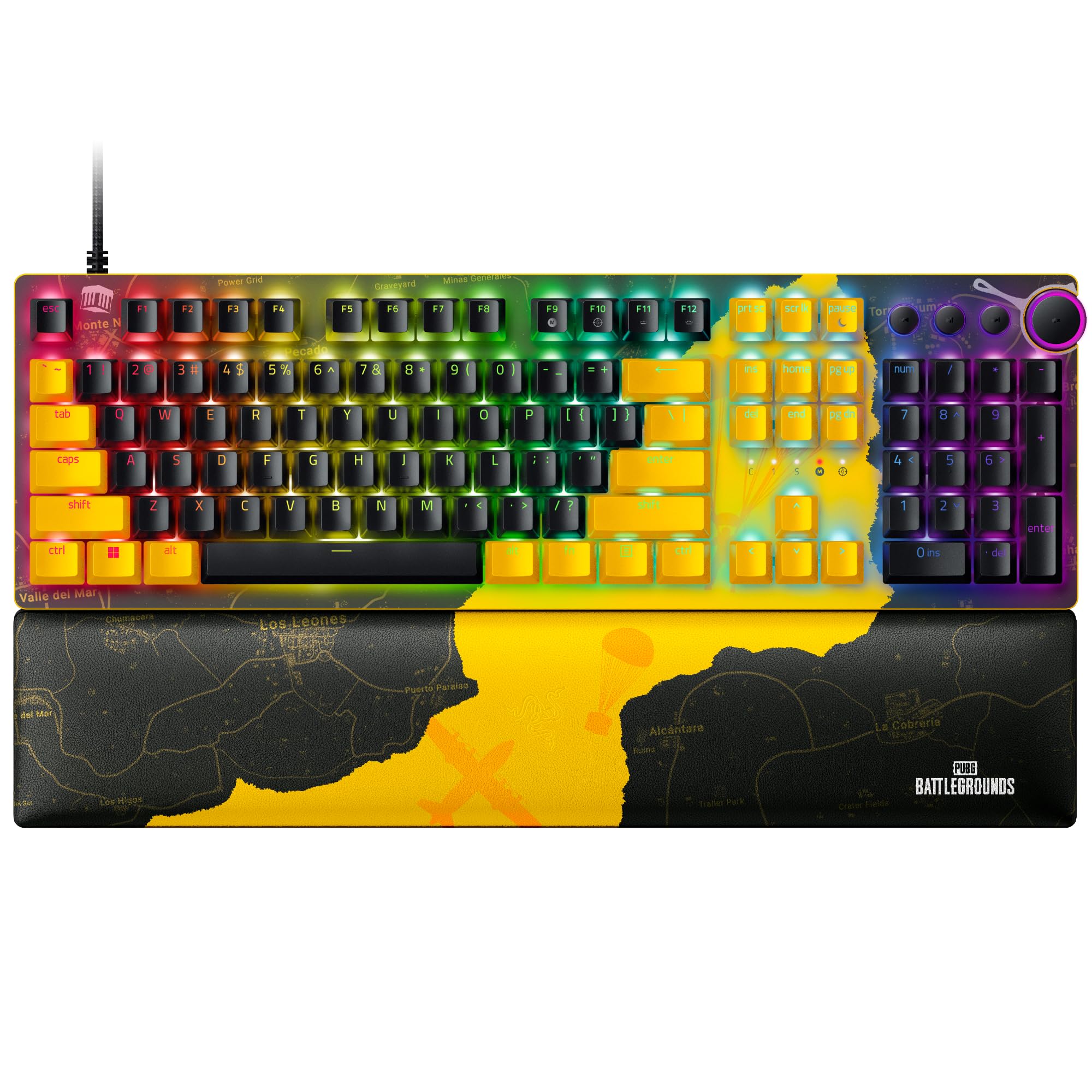
Experience dominance on a scale with the Razer Huntsman Mini, a 40% smaller gaming keyboard with state-of-the-art Razer Optical Switches. Perfect for portability and ideal for minimalist setups, experience lightning-fast triggering with the most compact gaming keyboard yet. Engineered for even more durability, these keycaps won't wear down to a shine, nor will they lose their lettering through heavy use. Secondary functions are conveniently printed on the front.
Experience dominance on a scale with the Razer Huntsman Mini, a 40% smaller gaming keyboard with state-of-the-art Razer Optical Switches. Perfect for portability and ideal for minimalist setups, experience lightning-fast triggering with the most compact gaming keyboard yet. Engineered for even more durability, these keycaps won't wear down to a shine, nor will they lose their lettering through heavy use. Secondary functions are conveniently printed on the front.
in 3 offers
The lowest price for Huntsman Mini Lin, BK | RZ03-03391900-R3G1 Adapter/Cable right now is $124.38 at Playthek.com, compared across 3 retailers.
The all-time low was $124.38 on 31 Aug 2026. That's the lowest price we've ever tracked — a great time to buy.
Prices last updated 3 Sept 2026.
Huntsman Mini Lin, BK | RZ03-03391900-R3G1 Adapter/Cable
Experience dominance on a scale with the Razer Huntsman Mini, a 40% smaller gaming keyboard with state-of-the-art Razer Optical Switches. Perfect for portability and ideal for minimalist setups, experience lightning-fast triggering with the most compact gaming keyboard yet. Engineered for even more durability, these keycaps won't wear down to a shine, nor will they lose their lettering through heavy use. Secondary functions are conveniently printed on the front.
Experience dominance on a scale with the Razer Huntsman Mini, a 40% smaller gaming keyboard with state-of-the-art Razer Optical Switches. Perfect for portability and ideal for minimalist setups, experience lightning-fast triggering with the most compact gaming keyboard yet. Engineered for even more durability, these keycaps won't wear down to a shine, nor will they lose their lettering through heavy use. Secondary functions are conveniently printed on the front.

