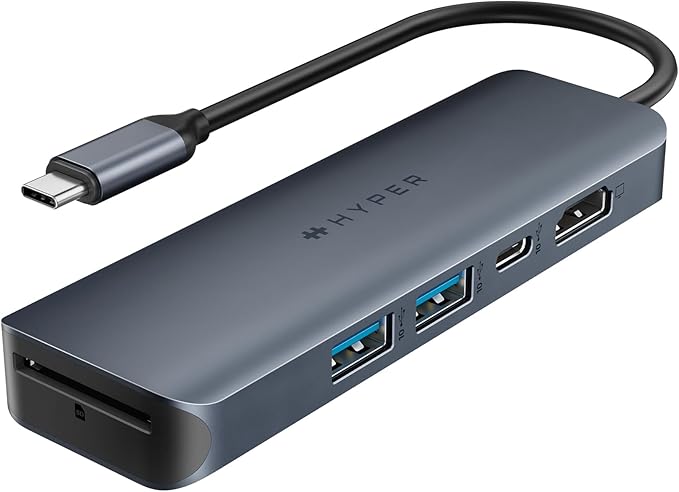
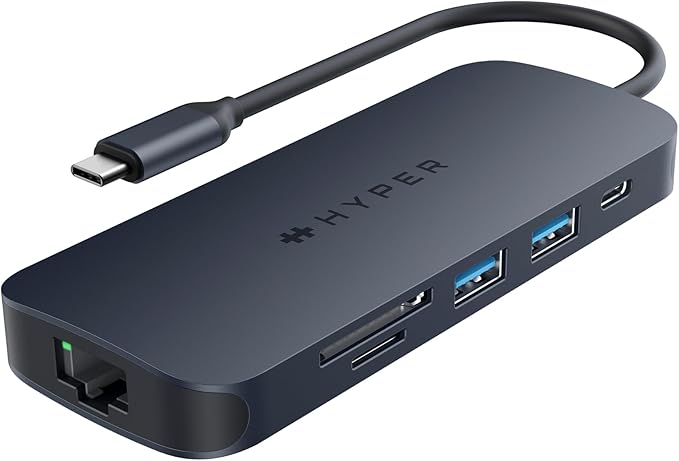
HyperDrive Gen2 11 Port Dual 4K USB-C Hub
Introducing the HyperDrive Next 11 Port USB-C Hub – the ultimate connectivity solution for creators, editors, photographers, and more. With dual 4K60Hz monitor support for PC and Chromebook, 11 ultra-fast ports, and lightning-fast data transfers, unleash your creative potential anywhere. Experience 2X faster file transfers using the 10Gbps USB ports and 3X faster photo and video transfers with microSD and SD 4.0. Benefit from 40% more power with a PD 3.1 140W power pass-through port, ensuring efficient charging. Maximize productivity with the HyperDrive Next 11 Port Dual 4K USB-C Hub.
Introducing the HyperDrive Next 11 Port USB-C Hub – the ultimate connectivity solution for creators, editors, photographers, and more. With dual 4K60Hz monitor support for PC and Chromebook, 11 ultra-fast ports, and lightning-fast data transfers, unleash your creative potential anywhere. Experience 2X faster file transfers using the 10Gbps USB ports and 3X faster photo and video transfers with microSD and SD 4.0. Benefit from 40% more power with a PD 3.1 140W power pass-through port, ensuring efficient charging. Maximize productivity with the HyperDrive Next 11 Port Dual 4K USB-C Hub.
Introducing the HyperDrive Next 11 Port USB-C Hub – the ultimate connectivity solution for creators, editors, photographers, and more. With dual 4K60Hz monitor support for PC and Chromebook, 11 ultra-fast ports, and lightning-fast data transfers, unleash your creative potential anywhere. Experience 2X faster file transfers using the 10Gbps USB ports and 3X faster photo and video transfers with microSD and SD 4.0. Benefit from 40% more power with a PD 3.1 140W power pass-through port, ensuring efficient charging. Maximize productivity with the HyperDrive Next 11 Port Dual 4K USB-C Hub.
Introducing the HyperDrive Next 11 Port USB-C Hub – the ultimate connectivity solution for creators, editors, photographers, and more. With dual 4K60Hz monitor support for PC and Chromebook, 11 ultra-fast ports, and lightning-fast data transfers, unleash your creative potential anywhere. Experience 2X faster file transfers using the 10Gbps USB ports and 3X faster photo and video transfers with microSD and SD 4.0. Benefit from 40% more power with a PD 3.1 140W power pass-through port, ensuring efficient charging. Maximize productivity with the HyperDrive Next 11 Port Dual 4K USB-C Hub.
in 13 offers
The lowest price for HyperDrive Gen2 11 Port Dual 4K USB-C Hub right now is $91.26 at TechForGood Australia, compared across 11 retailers.
The all-time low was $27.42 on 2 May 2026 — today's price is 233% above the lowest ever. It has been notably cheaper before — worth setting a price alert.
Prices last updated 11 June 2026.
Last updated at 11/06/2026 09:08:59
TARGUS HyperDrive 8 Port USB Hub
Delivery $25
TARGUS HyperDrive Docking Station
Delivery $25
Targus HyperDrive Next EcoSmart 8 Port Docking Station
Delivery between 16–19 June $18
HyperDrive Gen2 11 Port Dual 4K USB-C Hub
Affiliate Disclosure: We may receive a small commission for purchases made through this link at no extra cost to you. This helps support our site. Thank you!
HD4006GL Targus HyperDrive HD4006GL USB Type C Docking Station - Memory Card Reader - SD - Midnight Blue - 2.0 Displays Supported - 4K - 3840 x 2160 -
Delivery between 15–18 June $15
HyperDrive Gen2 11 Port Dual 4K USB-C Hub
Delivery $6.99
Targus HyperDrive HD4006GL USB Type C Docking Station - Memory Card Reader - SD - Midnight Blue - 2.0 Displays Supported - 4K - 3840 x 2160 - 2 x USB
Delivery $7.95
Targus HYPERDRIVE Next 11 PORT.DUAL 4K 60HZ HDMI USB-C Hub
Delivery between 16–18 June $16
Targus HyperDrive HD4006GL USB Type C Docking Station - Memory Card Reader - SD - Midnight Blue - 2.0 Displays Supported - 4K - 3840 x 2160 - 2 x USB
Free delivery
HyperDrive Gen2 11 Port Dual 4K Hub [HD4006GL]
Free delivery
originally posted on influenster.com
I didn’t know I needed this and now I can’t be without it! Love this hub. From its color of a sleek metallic slate blue to the sleek feel of the device itself! I didn’t realize how compact and portable it was until until I took it out of the box. And it’s a powerhouse of power and capability. I will never be without with this device. It USB-C connects easily and effortlessly. And the ports are vital. My fave are the micro and standard SD cards. I’m always misplacing my mini SD readers which is very inconvenient. Now I don’t have to worry with this since I always have it with my laptop and I love Ethernet port believe it or not. I’m a court reporter and there are times that I need a solid wired internet connection for virtual proceedings and it’s good to know I have ... MoreI didn’t know I needed this and now I can’t be without it! Love this hub. From its color of a sleek metallic slate blue to the sleek feel of the device itself! I didn’t realize how compact and portable it was until until I took it out of the box. And it’s a powerhouse of power and capability. I will never be without with this device. It USB-C connects easily and effortlessly. And the ports are vital. My fave are the micro and standard SD cards. I’m always misplacing my mini SD readers which is very inconvenient. Now I don’t have to worry with this since I always have it with my laptop and I love Ethernet port believe it or not. I’m a court reporter and there are times that I need a solid wired internet connection for virtual proceedings and it’s good to know I have this option since my laptop doesn’t have this. The device itself is fast. No issues with connectivity. I also plan to use this hub to be able to use two monitors. I love the idea of using one screen for my editing and the second screen to Google research terms and phrases without losing or slowing down my flow by minimizing and moving screens around. Especially keeps me from venturing off to la la land with social media or randomness since my edit screen is staring at me the whole time. Lol. I highly recommend this Hyper 11 Port USB-C Hub. You’ll be ready for anything.
originally posted on influenster.com
I was so excited to get this hibiscus as the one I had suffered from very lose HDMI ports. It arrived in a nice package, well protected. Plugged it in and everything is working beautifully. My only issue is it only has two USB ports. My set up requires minimum 4. That being said, this doesn’t have USB-C ports, so I can work around things. Overall thumbs up!
originally posted on influenster.com
This device is great when it comes to connecting dual devices. This is very good for working from home. It is also very good for transferring photos and data from on device to another. This is a very fun device with multiple uses. Multi uses and purposes.
| Network I/O | 1x RJ45 (10/100/1000 Mb/s) |
| Video I/O | 2x HDMI (Female) |
| Audio I/O | 1x 1/8" / 3.5 mm Headphone/Microphone Combo Jack |
| Connection Type | Integrated Cable |
| Maximum Resolution Supported | 3840 x 2160 at 60 Hz (Dual Display) |
TARGUS HyperDrive 8 Port USB Hub
Delivery $25
TARGUS HyperDrive Docking Station
Delivery $25
Targus HyperDrive Next EcoSmart 8 Port Docking Station
Delivery between 16–19 June $18
HyperDrive Gen2 11 Port Dual 4K USB-C Hub
Affiliate Disclosure: We may receive a small commission for purchases made through this link at no extra cost to you. This helps support our site. Thank you!
HD4006GL Targus HyperDrive HD4006GL USB Type C Docking Station - Memory Card Reader - SD - Midnight Blue - 2.0 Displays Supported - 4K - 3840 x 2160 -
Delivery between 15–18 June $15
I didn’t know I needed this and now I can’t be without it! Love this hub. From its color of a sleek metallic slate blue to the sleek feel of the device itself! I didn’t realize how compact and portable it was until until I took it out of the box. And it’s a powerhouse of power and capability. I will never be without with this device. It USB-C connects easily and effortlessly. And the ports are vital. My fave are the micro and standard SD cards. I’m always misplacing my mini SD readers which is very inconvenient. Now I don’t have to worry with this since I always have it with my laptop and I love Ethernet port believe it or not. I’m a court reporter and there are times that I need a solid wired internet connection for virtual proceedings and it’s good to know I have ... MoreI didn’t know I needed this and now I can’t be without it! Love this hub. From its color of a sleek metallic slate blue to the sleek feel of the device itself! I didn’t realize how compact and portable it was until until I took it out of the box. And it’s a powerhouse of power and capability. I will never be without with this device. It USB-C connects easily and effortlessly. And the ports are vital. My fave are the micro and standard SD cards. I’m always misplacing my mini SD readers which is very inconvenient. Now I don’t have to worry with this since I always have it with my laptop and I love Ethernet port believe it or not. I’m a court reporter and there are times that I need a solid wired internet connection for virtual proceedings and it’s good to know I have this option since my laptop doesn’t have this. The device itself is fast. No issues with connectivity. I also plan to use this hub to be able to use two monitors. I love the idea of using one screen for my editing and the second screen to Google research terms and phrases without losing or slowing down my flow by minimizing and moving screens around. Especially keeps me from venturing off to la la land with social media or randomness since my edit screen is staring at me the whole time. Lol. I highly recommend this Hyper 11 Port USB-C Hub. You’ll be ready for anything.
I was so excited to get this hibiscus as the one I had suffered from very lose HDMI ports. It arrived in a nice package, well protected. Plugged it in and everything is working beautifully. My only issue is it only has two USB ports. My set up requires minimum 4. That being said, this doesn’t have USB-C ports, so I can work around things. Overall thumbs up!
This device is great when it comes to connecting dual devices. This is very good for working from home. It is also very good for transferring photos and data from on device to another. This is a very fun device with multiple uses. Multi uses and purposes.
I received this for my review. The Next 11 Port USB-C Dual Hub is a game-changer for connectivity enthusiasts. Its sleek design and impressive functionality make it a must-have accessory. With 11 USB-C ports, it offers ample space for multiple devices, ensuring seamless data transfer and charging. The hub's durability and compatibility with various devices add to its appeal. I think it’s a solid investment for those needing a reliable and versatile USB-C hub.
I searched for a dock and landed on this hub. The price for the hub was better than the dock, however, was somewhat disappointed in that the cords plug in on both sides and was difficult to keep on the desk since it's so lightweight. The hub is too lightweight and couldn't be stored in my laptop stand to organize the desktop better with the dual sided plug in. Recommend a dock/docking station with cords plugging in on one side instead. Otherwise works fine and accomplishes the goal of easier connectivity. Can do better than this product.
The device works well for what it is. I use it with two 27 inch HP monitors. I plug in a Cat5 cable as well as an external Bluetooth keyboard and mouse. I place a USB-C power into it to keep everything running like a normal docking station would. There seems to be the issue… if I unplug my computer and let it sit for a while it’s as if the hub completely shuts down. I have to unplug the power, plug it back in, and I do this every time that I leave for work to go home. So every day it’s a rinse and repeat versus a plug-in play constant
Great product once you get it up and running. Initial issues getting product setup. Had to download the software from the website and remove and download again after updating to the newest MacOS. Website and videos produced by the company weren’t much aid in helping and it was trial and error until it worked.It was a necessary purchase for me and it does what I need it to do.
I have two Insignia USB-C to display port adapters that work fine directly in my new Lenovo Thinkpad Workstation but won't work in this device. When connecting them, Windows said "Connection Might Be Limited" making me think there's some kind of incompatibilities. What struck me as odd is there are no drivers or firmware upgrades for this hub, so only the standard drivers for Windows seem to be used?? That seems questionable to me. Maybe these USB-C port don't support monitors or Insignia displayport adapters the way the ones built into the laptop do.For $119, I'm not going to go out and get HDMI wires. Gonna bring this puppy back and get something cheaper if I'm going to deal with something like that.I did not have this problem with a Surface / USB-C dock and ... MoreI have two Insignia USB-C to display port adapters that work fine directly in my new Lenovo Thinkpad Workstation but won't work in this device. When connecting them, Windows said "Connection Might Be Limited" making me think there's some kind of incompatibilities. What struck me as odd is there are no drivers or firmware upgrades for this hub, so only the standard drivers for Windows seem to be used?? That seems questionable to me. Maybe these USB-C port don't support monitors or Insignia displayport adapters the way the ones built into the laptop do.For $119, I'm not going to go out and get HDMI wires. Gonna bring this puppy back and get something cheaper if I'm going to deal with something like that.I did not have this problem with a Surface / USB-C dock and the two Insignia Adapters after installing the drivers and updating the Surface firmware and drivers. This kind of behavior reminds me of such without the firmware and driver updates.Therefore, I think that this hub needs to be field-tested some more.
If all you are looking for is a multiport dock that allows you to hook up multiple devices, then this would probably qualify as a 5-star review.That is not all that I was looking for though. It claims to have a USB-C 140W PD 3.1 port. Maybe I got unlucky and got a dud, I don't know, but the pass through power is almost non-existent. I had plugged my USB-C power into the PD port of the hub while at work the other day, thinking I was charging. By 11:00 my laptop warned me it was going into low power mode and it was at 2%. I have a USB multimeter so I tested it out.When I placed the multimeter between the power source and my USB-C cable and then ran it directly to my laptop you can see I was showing 4.9V and 1.4A. Next, I plugged the USB-C cable into the Hyper ... MoreIf all you are looking for is a multiport dock that allows you to hook up multiple devices, then this would probably qualify as a 5-star review.That is not all that I was looking for though. It claims to have a USB-C 140W PD 3.1 port. Maybe I got unlucky and got a dud, I don't know, but the pass through power is almost non-existent. I had plugged my USB-C power into the PD port of the hub while at work the other day, thinking I was charging. By 11:00 my laptop warned me it was going into low power mode and it was at 2%. I have a USB multimeter so I tested it out.When I placed the multimeter between the power source and my USB-C cable and then ran it directly to my laptop you can see I was showing 4.9V and 1.4A. Next, I plugged the USB-C cable into the Hyper hub's PD port, then plugged the port into my laptop. This time, roughly the same 4.97V, but the current was cut to almost a third, 0.5A. Third test, I moved the multimeter to the laptop. So it went power adapter to USB-C cable to Hyper PD port to the multimeter. That's where the real breakdown shows, 4.9V but only 0.03A. So I'm getting roughly 2% of the current through the hub that I did when I removed the hub.So, if you plan on charging your device through the hub you'll need to find a different product.
Bought this to have 2 extra displays for the laptop, also has the benefit of multiple ports added as well. Haven't used the extra ports yet, but the monitor splitter works flawlessly. Only thing to be cautious of, this is NOT powered. It appears to work fine with the new thunderbolt ports, but when we plugged into the USB-C port our laptop was not happy due to the power consumption required to drive this.
| Network I/O | 1x RJ45 (10/100/1000 Mb/s) |
| Video I/O | 2x HDMI (Female) |
| Audio I/O | 1x 1/8" / 3.5 mm Headphone/Microphone Combo Jack |
| Connection Type | Integrated Cable |
| Maximum Resolution Supported | 3840 x 2160 at 60 Hz (Dual Display) |