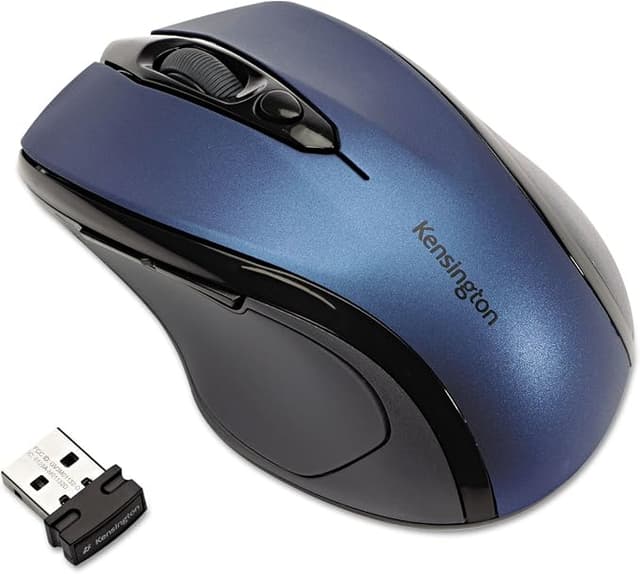
Kensington Pro Fit Ergo Vertical Wireless Mouse Grey
Kensington Profit vertical wireless mouse in grey with natural 46.7° slope for wrist comfort. Plug in nano receiver, 20m wireless.
Kensington Profit vertical wireless mouse in grey with natural 46.7° slope for wrist comfort. Plug in nano receiver, 20m wireless.
Kensington Profit vertical wireless mouse in grey with natural 46.7° slope for wrist comfort. Plug in nano receiver, 20m wireless.
Kensington Profit vertical wireless mouse in grey with natural 46.7° slope for wrist comfort. Plug in nano receiver, 20m wireless.
in 55 offers
The lowest price for Kensington Pro Fit Ergo Vertical Wireless Mouse Grey right now is $52.64 at TechForGood Australia, compared across 45 retailers.
The all-time low was $10.00 on 2 June 2024 — today's price is 426% above the lowest ever. It has been notably cheaper before — worth setting a price alert.
Prices last updated 5 Nov 2026.
Last updated at 05/11/2026 03:29:16
KENSINGTON Pro Fit Ergo Vertical Mouse, Grey, K75520WW
Affiliate Disclosure: We may receive a small commission for purchases made through this link at no extra cost to you. This helps support our site. Thank you!
KENSINGTON Pro Fit Ergo – Wireless 2.4GHz / Vertical – Mouse Grey
Delivery $25
Kensington PRO FIT ERGO VERTICAL WLESS MOUSE -GREY K75520WW
Delivery $11.99
[K75520WW] Kensington Pro FIT ERGO Vertical Wireless Mouse -GREY
Kensington K75520WW mouse Office Right-hand RF Wireless 1600 DPI
Kensington Pro Fit Ergo Vertical Wireless Mouse Gray
KENSINGTON PRO FIT ERGO VERTICAL Wireless MOUSE -GREY
Delivery $16.50
Kensington Pro Fit Ergo Vertical Wireless Mouse - Black Grey
Kensington Pro Fit Mouse - Radio Frequency - USB - 6 Button(s) - Grey - Wireless - 2.40 GHz - 1600 dpi - Scroll Wheel
Kensington Pro Fit K75520WW Ergo Vertical Wireless Mouse - Grey
Delivery between 9–14 Nov $9
originally posted on pbtech.co.nz
I got carpal tunnel about a month ago and got this mouse to help reduce the chance of it happening again after recovery. I work a lot on computer, I also stream on Twitch as a musician and play video games. The natural resting position is instantly recognizable as more relaxing.The hand position did feel weird at first and it took me about half a day to get used to that.The way you pick it up to place it back down on another part of the mousepad is different to a normal mouse. That took a few days to get used to.The wireless feature is a bonus and I've had no issues with it. There's also a transit chamber for the dongle inside the mouse so, unlike some of my other wireless options, it doesn't sometimes fall out in transit. I've had zero noticeable latency or ... MoreI got carpal tunnel about a month ago and got this mouse to help reduce the chance of it happening again after recovery. I work a lot on computer, I also stream on Twitch as a musician and play video games. The natural resting position is instantly recognizable as more relaxing.The hand position did feel weird at first and it took me about half a day to get used to that.The way you pick it up to place it back down on another part of the mousepad is different to a normal mouse. That took a few days to get used to.The wireless feature is a bonus and I've had no issues with it. There's also a transit chamber for the dongle inside the mouse so, unlike some of my other wireless options, it doesn't sometimes fall out in transit. I've had zero noticeable latency or disconnection issues.It does auto turn off after a few minutes of not being used and, unlike my other mouse, you need to press a button to wake it. It took about a week to get used to that.I still have my gaming mouse but I haven't yet needed to go back but I haven't played all my games yet (for example first person shooters).
originally posted on pbtech.co.nz
I've used Evoluent and Contour upright mice for CAD and this for the price has many of the advantages of the other upright mice.Where it's not so good is not having a dedicated middle button, and the back thumb button isn't ideally positioned for my (very large) hand.
originally posted on dell.com
This mouse is the best I've ever used. I've now bought it for home and for office. It fits my hand so naturally and I could use it for hours without any affect on my wrist. I used to struggle with carpel tunnel type pain but not anymore. I can't see me ever using another mouse.
| Sensitivity | 1600 DPI |
| Top Use Cases | Office |
| Typical Users | Users with average to larger sized hands |
| Sensor Type | Optical |
| Switches | Pressed buttons |

KENSINGTON Pro Fit Ergo Vertical Mouse, Grey, K75520WW
Affiliate Disclosure: We may receive a small commission for purchases made through this link at no extra cost to you. This helps support our site. Thank you!
KENSINGTON Pro Fit Ergo – Wireless 2.4GHz / Vertical – Mouse Grey
Delivery $25
Kensington PRO FIT ERGO VERTICAL WLESS MOUSE -GREY K75520WW
Delivery $11.99
[K75520WW] Kensington Pro FIT ERGO Vertical Wireless Mouse -GREY
Kensington K75520WW mouse Office Right-hand RF Wireless 1600 DPI
I got carpal tunnel about a month ago and got this mouse to help reduce the chance of it happening again after recovery. I work a lot on computer, I also stream on Twitch as a musician and play video games. The natural resting position is instantly recognizable as more relaxing.The hand position did feel weird at first and it took me about half a day to get used to that.The way you pick it up to place it back down on another part of the mousepad is different to a normal mouse. That took a few days to get used to.The wireless feature is a bonus and I've had no issues with it. There's also a transit chamber for the dongle inside the mouse so, unlike some of my other wireless options, it doesn't sometimes fall out in transit. I've had zero noticeable latency or ... MoreI got carpal tunnel about a month ago and got this mouse to help reduce the chance of it happening again after recovery. I work a lot on computer, I also stream on Twitch as a musician and play video games. The natural resting position is instantly recognizable as more relaxing.The hand position did feel weird at first and it took me about half a day to get used to that.The way you pick it up to place it back down on another part of the mousepad is different to a normal mouse. That took a few days to get used to.The wireless feature is a bonus and I've had no issues with it. There's also a transit chamber for the dongle inside the mouse so, unlike some of my other wireless options, it doesn't sometimes fall out in transit. I've had zero noticeable latency or disconnection issues.It does auto turn off after a few minutes of not being used and, unlike my other mouse, you need to press a button to wake it. It took about a week to get used to that.I still have my gaming mouse but I haven't yet needed to go back but I haven't played all my games yet (for example first person shooters).
I've used Evoluent and Contour upright mice for CAD and this for the price has many of the advantages of the other upright mice.Where it's not so good is not having a dedicated middle button, and the back thumb button isn't ideally positioned for my (very large) hand.
This mouse is the best I've ever used. I've now bought it for home and for office. It fits my hand so naturally and I could use it for hours without any affect on my wrist. I used to struggle with carpel tunnel type pain but not anymore. I can't see me ever using another mouse.
I am sorry I bought this. It does not work. Unfortunately, I threw away the original packaging s can't return it. I tried 2 different laptops. I tried replacing the batteries they supplied. There is something wrong within the wiring I think. I bought a similar mouse from a discount store and it works just fine. I thought this would be an even better quality mouse. No such luck.
I bought this to streamline my workspace with less cords, and wanted to make an ergonomic choice. Also needed to be compatible with Mac and Windows due to work arrangements.It drains through batteries like nobody's business, even being fastidious about turning it off when not using.When it is on it jumps and makes it difficult to work efficiently
TL;DR: can't click both the right and left mouse buttons at the same timeI bought this mouse to try and help the fatigue I feel using a normal mouse. It helped a lot due to its ergonomic design. I didn't pick this one out for any particular reason besides I saw it was fairly cheap compared to others. At first, I loved it but then I noticed it wouldn't register my clicks every once in a while. It wasn't until I was playing an FPS game that I figured it out. This mouse doesn't let you click both the right and left mouse buttons at once. If this doesn't bother you, great! To me, it made FPS games unplayable and I think it affected my other work. I couldn't be sure, but I think there is a short period between presses where you can't press the other side click. ... MoreTL;DR: can't click both the right and left mouse buttons at the same timeI bought this mouse to try and help the fatigue I feel using a normal mouse. It helped a lot due to its ergonomic design. I didn't pick this one out for any particular reason besides I saw it was fairly cheap compared to others. At first, I loved it but then I noticed it wouldn't register my clicks every once in a while. It wasn't until I was playing an FPS game that I figured it out. This mouse doesn't let you click both the right and left mouse buttons at once. If this doesn't bother you, great! To me, it made FPS games unplayable and I think it affected my other work. I couldn't be sure, but I think there is a short period between presses where you can't press the other side click. Microcenter accepted my return and all is well now.
Fits the hand like a glove and has all the features you would want for almost half the price of others. Good quality and function. Very soft touch buttons and it automatically shuts off power to save batteries when not in use. One click powers it back on instantly. Slightly relaxed upright position.
I took me a while to get my Dell All-In-One to recognize the mouse, but after a few tries, it worked. I like this mouse, is more comfortable than my regular one. One thing though, I changed the amount of lines when scrolling setting, then changed it back, and occasionally it reverts back to the old setting for no apparent reason.
The other reviewer is correct; this mouse only registers one mouse button at a time. I would never have noticed this if not for that review though.The KensingtonWorks software is GREAT. You can cloud sync your settings across devices. You can also program the buttons to have different features depending on which application you're using.I programmed the thumb buttons to toggle my camera and mic in Microsoft Teams, and to snap windows and maximize windows in other applications.The DPI button cannot be re-programmed.This "vertical" mouse has a somewhat shallow 46.7 degree angle. I think I'd prefer something in the 70 degree range, but that's just personal preference. The shallow angle makes it an easy transition from a normal mouse, while still alleviating ... MoreThe other reviewer is correct; this mouse only registers one mouse button at a time. I would never have noticed this if not for that review though.The KensingtonWorks software is GREAT. You can cloud sync your settings across devices. You can also program the buttons to have different features depending on which application you're using.I programmed the thumb buttons to toggle my camera and mic in Microsoft Teams, and to snap windows and maximize windows in other applications.The DPI button cannot be re-programmed.This "vertical" mouse has a somewhat shallow 46.7 degree angle. I think I'd prefer something in the 70 degree range, but that's just personal preference. The shallow angle makes it an easy transition from a normal mouse, while still alleviating some stress on my wrist.The bulbous scroll wheel is really nice feeling and each scroll has a tactile click. You can middle click it, but not tilt it or scroll it left and right.I have large hands (not huge) and this mouse is ALMOST too small for me. If you have bigger hands, I would get a different mouse.
I have used a vertical mouse for years and love the comfort and relief I find from using them. However, they have been expensive and hard to find. I found this one at the Denver Micro Center and decided to give it a try. I've only had it about a month but have put all my other mice away. It is a joy to use. It is also a real value for the money.
| Sensitivity | 1600 DPI |
| Top Use Cases | Office |
| Typical Users | Users with average to larger sized hands |
| Sensor Type | Optical |
| Switches | Pressed buttons |