Lenovo ThinkPad Hybrid USB-C With USB-A Dock
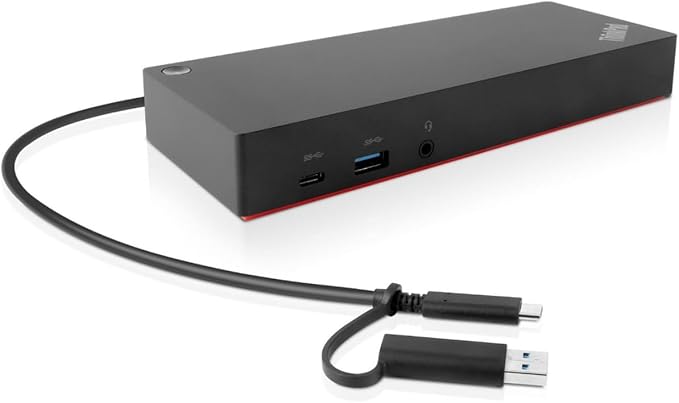
The Lenovo ThinkPad Hybrid USB-C with USB-A Dock is the perfect docking station for your Lenovo Notebook PC. With its wide compatibility, it works seamlessly with a range of Lenovo models, including the ThinkPad X280, ThinkPad E480, and ThinkPad R480. The package includes everything you need for a complete docking solution, including the dock itself, a USB-C cable, a 135W AC adapter, power cord, and a poster with setup instructions. Not only is this docking station practical, but it's also environmentally friendly, making it a great choice for eco-conscious users. It offers a range of connectivity options, including HDMI and DisplayPort for high-quality video output, an Audio Line Out for connecting external speakers or headphones, and a USB Type C host interface for easy connectivity. With a network (RJ-45) port for a wired internet connection and a total of 6 USB ports (including 2 USB 2.0 ports), you can connect multiple devices and enjoy fast and reliable performance. The maximum power supply wattage of 135W ensures that your devices are powered up and ready to go. Upgrade your docking experience with the Lenovo ThinkPad Hybrid USB-C with USB-A Dock. It's the perfect companion for your Lenovo Notebook PC, offering convenience, versatility, and reliable performance. Take your productivity to the next level with this powerful docking station.
The Lenovo ThinkPad Hybrid USB-C with USB-A Dock is the perfect docking station for your Lenovo Notebook PC. With its wide compatibility, it works seamlessly with a range of Lenovo models, including the ThinkPad X280, ThinkPad E480, and ThinkPad R480. The package includes everything you need for a complete docking solution, including the dock itself, a USB-C cable, a 135W AC adapter, power cord, and a poster with setup instructions. Not only is this docking station practical, but it's also environmentally friendly, making it a great choice for eco-conscious users. It offers a range of connectivity options, including HDMI and DisplayPort for high-quality video output, an Audio Line Out for connecting external speakers or headphones, and a USB Type C host interface for easy connectivity. With a network (RJ-45) port for a wired internet connection and a total of 6 USB ports (including 2 USB 2.0 ports), you can connect multiple devices and enjoy fast and reliable performance. The maximum power supply wattage of 135W ensures that your devices are powered up and ready to go. Upgrade your docking experience with the Lenovo ThinkPad Hybrid USB-C with USB-A Dock. It's the perfect companion for your Lenovo Notebook PC, offering convenience, versatility, and reliable performance. Take your productivity to the next level with this powerful docking station.
The Lenovo ThinkPad Hybrid USB-C with USB-A Dock is the perfect docking station for your Lenovo Notebook PC. With its wide compatibility, it works seamlessly with a range of Lenovo models, including the ThinkPad X280, ThinkPad E480, and ThinkPad R480. The package includes everything you need for a complete docking solution, including the dock itself, a USB-C cable, a 135W AC adapter, power cord, and a poster with setup instructions. Not only is this docking station practical, but it's also environmentally friendly, making it a great choice for eco-conscious users. It offers a range of connectivity options, including HDMI and DisplayPort for high-quality video output, an Audio Line Out for connecting external speakers or headphones, and a USB Type C host interface for easy connectivity. With a network (RJ-45) port for a wired internet connection and a total of 6 USB ports (including 2 USB 2.0 ports), you can connect multiple devices and enjoy fast and reliable performance. The maximum power supply wattage of 135W ensures that your devices are powered up and ready to go. Upgrade your docking experience with the Lenovo ThinkPad Hybrid USB-C with USB-A Dock. It's the perfect companion for your Lenovo Notebook PC, offering convenience, versatility, and reliable performance. Take your productivity to the next level with this powerful docking station.
The Lenovo ThinkPad Hybrid USB-C with USB-A Dock is the perfect docking station for your Lenovo Notebook PC. With its wide compatibility, it works seamlessly with a range of Lenovo models, including the ThinkPad X280, ThinkPad E480, and ThinkPad R480. The package includes everything you need for a complete docking solution, including the dock itself, a USB-C cable, a 135W AC adapter, power cord, and a poster with setup instructions. Not only is this docking station practical, but it's also environmentally friendly, making it a great choice for eco-conscious users. It offers a range of connectivity options, including HDMI and DisplayPort for high-quality video output, an Audio Line Out for connecting external speakers or headphones, and a USB Type C host interface for easy connectivity. With a network (RJ-45) port for a wired internet connection and a total of 6 USB ports (including 2 USB 2.0 ports), you can connect multiple devices and enjoy fast and reliable performance. The maximum power supply wattage of 135W ensures that your devices are powered up and ready to go. Upgrade your docking experience with the Lenovo ThinkPad Hybrid USB-C with USB-A Dock. It's the perfect companion for your Lenovo Notebook PC, offering convenience, versatility, and reliable performance. Take your productivity to the next level with this powerful docking station.
in 3 offers
The lowest price for Lenovo ThinkPad Hybrid USB-C With USB-A Dock right now is $225.64 at Amazon.com.au, compared across 3 retailers.
The all-time low was $58.05 on 25 Oct 2024 — today's price is 289% above the lowest ever. It has been notably cheaper before — worth setting a price alert.
Prices last updated 9 Oct 2026.
Last updated at 09/10/2026 20:01:37
New Genuine Dock for ThinkPad Hybrid USB-C with USB-A Dock US 40AF0135US SD20Q13457
Free delivery
Affiliate Disclosure: We may receive a small commission for purchases made through this link at no extra cost to you. This helps support our site. Thank you!
Lenovo 40AF0135AU | ThinkPad Hybrid USB-C Dock, USB 3.2 Gen 2, AU Plug
Delivery between Mon – Thu $15
Lenovo 40AF0135AU Thinkpad Hybrid USB-C, USB 3.0 Dock,2xHDMI,2xDP,3xUSB
Free delivery between Tue – Wed
originally posted on ebay.com
The Lenovo 40AF0135UK USB-C docking station is built to a high standard, small yet comes with more inputs than most. The dock is compatible with any USB 3 laptop which support the display link driver with the help of the bundled USB-C to USB-A adapter (Laptop will not charge via the adaptor). As with all USB docking stations the more powerful the laptop the better performance you will get as the majority of the graphics work is done here, but with this dock being 135w it will juice even most high performance gaming laptops and MacBooks Pros. Pros: - Laptop Charging via USB-C - Device Charging via 1x USB-C and 1x USB-A - 2x HDMI Out and 2x DP Out - 4x USB 3.0 ports (3x USB-A 1x USB-C) - USB-C to A adapter built into the host cable - Works with webcams (even high ... MoreThe Lenovo 40AF0135UK USB-C docking station is built to a high standard, small yet comes with more inputs than most. The dock is compatible with any USB 3 laptop which support the display link driver with the help of the bundled USB-C to USB-A adapter (Laptop will not charge via the adaptor). As with all USB docking stations the more powerful the laptop the better performance you will get as the majority of the graphics work is done here, but with this dock being 135w it will juice even most high performance gaming laptops and MacBooks Pros. Pros: - Laptop Charging via USB-C - Device Charging via 1x USB-C and 1x USB-A - 2x HDMI Out and 2x DP Out - 4x USB 3.0 ports (3x USB-A 1x USB-C) - USB-C to A adapter built into the host cable - Works with webcams (even high end), microphones, USB-Extenders, KVMs, wireless keyboards and mice etc. - Very reliable, will accept multiple changes of host in quick concession without crashing. Cons - Bundled USB-C to USB-C cable can cause problems with multiple devices or daisy chaining, to work around this simply purchase a good quality 100w rated USB-C to USB-C cable (3rd Party) - Mac compatibility will take a little trial and error depending on the device, OS version and Driver, however we have managed to get all our various Macs using the dock, eventually. Far superior to the Hengedock solutions. This little dock, whilst expensive has revolutionised the way we dock our devices, highly recommended.
originally posted on lenovo.com
This dock uses DisplayLink to be able to send video over any USB, making it compatible with almost any computer. However, DisplayLink causes a lot of stuttering and dropped frames in video. It’s even noticeable when moving the mouse. It is not a pleasant experience. I returned and bought the ThinkPad Ultra docking station that doesn’t use DisplayLink, which works great.
originally posted on lenovo.com
We have several Lenovo USB-C and Thunderbolt docks deployed among our staff and they are always great performers and reliable. This Hybrid dock may lack Thunderbolt support, but so do many of our AMD-powered laptops - exactly why we were seeking a USB option.I appreciate the dual-monitor options of a combination of DisplayPort and HDMI outputs, having always found DisplayPort connections to be problematic. Even higher resolution displays are solid with this dock and some quality HDMI 2.0/2.1 cables. Quickly solved a resolution issue we had connecting a different dock to a 1440p ultrawide monitor with this.I also like that the cable to connect to the computer offers an attached USB-A connector for use with systems that do not feature a USB-C connection. Very ... MoreWe have several Lenovo USB-C and Thunderbolt docks deployed among our staff and they are always great performers and reliable. This Hybrid dock may lack Thunderbolt support, but so do many of our AMD-powered laptops - exactly why we were seeking a USB option.I appreciate the dual-monitor options of a combination of DisplayPort and HDMI outputs, having always found DisplayPort connections to be problematic. Even higher resolution displays are solid with this dock and some quality HDMI 2.0/2.1 cables. Quickly solved a resolution issue we had connecting a different dock to a 1440p ultrawide monitor with this.I also like that the cable to connect to the computer offers an attached USB-A connector for use with systems that do not feature a USB-C connection. Very versatile, even with slightly older systems.
| Ports & interfaces | |
| Microphone in | Y |
| Headphone outputs | 1 |
| DC-in jack | Y |
| Headphone connectivity | 3.5 mm |

New Genuine Dock for ThinkPad Hybrid USB-C with USB-A Dock US 40AF0135US SD20Q13457
Free delivery
Affiliate Disclosure: We may receive a small commission for purchases made through this link at no extra cost to you. This helps support our site. Thank you!
Lenovo 40AF0135AU | ThinkPad Hybrid USB-C Dock, USB 3.2 Gen 2, AU Plug
Delivery between Mon – Thu $15
Lenovo 40AF0135AU Thinkpad Hybrid USB-C, USB 3.0 Dock,2xHDMI,2xDP,3xUSB
Free delivery between Tue – Wed
The Lenovo 40AF0135UK USB-C docking station is built to a high standard, small yet comes with more inputs than most. The dock is compatible with any USB 3 laptop which support the display link driver with the help of the bundled USB-C to USB-A adapter (Laptop will not charge via the adaptor). As with all USB docking stations the more powerful the laptop the better performance you will get as the majority of the graphics work is done here, but with this dock being 135w it will juice even most high performance gaming laptops and MacBooks Pros. Pros: - Laptop Charging via USB-C - Device Charging via 1x USB-C and 1x USB-A - 2x HDMI Out and 2x DP Out - 4x USB 3.0 ports (3x USB-A 1x USB-C) - USB-C to A adapter built into the host cable - Works with webcams (even high ... MoreThe Lenovo 40AF0135UK USB-C docking station is built to a high standard, small yet comes with more inputs than most. The dock is compatible with any USB 3 laptop which support the display link driver with the help of the bundled USB-C to USB-A adapter (Laptop will not charge via the adaptor). As with all USB docking stations the more powerful the laptop the better performance you will get as the majority of the graphics work is done here, but with this dock being 135w it will juice even most high performance gaming laptops and MacBooks Pros. Pros: - Laptop Charging via USB-C - Device Charging via 1x USB-C and 1x USB-A - 2x HDMI Out and 2x DP Out - 4x USB 3.0 ports (3x USB-A 1x USB-C) - USB-C to A adapter built into the host cable - Works with webcams (even high end), microphones, USB-Extenders, KVMs, wireless keyboards and mice etc. - Very reliable, will accept multiple changes of host in quick concession without crashing. Cons - Bundled USB-C to USB-C cable can cause problems with multiple devices or daisy chaining, to work around this simply purchase a good quality 100w rated USB-C to USB-C cable (3rd Party) - Mac compatibility will take a little trial and error depending on the device, OS version and Driver, however we have managed to get all our various Macs using the dock, eventually. Far superior to the Hengedock solutions. This little dock, whilst expensive has revolutionised the way we dock our devices, highly recommended.
This dock uses DisplayLink to be able to send video over any USB, making it compatible with almost any computer. However, DisplayLink causes a lot of stuttering and dropped frames in video. It’s even noticeable when moving the mouse. It is not a pleasant experience. I returned and bought the ThinkPad Ultra docking station that doesn’t use DisplayLink, which works great.
We have several Lenovo USB-C and Thunderbolt docks deployed among our staff and they are always great performers and reliable. This Hybrid dock may lack Thunderbolt support, but so do many of our AMD-powered laptops - exactly why we were seeking a USB option.I appreciate the dual-monitor options of a combination of DisplayPort and HDMI outputs, having always found DisplayPort connections to be problematic. Even higher resolution displays are solid with this dock and some quality HDMI 2.0/2.1 cables. Quickly solved a resolution issue we had connecting a different dock to a 1440p ultrawide monitor with this.I also like that the cable to connect to the computer offers an attached USB-A connector for use with systems that do not feature a USB-C connection. Very ... MoreWe have several Lenovo USB-C and Thunderbolt docks deployed among our staff and they are always great performers and reliable. This Hybrid dock may lack Thunderbolt support, but so do many of our AMD-powered laptops - exactly why we were seeking a USB option.I appreciate the dual-monitor options of a combination of DisplayPort and HDMI outputs, having always found DisplayPort connections to be problematic. Even higher resolution displays are solid with this dock and some quality HDMI 2.0/2.1 cables. Quickly solved a resolution issue we had connecting a different dock to a 1440p ultrawide monitor with this.I also like that the cable to connect to the computer offers an attached USB-A connector for use with systems that do not feature a USB-C connection. Very versatile, even with slightly older systems.
I bought this USB-C dock to pair with my Ideapad 3-15ITL6 (Type 82H8) laptop. It has a lot of ports to expand the capacity of the laptop and super easy to install. After a couple of hours of using the laptop connected to the dock, I noticed that the PC was draining battery and not recharging it. I looked at the laptop specs and discovered that the USB-C port on the laptop is for data only, so now I have to use the power adapter that comes with the laptop in addition to the dock power cord to keep both devices running. I spoke with Lenovo product support prior to purchasing the USB-C dock and they confirmed the compatibility of the product with my laptop, but did not say anything about the power limitation. In my opinion, PC power capability is a key feature of these ... MoreI bought this USB-C dock to pair with my Ideapad 3-15ITL6 (Type 82H8) laptop. It has a lot of ports to expand the capacity of the laptop and super easy to install. After a couple of hours of using the laptop connected to the dock, I noticed that the PC was draining battery and not recharging it. I looked at the laptop specs and discovered that the USB-C port on the laptop is for data only, so now I have to use the power adapter that comes with the laptop in addition to the dock power cord to keep both devices running. I spoke with Lenovo product support prior to purchasing the USB-C dock and they confirmed the compatibility of the product with my laptop, but did not say anything about the power limitation. In my opinion, PC power capability is a key feature of these docking devices and not having this with my laptop setup is very disappointing considering what I paid for the device (over $260).
The Hybrid USB-C docking station replaced a lower-tier Lenovo USB docking station that malfunctioned after about 3 years. This was on sale (15% off) and had the porting options I needed. While unrelated to the product itself, Lenovo and UPS utterly botched the shipping, with UPS returning it to Lenovo after a week without attempting to deliver it. I had to order it again and it took 4 weeks for the refund for the first aborted order to post to my credit card after calling to complain. But that eventually got resolved OK and the docking station is doing its job.
Different from what I'm used too, but I like it! One USB-C connection to laptop is all you need. It is better than a traditional docking station because you have that flexibility to put your laptop anywhere on the desk. Has many ports and everything works perfectly with no lag. My only negative comment is that it was a little pricey.This Supports Up to 2 4K Displays2 x DisplayPort 1.2 Ports2 x HDMI Ports1 x USB 3.1 Gen 2 Type-C Port3 x USB 3.1 Gen 2 Type-A Ports2 USB 2.0 Type-A Ports1 x 10/100/1000 Mb/s Ethernet PortUSB Type-C Cable with Type-A Adapter
This docking station came up as a compatible dock for the ThinkPad T15p gen.2. I reviewed the user guide for the laptop and the dock. Both state that power over USB-C is a feature. Well, it isn't. We were forced to buy a 3rd power adapter for the end-user to have when they take the laptop home or visit a client site. The power adapter that came with the laptop stays connected to the laptop while at the office and the power adapter that came with the dock always stays connected to the dock.
I bought this to use with my new Thinkpad, which replaced my 25th Anniversary edition Thinkpad. It definitely does what I need (connect via HDMI to dual external monitors, Ethernet, and additional USB ports). However, in replacing my old setup, I sacrificed the dock, which doubled as an angled laptop stand/riser, in addition to housing all the ports, and connected through a special port on the bottom of the old Thinkpad. Perhaps a future iteration of this item could "hybridize" the two ideas by making the case angled, but keeping the USB-C connection to the laptop.
The unit works as expected. It is nice that the USB ports are powered when the laptop is not present. This works great for charging phone. The only small issue is periodically when the laptop have been to sleep and powered up, the monitor does not get a signal. I have to unplug the display cable and replug. No sure if this is the USB hub issue or my display. Other than that, it have been great.
If you are looking into buying this make sure you know how many watts of power your laptop actually uses, this dock has a 135w power supply but will only charge your laptop at 90w. The other 45 watts are used by other devices on the dock but not for the laptop.The Compatibility Matrix for this docking station only refers to the driver compatibility not the ability to provide enough watts of power to your laptop through the type-C thunderbolt 4 cable. I had my work buy this for me so I would not have to fill up all the plugs on my laptop every time I came to the office. It does work nice as a hub, I only need one USB C cable for everything but it barely keeps up charging my Thinkpad P16s Gen 1. I primarily use the laptop for CAD design and with all my usual apps ... MoreIf you are looking into buying this make sure you know how many watts of power your laptop actually uses, this dock has a 135w power supply but will only charge your laptop at 90w. The other 45 watts are used by other devices on the dock but not for the laptop.The Compatibility Matrix for this docking station only refers to the driver compatibility not the ability to provide enough watts of power to your laptop through the type-C thunderbolt 4 cable. I had my work buy this for me so I would not have to fill up all the plugs on my laptop every time I came to the office. It does work nice as a hub, I only need one USB C cable for everything but it barely keeps up charging my Thinkpad P16s Gen 1. I primarily use the laptop for CAD design and with all my usual apps open I must be using exactly the 90 watts this dock can output through the thunderbolt 4 cable. If I arrive at work with 95% battery, I will leave work with 95% battery. The charger the laptop came with will output 100 watts and has no problem charging and running all day, but this hub is barely keeping up with my system. Unfortunately there is not currently a larger power supply version of this docking station so the only way I can get better charging is to use both the charger my laptop came with and the docking station at the same time. Then the docking station is only used as an overpriced USB hub.
| Ports & interfaces | |
| Microphone in | Y |
| Headphone outputs | 1 |
| DC-in jack | Y |
| Headphone connectivity | 3.5 mm |