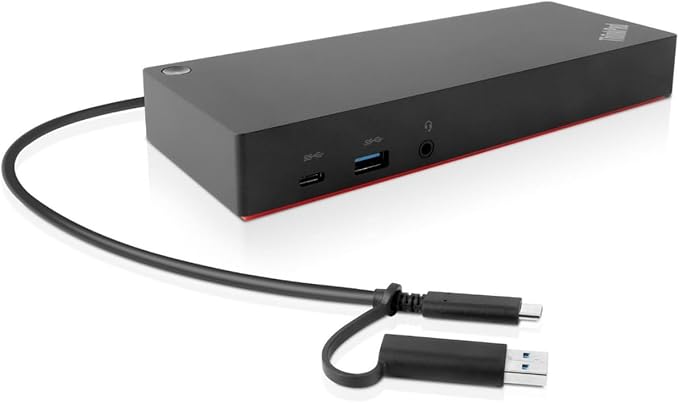
Lenovo ThinkPad USB-C Dock Gen 2
TheThinkPad USB Type-C Dock Gen 2fromLenovois a one-cable universal docking solution that expands the connectivity options for USB Type-C and Thunderbolt 3 systems. It connects to host systems running Windows 10 and 7 using an integrated USB 3.1 Gen 2 Type-C port and an included USB Type-C cable that may be detached when the dock is not in use.Lenovo built this dock with one USB 3.1 Gen 2 Type-C port, two USB 3.1 Gen 2 Type-A ports, two USB 2.0 Type-A ports, one Gigabit Ethernet port, and one 3.5mm headphone/microphone combo jack. There is also a third USB 3.1 Gen 2 Type-A port that in addition to peripheral connectivity, provides 5V / 3A of charging power for compatible devices. However, the charging power provided by this port will only be active if the dock is connected to the included 90W AC adapter.Also featured are two DisplayPort 1.4 and one HDMI 2.0 ports which support up to three displays, depending on your system's configuration. If your system's USB Type-C or Thunderbolt 3 port supports DisplayPort 1.4, the dock supports one 3840 x 2160 / 60 Hz display, two 3840 x 2160 / 30 Hz displays, or three 1920 x 1080 / 60 Hz displays. If your system supports DisplayPort 1.2, the dock supports one 3840 x 2160 / 30 Hz display or two 1920 x 1080 / 60 Hz displays.
TheThinkPad USB Type-C Dock Gen 2fromLenovois a one-cable universal docking solution that expands the connectivity options for USB Type-C and Thunderbolt 3 systems. It connects to host systems running Windows 10 and 7 using an integrated USB 3.1 Gen 2 Type-C port and an included USB Type-C cable that may be detached when the dock is not in use.Lenovo built this dock with one USB 3.1 Gen 2 Type-C port, two USB 3.1 Gen 2 Type-A ports, two USB 2.0 Type-A ports, one Gigabit Ethernet port, and one 3.5mm headphone/microphone combo jack. There is also a third USB 3.1 Gen 2 Type-A port that in addition to peripheral connectivity, provides 5V / 3A of charging power for compatible devices. However, the charging power provided by this port will only be active if the dock is connected to the included 90W AC adapter.Also featured are two DisplayPort 1.4 and one HDMI 2.0 ports which support up to three displays, depending on your system's configuration. If your system's USB Type-C or Thunderbolt 3 port supports DisplayPort 1.4, the dock supports one 3840 x 2160 / 60 Hz display, two 3840 x 2160 / 30 Hz displays, or three 1920 x 1080 / 60 Hz displays. If your system supports DisplayPort 1.2, the dock supports one 3840 x 2160 / 30 Hz display or two 1920 x 1080 / 60 Hz displays.
TheThinkPad USB Type-C Dock Gen 2fromLenovois a one-cable universal docking solution that expands the connectivity options for USB Type-C and Thunderbolt 3 systems. It connects to host systems running Windows 10 and 7 using an integrated USB 3.1 Gen 2 Type-C port and an included USB Type-C cable that may be detached when the dock is not in use.Lenovo built this dock with one USB 3.1 Gen 2 Type-C port, two USB 3.1 Gen 2 Type-A ports, two USB 2.0 Type-A ports, one Gigabit Ethernet port, and one 3.5mm headphone/microphone combo jack. There is also a third USB 3.1 Gen 2 Type-A port that in addition to peripheral connectivity, provides 5V / 3A of charging power for compatible devices. However, the charging power provided by this port will only be active if the dock is connected to the included 90W AC adapter.Also featured are two DisplayPort 1.4 and one HDMI 2.0 ports which support up to three displays, depending on your system's configuration. If your system's USB Type-C or Thunderbolt 3 port supports DisplayPort 1.4, the dock supports one 3840 x 2160 / 60 Hz display, two 3840 x 2160 / 30 Hz displays, or three 1920 x 1080 / 60 Hz displays. If your system supports DisplayPort 1.2, the dock supports one 3840 x 2160 / 30 Hz display or two 1920 x 1080 / 60 Hz displays.
TheThinkPad USB Type-C Dock Gen 2fromLenovois a one-cable universal docking solution that expands the connectivity options for USB Type-C and Thunderbolt 3 systems. It connects to host systems running Windows 10 and 7 using an integrated USB 3.1 Gen 2 Type-C port and an included USB Type-C cable that may be detached when the dock is not in use.Lenovo built this dock with one USB 3.1 Gen 2 Type-C port, two USB 3.1 Gen 2 Type-A ports, two USB 2.0 Type-A ports, one Gigabit Ethernet port, and one 3.5mm headphone/microphone combo jack. There is also a third USB 3.1 Gen 2 Type-A port that in addition to peripheral connectivity, provides 5V / 3A of charging power for compatible devices. However, the charging power provided by this port will only be active if the dock is connected to the included 90W AC adapter.Also featured are two DisplayPort 1.4 and one HDMI 2.0 ports which support up to three displays, depending on your system's configuration. If your system's USB Type-C or Thunderbolt 3 port supports DisplayPort 1.4, the dock supports one 3840 x 2160 / 60 Hz display, two 3840 x 2160 / 30 Hz displays, or three 1920 x 1080 / 60 Hz displays. If your system supports DisplayPort 1.2, the dock supports one 3840 x 2160 / 30 Hz display or two 1920 x 1080 / 60 Hz displays.
in 10 offers
The lowest price for Lenovo ThinkPad USB-C Dock Gen 2 right now is $65.00 at Cash Converters, compared across 6 retailers.
The all-time low was $61.68 on 12 Mar 2026 — today's price is 5% above the lowest ever. This is at or near its all-time low — a good time to buy.
Prices last updated 1 Nov 2026.
Last updated at 01/11/2026 15:27:36
Lenovo Thinkpad Usb-C Dock Gen 2 40As Black Computer Cable
Delivery $12.50
Lenovo Thinkpad Gen 2 Usb-c 4k Dock 40as Hdmi W/ Power Adapter +
Delivery $15
Affiliate Disclosure: We may receive a small commission for purchases made through this link at no extra cost to you. This helps support our site. Thank you!
Lenovo USA Lenovo ThinkPad USB-C Dock Gen 2
Delivery $28.44
USA Lenovo ThinkPad USB-C Dock Gen 2 (40AS0090US)
Free delivery between 10–13 Nov
Lenovo USA USB-C Dock for Lenovo ThinkPad 2nd Generation 40AS0090US
Delivery between 6–10 Nov $41
Lenovo ThinkPad USB Type-C Dock Gen 2, Black
Delivery $87.28
originally posted on lenovo.com
This docking station simply does not work (with my Thinkpad Carbon X1). No other way to describe it.devices plugged into the USB ports are sometimes recognized, sometimes not. Usually not. HDMI port worked at first but stopped working a few months later.Thinking I had a defective product, Lenovo replaced this dock for me not once but twice. The only change was that different ports worked or didn't. I have had this product for about a year, and it has never worked properly. The best I could ever get was to have SOME of the ports working some of the time.I updated all firmware and drivers. I did all windows updates. I reinstalled Windows 10. Problems still persist. Every time there is a new windows update, I get different behavior. Then I try to find new Lenovo ... MoreThis docking station simply does not work (with my Thinkpad Carbon X1). No other way to describe it.devices plugged into the USB ports are sometimes recognized, sometimes not. Usually not. HDMI port worked at first but stopped working a few months later.Thinking I had a defective product, Lenovo replaced this dock for me not once but twice. The only change was that different ports worked or didn't. I have had this product for about a year, and it has never worked properly. The best I could ever get was to have SOME of the ports working some of the time.I updated all firmware and drivers. I did all windows updates. I reinstalled Windows 10. Problems still persist. Every time there is a new windows update, I get different behavior. Then I try to find new Lenovo dock firmware and update that. Still never get better than partial function.This is a terrible product. I have had better performance from $60 USB hubs from Amazon. Complete waste of money.Strongly recommend you avoid this product if you have a Carbon X1.
originally posted on lenovo.com
This had major issues. I bought this to use with my Lenovo Thinkpad P-70 laptop. The Thinkpad P-70 would freeze at boot time whenever this was plugged in. My P-70 is rock solid and I keep it updated with the latest Windows updates, security software updates and Lenovo software updates without fail and it has never given any problem in any way. This was possibly the first time I saw an issue working on it and that was not its fault. I tried installing the latest firmware and drivers from the official Lenovo website but that did not solve the problem. Had to return this. Bought a Lenovo USB C hub to replace this for much cheaper and that works beautifully. Not sure why this did not work with Thinkpad P-70. I had tried this with another laptop (Dell) and this had ... MoreThis had major issues. I bought this to use with my Lenovo Thinkpad P-70 laptop. The Thinkpad P-70 would freeze at boot time whenever this was plugged in. My P-70 is rock solid and I keep it updated with the latest Windows updates, security software updates and Lenovo software updates without fail and it has never given any problem in any way. This was possibly the first time I saw an issue working on it and that was not its fault. I tried installing the latest firmware and drivers from the official Lenovo website but that did not solve the problem. Had to return this. Bought a Lenovo USB C hub to replace this for much cheaper and that works beautifully. Not sure why this did not work with Thinkpad P-70. I had tried this with another laptop (Dell) and this had worked with it - strange! Very disappointed as I had paid the premium price seeing the port options of this and hoping for first class reliability and compatibility with my Lenovo Thinkpad.
originally posted on lenovo.com
The dock is more a USB extension, and promises to provide HDMI, DP output, Ethernet connectivity as well as extra USB peripherals. To this day, i've not been able to have a reliable Ethernet connection from the Dock. Initially it was blamed on my Linux OS, but even on Windows with all the firmware updated and drivers checked, ethernet simply is flaky. I now resorted to a USB dongle for ethernet, which entirely defeats the purpose for which I bought it. Display randomly goes off for a few seconds, but I observe this only when watching some videos, but for regular work, it does not seem to occur. I use two DELL 24" on DP, and I know that these monitors are in perfect shape. So the "dock" is now limited to serving the two monitors and my Wireless mouse receiver, but ... MoreThe dock is more a USB extension, and promises to provide HDMI, DP output, Ethernet connectivity as well as extra USB peripherals. To this day, i've not been able to have a reliable Ethernet connection from the Dock. Initially it was blamed on my Linux OS, but even on Windows with all the firmware updated and drivers checked, ethernet simply is flaky. I now resorted to a USB dongle for ethernet, which entirely defeats the purpose for which I bought it. Display randomly goes off for a few seconds, but I observe this only when watching some videos, but for regular work, it does not seem to occur. I use two DELL 24" on DP, and I know that these monitors are in perfect shape. So the "dock" is now limited to serving the two monitors and my Wireless mouse receiver, but ethernet is unusable. I would not recommend if there are alternates available. My work only provided this option to me.
| Ports & interfaces | |
| Microphone in | N |
| Headphone connectivity | 3.5 mm |
| Combo headphone/mic port | Y |
| DisplayPorts quantity | 2 |
Lenovo Thinkpad Usb-C Dock Gen 2 40As Black Computer Cable
Delivery $12.50
Lenovo Thinkpad Gen 2 Usb-c 4k Dock 40as Hdmi W/ Power Adapter +
Delivery $15
Affiliate Disclosure: We may receive a small commission for purchases made through this link at no extra cost to you. This helps support our site. Thank you!
Lenovo USA Lenovo ThinkPad USB-C Dock Gen 2
Delivery $28.44
USA Lenovo ThinkPad USB-C Dock Gen 2 (40AS0090US)
Free delivery between 10–13 Nov
Lenovo USA USB-C Dock for Lenovo ThinkPad 2nd Generation 40AS0090US
Delivery between 6–10 Nov $41
This docking station simply does not work (with my Thinkpad Carbon X1). No other way to describe it.devices plugged into the USB ports are sometimes recognized, sometimes not. Usually not. HDMI port worked at first but stopped working a few months later.Thinking I had a defective product, Lenovo replaced this dock for me not once but twice. The only change was that different ports worked or didn't. I have had this product for about a year, and it has never worked properly. The best I could ever get was to have SOME of the ports working some of the time.I updated all firmware and drivers. I did all windows updates. I reinstalled Windows 10. Problems still persist. Every time there is a new windows update, I get different behavior. Then I try to find new Lenovo ... MoreThis docking station simply does not work (with my Thinkpad Carbon X1). No other way to describe it.devices plugged into the USB ports are sometimes recognized, sometimes not. Usually not. HDMI port worked at first but stopped working a few months later.Thinking I had a defective product, Lenovo replaced this dock for me not once but twice. The only change was that different ports worked or didn't. I have had this product for about a year, and it has never worked properly. The best I could ever get was to have SOME of the ports working some of the time.I updated all firmware and drivers. I did all windows updates. I reinstalled Windows 10. Problems still persist. Every time there is a new windows update, I get different behavior. Then I try to find new Lenovo dock firmware and update that. Still never get better than partial function.This is a terrible product. I have had better performance from $60 USB hubs from Amazon. Complete waste of money.Strongly recommend you avoid this product if you have a Carbon X1.
This had major issues. I bought this to use with my Lenovo Thinkpad P-70 laptop. The Thinkpad P-70 would freeze at boot time whenever this was plugged in. My P-70 is rock solid and I keep it updated with the latest Windows updates, security software updates and Lenovo software updates without fail and it has never given any problem in any way. This was possibly the first time I saw an issue working on it and that was not its fault. I tried installing the latest firmware and drivers from the official Lenovo website but that did not solve the problem. Had to return this. Bought a Lenovo USB C hub to replace this for much cheaper and that works beautifully. Not sure why this did not work with Thinkpad P-70. I had tried this with another laptop (Dell) and this had ... MoreThis had major issues. I bought this to use with my Lenovo Thinkpad P-70 laptop. The Thinkpad P-70 would freeze at boot time whenever this was plugged in. My P-70 is rock solid and I keep it updated with the latest Windows updates, security software updates and Lenovo software updates without fail and it has never given any problem in any way. This was possibly the first time I saw an issue working on it and that was not its fault. I tried installing the latest firmware and drivers from the official Lenovo website but that did not solve the problem. Had to return this. Bought a Lenovo USB C hub to replace this for much cheaper and that works beautifully. Not sure why this did not work with Thinkpad P-70. I had tried this with another laptop (Dell) and this had worked with it - strange! Very disappointed as I had paid the premium price seeing the port options of this and hoping for first class reliability and compatibility with my Lenovo Thinkpad.
The dock is more a USB extension, and promises to provide HDMI, DP output, Ethernet connectivity as well as extra USB peripherals. To this day, i've not been able to have a reliable Ethernet connection from the Dock. Initially it was blamed on my Linux OS, but even on Windows with all the firmware updated and drivers checked, ethernet simply is flaky. I now resorted to a USB dongle for ethernet, which entirely defeats the purpose for which I bought it. Display randomly goes off for a few seconds, but I observe this only when watching some videos, but for regular work, it does not seem to occur. I use two DELL 24" on DP, and I know that these monitors are in perfect shape. So the "dock" is now limited to serving the two monitors and my Wireless mouse receiver, but ... MoreThe dock is more a USB extension, and promises to provide HDMI, DP output, Ethernet connectivity as well as extra USB peripherals. To this day, i've not been able to have a reliable Ethernet connection from the Dock. Initially it was blamed on my Linux OS, but even on Windows with all the firmware updated and drivers checked, ethernet simply is flaky. I now resorted to a USB dongle for ethernet, which entirely defeats the purpose for which I bought it. Display randomly goes off for a few seconds, but I observe this only when watching some videos, but for regular work, it does not seem to occur. I use two DELL 24" on DP, and I know that these monitors are in perfect shape. So the "dock" is now limited to serving the two monitors and my Wireless mouse receiver, but ethernet is unusable. I would not recommend if there are alternates available. My work only provided this option to me.
Everything as advertised, and delivered promptly. Quite a number of different cabling connectors, so that I can now connect virtually anything to anything else, which is of high value to me. Docking station works great as well - these Lenovo docking stations will attach to anything with a USB-C port, so I was able to connect a Dell computer, a Lenovo and a Microsoft Surface up, and each one worked just fine. Didn't think that was possible.
I am very satisfied with this purchase. I have used it on four differerent devices and it has worked with all! The main reason for the purchase is the need to connect to extra monitors (currently conected to two external monitors). In terms of devices, I have used a Lenovo thinkpad X1 (Windows), Samsung tablet and phone (Android / Dex) and a Lenovo Chromebook Duet (ChromeOS). Plug and play, works straight out of the box with all the devices above. With the Windows device, it can extent fully to two external monitors. With Samsung Dex, the two external monitors have the same display, but the tablet / phone can be used separately. I can't work out how to create two separate external displays using Dex. On the Lenovo Chromebook Duet, the display can only extend to one ... MoreI am very satisfied with this purchase. I have used it on four differerent devices and it has worked with all! The main reason for the purchase is the need to connect to extra monitors (currently conected to two external monitors). In terms of devices, I have used a Lenovo thinkpad X1 (Windows), Samsung tablet and phone (Android / Dex) and a Lenovo Chromebook Duet (ChromeOS). Plug and play, works straight out of the box with all the devices above. With the Windows device, it can extent fully to two external monitors. With Samsung Dex, the two external monitors have the same display, but the tablet / phone can be used separately. I can't work out how to create two separate external displays using Dex. On the Lenovo Chromebook Duet, the display can only extend to one external display, but I think this is the Duet's hardware issue rather than the dock.
I have a brand new ThinkPad X1 Carbon Gen 9 (20XW002BRT) and this 40AS dockstation with ONE (not three or even two!) regular FullHD display (BENQ GL2450) connected via DVI-HDMI cable, and moreover it randomly switching on/off display, sometimes it might switch it off completely, but in pretty interesting way — sometimes you get black screen, sometimes it might be filled with other random color (purple or dark-red for example), and sometimes it may give you some corrupted image affected by strong gray noise. And all of that accompanied by strong overheating of the dock.And, despite all other devices connected to the dock is still operating, the only way to fix it is to reconnect the whole dock to notebook, simple monitor reconnection wouldn't do the ... MoreI have a brand new ThinkPad X1 Carbon Gen 9 (20XW002BRT) and this 40AS dockstation with ONE (not three or even two!) regular FullHD display (BENQ GL2450) connected via DVI-HDMI cable, and moreover it randomly switching on/off display, sometimes it might switch it off completely, but in pretty interesting way — sometimes you get black screen, sometimes it might be filled with other random color (purple or dark-red for example), and sometimes it may give you some corrupted image affected by strong gray noise. And all of that accompanied by strong overheating of the dock.And, despite all other devices connected to the dock is still operating, the only way to fix it is to reconnect the whole dock to notebook, simple monitor reconnection wouldn't do the trick.Firmware both on notebook (N32ET68W 1.44) and dockstation (1.0.8.03231) is up to date.Rearranging USB-C cable to elimate bending as much as possible doesn't make noticeable difference.And I guess it's not worth to mention that I never had this issue while the monitor was connected to notebook directly via HDMI port on it. Also dockstation without connected monitor to it becomes less hot.The second issue is less annoying but still persists: when laptop is powered off and you have speakers connected to 3.5" jack, dockstation outputs to it high-pitched humming noise, which instantly disappers when laptop is back on-line.People are complaining about this issues for a pretty long time, but nothing changes.
I used this dock on my Dell XPS 13 7390 2-in-1. I appreciate the numerous, high-speed USB ports that it provides, and the 60-watt power delivery.However, I am very disappointed in the display capabilities of this dock. Every time I let my laptop go to sleep or shut it down, I find that my external monitor that is connected to the dock is unable to wake up again. The only (and annoying) workaround is to disconnect and reconnect the dock. I have downloaded all the necessary drivers and firmware. I'm not sure if there are any compatibility issues, but this dock is advertised as "universal" and the product description explicitly states compatibility with Dell and other non-Lenovo laptops.Another criticism of the display capabilities. My 4k monitor only runs at 30hz ... MoreI used this dock on my Dell XPS 13 7390 2-in-1. I appreciate the numerous, high-speed USB ports that it provides, and the 60-watt power delivery.However, I am very disappointed in the display capabilities of this dock. Every time I let my laptop go to sleep or shut it down, I find that my external monitor that is connected to the dock is unable to wake up again. The only (and annoying) workaround is to disconnect and reconnect the dock. I have downloaded all the necessary drivers and firmware. I'm not sure if there are any compatibility issues, but this dock is advertised as "universal" and the product description explicitly states compatibility with Dell and other non-Lenovo laptops.Another criticism of the display capabilities. My 4k monitor only runs at 30hz when connected to the dock (instead of the advertised 60hz). I know that my laptop is fully capable of displaying 4k@60hz, with a direct usb-c to displayport cable.Overall, the features on this dock are good, but the performance of the HDMI and Displayports is extremely poor. Something that I would not expect from Lenovo products.
2 Weeks in and this Dock is perfect. This is my first foray into the world of Docked Laptops. My company recently allowed up to purchase a few screens and a dock, as it looks like we will be working from home for quite some time. I have not dealt with any desk top peripherals since I chucked my jacked up HP out of my apartment window one fateful night in 2005. It's been Laptop/Mac life since then. With my job however, we were supplied with Lenovo Laptops, and now, this wonderful docking solution. It's been plug and play all the way for me with this device. It does not get hot, and I have the ports maxed out. I did some research into preparing myself for setting this up by watching a few YouTube videos, and I'm sure glad that I did. I have never heard of Display ... More2 Weeks in and this Dock is perfect. This is my first foray into the world of Docked Laptops. My company recently allowed up to purchase a few screens and a dock, as it looks like we will be working from home for quite some time. I have not dealt with any desk top peripherals since I chucked my jacked up HP out of my apartment window one fateful night in 2005. It's been Laptop/Mac life since then. With my job however, we were supplied with Lenovo Laptops, and now, this wonderful docking solution. It's been plug and play all the way for me with this device. It does not get hot, and I have the ports maxed out. I did some research into preparing myself for setting this up by watching a few YouTube videos, and I'm sure glad that I did. I have never heard of Display Ports. I had a few nice HDMI cords laying around,and I figured that would be good for my new monitors that only take HDMI. Once I realized that this dock has 2 Display Ports and 1 HDMI port, I grabbed a DP to HDMI adapter and I was good to go. Hooked up a wireless Logitech MX3 and Keykron K4, a 4 port USB hub in the front, plugged in my 10 year old BOSE computer speakers(still sound amazing) and I've been good to go. Would recommend to anyone. Oh, I am connecting to a Lenovo E590
For years I have used both a desktop and a laptop computer for the special advantages each offered. My laptop offered me the portability when I traveled. My desktop offered me the power and expanded capability when I was at my home base. I put up with the cost of having two sets of software applications and the inconvenience of moving my email and data files back and forth between the two computers as I switched between them. As the power of laptops evolved, I decided focus on one powerful laptop computer and give up my older desktop computer. This year I purchased a Lenovo ThinkPad L13 Yoga computer and I love it! I have owned many ThinkPad laptops in the past and they are my favorite laptop. My most recent laptop was a small Lenovo Flex computer, similar to the ... MoreFor years I have used both a desktop and a laptop computer for the special advantages each offered. My laptop offered me the portability when I traveled. My desktop offered me the power and expanded capability when I was at my home base. I put up with the cost of having two sets of software applications and the inconvenience of moving my email and data files back and forth between the two computers as I switched between them. As the power of laptops evolved, I decided focus on one powerful laptop computer and give up my older desktop computer. This year I purchased a Lenovo ThinkPad L13 Yoga computer and I love it! I have owned many ThinkPad laptops in the past and they are my favorite laptop. My most recent laptop was a small Lenovo Flex computer, similar to the Lenovo Yoga. I enjoyed many of the special options of the Flex, but I missed many of the features of my favorite ThinkPad computers. The ThinkPad Yoga gave me a ThinkPad laptop with the flexibility of the Yoga laptops. An ideal combination in my opinion.Now, I needed a convenient way to attach all of my desktop devices to my new ThinkPad Yoga laptop computer. That is where the ThinkPad USB-C Docking Station plays such an important role in my move to a single computer system. The new Lenovo Yoga laptop could handle attaching each device individually, but did not have enough ports to attach all of them together. Not only that, but the bother to attach or detach so many devices each time I wanted to take my laptop on a trip or into another room would be enormous. With the docking station, I now only need to attach or detach one wire and all of my devices are connected or disconnected at once. When I take my laptop with me, my extra devices remain at my desk connected to the docking station, waiting for my return. The Lenovo ThinkPad docking station works perfectly for my needs.
Lenovo has conflicting information about compatibility of this dock (Model LDC-02) on their website. Initially it only worked on my Thinkpad Carbon X1 Gen6 laptop but after installing the latest driver (Jan2021 V1.0.6.01201) on my (Model 15ITL05, Type B2FG) which has USB-C (3.2 Gen1/Gen2) port with DisplayPort1.2, I was able to get two (non 4k) monitors working along with keyboard & mouse and charge my battery. Display resolution is 1920x1080 on both with one monitor using HDMI cable and the other a HDMI with a display port adapter added to end of cable. The Dock does not support two physical HDMI inputs so I needed to add the DP adapter on one cable.) I did not update the firmware of the dock itself as I don't think it's wise to mess with what's working.It's ... MoreLenovo has conflicting information about compatibility of this dock (Model LDC-02) on their website. Initially it only worked on my Thinkpad Carbon X1 Gen6 laptop but after installing the latest driver (Jan2021 V1.0.6.01201) on my (Model 15ITL05, Type B2FG) which has USB-C (3.2 Gen1/Gen2) port with DisplayPort1.2, I was able to get two (non 4k) monitors working along with keyboard & mouse and charge my battery. Display resolution is 1920x1080 on both with one monitor using HDMI cable and the other a HDMI with a display port adapter added to end of cable. The Dock does not support two physical HDMI inputs so I needed to add the DP adapter on one cable.) I did not update the firmware of the dock itself as I don't think it's wise to mess with what's working.It's possible this is just luck that I got it working. I tried using Lenovo's dock finder on the website and it came up with nada. (Lenovo needs to improve the dock finder tool as it doesn't show any compatible docks for my idea pad.) I found one old school web page that listed my model/type as compatible and then called tech support to confirm but salesperson said it would not be compatible and I needed to use the lenovo usb-c mini-dock or thunderbolt essential dock. (IdeaPad 5 doesn't have thunderbolt but that's okay since its backwards compatible). I guess time will tell if this has some sort of issue but so far so good...
| Ports & interfaces | |
| Microphone in | N |
| Headphone connectivity | 3.5 mm |
| Combo headphone/mic port | Y |
| DisplayPorts quantity | 2 |