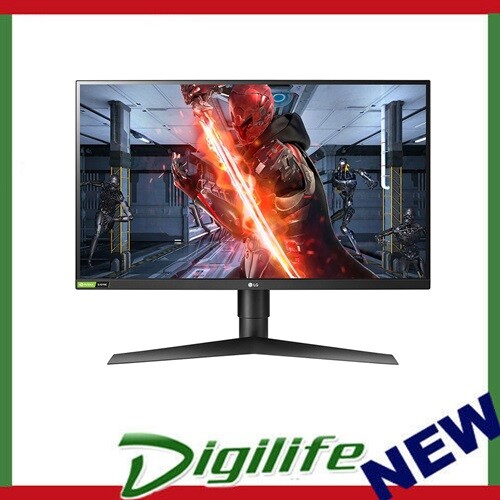
See your way to victory with the innovative 27GL850 UltraGear gaming monitor, providing the crispest visuals and the sharpest clarity. You can experience breathtaking immersion on a Nano IPS display with a 1ms response time.
See your way to victory with the innovative 27GL850 UltraGear gaming monitor, providing the crispest visuals and the sharpest clarity. You can experience breathtaking immersion on a Nano IPS display with a 1ms response time.
in 1 offers
last seen 30 Apr 2026
The lowest price we last saw for LG 27GL850-B LED Display 68.6 cm (27") 2560 x 1440 Pixels Quad HD Black, Red was $787.00 at MyITHub Australia (last seen 30 Apr 2026). Prices may have changed since.
The all-time low we recorded was $648.50 on 28 Sept 2025.
Prices last updated 30 Apr 2026.
LG 27GL850-B LED Display 68.6 cm (27") 2560 x 1440 Pixels Quad HD Black, Red
See your way to victory with the innovative 27GL850 UltraGear gaming monitor, providing the crispest visuals and the sharpest clarity. You can experience breathtaking immersion on a Nano IPS display with a 1ms response time.
See your way to victory with the innovative 27GL850 UltraGear gaming monitor, providing the crispest visuals and the sharpest clarity. You can experience breathtaking immersion on a Nano IPS display with a 1ms response time.
Last updated at 30/04/2026 20:02:38
LG 27GL850-B 27" Quad HD IPS 1ms Gaming Monitor, Black, Red, G-Sync Compatible
Delivery between Mon – Wed $18
originally posted on ebuyer.com
I have had this monitor for a few days now and so far it seems to be what I wanted. I will need to calibrate the colours in the standard mode as the reds seem a little warm, but that would be the same with any monitor.The sRGB mode is a lovely feature to have and enables work in Photoshop, the gamer mode and wider colour gamut with g-sync result in some vivid visuals without any tearing. This was a pleasant upgrade on my previous TN HD panel. The extra screen space is welcome when using office applications too.The monitor is not too showy, lacking RGB lighting and the like, but is well made and feels sturdy. The refresh rate may not be as fast as some gaming monitors, but I don't play competitively, so this is fine for my needs and doesn't tax the graphics card ... MoreI have had this monitor for a few days now and so far it seems to be what I wanted. I will need to calibrate the colours in the standard mode as the reds seem a little warm, but that would be the same with any monitor.The sRGB mode is a lovely feature to have and enables work in Photoshop, the gamer mode and wider colour gamut with g-sync result in some vivid visuals without any tearing. This was a pleasant upgrade on my previous TN HD panel. The extra screen space is welcome when using office applications too.The monitor is not too showy, lacking RGB lighting and the like, but is well made and feels sturdy. The refresh rate may not be as fast as some gaming monitors, but I don't play competitively, so this is fine for my needs and doesn't tax the graphics card unduly.The HDR is largely pointless, not even meeting the 400 standard, but I didn't buy the monitor for HDR - it's nice to know it's there. If HDR is important to you, I would advise going for a different monitor.Overall, I think this is a lovely 2K monitor. Really good colour gamut, wide range of controls and the sRGB mode allows for work on photos (if you are planning to print them or put them on another machine sRGB will give you a good indication of what it might look like than the standard mode).
originally posted on LG
One of the best monitors around. Good response and colour replication and perfect for gaming and WFH. It's no wonder that this monitor is highly rated on people's top monitor lists.Obviously with the newer technology coming out now and 4K resolution above 144Hz becoming more "affordable" and accessible, this monitor may not be as desirable in the future BUT will still be an excellent monitor for still some years.Overall aesthetics are great with a tiny bezel at the top, left and right sides. Perfect for multiple monitors. It's not over-the-top in it's look, unlike some other monitors with plenty of reds and RGB going around.Functionally does everything that you would need. Only minor gripe is that the monitor doesn't swing left and right on it's stand and even ... MoreOne of the best monitors around. Good response and colour replication and perfect for gaming and WFH. It's no wonder that this monitor is highly rated on people's top monitor lists.Obviously with the newer technology coming out now and 4K resolution above 144Hz becoming more "affordable" and accessible, this monitor may not be as desirable in the future BUT will still be an excellent monitor for still some years.Overall aesthetics are great with a tiny bezel at the top, left and right sides. Perfect for multiple monitors. It's not over-the-top in it's look, unlike some other monitors with plenty of reds and RGB going around.Functionally does everything that you would need. Only minor gripe is that the monitor doesn't swing left and right on it's stand and even though I'm not really affected by it, I know a lot of people would be put off by it.Setup and compatibility is just too easy and has enough connectivity behind the monitor to suit most people.Price-wise, it's not a cheap monitor at RRP, but you definitely get your money's worth. I would still definitely recommend this to cost conscious buyers, especially as the monitor gets older. Until 4K gaming becomes attainable in fps without too much effort, this will still be a great monitor.Seriously consider this monitor as your daily driver as it's buttery smooth in gaming unless you're after 4K resolutions. Or just get it in the interim, and sell it when the 4K monitors at 144Hz+ are cheaper and easier to get.
originally posted on LG
I have used the monitor for roughly over 1.5 months now and here are some of my reviews.- Nano IPS QHD (2560 x 1440) with HDR 10. I switched from VA pannel (BenQ XL2720-B) to IPS pannel which provides dynamic and in-depth colors. To be honest, I didn’t notice this difference until I compare with my previous monitor which I am extremely satisfied with this purchase.- Unfortunately my stationary is equipped with G-force GTX 1070. But the monitor itself has G sync compatible so I could not test it myself. But as far as I know this was the first NVIDIA certified G sync compatible monitor introduced in the market so I believe the competitiveness should works fine with all the free-sync computers.- 1ms Grey to grey with 144Hz : I do play Apex on my computer and with ... MoreI have used the monitor for roughly over 1.5 months now and here are some of my reviews.- Nano IPS QHD (2560 x 1440) with HDR 10. I switched from VA pannel (BenQ XL2720-B) to IPS pannel which provides dynamic and in-depth colors. To be honest, I didn’t notice this difference until I compare with my previous monitor which I am extremely satisfied with this purchase.- Unfortunately my stationary is equipped with G-force GTX 1070. But the monitor itself has G sync compatible so I could not test it myself. But as far as I know this was the first NVIDIA certified G sync compatible monitor introduced in the market so I believe the competitiveness should works fine with all the free-sync computers.- 1ms Grey to grey with 144Hz : I do play Apex on my computer and with setting called faster, I do just fine with moving shots- Cable arrangement: the monitor makes it supper easy to access all the ports such as display ports, HDMI since all the ports are on rear side not the bottom side. At first I was worried that I will not be able to push the monitor against the wall since my desk is quite narrow. But since the monitor stand pole is the first thing touches the wall, this was not an issue. So now I save much more space compare to my previous monitor.- Bezel less design : compare to old fashion monitor with thick bezel, the monitor looks much slimmer- The interface with speaker: there is speaker onscreen control available on the inbuilt software and I thought the monitor had speaker. After numerous attempt with turning on and off the speaker and contacting LG service center, the monitor does not come with speaker. So I am not sure why LG didn’t remove it from the software.
| Display resolution | 2560 x 1440 pixels |
| HD type | Quad HD |
| Panel type | IPS |
| Screen shape | Flat |
| Maximum refresh rate | 144 Hz |
LG 27GL850-B 27" Quad HD IPS 1ms Gaming Monitor, Black, Red, G-Sync Compatible
Delivery between Mon – Wed $18
I have had this monitor for a few days now and so far it seems to be what I wanted. I will need to calibrate the colours in the standard mode as the reds seem a little warm, but that would be the same with any monitor.The sRGB mode is a lovely feature to have and enables work in Photoshop, the gamer mode and wider colour gamut with g-sync result in some vivid visuals without any tearing. This was a pleasant upgrade on my previous TN HD panel. The extra screen space is welcome when using office applications too.The monitor is not too showy, lacking RGB lighting and the like, but is well made and feels sturdy. The refresh rate may not be as fast as some gaming monitors, but I don't play competitively, so this is fine for my needs and doesn't tax the graphics card ... MoreI have had this monitor for a few days now and so far it seems to be what I wanted. I will need to calibrate the colours in the standard mode as the reds seem a little warm, but that would be the same with any monitor.The sRGB mode is a lovely feature to have and enables work in Photoshop, the gamer mode and wider colour gamut with g-sync result in some vivid visuals without any tearing. This was a pleasant upgrade on my previous TN HD panel. The extra screen space is welcome when using office applications too.The monitor is not too showy, lacking RGB lighting and the like, but is well made and feels sturdy. The refresh rate may not be as fast as some gaming monitors, but I don't play competitively, so this is fine for my needs and doesn't tax the graphics card unduly.The HDR is largely pointless, not even meeting the 400 standard, but I didn't buy the monitor for HDR - it's nice to know it's there. If HDR is important to you, I would advise going for a different monitor.Overall, I think this is a lovely 2K monitor. Really good colour gamut, wide range of controls and the sRGB mode allows for work on photos (if you are planning to print them or put them on another machine sRGB will give you a good indication of what it might look like than the standard mode).
One of the best monitors around. Good response and colour replication and perfect for gaming and WFH. It's no wonder that this monitor is highly rated on people's top monitor lists.Obviously with the newer technology coming out now and 4K resolution above 144Hz becoming more "affordable" and accessible, this monitor may not be as desirable in the future BUT will still be an excellent monitor for still some years.Overall aesthetics are great with a tiny bezel at the top, left and right sides. Perfect for multiple monitors. It's not over-the-top in it's look, unlike some other monitors with plenty of reds and RGB going around.Functionally does everything that you would need. Only minor gripe is that the monitor doesn't swing left and right on it's stand and even ... MoreOne of the best monitors around. Good response and colour replication and perfect for gaming and WFH. It's no wonder that this monitor is highly rated on people's top monitor lists.Obviously with the newer technology coming out now and 4K resolution above 144Hz becoming more "affordable" and accessible, this monitor may not be as desirable in the future BUT will still be an excellent monitor for still some years.Overall aesthetics are great with a tiny bezel at the top, left and right sides. Perfect for multiple monitors. It's not over-the-top in it's look, unlike some other monitors with plenty of reds and RGB going around.Functionally does everything that you would need. Only minor gripe is that the monitor doesn't swing left and right on it's stand and even though I'm not really affected by it, I know a lot of people would be put off by it.Setup and compatibility is just too easy and has enough connectivity behind the monitor to suit most people.Price-wise, it's not a cheap monitor at RRP, but you definitely get your money's worth. I would still definitely recommend this to cost conscious buyers, especially as the monitor gets older. Until 4K gaming becomes attainable in fps without too much effort, this will still be a great monitor.Seriously consider this monitor as your daily driver as it's buttery smooth in gaming unless you're after 4K resolutions. Or just get it in the interim, and sell it when the 4K monitors at 144Hz+ are cheaper and easier to get.
I have used the monitor for roughly over 1.5 months now and here are some of my reviews.- Nano IPS QHD (2560 x 1440) with HDR 10. I switched from VA pannel (BenQ XL2720-B) to IPS pannel which provides dynamic and in-depth colors. To be honest, I didn’t notice this difference until I compare with my previous monitor which I am extremely satisfied with this purchase.- Unfortunately my stationary is equipped with G-force GTX 1070. But the monitor itself has G sync compatible so I could not test it myself. But as far as I know this was the first NVIDIA certified G sync compatible monitor introduced in the market so I believe the competitiveness should works fine with all the free-sync computers.- 1ms Grey to grey with 144Hz : I do play Apex on my computer and with ... MoreI have used the monitor for roughly over 1.5 months now and here are some of my reviews.- Nano IPS QHD (2560 x 1440) with HDR 10. I switched from VA pannel (BenQ XL2720-B) to IPS pannel which provides dynamic and in-depth colors. To be honest, I didn’t notice this difference until I compare with my previous monitor which I am extremely satisfied with this purchase.- Unfortunately my stationary is equipped with G-force GTX 1070. But the monitor itself has G sync compatible so I could not test it myself. But as far as I know this was the first NVIDIA certified G sync compatible monitor introduced in the market so I believe the competitiveness should works fine with all the free-sync computers.- 1ms Grey to grey with 144Hz : I do play Apex on my computer and with setting called faster, I do just fine with moving shots- Cable arrangement: the monitor makes it supper easy to access all the ports such as display ports, HDMI since all the ports are on rear side not the bottom side. At first I was worried that I will not be able to push the monitor against the wall since my desk is quite narrow. But since the monitor stand pole is the first thing touches the wall, this was not an issue. So now I save much more space compare to my previous monitor.- Bezel less design : compare to old fashion monitor with thick bezel, the monitor looks much slimmer- The interface with speaker: there is speaker onscreen control available on the inbuilt software and I thought the monitor had speaker. After numerous attempt with turning on and off the speaker and contacting LG service center, the monitor does not come with speaker. So I am not sure why LG didn’t remove it from the software.
I bought this expecting it to work with HDR10 and its wider colour gamut. The G-Sync compatibility was a bonus but not a selling point for me. The monitor is connected to an nVidia 3060 Ti over DisplayPort.However, this monitor has a bad display flaw - if DisplayPort 1.4 is enabled the brightness will flicker subtly every now and then (often enough to be distracting), especially when there is motion on the screen eg. a video playing in a window. If you disable DisplayPort 1.4 the flickering remains unless you *also* disable the Energy Saving setting - and then it's fine. However, without DP1.4 you can't use HDR10 colour. Yet with DP1.4 enabled, Energy Saving settings are inexplicably disabled so you can't fix it that way.Multiple driver updates and checking the ... MoreI bought this expecting it to work with HDR10 and its wider colour gamut. The G-Sync compatibility was a bonus but not a selling point for me. The monitor is connected to an nVidia 3060 Ti over DisplayPort.However, this monitor has a bad display flaw - if DisplayPort 1.4 is enabled the brightness will flicker subtly every now and then (often enough to be distracting), especially when there is motion on the screen eg. a video playing in a window. If you disable DisplayPort 1.4 the flickering remains unless you *also* disable the Energy Saving setting - and then it's fine. However, without DP1.4 you can't use HDR10 colour. Yet with DP1.4 enabled, Energy Saving settings are inexplicably disabled so you can't fix it that way.Multiple driver updates and checking the monitor's firmware have confirmed they're on the latest version. Searching for this issue brings up multiple posts of the same brightness flicker. There is some suggestion of it being an nVidia issue, however by disabling DP1.4 and Energy Saving, it would suggest that it's actually LG's issue to resolve.Additionally, it's worth noting that even though it supports HDR10, this display isn't going to ever be as punchy with the contrast as say an OLED panel, simply due to the way IPS screen technology works with backlighting. Pure blacks will be a little washed out as a result. Just something to be aware of.For now I've disabled DP1.4 and Energy Saving, and I only turn it on if I know I want to play something in HDR (and I just try to ignore the brightness flicker).
Unboxing: It's a typical tv package with Styrofoam holders that although looks fantastic on the outside offers nothing special. 7/10Set-up: LG GREAT JOB ON THIS!!! This is the first monitor/tv that I have bought that actually is intuitive and easy to put together. No Tools required (unless you are wall mounting) the stand has a tab that you slide into the back of the monitor and locks in, takes no effort. The base that connects to the stand has a thumbscrew with a lift-able piece to make it easier to turn by hand. Once I had the box open and the the three pieces unwrapped it took literal seconds to setup. 11/10Cords: Even though the HDMI and DP cables are only 3-4 ft. It comes with both and a USB cord as well and is pretty generous for what people normally ... MoreUnboxing: It's a typical tv package with Styrofoam holders that although looks fantastic on the outside offers nothing special. 7/10Set-up: LG GREAT JOB ON THIS!!! This is the first monitor/tv that I have bought that actually is intuitive and easy to put together. No Tools required (unless you are wall mounting) the stand has a tab that you slide into the back of the monitor and locks in, takes no effort. The base that connects to the stand has a thumbscrew with a lift-able piece to make it easier to turn by hand. Once I had the box open and the the three pieces unwrapped it took literal seconds to setup. 11/10Cords: Even though the HDMI and DP cables are only 3-4 ft. It comes with both and a USB cord as well and is pretty generous for what people normally receive in monitor boxes. Power cable is a great length and feels extremely well built. 7/10Monitor settings: Easy, Intuitive, Quick Viewing Bar conveniently pinned above setting menus for all relevant ACTIVE settings on the fly. The menu itself looks clean and professional unlike most monitor menus the red and black trend of the monitor itself is carried in to this. In the actual sub menus are easy to navigate and provide clear information to the user. 10/10Actual Performance: Crisp Clear Images g-sync works great, love the response time, Lost for words this is hands down best gaming monitor I have ever owned.
I've being using it for less than 1 week but so far, I'm very pleased with the buy!The quality of the screen is good, the colour reproduction is good (Was noticed by my partner using a Macbook pro that the colours were closer in Gamer 1 than in sRGB, weird). Was used so far for working and gaming.Working: Very bright screen and matte finish, no need to worry about glare or not being able to see. Colours are very good, no weird lighting or leaking on the edges or corners. Easy to read text with no artefacts or blurry text.Gaming: HDMI the screen maxes out at 100Hz (as expected) at 1440p and Display port I was able to get consistent 1440p 144Hz without any issues. G-Sync compatibility was immediately recognised and I had a very good experience while playing ... MoreI've being using it for less than 1 week but so far, I'm very pleased with the buy!The quality of the screen is good, the colour reproduction is good (Was noticed by my partner using a Macbook pro that the colours were closer in Gamer 1 than in sRGB, weird). Was used so far for working and gaming.Working: Very bright screen and matte finish, no need to worry about glare or not being able to see. Colours are very good, no weird lighting or leaking on the edges or corners. Easy to read text with no artefacts or blurry text.Gaming: HDMI the screen maxes out at 100Hz (as expected) at 1440p and Display port I was able to get consistent 1440p 144Hz without any issues. G-Sync compatibility was immediately recognised and I had a very good experience while playing Assassins Creed Origins with all of its colours.UI: Very snappy UI which only took 1 minute to understand out it worked. Recognises other inputs and asks to shift if you want. With a quick click you can see the current refresh rate of monitor, if the adaptive-sync is On, response time setting etc.Looks: I was sceptical about the look but now I love it, if you look at it straight on, you don't see the red (gaming) accents of it, just looks like a normal display. While using you can see a little of the red in the stand and the Red on the back IO is very subtle. I love the "Stealth" look.For all of you that are looking for a good gaming monitor that doesn't lose on the media consumption and working from home, this is the one for you, the IPS panel doesn't disappoint.
Bought a few weeks ago, had read that blacklight bleed could be a bit of an issue on this particular panel but I seemed to have lucked out and got one with practically none. The calibration out of the box was great in SRGB and display wise I cannot complain. I do have one small issue. Devices connected to the USB hub are detected perfectly fine, but the hub comes up with an error for the device descriptor failing and gets detected as a USB drive with a visible firmware.bin file contained in it. It isn't always detected as a removable disk though. The other issue is that from the LG on-screen display software it will control pretty much every other function of the screen but it tells me I need to connect my monitor by USB to update the firmware when it's already ... MoreBought a few weeks ago, had read that blacklight bleed could be a bit of an issue on this particular panel but I seemed to have lucked out and got one with practically none. The calibration out of the box was great in SRGB and display wise I cannot complain. I do have one small issue. Devices connected to the USB hub are detected perfectly fine, but the hub comes up with an error for the device descriptor failing and gets detected as a USB drive with a visible firmware.bin file contained in it. It isn't always detected as a removable disk though. The other issue is that from the LG on-screen display software it will control pretty much every other function of the screen but it tells me I need to connect my monitor by USB to update the firmware when it's already connected. I have been in contract with LG support, the issue has been acknowleged and acknowledged as common enough that the support agent had heard of it before but they hadn't heard of a solution yet. It took almost two weeks to be contacted back to basically be offered a new USB3 A to B cable to try. I'm basically waiting for that to arrive because I can't find one in stock anywhere locally from a third-party. I don't think it will work and I am dreading dealing with my retailer (Umart) because I'm already locked in a consumer complaint with them over a motherboard that died after 8 months. Despite all that, I'm happy enough to consider persisting with the panel even if I can't get the USB issue solved because for the most part it works and it's not like there is a publicly available changelog that even says what the firmware update does.
Good Points: At the time of writing, this is possibly the fastest refresh rate IPS screen available in the PC monitor space. Toggling this option does cause ghosting though, so advisable to use the 'fast' option over 'faster', which is still outstanding.Monitor features both G-Sync and FreeSync compatibility, so good for either Nvidia or AMD GFX cards.144HZ is the best feature of this monitor, thin bezel, and response times with excellent low input lag.This is a wide-gamut screen, and colour is setup well from the factory calibration, of which a report is enclosed. I advise turning down the brightness setting to between 25-35. The sRGB emulation mode is also highly accurate.Monitor will also happily receive a 4K signal from a games console (this is not a 4K ... MoreGood Points: At the time of writing, this is possibly the fastest refresh rate IPS screen available in the PC monitor space. Toggling this option does cause ghosting though, so advisable to use the 'fast' option over 'faster', which is still outstanding.Monitor features both G-Sync and FreeSync compatibility, so good for either Nvidia or AMD GFX cards.144HZ is the best feature of this monitor, thin bezel, and response times with excellent low input lag.This is a wide-gamut screen, and colour is setup well from the factory calibration, of which a report is enclosed. I advise turning down the brightness setting to between 25-35. The sRGB emulation mode is also highly accurate.Monitor will also happily receive a 4K signal from a games console (this is not a 4K monitor), and will downscale internally to the native 1440p.Improvement Points: Biggest thing to note, this monitor does not offer viable support for HDR content. There's no local dimming (highly important), contrast is too low, and the brightness is less than 400 cd/m2. It accepts a HDR signal, but you won't see the benefits of it on screen.Stand is easy to setup, light in weight, but is maybe not the strongest. The stand also doesn't offer swivel (though it's a less important feature in hindsight if screen directly in-front of you).
I've Unleashed and been using this ultra beast now for over two months and I've been pushing it to it's full potential extensively using my Geforce RTX 2080-Ti.Forget the "Pro's & Con's"Here is the Truth:I purchased the "LG UltraGear 27GN850-B model" which is pretty much the same monitor as the 27GL850-B but without the (USB-ports).Let me tell you... This Monitor Dropkicks" the QHD 2K 1440p -144hrz & HD 1080p 100hrz gaming competition out of our solar system with it's raw IPS performance!!It is a phenomenal gaming monitor and I have experienced 3 other gaming monitors so far, now 4. It delivers vibrant, accurate, and consistent colors with the fastest response time speed equal if not better than any other IPS monitor in the market from 2019 into ... MoreI've Unleashed and been using this ultra beast now for over two months and I've been pushing it to it's full potential extensively using my Geforce RTX 2080-Ti.Forget the "Pro's & Con's"Here is the Truth:I purchased the "LG UltraGear 27GN850-B model" which is pretty much the same monitor as the 27GL850-B but without the (USB-ports).Let me tell you... This Monitor Dropkicks" the QHD 2K 1440p -144hrz & HD 1080p 100hrz gaming competition out of our solar system with it's raw IPS performance!!It is a phenomenal gaming monitor and I have experienced 3 other gaming monitors so far, now 4. It delivers vibrant, accurate, and consistent colors with the fastest response time speed equal if not better than any other IPS monitor in the market from 2019 into 2020!I've been giddy like a kid again enjoying the extremely low input lag, and tear-free G-sync action!. There's plenty of additional useful features that I am loving like the "Cross-Hair" input option that really actually helps in fast paced FPS games.I thought it was just a gimmick but I was schooled by it's attribute. Other features like "Black Stabilizer" which lets you tune/tweak the blacks/shadows within games and media to my satisfaction! Also, there is the "Game Mode" a preset configuration of different calibrated styles like "Gamer Mode 1 & 2 which are for a variety of different games that gives you the ability to tweak & configure them both to your liking!Along with an "FPS Mode - RTS Mode - HDR Effect - Reader Mode - sRGB Mode. But the best of them all..."My Favorite ~ Vibrant Mode" this mode (imo) is excellent for Movie watching and especially for single player open world Games like The Witcher 3 & Red Dead Redemption 2, also I'm currently playing The Last Of Us 2 on my PS4 Pro and it's gorgeous running at 2160p due to the wonderful radiant colors and finely tuned gamma/contrast ratio!.I could ramble on about how good this monitor is but I'm sure you get the point...Now for the other Truth:My only warning to anyone who loves to use monitors in the darkest of rooms will of course notice there is some IPS glow from the edges of the screen and some minor backlight bleeding. So to those who might be wondering what does that mean? It means the deep blacks within videos/movies that appear on screen look more like very dark grey and at bad angels there is shiny reflections/glowing from the corners of the screen but for games you can work around that with built in features/options as I described above. Also easy fix is to just turn on a lamp or burn some candles which will brighten up the room a little thus negating some of the IPS glow.But with that said this small downside does not have a negative impact on me with my every day enjoyment/experience with it, but it might for someone who like I said, "Really Loves" to watch scary horror flicks or prefers to work/edit in the dark.Overall:This LG UltraGear QHD LED IPS Monitor is a premium (Savage!)For the $400+ price-tag this is one of the top 5 best of the best gaming monitors you can buy hands down!!.For someone who is looking to upgrade or is a new adventurer in this landscape."I Highly Recommend This Product"
I've had these monitors for over a month now and I am happy with them for the price I paid while on sale. The colors are pretty good, I can't really complain and the refresh is nice. I wish the blacks were darker but that's the way it goes with this type of panel.I needed all the I/O on the back of these monitors so that was a huge bonus! Wouldn't be able to use my setup without that feature.1 gripe is that the "fastest" mode makes everything look super ghosty and will basically never be used. So the rates advertised aren't really true. But still performance on fast mode looks great so buy on sale.
| Display resolution | 2560 x 1440 pixels |
| HD type | Quad HD |
| Panel type | IPS |
| Screen shape | Flat |
| Maximum refresh rate | 144 Hz |

