Last updated at 05/09/2026 14:38:45
Lg 45gr95qe Ultragear 45" Curved Gaming Monitor Wqhd Oled 240hz 0.03ms
Delivery $138.91
Affiliate Disclosure: We may receive a small commission for purchases made through this link at no extra cost to you. This helps support our site. Thank you!
originally posted on bestbuy.com
This monitor is almost perfect. I was using a Samsung CRG49 and loved it. I work remotely part time and game from the same space. It provided me with all the screen space I needed for work, and was pretty good for gaming, though it was almost too wide given the small curve.I opted for this because OLED monitors are finally getting to where I am comfortable using one as my main PC monitor. I wanted the faster refresh rate and the better HDR performance that OLED would give me. This monitor also has HDMI 2.1 which I needed to connect my Xbox Series X for the best performance. The other big perk that has simplified my setup is the SPDIF out that goes to my Creative Katana v2. Instead of switching between 3 different audio inputs I can have everything go through ... MoreThis monitor is almost perfect. I was using a Samsung CRG49 and loved it. I work remotely part time and game from the same space. It provided me with all the screen space I needed for work, and was pretty good for gaming, though it was almost too wide given the small curve.I opted for this because OLED monitors are finally getting to where I am comfortable using one as my main PC monitor. I wanted the faster refresh rate and the better HDR performance that OLED would give me. This monitor also has HDMI 2.1 which I needed to connect my Xbox Series X for the best performance. The other big perk that has simplified my setup is the SPDIF out that goes to my Creative Katana v2. Instead of switching between 3 different audio inputs I can have everything go through optical. It's a small thing that has saved some of my sanity.The color and performance on this monitor are just next level. Some games that I play where they do not have high refresh rates, I would experience tearing, but this is smooth. And the colors pop. I've always disliked HDR mode with the CRG49 and Windows in general, but HRD mode in Windows finally feels like I am not seeing wildly different image quality based on SDR or HDR.Resolution is where I am giving this 4 instead of 5 stars. In my opinion, going from the Samsung CRG49 to this, I have lost a lot of text quality. Since I work on this monitor as well, it's very noticeable given the Excel, Word, Slack messages and emails I am interacting with. I knew I would lose width for my large Excel files, but I am okay with that sacrifice. The text quality though does really make me question if I want to keep the monitor. The curve makes you want to be enveloped in this monitor, but it is not crisp enough for text. In games though it isn't nearly as bad. The resolution also lets me crank up details since it's less wide than the CRG49. When games are moving I have not really noticed the resolution issue.One small annoyance is the remote that must be used to change some settings. There really should be a nipple style controller tucked into the underside of the monitor so I do not have to pull out the remote for all settings.Overall I am happy with this monitor and I think I will be keeping it. The text quality is pretty bad but if your main use case is gaming or media consumption, this may be the perfect monitor.
originally posted on LG
I purchased this monitor to get a first-hand, early preview of MLA technology used in third-generation LG OLED evo. This monitor does not disappoint. This third-gen panel is fast, large, and is a perfect display within its design intentions. Yes, the resolution may be lacking for those looking for a UHD or higher panel. Yes, the pixel density is low, so text isn't razor sharp, akin or retina (HiDPI) displays. That said, if the primary use is gaming or content consumption — it's still a fantastic panel wrapped in LG's modern enclosure. If you've owned a LG C2 or G2, this shares the same design language.Some might be very deterred by matte-coating. Fair enough. For those who have never used one, or may prefer matte-coating, LG has used a high quality coating that ... MoreI purchased this monitor to get a first-hand, early preview of MLA technology used in third-generation LG OLED evo. This monitor does not disappoint. This third-gen panel is fast, large, and is a perfect display within its design intentions. Yes, the resolution may be lacking for those looking for a UHD or higher panel. Yes, the pixel density is low, so text isn't razor sharp, akin or retina (HiDPI) displays. That said, if the primary use is gaming or content consumption — it's still a fantastic panel wrapped in LG's modern enclosure. If you've owned a LG C2 or G2, this shares the same design language.Some might be very deterred by matte-coating. Fair enough. For those who have never used one, or may prefer matte-coating, LG has used a high quality coating that diffuses light, but does not diminish perceived contrasts. (It still appear like an OLED where it matters.)For owners of LG C2 42-inch or other televisions, the 45GR95QE succeeds in all the places a television doesn't. It features DisplayPort, it automatic turns off when a PC sleeps or powers off, it turns on just the same. The remote is far more refined that LG's last large screen UltraGear, and the picture and picture option is far more handy than anticipated. Having a streaming device connected to a HDMI port is an effortless way to watch YouTube or other content while bopping around on the computer.If you're on the fence, give it a try. If you demand a HiDPI display, this isn't that, so look elsewhere. If you want to experience MLA tech in a monitor-first package, there isn't a better OLED display out there. I was surprised with how much I enjoyed using this, low pixel density and matte finish aside.
originally posted on bestbuy.com
The LG UltraGear 45GR95QE-B is a 45” ultrawide OLED gaming monitor that lays claim to title of the world’s first 240Hz OLED monitor. This monitor comes with a solid 3440x1440p resolution in a 21:9 aspect ratio and a tight 800R radius. It has a super fast 0.03ms response time (GTG). The panel also supports HDR10, and 98.5% of the wider DCI-P3 color space.Aside from the headlining features there are other important specs to keep in mind. The I/O panel features (2) HDMI 2.1 ports, (1) DisplayPort 1.4a, (2) USB 3.0, S/PDIF optical audio, and 3.5mm headset jack. The monitor stand tilts (up/down) -5/+10°, swivels ±10°, and has 4.3” (110mm) of vertical travel. If you want to use a mount instead, the stand is removable and you can use a 100x100mm VESA compatible mount ... MoreThe LG UltraGear 45GR95QE-B is a 45” ultrawide OLED gaming monitor that lays claim to title of the world’s first 240Hz OLED monitor. This monitor comes with a solid 3440x1440p resolution in a 21:9 aspect ratio and a tight 800R radius. It has a super fast 0.03ms response time (GTG). The panel also supports HDR10, and 98.5% of the wider DCI-P3 color space.Aside from the headlining features there are other important specs to keep in mind. The I/O panel features (2) HDMI 2.1 ports, (1) DisplayPort 1.4a, (2) USB 3.0, S/PDIF optical audio, and 3.5mm headset jack. The monitor stand tilts (up/down) -5/+10°, swivels ±10°, and has 4.3” (110mm) of vertical travel. If you want to use a mount instead, the stand is removable and you can use a 100x100mm VESA compatible mount (screws are preinstalled). There are minimal controls on the display (a single well-hidden button), so it is almost entirely controlled by a remote. The packaging includes an HDMI (Ultra High Speed) and DisplayPort 1.4 (I think) cable.It comes with multiple display mode presets that are accessed through the Game Mode tab in the menu. There are additional gamer focused settings like VRR (Freesync/GSync), an on screen crosshair, and an FPS counter. There are picture adjustments that can be made to tweak the presets – brightness, sharpness, contrast, RGB, Six Color (RGBCMYK), and black level. With HDR on most of these options are grayed out with the exception of brightness and sharpness. There’s different menu controls for input switching, aspect ratio, and a picture-in-picture (PIP) or picture-by-picture (PBP) mode. I fiddled with PIP and PBP a bit, but I haven’t had time to see if its something I would use heavily or not. There are also various built in OLED care tools like a screen saver, image cleaner, pixel cleaner, and screen mover. The screen mover shifts the display around a few pixels at a time to reduce image retention. The screen saver kicks in after a short period of time if a static image/desktop is detected – a shake of the mouse stops it from turning on the screen saver.This is my first ultrawide monitor, but I am no stranger to wide format gaming setups. I have been using a triple monitor setup for over 12 years – going all the way back to my triple 4:3 ratio monitors. Prior to changing to this display I used a triple setup of LG ultra-thin bezel 22” 75Hz FHD monitors on a stand along with a single 24” 144Hz FHD display. I have always had the outer panels pitched inwards to simulate a wrap around effect. I had been using that exact setup for gaming and work for the last 5 years. For gaming I would combine my displays into an Eyefinity group for a 5760x1080p “single” display. I did this for single player story mode and racing/cockpit view games. The multi-display setup really helped with immersion on those games. I used my 24” 144Hz FHD monitor for any FPS games because the super wide and thin FOV was a bit overwhelming, and the monitor bezel breaks (even though they were thin) were a distraction. That setup’s screen area was 41-43” wide (depending on the side monitor angle), and only 10.5” tall (screen height). Compared to the UltraGear 45 my old setup was a tad wider (5-10%) but significantly shorter (40% smaller screen height).Setting up the UltraGear 45 meant preparing the space on my desk and making a clear a path for the stand. Getting the monitor out of the box was a bit nerve racking because I didn’t want to damage it. Attaching the stand to the rear of the panel and using it to pick the monitor out of the packaging ended up being the best way for me. I took a picture of the rear I/O for reference so I would know where I was plugging things in. Trying to spin the monitor around or looking at the rear once its on the desk is beyond difficult due to the size of the panel. I have 3 different PC’s hooked up at the moment – DisplayPort to my tower, and HDMI to my work and gaming laptops. The USB hub port is hooked up to my tower, and I have my Corsair ST100 headset stand and Logitech webcam hooked up to the 2 USB ports in the hub. I tried to hook my Logitech Z623 speakers up to the headset port, but I was hit with a buzzing feedback that made me disconnect. I ended up connecting a pair of wired gaming headphones, which didn’t experience any buzzing. The stand includes a cable organizer clip which can handle all of the cables coming out of a fully populated I/O panel. The stand itself is very well made and solid – tilt, swivel, and vertical adjustments are very easy to make.Build quality of the panel is superb. The frame edge is a thin strip of dark brushed metal while the back is a satin textured plastic. The bulk of the panel is only 7.5mm thick with a thicker section in the middle that carries the I/O, LED lightings, and processing components. The panel has a thin border all around the screen image – 7.5mm on the sides, 9mm at the top, and 11.5mm along the bottom. There were no dead or stuck pixels present on the display.Testing out this panel I used my tower with an AMD Vega 64 GPU, gaming laptop with Nvidia 3070, and workstation laptop with Nvidia Quadro M2200. The Vega 64 and the Quadro are both older GPU’s, so they struggled a bit (upgrades are on the horizon).With my work laptop I was able to try out the display in a workstation environment. I am an engineer so I spend my time in spreadsheets, Solidworks, and file/web browsers. My docking station is limited to 3 external displays, so I was never able to use my 24” panel for work. I now have the 24 and 45 working together since its just 2 displays. With the Nvidia Desktop Manager I could add a grid to the display to define areas to snap program windows to. This was my biggest concern going to an ultrawide from having individual monitors. Before I just snapped a window to each monitor and that was that. However, over the last few days I have grown more accustomed to the setup, and I honestly really like it. I have divided up my display area into give me a tall vertical for documents/spreadsheets, a 16:9 area for browsing/modeling/etc, and then smaller auxiliary grid spaces for random support programs. With all of this in place I still have my 24 completely unused, and available. I have never crammed so much into a single viewable window before. At best I used to have 4 programs open, and I was constantly min/maxing windows. I haven’t really had any difficulty with scaling programs to fit their windows. Text and images look perfectly sharp, and the screen brightness is more than enough for a bright office space.For gaming I played on my tower which unfortunately maxed out at 1440p@200Hz, but I rolled it back to 144Hz to closer match the framerate of the games. I’m not sure why I couldn’t push a higher refresh, but AMD Radeon Software fought me a bunch on this. Regardless I fired up Halo Infinite for some sweet HDR gameplay. I was pushing around 90FPS with high settings. Without a doubt this was the best experience I have had playing Halo. My initial thought was “holy cow.” The curve of the screen was the perfect amount of wrap to dial in the immersion. I would play Infinite on my 4K 120Hz TV on my Series X, which tops out at 60 FPS(?) in Infinite and I always felt that was pretty great. However, this is just hands down better. The OLED panel is just amazing. The contrast and lighting is the best I have ever experienced in a game. I toggled HDR off which brightened the panel up, and resulted in the really bright spots being washed out and not appearing as bright. I spun up some other titles like - Halo MCC, Dirt Rally, and Elite Dangerous. Elite Dangerous looked amazing as a cockpit view game, same with Dirt Rally. My biggest gripe with my triple monitor setup was the side panels always introduced a little bit of distortion to the image that you could (or had to) look past. With the UltraGear 45 the distortion is gone but the immersion is still there. Honestly it is so much better than the triple monitor setup.I switched over to my gaming laptop which has a 3070, and had no problem setting it up as a 1440p 240Hz HDR display. I’m pretty sure it was recognized natively, so I didn’t have to do anything other than plug it in. I went back to the same games I already played on my tower since I was limited to 144Hz there. The biggest change comes from the extra graphical horsepower and keeping the frames up decently higher. In Dirt Rally I was over 200FPS with most of the highest settings. The gameplay looked a little smoother overall, and there was less blur with the passing scenery. I pulled up Forza Horizon 5 as well, and found it had lost some of the motion blur on passing scenery as well. The jump from 75Hz to 240Hz was massive and I could really feel it in these games. The jump from 144Hz to 240Hz was not as pronounced, but it was still quite noticeable on wide tracking shots/cutscenes and other fast paced motion. Where I saw another huge improvement was in playing Shadow of War, which has a dark color palette and a lot of shadows. The inky blacks that this panel can reproduce are far and away better than any monitor or TV that I have used. For a gaming monitor this panel is fantastic.I also took the opportunity to play some videos and selections from movies as well. I pulled up my 4K copy of The Two Towers and went to the Moria scenes for something dark to display. The shadows and lights had great contrast and really looked great. When the balrog come on screen its fiery body was lit without any haloing while the shadows remained dark – especially as they fell through the cave into the water below.I used this display for both work and gaming and I can’t say I have found any faults or issues. It displays a wonderful picture for movies and games, and its lightning fast response and refresh times mean you have an edge in your matches. The OLED display is just so very good, and the curve really seals it. Great Product.
| Aspect Ratio | 21:9 |
| Box Weight | 16 Kg |
| Brightness | 200 cd/m² |
| Built-in Speaker | No |
| Dimensions with stand | 99.27 x 64.77 x 36.25 Cm |
Lg 45gr95qe Ultragear 45" Curved Gaming Monitor Wqhd Oled 240hz 0.03ms
Delivery $138.91
Affiliate Disclosure: We may receive a small commission for purchases made through this link at no extra cost to you. This helps support our site. Thank you!
This monitor is almost perfect. I was using a Samsung CRG49 and loved it. I work remotely part time and game from the same space. It provided me with all the screen space I needed for work, and was pretty good for gaming, though it was almost too wide given the small curve.I opted for this because OLED monitors are finally getting to where I am comfortable using one as my main PC monitor. I wanted the faster refresh rate and the better HDR performance that OLED would give me. This monitor also has HDMI 2.1 which I needed to connect my Xbox Series X for the best performance. The other big perk that has simplified my setup is the SPDIF out that goes to my Creative Katana v2. Instead of switching between 3 different audio inputs I can have everything go through ... MoreThis monitor is almost perfect. I was using a Samsung CRG49 and loved it. I work remotely part time and game from the same space. It provided me with all the screen space I needed for work, and was pretty good for gaming, though it was almost too wide given the small curve.I opted for this because OLED monitors are finally getting to where I am comfortable using one as my main PC monitor. I wanted the faster refresh rate and the better HDR performance that OLED would give me. This monitor also has HDMI 2.1 which I needed to connect my Xbox Series X for the best performance. The other big perk that has simplified my setup is the SPDIF out that goes to my Creative Katana v2. Instead of switching between 3 different audio inputs I can have everything go through optical. It's a small thing that has saved some of my sanity.The color and performance on this monitor are just next level. Some games that I play where they do not have high refresh rates, I would experience tearing, but this is smooth. And the colors pop. I've always disliked HDR mode with the CRG49 and Windows in general, but HRD mode in Windows finally feels like I am not seeing wildly different image quality based on SDR or HDR.Resolution is where I am giving this 4 instead of 5 stars. In my opinion, going from the Samsung CRG49 to this, I have lost a lot of text quality. Since I work on this monitor as well, it's very noticeable given the Excel, Word, Slack messages and emails I am interacting with. I knew I would lose width for my large Excel files, but I am okay with that sacrifice. The text quality though does really make me question if I want to keep the monitor. The curve makes you want to be enveloped in this monitor, but it is not crisp enough for text. In games though it isn't nearly as bad. The resolution also lets me crank up details since it's less wide than the CRG49. When games are moving I have not really noticed the resolution issue.One small annoyance is the remote that must be used to change some settings. There really should be a nipple style controller tucked into the underside of the monitor so I do not have to pull out the remote for all settings.Overall I am happy with this monitor and I think I will be keeping it. The text quality is pretty bad but if your main use case is gaming or media consumption, this may be the perfect monitor.
I purchased this monitor to get a first-hand, early preview of MLA technology used in third-generation LG OLED evo. This monitor does not disappoint. This third-gen panel is fast, large, and is a perfect display within its design intentions. Yes, the resolution may be lacking for those looking for a UHD or higher panel. Yes, the pixel density is low, so text isn't razor sharp, akin or retina (HiDPI) displays. That said, if the primary use is gaming or content consumption — it's still a fantastic panel wrapped in LG's modern enclosure. If you've owned a LG C2 or G2, this shares the same design language.Some might be very deterred by matte-coating. Fair enough. For those who have never used one, or may prefer matte-coating, LG has used a high quality coating that ... MoreI purchased this monitor to get a first-hand, early preview of MLA technology used in third-generation LG OLED evo. This monitor does not disappoint. This third-gen panel is fast, large, and is a perfect display within its design intentions. Yes, the resolution may be lacking for those looking for a UHD or higher panel. Yes, the pixel density is low, so text isn't razor sharp, akin or retina (HiDPI) displays. That said, if the primary use is gaming or content consumption — it's still a fantastic panel wrapped in LG's modern enclosure. If you've owned a LG C2 or G2, this shares the same design language.Some might be very deterred by matte-coating. Fair enough. For those who have never used one, or may prefer matte-coating, LG has used a high quality coating that diffuses light, but does not diminish perceived contrasts. (It still appear like an OLED where it matters.)For owners of LG C2 42-inch or other televisions, the 45GR95QE succeeds in all the places a television doesn't. It features DisplayPort, it automatic turns off when a PC sleeps or powers off, it turns on just the same. The remote is far more refined that LG's last large screen UltraGear, and the picture and picture option is far more handy than anticipated. Having a streaming device connected to a HDMI port is an effortless way to watch YouTube or other content while bopping around on the computer.If you're on the fence, give it a try. If you demand a HiDPI display, this isn't that, so look elsewhere. If you want to experience MLA tech in a monitor-first package, there isn't a better OLED display out there. I was surprised with how much I enjoyed using this, low pixel density and matte finish aside.
The LG UltraGear 45GR95QE-B is a 45” ultrawide OLED gaming monitor that lays claim to title of the world’s first 240Hz OLED monitor. This monitor comes with a solid 3440x1440p resolution in a 21:9 aspect ratio and a tight 800R radius. It has a super fast 0.03ms response time (GTG). The panel also supports HDR10, and 98.5% of the wider DCI-P3 color space.Aside from the headlining features there are other important specs to keep in mind. The I/O panel features (2) HDMI 2.1 ports, (1) DisplayPort 1.4a, (2) USB 3.0, S/PDIF optical audio, and 3.5mm headset jack. The monitor stand tilts (up/down) -5/+10°, swivels ±10°, and has 4.3” (110mm) of vertical travel. If you want to use a mount instead, the stand is removable and you can use a 100x100mm VESA compatible mount ... MoreThe LG UltraGear 45GR95QE-B is a 45” ultrawide OLED gaming monitor that lays claim to title of the world’s first 240Hz OLED monitor. This monitor comes with a solid 3440x1440p resolution in a 21:9 aspect ratio and a tight 800R radius. It has a super fast 0.03ms response time (GTG). The panel also supports HDR10, and 98.5% of the wider DCI-P3 color space.Aside from the headlining features there are other important specs to keep in mind. The I/O panel features (2) HDMI 2.1 ports, (1) DisplayPort 1.4a, (2) USB 3.0, S/PDIF optical audio, and 3.5mm headset jack. The monitor stand tilts (up/down) -5/+10°, swivels ±10°, and has 4.3” (110mm) of vertical travel. If you want to use a mount instead, the stand is removable and you can use a 100x100mm VESA compatible mount (screws are preinstalled). There are minimal controls on the display (a single well-hidden button), so it is almost entirely controlled by a remote. The packaging includes an HDMI (Ultra High Speed) and DisplayPort 1.4 (I think) cable.It comes with multiple display mode presets that are accessed through the Game Mode tab in the menu. There are additional gamer focused settings like VRR (Freesync/GSync), an on screen crosshair, and an FPS counter. There are picture adjustments that can be made to tweak the presets – brightness, sharpness, contrast, RGB, Six Color (RGBCMYK), and black level. With HDR on most of these options are grayed out with the exception of brightness and sharpness. There’s different menu controls for input switching, aspect ratio, and a picture-in-picture (PIP) or picture-by-picture (PBP) mode. I fiddled with PIP and PBP a bit, but I haven’t had time to see if its something I would use heavily or not. There are also various built in OLED care tools like a screen saver, image cleaner, pixel cleaner, and screen mover. The screen mover shifts the display around a few pixels at a time to reduce image retention. The screen saver kicks in after a short period of time if a static image/desktop is detected – a shake of the mouse stops it from turning on the screen saver.This is my first ultrawide monitor, but I am no stranger to wide format gaming setups. I have been using a triple monitor setup for over 12 years – going all the way back to my triple 4:3 ratio monitors. Prior to changing to this display I used a triple setup of LG ultra-thin bezel 22” 75Hz FHD monitors on a stand along with a single 24” 144Hz FHD display. I have always had the outer panels pitched inwards to simulate a wrap around effect. I had been using that exact setup for gaming and work for the last 5 years. For gaming I would combine my displays into an Eyefinity group for a 5760x1080p “single” display. I did this for single player story mode and racing/cockpit view games. The multi-display setup really helped with immersion on those games. I used my 24” 144Hz FHD monitor for any FPS games because the super wide and thin FOV was a bit overwhelming, and the monitor bezel breaks (even though they were thin) were a distraction. That setup’s screen area was 41-43” wide (depending on the side monitor angle), and only 10.5” tall (screen height). Compared to the UltraGear 45 my old setup was a tad wider (5-10%) but significantly shorter (40% smaller screen height).Setting up the UltraGear 45 meant preparing the space on my desk and making a clear a path for the stand. Getting the monitor out of the box was a bit nerve racking because I didn’t want to damage it. Attaching the stand to the rear of the panel and using it to pick the monitor out of the packaging ended up being the best way for me. I took a picture of the rear I/O for reference so I would know where I was plugging things in. Trying to spin the monitor around or looking at the rear once its on the desk is beyond difficult due to the size of the panel. I have 3 different PC’s hooked up at the moment – DisplayPort to my tower, and HDMI to my work and gaming laptops. The USB hub port is hooked up to my tower, and I have my Corsair ST100 headset stand and Logitech webcam hooked up to the 2 USB ports in the hub. I tried to hook my Logitech Z623 speakers up to the headset port, but I was hit with a buzzing feedback that made me disconnect. I ended up connecting a pair of wired gaming headphones, which didn’t experience any buzzing. The stand includes a cable organizer clip which can handle all of the cables coming out of a fully populated I/O panel. The stand itself is very well made and solid – tilt, swivel, and vertical adjustments are very easy to make.Build quality of the panel is superb. The frame edge is a thin strip of dark brushed metal while the back is a satin textured plastic. The bulk of the panel is only 7.5mm thick with a thicker section in the middle that carries the I/O, LED lightings, and processing components. The panel has a thin border all around the screen image – 7.5mm on the sides, 9mm at the top, and 11.5mm along the bottom. There were no dead or stuck pixels present on the display.Testing out this panel I used my tower with an AMD Vega 64 GPU, gaming laptop with Nvidia 3070, and workstation laptop with Nvidia Quadro M2200. The Vega 64 and the Quadro are both older GPU’s, so they struggled a bit (upgrades are on the horizon).With my work laptop I was able to try out the display in a workstation environment. I am an engineer so I spend my time in spreadsheets, Solidworks, and file/web browsers. My docking station is limited to 3 external displays, so I was never able to use my 24” panel for work. I now have the 24 and 45 working together since its just 2 displays. With the Nvidia Desktop Manager I could add a grid to the display to define areas to snap program windows to. This was my biggest concern going to an ultrawide from having individual monitors. Before I just snapped a window to each monitor and that was that. However, over the last few days I have grown more accustomed to the setup, and I honestly really like it. I have divided up my display area into give me a tall vertical for documents/spreadsheets, a 16:9 area for browsing/modeling/etc, and then smaller auxiliary grid spaces for random support programs. With all of this in place I still have my 24 completely unused, and available. I have never crammed so much into a single viewable window before. At best I used to have 4 programs open, and I was constantly min/maxing windows. I haven’t really had any difficulty with scaling programs to fit their windows. Text and images look perfectly sharp, and the screen brightness is more than enough for a bright office space.For gaming I played on my tower which unfortunately maxed out at 1440p@200Hz, but I rolled it back to 144Hz to closer match the framerate of the games. I’m not sure why I couldn’t push a higher refresh, but AMD Radeon Software fought me a bunch on this. Regardless I fired up Halo Infinite for some sweet HDR gameplay. I was pushing around 90FPS with high settings. Without a doubt this was the best experience I have had playing Halo. My initial thought was “holy cow.” The curve of the screen was the perfect amount of wrap to dial in the immersion. I would play Infinite on my 4K 120Hz TV on my Series X, which tops out at 60 FPS(?) in Infinite and I always felt that was pretty great. However, this is just hands down better. The OLED panel is just amazing. The contrast and lighting is the best I have ever experienced in a game. I toggled HDR off which brightened the panel up, and resulted in the really bright spots being washed out and not appearing as bright. I spun up some other titles like - Halo MCC, Dirt Rally, and Elite Dangerous. Elite Dangerous looked amazing as a cockpit view game, same with Dirt Rally. My biggest gripe with my triple monitor setup was the side panels always introduced a little bit of distortion to the image that you could (or had to) look past. With the UltraGear 45 the distortion is gone but the immersion is still there. Honestly it is so much better than the triple monitor setup.I switched over to my gaming laptop which has a 3070, and had no problem setting it up as a 1440p 240Hz HDR display. I’m pretty sure it was recognized natively, so I didn’t have to do anything other than plug it in. I went back to the same games I already played on my tower since I was limited to 144Hz there. The biggest change comes from the extra graphical horsepower and keeping the frames up decently higher. In Dirt Rally I was over 200FPS with most of the highest settings. The gameplay looked a little smoother overall, and there was less blur with the passing scenery. I pulled up Forza Horizon 5 as well, and found it had lost some of the motion blur on passing scenery as well. The jump from 75Hz to 240Hz was massive and I could really feel it in these games. The jump from 144Hz to 240Hz was not as pronounced, but it was still quite noticeable on wide tracking shots/cutscenes and other fast paced motion. Where I saw another huge improvement was in playing Shadow of War, which has a dark color palette and a lot of shadows. The inky blacks that this panel can reproduce are far and away better than any monitor or TV that I have used. For a gaming monitor this panel is fantastic.I also took the opportunity to play some videos and selections from movies as well. I pulled up my 4K copy of The Two Towers and went to the Moria scenes for something dark to display. The shadows and lights had great contrast and really looked great. When the balrog come on screen its fiery body was lit without any haloing while the shadows remained dark – especially as they fell through the cave into the water below.I used this display for both work and gaming and I can’t say I have found any faults or issues. It displays a wonderful picture for movies and games, and its lightning fast response and refresh times mean you have an edge in your matches. The OLED display is just so very good, and the curve really seals it. Great Product.
Wow, this monitor is amazing!I wouldn't consider myself an avid gamer, but something about this monitor really captivated me. I knew that I had to get this one, and this one specifically. My hunch had never been wrong before, and it definitely wasn't wrong now!The monitor is a jaw-dropping 45-inches of superb color and contrast, and you really have to see it in person to appreciate it. While the 1440p resolution is understandably a sore spot for many, I honestly did not notice it while gaming. The text clarity does take a hit, but it was not something I couldn't get used to, and I was aware of it coming in. This resolution is also perfect for people that do have GPUs that support HDMI 2.1, such as me.Installation was easy since I just needed to install it on a ... MoreWow, this monitor is amazing!I wouldn't consider myself an avid gamer, but something about this monitor really captivated me. I knew that I had to get this one, and this one specifically. My hunch had never been wrong before, and it definitely wasn't wrong now!The monitor is a jaw-dropping 45-inches of superb color and contrast, and you really have to see it in person to appreciate it. While the 1440p resolution is understandably a sore spot for many, I honestly did not notice it while gaming. The text clarity does take a hit, but it was not something I couldn't get used to, and I was aware of it coming in. This resolution is also perfect for people that do have GPUs that support HDMI 2.1, such as me.Installation was easy since I just needed to install it on a desk mount. It uses a standard VESA 100x100 layout and is compatible with whatever I had lying around. Since the monitor is only 18 pounds, you should have no issues with most arm mounts. Since it comes with a remote, I could push the monitor a bit further back without having to awkwardly fiddle with the awful single-button navigation on the monitor.As for the display itself, the black levels are perfect, and the colors are incredibly vibrant. In HDR, peak brightness can get super bright. While it may only peak at around 1000 nits or lower, the incredible contrast and response times of the OLED panel really makes it hard to complain about anything. The matte coating on the screen does affect the quality of the screen somewhat, but I am super impressed with how nice their coating is and how well it eliminates ambient and direct lighting.The aspect ratio is also much nicer than I had imagined. I was expecting to have issues running games that do not support ultrawide, but I was pleasantly surprised to find that so many games natively support it now, and with a growing number of older games having support added in through mods. Since the OLED also has perfect blacks, it also makes 16:9 gaming much more tolerable compared to other panels.All in all, I am very much pleased with this monitor. There has never been a monitor much like this one, in my opinion. The absurd 800R curve is actually perfect, and the build quality is equally impressive. Did you know this monitor actually curves all the way through, and not taper flat like all the other non-OLED curved monitors?My only real gripes would be with the uniformity of the grays and dark grays, but that is to be expected of the technology. Additionally, there is a weird issue with my monitor where there is a faint line visible that divides the screen in half vertically. I am hoping that this is a software issue, but I do not notice it in 99% of use.At the price of 1699.99, it is an incredibly hard pill to swallow. I wouldn't have purchased it either if I hadn't been able to purchase it open box for almost thirty percent off. Regardless, once you see it in action, it almost becomes worth it at any price point.
The experience of owning this monitor came with more than I would have expected. First off the fact that it is OLED was a game changer for consuming HDR content and playing games like Dead Space remake and God of War. Colors are so vibrant. It basically envelopes your entire peripheral vision making content more immersive.The problems I had with it were not being able to update firmware on 2 separate monitors and full screen brightness was dimmer than my odyssey g7 32 1440p monitor. I thought that hdr 1000 was at least like 500-700 nits of brightness kind of like how some monitors are advertised as hdr but only certified for hdr 300. There needs to be more transparency in the industry but that is a whole other conversation. I’ve learned that sustained brightness ... MoreThe experience of owning this monitor came with more than I would have expected. First off the fact that it is OLED was a game changer for consuming HDR content and playing games like Dead Space remake and God of War. Colors are so vibrant. It basically envelopes your entire peripheral vision making content more immersive.The problems I had with it were not being able to update firmware on 2 separate monitors and full screen brightness was dimmer than my odyssey g7 32 1440p monitor. I thought that hdr 1000 was at least like 500-700 nits of brightness kind of like how some monitors are advertised as hdr but only certified for hdr 300. There needs to be more transparency in the industry but that is a whole other conversation. I’ve learned that sustained brightness has to do with how much the panel can be cooled to keep oled pixels from getting too hot and accelerating burn in. Text looks weird against a white background almost looking blurred. I think that firmware updates would address the issue but I was never able to update. It would proceed for a while but then error out at like 60% and prompt me to disconnect power and try again.The final deal breaker was when I launched into a game, the monitor would switch into different modes(hdr or game mode even though I turned them on in osd) causing weird anomalies like when alt tabbing it would have to switch back into the main mode I set it into the osd. It felt jankey and even having the game in borderless it would still happen. If there are problems similar to this please reply as I would like to know if other monitors are like this or if I just haven’t set it up properly. Is it windows 10 hdr bugging out ( Modern warfare 2019 looked better in sdr and brighter than hdr even with the hdr tuning in settings).As a side you will need a monitor arm that can support its weight. I got the WALI Single Monitor Gas Spring Desk Mount, Heavy Duty Monitor Arm for Ultrawide Screen up to 35 inch, 33 lbs. Fully Adjustable, VESA 75 and 100 (GSM001XL) and it worked perfectly. I hope that my issues are just me not understanding how hdr works and not being set up properly for optimal experience as I would like to get another better specked monitor in the future.
This is my first curved monitor and what better way of introductory to one, than being an OLED from LG! Ecstatic doesn't even come close to my feelings. It makes everything immersive while playing games as the screen just hugs your peripheral vision all nice and snugly. I find it easier to play with a second player much more gratifying because we can see each other easier.I have played many different games, attached different devices like laptops, PC's, PS5, Xbox X, Raspberry Pi 400, Steam Deck, Switch and even docked my S22 Ultra and Z Fold 4. All of them have displayed at its best on the 45” monitor so beautifully! I would have liked better pixel density and a bit more brightness as I'm used to getting from the LG C2 but we might get that in the next ... MoreThis is my first curved monitor and what better way of introductory to one, than being an OLED from LG! Ecstatic doesn't even come close to my feelings. It makes everything immersive while playing games as the screen just hugs your peripheral vision all nice and snugly. I find it easier to play with a second player much more gratifying because we can see each other easier.I have played many different games, attached different devices like laptops, PC's, PS5, Xbox X, Raspberry Pi 400, Steam Deck, Switch and even docked my S22 Ultra and Z Fold 4. All of them have displayed at its best on the 45” monitor so beautifully! I would have liked better pixel density and a bit more brightness as I'm used to getting from the LG C2 but we might get that in the next iteration.The blacks and the colors are simply stunning! Super nice touch on the RGB lighting especially the illumination light for the keyboard. You can connect via Display Port or HDMI and I have used both and was extremely satisfied on both displays. Every single type of media or game just looked superb and there's many settings to adjust in the GUI if you want to sample all it can do. And having a remote control makes all of that easier. It supports PBP and PIP making it a tech's dream monitor.You can install the OnScreen Control software to check for updates but must be connected to your PC via USB upstream. You can install the Dual Controller software if you want to use 2 devices and 1 mouse/keyboard. There's many more features than meets the eye and LG's Calibration Studio software lets you calibrate color spectrums if you have a calibrator.You can also adjust the positions by tilt, swivel or height fairly easily. OLED Care is built in and will alert you that it will run before powering down after a long play session. You can connect speakers via the optical port but I haven't received the gaming speaker as of this moment.Overall, I'm quite impressed and taken aback on just how awesome and intuitive this 45” Curved OLED Monitor from LG is. And yes, I would definitely want this in my arsenal of devices!
Let me start by saying I've decide to choose this over the Alienware DW and DWF, both of which I purchased and tested against this. For starters, the screen size of 45" vs 34", i personally prefer the larger and with the curve, games really feel like they pull you in entirely. I also prefer the matte screen finish, but know it's not for everyone. It's not a super aggressive matte, but be warned, it does seem to cause very, very slight bloom, even though the panel is OLED. Colors on the DW/DWF seemed to "pop" more than on the LG, but at the same time, it almost caused colors to be over contrasted or washed out as a result, whereas the LG seems more "true to life". To address some of the complaints i see, brightness and PPI. Brightness appears to not be much different ... MoreLet me start by saying I've decide to choose this over the Alienware DW and DWF, both of which I purchased and tested against this. For starters, the screen size of 45" vs 34", i personally prefer the larger and with the curve, games really feel like they pull you in entirely. I also prefer the matte screen finish, but know it's not for everyone. It's not a super aggressive matte, but be warned, it does seem to cause very, very slight bloom, even though the panel is OLED. Colors on the DW/DWF seemed to "pop" more than on the LG, but at the same time, it almost caused colors to be over contrasted or washed out as a result, whereas the LG seems more "true to life". To address some of the complaints i see, brightness and PPI. Brightness appears to not be much different than the Alienware, at least on the panels i had. Against both HDR1000 and 400 True black, the LG seems to be just as bright in HDR and SDR content. I understand that it's not on paper, but if you have proper lighting, you're not going to be cranking any monitor at max brightness anyways, especially OLED. The other, PPI, is it noticeable? Short answer is yes, long answer is your mileage may vary. To me, apps like Office 365 have no clarity issues, same with the overall Windows UI. Other apps, such as one of my add-on managers for a game, look absolutely awful as a result of not scaling with windows. I wouldn't say its any better/worse than the QD OLED panels due to their odd pixel layout as well. ClearType and Better ClearType do help, but also, spending the price you are for this monitor or the DW/DWF, you should already know what to expect going in, rather than purchasing it and then being mad you didn't do your research on monitors in the $1400-$1800 range. In gaming, the text fringing is not a problem at all and games look amazing. Windows advanced HDR calibration shows the monitor only reaching about 600 nits, not the advertised 1000, but again, a properly lit room resolves this for most panels.
I preordered this in December after desperately trying to find a monitor that fits my very specific requirements and desires, but oddly enough the market is rather devoid of the area I'd like to see a monitor in. The only sacrifice you make with this monitor is the resolution. With the size of the monitor, it comes in at only 83.8 pixels per inch. This was actually LOWER than my old monitor which was smaller and significantly cheaper, but I was really hopeful that given the monitor size and other redeeming picture qualities it would not be as noticable.Unfortunately, if you need this monitor for anything that requires sharp pixel recognition, coding, reading, spreadsheets, work etc, this is probably NOT the monitor for you, and this is ultimately why I sadly had ... MoreI preordered this in December after desperately trying to find a monitor that fits my very specific requirements and desires, but oddly enough the market is rather devoid of the area I'd like to see a monitor in. The only sacrifice you make with this monitor is the resolution. With the size of the monitor, it comes in at only 83.8 pixels per inch. This was actually LOWER than my old monitor which was smaller and significantly cheaper, but I was really hopeful that given the monitor size and other redeeming picture qualities it would not be as noticable.Unfortunately, if you need this monitor for anything that requires sharp pixel recognition, coding, reading, spreadsheets, work etc, this is probably NOT the monitor for you, and this is ultimately why I sadly had to return it.The Good:If you want a purely gaming monitor, this is probably the best one I've ever seen or used, the color, contrast, and backlighting is spectacular, going back and forth between my old monitor and the new one was a DRASTIC difference in color even without HDR, and after having used the OLED now I think I have to update my dream monitor to include that as a requirement because it's so much easier on the eyes.The Ugly:Sadly I had to return the monitor, as at this price-point I could not justify the use-case of the monitor, I love the idea very much, and if it was only a higher resolution this would be the perfect monitor on the market. The steep curvature of the display is perfect for normal desk depth distance, and is fantastic, however, it is at odds with the low pixel density. On the one hand the strong curvature requires you to sit closer (normal desk sitting distance) to properly utilize the screen, but on the other end of the spectrum the pixel density is so low that you quickly notice the pixels and blurriness of text at that same distance. If you sit back far enough not to see the pixels, the curvature is a bit too aggressive to be viewed properly, which is unfortunate, because I really loved the curvature of this screen at this size.I have attached two photographs highlighting the blurriness and fuzziness of text on this display. Again I can't emphasize enough how if the pixel density and resolution had just been a bit higher I would be extremely happy with this monitor.If it was say: 5120x2160, which is technically higher than 4K, it would have 124.88 PPI, making it a perfect density, but 83.8 PPI on a monitor this price just isn't justifiable unfortunately.More realistically, at the oddball resolution of 3840x1600, which is basically the 21:9 version of 4K (but less vertical pixels), it would come in at 93.48 PPI, which while still considered to be on the "low" side of modern displays, would at least be acceptable for mixed use, but still definitely a bit low for the price point.Hopefully this helps clarify anything for anyone else on the fence with this display, I've been saving up for a nice big high refresh mixed-use monitor for my work from home desktop and gaming setup, and I took the risk with this monitor and unfortunately it didn't work out. If it was only for gaming though this display would still be my top choice I think, as you get much better performance at 1440p and can better utilize the 240HZ refresh than if you actually tried to get 4K at even 100 FPS.
This is a good monitor. The size is perfect and I'm really excited for this size monitor to become more widely available. It fills your field of view, without being too tall. The curve is very nice also, although it does cause some distortion near the sides of the screen.The OLED screen is breathtaking and has convinced me that I'm not going back from OLED on any future monitor. The refresh rate is also top-notch, and I love gaming on high-rate monitors. However, there is ghosting on the screen which should not be occurring if the response times are <1ms as advertised. Not really sure what's going on there.Now for the disappointment, and the reason I'm going to have to return it. The pixel density is terrible. I've tried my best to ignore it, but it's too tough ... MoreThis is a good monitor. The size is perfect and I'm really excited for this size monitor to become more widely available. It fills your field of view, without being too tall. The curve is very nice also, although it does cause some distortion near the sides of the screen.The OLED screen is breathtaking and has convinced me that I'm not going back from OLED on any future monitor. The refresh rate is also top-notch, and I love gaming on high-rate monitors. However, there is ghosting on the screen which should not be occurring if the response times are <1ms as advertised. Not really sure what's going on there.Now for the disappointment, and the reason I'm going to have to return it. The pixel density is terrible. I've tried my best to ignore it, but it's too tough for me to ignore. I was able to smooth out the text on the screen using Windows Clear Type, and that's not really a huge issue anymore, but you can actually see the pixels from a normal distance from this screen. That means that most games end up looking a little grainy. There are lots of different display modes, but I find they either soften the image to the point of looking blurry or have that grainy appearance. Also, objects in the background of games just end up losing all definition.Bumping the resolution of this monitor to 3840x1600 would help, but I still don't think it would be enough, as the pixel density would still be about 92 or 93 ppi. I think a monitor this size needs to have a 4k resolution. If LG made this a 4k Ultrawide, it would literally be the perfect monitor for me. I understand that would be 30% more pixels that a 16:9 4k display, so it would be a greater strain on the GPU, but the image would be amazing. I'm running a 4090, and my pc could handle the extra pixels, albeit at a lower frame rate. This is definitely a premium price monitor, and therefore there could be a reasonable expectation that you have a premium PC to drive it. I would buy this thing in a second at higher resolution, but in it's current state, you have to sacrifice image quality to use this.
Wow I was anticipating this monitor ever since I heard about it. This 45'' LG OLED monitor just has to be seen to truly experience how epic it is. When it comes to specs, this monitor has everything anyone could want in a beast of a monitor. The monitor includes all the ports for your needs such as HDMI 2.1, Displayport 1.4, USB throughput, as well as a headphone jack with DTS:X sound for those headsets that support it. The display is an amazing OLED panel with a 240hz refresh rate and 0.03ms response time that even the best non OLED monitors cannot even compete with, that means for the gamers that truly want the best gaming monitor, this is the one to get.Upon receiving the monitor, the main thing I noticed was how massive the box is, which had me grinning in ... MoreWow I was anticipating this monitor ever since I heard about it. This 45'' LG OLED monitor just has to be seen to truly experience how epic it is. When it comes to specs, this monitor has everything anyone could want in a beast of a monitor. The monitor includes all the ports for your needs such as HDMI 2.1, Displayport 1.4, USB throughput, as well as a headphone jack with DTS:X sound for those headsets that support it. The display is an amazing OLED panel with a 240hz refresh rate and 0.03ms response time that even the best non OLED monitors cannot even compete with, that means for the gamers that truly want the best gaming monitor, this is the one to get.Upon receiving the monitor, the main thing I noticed was how massive the box is, which had me grinning in anticipation to see how great it will be. Unboxing the monitor and taking out all the items was easy but for some picking up the display might require a second person. Assembly of the monitor didn't take much effort besides just screwing the monitor base to the arm and attaching the arm to the monitor. The monitor is truly gorgeous when put together, with its high quality build it shows its own worth easily. In the box comes all the cables needed to use the monitor as well as a nifty small remote for functions that's way better than having to use the button on the monitor. When turning on the monitor and using it for the time, I was blown away with it. Most tech people know that OLED is the tech to beat at the moment and is truly unmatched. Colors just pop when viewing movies or content in way that seems lifelike, and movies with dark scenes are truly dark because of how OLED can turn off each individual pixel, so contrast is almost infinite. Playing games is where this monitor shines with its ability to immerse you into the game with its 800R curved screen that puts everything in your peripheral vision, and buttery smooth motion in games that will put you at an advantage over others. The monitor also has cool LED lights on the back called Hexagon lighting as well as a small LED on the bottom of the monitor that are both in sync for cool effects.Some of the extra features of the monitor are PIP or PBP so you can have two different forms of media from 2 sources playing at the same time either through split screen, or a pop up screen, which is awesome to me. In full, this is the monitor to beat when it comes to all those features that you could want, so I would recommend this to everyone.
| Aspect Ratio | 21:9 |
| Box Weight | 16 Kg |
| Brightness | 200 cd/m² |
| Built-in Speaker | No |
| Dimensions with stand | 99.27 x 64.77 x 36.25 Cm |
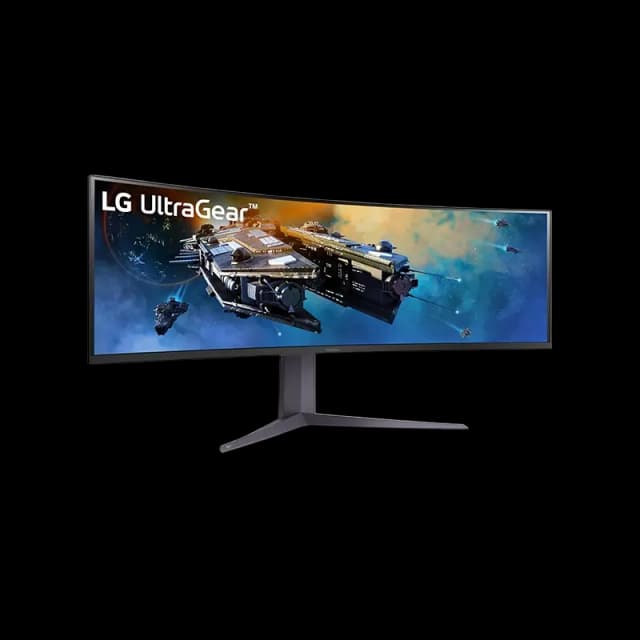
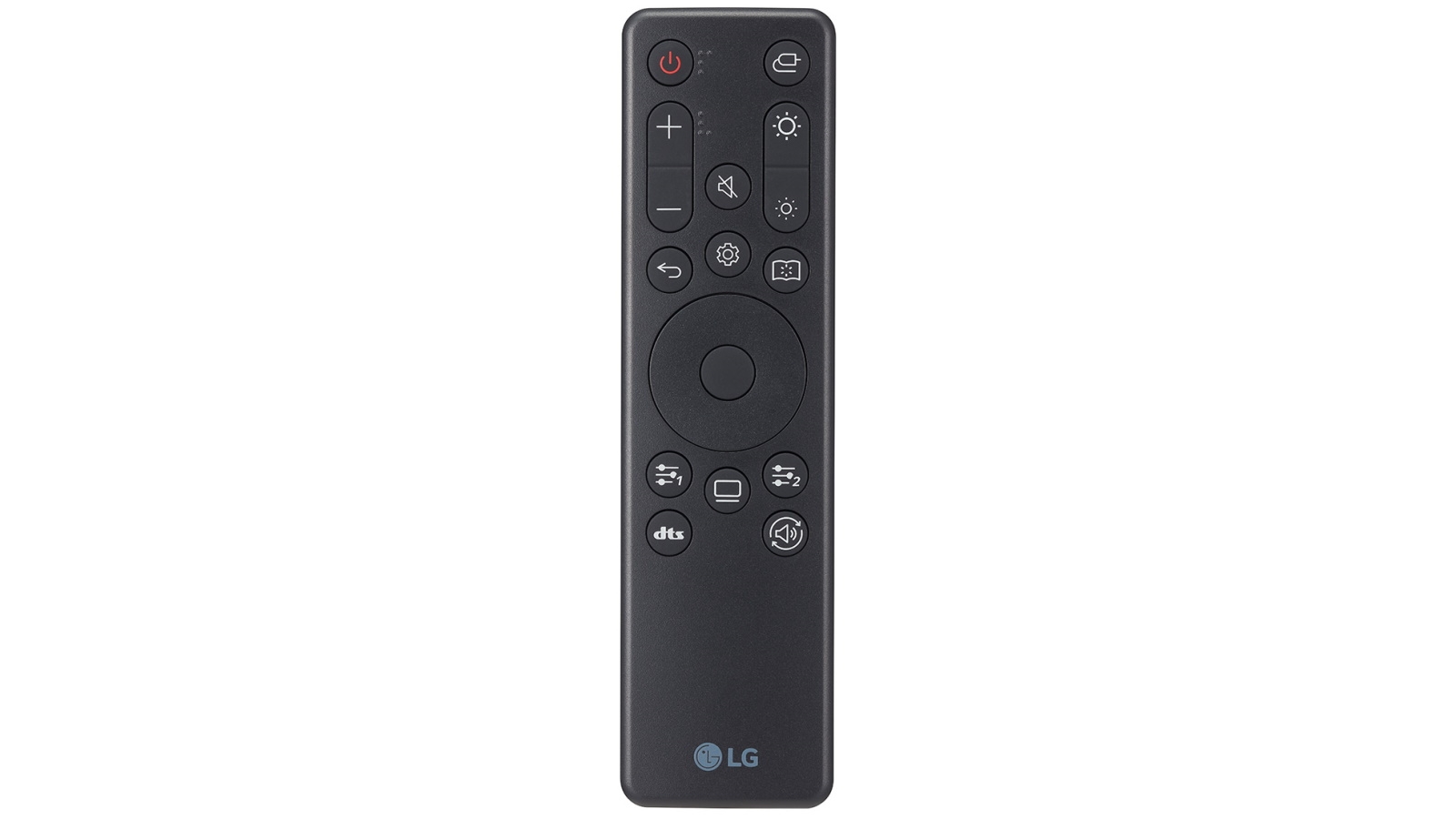
UltraGear™ 45 inch OLED WQHD 240Hz Curved Gaming Monitor with 0.03ms (GtG at Faster)WQHD, G-SYNC® Compatible, FreeSync™ Premium, 800R - 45GR95QE-B
UltraGear™ 45 inch OLED WQHD 240Hz Curved Gaming Monitor with 0.03ms (GtG at Faster)WQHD, G-SYNC® Compatible, FreeSync™ Premium, 800R - 45GR95QE-B
in 2 offers
The lowest price for LG UltraGear 45GR95QE 45in 240Hz 0.03ms HDR10 OLED FreeSync Curved Gaming Monitor right now is $3,739.51 at eBay.com.au.
The all-time low was $1,495.00 on 2 May 2026 — today's price is 150% above the lowest ever. It has been notably cheaper before — worth setting a price alert.
Prices last updated 5 Sept 2026.
LG UltraGear 45GR95QE 45in 240Hz 0.03ms HDR10 OLED FreeSync Curved Gaming Monitor
UltraGear™ 45 inch OLED WQHD 240Hz Curved Gaming Monitor with 0.03ms (GtG at Faster)WQHD, G-SYNC® Compatible, FreeSync™ Premium, 800R - 45GR95QE-B
UltraGear™ 45 inch OLED WQHD 240Hz Curved Gaming Monitor with 0.03ms (GtG at Faster)WQHD, G-SYNC® Compatible, FreeSync™ Premium, 800R - 45GR95QE-B

