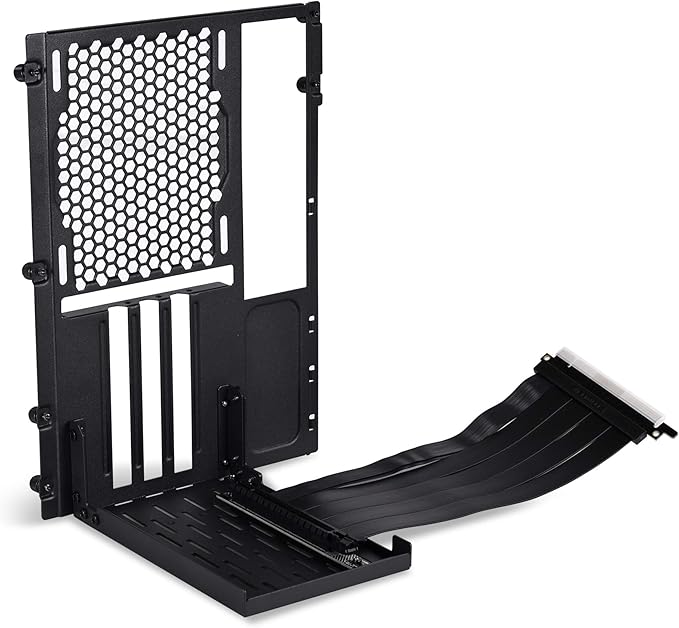
Enables Vertical GPU Installation, 7.87" PCIe Riser Cable, PCIe x16 Interface, Supports PCIe 2.0 & 3.0 Protocols, Data Transfer Speeds up to 8 Gb/s, SGCC Steel Construction, Works with LANCOOL II Computer Cases Put your graphics card on full display using the LANCOOL II-1X Vertical GPU Kit from Lian Li. Designed specifically for the LANCOOL II computer case this riser kit is comprised of a mounting bracket made from SGCC steel. The included PCIe riser cable measures 7.87 and sports an x16 interface with support for transfer speeds up to 8 Gb/s and PCIe 2.0 and 3.0 protocols. Please note this kit is not compatible with PCIe 4.0 or NVIDIA RTX 3080 and 3090 graphics cards.
Enables Vertical GPU Installation, 7.87" PCIe Riser Cable, PCIe x16 Interface, Supports PCIe 2.0 & 3.0 Protocols, Data Transfer Speeds up to 8 Gb/s, SGCC Steel Construction, Works with LANCOOL II Computer Cases Put your graphics card on full display using the LANCOOL II-1X Vertical GPU Kit from Lian Li. Designed specifically for the LANCOOL II computer case this riser kit is comprised of a mounting bracket made from SGCC steel. The included PCIe riser cable measures 7.87 and sports an x16 interface with support for transfer speeds up to 8 Gb/s and PCIe 2.0 and 3.0 protocols. Please note this kit is not compatible with PCIe 4.0 or NVIDIA RTX 3080 and 3090 graphics cards.
in 3 offers
The lowest price for Lian Li Lancool II-1X Vertical Gpu Kit right now is $69.00 at Umart, compared across 3 retailers.
The all-time low was $69.00 on 4 June 2026. That's the lowest price we've ever tracked — a great time to buy.
Prices last updated 2 July 2026.
Lian Li Lancool II-1X Vertical Gpu Kit
Enables Vertical GPU Installation, 7.87" PCIe Riser Cable, PCIe x16 Interface, Supports PCIe 2.0 & 3.0 Protocols, Data Transfer Speeds up to 8 Gb/s, SGCC Steel Construction, Works with LANCOOL II Computer Cases Put your graphics card on full display using the LANCOOL II-1X Vertical GPU Kit from Lian Li. Designed specifically for the LANCOOL II computer case this riser kit is comprised of a mounting bracket made from SGCC steel. The included PCIe riser cable measures 7.87 and sports an x16 interface with support for transfer speeds up to 8 Gb/s and PCIe 2.0 and 3.0 protocols. Please note this kit is not compatible with PCIe 4.0 or NVIDIA RTX 3080 and 3090 graphics cards.
Enables Vertical GPU Installation, 7.87" PCIe Riser Cable, PCIe x16 Interface, Supports PCIe 2.0 & 3.0 Protocols, Data Transfer Speeds up to 8 Gb/s, SGCC Steel Construction, Works with LANCOOL II Computer Cases Put your graphics card on full display using the LANCOOL II-1X Vertical GPU Kit from Lian Li. Designed specifically for the LANCOOL II computer case this riser kit is comprised of a mounting bracket made from SGCC steel. The included PCIe riser cable measures 7.87 and sports an x16 interface with support for transfer speeds up to 8 Gb/s and PCIe 2.0 and 3.0 protocols. Please note this kit is not compatible with PCIe 4.0 or NVIDIA RTX 3080 and 3090 graphics cards.
Last updated at 02/07/2026 03:38:37
Lian Li Lancool II 1X Vertical Graphics Card Holder - Case Accessories
Delivery $12.73
Lian Li Lancool II 1X Vertical Graphics Card Holder - Case Accessories
Delivery $12
Lian-Li Premium PCI-E x16 3.0 Black Extender Riser Cable 200mm and Covert Bracket Mount for LANCOOL II | LAN2-1X
Delivery between 7–13 July $48.38
originally posted on microcenter.com
I’ve used this in so many builds. The vertical mount can be a little more rigid in my opinion. It’s nice that you can adjust it in two ways, one of those ways to accommodate fans below your GPU and the other to accommodate for more space above the GPU to clear cpu coolers. This was not offered with a pcie 4.0 riser cable when I think it should have been, and also should be offered in white considered the many different white versions of the Lancool line. You can always paint it like I did too.
originally posted on newegg.com
If you're doing a air system, this case is the one for you but if you're into water it's a real challenge to get a pump etc in there. If you have a big graphics card (Mine is 12 inches) it makes it worse. I had to go vertical mount and it was still tough! Took me two solid weeks to get it built because every time I thought I had it made I'd run into another snag and have to order another something or other. I had to bump out the top two inches to get it all in there. Also added a HDD led to the top and it looks original but LL really should have had that option.
originally posted on microcenter.com
The hardware is meant to accommodate a GPU vertically in a Lancool II, but blocks the other PCIe slots on an ATX motherboard (Auros 570 Pro Wifi). My system has 2 other add on cards that would be blocked by this device. The pieces of metal are joined by rivets instead of screws. I had to do some primitive metal work to resolve. Look for an alternative vertical mount if you have other add on cards.
| Connector 1 | 1 x PCIe 3.0 x16 |
| Connector 2 | 1 x PCIe 3.0 x16 |
| Material of Construction | Steel |
| Cable Length | 7.87" / 200 mm |
| Dimensions | 5.55 x 5.55 x 4.65" / 141 x 141 x 118 mm |
Lian Li Lancool II 1X Vertical Graphics Card Holder - Case Accessories
Delivery $12.73
Lian Li Lancool II 1X Vertical Graphics Card Holder - Case Accessories
Delivery $12
Lian-Li Premium PCI-E x16 3.0 Black Extender Riser Cable 200mm and Covert Bracket Mount for LANCOOL II | LAN2-1X
Delivery between 7–13 July $48.38
I’ve used this in so many builds. The vertical mount can be a little more rigid in my opinion. It’s nice that you can adjust it in two ways, one of those ways to accommodate fans below your GPU and the other to accommodate for more space above the GPU to clear cpu coolers. This was not offered with a pcie 4.0 riser cable when I think it should have been, and also should be offered in white considered the many different white versions of the Lancool line. You can always paint it like I did too.
If you're doing a air system, this case is the one for you but if you're into water it's a real challenge to get a pump etc in there. If you have a big graphics card (Mine is 12 inches) it makes it worse. I had to go vertical mount and it was still tough! Took me two solid weeks to get it built because every time I thought I had it made I'd run into another snag and have to order another something or other. I had to bump out the top two inches to get it all in there. Also added a HDD led to the top and it looks original but LL really should have had that option.
The hardware is meant to accommodate a GPU vertically in a Lancool II, but blocks the other PCIe slots on an ATX motherboard (Auros 570 Pro Wifi). My system has 2 other add on cards that would be blocked by this device. The pieces of metal are joined by rivets instead of screws. I had to do some primitive metal work to resolve. Look for an alternative vertical mount if you have other add on cards.
The product is not bad, good quality, and presentation, however, been a product of the same brand fo the specific case, it should be perfectly fitting, unfortunately, it is not a perfect fitting.Since the bracket hangs leaving a space bellow for ventilation, it also makes the GPU (mine is Asus STRIX) tilted to the back and not straight.Removing the GPU from the bracket or the bracket from the case should be a snap, however, it is NOT and in fact a Pain in the neck,At $35, Phanteks-PH-VGPUKT_02-Universal-Vertical-Pci/dp/B07MW73HTJ, is a much better proposition
Put together a small pc and needed to add a GPU for an arcade cabinet.This product allowed me to extend the GPU connection on the mother board to be able to connect a Nvidia GPU. It would not fit inside the PC case. This extender is easy to set up and connects very well. Will definitely buy again.
It is poorly designed. The build quality of the parts are great. It is all metal and everything but the holes do not line up. I had to drill out the holes to make them big enough. Then to keep it from sagging I had to crank the screws in. That was also a nightmare because unlike other vertical mounts the GPU screws are on the inside. This causes the back fan to get in the way of the screw making screwing it a nightmare. All in all I like the look, but I would suggest living without this one.
In summary, I love the look of the layout in my case with the Video Card mounted in this adapter and would love it even more if I could actually use the computer. As graphics cards continue to grow, hanging them off of PCI slots is an increasingly bad idea. Vertical mounts, removing the weight from the motherboard PCI slots, are becoming a necessity rather than just a visual choice. I have a medium weight card that sags and a much heavier card on pre-order that will require some sort of support aside from the PCI slot. I had hopes for this to be the fix and hopefully I just got one that was overlooked at some point in the QC path. **Update 12.03.20** I'm not pushing my rating up to a full 5 eggs because of the lack of direction in the package regarding setting the ... MoreIn summary, I love the look of the layout in my case with the Video Card mounted in this adapter and would love it even more if I could actually use the computer. As graphics cards continue to grow, hanging them off of PCI slots is an increasingly bad idea. Vertical mounts, removing the weight from the motherboard PCI slots, are becoming a necessity rather than just a visual choice. I have a medium weight card that sags and a much heavier card on pre-order that will require some sort of support aside from the PCI slot. I had hopes for this to be the fix and hopefully I just got one that was overlooked at some point in the QC path. **Update 12.03.20** I'm not pushing my rating up to a full 5 eggs because of the lack of direction in the package regarding setting the PCIE to 3.0 on newer combinations that default to 4.0. So if you are running a new X570 series board with a PCIE 4.0 capable GPU you must go into the BIOS and set the PCIE to 3.0 prior to using this setup. I ended up going a different route altogether with a new case that came with a vertical mount and riser cable. Had the same issue and only after a lot of research did I find in someone's review of the case that the PCIE has to be set to 3.0 on certain combinations.
Although the bracket is made for the case it didn't fit in right and I barely got my motherboard in there along with it. The graphics card which isn't one of the larger ones, (EVGA 2 fan, XC) wouldn't fit into the slot or screw into place. Ultimately I had to unscrew the riser from the bracket, connect the card, then use zip ties and metal pegs to hold the card in place. The screws that come with the case couldn't close the gap between the card and the bracket. I'm worried the card could be damaged from all the in and out the card had to do with the riser to try and get it into place. Once in place using the combo I mentioned the card looks nice sitting there on the bracket, but the work and makeshift methods I had to use to get it there isn't worth it. Should I ... MoreAlthough the bracket is made for the case it didn't fit in right and I barely got my motherboard in there along with it. The graphics card which isn't one of the larger ones, (EVGA 2 fan, XC) wouldn't fit into the slot or screw into place. Ultimately I had to unscrew the riser from the bracket, connect the card, then use zip ties and metal pegs to hold the card in place. The screws that come with the case couldn't close the gap between the card and the bracket. I'm worried the card could be damaged from all the in and out the card had to do with the riser to try and get it into place. Once in place using the combo I mentioned the card looks nice sitting there on the bracket, but the work and makeshift methods I had to use to get it there isn't worth it. Should I need to do any more or move it for any reason, all that will have to be redone. I wouldn't recommend this to anyone.
I ended up having to customize the bracket partially in order to fit everything properly. However, the PCIe cable did not work. I removed it from the bracket to alter the bracket, and when I tested the cable it would not send a signal. I purchased the Corsair PCIe riser cable and the PC has been performing perfectly since.The bracket was designed for my case, but didnt seat properly. The PCIe riser was broken out of the box.
I saw some other reviews online in regards to other users being able to use this Vertical GPU Kit for the LANCOOL II in their PC-011 Dynamic (Non-XL). I recently upgraded graphics cards to a 2.5 slot one with the oversized heat syncs so GPU Sag became one of my fears. Upon checking out the other Vertical GPU Mounts, including the one for the PC-011 Dynamic itself, some seemed a bit flimsy and Some required you to remove the bottom fan (which i didnt want).So I settled for this Lan-Cool II one because of its sturdy bracket. The bracket connected well to my PC-011 Case and sat right ontop of one of my Case Fans for further stability. Now my GPU doesnt feel so flimsy.However, since this kit only came with a 3.0 Riser cable i did have to purchase a separate 4.0 ... MoreI saw some other reviews online in regards to other users being able to use this Vertical GPU Kit for the LANCOOL II in their PC-011 Dynamic (Non-XL). I recently upgraded graphics cards to a 2.5 slot one with the oversized heat syncs so GPU Sag became one of my fears. Upon checking out the other Vertical GPU Mounts, including the one for the PC-011 Dynamic itself, some seemed a bit flimsy and Some required you to remove the bottom fan (which i didnt want).So I settled for this Lan-Cool II one because of its sturdy bracket. The bracket connected well to my PC-011 Case and sat right ontop of one of my Case Fans for further stability. Now my GPU doesnt feel so flimsy.However, since this kit only came with a 3.0 Riser cable i did have to purchase a separate 4.0 cable that would be compatible with my Card/Motherboard combo.
| Connector 1 | 1 x PCIe 3.0 x16 |
| Connector 2 | 1 x PCIe 3.0 x16 |
| Material of Construction | Steel |
| Cable Length | 7.87" / 200 mm |
| Dimensions | 5.55 x 5.55 x 4.65" / 141 x 141 x 118 mm |