Logitech Buy MX Anywhere 3S Wireless Bluetooth Mouse in Graphite
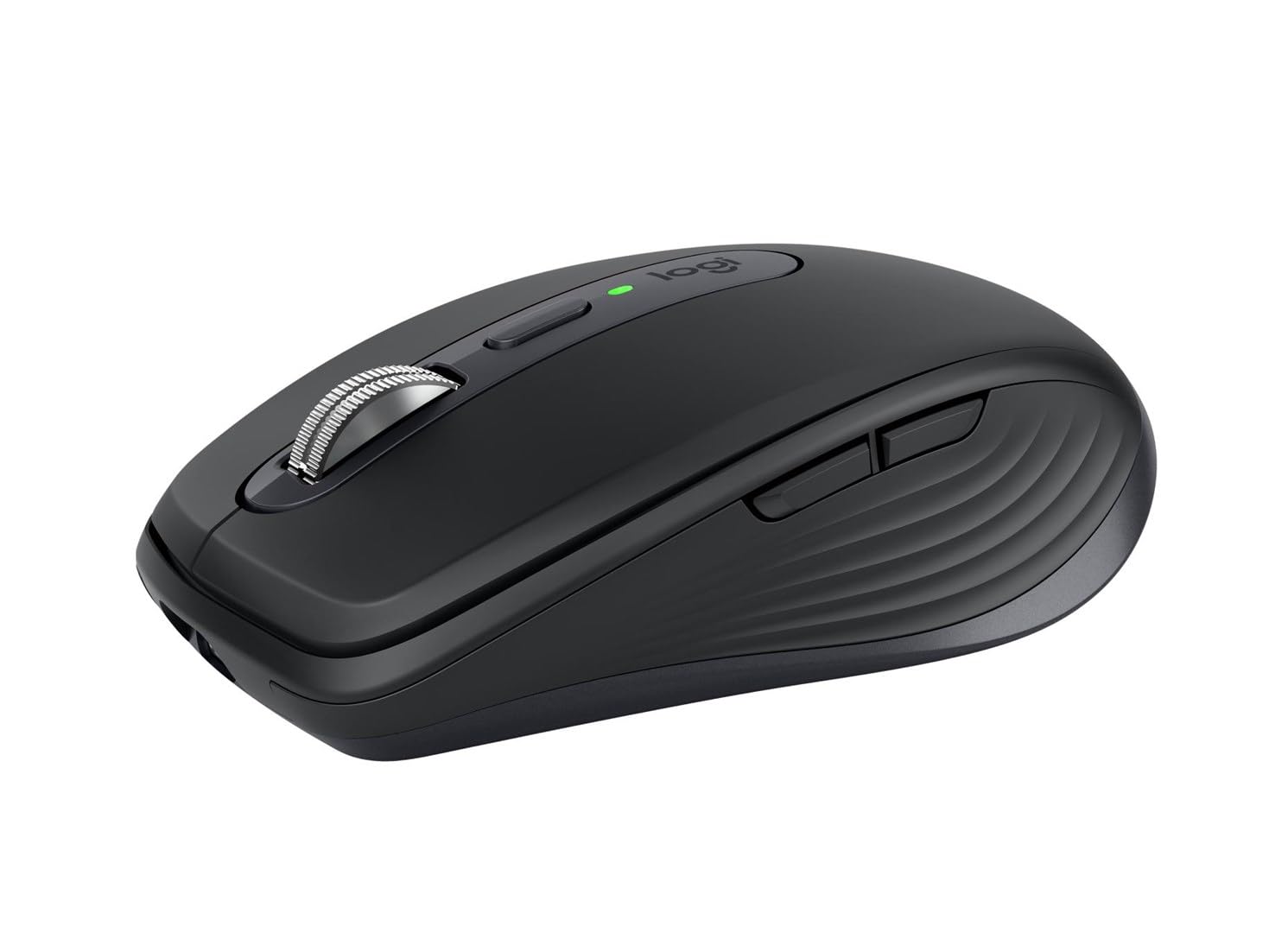
Tracks Anywhere, Goes Everywhere: Work on any surface, even glass (1), with MX Anywhere 3S Bluetooth Mouse – now with an 8K DPI sensor so you can cover more ground with subtle movement Deeper Flow with Quiet Clicks: MX Anywhere 3S Wireless Mouse introduces Quiet Clicks – the same satisfying feel but with less click noise (than MX Anywhere 3) for less distraction and more focus Scroll 1000 Lines Per Second: With MagSpeed, Logitech's fastest (5) and most precise scroll wheel (4) Multi-Device, Multi-OS: Connect with up to 3 devices via Bluetooth on Windows, macOS, Chrome OS or Linux. Compatible with Logi Bolt USB receiver only (receiver not included) (6) Seamless Connectivity: MX Anywhere 3S portable mouse is Engineered for Intel Evo which verifies it meets technical specifications for optimal Bluetooth connection: no dongles, no wires, no hassle Optimize Your Workflow: Work across devices, set tracking speed, customize buttons and use ready-made app-specific customizations with Logi Options+ (7) Quick Charging, Long-Lasting USB C Mouse: Stays powered for up to 70 days on a full charge and lasts up to 3 hours off a 1-minute charge (8); charge with the included USB C cable Made with Recycled Plastic: Plastic parts in MX Anywhere 3S include certified post-consumer recycled plastic – 78% for Graphite, 61% for Pale Grey and Rose (10)
Tracks Anywhere, Goes Everywhere: Work on any surface, even glass (1), with MX Anywhere 3S Bluetooth Mouse – now with an 8K DPI sensor so you can cover more ground with subtle movement Deeper Flow with Quiet Clicks: MX Anywhere 3S Wireless Mouse introduces Quiet Clicks – the same satisfying feel but with less click noise (than MX Anywhere 3) for less distraction and more focus Scroll 1000 Lines Per Second: With MagSpeed, Logitech's fastest (5) and most precise scroll wheel (4) Multi-Device, Multi-OS: Connect with up to 3 devices via Bluetooth on Windows, macOS, Chrome OS or Linux. Compatible with Logi Bolt USB receiver only (receiver not included) (6) Seamless Connectivity: MX Anywhere 3S portable mouse is Engineered for Intel Evo which verifies it meets technical specifications for optimal Bluetooth connection: no dongles, no wires, no hassle Optimize Your Workflow: Work across devices, set tracking speed, customize buttons and use ready-made app-specific customizations with Logi Options+ (7) Quick Charging, Long-Lasting USB C Mouse: Stays powered for up to 70 days on a full charge and lasts up to 3 hours off a 1-minute charge (8); charge with the included USB C cable Made with Recycled Plastic: Plastic parts in MX Anywhere 3S include certified post-consumer recycled plastic – 78% for Graphite, 61% for Pale Grey and Rose (10)
Tracks Anywhere, Goes Everywhere: Work on any surface, even glass (1), with MX Anywhere 3S Bluetooth Mouse – now with an 8K DPI sensor so you can cover more ground with subtle movement Deeper Flow with Quiet Clicks: MX Anywhere 3S Wireless Mouse introduces Quiet Clicks – the same satisfying feel but with less click noise (than MX Anywhere 3) for less distraction and more focus Scroll 1000 Lines Per Second: With MagSpeed, Logitech's fastest (5) and most precise scroll wheel (4) Multi-Device, Multi-OS: Connect with up to 3 devices via Bluetooth on Windows, macOS, Chrome OS or Linux. Compatible with Logi Bolt USB receiver only (receiver not included) (6) Seamless Connectivity: MX Anywhere 3S portable mouse is Engineered for Intel Evo which verifies it meets technical specifications for optimal Bluetooth connection: no dongles, no wires, no hassle Optimize Your Workflow: Work across devices, set tracking speed, customize buttons and use ready-made app-specific customizations with Logi Options+ (7) Quick Charging, Long-Lasting USB C Mouse: Stays powered for up to 70 days on a full charge and lasts up to 3 hours off a 1-minute charge (8); charge with the included USB C cable Made with Recycled Plastic: Plastic parts in MX Anywhere 3S include certified post-consumer recycled plastic – 78% for Graphite, 61% for Pale Grey and Rose (10)
Tracks Anywhere, Goes Everywhere: Work on any surface, even glass (1), with MX Anywhere 3S Bluetooth Mouse – now with an 8K DPI sensor so you can cover more ground with subtle movement Deeper Flow with Quiet Clicks: MX Anywhere 3S Wireless Mouse introduces Quiet Clicks – the same satisfying feel but with less click noise (than MX Anywhere 3) for less distraction and more focus Scroll 1000 Lines Per Second: With MagSpeed, Logitech's fastest (5) and most precise scroll wheel (4) Multi-Device, Multi-OS: Connect with up to 3 devices via Bluetooth on Windows, macOS, Chrome OS or Linux. Compatible with Logi Bolt USB receiver only (receiver not included) (6) Seamless Connectivity: MX Anywhere 3S portable mouse is Engineered for Intel Evo which verifies it meets technical specifications for optimal Bluetooth connection: no dongles, no wires, no hassle Optimize Your Workflow: Work across devices, set tracking speed, customize buttons and use ready-made app-specific customizations with Logi Options+ (7) Quick Charging, Long-Lasting USB C Mouse: Stays powered for up to 70 days on a full charge and lasts up to 3 hours off a 1-minute charge (8); charge with the included USB C cable Made with Recycled Plastic: Plastic parts in MX Anywhere 3S include certified post-consumer recycled plastic – 78% for Graphite, 61% for Pale Grey and Rose (10)
in 15 offers
The lowest price for Logitech Buy MX Anywhere 3S Wireless Bluetooth Mouse in Graphite right now is $98.00 at Amazon.com.au, compared across 13 retailers.
The all-time low was $66.99 on 20 Sept 2026 — today's price is 46% above the lowest ever. It has been notably cheaper before — worth setting a price alert.
Prices last updated 20 Oct 2026.
Last updated at 20/10/2026 22:49:58
Logitech MX Anywhere 3S Compact Wireless Mouse, Graphite
Free delivery
Affiliate Disclosure: We may receive a small commission for purchases made through this link at no extra cost to you. This helps support our site. Thank you!
Logitech MX Anywhere 3S Wireless 8000 DPI Mouse - Rose
Delivery between Thu – Tue $11.64
Logitech MX Anywhere 3S Compact Wireless Performance Mouse (Graphite)
Delivery between 22 Oct – 2 Nov $11.64
Logitech MX Anywhere 3S Wireless Mouse - Graphite
Free delivery
Logitech MX ANYWHERE 3S Wireless Mouse, Rose
Delivery $12
Logitech MX Anywhere 3S Compact Wireless Performance Mouse - Graphite 910-006932
Delivery between Fri – Mon $6
Logitech MX Anywhere 3S Wireless Bluetooth Mouse in Graphite 910-006932
Delivery $22
Logitech MX Anywhere 3S Compact Wireless Mouse - Pale Grey
Delivery between 24–29 Oct $7.95
Logitech MX Anywhere 3S Wireless Mouse (Rose)
Delivery $8.99
Logitech MX Anywhere 3S Mouse (Graphite)
Next-day delivery $4
originally posted on logitech.com
So I originally bought the MX Master 3S (which I miss terribly), however my dog was able to grab it from the table and in a short amount of time render it completely unusable. Instead of buying another one, I decided to purchase the MX Anywhere 3S. The mouse is much smaller than the MX Master, so it fits easier in to most bag pockets for traveling. I use the mouse between my Windows laptop and my MacBook Pro. When switching between devices, it is seamless. The battery life is great, which is also another plus for when on the road. Also, having the ability to switch between free spin and ratchet is really key when dealing with thousands of lines of code. The addition of the Logi Options+ software is also very helpful for establishing key shortcuts or other operating ... MoreSo I originally bought the MX Master 3S (which I miss terribly), however my dog was able to grab it from the table and in a short amount of time render it completely unusable. Instead of buying another one, I decided to purchase the MX Anywhere 3S. The mouse is much smaller than the MX Master, so it fits easier in to most bag pockets for traveling. I use the mouse between my Windows laptop and my MacBook Pro. When switching between devices, it is seamless. The battery life is great, which is also another plus for when on the road. Also, having the ability to switch between free spin and ratchet is really key when dealing with thousands of lines of code. The addition of the Logi Options+ software is also very helpful for establishing key shortcuts or other operating system actions via the mouse and keyboard. Great job!
originally posted on bestbuy.com
Logitech MX Anywhere 3SWhile being on the small side (since it is designed as a mobile mouse) it has a great feel. I like the ability to switch between click and smooth scrolling like some of the other Logitech products by clicking the small button just behind the scroll wheel, on top of the mouse. This mouse has the familiar Logitech satin finish, side buttons for moving back and forth in a webpage and has a nice contrast with the weighted, metal scroll wheel.I am using this mouse to replace my daily driver - an older MX Master mouse - that is getting kind of worn out. The movement is very smooth and the buttons have a very positive “click” to them without being hard to press. The laser reads on every surface I have tried it on. The button on the bottom allows ... MoreLogitech MX Anywhere 3SWhile being on the small side (since it is designed as a mobile mouse) it has a great feel. I like the ability to switch between click and smooth scrolling like some of the other Logitech products by clicking the small button just behind the scroll wheel, on top of the mouse. This mouse has the familiar Logitech satin finish, side buttons for moving back and forth in a webpage and has a nice contrast with the weighted, metal scroll wheel.I am using this mouse to replace my daily driver - an older MX Master mouse - that is getting kind of worn out. The movement is very smooth and the buttons have a very positive “click” to them without being hard to press. The laser reads on every surface I have tried it on. The button on the bottom allows it to b e configured for three different devices and can switch between them with a simple press of the button. It uses either Bluetooth or the new Bolt receiver. I do not have one of the receivers (non is supplied in the box) so I cannot say how well it works, but the new sensors work very well to give the user a solid, precise feel to every movement.Because of the size, it actually fits my space better than the very comfortable mouse it is replacing. I might miss the shape that fit my hand so well, but the precision of the new mouse is so great that I am happy with my swap! I can once again select multiple items with a simple swipe instead of losing the first few as it reset itself halfway through the motion.Logitech has proven itself with quality products for decades. This new version in their Anywhere line is a fitting example of the continual evolution of their designs. I look forward to many years of use for this mouse, as I have had from so many other Logitech mice, since the 90’s.
originally posted on bestbuy.com
The Logitech MX Anywhere 3S is a compact mouse that features accurate, precise tracking, good battery life, and can be connected to up to three devices. As someone who travels with both my work and personal computers, this is a great addition to my bag.I will note right up front that the MX Anywhere 3S is small. I find it comfortable to use with my “fingertip” mouse grip, but those with larger hands, or who prefer a “palm” grip might find it less comfortable.The next thing I’ll mention is the precise tracking. I like being able to move the cursor quite a bit with relatively small movements of the mouse, and the MX Anywhere 3S works great for that.I also want to comment on the scroll wheel. Like many others, there’s a haptic “clicky” feeling to give you ... MoreThe Logitech MX Anywhere 3S is a compact mouse that features accurate, precise tracking, good battery life, and can be connected to up to three devices. As someone who travels with both my work and personal computers, this is a great addition to my bag.I will note right up front that the MX Anywhere 3S is small. I find it comfortable to use with my “fingertip” mouse grip, but those with larger hands, or who prefer a “palm” grip might find it less comfortable.The next thing I’ll mention is the precise tracking. I like being able to move the cursor quite a bit with relatively small movements of the mouse, and the MX Anywhere 3S works great for that.I also want to comment on the scroll wheel. Like many others, there’s a haptic “clicky” feeling to give you feedback as you scroll with the wheel. However, instead of a mechanical implementation, the MX Anywhere 3S takes some sort of electromagnetic approach. That means the clicky feedback can be turned on or off quickly using the button on top of the mouse, it can be made more or less intense using the Options+ software, and it automatically disappears once you begin to scroll quickly, allowing for smoother, faster movement along many pages. It’s very intuitive to use.As far as connectivity goes, I was able to get the MX Anywhere 3S working with both computers right away, out of the box. There’s a small button on the bottom to toggle between paired devices. Also, I’ve only had it a few days, but the battery life seems great, and charging via USB-C port right up front seems very convenient.Overall, I like the MX Anywhere 3S, and would recommend it to anyone who doesn’t mind a fairly compact form factor in their mouse.
| Sensor Type | Optical sensor |
| Polling Rate | 88,133 Hz |
| Switches | Quiet Click buttons |
| Connectivity Type | Wireless |
| Interface | USB-C (for charging) |

Logitech MX Anywhere 3S Compact Wireless Mouse, Graphite
Free delivery
Affiliate Disclosure: We may receive a small commission for purchases made through this link at no extra cost to you. This helps support our site. Thank you!
Logitech MX Anywhere 3S Wireless 8000 DPI Mouse - Rose
Delivery between Thu – Tue $11.64
Logitech MX Anywhere 3S Compact Wireless Performance Mouse (Graphite)
Delivery between 22 Oct – 2 Nov $11.64
Logitech MX Anywhere 3S Wireless Mouse - Graphite
Free delivery
Logitech MX ANYWHERE 3S Wireless Mouse, Rose
Delivery $12
So I originally bought the MX Master 3S (which I miss terribly), however my dog was able to grab it from the table and in a short amount of time render it completely unusable. Instead of buying another one, I decided to purchase the MX Anywhere 3S. The mouse is much smaller than the MX Master, so it fits easier in to most bag pockets for traveling. I use the mouse between my Windows laptop and my MacBook Pro. When switching between devices, it is seamless. The battery life is great, which is also another plus for when on the road. Also, having the ability to switch between free spin and ratchet is really key when dealing with thousands of lines of code. The addition of the Logi Options+ software is also very helpful for establishing key shortcuts or other operating ... MoreSo I originally bought the MX Master 3S (which I miss terribly), however my dog was able to grab it from the table and in a short amount of time render it completely unusable. Instead of buying another one, I decided to purchase the MX Anywhere 3S. The mouse is much smaller than the MX Master, so it fits easier in to most bag pockets for traveling. I use the mouse between my Windows laptop and my MacBook Pro. When switching between devices, it is seamless. The battery life is great, which is also another plus for when on the road. Also, having the ability to switch between free spin and ratchet is really key when dealing with thousands of lines of code. The addition of the Logi Options+ software is also very helpful for establishing key shortcuts or other operating system actions via the mouse and keyboard. Great job!
Logitech MX Anywhere 3SWhile being on the small side (since it is designed as a mobile mouse) it has a great feel. I like the ability to switch between click and smooth scrolling like some of the other Logitech products by clicking the small button just behind the scroll wheel, on top of the mouse. This mouse has the familiar Logitech satin finish, side buttons for moving back and forth in a webpage and has a nice contrast with the weighted, metal scroll wheel.I am using this mouse to replace my daily driver - an older MX Master mouse - that is getting kind of worn out. The movement is very smooth and the buttons have a very positive “click” to them without being hard to press. The laser reads on every surface I have tried it on. The button on the bottom allows ... MoreLogitech MX Anywhere 3SWhile being on the small side (since it is designed as a mobile mouse) it has a great feel. I like the ability to switch between click and smooth scrolling like some of the other Logitech products by clicking the small button just behind the scroll wheel, on top of the mouse. This mouse has the familiar Logitech satin finish, side buttons for moving back and forth in a webpage and has a nice contrast with the weighted, metal scroll wheel.I am using this mouse to replace my daily driver - an older MX Master mouse - that is getting kind of worn out. The movement is very smooth and the buttons have a very positive “click” to them without being hard to press. The laser reads on every surface I have tried it on. The button on the bottom allows it to b e configured for three different devices and can switch between them with a simple press of the button. It uses either Bluetooth or the new Bolt receiver. I do not have one of the receivers (non is supplied in the box) so I cannot say how well it works, but the new sensors work very well to give the user a solid, precise feel to every movement.Because of the size, it actually fits my space better than the very comfortable mouse it is replacing. I might miss the shape that fit my hand so well, but the precision of the new mouse is so great that I am happy with my swap! I can once again select multiple items with a simple swipe instead of losing the first few as it reset itself halfway through the motion.Logitech has proven itself with quality products for decades. This new version in their Anywhere line is a fitting example of the continual evolution of their designs. I look forward to many years of use for this mouse, as I have had from so many other Logitech mice, since the 90’s.
The Logitech MX Anywhere 3S is a compact mouse that features accurate, precise tracking, good battery life, and can be connected to up to three devices. As someone who travels with both my work and personal computers, this is a great addition to my bag.I will note right up front that the MX Anywhere 3S is small. I find it comfortable to use with my “fingertip” mouse grip, but those with larger hands, or who prefer a “palm” grip might find it less comfortable.The next thing I’ll mention is the precise tracking. I like being able to move the cursor quite a bit with relatively small movements of the mouse, and the MX Anywhere 3S works great for that.I also want to comment on the scroll wheel. Like many others, there’s a haptic “clicky” feeling to give you ... MoreThe Logitech MX Anywhere 3S is a compact mouse that features accurate, precise tracking, good battery life, and can be connected to up to three devices. As someone who travels with both my work and personal computers, this is a great addition to my bag.I will note right up front that the MX Anywhere 3S is small. I find it comfortable to use with my “fingertip” mouse grip, but those with larger hands, or who prefer a “palm” grip might find it less comfortable.The next thing I’ll mention is the precise tracking. I like being able to move the cursor quite a bit with relatively small movements of the mouse, and the MX Anywhere 3S works great for that.I also want to comment on the scroll wheel. Like many others, there’s a haptic “clicky” feeling to give you feedback as you scroll with the wheel. However, instead of a mechanical implementation, the MX Anywhere 3S takes some sort of electromagnetic approach. That means the clicky feedback can be turned on or off quickly using the button on top of the mouse, it can be made more or less intense using the Options+ software, and it automatically disappears once you begin to scroll quickly, allowing for smoother, faster movement along many pages. It’s very intuitive to use.As far as connectivity goes, I was able to get the MX Anywhere 3S working with both computers right away, out of the box. There’s a small button on the bottom to toggle between paired devices. Also, I’ve only had it a few days, but the battery life seems great, and charging via USB-C port right up front seems very convenient.Overall, I like the MX Anywhere 3S, and would recommend it to anyone who doesn’t mind a fairly compact form factor in their mouse.
Using this mouse has basically spoiled using any other mouse that isn't an MX with how nice it is (coming from using a lower cost Logitech mouse)! This mouse is the perfect low profile mouse to take with you anywhere if you are a student, remote worker, or someone who travels a lot and wants to be productive on the go. With excellent build quality focused on comfort and tactility in a small form factor, the buttons are very clicky and responsive, the scroll wheel is extremely satisfying, tactile and precise, and there are extremely handy forward and back buttons on the side that are a must have for improved productivity. The hand shape and arch of the mouse is not as tall as other MX/general Logitech mice, but it honestly works perfectly for this mouse, as it's form ... MoreUsing this mouse has basically spoiled using any other mouse that isn't an MX with how nice it is (coming from using a lower cost Logitech mouse)! This mouse is the perfect low profile mouse to take with you anywhere if you are a student, remote worker, or someone who travels a lot and wants to be productive on the go. With excellent build quality focused on comfort and tactility in a small form factor, the buttons are very clicky and responsive, the scroll wheel is extremely satisfying, tactile and precise, and there are extremely handy forward and back buttons on the side that are a must have for improved productivity. The hand shape and arch of the mouse is not as tall as other MX/general Logitech mice, but it honestly works perfectly for this mouse, as it's form factor is perfect for portability while maintaining comfort when using the mouse. The mouse connects via bluetooth, which, while technically has a "slower" response rate in terms of tracking as compared to wired or dongled mice, is actually relatively unnoticable to the untrained eye (you can see it more noticeably on high refresh rate screens, as it seems to run closer to 60FPS on my 144Hz display) and is perfectly fine to keep the mouse dongle-free and still very accurate and performant! The mouse can also remember 3 computers you've connected to at a time as well for seamless computer switching! One of the best parts of the mouse is that it tracks excellent on any surface - better than any mouse I have ever used because of it's special tracking sensor and 4 smooth pads underneath the corners of the mouse! This mouse is a must-have for on the go productivity!
I use an MX Master as my primary "pointing" device on the desk at the office, but that's way too large and bulky to throw in a bag and take with you on the go. The MX Anywhere is a great option for that. This mouse has what feels like a semi ergonomic design, that could also be used right or left handed. I'm right, but my partner is left, and she sometimes grabs my computer mouse, so this works out well for her. Surprisingly a magnetic haptic scroll wheel is included in such a small package. The only downside was that this package is bluetooth only, as I see it's compatible with logitech receivers, but one wasn't included. In retrospect, this might be okay, since I have a bunch of these laying around at home now that almost all my devices are bluetooth capable, and ... MoreI use an MX Master as my primary "pointing" device on the desk at the office, but that's way too large and bulky to throw in a bag and take with you on the go. The MX Anywhere is a great option for that. This mouse has what feels like a semi ergonomic design, that could also be used right or left handed. I'm right, but my partner is left, and she sometimes grabs my computer mouse, so this works out well for her. Surprisingly a magnetic haptic scroll wheel is included in such a small package. The only downside was that this package is bluetooth only, as I see it's compatible with logitech receivers, but one wasn't included. In retrospect, this might be okay, since I have a bunch of these laying around at home now that almost all my devices are bluetooth capable, and the receiver isn't needed anyway. This becomes even more important with the thin form factor of lots of today's laptops and the low number of usb ports, or even my newest one with NO usb A ports at all. Charging over USB C and the ability to connect to 3 different devices are just added features. Logitech has the brushed plastic luxe feel down, and not many can recreate it as nicely as this one feels in the hand. Would recommend this mouse!
I got a new laptop, which didn't have a USB-A port, so using my beloved Logitech M510, was going to be more difficult. I decided on the Logitech MX Anywhere 3S because I can use it with a USB receiver (not provided) or Bluetooth. I've been using the MX Anywhere 3S for about 4 days now on my home laptop, work laptop and my desktop. I really love it and it is the perfect replacement for my trustworthy M510.First, the Logitech MX Anywhere 3S is slightly smaller than my M510, which makes the 3S great for traveling with my laptop. But, the size and fit are very nice and easy to use for long periods of time. The MX Anywhere 3S has a smooth scroll wheel with a great tactile feel. In addition, moving the mouse around on the screen uses simpler, more precise movements, ... MoreI got a new laptop, which didn't have a USB-A port, so using my beloved Logitech M510, was going to be more difficult. I decided on the Logitech MX Anywhere 3S because I can use it with a USB receiver (not provided) or Bluetooth. I've been using the MX Anywhere 3S for about 4 days now on my home laptop, work laptop and my desktop. I really love it and it is the perfect replacement for my trustworthy M510.First, the Logitech MX Anywhere 3S is slightly smaller than my M510, which makes the 3S great for traveling with my laptop. But, the size and fit are very nice and easy to use for long periods of time. The MX Anywhere 3S has a smooth scroll wheel with a great tactile feel. In addition, moving the mouse around on the screen uses simpler, more precise movements, which don't look jerky or too fast. The back and forward buttons are easy to find with your thumb without having to look as well.Secondly, I really like that I can connect/pair my Logitech MX Anywhere 3S mouse to three different devices and easily switch between either of them at anytime. So, I can be using the MX Anywhere 3S with my desktop, then quickly switch to my home laptop or my work laptop with a push of a button on the bottom. It remembers each device and you can see which device is programmed to each easy-switch button in the Logitech Options+ App.Lastly, what I really love is that I can program the different buttons on the MX Anywhere 3S to perform App specific functions by App. For example, in MS-Word I can program the Back button to be Undo and the Forward button to be Redo. But, in Adobe Lightroom, the Back button could be Zoom Out and the Forward button could be Zoom In. I really love this feature and it is been a great time saver for me.As I mentioned, I have only been using this for 4 days, so I am still figuring out the best way to configure my new mouse and what I want the buttons to do in each App. I haven't checked to see if those configurations are automatically synced to my other PCs (i.e., do they sync to my desktop, work laptop, and home laptop). But, I really like how simple Logitech has made this mouse to setup, configure, and use. It automatically setup the main Apps on my system like MS-Office. But, you can easily program the buttons for any other App in the Logitech Options+ App too.I highly recommend the Logitech MX Anywhere 3S. It works great for desktop and mobile use. Over my old M510, this is a lot more precise and smoother using it. It is also considerably more configurable and saves time with repetitive tasks. It is a great value.
Logitech’s latest premium offering, the MX Anywhere 3S sets a new bar for mobile productivity. The design and build continue the direction set by their MX Master 3 and 3S. The new sensor allows for precision control wherever you are working. While compact, it’s still comfortable and has a nicer feel than the MX Anywhere 2 mouse that I’m upgrading from.The MX Anywhere 3S has 2 quiet click buttons and a nearly silent Scroll wheel.The scroll wheel defaults to ratcheting one line at a time but if you give it a good push it will autoswitch to a flywheel which allows you to scroll hundreds of lines at a time. Horizontal scrolling is achieved by holding one of the side buttons while scrolling with the main flywheel, a trick borrowed from it’s predecessor. The standard ... MoreLogitech’s latest premium offering, the MX Anywhere 3S sets a new bar for mobile productivity. The design and build continue the direction set by their MX Master 3 and 3S. The new sensor allows for precision control wherever you are working. While compact, it’s still comfortable and has a nicer feel than the MX Anywhere 2 mouse that I’m upgrading from.The MX Anywhere 3S has 2 quiet click buttons and a nearly silent Scroll wheel.The scroll wheel defaults to ratcheting one line at a time but if you give it a good push it will autoswitch to a flywheel which allows you to scroll hundreds of lines at a time. Horizontal scrolling is achieved by holding one of the side buttons while scrolling with the main flywheel, a trick borrowed from it’s predecessor. The standard forward and back buttons sit on the left side for easy access by right handers.Logitech has upgraded their mouse control software to Options+, which is a nice visual redesign from what’s been used up until now. Options + is, unfortunately, not compatible with some of Logitech's earlier mice in the MX Master family. Fear not, the original Options software will still work with the MX Anywhere 3S.The mouse comes with a USB-A to USB-C cable for charging. However, you can use any USB-C charger. I used the charger for my laptop. The specs indicate it will hold a charge for 70 days of usage. While I wasn’t able to verify that, a full day’s standard office work barely drained the battery at all. Logitech has abandoned their unifying receiver with this mouse. It’s designed to work with Bluetooth and the Bolt receiver only. The Bolt receiver is designed for offices which have many Bluetooth devices that could otherwise interfere with each other.Adding the mouse in Logitech Options+ was straightforward. Once added, I was able to customize the buttons for shortcuts I often use for closing windows and opening commonly used programs. The high resolution made it a cinch to use, even on large screens. It worked equally well on my Ipad as it did on my laptop. I would recommend this in a wholeheartedly to anyone looking to improve their productivity on the go and at a desk, too!
I had been using Logitech MK270 pair for working while traveling and needed a new mouse. I was motivated to get an MX Anywhere because of good MagSpeed stories. I loved Hyperscroll two models ago, but it had bugs on my last mouse and I quit using it. The MagSpeed on the MX Anywhere is perfect. I don’t need to switch it between modes. It scrolls in the normal ratchet mode until I spin the wheel; then the ratchet lets go and the wheel spins. When it stops, there is a very satisfying click for feedback. This is as perfect as perfect can be. I use MagSpeed a lot for scrolling long code files and web pages. I also like the Web Connect online utility for pairing the mouse to the Logi Bolt receiver that came with the keyboard. I have never liked installing software just to ... MoreI had been using Logitech MK270 pair for working while traveling and needed a new mouse. I was motivated to get an MX Anywhere because of good MagSpeed stories. I loved Hyperscroll two models ago, but it had bugs on my last mouse and I quit using it. The MagSpeed on the MX Anywhere is perfect. I don’t need to switch it between modes. It scrolls in the normal ratchet mode until I spin the wheel; then the ratchet lets go and the wheel spins. When it stops, there is a very satisfying click for feedback. This is as perfect as perfect can be. I use MagSpeed a lot for scrolling long code files and web pages. I also like the Web Connect online utility for pairing the mouse to the Logi Bolt receiver that came with the keyboard. I have never liked installing software just to link receivers. I don’t customize my HID so that it’s easier to switch between computers with different devices.
The TL:DR version of my review: Great compact mouse—maybe even the best on the current market—that shines against lesser competition. However, several nice features are missing that were once included.I’m going to up-front about the Logitech Anywhere MX 3S mouse. On one hand, it’s one of the nicest mice you can buy on today’s (2023) market. On the other hand, it’s missing several useful features that the Anywhere MX 2S had…and I’m definitely missing those features.The mouse has a lot going for it. It’s practically silent—no audible button clinks or wheel turns. The buttons click with an affirming ‘click’, as do the side buttons (forward/back for most of us). The mouse turns on instantly and connects to via Bluetooth to my 12th Gen Intel Asus laptop in less than 2 ... MoreThe TL:DR version of my review: Great compact mouse—maybe even the best on the current market—that shines against lesser competition. However, several nice features are missing that were once included.I’m going to up-front about the Logitech Anywhere MX 3S mouse. On one hand, it’s one of the nicest mice you can buy on today’s (2023) market. On the other hand, it’s missing several useful features that the Anywhere MX 2S had…and I’m definitely missing those features.The mouse has a lot going for it. It’s practically silent—no audible button clinks or wheel turns. The buttons click with an affirming ‘click’, as do the side buttons (forward/back for most of us). The mouse turns on instantly and connects to via Bluetooth to my 12th Gen Intel Asus laptop in less than 2 seconds (which is much faster than the MX 2S that I own). Tracking is spot-on. This thing points exactly where it’s meant to, even on the stock Windows 12 settings. Likewise, scrolling is very smooth with the scroll wheel…and super quiet, as I mentioned previously. It even feels more accurate than my MX 2S.So why not a 5-star rating? I’ve used the Logitech Anywhere MX 2S for the last several years, and I honestly don’t feel like the 3S is an upgrade. My first gripe is the 3S’s scroll wheel not moving from side-to-side to control right and left scrolling. I often keep my laptop screen divided in two, making webpages too wide for the split screen view. With my MX 2S, I can scroll either page from top to bottom and right to left. The 3S doesn’t have the right to left scrolling. Second: The 3S doesn’t have the same solid feeling or ‘heft’ that the 2S does. I’m guessing that they both have about the same overall weight, but the 2S has a bit of weight on the bottom that makes it feel sturdier/weightier during use. And my final gripe is the software that Logitech hopes you install. No matter what I did, including reinstalling the software, I could not get the software to read that the mouse was connected to my PC. So, for me, the software was completely useless.Now, this isn’t to say that the Logitech Anywhere MX 3S isn’t a nice mouse—trust me, it is! It’s just missing a few key components that I happen to use frequently. If you’re like me and use the side-to-side scrolling, then you might keep looking. But if you’re like the majority of people and don’t care about the sideways scrolling, then I can confidently recommend this mouse, as it’s probably the nicest compact mouse on the market today.
I received the Logitech bluetooth mouse and am so happy I ordered this one! Upon opening up the box you'll find a charging cable included but will need to provide a charger or use your computer's USB port. It holds a charge extremely well. Since I received it a few days back, and I've been using quite frequently, it's still at 95% charge. There is a small green light on top that blinks while it's charging and turns off when done.You are offered 3 easy switch settings on the base so it can be connected via bluetooth to 3 different devices ~ desktop, laptop or tablet. That connection works flawlessly ~ paired with every device immediately without a hitch. It has a horizontal scroll feature while holding one of the 2 buttons on left side, a pointer speed setup with ... MoreI received the Logitech bluetooth mouse and am so happy I ordered this one! Upon opening up the box you'll find a charging cable included but will need to provide a charger or use your computer's USB port. It holds a charge extremely well. Since I received it a few days back, and I've been using quite frequently, it's still at 95% charge. There is a small green light on top that blinks while it's charging and turns off when done.You are offered 3 easy switch settings on the base so it can be connected via bluetooth to 3 different devices ~ desktop, laptop or tablet. That connection works flawlessly ~ paired with every device immediately without a hitch. It has a horizontal scroll feature while holding one of the 2 buttons on left side, a pointer speed setup with an Extend Sensor range to 8K DPI from 200 to 8000 and scroll wheel speed modes 0-100%. The default is 50% and I left it at that as it seemed the best scrolling for me. The scroll wheel works smoothly. You will need to access the Logi app to set some of the features but the 3 button device switch you can use without using the app as well as the scroll wheel, unless you need to adjust the speed.It works beautifully on multiple surfaces just as advertised. I tried it on a vinyl kitchen tablecloth, wood desk, my kitchen counter and a glass top computer stand. This mouse worked perfectly on them all. Haven't needed a mouse pad yet. Very impressive!I find it to be extremely responsive in all areas and very comfortable to use for long periods of time. I have small hands and it feels great.I highly recommend this Logitech mouse and it won't disappoint you. Definitely a winner and an A+ purchase!
| Sensor Type | Optical sensor |
| Polling Rate | 88,133 Hz |
| Switches | Quiet Click buttons |
| Connectivity Type | Wireless |
| Interface | USB-C (for charging) |