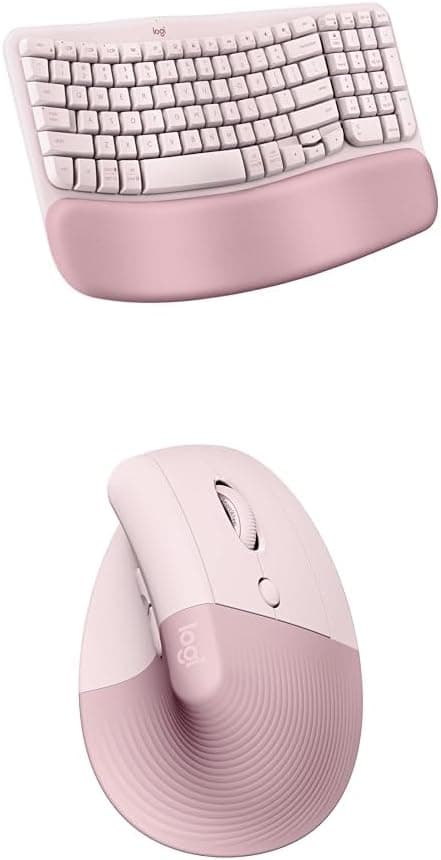
Logitech Wave Keys Wireless Ergonomic Keyboard - Rose [920-012514]
A wireless ergonomic keyboard with a cushioned palm rest, for natural, feel-good typing throughout the day. Familiar typing. Only comfier. *Compared to a traditional Logitech keyboard without palm rest Experience the delights of a wave-shaped keyboard with a cushioned palm rest. Enjoy more wrist support, less pressure, and a natural typing posture throughout the day. Comfy typing, all day long. This compact keyboard’s wavy design places your hands, wrists and forearms in a natural typing position for daylong feel-good. More palm support, less pressure. *Compared to a traditional Logitech keyboard without palm rest With a cushioned palm rest with 3 layers of memory foam, Wave Keys gives your wrists the support they need to keep typing in comfort. Approved by ergonomists Wave Keys has been developed and tested with The Logi Ergo Lab, and certified ergonomic with the stamp of approval from United States Ergonomics. Smoother days, your way with Logi Options+ App Stay relaxed with fluid, natural typing, and customizable keys using Logi Options+ App. You can even customize your shortcuts for specific apps. Peaceful connectivity Connect Wave Keys wireless ergonomic keyboard using Bluetooth or the included Logi Bolt receiver, and switch between your laptop, tablet or phone in a tap using the Easy-Switch keys. Wave Keys works with your favorite devices (Windows, macOS, ChromeOS, iPadOS, iOS, Android)15The device's basic functions will be supported without additional drivers for operating systems other than Windows and macOS. Enjoy up to 3 years’ battery life with the included batteries (2x AAA)16Battery life may vary based on user and computing conditions.
A wireless ergonomic keyboard with a cushioned palm rest, for natural, feel-good typing throughout the day. Familiar typing. Only comfier. *Compared to a traditional Logitech keyboard without palm rest Experience the delights of a wave-shaped keyboard with a cushioned palm rest. Enjoy more wrist support, less pressure, and a natural typing posture throughout the day. Comfy typing, all day long. This compact keyboard’s wavy design places your hands, wrists and forearms in a natural typing position for daylong feel-good. More palm support, less pressure. *Compared to a traditional Logitech keyboard without palm rest With a cushioned palm rest with 3 layers of memory foam, Wave Keys gives your wrists the support they need to keep typing in comfort. Approved by ergonomists Wave Keys has been developed and tested with The Logi Ergo Lab, and certified ergonomic with the stamp of approval from United States Ergonomics. Smoother days, your way with Logi Options+ App Stay relaxed with fluid, natural typing, and customizable keys using Logi Options+ App. You can even customize your shortcuts for specific apps. Peaceful connectivity Connect Wave Keys wireless ergonomic keyboard using Bluetooth or the included Logi Bolt receiver, and switch between your laptop, tablet or phone in a tap using the Easy-Switch keys. Wave Keys works with your favorite devices (Windows, macOS, ChromeOS, iPadOS, iOS, Android)15The device's basic functions will be supported without additional drivers for operating systems other than Windows and macOS. Enjoy up to 3 years’ battery life with the included batteries (2x AAA)16Battery life may vary based on user and computing conditions.
A wireless ergonomic keyboard with a cushioned palm rest, for natural, feel-good typing throughout the day. Familiar typing. Only comfier. *Compared to a traditional Logitech keyboard without palm rest Experience the delights of a wave-shaped keyboard with a cushioned palm rest. Enjoy more wrist support, less pressure, and a natural typing posture throughout the day. Comfy typing, all day long. This compact keyboard’s wavy design places your hands, wrists and forearms in a natural typing position for daylong feel-good. More palm support, less pressure. *Compared to a traditional Logitech keyboard without palm rest With a cushioned palm rest with 3 layers of memory foam, Wave Keys gives your wrists the support they need to keep typing in comfort. Approved by ergonomists Wave Keys has been developed and tested with The Logi Ergo Lab, and certified ergonomic with the stamp of approval from United States Ergonomics. Smoother days, your way with Logi Options+ App Stay relaxed with fluid, natural typing, and customizable keys using Logi Options+ App. You can even customize your shortcuts for specific apps. Peaceful connectivity Connect Wave Keys wireless ergonomic keyboard using Bluetooth or the included Logi Bolt receiver, and switch between your laptop, tablet or phone in a tap using the Easy-Switch keys. Wave Keys works with your favorite devices (Windows, macOS, ChromeOS, iPadOS, iOS, Android)15The device's basic functions will be supported without additional drivers for operating systems other than Windows and macOS. Enjoy up to 3 years’ battery life with the included batteries (2x AAA)16Battery life may vary based on user and computing conditions.
A wireless ergonomic keyboard with a cushioned palm rest, for natural, feel-good typing throughout the day. Familiar typing. Only comfier. *Compared to a traditional Logitech keyboard without palm rest Experience the delights of a wave-shaped keyboard with a cushioned palm rest. Enjoy more wrist support, less pressure, and a natural typing posture throughout the day. Comfy typing, all day long. This compact keyboard’s wavy design places your hands, wrists and forearms in a natural typing position for daylong feel-good. More palm support, less pressure. *Compared to a traditional Logitech keyboard without palm rest With a cushioned palm rest with 3 layers of memory foam, Wave Keys gives your wrists the support they need to keep typing in comfort. Approved by ergonomists Wave Keys has been developed and tested with The Logi Ergo Lab, and certified ergonomic with the stamp of approval from United States Ergonomics. Smoother days, your way with Logi Options+ App Stay relaxed with fluid, natural typing, and customizable keys using Logi Options+ App. You can even customize your shortcuts for specific apps. Peaceful connectivity Connect Wave Keys wireless ergonomic keyboard using Bluetooth or the included Logi Bolt receiver, and switch between your laptop, tablet or phone in a tap using the Easy-Switch keys. Wave Keys works with your favorite devices (Windows, macOS, ChromeOS, iPadOS, iOS, Android)15The device's basic functions will be supported without additional drivers for operating systems other than Windows and macOS. Enjoy up to 3 years’ battery life with the included batteries (2x AAA)16Battery life may vary based on user and computing conditions.
in 21 offers
The lowest price for Logitech Wave Keys Wireless Ergonomic Keyboard - Rose [920-012514] right now is $84.34 at 友和 Yoho, compared across 19 retailers.
The all-time low was $39.35 on 15 July 2026 — today's price is 114% above the lowest ever. It has been notably cheaper before — worth setting a price alert.
Prices last updated 26 Oct 2026.
Last updated at 26/10/2026 09:48:26
Logitech Wave Keys Wireless Ergonomic Keyboard, Rose
Free delivery
Affiliate Disclosure: We may receive a small commission for purchases made through this link at no extra cost to you. This helps support our site. Thank you!
Mastercard $100 OFF | Logitech WAVE KEYS Wireless Keyboard – Rose 920-012514
Delivery $25.39
Logitech Wave Keys Wireless Ergonomic Keyboard - Rose [920-012514]
Delivery $9.95
Logitech Wave Keys Wireless Ergonomic Keyboard - Rose
Delivery between 28 Oct – 2 Nov $14
Logitech Wave Keys Wireless Ergonomic Keyboard - Rose [920-012514]
Delivery $9.95
Logitech Wave Keys Wireless Ergonomic Keyboard (Rose)
Free delivery between 29 Oct – 5 Nov
Logitech 920-012514 Wave Keys Wireless Ergonomic Keyboard Rose
Logitech Wave Keys Wireless Ergonomic Keyboard - Rose
Delivery between 28 Oct – 2 Nov $15.90
Logitech Wave Keys Wireless Ergonomic Keyboard (Rose)
Delivery between 29 Oct – 2 Nov $8.95
Logitech Wave Keys Wireless Ergonomic Keyboard Rose | Best Online Computer Store
Delivery $12.12
originally posted on influenster.com
I received Logitech Wace Keys keyboard ergo series from Influenster and Logitech to test and leave honest review. A wireless ergonomic keyboard with a cushioned palm rest, for natural, feel-good typing throughout the day. Its lightweight keyboard, easy to install with my laptop. Lovely black colour and great wavy design with comfortable cushion. Im really love it. Especially its sometimes problem after few hours of sitting and typing on other keyboard, this one its really comfortable. Working perfect with Windows, macOS, iPadOS, iOS, Android, ChromeOS and Linux. Connect via bluetooth. Instruction coming with box. Included two batteries. 36 months of battery life so its really great news. Secret place to keep usb. Im happy to test it and I will keep it for longer ... MoreI received Logitech Wace Keys keyboard ergo series from Influenster and Logitech to test and leave honest review. A wireless ergonomic keyboard with a cushioned palm rest, for natural, feel-good typing throughout the day. Its lightweight keyboard, easy to install with my laptop. Lovely black colour and great wavy design with comfortable cushion. Im really love it. Especially its sometimes problem after few hours of sitting and typing on other keyboard, this one its really comfortable. Working perfect with Windows, macOS, iPadOS, iOS, Android, ChromeOS and Linux. Connect via bluetooth. Instruction coming with box. Included two batteries. 36 months of battery life so its really great news. Secret place to keep usb. Im happy to test it and I will keep it for longer using. This is my wrist saver. Highly recommend it.
originally posted on johnlewis.com
I recently switched to the Logitech Wave Keys keyboard after years with Apple's Magic Keyboard. The ergonomic design with its built-in wrist rest and curved shape makes typing so much more comfortable. My hands and wrists feel way better, and I feel like it's helped reduce strain.I was initially worried about the non-rechargeable batteries, but the long battery life that's advertised is impressive, and could even last longer than a rechargeable keyboard.The only downside is the multiple device support. Switching between my MacBook and iPad isn't as smooth as with my Logitech MX Ergo trackball. I often have to re-pair my iPad in Bluetooth settings, which is a bit annoying.
originally posted on logitech.com
I ordered the pink wave keyboard and I love it. The look is perfect for my pink office dream. The wrist rest and wavy ergonomic design is very comfortable. I have never used an ergonomic keyboard before and this one is not an aggressive separated version, it is a gentle wave that required no time at all to get used to. Very intuitive.I did have an issue with Bluetooth connectivity. I called for support and the issue was in having two separate USB receivers for the wave keyboard and the lift mouse. The woman on the line for support walked me through linking them both to one receiver and that fixed the delay issue completely!
| Brand | Logitech |
| Model Name | Wave Keys |
| Series | Ergo Series |
| Form Factor | Ergonomic |
| Keyboard Subtype | Wireless keyboard |

Logitech Wave Keys Wireless Ergonomic Keyboard, Rose
Free delivery
Affiliate Disclosure: We may receive a small commission for purchases made through this link at no extra cost to you. This helps support our site. Thank you!
Mastercard $100 OFF | Logitech WAVE KEYS Wireless Keyboard – Rose 920-012514
Delivery $25.39
Logitech Wave Keys Wireless Ergonomic Keyboard - Rose [920-012514]
Delivery $9.95
Logitech Wave Keys Wireless Ergonomic Keyboard - Rose
Delivery between 28 Oct – 2 Nov $14
Logitech Wave Keys Wireless Ergonomic Keyboard - Rose [920-012514]
Delivery $9.95
I received Logitech Wace Keys keyboard ergo series from Influenster and Logitech to test and leave honest review. A wireless ergonomic keyboard with a cushioned palm rest, for natural, feel-good typing throughout the day. Its lightweight keyboard, easy to install with my laptop. Lovely black colour and great wavy design with comfortable cushion. Im really love it. Especially its sometimes problem after few hours of sitting and typing on other keyboard, this one its really comfortable. Working perfect with Windows, macOS, iPadOS, iOS, Android, ChromeOS and Linux. Connect via bluetooth. Instruction coming with box. Included two batteries. 36 months of battery life so its really great news. Secret place to keep usb. Im happy to test it and I will keep it for longer ... MoreI received Logitech Wace Keys keyboard ergo series from Influenster and Logitech to test and leave honest review. A wireless ergonomic keyboard with a cushioned palm rest, for natural, feel-good typing throughout the day. Its lightweight keyboard, easy to install with my laptop. Lovely black colour and great wavy design with comfortable cushion. Im really love it. Especially its sometimes problem after few hours of sitting and typing on other keyboard, this one its really comfortable. Working perfect with Windows, macOS, iPadOS, iOS, Android, ChromeOS and Linux. Connect via bluetooth. Instruction coming with box. Included two batteries. 36 months of battery life so its really great news. Secret place to keep usb. Im happy to test it and I will keep it for longer using. This is my wrist saver. Highly recommend it.
I recently switched to the Logitech Wave Keys keyboard after years with Apple's Magic Keyboard. The ergonomic design with its built-in wrist rest and curved shape makes typing so much more comfortable. My hands and wrists feel way better, and I feel like it's helped reduce strain.I was initially worried about the non-rechargeable batteries, but the long battery life that's advertised is impressive, and could even last longer than a rechargeable keyboard.The only downside is the multiple device support. Switching between my MacBook and iPad isn't as smooth as with my Logitech MX Ergo trackball. I often have to re-pair my iPad in Bluetooth settings, which is a bit annoying.
I ordered the pink wave keyboard and I love it. The look is perfect for my pink office dream. The wrist rest and wavy ergonomic design is very comfortable. I have never used an ergonomic keyboard before and this one is not an aggressive separated version, it is a gentle wave that required no time at all to get used to. Very intuitive.I did have an issue with Bluetooth connectivity. I called for support and the issue was in having two separate USB receivers for the wave keyboard and the lift mouse. The woman on the line for support walked me through linking them both to one receiver and that fixed the delay issue completely!
The keyboard is ergonomically comfortable; I'm able to use it for long periods of time with no tiring. The customizable multi-function keys are all I could ask for. I like the keypad to the right, and the layout of the page up and page down keys, the home and end keys, and the four cursor keys (inverted-T).My only only disappointment is that the letters on the keys are merely stamped, and the keys used most frequently (E, S, D, and L in my case) have had the letter designation completely worn off, or nearly so.I've used this model keyboard for a decade or more, and I've had to replace each keyboard with a new one four or five times because when the key legends wear off, there seems to be no way to replace the key caps. Given enough time, even the little "nubs" on ... MoreThe keyboard is ergonomically comfortable; I'm able to use it for long periods of time with no tiring. The customizable multi-function keys are all I could ask for. I like the keypad to the right, and the layout of the page up and page down keys, the home and end keys, and the four cursor keys (inverted-T).My only only disappointment is that the letters on the keys are merely stamped, and the keys used most frequently (E, S, D, and L in my case) have had the letter designation completely worn off, or nearly so.I've used this model keyboard for a decade or more, and I've had to replace each keyboard with a new one four or five times because when the key legends wear off, there seems to be no way to replace the key caps. Given enough time, even the little "nubs" on the F and J keys (that help touch typists intuitively find the home row) wear off.I'm a touch typist, and I probably shouldn't need the key cap legends, but they really do come in handy, particularly since--many years ago--IBM decided to move the 10 function keys from the left side of the keyboard--where god intended them to be--to a position above the number keys, which necessitates removing your fingers from the home row position far more frequently than should be necessary.
First off, I'm coming from using the Logitech K350 keyboard(also part of the Wave lineup) and M705 mouse, both of which I have used daily for the last 10+ years. I did not have any issues and love both of those devices, I just decided to start looking into some more ergonomic solutions. So I purchased this Wave Keys keyboard (Part #YR0096) along with an MX Master 3S mouse.Pros: The keyboard palm rest is exceptionally comfortable and feels excellent during all day use. The keys are very quiet and the motion feels good. The "wave" design is subtle yet very comfortable and natural feeling. It connects with the new Logibolt USB receiver but Bluetooth is also available and I've had no connection issues (both devices connect to 1 receiver). It has 1 setting for raising ... MoreFirst off, I'm coming from using the Logitech K350 keyboard(also part of the Wave lineup) and M705 mouse, both of which I have used daily for the last 10+ years. I did not have any issues and love both of those devices, I just decided to start looking into some more ergonomic solutions. So I purchased this Wave Keys keyboard (Part #YR0096) along with an MX Master 3S mouse.Pros: The keyboard palm rest is exceptionally comfortable and feels excellent during all day use. The keys are very quiet and the motion feels good. The "wave" design is subtle yet very comfortable and natural feeling. It connects with the new Logibolt USB receiver but Bluetooth is also available and I've had no connection issues (both devices connect to 1 receiver). It has 1 setting for raising the back of the keyboard which works perfectly for me. I use an under desk sliding keyboard/mouse tray and it fits nicely. The LogiOptions+ software make the keyboard (and more so the mouse) incredibly versatile with the ability to create all kinds of custom shortcuts and even record a series of actions that will be performed after hitting a hot key of your choice.Cons: The keyboard is a bit smaller than the quite large K350 which isn't in itself a bad thing but the up/down arrow keys are about 1/2 size and easily missed. I would also like to see an additional setting for raising the keyboard like the K350 as one setting may not work for everyone.Overall I'm very very happy with my purchase and I would highly recommend pairing this keyboard with the MX Master 3S mouse and installing the LogiOptions + software. I expect I'll use these devices for another 10+ years before considering another change.
This keyboard has a great layout and feels very comfortable when typing. I touch type 80+wpm so the responsiveness of the keys is of paramount importance. The quality of the parts and build feels solid, and the design of the wave keyboard is well thought out. I have large hands and my left wrist does fall off the end of the wrist rest, especially when using the tab button. Another half inch would be great.My biggest issue is that there is no native Print Screen button. I use this daily in my work, and it is a real challenge to not have it available. I am trying to work with tech support but so far I have not been able to resolve this. Overall I would recommend this keyboard to someone who needs to reclaim more space on their desk, and if they have smaller hands.
I work from home and then I write for fun after work, so I do a *ton* of typing all day. I was using a mechanical keyboard, which helped, but my wrists were still bothering me. Since switching to this keyboard, my wrists feel so much better. The keys are soft, so you can type very lightly, and the keys bounce back, which helps minimize unnecessary movements. I didn't have any learning curve with the wavy keyboard.Wrist rest and feet for angling the keyboard are great. Love that a number keyboard is included too. Plus I love the pink! Goes great with my Pebble mouse (prefer over Lift mouse).
Previously I was using a Logitech K850 which was a good keyboard. A while ago I was doing a lot of typing very quickly and I found that it was causing my wrists to ache quite bad. I tried both Logitech's highest end ergo keyboard as well as Microsoft's sculpt model. Both felt too intense and also put the B on the wrong side. I honestly didn't find either one comfortable to type on.For the last while I've been using the K850 and it's been fantastic. My family were wondering what to get me for my birthday and I said this Wave and the Lift mouse (there was a combo pack) and I have to say these are some of the most comfortable products I've used. I'm less sold on the Lift but I think I'm going to enjoy it. But this keyboard is absolutely fantastic!I will say I wish ... MorePreviously I was using a Logitech K850 which was a good keyboard. A while ago I was doing a lot of typing very quickly and I found that it was causing my wrists to ache quite bad. I tried both Logitech's highest end ergo keyboard as well as Microsoft's sculpt model. Both felt too intense and also put the B on the wrong side. I honestly didn't find either one comfortable to type on.For the last while I've been using the K850 and it's been fantastic. My family were wondering what to get me for my birthday and I said this Wave and the Lift mouse (there was a combo pack) and I have to say these are some of the most comfortable products I've used. I'm less sold on the Lift but I think I'm going to enjoy it. But this keyboard is absolutely fantastic!I will say I wish that they were truly black not just a dark grey. I'm not sure why they don't just to straight up black. My guess is it has to do with using recycled plastic or something. So if you're looking for a BLACK mouse and keyboard it'll be more of a dark grey. But these are great either way.
I received this Logitech keyboard free from Influenster in return for my honest review.First thing out of the box it's smaller and feels squashed than my normal keyboard but it was easy to set up.It is nice to type on and the keys are really smooth and light even though they look chunky. The keys feel like they are in different places to what I am used to, although I am sure I will get used to it.The keyboard has a wave to it, which actually makes typing feel much lighter.The built-in wrist rest is a nice touch and is nice to rest your wrists on as you're typing.Overall I like it, I think once I get used to the squished up feel to it, I will love it.I work in an office and from home so will get loads of use out of it.I have been using this for a few days now ... MoreI received this Logitech keyboard free from Influenster in return for my honest review.First thing out of the box it's smaller and feels squashed than my normal keyboard but it was easy to set up.It is nice to type on and the keys are really smooth and light even though they look chunky. The keys feel like they are in different places to what I am used to, although I am sure I will get used to it.The keyboard has a wave to it, which actually makes typing feel much lighter.The built-in wrist rest is a nice touch and is nice to rest your wrists on as you're typing.Overall I like it, I think once I get used to the squished up feel to it, I will love it.I work in an office and from home so will get loads of use out of it.I have been using this for a few days now and there are lots of positives like the softness of the keys, it feels nice to type, I like the wrist rest, it connects so easily and it does feel really good quality, but I am still struggling to get used to the compactness. Things just feel out of place and I keep pressing the wrong keys, I suppose it is going to take longer than a few days to get used to, especially as I have been typing for about 40 years. I will definitely keep trying though as the positives far outweigh this.
I hate normal, straight keyboards and I cannot get on with full ergonomic ones.This sits beautifully between the two; very easy to adapt to and very comfortable to use all day long.It's not too wide either; I have a reasonably small desk at home and this still allows for mouse and writing pad.The wrist support is good too - not used one for a while and it is better with one.I also like that the keyboard has feet; I like the keys at a slight incline.That seems to be a feature that many keyboards have done away with.If you've been thinking of getting one... I'm glad I did and I'm really happy with it.
| Brand | Logitech |
| Model Name | Wave Keys |
| Series | Ergo Series |
| Form Factor | Ergonomic |
| Keyboard Subtype | Wireless keyboard |