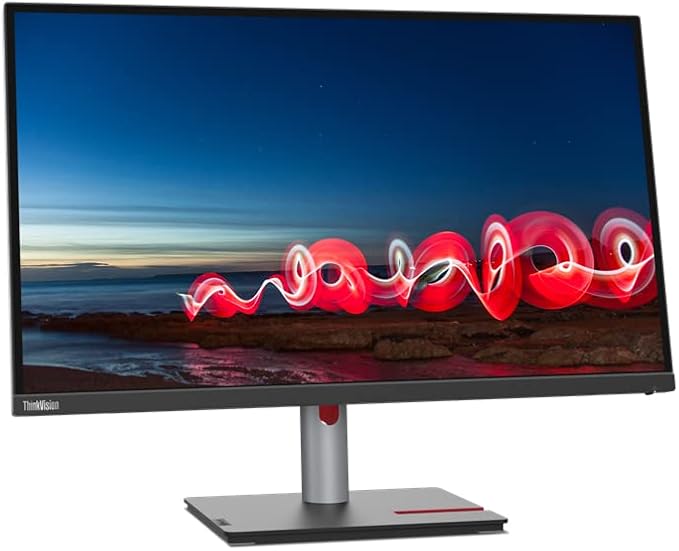
TFT/LCD displays are perfectly flat, a lot thinner and lighter than conventional CRT displays and do not flicker, all this because of the new technology they use for producing images. Do you want to free up space on your desk, or do you want to be able to move your monitor without breaking your back? Then this is the perfect display for you!
TFT/LCD displays are perfectly flat, a lot thinner and lighter than conventional CRT displays and do not flicker, all this because of the new technology they use for producing images. Do you want to free up space on your desk, or do you want to be able to move your monitor without breaking your back? Then this is the perfect display for you!
in 2 offers
The lowest price for Monitor Lenovo ThinkVision P27h-30 27" IPS Quad HD right now is $661.89 at Playthek.com, compared across 2 retailers.
The all-time low was $471.20 on 6 June 2026 — today's price is 40% above the lowest ever. It has been notably cheaper before — worth setting a price alert.
Prices last updated 29 June 2026.
Monitor Lenovo ThinkVision P27h-30 27" IPS Quad HD
TFT/LCD displays are perfectly flat, a lot thinner and lighter than conventional CRT displays and do not flicker, all this because of the new technology they use for producing images. Do you want to free up space on your desk, or do you want to be able to move your monitor without breaking your back? Then this is the perfect display for you!
TFT/LCD displays are perfectly flat, a lot thinner and lighter than conventional CRT displays and do not flicker, all this because of the new technology they use for producing images. Do you want to free up space on your desk, or do you want to be able to move your monitor without breaking your back? Then this is the perfect display for you!
Last updated at 29/06/2026 05:40:36
Lenovo ThinkVision P27h-30 68.6 cm (27") 2560 x 1440 pixels Quad HD IPS Black
Free delivery
Lenovo 63a1gat1eu Thinkvision P27h-20
Free delivery
Affiliate Disclosure: We may receive a small commission for purchases made through this link at no extra cost to you. This helps support our site. Thank you!
originally posted on lenovo.com
Bought this monitor to be used side by side with my Dell Ultrasharp FHD one. The 4K resolution is so much better for viewing text at work, not to mention getting the best out of 4K videos/movies. Out of box, the color is so much more vibrant and accurate compared to my older monitor. That motived me to go through my photo collection again and I got better memory about the trips I went for taking those photos. My measurements with a Spyder Pro indicate 100% coverage for Adobe RGB color gamut, matching the specifications. The thunderbolt connection also works great with my laptop, and I can actually use the one-cable solution without worry about balancing bandwidths for video and data signals. I really believe that Thunderbolt or USB C 4 IS required for a 4K monitor ... MoreBought this monitor to be used side by side with my Dell Ultrasharp FHD one. The 4K resolution is so much better for viewing text at work, not to mention getting the best out of 4K videos/movies. Out of box, the color is so much more vibrant and accurate compared to my older monitor. That motived me to go through my photo collection again and I got better memory about the trips I went for taking those photos. My measurements with a Spyder Pro indicate 100% coverage for Adobe RGB color gamut, matching the specifications. The thunderbolt connection also works great with my laptop, and I can actually use the one-cable solution without worry about balancing bandwidths for video and data signals. I really believe that Thunderbolt or USB C 4 IS required for a 4K monitor which is also used as hub.
originally posted on lenovo.com
I want a screen that would replace the laptop + extra screen setup that I've used for the past few years. I want really high definition. I want zero eyestrain images and text from daylight to night time use. I want good screen adjustment both vertically and on a horizontal axis (for use standing and sitting). I want minimum wires across my desk. I get all of these benefits from the ThinkVision P27u20. I purchased following a review in PC Pro magazine who rate this highly at just under £500. That was my budget and so it went into my shortlist. The first thing you notice is the seriously well engineered stand that's included. By laying the box on the floor and opening it up there you can attach the stand to the base, clip the stand into the screen and then lift the ... MoreI want a screen that would replace the laptop + extra screen setup that I've used for the past few years. I want really high definition. I want zero eyestrain images and text from daylight to night time use. I want good screen adjustment both vertically and on a horizontal axis (for use standing and sitting). I want minimum wires across my desk. I get all of these benefits from the ThinkVision P27u20. I purchased following a review in PC Pro magazine who rate this highly at just under £500. That was my budget and so it went into my shortlist. The first thing you notice is the seriously well engineered stand that's included. By laying the box on the floor and opening it up there you can attach the stand to the base, clip the stand into the screen and then lift the screen, attached to the base, easily. Once attached the weight of the screen and stiffness of the stand are perfectly engineered to set it up on your desk/table without fuss. While observing that the screen display must be treated with care, the assembled unit is strong and firm. There are little feet on the base that ensure the assembly doesn't slide around. very good. Now to connect to my computer. I no longer need a laptop, so recently bought a "mini" PC (so much power for the money but do research customer feedback and reviews). The "getting started" document was minimal and hard to read. I ended up going on line to read the larger manual there first. The P27u-20 has 3 ways of connecting: HDMI, Displayport and Thunderbolt. Since Thunderbolt uses a USB "C" plug design I though the USB "C" socket on my Windows PC would work...er "No". I've learned something then - but if a Windows, rather than new Macbook user, the associated 2 sockets on the screen may not be much use. HDMI and DisplayPort definitely do work without issue. Also on initial switch on, the definition was awful, less than HD. I despair I went to the Lenovo site and downloaded a few drivers that seemed appropriate..and after restarting the PC a few times the appropriate drivers automatically loaded (Win 11) so my initial disappointment evaporated. I still think that better documentation could have prepared me for this. The P27u-20 is a sophisticated device and did not behave in a "plug & play" manner. Not at first anyway. Once up and running the first noticeable benefit is the super screen clarity. I can now display 2 full window displays side by side, sufficient to write on one and simultaneously research in another, which is how I like to work. I've not explored the full colours capability yet, as mentioned this is a sophisticated device and I am sure that it has much more capability than I am using. The user manual is quite large but quite technical. I think there is scope for a document covering typical use cases and how to set-up the screen for them. Here's an early example - I'm very serious about music and sometimes like to play music from my PC without having to switch on my "studio monitors". The P27u-20 has speakers, not large ones, but the 2 X 2 watts should be adequate. At first I was hugely disappointed ..the sound was a whisper. However investigation of the screen menu (not the PC sound controls), revealed an internal volume control. Set that higher than the 50% default setting and the display sound is perfectly good for use with Youtube and Facebook. A word about the sockets. The P27u-20 is advertised as a "Docking" screen. Yes it has 2 standard USB sockets, a NW RJ45 and a couple of Thunderbolts. But these sockets are not easily accessible once the screen is set up for use...e.g. certainly not for the temporary plugging in of say a USB storage drive. In practice you'll still need a PC with sockets or an outboard docking station that you can get at. So while the docking functionality of the P27u-20 is useful, its NOT THAT useful. In summary then, am I pleased that I bought the P27u-20? YES, I am. Now its all working for my needs above I'm happy that they have been met. Would I pay more than the £500 (just under) I paid for it? NO. There are plenty of 4K 27" screens at this price point to choose from. I note that Lenovo have raised the price to £700+ at the moment, but I suspect this will come down again and the rise is just so they can lower it again to show a discount for "Black Friday" (ever the cynic). It may be that the screen has features that I'm not using that make it worth a higher price. Maybe, but not to me. If that's that case then these should feature in their marketing. Right now it doesn't stand out as being worth the extra...but it IS a good screen for a home/office and I'm glad I bought it (at under £500).
originally posted on lenovo.com
First, the contras, that may not be relevant for you.- If the KVM is important to you, look somewhere else. The KVM of this monitor is quirky when it works. Most times it doesn't work. It is uncapable of waking up a PC that was sleeping, so you need to wake up the PC, then switch to it.- Controls are outdated. Modern monitors come with a joystick to operate the OSD, but this still uses the row of buttons.- PC software only works in Windows 10, not Windows 11.- Black is not very dark.- In hopes to improve the KVM, I searched for a firmware update. There's no tool available, meaning that Lenovo does not plan to update its firmware. This may change in the future.Now the pros:- Excellent color! Delta E smaller than 0.5, which is great. Means that the color ... MoreFirst, the contras, that may not be relevant for you.- If the KVM is important to you, look somewhere else. The KVM of this monitor is quirky when it works. Most times it doesn't work. It is uncapable of waking up a PC that was sleeping, so you need to wake up the PC, then switch to it.- Controls are outdated. Modern monitors come with a joystick to operate the OSD, but this still uses the row of buttons.- PC software only works in Windows 10, not Windows 11.- Black is not very dark.- In hopes to improve the KVM, I searched for a firmware update. There's no tool available, meaning that Lenovo does not plan to update its firmware. This may change in the future.Now the pros:- Excellent color! Delta E smaller than 0.5, which is great. Means that the color presented on the screen is very close to the color sent by the PC.- Impressive color space. 100% sRGB and more than 95% AdobeRGB and DCI-P3.- Very good number of ports. I removed a number of cables, KVM and USB hubs when I installed this monitor.
| Market positioning | Business |
| Detachable stand | Y |
| Feet colour | Black |
| Headphone out | Y |
| Display diagonal | 68.6 cm |
Lenovo ThinkVision P27h-30 68.6 cm (27") 2560 x 1440 pixels Quad HD IPS Black
Free delivery
Lenovo 63a1gat1eu Thinkvision P27h-20
Free delivery
Affiliate Disclosure: We may receive a small commission for purchases made through this link at no extra cost to you. This helps support our site. Thank you!
Bought this monitor to be used side by side with my Dell Ultrasharp FHD one. The 4K resolution is so much better for viewing text at work, not to mention getting the best out of 4K videos/movies. Out of box, the color is so much more vibrant and accurate compared to my older monitor. That motived me to go through my photo collection again and I got better memory about the trips I went for taking those photos. My measurements with a Spyder Pro indicate 100% coverage for Adobe RGB color gamut, matching the specifications. The thunderbolt connection also works great with my laptop, and I can actually use the one-cable solution without worry about balancing bandwidths for video and data signals. I really believe that Thunderbolt or USB C 4 IS required for a 4K monitor ... MoreBought this monitor to be used side by side with my Dell Ultrasharp FHD one. The 4K resolution is so much better for viewing text at work, not to mention getting the best out of 4K videos/movies. Out of box, the color is so much more vibrant and accurate compared to my older monitor. That motived me to go through my photo collection again and I got better memory about the trips I went for taking those photos. My measurements with a Spyder Pro indicate 100% coverage for Adobe RGB color gamut, matching the specifications. The thunderbolt connection also works great with my laptop, and I can actually use the one-cable solution without worry about balancing bandwidths for video and data signals. I really believe that Thunderbolt or USB C 4 IS required for a 4K monitor which is also used as hub.
I want a screen that would replace the laptop + extra screen setup that I've used for the past few years. I want really high definition. I want zero eyestrain images and text from daylight to night time use. I want good screen adjustment both vertically and on a horizontal axis (for use standing and sitting). I want minimum wires across my desk. I get all of these benefits from the ThinkVision P27u20. I purchased following a review in PC Pro magazine who rate this highly at just under £500. That was my budget and so it went into my shortlist. The first thing you notice is the seriously well engineered stand that's included. By laying the box on the floor and opening it up there you can attach the stand to the base, clip the stand into the screen and then lift the ... MoreI want a screen that would replace the laptop + extra screen setup that I've used for the past few years. I want really high definition. I want zero eyestrain images and text from daylight to night time use. I want good screen adjustment both vertically and on a horizontal axis (for use standing and sitting). I want minimum wires across my desk. I get all of these benefits from the ThinkVision P27u20. I purchased following a review in PC Pro magazine who rate this highly at just under £500. That was my budget and so it went into my shortlist. The first thing you notice is the seriously well engineered stand that's included. By laying the box on the floor and opening it up there you can attach the stand to the base, clip the stand into the screen and then lift the screen, attached to the base, easily. Once attached the weight of the screen and stiffness of the stand are perfectly engineered to set it up on your desk/table without fuss. While observing that the screen display must be treated with care, the assembled unit is strong and firm. There are little feet on the base that ensure the assembly doesn't slide around. very good. Now to connect to my computer. I no longer need a laptop, so recently bought a "mini" PC (so much power for the money but do research customer feedback and reviews). The "getting started" document was minimal and hard to read. I ended up going on line to read the larger manual there first. The P27u-20 has 3 ways of connecting: HDMI, Displayport and Thunderbolt. Since Thunderbolt uses a USB "C" plug design I though the USB "C" socket on my Windows PC would work...er "No". I've learned something then - but if a Windows, rather than new Macbook user, the associated 2 sockets on the screen may not be much use. HDMI and DisplayPort definitely do work without issue. Also on initial switch on, the definition was awful, less than HD. I despair I went to the Lenovo site and downloaded a few drivers that seemed appropriate..and after restarting the PC a few times the appropriate drivers automatically loaded (Win 11) so my initial disappointment evaporated. I still think that better documentation could have prepared me for this. The P27u-20 is a sophisticated device and did not behave in a "plug & play" manner. Not at first anyway. Once up and running the first noticeable benefit is the super screen clarity. I can now display 2 full window displays side by side, sufficient to write on one and simultaneously research in another, which is how I like to work. I've not explored the full colours capability yet, as mentioned this is a sophisticated device and I am sure that it has much more capability than I am using. The user manual is quite large but quite technical. I think there is scope for a document covering typical use cases and how to set-up the screen for them. Here's an early example - I'm very serious about music and sometimes like to play music from my PC without having to switch on my "studio monitors". The P27u-20 has speakers, not large ones, but the 2 X 2 watts should be adequate. At first I was hugely disappointed ..the sound was a whisper. However investigation of the screen menu (not the PC sound controls), revealed an internal volume control. Set that higher than the 50% default setting and the display sound is perfectly good for use with Youtube and Facebook. A word about the sockets. The P27u-20 is advertised as a "Docking" screen. Yes it has 2 standard USB sockets, a NW RJ45 and a couple of Thunderbolts. But these sockets are not easily accessible once the screen is set up for use...e.g. certainly not for the temporary plugging in of say a USB storage drive. In practice you'll still need a PC with sockets or an outboard docking station that you can get at. So while the docking functionality of the P27u-20 is useful, its NOT THAT useful. In summary then, am I pleased that I bought the P27u-20? YES, I am. Now its all working for my needs above I'm happy that they have been met. Would I pay more than the £500 (just under) I paid for it? NO. There are plenty of 4K 27" screens at this price point to choose from. I note that Lenovo have raised the price to £700+ at the moment, but I suspect this will come down again and the rise is just so they can lower it again to show a discount for "Black Friday" (ever the cynic). It may be that the screen has features that I'm not using that make it worth a higher price. Maybe, but not to me. If that's that case then these should feature in their marketing. Right now it doesn't stand out as being worth the extra...but it IS a good screen for a home/office and I'm glad I bought it (at under £500).
First, the contras, that may not be relevant for you.- If the KVM is important to you, look somewhere else. The KVM of this monitor is quirky when it works. Most times it doesn't work. It is uncapable of waking up a PC that was sleeping, so you need to wake up the PC, then switch to it.- Controls are outdated. Modern monitors come with a joystick to operate the OSD, but this still uses the row of buttons.- PC software only works in Windows 10, not Windows 11.- Black is not very dark.- In hopes to improve the KVM, I searched for a firmware update. There's no tool available, meaning that Lenovo does not plan to update its firmware. This may change in the future.Now the pros:- Excellent color! Delta E smaller than 0.5, which is great. Means that the color ... MoreFirst, the contras, that may not be relevant for you.- If the KVM is important to you, look somewhere else. The KVM of this monitor is quirky when it works. Most times it doesn't work. It is uncapable of waking up a PC that was sleeping, so you need to wake up the PC, then switch to it.- Controls are outdated. Modern monitors come with a joystick to operate the OSD, but this still uses the row of buttons.- PC software only works in Windows 10, not Windows 11.- Black is not very dark.- In hopes to improve the KVM, I searched for a firmware update. There's no tool available, meaning that Lenovo does not plan to update its firmware. This may change in the future.Now the pros:- Excellent color! Delta E smaller than 0.5, which is great. Means that the color presented on the screen is very close to the color sent by the PC.- Impressive color space. 100% sRGB and more than 95% AdobeRGB and DCI-P3.- Very good number of ports. I removed a number of cables, KVM and USB hubs when I installed this monitor.
I recently purchased the Lenovo ThinkVision 27-inch Monitor (T27h-30), and it has exceeded all my expectations. Here’s a detailed review of my experience with this outstanding monitor:Display Quality:The 27-inch QHD (2560 x 1440) display provides exceptional clarity and vibrant colors. The IPS panel offers wide viewing angles without any color distortion, which is crucial for my graphic design work. The sharpness and detail are impressive, making both work and entertainment visually stunning. Whether I'm editing photos or watching high-definition videos, the visual experience is top-notch.Connectivity:One of the standout features of this monitor is its versatile connectivity options. The USB-C port is a game-changer, allowing me to connect my laptop with a ... MoreI recently purchased the Lenovo ThinkVision 27-inch Monitor (T27h-30), and it has exceeded all my expectations. Here’s a detailed review of my experience with this outstanding monitor:Display Quality:The 27-inch QHD (2560 x 1440) display provides exceptional clarity and vibrant colors. The IPS panel offers wide viewing angles without any color distortion, which is crucial for my graphic design work. The sharpness and detail are impressive, making both work and entertainment visually stunning. Whether I'm editing photos or watching high-definition videos, the visual experience is top-notch.Connectivity:One of the standout features of this monitor is its versatile connectivity options. The USB-C port is a game-changer, allowing me to connect my laptop with a single cable for video, data, and power. This significantly reduces cable clutter on my desk. Additionally, the monitor includes HDMI, DisplayPort, and multiple USB ports, providing plenty of options for connecting various devices.Ergonomics and Design:The monitor’s ergonomic design is highly appreciated. The adjustable stand allows for height, tilt, swivel, and pivot adjustments, enabling me to set up my workspace for maximum comfort. The build quality is robust and elegant, with thin bezels that give it a sleek, modern look. It seamlessly fits into my home office setup and enhances the overall aesthetic.User Experience:Setting up the ThinkVision T27h-30 was straightforward and quick. The on-screen display (OSD) menu is user-friendly, making it easy to navigate through the settings and adjust the display to my preference. The low blue light technology helps reduce eye strain during long working hours, which is a significant benefit for someone who spends a lot of time in front of the screen.Value for Money:Considering the high-quality display, versatile connectivity, and ergonomic design, the Lenovo ThinkVision T27h-30 offers excellent value for money. It’s a solid investment for anyone needing a reliable and high-performing monitor for both professional and personal use.Overall Satisfaction:I am extremely satisfied with my purchase of the Lenovo ThinkVision 27-inch Monitor. It has significantly improved my productivity and overall user experience. I highly recommend this monitor to anyone in the market for a new display, especially if you need a combination of excellent visual quality and versatile connectivity.Thank you, Lenovo, for creating such a superb product. This monitor has truly enhanced my workspace and workflow!
This monitor has the same color reproduction capabilities (near-full AdobeRGB and DCI-P3 coverage) and features (e.g. KVM switch, Thunderbolt 3/4 support with daisy chaining) typically found in the $900+ equivalents.Unfortunately, the quality control and the customer service backing the product is quite poor. While decently quiet and steady when active, my original unit produces an excessively loud and pulsating coil whine on sleep/standby. I had to call in 4-5 times during the past 6 months I've owned it to get a replacement (since apparently monitors can't be handled via the web portal or email), each time resulting in support saying a monitor would be sent but nothing actually sent for a month. When they finally sent a replacement, the unit had marginally ... MoreThis monitor has the same color reproduction capabilities (near-full AdobeRGB and DCI-P3 coverage) and features (e.g. KVM switch, Thunderbolt 3/4 support with daisy chaining) typically found in the $900+ equivalents.Unfortunately, the quality control and the customer service backing the product is quite poor. While decently quiet and steady when active, my original unit produces an excessively loud and pulsating coil whine on sleep/standby. I had to call in 4-5 times during the past 6 months I've owned it to get a replacement (since apparently monitors can't be handled via the web portal or email), each time resulting in support saying a monitor would be sent but nothing actually sent for a month. When they finally sent a replacement, the unit had marginally better but still excessive coil whine. The bottom bezel also doesn't sit flush against the panel in several sections on both units.If you're willing to play the quality control lottery, this is still a good value when it comes to performance and features. If not, I'd look at other monitors using variants of the same BOE quantum dot panel like the ViewSonic VP2786-4K (~$1000, similar color reproduction performance and KVM but drops Thunderbolt 3/4 support for a built-in colorimeter + control puck and magnetic monitor hood), Philips 279E2FQE (~$500-600 USD equivalent in TWD/NT) if you're in Asia Pacific. No KVM), or Xiaomi Mi 4K Professional Display XMMNT27NU (~$550 USD equivalent in CNY) if you're in Asia Pacific. No KVM). Outside of those, most other monitors with similar performance and features are in the $1000-1500+ range like the ones based off variants of a 2304 zone MiniLED panel from BOE, a high refresh 576 zone MiniLED panel from AUO, or OLED panels. If this model's an indicator of its successor, the Lenovo ThinkVision P27pz-30, I'd be cautious of that one as well.
Good UHD monitor, no complaints about the quality. Much more expensive than a full HD one, so is the extra worth it? It means I get super detail when watching Netflix UHD content on my computer (which I don’t do often), and see all the detail in the photos I took with my DSLR camera.I find glare from the window beside me more intrusive than my previous monitor, perhaps because it is larger. I thought the step up to 27” over 24” might be overwhelming, but it is great! I can genuinely have windows open side-by-side and (for example) copy of move stuff from one to the other without their being small and cramped as on the old screen.On the downside, I have had to set text scaling in Windows to 200% in order to still read stuff, so in most programs, there is no gain at ... MoreGood UHD monitor, no complaints about the quality. Much more expensive than a full HD one, so is the extra worth it? It means I get super detail when watching Netflix UHD content on my computer (which I don’t do often), and see all the detail in the photos I took with my DSLR camera.I find glare from the window beside me more intrusive than my previous monitor, perhaps because it is larger. I thought the step up to 27” over 24” might be overwhelming, but it is great! I can genuinely have windows open side-by-side and (for example) copy of move stuff from one to the other without their being small and cramped as on the old screen.On the downside, I have had to set text scaling in Windows to 200% in order to still read stuff, so in most programs, there is no gain at all. And a few programs scale at 100% anyway, so dialogue boxes are tiny.But my biggest gripe is that I spent all that money in part because of the clever stuff it can do. I imagined having more than one computer plugged in at a time and my being able to switch between them seamlessly. It is advertised as a USB-C docking monitor, after all. But it came with zero documentation. I don’t know how to do anything other than plug in one machine. There are sockets marked with strange abbreviations I have never heard of (and I WORK in IT!) but no explanations or instructions are included. It is bizarre that Lenovo go to all the trouble of building in the clever stuff, then don’t tell users how to benefit from it, but I guess they got their money whether I use the functionality or not, and a piece of paper costs something. Maybe I’ll get round to googling some time, but I shouldn’t have to at this price.
After researching a few different ultra-wide monitors, I landed on this monitor. Having Thunderbolt 4 was the main decision factor for me, mostly in the name of future proofing. Coming from a 32" 4k monitor, it was a little bit of an adjustment but it was worth it. This is just like using 2 27" monitors without the panel gap in the middle. This monitor has made me much more productive.However, after about a month of use, the monitor just stopped working. The hub still works, and the daisy chained monitor via USB-C is still working, but nothing is on display anymore. I called support and they are sending me a new unit. Due to supply issues, I am still waiting on a replacement, but looking forward to getting the replacement, whenever it arrives.
This is a very nice monitor. I was tracking it at $750 and was considering purchasing, but when it dropped to $550, I jumped on it. It is not as nice as the 5k on my iMac pro, but VERY close. It is a matte finish screen and has pretty small bezels and is very adjustable. I also like the slot on the base that I can stick my cell phone in as a stand. Very nice touch! I didn't like the calibration out of the box (it did include a report on the calibration, but it felt a little too warm to me) and I'm not using this for any hyper critical color work, so I played with the settings a bunch and got it to match pretty closely to my iMac's monitor and that works for me just nice. brightness is supposedly less than the iMac Pro monitor, but I have my iMac at about 40% ... MoreThis is a very nice monitor. I was tracking it at $750 and was considering purchasing, but when it dropped to $550, I jumped on it. It is not as nice as the 5k on my iMac pro, but VERY close. It is a matte finish screen and has pretty small bezels and is very adjustable. I also like the slot on the base that I can stick my cell phone in as a stand. Very nice touch! I didn't like the calibration out of the box (it did include a report on the calibration, but it felt a little too warm to me) and I'm not using this for any hyper critical color work, so I played with the settings a bunch and got it to match pretty closely to my iMac's monitor and that works for me just nice. brightness is supposedly less than the iMac Pro monitor, but I have my iMac at about 40% brightness (Apple uses dots, not numbers, so I'm not sure what the exact percentage is) for my dark office and I set this one at 25% to feel similar to the iMac.... so go figure on that one... I do some photo work and some video work. Video looks good on this monitor, but it's not a gaming monitor. It plays the games I play fine (Minecraft and some vintage games) but I don't know how it would hold up to high frame rate games that need a super high refresh rate.... maybe it would be ok though... I just like the crispness of the monitor for text and graphics. Very nice and well worth even the $750 I was considering spending on it. Oh, I did play around with rotating this when I was first setting it up just to see what that was like and I felt like it wouldn't lock in at exactly 90 degrees when I put it in portrait mode (it seemed to want to be very slightly crooked and I felt that it would need some modification to get it to exactly 90 degrees for portrait mode) and that was the only negative thing about it for me, but I'm planning to keep it in horizontal mode all the time, so not a deal breaker, but I'm mentioning it just in case it helps someone.
Moved from a P32u-10 and have been very impressed. The extra screen space makes for greater productivity as does the ability to create two virtual screens with one cable (aka True Split).Image quality very good, although HDR is poor. Another minor niggle is that Windows only appears to support 10 bit colour depth if HDR is enabled (whcih results in a poorer SDR image in my opinion).Connectivity is very good and means I can replace a separate Thunderbolt dock when I want to connect my X1 Nano, simply swapping the Thunderbolt cable from my P3 Ultra.Stability of the monitor is very good with no movement when typing.One negative compared to the P32u-10 which came with a long Thunderbolt 3 cable, DisplayPort and USB cable is that only a rather short Thunderbolt 4 ... MoreMoved from a P32u-10 and have been very impressed. The extra screen space makes for greater productivity as does the ability to create two virtual screens with one cable (aka True Split).Image quality very good, although HDR is poor. Another minor niggle is that Windows only appears to support 10 bit colour depth if HDR is enabled (whcih results in a poorer SDR image in my opinion).Connectivity is very good and means I can replace a separate Thunderbolt dock when I want to connect my X1 Nano, simply swapping the Thunderbolt cable from my P3 Ultra.Stability of the monitor is very good with no movement when typing.One negative compared to the P32u-10 which came with a long Thunderbolt 3 cable, DisplayPort and USB cable is that only a rather short Thunderbolt 4 cable is supplied.
This is my 2nd monitor from Lenovo and it is a really great one at that. Great contrast, does not jiggle about, sharp, easy to set up, and i LOVE the connectivity this thing offers. I am still surprised how many monitors do not have usb-c connectivity today, and this thing as 2, and also does power delivery to my device as well! It also offers usb A too. The cable management does not allow for people looking for the no-show aesthetics but it works well enough for me. The phone stand is a welcomed addition too. Adjustability of the stand offers great flexibility for monitor positioning. One star off because I wished there were speakers on this thing. Other than that. this is great!
| Market positioning | Business |
| Detachable stand | Y |
| Feet colour | Black |
| Headphone out | Y |
| Display diagonal | 68.6 cm |