Last updated at 03/09/2026 08:15:46
NETGEAR Nighthawk 12-Stream WiFi 6E Router (RAXE500) | AXE11000 Tri-Band Wireless Speed (Up to 10.8 Gbps) |New 6 GHz Band | 2,500 Sq. Ft. Coverage,
Affiliate Disclosure: We may receive a small commission for purchases made through this link at no extra cost to you. This helps support our site. Thank you!
Netgear Nighthawk RAXE500-100APS wireless router Gigabit Ethernet Tri-band (2.4 GHz / 5 GHz / 6 GHz) Black, Nighthawk Tri-Band WiFi 6E Router (up to
Delivery between 7–17 Sept $12
NETGEAR Nighthawk WiFi 6E Tri-BandRouter RAXE500 Black - Buydeal Australia
Free delivery between 11–16 Sept
originally posted on bestbuy.com
It started out to be a great router. After a year and a half, we upgraded to 1 gig internet. After two years, it loses signal with the modem, constantly losing internet several times a week. I keeps the firmware up to date, and even after 2 resets in the past month, it hasn't resolved the issue. I have also switched out the cat6 cables. I have about 10 devices on the Wi-Fi and 3 hardline connected. It's disappointing because I have been a loyal Netgear customer for years. I purchased this brand new when it came out, $645. That's a lot of money for only 2 years worth of use. I specifically purchased an APC battery for it, it's only been plugged into that to protect it from rampant power surges and outages. After this experience, I hesitate to purchase the new Netgear ... MoreIt started out to be a great router. After a year and a half, we upgraded to 1 gig internet. After two years, it loses signal with the modem, constantly losing internet several times a week. I keeps the firmware up to date, and even after 2 resets in the past month, it hasn't resolved the issue. I have also switched out the cat6 cables. I have about 10 devices on the Wi-Fi and 3 hardline connected. It's disappointing because I have been a loyal Netgear customer for years. I purchased this brand new when it came out, $645. That's a lot of money for only 2 years worth of use. I specifically purchased an APC battery for it, it's only been plugged into that to protect it from rampant power surges and outages. After this experience, I hesitate to purchase the new Netgear router as I'm looking to upgrade to 2 gig Fiber internet. Instead, I'm looking at the new Asus Rog Rapture router.
originally posted on netgear.com
The parental controls and netgeargear security are garbabge, we just leave them off. When we turned netgear security on it would actually drop wifi signal and reboot. This is a known issue and you can read about it from other users, just leave it off. However, once we turned that stuff off we have had no other issues. We have a RING security system with 5 cameras, we have about 20 smart wifi exterior garage lights and numorous other devices. The router says we have around 60 devices. And they all work great. We have air tv to get local channals via SLING, so you hook up you antenna that is hooked up to a hard drvie that then transmits our local channals throughout our home network to are roku devices. Works great, however, this was too much for are previous router. ... MoreThe parental controls and netgeargear security are garbabge, we just leave them off. When we turned netgear security on it would actually drop wifi signal and reboot. This is a known issue and you can read about it from other users, just leave it off. However, once we turned that stuff off we have had no other issues. We have a RING security system with 5 cameras, we have about 20 smart wifi exterior garage lights and numorous other devices. The router says we have around 60 devices. And they all work great. We have air tv to get local channals via SLING, so you hook up you antenna that is hooked up to a hard drvie that then transmits our local channals throughout our home network to are roku devices. Works great, however, this was too much for are previous router. I thought that we had poor reception because it was constanly buffering, but once we hooked up this router it works like a charm. Also, we had an issue with our ring cameras not consistently following its light schedule. I thought it was due to the camera itself so i called ring and they sent me a new camera (they have a lifetime warrenty), however the old camera did the same thing. Are old router was the netgear R7000 which i though was pretty nice but our new router resolved these issues. Now everything just works so nicely. So if your having problems with you devices, it may kust be network conjestion. I took 1 star off because their security sucks and they charge for it.
originally posted on bestbuy.com
Very fast router when connected to 2.5Gb Ethernet! I have at&t fiber for ISP, the Netgear Nighthawk Tri-Band router AXE1100 (RAXE500) It does everything that you need it to, especially wifi 6E, I see speeds up to 1,500mbps on both upload and download. Speeds up to 1,200mbps on 5ghz wifi band.The best features of this router are that you can have link aggregation for bonding of 2 network cables on an attached compatible device. Very nice that even if you don't have 2.5Gb internet service you can chose to modify the routing of the back Ethernet ports. For example you can combine 2 ethernet lines of 1Gb Ethernet and combine then to get "multi-gig" internet speeds if you do not have 2.5Gig speeds by your ISP. Coverage wise: it has a very strong signal on every ... MoreVery fast router when connected to 2.5Gb Ethernet! I have at&t fiber for ISP, the Netgear Nighthawk Tri-Band router AXE1100 (RAXE500) It does everything that you need it to, especially wifi 6E, I see speeds up to 1,500mbps on both upload and download. Speeds up to 1,200mbps on 5ghz wifi band.The best features of this router are that you can have link aggregation for bonding of 2 network cables on an attached compatible device. Very nice that even if you don't have 2.5Gb internet service you can chose to modify the routing of the back Ethernet ports. For example you can combine 2 ethernet lines of 1Gb Ethernet and combine then to get "multi-gig" internet speeds if you do not have 2.5Gig speeds by your ISP. Coverage wise: it has a very strong signal on every frequency. I was also able to find my network when I was across the street at my neighbor's party in their backyard, I was very surprised at the length and distance that I was still able to connect. I was going to buy a switch but this was the best option due to all of it's features! I really recommend this router. You get what you pay for! I also had the Nighthawk X10 R9000 which was a beast at the time!
| WAN connection | |
| WAN connection type | RJ-45 |
| 3G/4G USB modem compatibility | N |
| SIM card slot | N |
| DSL WAN | N |

NETGEAR Nighthawk 12-Stream WiFi 6E Router (RAXE500) | AXE11000 Tri-Band Wireless Speed (Up to 10.8 Gbps) |New 6 GHz Band | 2,500 Sq. Ft. Coverage,
Affiliate Disclosure: We may receive a small commission for purchases made through this link at no extra cost to you. This helps support our site. Thank you!
Netgear Nighthawk RAXE500-100APS wireless router Gigabit Ethernet Tri-band (2.4 GHz / 5 GHz / 6 GHz) Black, Nighthawk Tri-Band WiFi 6E Router (up to
Delivery between 7–17 Sept $12
NETGEAR Nighthawk WiFi 6E Tri-BandRouter RAXE500 Black - Buydeal Australia
Free delivery between 11–16 Sept
It started out to be a great router. After a year and a half, we upgraded to 1 gig internet. After two years, it loses signal with the modem, constantly losing internet several times a week. I keeps the firmware up to date, and even after 2 resets in the past month, it hasn't resolved the issue. I have also switched out the cat6 cables. I have about 10 devices on the Wi-Fi and 3 hardline connected. It's disappointing because I have been a loyal Netgear customer for years. I purchased this brand new when it came out, $645. That's a lot of money for only 2 years worth of use. I specifically purchased an APC battery for it, it's only been plugged into that to protect it from rampant power surges and outages. After this experience, I hesitate to purchase the new Netgear ... MoreIt started out to be a great router. After a year and a half, we upgraded to 1 gig internet. After two years, it loses signal with the modem, constantly losing internet several times a week. I keeps the firmware up to date, and even after 2 resets in the past month, it hasn't resolved the issue. I have also switched out the cat6 cables. I have about 10 devices on the Wi-Fi and 3 hardline connected. It's disappointing because I have been a loyal Netgear customer for years. I purchased this brand new when it came out, $645. That's a lot of money for only 2 years worth of use. I specifically purchased an APC battery for it, it's only been plugged into that to protect it from rampant power surges and outages. After this experience, I hesitate to purchase the new Netgear router as I'm looking to upgrade to 2 gig Fiber internet. Instead, I'm looking at the new Asus Rog Rapture router.
The parental controls and netgeargear security are garbabge, we just leave them off. When we turned netgear security on it would actually drop wifi signal and reboot. This is a known issue and you can read about it from other users, just leave it off. However, once we turned that stuff off we have had no other issues. We have a RING security system with 5 cameras, we have about 20 smart wifi exterior garage lights and numorous other devices. The router says we have around 60 devices. And they all work great. We have air tv to get local channals via SLING, so you hook up you antenna that is hooked up to a hard drvie that then transmits our local channals throughout our home network to are roku devices. Works great, however, this was too much for are previous router. ... MoreThe parental controls and netgeargear security are garbabge, we just leave them off. When we turned netgear security on it would actually drop wifi signal and reboot. This is a known issue and you can read about it from other users, just leave it off. However, once we turned that stuff off we have had no other issues. We have a RING security system with 5 cameras, we have about 20 smart wifi exterior garage lights and numorous other devices. The router says we have around 60 devices. And they all work great. We have air tv to get local channals via SLING, so you hook up you antenna that is hooked up to a hard drvie that then transmits our local channals throughout our home network to are roku devices. Works great, however, this was too much for are previous router. I thought that we had poor reception because it was constanly buffering, but once we hooked up this router it works like a charm. Also, we had an issue with our ring cameras not consistently following its light schedule. I thought it was due to the camera itself so i called ring and they sent me a new camera (they have a lifetime warrenty), however the old camera did the same thing. Are old router was the netgear R7000 which i though was pretty nice but our new router resolved these issues. Now everything just works so nicely. So if your having problems with you devices, it may kust be network conjestion. I took 1 star off because their security sucks and they charge for it.
Very fast router when connected to 2.5Gb Ethernet! I have at&t fiber for ISP, the Netgear Nighthawk Tri-Band router AXE1100 (RAXE500) It does everything that you need it to, especially wifi 6E, I see speeds up to 1,500mbps on both upload and download. Speeds up to 1,200mbps on 5ghz wifi band.The best features of this router are that you can have link aggregation for bonding of 2 network cables on an attached compatible device. Very nice that even if you don't have 2.5Gb internet service you can chose to modify the routing of the back Ethernet ports. For example you can combine 2 ethernet lines of 1Gb Ethernet and combine then to get "multi-gig" internet speeds if you do not have 2.5Gig speeds by your ISP. Coverage wise: it has a very strong signal on every ... MoreVery fast router when connected to 2.5Gb Ethernet! I have at&t fiber for ISP, the Netgear Nighthawk Tri-Band router AXE1100 (RAXE500) It does everything that you need it to, especially wifi 6E, I see speeds up to 1,500mbps on both upload and download. Speeds up to 1,200mbps on 5ghz wifi band.The best features of this router are that you can have link aggregation for bonding of 2 network cables on an attached compatible device. Very nice that even if you don't have 2.5Gb internet service you can chose to modify the routing of the back Ethernet ports. For example you can combine 2 ethernet lines of 1Gb Ethernet and combine then to get "multi-gig" internet speeds if you do not have 2.5Gig speeds by your ISP. Coverage wise: it has a very strong signal on every frequency. I was also able to find my network when I was across the street at my neighbor's party in their backyard, I was very surprised at the length and distance that I was still able to connect. I was going to buy a switch but this was the best option due to all of it's features! I really recommend this router. You get what you pay for! I also had the Nighthawk X10 R9000 which was a beast at the time!
It's expensive. I wish it was less expensive. However, I get 900 Mbps - 1 Gbps wirelessly. I have no more network congestion - even when family is remotely streaming Plex from my media pc and my kid is simultaneously listening to a 4k Youtube video instead of watching it (WHY), while she's playing a game, and my wife is watching Netflix. The latency to my own game servers is usually less than 20ms, and I haven't used an ethernet cable in 6 years.For what it's worth, the last Nighhawk (R8000) still works, and I didn't upgrade it for any reason except I wanted faster wireless throughput, and I have about a million more smart home devices connected now than when I bought it 6 years ago. Some people complain about Netgear build quality or software issues, but I ... MoreIt's expensive. I wish it was less expensive. However, I get 900 Mbps - 1 Gbps wirelessly. I have no more network congestion - even when family is remotely streaming Plex from my media pc and my kid is simultaneously listening to a 4k Youtube video instead of watching it (WHY), while she's playing a game, and my wife is watching Netflix. The latency to my own game servers is usually less than 20ms, and I haven't used an ethernet cable in 6 years.For what it's worth, the last Nighhawk (R8000) still works, and I didn't upgrade it for any reason except I wanted faster wireless throughput, and I have about a million more smart home devices connected now than when I bought it 6 years ago. Some people complain about Netgear build quality or software issues, but I haven't experienced that. This one has been on for a couple of months now and I haven't had to reset it or touch it after initial set up - which took about 15 minutes total. The most time-consuming part was removing the old router from the Nighthawk app, and then there not being a QR code on my unit despite the app insisting there was - I had to find it manually.Worth the buy if you're interested in the throughput speeds and connectivity it offers. Expensive and overkill if you're not going to utilize it and don't have fast enough internet to hit those speeds.
Coming from the nighthawk series of routers, Netgear does a few things extremely well year over year. Specifically, their NAT. If you have multiple (4+) xboxes or PS, netgear always works well with an open nat where I have found other brands to have issues. However, where netgear struggles is really been high quality launches. I've noticed some instability with wifi that I did not experience in previous products. Though, with each firmware update it seems to get better. Wifi performance and speed is excellent, and it does get slightly more range that my nighthawk did. I wish it went an extra couple of feet but at least it's an improvement. Overall, high quality product that I would recommend. Only thing I wish it had was better information about your network ... MoreComing from the nighthawk series of routers, Netgear does a few things extremely well year over year. Specifically, their NAT. If you have multiple (4+) xboxes or PS, netgear always works well with an open nat where I have found other brands to have issues. However, where netgear struggles is really been high quality launches. I've noticed some instability with wifi that I did not experience in previous products. Though, with each firmware update it seems to get better. Wifi performance and speed is excellent, and it does get slightly more range that my nighthawk did. I wish it went an extra couple of feet but at least it's an improvement. Overall, high quality product that I would recommend. Only thing I wish it had was better information about your network utilization.
This is my fourth Netgear router because each one just keeps getting better than the one before it. Two of my prior three are still in service at other homes. This router is the fastest one to date and has the advantage of Wi-Fi 6 e. This is still a relatively new form of very high speed Wi-Fi that runs on a different band from 2.4 and 5 gig. But it is currently available in this router and two of my Samsung Galaxy smartphones are already designed to take advantage of the faster speeds. In all truthfulness this router has the chops to keep up with all 40 devices in our home including streaming televisions in 4K and phones tablets computers and what have you. I'm very pleased with this and expected flawless performance and that's exactly what I have gotten. I paired ... MoreThis is my fourth Netgear router because each one just keeps getting better than the one before it. Two of my prior three are still in service at other homes. This router is the fastest one to date and has the advantage of Wi-Fi 6 e. This is still a relatively new form of very high speed Wi-Fi that runs on a different band from 2.4 and 5 gig. But it is currently available in this router and two of my Samsung Galaxy smartphones are already designed to take advantage of the faster speeds. In all truthfulness this router has the chops to keep up with all 40 devices in our home including streaming televisions in 4K and phones tablets computers and what have you. I'm very pleased with this and expected flawless performance and that's exactly what I have gotten. I paired this with the Netgear cable modem cm2000 which helps provide the speed that I need to power the Netgear 6 enhanced router. I never go wrong with Netflix.
On paper NETGEAR over promises with the RAXE500. Compared to my previous router the AC2400, the RAXE500 comes with all the bells and whistles. But I bought the RAXE500 trusting that NETGEAR wouldn’t release an unfinished product or a badly finished product that could at least match the features that the AC2400 had. The RAXE500 does not match the AC2400 in features or even reliability.The RAXE500 USB ports do not work for streaming from an external hard drive. The exact same setup as the AC2400 does not work on the RAXE500. Playing videos drop out every 4 to 6 minutes. The only temporary fix that I had to figure out myself was to log into the RAXE500 and reboot the router from the menu.Videos can play without dropping out for about a day, give or take and then I ... MoreOn paper NETGEAR over promises with the RAXE500. Compared to my previous router the AC2400, the RAXE500 comes with all the bells and whistles. But I bought the RAXE500 trusting that NETGEAR wouldn’t release an unfinished product or a badly finished product that could at least match the features that the AC2400 had. The RAXE500 does not match the AC2400 in features or even reliability.The RAXE500 USB ports do not work for streaming from an external hard drive. The exact same setup as the AC2400 does not work on the RAXE500. Playing videos drop out every 4 to 6 minutes. The only temporary fix that I had to figure out myself was to log into the RAXE500 and reboot the router from the menu.Videos can play without dropping out for about a day, give or take and then I have to reboot all over again. THIS WAS NOT A PROBLEM WITH THE AC2400. Netgear Support has not done anything even after I told them about the return period. I have exchanged the RAXE500 3 times thinking that the router was defective.It is very clear that all of the RAXE500’s don’t work and Netgear Support’s best “advise” is “to play around with the channel”. Needless to say, my older and cheaper AC2400 did not need any channel “playing”. My advice is to spend your money on a router made by another brand.
First off 6E, the only new Items I have that use it is latest IPAD pro and latest Fire TV cube 3rd gen. More will be on the way. When your setting up the router you have to log into your Netgear account to proceed and somehow mine got screwed up and would not send me the code. I created an account in my wife's name and it worked. I wrote a support request and they did not fix it and closed the ticket.Another thing is when the IPAD pro connects to the 6E it complaining that it needs to be set so there is one WiFi network seen and the router decides what device uses which. Seems Airplay is the reason.Watch when moving this there are switches on the top that will kill the Wireless. If you hit by mistake without knowing it you might be chasing it for a while.It has ... MoreFirst off 6E, the only new Items I have that use it is latest IPAD pro and latest Fire TV cube 3rd gen. More will be on the way. When your setting up the router you have to log into your Netgear account to proceed and somehow mine got screwed up and would not send me the code. I created an account in my wife's name and it worked. I wrote a support request and they did not fix it and closed the ticket.Another thing is when the IPAD pro connects to the 6E it complaining that it needs to be set so there is one WiFi network seen and the router decides what device uses which. Seems Airplay is the reason.Watch when moving this there are switches on the top that will kill the Wireless. If you hit by mistake without knowing it you might be chasing it for a while.It has Netgear Armor on it but not sure if I'm going to keep it. Still evaluating it. Using this as an Acess point which is what my previous Netgear did. I'm hoping with this being thier best router that it can handle all my devices, we'll see...
I really wanted to like this router. I have been a nighthawk fan for years but the last two units are just unstable. I had the 7000 series and it lasted 2 years before it started dropping signal constantly. I upgraded to the AXE 11000 and in the first week if was great. Blazing fast speeds and long range WIFI. Then the true colors came out. 5G and 6G speeds were great but had constant disconnections. After about a month the 2.4 started doing the same. I had the latest firmware installed with the same issues. I rolled back the firmware to the previous in hopes it was just the firmware version but it still showed the same stability issues. Unfortunately it is past the return date so I will just have to eat it and replace it. After speaking with others they have ... MoreI really wanted to like this router. I have been a nighthawk fan for years but the last two units are just unstable. I had the 7000 series and it lasted 2 years before it started dropping signal constantly. I upgraded to the AXE 11000 and in the first week if was great. Blazing fast speeds and long range WIFI. Then the true colors came out. 5G and 6G speeds were great but had constant disconnections. After about a month the 2.4 started doing the same. I had the latest firmware installed with the same issues. I rolled back the firmware to the previous in hopes it was just the firmware version but it still showed the same stability issues. Unfortunately it is past the return date so I will just have to eat it and replace it. After speaking with others they have experienced the same issues. I guess NetGear quality just is not what it used to be.
Recently upgraded from an X10 R9000 Nighthawk Router since this router just approached four years old. This new router is almost twice as much as the old one in terms of cost. But so far, this new router seems to have solved my wifi range issues from the old one. My ring door bell on my front door is now reporting much better network connectivity. I can now remove my Netgear Mesh Extender. It seems that all my 2Ghz devices are doing much better as well (cameras, garage, printer, etc.) For cons, the 5Ghz range seems a little slower compared to the old router. I also had to disable Netgear Armor after a day since I had no idea that Netgear Armor automatically installs. Having Netgear Armor slows down my internet speeds drastically from 900MBS to about 200MBS on my ... MoreRecently upgraded from an X10 R9000 Nighthawk Router since this router just approached four years old. This new router is almost twice as much as the old one in terms of cost. But so far, this new router seems to have solved my wifi range issues from the old one. My ring door bell on my front door is now reporting much better network connectivity. I can now remove my Netgear Mesh Extender. It seems that all my 2Ghz devices are doing much better as well (cameras, garage, printer, etc.) For cons, the 5Ghz range seems a little slower compared to the old router. I also had to disable Netgear Armor after a day since I had no idea that Netgear Armor automatically installs. Having Netgear Armor slows down my internet speeds drastically from 900MBS to about 200MBS on my wired connections. I had to reboot the router after disabling Netgear Armor from the Nighthawk app. I was able to print out my old wifi settings from my old router first, and was able to eventually manually configure this new router and it just worked eventually using the web interface initially. Afterwards, I just downloaded and installed my Nighthawk app, and discovered that configuration, firmware updates, etc. can be done as well from the Nighthawk app too. Another con is that I can't seem to connect my MSI Raider laptop to the 6ghz range so far. I'm hoping that future 6E devices can work seamlessly with this new router including hopefully the iPhone 14, etc. The firmware that came with this router seems to be the latest version, so no need to upgrade firmware yet. Overall, I'm satisfied with this new router so far. Here's to another four years hopefully.
| WAN connection | |
| WAN connection type | RJ-45 |
| 3G/4G USB modem compatibility | N |
| SIM card slot | N |
| DSL WAN | N |
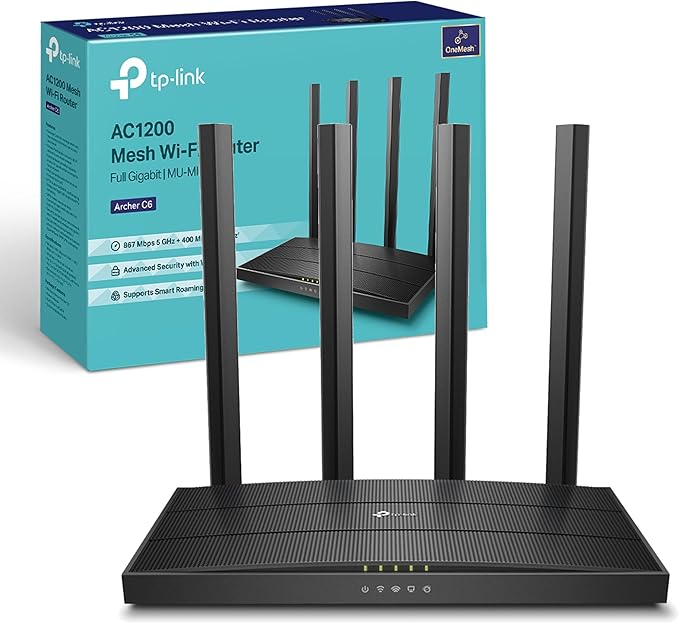
Netgear Nighthawk RAXE500 Wireless Router Gigabit Ethernet Tri-Band (2.4 GHz / 5 GHz / 6 GHz) Black
Nighthawk RAXE500 Tri-Band Wi-Fi 6E Router is powered by Wi-Fi 6E, delivering the smoothest and fastest streaming, eLearning, video conferencing, and gaming experience. Now you can have all the power of 6th generation Wi-Fi plus expanded speeds, connections, and capacity with a completely new and wider 6GHz Wi-Fi band that has up to 3.5X more Wi-Fi channels. Up to 9x faster Wi-Fi speeds up to 10.8Gbps and AX-optimized 1.8GHz quad-core processor powers smart home automation, ultra-smooth 4K/8K streaming, low latency gaming, and more. Multi-Gig 2.5G Ethernet interface can be used for wired devices on LAN or for getting faster Multi-Gig Internet speed. Plus, eight high-performance antennas on the router amplify Wi-Fi signals for maximized range and reliable coverage for a 5-6-bedroom home. With NETGEAR Armor, you get multi-layered cybersecurity for an unlimited number of devices that provides encrypted connections, keeps your online activity private, secures lost or stolen devices, and blocks suspicious devices on your network.
Nighthawk RAXE500 Tri-Band Wi-Fi 6E Router is powered by Wi-Fi 6E, delivering the smoothest and fastest streaming, eLearning, video conferencing, and gaming experience. Now you can have all the power of 6th generation Wi-Fi plus expanded speeds, connections, and capacity with a completely new and wider 6GHz Wi-Fi band that has up to 3.5X more Wi-Fi channels. Up to 9x faster Wi-Fi speeds up to 10.8Gbps and AX-optimized 1.8GHz quad-core processor powers smart home automation, ultra-smooth 4K/8K streaming, low latency gaming, and more. Multi-Gig 2.5G Ethernet interface can be used for wired devices on LAN or for getting faster Multi-Gig Internet speed. Plus, eight high-performance antennas on the router amplify Wi-Fi signals for maximized range and reliable coverage for a 5-6-bedroom home. With NETGEAR Armor, you get multi-layered cybersecurity for an unlimited number of devices that provides encrypted connections, keeps your online activity private, secures lost or stolen devices, and blocks suspicious devices on your network.
Nighthawk RAXE500 Tri-Band Wi-Fi 6E Router is powered by Wi-Fi 6E, delivering the smoothest and fastest streaming, eLearning, video conferencing, and gaming experience. Now you can have all the power of 6th generation Wi-Fi plus expanded speeds, connections, and capacity with a completely new and wider 6GHz Wi-Fi band that has up to 3.5X more Wi-Fi channels. Up to 9x faster Wi-Fi speeds up to 10.8Gbps and AX-optimized 1.8GHz quad-core processor powers smart home automation, ultra-smooth 4K/8K streaming, low latency gaming, and more. Multi-Gig 2.5G Ethernet interface can be used for wired devices on LAN or for getting faster Multi-Gig Internet speed. Plus, eight high-performance antennas on the router amplify Wi-Fi signals for maximized range and reliable coverage for a 5-6-bedroom home. With NETGEAR Armor, you get multi-layered cybersecurity for an unlimited number of devices that provides encrypted connections, keeps your online activity private, secures lost or stolen devices, and blocks suspicious devices on your network.
Nighthawk RAXE500 Tri-Band Wi-Fi 6E Router is powered by Wi-Fi 6E, delivering the smoothest and fastest streaming, eLearning, video conferencing, and gaming experience. Now you can have all the power of 6th generation Wi-Fi plus expanded speeds, connections, and capacity with a completely new and wider 6GHz Wi-Fi band that has up to 3.5X more Wi-Fi channels. Up to 9x faster Wi-Fi speeds up to 10.8Gbps and AX-optimized 1.8GHz quad-core processor powers smart home automation, ultra-smooth 4K/8K streaming, low latency gaming, and more. Multi-Gig 2.5G Ethernet interface can be used for wired devices on LAN or for getting faster Multi-Gig Internet speed. Plus, eight high-performance antennas on the router amplify Wi-Fi signals for maximized range and reliable coverage for a 5-6-bedroom home. With NETGEAR Armor, you get multi-layered cybersecurity for an unlimited number of devices that provides encrypted connections, keeps your online activity private, secures lost or stolen devices, and blocks suspicious devices on your network.
in 3 offers
The lowest price for Netgear Nighthawk RAXE500 Wireless Router Gigabit Ethernet Tri-Band (2.4 GHz / 5 GHz / 6 GHz) Black right now is $346.67 at Amazon.com.au, compared across 3 retailers.
The all-time low was $227.52 on 23 Feb 2026 — today's price is 52% above the lowest ever. It has been notably cheaper before — worth setting a price alert.
Prices last updated 3 Sept 2026.