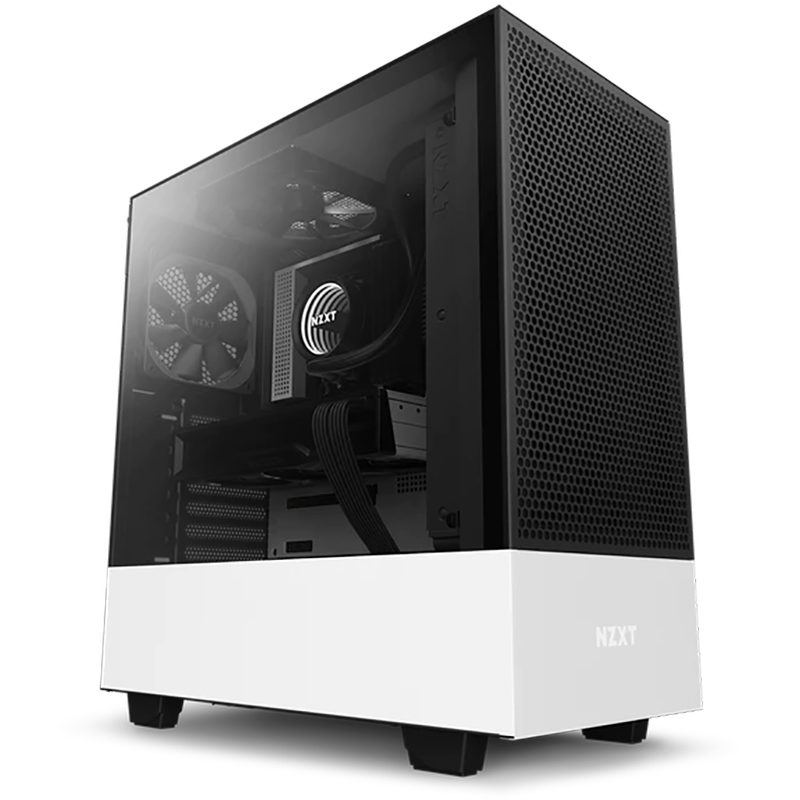
The H5 Flow boosts airflow and GPU cooling with its perforated PSU shroud, mesh panels, and large radiator support—all in a compact mid-tower form factor. The PSU shroud is perforated on the side and bottom, enabling optimal air intake from two 120mm fans (not included). Supports up to a 360mm radiator in front and a 240mm radiator up top for powerful liquid cooling potential. Ultra-fine mesh on the top, front, and side panels creates maximum airflow and filters dust. Equipped with two 120mm Quiet Airflow fans (CV) —one in front, one in rear—for solid out-of-the-box performance. Effortlessly route and conceal cables using the wide channels, hooks, and straps.
The H5 Flow boosts airflow and GPU cooling with its perforated PSU shroud, mesh panels, and large radiator support—all in a compact mid-tower form factor. The PSU shroud is perforated on the side and bottom, enabling optimal air intake from two 120mm fans (not included). Supports up to a 360mm radiator in front and a 240mm radiator up top for powerful liquid cooling potential. Ultra-fine mesh on the top, front, and side panels creates maximum airflow and filters dust. Equipped with two 120mm Quiet Airflow fans (CV) —one in front, one in rear—for solid out-of-the-box performance. Effortlessly route and conceal cables using the wide channels, hooks, and straps.
in 2 offers
The lowest price for NZXT H510 Flow Mid-Tower ATX White Case right now is $153.00 at www.i-tech.com.au, compared across 2 retailers.
The all-time low was $109.00 on 1 Mar 2026 — today's price is 40% above the lowest ever. It has been notably cheaper before — worth setting a price alert.
Prices last updated 28 July 2026.
NZXT H510 Flow Mid-Tower ATX White Case
The H5 Flow boosts airflow and GPU cooling with its perforated PSU shroud, mesh panels, and large radiator support—all in a compact mid-tower form factor. The PSU shroud is perforated on the side and bottom, enabling optimal air intake from two 120mm fans (not included). Supports up to a 360mm radiator in front and a 240mm radiator up top for powerful liquid cooling potential. Ultra-fine mesh on the top, front, and side panels creates maximum airflow and filters dust. Equipped with two 120mm Quiet Airflow fans (CV) —one in front, one in rear—for solid out-of-the-box performance. Effortlessly route and conceal cables using the wide channels, hooks, and straps.
The H5 Flow boosts airflow and GPU cooling with its perforated PSU shroud, mesh panels, and large radiator support—all in a compact mid-tower form factor. The PSU shroud is perforated on the side and bottom, enabling optimal air intake from two 120mm fans (not included). Supports up to a 360mm radiator in front and a 240mm radiator up top for powerful liquid cooling potential. Ultra-fine mesh on the top, front, and side panels creates maximum airflow and filters dust. Equipped with two 120mm Quiet Airflow fans (CV) —one in front, one in rear—for solid out-of-the-box performance. Effortlessly route and conceal cables using the wide channels, hooks, and straps.
Last updated at 28/07/2026 01:18:56
NZXT Mid-Tower Case: H510 Flow Computer Case - ATX, Mini ITX, Micro ATX Motherboard Supported - Steel, Tempered Glass - Matt White - 6 x Bay(s) - 2 x
Professional Computer Case NZ-XT H510 Flow Mid-Tower Support ATX / Micro-ATX / Mini-ITX Desktop
Free delivery
originally posted on bhphotovideo.com
Case arrived in good packaging and was easy/intuitive to set up. Built the computer about a month ago and it has been running well so far. I was worried ventilation would be an issue based on some past H510 reviews, but I've got an i7 and a 3060 in there with an AiO and the temperature hasn't been an issue at all. The H510 Flow definitely lives up to its name.The design itself is super clean and sleek, but I assume that's why you're even considering it in the first place. The size is comfortable for most work spaces, the feet are stable, and there's plenty of space for cable management. Some of the cable tie options were a bit unintuitive, but there's so much room that that's not an issue and it's still very easy to keep clean wires.Oh, and if you're worried it ... MoreCase arrived in good packaging and was easy/intuitive to set up. Built the computer about a month ago and it has been running well so far. I was worried ventilation would be an issue based on some past H510 reviews, but I've got an i7 and a 3060 in there with an AiO and the temperature hasn't been an issue at all. The H510 Flow definitely lives up to its name.The design itself is super clean and sleek, but I assume that's why you're even considering it in the first place. The size is comfortable for most work spaces, the feet are stable, and there's plenty of space for cable management. Some of the cable tie options were a bit unintuitive, but there's so much room that that's not an issue and it's still very easy to keep clean wires.Oh, and if you're worried it doesn't look as white as the other H510 variants because of the black grate on the front, don't fear. Any angle where you can see above it is still dominated by the white design work. It's only the angle of the example photos that makes it look otherwise. Of course, if you really want to have some fun with it, try 3D printing a custom mesh front - that piece is very modular, so it wouldn't be too difficult! On my to-do list for sure!Overall TLDR, been quite happy with this! Good air-flow and sleek design live up to expectations.
originally posted on microcenter.com
This case is excellent all around. Micro center’s price was fair, they had many in stock and the employees there helped me to find components to fit perfectly. The glass on the case gives a great view into the components and it’s air flow and many fans are an excellent way to keep them all cool. I definitely recommend this to anyone looking for a quality case.
originally posted on microcenter.com
If you like the look of the case there's no hesitation in buying it. However if you're just looking for a best bang for the buck case this isn't it. Other cases in this price range offer much better which along with slightly better airflow.One of the biggest cons of this case is that it comes with only two fans, one in the back and one at the front at the bottom. I'd highly advise you to get at least one other fan and put it at the front top slot. Otherwise the front fan is only going to blow air towards the GPU and the CPU cooler will have to take in the hot air from the GPU.
| General | |
| Form Factor | Mid tower |
| Windowed Side Panel | Yes |
| Max Mainboard Size | ATX |
| Supported Motherboards | ATX, microATX, Mini-ITX |
NZXT Mid-Tower Case: H510 Flow Computer Case - ATX, Mini ITX, Micro ATX Motherboard Supported - Steel, Tempered Glass - Matt White - 6 x Bay(s) - 2 x
Professional Computer Case NZ-XT H510 Flow Mid-Tower Support ATX / Micro-ATX / Mini-ITX Desktop
Free delivery
Case arrived in good packaging and was easy/intuitive to set up. Built the computer about a month ago and it has been running well so far. I was worried ventilation would be an issue based on some past H510 reviews, but I've got an i7 and a 3060 in there with an AiO and the temperature hasn't been an issue at all. The H510 Flow definitely lives up to its name.The design itself is super clean and sleek, but I assume that's why you're even considering it in the first place. The size is comfortable for most work spaces, the feet are stable, and there's plenty of space for cable management. Some of the cable tie options were a bit unintuitive, but there's so much room that that's not an issue and it's still very easy to keep clean wires.Oh, and if you're worried it ... MoreCase arrived in good packaging and was easy/intuitive to set up. Built the computer about a month ago and it has been running well so far. I was worried ventilation would be an issue based on some past H510 reviews, but I've got an i7 and a 3060 in there with an AiO and the temperature hasn't been an issue at all. The H510 Flow definitely lives up to its name.The design itself is super clean and sleek, but I assume that's why you're even considering it in the first place. The size is comfortable for most work spaces, the feet are stable, and there's plenty of space for cable management. Some of the cable tie options were a bit unintuitive, but there's so much room that that's not an issue and it's still very easy to keep clean wires.Oh, and if you're worried it doesn't look as white as the other H510 variants because of the black grate on the front, don't fear. Any angle where you can see above it is still dominated by the white design work. It's only the angle of the example photos that makes it look otherwise. Of course, if you really want to have some fun with it, try 3D printing a custom mesh front - that piece is very modular, so it wouldn't be too difficult! On my to-do list for sure!Overall TLDR, been quite happy with this! Good air-flow and sleek design live up to expectations.
This case is excellent all around. Micro center’s price was fair, they had many in stock and the employees there helped me to find components to fit perfectly. The glass on the case gives a great view into the components and it’s air flow and many fans are an excellent way to keep them all cool. I definitely recommend this to anyone looking for a quality case.
If you like the look of the case there's no hesitation in buying it. However if you're just looking for a best bang for the buck case this isn't it. Other cases in this price range offer much better which along with slightly better airflow.One of the biggest cons of this case is that it comes with only two fans, one in the back and one at the front at the bottom. I'd highly advise you to get at least one other fan and put it at the front top slot. Otherwise the front fan is only going to blow air towards the GPU and the CPU cooler will have to take in the hot air from the GPU.
I bought this case about a month ago to build my first PC. It had good reviews, it was popular, and from a reputable brand. It also looks very good. Pros and cons list:Pros:AestheticsEasy to build inGood cable managementEasy to clean/disassembleFits full-size GPUFits 120mm CPU fanCons:Power button LEDs are VERY bright- too bright to leave on at night if you keep your PC in your room. I turned off the flashing sleep light in my BiOS.No filter on top intake fan- Initially I thought that this wasn't a problem, but when using a 140mm fan and aftermarket filter, the fan does not fit as it collides with the CPU power cables. This may be specific to my motherboard though. (MSI Z690-A Pro)HDD bays make it difficult to plug in power supply cables ... MoreI bought this case about a month ago to build my first PC. It had good reviews, it was popular, and from a reputable brand. It also looks very good. Pros and cons list:Pros:AestheticsEasy to build inGood cable managementEasy to clean/disassembleFits full-size GPUFits 120mm CPU fanCons:Power button LEDs are VERY bright- too bright to leave on at night if you keep your PC in your room. I turned off the flashing sleep light in my BiOS.No filter on top intake fan- Initially I thought that this wasn't a problem, but when using a 140mm fan and aftermarket filter, the fan does not fit as it collides with the CPU power cables. This may be specific to my motherboard though. (MSI Z690-A Pro)HDD bays make it difficult to plug in power supply cables without removing them completely- they do slide, but not quite enough.These are the only issues I've experienced with my case. Overall a very good case and I love how it looks.
I like the way it looks and the thumb screws make it very easy to open all the panels and close them. Comes with a lot of screws for the motherboard and storage drives which by the way you can easily remove (storage drive that is). The 2 included fans are quiet. Does a good job exhausting the air with my set up of a 120mm rear fan and a 140mm top mounted fan and the front mesh panel allows for pulling in cooler air from the two 120mm front mounted fans. Cable management on the back panel is decent. Lots of places where you can zip tie some cables to the case along the back. The basement has ample room to hide the cables, especially if you take out the HDD bay. Overall it’s a great looking case and works great for my needs.
Great overall case. Looks amazing. Airflow is there ( make sure to upgrade fans for better cooling). Overall pleased with this over the regular hot box h510. Price point of this case brought me here vs the gen pop case everyone else has (o11 dynamic). But if you have a big graphics card then you might want to reconsider cases. I’m currently running a 3070Ti MSI Suprim X and it is almost touching the radiator. Other than that, it’s a pretty solid case.
I built a system a few years ago in a smaller version of this chassis. NZXT builds sturdy cases with large channels for cable management, plus a few other tie downs near fan mounts and common places motherboards have power cables. I love the style of NZXT cases, and to have a mesh front panel for an air cooled build allows this system using the box cooler included with the CPU to run as cool as my other one with an AIO. Was a bit confused how to remove the glass panel and even more confused by the front panel splitter they offer if your motherboard has an unusual pinout, but I got past those and love everything else about this case.
This model has the greatly improved airflow to all of my components. It was a pretty smooth process getting all the parts connected and assembled. Cable management was a breeze and everything looks much neater and cleaner overall. Nice compact size but still large enough to fit all my components with no issue.
I really liked the 510i however airflow was an issue. I built a new almost full nzxt pc (Corsair psu). After hours and hours of reviews, I pulled the trigger. I am very happy with the aesthetic and functionality. I found all the nzxt products high quality and so far I'm happy with performance.
Overall the computer case is not bad choice for the price point. I had a choice of a much bigger computer case providing features I wanted over something that did the job "ok" while not taking over the desk.The screws on the case side is not as refined. The number of hard drives supported is minimal.One big issue I found was that the top case while advertised on MicroCenter was2 USB 3.0 - but the connectors for the motherboard are USB 3.2 Gen 1 Type-A and USB 3.2 Gen 2 Type-C.Now if your motherboard has that unique header - it is a bonus feature, if not - you will have a only one usable top mounted USB port.
| General | |
| Form Factor | Mid tower |
| Windowed Side Panel | Yes |
| Max Mainboard Size | ATX |
| Supported Motherboards | ATX, microATX, Mini-ITX |

