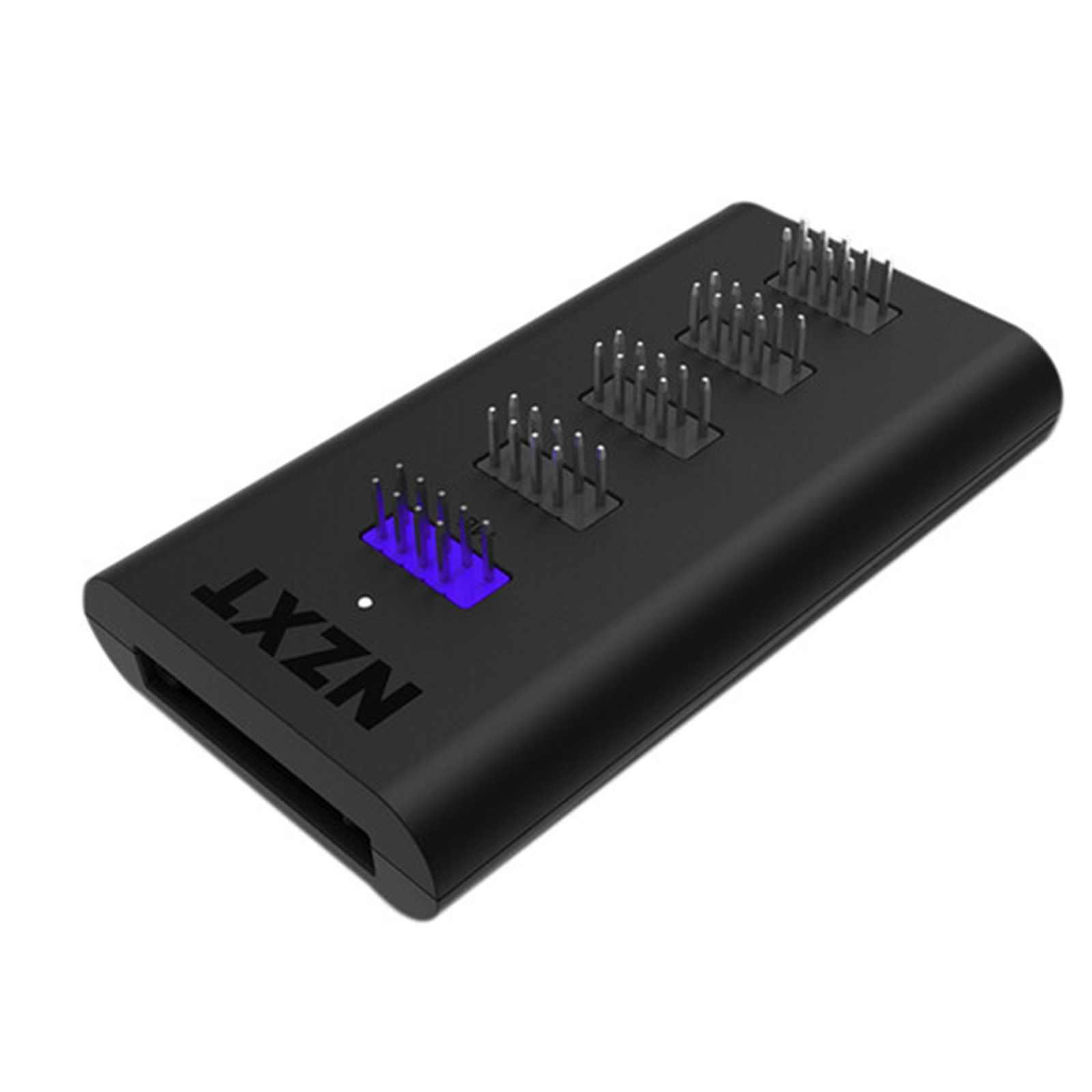
NZXT Internal USB Hub 3 (Ac-Iusbh-M3)
The NZXT AC-IUSBH-M3 is a versatile case accessory designed for efficient USB connectivity. With dimensions of 41 mm width, 82 mm depth, and 20 mm height, it fits seamlessly into your setup. This accessory enhances your case by providing additional USB ports, making it easier to connect devices without hassle. Its compact design ensures it doesn't take up much space while offering functionality and convenience for your PC build.
The NZXT AC-IUSBH-M3 is a versatile case accessory designed for efficient USB connectivity. With dimensions of 41 mm width, 82 mm depth, and 20 mm height, it fits seamlessly into your setup. This accessory enhances your case by providing additional USB ports, making it easier to connect devices without hassle. Its compact design ensures it doesn't take up much space while offering functionality and convenience for your PC build.
The NZXT AC-IUSBH-M3 is a versatile case accessory designed for efficient USB connectivity. With dimensions of 41 mm width, 82 mm depth, and 20 mm height, it fits seamlessly into your setup. This accessory enhances your case by providing additional USB ports, making it easier to connect devices without hassle. Its compact design ensures it doesn't take up much space while offering functionality and convenience for your PC build.
The NZXT AC-IUSBH-M3 is a versatile case accessory designed for efficient USB connectivity. With dimensions of 41 mm width, 82 mm depth, and 20 mm height, it fits seamlessly into your setup. This accessory enhances your case by providing additional USB ports, making it easier to connect devices without hassle. Its compact design ensures it doesn't take up much space while offering functionality and convenience for your PC build.
in 20 offers
The lowest price for NZXT Internal USB Hub 3 (Ac-Iusbh-M3) right now is $20.47 at PB Tech, compared across 15 retailers.
The all-time low was $16.89 on 21 Feb 2026 — today's price is 21% above the lowest ever. It has been notably cheaper before — worth setting a price alert.
Prices last updated 27 June 2026.
Last updated at 27/06/2026 14:19:45
NZXT Internal USB Hub AC-IUSBH-M3 - Hub
Free delivery
Affiliate Disclosure: We may receive a small commission for purchases made through this link at no extra cost to you. This helps support our site. Thank you!
NZXT Internal USB HUB (Gen 3), Expand with 4 Internal Connectors.
7-day returns
NZXT Internal 4-Port Gen 3 USB 2.0 Hub
7-day returns
NZXT Internal 4-Port USB Hub
Delivery between Tue – Fri $11.64
NZXT Internal USB Hub 3
Delivery between Tue – Thu $15
NZXT AC-IUSBH-M3 USB Hub - USB 2.0 - Matte Black - 4 Total USB Port(s) - 4 USB 2.0 Port(s)1 SATA Port(s) - PC
Delivery $7.95
NZXT AC-IUSBH-M3, AC-IUSBH-M3, Internal USB Hub Gen 3, 1x USB 2.0 Header, 1x SATA
Delivery between 30 June – 10 July $14.99
NZXT Internal USB Port Expansion Gen 3 with Dedicated Power
Delivery $13
Nzxt Internal Usb Hub Gen 3 Ac-iusbh-m3
Free delivery
Affiliate Disclosure: We may receive a small commission for purchases made through this link at no extra cost to you. This helps support our site. Thank you!
Nzxt Internal Usb Hub Ac-iusbh-m3 - Hub
Free delivery
Affiliate Disclosure: We may receive a small commission for purchases made through this link at no extra cost to you. This helps support our site. Thank you!
originally posted on microcenter.com
Solid build and is powered via SATA. Most USB splitters don't have their own power source. That said I am only giving 3 stars since it does not work for it's intended purpose. I have 3 Corsair icue devices all of which require a motherboard USB header. This NZXT hub will not work for that purpose. One of the fans is spinning but has no color and the color cannot be changed via icue. If you are looking for a solution for an additional icue header look elsewhere, this will not work.
originally posted on microcenter.com
I had a case that had more USB to motherboard wires than my motherboard offered. Searching around, I managed to come across this. It hooked up flawlessly, takes away the worry of accidentally breaking a port once you get the single wire plugged up. Then it offers 4 more USB 2.0 hook ups. No issues at all using it. The magnetic mount is amazing for placing it and if you have an issue with that, it gives you some velcro-like tape for it instead.
originally posted on newegg.com
I was having an issue with one of the onboard USB headers on my motherboard. Whatever was connected to one of the two headers would disconnect and reconnect about every hour randomly. It didn't really affect anything but the sound was driving me crazy. Plugged this hub into the working USB header and everything else into the hub and no more disconnect/reconnect sound. Its the little things.
| General | |
| Device Type | Hub - 4 ports |
| Subtype | USB |
| Ports | 4 x USB 2.0 (internal) |
| Features | Magnet mounting, 3M Dual Lock |
NZXT Internal USB Hub AC-IUSBH-M3 - Hub
Free delivery
Affiliate Disclosure: We may receive a small commission for purchases made through this link at no extra cost to you. This helps support our site. Thank you!
NZXT Internal USB HUB (Gen 3), Expand with 4 Internal Connectors.
7-day returns
NZXT Internal 4-Port Gen 3 USB 2.0 Hub
7-day returns
NZXT Internal 4-Port USB Hub
Delivery between Tue – Fri $11.64
NZXT Internal USB Hub 3
Delivery between Tue – Thu $15
Solid build and is powered via SATA. Most USB splitters don't have their own power source. That said I am only giving 3 stars since it does not work for it's intended purpose. I have 3 Corsair icue devices all of which require a motherboard USB header. This NZXT hub will not work for that purpose. One of the fans is spinning but has no color and the color cannot be changed via icue. If you are looking for a solution for an additional icue header look elsewhere, this will not work.
I had a case that had more USB to motherboard wires than my motherboard offered. Searching around, I managed to come across this. It hooked up flawlessly, takes away the worry of accidentally breaking a port once you get the single wire plugged up. Then it offers 4 more USB 2.0 hook ups. No issues at all using it. The magnetic mount is amazing for placing it and if you have an issue with that, it gives you some velcro-like tape for it instead.
I was having an issue with one of the onboard USB headers on my motherboard. Whatever was connected to one of the two headers would disconnect and reconnect about every hour randomly. It didn't really affect anything but the sound was driving me crazy. Plugged this hub into the working USB header and everything else into the hub and no more disconnect/reconnect sound. Its the little things.
If your case lacks multiple USB2 headers which are used by many things such as several AIO CPU coolers as well as potentially some front panels on cases, then this may be the solution for you.Very easy to mount with its magnetic casing, and only required a SATA power connection.Has been a worthwhile purchase to allow 2 USB header connections to be utilised on a single motherboard header.
Stable power for all those controllers you need. I tried splitters and would end up with over volt situations and the need to install it, reboot, install one controller, reboot, install the other controller, reboot, then it should work. Thats not the case with this hub since using sata power means it gets all the power it needs. Plug it in, plug in your controllers and boot, thats it, everything working as it should.
I have a pretty Corsair-minded ecosystem and needed two USB 2.0 headers for my fans and AIO pump. I recently bought a Wifi card with Bluetooth and didn't realize the Bluetooth needed a USB 2.0 header. With only two 2.0 headers on my MoBo, I set about finding a way to get it connected. This little guy did the trick! Everything now runs off this hub, connected to a single USB 2.0 header from my MoBo.
When I plugged this onto my Asus motherboard I noticed that two of my three devices (AIO, Fan controller, Case LEDs) reset to the default rgb color unless I opened the application after boot. To test this I kept swapping devices one to the motherboard and two to the NZXT internal hub and determined that it doesn’t store the settings after shutting it off. If someone doesn’t have this issue or has a fix it would be greatly appreciated
Similar in situation to what another reviewer mentioned - my motherboard was woefully short on USB header connectors.Having recently purchased an NZXT fan controller and already using a Corsair AIO cooler for my CPU - I quickly stumbled across the problem that 3-into-1 wasn't going to work with the frontal USB ports on my case as well.Fitting this device was so straightforward. The pack contains a motherboard to hub USB cable that you simply connect to the purple port as shown in the picture and the other end to your mobo USB2.0 header connector. You also need to power the hub via the SATA connector at the bottom.Once done, I connected the USB2.0 ports from my chassis case, my Corsair AIO header cable and of course, the header cable from the NZXT fan ... MoreSimilar in situation to what another reviewer mentioned - my motherboard was woefully short on USB header connectors.Having recently purchased an NZXT fan controller and already using a Corsair AIO cooler for my CPU - I quickly stumbled across the problem that 3-into-1 wasn't going to work with the frontal USB ports on my case as well.Fitting this device was so straightforward. The pack contains a motherboard to hub USB cable that you simply connect to the purple port as shown in the picture and the other end to your mobo USB2.0 header connector. You also need to power the hub via the SATA connector at the bottom.Once done, I connected the USB2.0 ports from my chassis case, my Corsair AIO header cable and of course, the header cable from the NZXT fan controller also. I switched the PC on to test and all devices work fine - including the fan controller itself, which is now detected within the optional NZXT CAM software for direct fan control.As a final couple of plus points worth mentioning, each port has a little cap cover to protect those unused ones from unnecessary dust or any danger of pin damage. Also, the backing of the hub is magnetised - allowing easy attachment to the inside of the PC case. It also comes with velcro strips, should you prefer to go down that route to attach it instead..At just 8cm long and barely 4cm wide - this little hub has proven to be a great help and I would thoroughly recommend it to anyone struggling with onboard USB header capacity.
If you're looking to buy an internal splitter for USB headers, get this. Not the cheap ones from amazon/ebay that aren't powered. This is sata powered to give all of the headers the juice they need. It's magnetic and easy to install, and looks smart in the case.
I needed the USB hub because I needed extra devices installed, of course. Having 4 to work with is great, and installation was simple, especially with the magnets making it easy. Micro Center also price matched, and saving money is always good!
| General | |
| Device Type | Hub - 4 ports |
| Subtype | USB |
| Ports | 4 x USB 2.0 (internal) |
| Features | Magnet mounting, 3M Dual Lock |

