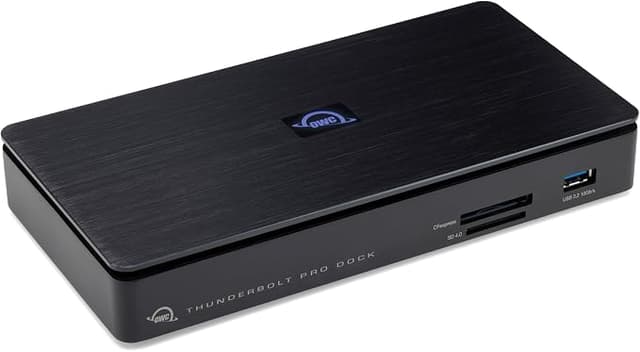
OWC Thunderbolt Pro Dock With 10GbE, USB Ports, CFExpress, Audio, DP & More
High bandwidth and flexibility for demanding hi-res needs. The Thunderbolt 3 Pro Dock is designed for professional creative workflows and offers 10 Gb Ethernet, CFast and SD card readers on the front, as well as support for Thunderbolt 3 devices and peripheral connections. Pro-level docking stations should be ready for any situation you encounter in a production workflow. The Thunderbolt 3 Pro Docking Station is your "mission control" on-site and in post-production, featuring an unmatched combination of ultra-fast 10 Gb Ethernet, CFast and SD card readers, two Thunderbolt 3 ports, three USB 3.1 ports, and full support for eSATA devices and drives. When you're on-site, your station needs the power of versatility. With conveniently accessible CFast and SD 4.0 card readers on the front, the Thunderbolt 3 Pro Dock helps you efficiently manage multiple card uploads. This is a significant advantage when collaborating with multiple videographers and photographers at events like conferences, festivals, and concerts. Need more space for your workspace? Do you need to access a large DAS (Direct Attached Storage) drive on-site? No problem. The Thunderbolt 3 Pro Dock provides a DisplayPort for an additional 4K display, as well as extra connections, including an eSATA port with port multiplier support, allowing you to access multiple drives in a multi-bay RAID setup.
High bandwidth and flexibility for demanding hi-res needs. The Thunderbolt 3 Pro Dock is designed for professional creative workflows and offers 10 Gb Ethernet, CFast and SD card readers on the front, as well as support for Thunderbolt 3 devices and peripheral connections. Pro-level docking stations should be ready for any situation you encounter in a production workflow. The Thunderbolt 3 Pro Docking Station is your "mission control" on-site and in post-production, featuring an unmatched combination of ultra-fast 10 Gb Ethernet, CFast and SD card readers, two Thunderbolt 3 ports, three USB 3.1 ports, and full support for eSATA devices and drives. When you're on-site, your station needs the power of versatility. With conveniently accessible CFast and SD 4.0 card readers on the front, the Thunderbolt 3 Pro Dock helps you efficiently manage multiple card uploads. This is a significant advantage when collaborating with multiple videographers and photographers at events like conferences, festivals, and concerts. Need more space for your workspace? Do you need to access a large DAS (Direct Attached Storage) drive on-site? No problem. The Thunderbolt 3 Pro Dock provides a DisplayPort for an additional 4K display, as well as extra connections, including an eSATA port with port multiplier support, allowing you to access multiple drives in a multi-bay RAID setup.
High bandwidth and flexibility for demanding hi-res needs. The Thunderbolt 3 Pro Dock is designed for professional creative workflows and offers 10 Gb Ethernet, CFast and SD card readers on the front, as well as support for Thunderbolt 3 devices and peripheral connections. Pro-level docking stations should be ready for any situation you encounter in a production workflow. The Thunderbolt 3 Pro Docking Station is your "mission control" on-site and in post-production, featuring an unmatched combination of ultra-fast 10 Gb Ethernet, CFast and SD card readers, two Thunderbolt 3 ports, three USB 3.1 ports, and full support for eSATA devices and drives. When you're on-site, your station needs the power of versatility. With conveniently accessible CFast and SD 4.0 card readers on the front, the Thunderbolt 3 Pro Dock helps you efficiently manage multiple card uploads. This is a significant advantage when collaborating with multiple videographers and photographers at events like conferences, festivals, and concerts. Need more space for your workspace? Do you need to access a large DAS (Direct Attached Storage) drive on-site? No problem. The Thunderbolt 3 Pro Dock provides a DisplayPort for an additional 4K display, as well as extra connections, including an eSATA port with port multiplier support, allowing you to access multiple drives in a multi-bay RAID setup.
High bandwidth and flexibility for demanding hi-res needs. The Thunderbolt 3 Pro Dock is designed for professional creative workflows and offers 10 Gb Ethernet, CFast and SD card readers on the front, as well as support for Thunderbolt 3 devices and peripheral connections. Pro-level docking stations should be ready for any situation you encounter in a production workflow. The Thunderbolt 3 Pro Docking Station is your "mission control" on-site and in post-production, featuring an unmatched combination of ultra-fast 10 Gb Ethernet, CFast and SD card readers, two Thunderbolt 3 ports, three USB 3.1 ports, and full support for eSATA devices and drives. When you're on-site, your station needs the power of versatility. With conveniently accessible CFast and SD 4.0 card readers on the front, the Thunderbolt 3 Pro Dock helps you efficiently manage multiple card uploads. This is a significant advantage when collaborating with multiple videographers and photographers at events like conferences, festivals, and concerts. Need more space for your workspace? Do you need to access a large DAS (Direct Attached Storage) drive on-site? No problem. The Thunderbolt 3 Pro Dock provides a DisplayPort for an additional 4K display, as well as extra connections, including an eSATA port with port multiplier support, allowing you to access multiple drives in a multi-bay RAID setup.
in 3 offers
The lowest price for OWC Thunderbolt Pro Dock With 10GbE, USB Ports, CFExpress, Audio, DP & More right now is $649.00 at Macfixit Australia, compared across 3 retailers.
The all-time low was $181.12 on 28 Feb 2026 — today's price is 258% above the lowest ever. It has been notably cheaper before — worth setting a price alert.
Prices last updated 1 Nov 2026.
Last updated at 01/11/2026 15:19:48
OWC Thunderbolt Pro Dock with 10GbE, USB Ports, CFExpress, Audio, DP & More
Delivery between 4–10 Nov $12
OWC OWCTB3DKPRO Thunderbolt Dock Networking + Media for Pro Video and Data 10GbE CFexpress SD USB-C/A
Delivery between 4–12 Nov $11.50
OWC Thunderbolt Pro Dock
Free delivery between 4–11 Nov
originally posted on macsales.com
I haven't had a problem with it since using it -iperf3-darwin tests at 9.40 gbps on the 10gbps ethernet port to the iperf3 server on a machine. That's going from an M1 Max MacBook Pro using the OWC adapter then 25 ft. of Cat6 to a fairly cheap 10 gbps unmanaged switch through 3 feet of cat6 to an M1 MacMini with the 10gbps ethernet port, while also using ARD to control the MacMini. The card reader seems to work, I haven't tried the DisplayPort. Only problems I've ran into is the network not coming back up correctly and external disks disconnecting - after waking up from sleep. Since those both have been ongoing problems with Ventura and earlier on M1 Macs, I don't blame the dock, and consider it an os problem, or perhaps a hw issue that hasn't been disclosed yet. ... MoreI haven't had a problem with it since using it -iperf3-darwin tests at 9.40 gbps on the 10gbps ethernet port to the iperf3 server on a machine. That's going from an M1 Max MacBook Pro using the OWC adapter then 25 ft. of Cat6 to a fairly cheap 10 gbps unmanaged switch through 3 feet of cat6 to an M1 MacMini with the 10gbps ethernet port, while also using ARD to control the MacMini. The card reader seems to work, I haven't tried the DisplayPort. Only problems I've ran into is the network not coming back up correctly and external disks disconnecting - after waking up from sleep. Since those both have been ongoing problems with Ventura and earlier on M1 Macs, I don't blame the dock, and consider it an os problem, or perhaps a hw issue that hasn't been disclosed yet. I'm happy with the OWC Thunderbolt Pro Dock, and recommend it.
originally posted on macsales.com
Great unit. It could surely use a few USB-A ports on the front for dongles and low speed usb drives. It gets fairly warm even at idle. Quality build, heavy duty. The logo lites up on top which is a nice touch. I dont regret purchase.
originally posted on bhphotovideo.com
Hudson Henry recommended this but it has its issues. First there are only 2 thunderbolt ports and one has to go to your computer. I had two thunderbolt NVMe drives (enclosures) from OWC so they won't both go into this Dock. That alone doesn't make it Pro.Further do NOT install their dock driver, or be prepared to uninstall it if it gives you issues. For me it interfered with the schedule task on my backup program and caused my network connection to drop everytime I inserted an CFE card from camera. While the transfer is reasonably fast it does run hot so don't leave your card in long.So what do I like - I got it for the 10gb port to my NAS and allows other drives to be connected (only one other TB though). It seems to be working ok now that I uninstalled the ... MoreHudson Henry recommended this but it has its issues. First there are only 2 thunderbolt ports and one has to go to your computer. I had two thunderbolt NVMe drives (enclosures) from OWC so they won't both go into this Dock. That alone doesn't make it Pro.Further do NOT install their dock driver, or be prepared to uninstall it if it gives you issues. For me it interfered with the schedule task on my backup program and caused my network connection to drop everytime I inserted an CFE card from camera. While the transfer is reasonably fast it does run hot so don't leave your card in long.So what do I like - I got it for the 10gb port to my NAS and allows other drives to be connected (only one other TB though). It seems to be working ok now that I uninstalled the driver that allowed one click for ejecting all the connected items (it never seemed to eject them all anyway.
| Compatible OS | Windows, macOS 12.x Monterey, macOS 13.x Ventura, macOS 14.x Sonoma, macOS 15.x Sequoia |
| Compatible Brand | Apple |
| Compatible Device Type | Laptop |
| Supported Resolutions | 4K |
| Data Transfer Speed | up to 40Gb/s (Thunderbolt 3), up to 10Gb/s (USB 3.2 Gen 2 Type-A), up to 10Gb/s (USB 3.2 Gen 2 Type-C) |
OWC Thunderbolt Pro Dock with 10GbE, USB Ports, CFExpress, Audio, DP & More
Delivery between 4–10 Nov $12
OWC OWCTB3DKPRO Thunderbolt Dock Networking + Media for Pro Video and Data 10GbE CFexpress SD USB-C/A
Delivery between 4–12 Nov $11.50
OWC Thunderbolt Pro Dock
Free delivery between 4–11 Nov
I haven't had a problem with it since using it -iperf3-darwin tests at 9.40 gbps on the 10gbps ethernet port to the iperf3 server on a machine. That's going from an M1 Max MacBook Pro using the OWC adapter then 25 ft. of Cat6 to a fairly cheap 10 gbps unmanaged switch through 3 feet of cat6 to an M1 MacMini with the 10gbps ethernet port, while also using ARD to control the MacMini. The card reader seems to work, I haven't tried the DisplayPort. Only problems I've ran into is the network not coming back up correctly and external disks disconnecting - after waking up from sleep. Since those both have been ongoing problems with Ventura and earlier on M1 Macs, I don't blame the dock, and consider it an os problem, or perhaps a hw issue that hasn't been disclosed yet. ... MoreI haven't had a problem with it since using it -iperf3-darwin tests at 9.40 gbps on the 10gbps ethernet port to the iperf3 server on a machine. That's going from an M1 Max MacBook Pro using the OWC adapter then 25 ft. of Cat6 to a fairly cheap 10 gbps unmanaged switch through 3 feet of cat6 to an M1 MacMini with the 10gbps ethernet port, while also using ARD to control the MacMini. The card reader seems to work, I haven't tried the DisplayPort. Only problems I've ran into is the network not coming back up correctly and external disks disconnecting - after waking up from sleep. Since those both have been ongoing problems with Ventura and earlier on M1 Macs, I don't blame the dock, and consider it an os problem, or perhaps a hw issue that hasn't been disclosed yet. I'm happy with the OWC Thunderbolt Pro Dock, and recommend it.
Great unit. It could surely use a few USB-A ports on the front for dongles and low speed usb drives. It gets fairly warm even at idle. Quality build, heavy duty. The logo lites up on top which is a nice touch. I dont regret purchase.
Hudson Henry recommended this but it has its issues. First there are only 2 thunderbolt ports and one has to go to your computer. I had two thunderbolt NVMe drives (enclosures) from OWC so they won't both go into this Dock. That alone doesn't make it Pro.Further do NOT install their dock driver, or be prepared to uninstall it if it gives you issues. For me it interfered with the schedule task on my backup program and caused my network connection to drop everytime I inserted an CFE card from camera. While the transfer is reasonably fast it does run hot so don't leave your card in long.So what do I like - I got it for the 10gb port to my NAS and allows other drives to be connected (only one other TB though). It seems to be working ok now that I uninstalled the ... MoreHudson Henry recommended this but it has its issues. First there are only 2 thunderbolt ports and one has to go to your computer. I had two thunderbolt NVMe drives (enclosures) from OWC so they won't both go into this Dock. That alone doesn't make it Pro.Further do NOT install their dock driver, or be prepared to uninstall it if it gives you issues. For me it interfered with the schedule task on my backup program and caused my network connection to drop everytime I inserted an CFE card from camera. While the transfer is reasonably fast it does run hot so don't leave your card in long.So what do I like - I got it for the 10gb port to my NAS and allows other drives to be connected (only one other TB though). It seems to be working ok now that I uninstalled the driver that allowed one click for ejecting all the connected items (it never seemed to eject them all anyway.
This dock has everything I need: USB-A, USB-C, and Thunderbolt ports (with Power Delivery), a 10 Gbps Ethernet port for network-attached storage, an SD card reader, and (... wait for it ...) a CFExpress Type B reader! There may be other docks out there with a CFExpress Type B reader, but this is the only one I've seen so far. Since my cameras all use either SD or CFExpress Type B cards, this clinched it for me. It doesn't come cheap, though, but for me it was worth it.
Excellent service as usual from scan and spoke to sales person who took order but this item is described on Scan as thunderbolt 3 and currently at OWC website... but is actually TB4. Not a biggy but I did also order some TB3 cables from Apple as backups and the unit came with TB 4 cable and doesn't work with the backup TB3 cables.
We recently upgraded our video infrastructure to NAS with 10Gb ethernet connections to desktops and laptops.Since we do a lot of video, we wanted something that could do it all 10Gb Ethernet, SD and CFExpress card readers (the two formats we primarily use), Thunderbolt power to laptops, and an array of ports.Pros: + The 10Gb ethernet is fast! We get the same speeds off this dock connected to M1Max MBP as we do to the Mac Studio (with built-in 10Gb) around 1000 MB/sec... yes megaBYTES/sec! + Easily charges a 16" M1 Max MBP with 85W of juice. + You can mount and transfer from CFExpress and SD at the same time. + Not sure how it works, because specs seem to indicate it shouldn't, but I'm driving an LG 5K display, connected via TB, and 4K display connected via display ... MoreWe recently upgraded our video infrastructure to NAS with 10Gb ethernet connections to desktops and laptops.Since we do a lot of video, we wanted something that could do it all 10Gb Ethernet, SD and CFExpress card readers (the two formats we primarily use), Thunderbolt power to laptops, and an array of ports.Pros: + The 10Gb ethernet is fast! We get the same speeds off this dock connected to M1Max MBP as we do to the Mac Studio (with built-in 10Gb) around 1000 MB/sec... yes megaBYTES/sec! + Easily charges a 16" M1 Max MBP with 85W of juice. + You can mount and transfer from CFExpress and SD at the same time. + Not sure how it works, because specs seem to indicate it shouldn't, but I'm driving an LG 5K display, connected via TB, and 4K display connected via display port at the same time. Specs say it should only support two 4K displays or one 5K display.Cons: - It only has one USB-C input on the back. I have my USB audio interface plugged into this and it works fine. Just wish I had more USB-C ports, especially up front. - The card slots are oriented differently. You put in the CFExpress facing up and the SD card facing down. Seems like they should just both face up.Other observations: * Like most 10Gb ethernet devices, it does get warm but I haven't had any problems with it overheating and dropping out. I'll watch this more closely as summer comes and ambient temperature rises a bit.Overall, I really like it! It replaced a CalDigit TS3 Plus and has been working great and fits our needs perfectly. Just a few minor changes would make it perfect. I'd definitely recommend for those that need 10Gb ethernet and multiple card readers.
This thing has been a pain since I received it. First of all, if you are on windows and you want to use it as a 10GBE ethernet adapter you have to go to some other website to find the 10GBE drivers to download for your computer, they don't even have it on their website which is no good, then you find out that the drivers don't even work (at least not for windows 11) I was able to connect to a Synology drive via ethernet but not at 10GBE speeds and the connection kept freezing my laptop completely to the point where I had to force a shut down holding the power button anytime I did a transfer over 100GB, It is going to take a long time to back up 10TB of footage at that rate. This drive also needs to be plugged into a thunderbolt port which limits what it can be ... MoreThis thing has been a pain since I received it. First of all, if you are on windows and you want to use it as a 10GBE ethernet adapter you have to go to some other website to find the 10GBE drivers to download for your computer, they don't even have it on their website which is no good, then you find out that the drivers don't even work (at least not for windows 11) I was able to connect to a Synology drive via ethernet but not at 10GBE speeds and the connection kept freezing my laptop completely to the point where I had to force a shut down holding the power button anytime I did a transfer over 100GB, It is going to take a long time to back up 10TB of footage at that rate. This drive also needs to be plugged into a thunderbolt port which limits what it can be plugged into and it doesn't clearly say what port you should use for connecting to it. All in all, I have not been happy with it. I only hope I can get everything sorted out with it.
As a MacBook Pro owner and photographer, I have plenty of need to plug in drives, monitor, usb printer and CfExpress card, etc. Thunderbolt takes care of all of these and keeps me organized without all the plugging and unplugging from my limited plugs on the Mac. After about a week, my OWC Disk ejector stopped working. OWC tech support was excellent and helped resolve the problem (Google syncing app) - all solved by their support. I don't know how I functioned without this dock before.
It's always a struggle to find AVB to Thunderbolt adapters without using a string of dongles. This offers flawless AVB connection with Avid and Digico consoles (and others, I'm sure) for multitrack recording and layback.
I purchased the dock a couple of months ago, and it has worked great with my laptops. I was looking for an external 10Gb adapter, so having that capability built in to the dock made it an exceptional value.Both card readers work without issue, and the CFexpress speed is very impressive. The dock has provided an improved workflow between my Fujifilm X-H2S and the laptops I use for photo editing.
| Compatible OS | Windows, macOS 12.x Monterey, macOS 13.x Ventura, macOS 14.x Sonoma, macOS 15.x Sequoia |
| Compatible Brand | Apple |
| Compatible Device Type | Laptop |
| Supported Resolutions | 4K |
| Data Transfer Speed | up to 40Gb/s (Thunderbolt 3), up to 10Gb/s (USB 3.2 Gen 2 Type-A), up to 10Gb/s (USB 3.2 Gen 2 Type-C) |

