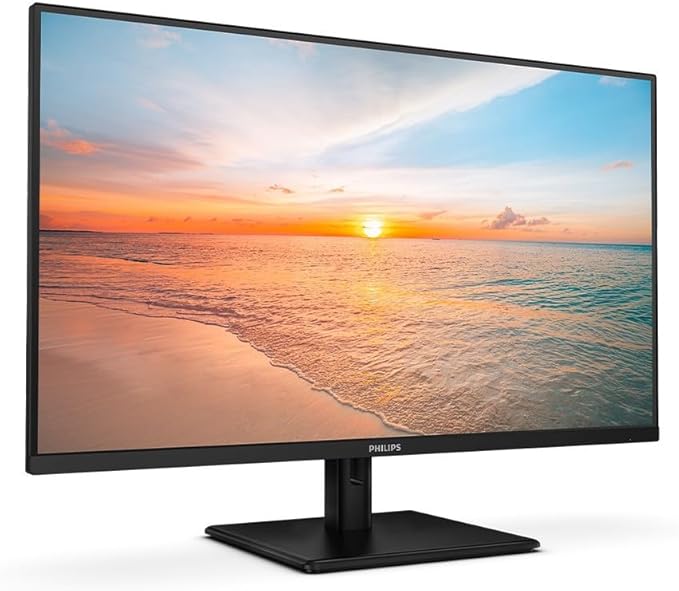
Philips 32E1N1800LA/00 4K Ultra HD 31.5" Monitor
LowBlue mode and Flicker-free easy-on-the eyes viewing Our LowBlue Mode and Flicker-free technology have been developed to reduce eye strain and fatigue often caused by long hours in front of a monitor. EasySelect menu toggle key for quick on-screen menu access The discreetly placed EasySelect Menu Toggle Key allows you to make quick and easy adjustments to monitor settings in the On-Screen Display menu. Cable management reduces cable clutter for a neat workspace Cable management is an intimate design that maintains a tidy workspace by organising the cables and wires required for the operation of a display device. Built-in stereo speakers for multimedia A pair of high-quality stereo speakers built into a display device. They may be visible front firing, or invisible down firing, top firing, rear firing etc. depending on model and design. DisplayPort connection for maximum visuals DisplayPort is a digital link from PC to monitor without any conversion. With higher capabilities than DVI standard, it is fully capable to support up to 15 metre cables and 10.8 Gbps/sec data transfer. With this high performance and zero latency, you get the fastest imaging and refresh rates — making DisplayPort the best choice for not only general office or home use, but also for the more demanding gaming and films, video editing and more. It also keeps interoperability in mind via the use of various adapters. HDMI ensures universal digital connectivity An HDMI-ready device has all the required hardware to accept High-Definition Multimedia Interface (HDMI) input. An HDMI cable enables high-quality digital video and audio to be transmitted over a single cable from a PC or any number of AV sources (including set-top boxes, DVD players, A/V receivers and video cameras).
LowBlue mode and Flicker-free easy-on-the eyes viewing Our LowBlue Mode and Flicker-free technology have been developed to reduce eye strain and fatigue often caused by long hours in front of a monitor. EasySelect menu toggle key for quick on-screen menu access The discreetly placed EasySelect Menu Toggle Key allows you to make quick and easy adjustments to monitor settings in the On-Screen Display menu. Cable management reduces cable clutter for a neat workspace Cable management is an intimate design that maintains a tidy workspace by organising the cables and wires required for the operation of a display device. Built-in stereo speakers for multimedia A pair of high-quality stereo speakers built into a display device. They may be visible front firing, or invisible down firing, top firing, rear firing etc. depending on model and design. DisplayPort connection for maximum visuals DisplayPort is a digital link from PC to monitor without any conversion. With higher capabilities than DVI standard, it is fully capable to support up to 15 metre cables and 10.8 Gbps/sec data transfer. With this high performance and zero latency, you get the fastest imaging and refresh rates — making DisplayPort the best choice for not only general office or home use, but also for the more demanding gaming and films, video editing and more. It also keeps interoperability in mind via the use of various adapters. HDMI ensures universal digital connectivity An HDMI-ready device has all the required hardware to accept High-Definition Multimedia Interface (HDMI) input. An HDMI cable enables high-quality digital video and audio to be transmitted over a single cable from a PC or any number of AV sources (including set-top boxes, DVD players, A/V receivers and video cameras).
LowBlue mode and Flicker-free easy-on-the eyes viewing Our LowBlue Mode and Flicker-free technology have been developed to reduce eye strain and fatigue often caused by long hours in front of a monitor. EasySelect menu toggle key for quick on-screen menu access The discreetly placed EasySelect Menu Toggle Key allows you to make quick and easy adjustments to monitor settings in the On-Screen Display menu. Cable management reduces cable clutter for a neat workspace Cable management is an intimate design that maintains a tidy workspace by organising the cables and wires required for the operation of a display device. Built-in stereo speakers for multimedia A pair of high-quality stereo speakers built into a display device. They may be visible front firing, or invisible down firing, top firing, rear firing etc. depending on model and design. DisplayPort connection for maximum visuals DisplayPort is a digital link from PC to monitor without any conversion. With higher capabilities than DVI standard, it is fully capable to support up to 15 metre cables and 10.8 Gbps/sec data transfer. With this high performance and zero latency, you get the fastest imaging and refresh rates — making DisplayPort the best choice for not only general office or home use, but also for the more demanding gaming and films, video editing and more. It also keeps interoperability in mind via the use of various adapters. HDMI ensures universal digital connectivity An HDMI-ready device has all the required hardware to accept High-Definition Multimedia Interface (HDMI) input. An HDMI cable enables high-quality digital video and audio to be transmitted over a single cable from a PC or any number of AV sources (including set-top boxes, DVD players, A/V receivers and video cameras).
LowBlue mode and Flicker-free easy-on-the eyes viewing Our LowBlue Mode and Flicker-free technology have been developed to reduce eye strain and fatigue often caused by long hours in front of a monitor. EasySelect menu toggle key for quick on-screen menu access The discreetly placed EasySelect Menu Toggle Key allows you to make quick and easy adjustments to monitor settings in the On-Screen Display menu. Cable management reduces cable clutter for a neat workspace Cable management is an intimate design that maintains a tidy workspace by organising the cables and wires required for the operation of a display device. Built-in stereo speakers for multimedia A pair of high-quality stereo speakers built into a display device. They may be visible front firing, or invisible down firing, top firing, rear firing etc. depending on model and design. DisplayPort connection for maximum visuals DisplayPort is a digital link from PC to monitor without any conversion. With higher capabilities than DVI standard, it is fully capable to support up to 15 metre cables and 10.8 Gbps/sec data transfer. With this high performance and zero latency, you get the fastest imaging and refresh rates — making DisplayPort the best choice for not only general office or home use, but also for the more demanding gaming and films, video editing and more. It also keeps interoperability in mind via the use of various adapters. HDMI ensures universal digital connectivity An HDMI-ready device has all the required hardware to accept High-Definition Multimedia Interface (HDMI) input. An HDMI cable enables high-quality digital video and audio to be transmitted over a single cable from a PC or any number of AV sources (including set-top boxes, DVD players, A/V receivers and video cameras).
in 3 offers
The lowest price for Philips 32E1N1800LA/00 4K Ultra HD 31.5" Monitor right now is $380.99 at Techinn.com, compared across 3 retailers.
The all-time low was $313.00 on 27 Feb 2026 — today's price is 22% above the lowest ever. It has been notably cheaper before — worth setting a price alert.
Prices last updated 20 July 2026.
Last updated at 20/07/2026 04:50:23
Philips 32e1n1800la/00 32 4k Ips Led Monitor Clear
Delivery $226.49
Philips 1000 Series 31.5 4K UHD VA Monitor (32E1N1800LA)
Delivery $10
Philips 1000 Series 31.5 4K UHD VA Monitor (32E1N1800LA)
Delivery between 23–27 July $10
Philips 32e1n1800la/00 32 4k Ips Led Monitor Clear
Delivery $226.49
Philips 1000 Series 31.5 4K UHD VA Monitor (32E1N1800LA)
Delivery $10
Philips 1000 Series 31.5 4K UHD VA Monitor (32E1N1800LA)
Delivery between 23–27 July $10