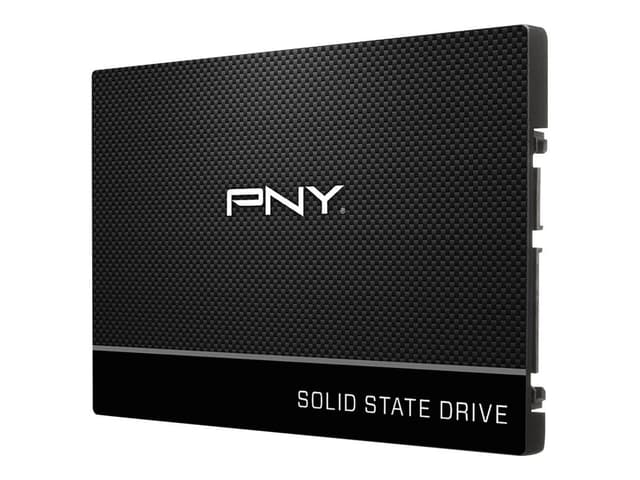
The CS900 is the ideal solution for a solid state drive (SSD) upgrade from a hard Disc drive (HDD). It offers all the most sought after features at an excellent value. Do more in less time with speeds of up to 550MB/s read and 515MB/s write; boot up, power down, and load applications in seconds. With no moving parts and non-volatile NAND, the CS900 is 30 times more robust and less prone to failure than traditional hard drives (HDD). The CS900 can withstand extreme environments, and retain data even when dropped. The CS900 is the ideal solution for a hard drive replacement in both MAC and PC systems. PNY CS900 is the ideal solution for a mainstream solid state drive (SSD) upgrade from a hard Disc drive (HDD). The CS900 delivers all the most sought after features at an excellent value, and is designed for an easy and cost-effective HDD replacement in the PC system to help Realise faster boot times, quicker application launches and better overall system performance. With no moving parts, PNY CS900 is highly durable and less likely to fail.
The CS900 is the ideal solution for a solid state drive (SSD) upgrade from a hard Disc drive (HDD). It offers all the most sought after features at an excellent value. Do more in less time with speeds of up to 550MB/s read and 515MB/s write; boot up, power down, and load applications in seconds. With no moving parts and non-volatile NAND, the CS900 is 30 times more robust and less prone to failure than traditional hard drives (HDD). The CS900 can withstand extreme environments, and retain data even when dropped. The CS900 is the ideal solution for a hard drive replacement in both MAC and PC systems. PNY CS900 is the ideal solution for a mainstream solid state drive (SSD) upgrade from a hard Disc drive (HDD). The CS900 delivers all the most sought after features at an excellent value, and is designed for an easy and cost-effective HDD replacement in the PC system to help Realise faster boot times, quicker application launches and better overall system performance. With no moving parts, PNY CS900 is highly durable and less likely to fail.
in 7 offers
last seen 12 May 2026
The lowest price we last saw for SSD 240GB PNY CS900 2.5" SATA III Internal Solid State Drive SSD7CS900-240 was $26.00 at Umart, compared across 7 retailers (last seen 12 May 2026). Prices may have changed since.
The all-time low we recorded was $21.95 on 22 Oct 2023.
Prices last updated 12 May 2026.
SSD 240GB PNY CS900 2.5" SATA III Internal Solid State Drive SSD7CS900-240
The CS900 is the ideal solution for a solid state drive (SSD) upgrade from a hard Disc drive (HDD). It offers all the most sought after features at an excellent value. Do more in less time with speeds of up to 550MB/s read and 515MB/s write; boot up, power down, and load applications in seconds. With no moving parts and non-volatile NAND, the CS900 is 30 times more robust and less prone to failure than traditional hard drives (HDD). The CS900 can withstand extreme environments, and retain data even when dropped. The CS900 is the ideal solution for a hard drive replacement in both MAC and PC systems. PNY CS900 is the ideal solution for a mainstream solid state drive (SSD) upgrade from a hard Disc drive (HDD). The CS900 delivers all the most sought after features at an excellent value, and is designed for an easy and cost-effective HDD replacement in the PC system to help Realise faster boot times, quicker application launches and better overall system performance. With no moving parts, PNY CS900 is highly durable and less likely to fail.
The CS900 is the ideal solution for a solid state drive (SSD) upgrade from a hard Disc drive (HDD). It offers all the most sought after features at an excellent value. Do more in less time with speeds of up to 550MB/s read and 515MB/s write; boot up, power down, and load applications in seconds. With no moving parts and non-volatile NAND, the CS900 is 30 times more robust and less prone to failure than traditional hard drives (HDD). The CS900 can withstand extreme environments, and retain data even when dropped. The CS900 is the ideal solution for a hard drive replacement in both MAC and PC systems. PNY CS900 is the ideal solution for a mainstream solid state drive (SSD) upgrade from a hard Disc drive (HDD). The CS900 delivers all the most sought after features at an excellent value, and is designed for an easy and cost-effective HDD replacement in the PC system to help Realise faster boot times, quicker application launches and better overall system performance. With no moving parts, PNY CS900 is highly durable and less likely to fail.
Last updated at 12/05/2026 17:56:17
PNY CS900 240GB 2.5in SATA III SSD (SSD7CS900-240-RB)
30-day returns
PNY CS900 240GB 2.5' SSD SATA3 515MB/s 490MB/s R/W 100TBW 98K/90K IOPS 2M hrs MTBF 3yrs wty ~SA400S37/240G freeshipping - Goodmayes Online
Delivery $15
"PNY CS900 240GB 2.5"SATA III 6Gb/s SSD - SSD7CS900-240-RB"
Delivery $12.99
PNY CS900 240GB 2.5" SSD SATA3 515MB/s 490MB/s R/W 100TBW 98K/90K IOPS 2M hrs MTBF 3yrs wty ~SA400S37/240G [PC]
Delivery between 14–20 May $12.70
"SSD 240GB PNY CS900 2.5"Sata III Internal Solid State Drive SSD7CS900-240"
Delivery $3.95
SSD 240GB PNY CS900 2.5" Sata III Internal Solid State Drive SSD7CS900-240
14-day returns
SSD 240GB PNY CS900 2.5" Sata III Internal Solid State Drive SSD7CS900-240
14-day returns
originally posted on bestbuy.com
I ended up getting this one since I needed a cheap SSD quick.The weekend before, I attempted an upgrade from CentOS 7 to 8. There is a reason why there's no official way to upgrade besides a clean install. Things got borked enough that it was quicker to do a clean install first, and then connect the old HDD to sort through the pieces by hand at a later time.What a world of difference changing to SSD makes! Before, resuming from hibernate was always a scratch fest as the system fetches memory from swap space back into the RAM. I even had a simple script to mass load the swapped memory back in. Now, resuming from hibernate results in a system that's completely usable in way less than a minute vs many minutes before.Applications start much, much faster from cold ... MoreI ended up getting this one since I needed a cheap SSD quick.The weekend before, I attempted an upgrade from CentOS 7 to 8. There is a reason why there's no official way to upgrade besides a clean install. Things got borked enough that it was quicker to do a clean install first, and then connect the old HDD to sort through the pieces by hand at a later time.What a world of difference changing to SSD makes! Before, resuming from hibernate was always a scratch fest as the system fetches memory from swap space back into the RAM. I even had a simple script to mass load the swapped memory back in. Now, resuming from hibernate results in a system that's completely usable in way less than a minute vs many minutes before.Applications start much, much faster from cold than before. Especially the web browsers and Libre office.I'm totally kicking myself for not upgrading years ago. I don't store a lot of stuff on my laptop, so low capacity is a non issue for me.The bottom line is, it's entirely possible to restore an ancient desktop or laptop to "better than new" working condition by replacing the hard drive with an SSD and installing the maximum amount of RAM the motherboard can support.
originally posted on bestbuy.com
I installed this 120GB SSD into an older desktop computer, that has a SATA II 3Gb/S interface. The drive has been reliable so far. Benchmarking reveals it writes faster than read with the slower SATA interface, about 225 MB/S read and 260 MB/S write, which is unusual. An unexpected finding is that Linux Mint would NOT boot with UEFI on this drive, and I had to change BIOS settings to disable UEFI. It works perfectly with MBR boot.As long as you do a fresh installation of your OS with MBR I would expect it to work just fine. Most newer factory installations of software will use UEFI as their default, and cloning a hard drive with a EFI partition is probably going to result in a new drive that won't boot. If you're cloning a Windows or Linux image, I would look to a ... MoreI installed this 120GB SSD into an older desktop computer, that has a SATA II 3Gb/S interface. The drive has been reliable so far. Benchmarking reveals it writes faster than read with the slower SATA interface, about 225 MB/S read and 260 MB/S write, which is unusual. An unexpected finding is that Linux Mint would NOT boot with UEFI on this drive, and I had to change BIOS settings to disable UEFI. It works perfectly with MBR boot.As long as you do a fresh installation of your OS with MBR I would expect it to work just fine. Most newer factory installations of software will use UEFI as their default, and cloning a hard drive with a EFI partition is probably going to result in a new drive that won't boot. If you're cloning a Windows or Linux image, I would look to a Sandisk 120 GB SSD Plus, as I have one of those that works just fine with UEFI. Those installing their OS fresh and able to disable UEFI in their BIOS will have no problems.Mine is an Intel desktop board with a G41 chipset, with a Core2Quad installed. Others may have a better experience than I did with a newer chipset and a SATA III 6 Gb/S interface. Anyway it works fine so far, and really improves a computer I'm giving away on the cheap.
originally posted on bestbuy.com
I bought so many of these drives through the pandemic for computer upgrades I was doing. I still have a few floating around, I use as usb drives, and extra OS drives. Got them full price and on sale multiple times. Not a lot of space, but more than enough to install windows and all of its updates. Plenty of space for a usb drive for music for my shows. Eventually will get a master drive to put everything onto that and start clearing them off and reusing them.
| General | |
| Device Type | Solid state drive - internal |
| Capacity | 240 GB |
| NAND Flash Memory Type | Triple-level cell (TLC) |
| Form Factor | 2.5" |
PNY CS900 240GB 2.5in SATA III SSD (SSD7CS900-240-RB)
30-day returns
PNY CS900 240GB 2.5' SSD SATA3 515MB/s 490MB/s R/W 100TBW 98K/90K IOPS 2M hrs MTBF 3yrs wty ~SA400S37/240G freeshipping - Goodmayes Online
Delivery $15
"PNY CS900 240GB 2.5"SATA III 6Gb/s SSD - SSD7CS900-240-RB"
Delivery $12.99
PNY CS900 240GB 2.5" SSD SATA3 515MB/s 490MB/s R/W 100TBW 98K/90K IOPS 2M hrs MTBF 3yrs wty ~SA400S37/240G [PC]
Delivery between 14–20 May $12.70
"SSD 240GB PNY CS900 2.5"Sata III Internal Solid State Drive SSD7CS900-240"
Delivery $3.95
I ended up getting this one since I needed a cheap SSD quick.The weekend before, I attempted an upgrade from CentOS 7 to 8. There is a reason why there's no official way to upgrade besides a clean install. Things got borked enough that it was quicker to do a clean install first, and then connect the old HDD to sort through the pieces by hand at a later time.What a world of difference changing to SSD makes! Before, resuming from hibernate was always a scratch fest as the system fetches memory from swap space back into the RAM. I even had a simple script to mass load the swapped memory back in. Now, resuming from hibernate results in a system that's completely usable in way less than a minute vs many minutes before.Applications start much, much faster from cold ... MoreI ended up getting this one since I needed a cheap SSD quick.The weekend before, I attempted an upgrade from CentOS 7 to 8. There is a reason why there's no official way to upgrade besides a clean install. Things got borked enough that it was quicker to do a clean install first, and then connect the old HDD to sort through the pieces by hand at a later time.What a world of difference changing to SSD makes! Before, resuming from hibernate was always a scratch fest as the system fetches memory from swap space back into the RAM. I even had a simple script to mass load the swapped memory back in. Now, resuming from hibernate results in a system that's completely usable in way less than a minute vs many minutes before.Applications start much, much faster from cold than before. Especially the web browsers and Libre office.I'm totally kicking myself for not upgrading years ago. I don't store a lot of stuff on my laptop, so low capacity is a non issue for me.The bottom line is, it's entirely possible to restore an ancient desktop or laptop to "better than new" working condition by replacing the hard drive with an SSD and installing the maximum amount of RAM the motherboard can support.
I installed this 120GB SSD into an older desktop computer, that has a SATA II 3Gb/S interface. The drive has been reliable so far. Benchmarking reveals it writes faster than read with the slower SATA interface, about 225 MB/S read and 260 MB/S write, which is unusual. An unexpected finding is that Linux Mint would NOT boot with UEFI on this drive, and I had to change BIOS settings to disable UEFI. It works perfectly with MBR boot.As long as you do a fresh installation of your OS with MBR I would expect it to work just fine. Most newer factory installations of software will use UEFI as their default, and cloning a hard drive with a EFI partition is probably going to result in a new drive that won't boot. If you're cloning a Windows or Linux image, I would look to a ... MoreI installed this 120GB SSD into an older desktop computer, that has a SATA II 3Gb/S interface. The drive has been reliable so far. Benchmarking reveals it writes faster than read with the slower SATA interface, about 225 MB/S read and 260 MB/S write, which is unusual. An unexpected finding is that Linux Mint would NOT boot with UEFI on this drive, and I had to change BIOS settings to disable UEFI. It works perfectly with MBR boot.As long as you do a fresh installation of your OS with MBR I would expect it to work just fine. Most newer factory installations of software will use UEFI as their default, and cloning a hard drive with a EFI partition is probably going to result in a new drive that won't boot. If you're cloning a Windows or Linux image, I would look to a Sandisk 120 GB SSD Plus, as I have one of those that works just fine with UEFI. Those installing their OS fresh and able to disable UEFI in their BIOS will have no problems.Mine is an Intel desktop board with a G41 chipset, with a Core2Quad installed. Others may have a better experience than I did with a newer chipset and a SATA III 6 Gb/S interface. Anyway it works fine so far, and really improves a computer I'm giving away on the cheap.
I bought so many of these drives through the pandemic for computer upgrades I was doing. I still have a few floating around, I use as usb drives, and extra OS drives. Got them full price and on sale multiple times. Not a lot of space, but more than enough to install windows and all of its updates. Plenty of space for a usb drive for music for my shows. Eventually will get a master drive to put everything onto that and start clearing them off and reusing them.
$15.99 for a 120GB SATA SSD was an offer I simply couldn’t refuse. PNY may be a lesser-known brand among storage giants like Samsung and Sandisk, but that’s not to say this drive is riddled with compromise by any means. It supports SATA 3 read/write speeds which is a plus, and it matches the same 3-year warranty offered by the competition. This drive is certainly an excellent value proposition if you’re trying to breathe new life into a machine with a mechanical hard disk.
Hello Guys, I got this drive, and it seemed to work just fine until you were attempting to download files to it. For some reason it would really choke and run slow while writing. I ran some crystal disk mark tests on it(pic included). And occasionally you could get it to show 500MB if your lucky. But for the most part I was getting write speeds below 100MB. And when I was using this drive as my main OS drive. This would create a lot of "freezing". If you were downloading any large files from BitTorrent, Steam(or any other digital platform) You really can't use your computer, unless you want to struggle through the freezing. I spent a lot of time testing the original SSD drive I had on multiple computers and same result. I went ahead and RMA'd the device and PAID for ... MoreHello Guys, I got this drive, and it seemed to work just fine until you were attempting to download files to it. For some reason it would really choke and run slow while writing. I ran some crystal disk mark tests on it(pic included). And occasionally you could get it to show 500MB if your lucky. But for the most part I was getting write speeds below 100MB. And when I was using this drive as my main OS drive. This would create a lot of "freezing". If you were downloading any large files from BitTorrent, Steam(or any other digital platform) You really can't use your computer, unless you want to struggle through the freezing. I spent a lot of time testing the original SSD drive I had on multiple computers and same result. I went ahead and RMA'd the device and PAID for shipping the device. Which after they received the device, I received a replacement within 2 days. That was great. But there was no advanced device sent so I had a computer down for a nearly a week. Unfortunately the replacement drive was the same situation and slow write speeds. I bought a drive that should be capable of up to 500MB write speed, and I've now had two with the same below 100MB speed. I included a couple pictures from crystal mark, and a pic of me attempting to copy files from a M.2 drive over to this SATA drive.
Bought this because Best Buy was out of stock on the SanDisk 120g SSD for the same price. Wanted to replace a mechanical drive to speed up the boot time. With SanDisk, Western Digital and Samsung drives you get free cloning software so you can clone your drive without having to reinstall windows and all your other programs. The brochure said this one came with free software as well but there was nothing in the box but the drive and there was not a link on the website. The tech support line hung up on me when I was several layers deep in the menu and hit 0 for a human. When I called back and hit 0 immediately I got somebody after listening to the phone ring for 2 minutes. The tech said they used to include free Acronis cloning software but stopped doing it and told ... MoreBought this because Best Buy was out of stock on the SanDisk 120g SSD for the same price. Wanted to replace a mechanical drive to speed up the boot time. With SanDisk, Western Digital and Samsung drives you get free cloning software so you can clone your drive without having to reinstall windows and all your other programs. The brochure said this one came with free software as well but there was nothing in the box but the drive and there was not a link on the website. The tech support line hung up on me when I was several layers deep in the menu and hit 0 for a human. When I called back and hit 0 immediately I got somebody after listening to the phone ring for 2 minutes. The tech said they used to include free Acronis cloning software but stopped doing it and told me there were plenty of free cloning apps available and recommended Clonezilla. Clonezilla said you couldn't use it unless you were going from the same size hard drive or to a bigger one. Didn't need as much hard drive space for this particular laptop. All the other programs I downloaded worked in the free trial versions right up until I hit the clone button then they would say that option wasn't available unless you spent $30-$60 for the full version. I only spent $22 on the hardrive itself. After 5 hours of fighting with various software I gave up and ordered a SanDisk drive that was back in stock. Ended up using this drive on a different old laptop that I didn't care about doing a clean install on. With all other brands offering free cloning software I won't buy another Pny drive.
This drive is perfect for refreshing PCs and Laptops that still use hard drives. Especially ones that really just get used for web browsing and video streaming.I revived two laptops that were unusably slow because the hard drives were gimping otherwise decent hardware. It's very common. If you're in the market for a new PC, make sure it comes with an SSD.If I were buying an SSD for a gaming PC, I'd go with a higher end one. This one would be fine, but there are higher end ones that have bigger and better chips in them.
This is a small hard drive, but at the time of this writing (4/2020), it's large enough to hold Windows 10, and still have some room to throw all your cat photos, you downloaded off the internet, on to it.If you're looking to upgrade your computer, you can do this and RAM. Those two upgrades (do this one first) are HUGE. If you have an old hard drive in your laptop, it makes it feel like you're using a computer from the stone age. Once you upgrade it with this, assuming you have enough RAM, you'll feel like you just bought a new computer.If you want to breath life into your computer, don't plan on loading it up with 5+ graphics intensive, modern games, then this is for sure for you.I found that in most computers, you can use the media creation tool (from ... MoreThis is a small hard drive, but at the time of this writing (4/2020), it's large enough to hold Windows 10, and still have some room to throw all your cat photos, you downloaded off the internet, on to it.If you're looking to upgrade your computer, you can do this and RAM. Those two upgrades (do this one first) are HUGE. If you have an old hard drive in your laptop, it makes it feel like you're using a computer from the stone age. Once you upgrade it with this, assuming you have enough RAM, you'll feel like you just bought a new computer.If you want to breath life into your computer, don't plan on loading it up with 5+ graphics intensive, modern games, then this is for sure for you.I found that in most computers, you can use the media creation tool (from Microsoft), to create the Windows 10 install disk, and put the operating directly on this hard drive, and somehow Microsoft just seems to know you had it previously installed.Just remember, if you do that, to buy a thumb drive, and copy all your cat videos, cute kid videos you haven't had time to upload to Facebook yet, along with the 10 hours of snoop diggity dog music you have stashed, and hiding, on your old computer, onto that thumb drive, prior to trashing the old hard drive.You may also want to smash the old hard drive to bits, if you don't know how to do a proper formatting. You wouldn't want the pirates to get a hold of your financials....This item, much like go faster stripes on a sports car, is the most important upgrade you'll ever make to your aging computer/laptop.
Clean install of Windows was done to ensure I wasn’t moving any slowness or bloat from old hard drive and any old Windows settings. That’s more common than people think, even if you don’t have any viruses. Can’t say anything about the longevity of this hard drive but I’ve been using it in an older laptop that was starting to CREEP between Windows updates and an old processor. Solid state drive has it booting in 5 seconds. My only complaint is they no longer include the data migration software from Acronis… not that I needed it this time but would be useful for that to still be honored incase it was needed by someone but they must have stopped giving licenses to PNY or cancelled their agreement. No big deal, the value here was still well worth it. It stopped me from ... MoreClean install of Windows was done to ensure I wasn’t moving any slowness or bloat from old hard drive and any old Windows settings. That’s more common than people think, even if you don’t have any viruses. Can’t say anything about the longevity of this hard drive but I’ve been using it in an older laptop that was starting to CREEP between Windows updates and an old processor. Solid state drive has it booting in 5 seconds. My only complaint is they no longer include the data migration software from Acronis… not that I needed it this time but would be useful for that to still be honored incase it was needed by someone but they must have stopped giving licenses to PNY or cancelled their agreement. No big deal, the value here was still well worth it. It stopped me from buying a $700 laptop new as the boot times are now the same or very similar
2014 HP laptop with old school, very slow, 5400rpm 500gb Seagate drive. Thought "boy this thing is getting slower n slower with Windoze 10". Read about these SSD's breathing new life and speed so figured why not try it. Bought the 240gb ssd seeing I only used around 100 of my original 500 anyway. MAN was I blown away at the speed. Used to take 3-5 minutes to get booted up to a useable system. NOW? 40 seconds before it is ready to go! Only 10 seconds to shut down. After installing 4GB of memory a few years back and not seeing much of a boost I didnt believe upgrading to an SSD drive would do much more. Had to buy the Sata to USB cable for 13 bucks since its a laptop. I bought a second drive for the wifes older laptop too after she was blown away by how fast mine got. ... More2014 HP laptop with old school, very slow, 5400rpm 500gb Seagate drive. Thought "boy this thing is getting slower n slower with Windoze 10". Read about these SSD's breathing new life and speed so figured why not try it. Bought the 240gb ssd seeing I only used around 100 of my original 500 anyway. MAN was I blown away at the speed. Used to take 3-5 minutes to get booted up to a useable system. NOW? 40 seconds before it is ready to go! Only 10 seconds to shut down. After installing 4GB of memory a few years back and not seeing much of a boost I didnt believe upgrading to an SSD drive would do much more. Had to buy the Sata to USB cable for 13 bucks since its a laptop. I bought a second drive for the wifes older laptop too after she was blown away by how fast mine got. ONLY issue is finding free cloning software. Macrium is the only one that will clone for truly free even if you are downsizing a drive from 500 to 240gb. Guess at this pricepoint they didnt want to include cloning software. But lots of them say free until you want to make a clone of your drive...Macrium is truly free. Took about an hour to complete the process. Took longer trying to find this awesome program after downloading so many others to discover cloning isnt free. Ugh.
| General | |
| Device Type | Solid state drive - internal |
| Capacity | 240 GB |
| NAND Flash Memory Type | Triple-level cell (TLC) |
| Form Factor | 2.5" |

