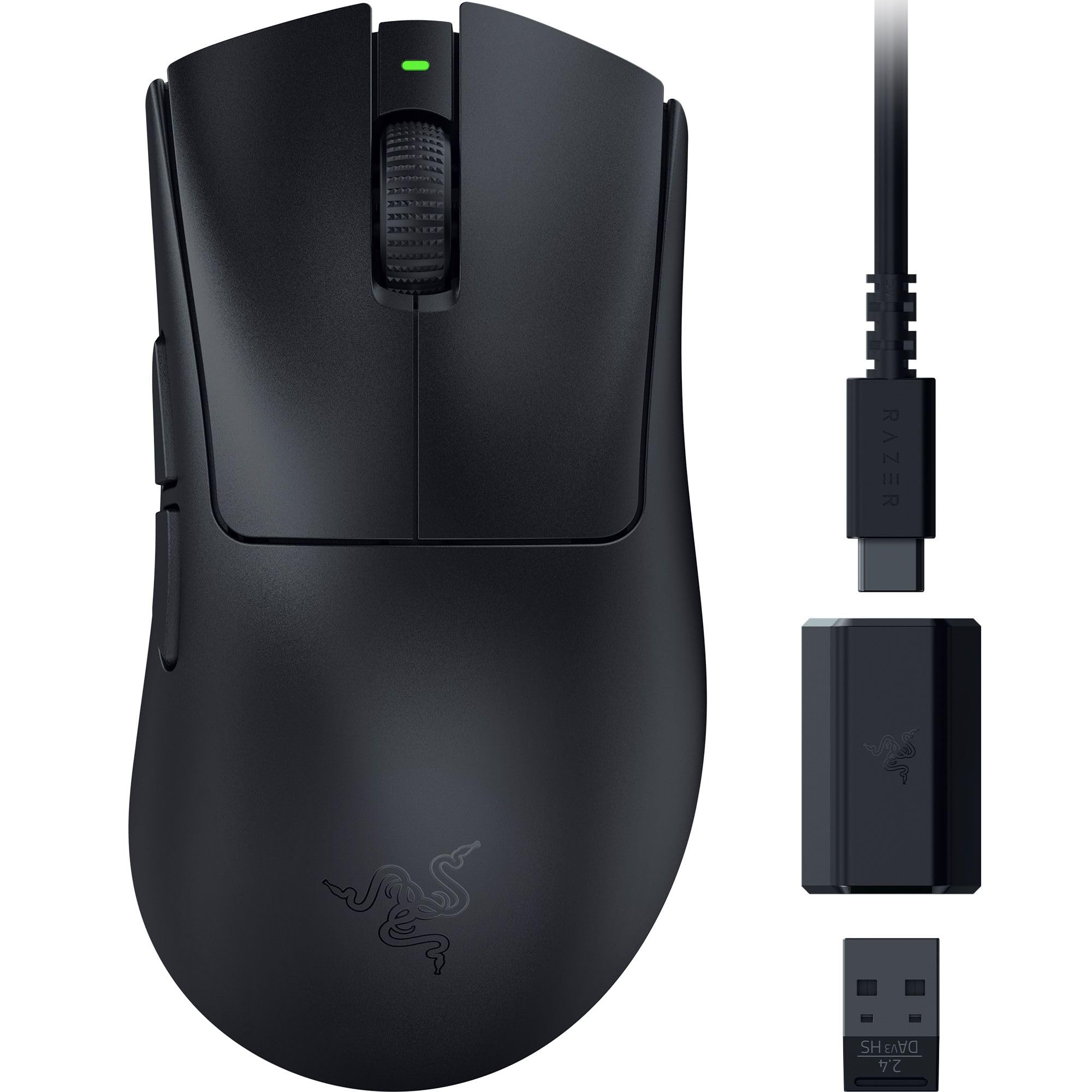
Razer DeathAdder V3 HyperSpeed Wireless Esports Gaming Mouse
Razer DeathAdder V3 HyperSpeed offers black design mouse with wireless connectivity. Others features including 55 g Ultra-Lightweight Design, Up to 100 hours of Battery Life, and Focus X 26K Optical Sensor Features: Razer DeathAdder V3 HyperSpeed Ultra-lightweight Wireless Ergonomic Esports Mouse 55 g Ultra-Lightweight Design Ergonomic Design with Smooth-Touch Texture Up to 100 hours of Battery Life For the pro The GOAT of esports mice returns in true winning form. All hail the Razer DeathAdder V3 HyperSpeed. From its ultra-lightweight ergonomics to top-tier wireless response, go for glory with a mouse that’s the winning pick for the world's best players. Improved Handling. Enhanced Comfort. The mouse's shape has been optimized with the aid of top esports pros to provide the most natural grip, coated with a smooth-touch finish for greater feel—a detail well-loved by the community. Zero Deadweight. Maximum Control. Get the perfect mix of speed and control with one of our lightest esports mouse tested and validated by pros. Pull off swipes with precision thanks to a mass-centralized design optimized for balance. Unrivalled Precision and Responsiveness Enjoy responsive, pixel-precise aim with a sensor that flawlessly tracks your movement with 99.6% resolution accuracy and 26K DPI.
Razer DeathAdder V3 HyperSpeed offers black design mouse with wireless connectivity. Others features including 55 g Ultra-Lightweight Design, Up to 100 hours of Battery Life, and Focus X 26K Optical Sensor Features: Razer DeathAdder V3 HyperSpeed Ultra-lightweight Wireless Ergonomic Esports Mouse 55 g Ultra-Lightweight Design Ergonomic Design with Smooth-Touch Texture Up to 100 hours of Battery Life For the pro The GOAT of esports mice returns in true winning form. All hail the Razer DeathAdder V3 HyperSpeed. From its ultra-lightweight ergonomics to top-tier wireless response, go for glory with a mouse that’s the winning pick for the world's best players. Improved Handling. Enhanced Comfort. The mouse's shape has been optimized with the aid of top esports pros to provide the most natural grip, coated with a smooth-touch finish for greater feel—a detail well-loved by the community. Zero Deadweight. Maximum Control. Get the perfect mix of speed and control with one of our lightest esports mouse tested and validated by pros. Pull off swipes with precision thanks to a mass-centralized design optimized for balance. Unrivalled Precision and Responsiveness Enjoy responsive, pixel-precise aim with a sensor that flawlessly tracks your movement with 99.6% resolution accuracy and 26K DPI.
Razer DeathAdder V3 HyperSpeed offers black design mouse with wireless connectivity. Others features including 55 g Ultra-Lightweight Design, Up to 100 hours of Battery Life, and Focus X 26K Optical Sensor Features: Razer DeathAdder V3 HyperSpeed Ultra-lightweight Wireless Ergonomic Esports Mouse 55 g Ultra-Lightweight Design Ergonomic Design with Smooth-Touch Texture Up to 100 hours of Battery Life For the pro The GOAT of esports mice returns in true winning form. All hail the Razer DeathAdder V3 HyperSpeed. From its ultra-lightweight ergonomics to top-tier wireless response, go for glory with a mouse that’s the winning pick for the world's best players. Improved Handling. Enhanced Comfort. The mouse's shape has been optimized with the aid of top esports pros to provide the most natural grip, coated with a smooth-touch finish for greater feel—a detail well-loved by the community. Zero Deadweight. Maximum Control. Get the perfect mix of speed and control with one of our lightest esports mouse tested and validated by pros. Pull off swipes with precision thanks to a mass-centralized design optimized for balance. Unrivalled Precision and Responsiveness Enjoy responsive, pixel-precise aim with a sensor that flawlessly tracks your movement with 99.6% resolution accuracy and 26K DPI.
Razer DeathAdder V3 HyperSpeed offers black design mouse with wireless connectivity. Others features including 55 g Ultra-Lightweight Design, Up to 100 hours of Battery Life, and Focus X 26K Optical Sensor Features: Razer DeathAdder V3 HyperSpeed Ultra-lightweight Wireless Ergonomic Esports Mouse 55 g Ultra-Lightweight Design Ergonomic Design with Smooth-Touch Texture Up to 100 hours of Battery Life For the pro The GOAT of esports mice returns in true winning form. All hail the Razer DeathAdder V3 HyperSpeed. From its ultra-lightweight ergonomics to top-tier wireless response, go for glory with a mouse that’s the winning pick for the world's best players. Improved Handling. Enhanced Comfort. The mouse's shape has been optimized with the aid of top esports pros to provide the most natural grip, coated with a smooth-touch finish for greater feel—a detail well-loved by the community. Zero Deadweight. Maximum Control. Get the perfect mix of speed and control with one of our lightest esports mouse tested and validated by pros. Pull off swipes with precision thanks to a mass-centralized design optimized for balance. Unrivalled Precision and Responsiveness Enjoy responsive, pixel-precise aim with a sensor that flawlessly tracks your movement with 99.6% resolution accuracy and 26K DPI.
in 54 offers
The lowest price for Razer DeathAdder V3 HyperSpeed Wireless Esports Gaming Mouse right now is $99.00 at Scorptec, compared across 35 retailers.
The all-time low was $52.70 on 12 Mar 2026 — today's price is 88% above the lowest ever. It has been notably cheaper before — worth setting a price alert.
Prices last updated 25 Oct 2026.
Last updated at 25/10/2026 08:17:55
Razer DeathAdder V3 HyperSpeed Wireless Gaming Mouse: 55g Lightweight - USB C Charging - Up to 100 Hr Battery - Advanced 26K Optical Sensor - Gen-3
Free delivery
Affiliate Disclosure: We may receive a small commission for purchases made through this link at no extra cost to you. This helps support our site. Thank you!
Razer DeathAdder V3 HyperSpeed Wireless Gaming Mouse, Black
Delivery $12
Razer DeathAdder V3 HyperSpeed Wireless Optical Esports Gaming Mouse
Free delivery between 28 Oct – 4 Nov
Razer Deathadder V3 Hyperspeed Wireless Esports Gaming Mouse (AP Packaging)
Delivery between Tue – Fri $11.64
Razer DeathAdder V3 HyperSpeed Wireless Gaming Mouse RZ01-05140100 | Best Online Computer Store
Delivery between 30 Oct – 6 Nov $9.90
Razer DeathAdder V3 Hyperspeed - Wireless eSports Gaming Mouse
Delivery between 27 Oct – 5 Nov $11.64
Razer DeathAdder V3 HyperSpeed Wireless Gaming Mouse (RZ01-05140100)
Delivery between Tue – Thu $15
Razer Deathadder V3 Hyperspeed Wireless Esports Gaming Mouse (ap
Delivery $12.99
Affiliate Disclosure: We may receive a small commission for purchases made through this link at no extra cost to you. This helps support our site. Thank you!
Razer DeathAdder V3 HyperSpeed Wireless Esports Gaming Mouse
Delivery $10
Razer DeathAdder V3 HyperSpeed Wireless Esports Gaming Mouse
Delivery $10
originally posted on bestbuy.com
I’ve been playing Diablo IV almost the whole week with the mouse and I must have clicked the mouse thousands of times if not more, so far this mouse exceeds my expectations. The mouse is lightweight, precise and responsive. The click feels just right. Although this mouse is intended for esports games, it checks all the boxes in click intensive games such as Diablo. I have no problem setting it up as I got my Razer software already installed for my other gears. You can use one Razer USB dongle to connect to multiple Razer gears, which makes this mouse a no-brainer if you already owned other Razer gears. The mouse comes with good quality USB-C cables and adapter.Design, Performance and Gaming ExperienceI really like the smooth black design of the mouse. The ... MoreI’ve been playing Diablo IV almost the whole week with the mouse and I must have clicked the mouse thousands of times if not more, so far this mouse exceeds my expectations. The mouse is lightweight, precise and responsive. The click feels just right. Although this mouse is intended for esports games, it checks all the boxes in click intensive games such as Diablo. I have no problem setting it up as I got my Razer software already installed for my other gears. You can use one Razer USB dongle to connect to multiple Razer gears, which makes this mouse a no-brainer if you already owned other Razer gears. The mouse comes with good quality USB-C cables and adapter.Design, Performance and Gaming ExperienceI really like the smooth black design of the mouse. The texture is nice and smooth. The size just feels right, it’s not too big and it’s definitely not small for my hand. The mouse looks good alongside my mechanical keyboard. More importantly, it’s ergonomic enough for my hand and the gliding is smooth and quite effortless, which one would expect from a lightweight mouse. The gliding is not the smoothest out there, however, it is still very good. This mouse does not have RGB lights, but I think the days when these lights were actually a prominent feature in a gaming mouse are long gone by now.The mouse packs plenty of customization and gives you access to the Razer’s Hyperpolling technology, which competitive/ esports gamer will find them very useful. As for casual gaming, the default setting is pretty much all ready to go out of the box. In Diablo IV, you can assign 3 skills to the mouse: two at the side buttons and one at the clicking wheel. Using these responsive mouse buttons to conquer the game just make the gaming experience even more engaging as you would only need to use keyboard mostly for non gameplay related actions. The experience is day and night if you use non-gaming mouse and there is significant difference is you use several generations older gaming mouse. The smooth glide, lightness and responsiveness of the mouse definitely shines.Battery LifeBattery life seems good as well, as I didn’t need to recharge the mouse ever since I got it.ConclusionThis mouse is all-rounder gaming mouse capable to give you both performance and comfort. The ergonomics, smooth glide and just how it feels when you use it and abuse it in click-intensive games make the mouse definitely recommended for both casual and competitive gamer.
originally posted on bestbuy.com
I recently built a new desktop PC and was in the market for a new gaming mouse. I’ve always been fond of Razer products because of their design, quality, and performance. The Deathadder V3 fits the bill.The first thing I noticed was that this mouse was devoid of RGB lights, which is what I’ve always thought of when it comes to Razer products. That’s likely to keep battery life really high. The next thing I noticed was how incredibly light it is. Seriously, I first wondered if it needed AA batteries as it reminded me of an older mouse that was empty. It’s seriously impressive as to how light it is.In the box you obviously get the mouse, a USB C to A cable and a wireless high speed dongle. You can use it either wired or wirelessly. The wireless high speed dongle ... MoreI recently built a new desktop PC and was in the market for a new gaming mouse. I’ve always been fond of Razer products because of their design, quality, and performance. The Deathadder V3 fits the bill.The first thing I noticed was that this mouse was devoid of RGB lights, which is what I’ve always thought of when it comes to Razer products. That’s likely to keep battery life really high. The next thing I noticed was how incredibly light it is. Seriously, I first wondered if it needed AA batteries as it reminded me of an older mouse that was empty. It’s seriously impressive as to how light it is.In the box you obviously get the mouse, a USB C to A cable and a wireless high speed dongle. You can use it either wired or wirelessly. The wireless high speed dongle actually has a USB port in it, where the dongle itself fits. So you could use it without the long cable wirelessly. Although in my experience, depending on your setup, you could have a spotty connection if you just use the base USB dongle that plugs into the USB port depending on how far away the mouse is for the computer. In short, I use the cable to put on my desk so it’s closer to the mouse but still use it wirelessly. From what I understand however, is that this wireless dongle doesn’t get you the 8000 hz polling that you can get when operating it wired.The design of the mouse is pretty understated, which is all a matter of personal preference. This one replaced my old Logitech G mouse which had RGB colors. But honestly, it didn’t add anything as you don’t look at the mouse when you’re using it and the lights turn off when it goes to sleep. But it does feel extremely cheap. I don’t mean that as a complaint, it just feels like a cheap piece of plastic. It’s not, and it’s more of a testament to the engineering behind it to make it so light. There’s only 5 buttons on the mouse, left right click, scroll click/wheel, and two buttons on the side. On the bottom is the power button and the button you can click to cycle through your DPI settings quickly. Honestly, this is perfect for me, it has all the buttons I need and nothing more.Setting it up was as easy as plugging it in. But you can update the firmware, which you wouldn’t know unless you did an internet search. On the Razer page you can find a firmware update utility which was a breeze to use (the mouse comes outdated out of the box, at least for me).I’ve heard some people complain about Razer Synapse, but I’m kind of ambivalent. I’m not one to really adjust the settings of my devices too often (I’m more of a casual gamer, I play frequently, but not competitively). But I am somewhat accustomed to Synapse as I use it for my Razer speakers. Once I updated the firmware, my mouse showed up immediately. I found the software - at least with respect to this mouse - easy to navigate and understand. You can customize profiles, adjust the performance (increasing DPI and polling rates), adjust mouse mat surface calibration (which to be honest, I don’t fully understand), and power settings. Basically when the mouse goes to sleep and when it goes into low power mode. I’ve only used the mouse a short while, never charging it after I took it out of the box, and it remained at 50% battery after going through a few lengthy gaming sessions. While a small sample set, I tend to trust Razer’s claim of the long 50+ hour battery life.In terms of performance, I played Cyberpunk for a while and was really impressed with teh accuracy and movements. I was better able to lift the mouse using the claw technique of holding a mouse and move it around with great success. The right and left buttons are really clickly, they don’t sound annoying at all, in fact, they give more of a satisfactory feeling of clicking the button - similar to using a mechanical keyboard, at least to me. Unlike my Logitech G mouse, I had zero accidental clicks from resting my fingers on the mouse, but at the same time, they were extremely responsive to clicking on them.While I can’t speak to professional gaming, as a casual gamer who is interested in having the best equipment on my computer, I’ve been extremely impressed with the Deathadder V3. It’s highly responsive when in use, it’s customizable with up to 5 profiles that you can switch on the fly (for those where that feature is a premium), and the battery life is terrific. I don’t know if I would shove this in my bag when traveling - for fear of it breaking - but it’s still seemingly durable with a nice smooth finish that’s easy to grip. It’s somewhat no frills, but brings serious performance. I highly recommend this mouse for even the casual gamer like myself.
originally posted on bestbuy.com
So I received my Razer DeathAdder V3 HyperSpeed wireless mouse about a week ago and have been putting it through its paces. Razer is one of the top mainstream gaming companies, gamers have come to love through the use of their plethora of amazing products they've produced over the years. I already have a couple of other Razers products that I use daily so I knew that this DeathAdder V3 HyperSpeed mouse would be just another amazing product. So when you open up the box you're greeted with:* Razer DeathAdder V3 HyperSpeed Mouse* Razer HyperSpeed Wireless Dongle + USB Dongle Adapter* USB-A to USB-C Cable* Quick Start Guide* Razer StickersNow this mouse can be setup one of two ways, either wired (via the include USB-A to USB-C cable) which also charges the ... MoreSo I received my Razer DeathAdder V3 HyperSpeed wireless mouse about a week ago and have been putting it through its paces. Razer is one of the top mainstream gaming companies, gamers have come to love through the use of their plethora of amazing products they've produced over the years. I already have a couple of other Razers products that I use daily so I knew that this DeathAdder V3 HyperSpeed mouse would be just another amazing product. So when you open up the box you're greeted with:* Razer DeathAdder V3 HyperSpeed Mouse* Razer HyperSpeed Wireless Dongle + USB Dongle Adapter* USB-A to USB-C Cable* Quick Start Guide* Razer StickersNow this mouse can be setup one of two ways, either wired (via the include USB-A to USB-C cable) which also charges the mouse, or wireless (via the Raze HyperSpeed Wireless Dongle + USB Dongle Adapter). Setting the mouse via the wired method is pretty straightforward, simply attached the USB-A end of the cable to your desktop/laptop and the other end to the USB-C port on the frontend of the mouse. Setting up wireless was easy as well, though the Quick Start Guide (for me at least) was a little hard to see due to the color options Razer chose to print the guide in (black paper with silver print, just isn't cutting it for me, not to mention the small teeny tiny print), however, nonetheless its not a dealbreaker for me. Just a minor nuisance. But once connected it'll prompt you to download and install the Razer Synapse software.The mouse looks very similar to any other standard mouse on the market today. However, it has a ton of features that you can tweak, calibrate and customize to your liking using the Razer Synapse software. And something that I found quite nice is the ability to even customize the settings down to specific games. To change the DPI settings simply press the Power/DPI button which is located underneath the mouse or you can opt to change these settings within the Razer Synapse software.In terms of gameplay, the Razer HyperSpeed has been a joy to use with its superb accuracy and flawlessly pinpoint movement in a couple of test games that I played to see how well it faired and how to save the custom settings for different games. Though it was nice to use, and extremely lightweight, I do wish it was a bigger due to me having larger hands, still not a dealbreaker. I will no doubt use this mouse when gaming and using my newly acquired Razer Nommo V2 speaker system.
| Number of Buttons | 8 |
| Programmable Buttons | Yes |
| Scroll Type | Scrolling wheel |
| Functionality Highlights | On-board memory profile |
| Battery Life | Up to 100 hours |

Razer DeathAdder V3 HyperSpeed Wireless Gaming Mouse: 55g Lightweight - USB C Charging - Up to 100 Hr Battery - Advanced 26K Optical Sensor - Gen-3
Free delivery
Affiliate Disclosure: We may receive a small commission for purchases made through this link at no extra cost to you. This helps support our site. Thank you!
Razer DeathAdder V3 HyperSpeed Wireless Gaming Mouse, Black
Delivery $12
Razer DeathAdder V3 HyperSpeed Wireless Optical Esports Gaming Mouse
Free delivery between 28 Oct – 4 Nov
Razer Deathadder V3 Hyperspeed Wireless Esports Gaming Mouse (AP Packaging)
Delivery between Tue – Fri $11.64
Razer DeathAdder V3 HyperSpeed Wireless Gaming Mouse RZ01-05140100 | Best Online Computer Store
Delivery between 30 Oct – 6 Nov $9.90
I’ve been playing Diablo IV almost the whole week with the mouse and I must have clicked the mouse thousands of times if not more, so far this mouse exceeds my expectations. The mouse is lightweight, precise and responsive. The click feels just right. Although this mouse is intended for esports games, it checks all the boxes in click intensive games such as Diablo. I have no problem setting it up as I got my Razer software already installed for my other gears. You can use one Razer USB dongle to connect to multiple Razer gears, which makes this mouse a no-brainer if you already owned other Razer gears. The mouse comes with good quality USB-C cables and adapter.Design, Performance and Gaming ExperienceI really like the smooth black design of the mouse. The ... MoreI’ve been playing Diablo IV almost the whole week with the mouse and I must have clicked the mouse thousands of times if not more, so far this mouse exceeds my expectations. The mouse is lightweight, precise and responsive. The click feels just right. Although this mouse is intended for esports games, it checks all the boxes in click intensive games such as Diablo. I have no problem setting it up as I got my Razer software already installed for my other gears. You can use one Razer USB dongle to connect to multiple Razer gears, which makes this mouse a no-brainer if you already owned other Razer gears. The mouse comes with good quality USB-C cables and adapter.Design, Performance and Gaming ExperienceI really like the smooth black design of the mouse. The texture is nice and smooth. The size just feels right, it’s not too big and it’s definitely not small for my hand. The mouse looks good alongside my mechanical keyboard. More importantly, it’s ergonomic enough for my hand and the gliding is smooth and quite effortless, which one would expect from a lightweight mouse. The gliding is not the smoothest out there, however, it is still very good. This mouse does not have RGB lights, but I think the days when these lights were actually a prominent feature in a gaming mouse are long gone by now.The mouse packs plenty of customization and gives you access to the Razer’s Hyperpolling technology, which competitive/ esports gamer will find them very useful. As for casual gaming, the default setting is pretty much all ready to go out of the box. In Diablo IV, you can assign 3 skills to the mouse: two at the side buttons and one at the clicking wheel. Using these responsive mouse buttons to conquer the game just make the gaming experience even more engaging as you would only need to use keyboard mostly for non gameplay related actions. The experience is day and night if you use non-gaming mouse and there is significant difference is you use several generations older gaming mouse. The smooth glide, lightness and responsiveness of the mouse definitely shines.Battery LifeBattery life seems good as well, as I didn’t need to recharge the mouse ever since I got it.ConclusionThis mouse is all-rounder gaming mouse capable to give you both performance and comfort. The ergonomics, smooth glide and just how it feels when you use it and abuse it in click-intensive games make the mouse definitely recommended for both casual and competitive gamer.
I recently built a new desktop PC and was in the market for a new gaming mouse. I’ve always been fond of Razer products because of their design, quality, and performance. The Deathadder V3 fits the bill.The first thing I noticed was that this mouse was devoid of RGB lights, which is what I’ve always thought of when it comes to Razer products. That’s likely to keep battery life really high. The next thing I noticed was how incredibly light it is. Seriously, I first wondered if it needed AA batteries as it reminded me of an older mouse that was empty. It’s seriously impressive as to how light it is.In the box you obviously get the mouse, a USB C to A cable and a wireless high speed dongle. You can use it either wired or wirelessly. The wireless high speed dongle ... MoreI recently built a new desktop PC and was in the market for a new gaming mouse. I’ve always been fond of Razer products because of their design, quality, and performance. The Deathadder V3 fits the bill.The first thing I noticed was that this mouse was devoid of RGB lights, which is what I’ve always thought of when it comes to Razer products. That’s likely to keep battery life really high. The next thing I noticed was how incredibly light it is. Seriously, I first wondered if it needed AA batteries as it reminded me of an older mouse that was empty. It’s seriously impressive as to how light it is.In the box you obviously get the mouse, a USB C to A cable and a wireless high speed dongle. You can use it either wired or wirelessly. The wireless high speed dongle actually has a USB port in it, where the dongle itself fits. So you could use it without the long cable wirelessly. Although in my experience, depending on your setup, you could have a spotty connection if you just use the base USB dongle that plugs into the USB port depending on how far away the mouse is for the computer. In short, I use the cable to put on my desk so it’s closer to the mouse but still use it wirelessly. From what I understand however, is that this wireless dongle doesn’t get you the 8000 hz polling that you can get when operating it wired.The design of the mouse is pretty understated, which is all a matter of personal preference. This one replaced my old Logitech G mouse which had RGB colors. But honestly, it didn’t add anything as you don’t look at the mouse when you’re using it and the lights turn off when it goes to sleep. But it does feel extremely cheap. I don’t mean that as a complaint, it just feels like a cheap piece of plastic. It’s not, and it’s more of a testament to the engineering behind it to make it so light. There’s only 5 buttons on the mouse, left right click, scroll click/wheel, and two buttons on the side. On the bottom is the power button and the button you can click to cycle through your DPI settings quickly. Honestly, this is perfect for me, it has all the buttons I need and nothing more.Setting it up was as easy as plugging it in. But you can update the firmware, which you wouldn’t know unless you did an internet search. On the Razer page you can find a firmware update utility which was a breeze to use (the mouse comes outdated out of the box, at least for me).I’ve heard some people complain about Razer Synapse, but I’m kind of ambivalent. I’m not one to really adjust the settings of my devices too often (I’m more of a casual gamer, I play frequently, but not competitively). But I am somewhat accustomed to Synapse as I use it for my Razer speakers. Once I updated the firmware, my mouse showed up immediately. I found the software - at least with respect to this mouse - easy to navigate and understand. You can customize profiles, adjust the performance (increasing DPI and polling rates), adjust mouse mat surface calibration (which to be honest, I don’t fully understand), and power settings. Basically when the mouse goes to sleep and when it goes into low power mode. I’ve only used the mouse a short while, never charging it after I took it out of the box, and it remained at 50% battery after going through a few lengthy gaming sessions. While a small sample set, I tend to trust Razer’s claim of the long 50+ hour battery life.In terms of performance, I played Cyberpunk for a while and was really impressed with teh accuracy and movements. I was better able to lift the mouse using the claw technique of holding a mouse and move it around with great success. The right and left buttons are really clickly, they don’t sound annoying at all, in fact, they give more of a satisfactory feeling of clicking the button - similar to using a mechanical keyboard, at least to me. Unlike my Logitech G mouse, I had zero accidental clicks from resting my fingers on the mouse, but at the same time, they were extremely responsive to clicking on them.While I can’t speak to professional gaming, as a casual gamer who is interested in having the best equipment on my computer, I’ve been extremely impressed with the Deathadder V3. It’s highly responsive when in use, it’s customizable with up to 5 profiles that you can switch on the fly (for those where that feature is a premium), and the battery life is terrific. I don’t know if I would shove this in my bag when traveling - for fear of it breaking - but it’s still seemingly durable with a nice smooth finish that’s easy to grip. It’s somewhat no frills, but brings serious performance. I highly recommend this mouse for even the casual gamer like myself.
So I received my Razer DeathAdder V3 HyperSpeed wireless mouse about a week ago and have been putting it through its paces. Razer is one of the top mainstream gaming companies, gamers have come to love through the use of their plethora of amazing products they've produced over the years. I already have a couple of other Razers products that I use daily so I knew that this DeathAdder V3 HyperSpeed mouse would be just another amazing product. So when you open up the box you're greeted with:* Razer DeathAdder V3 HyperSpeed Mouse* Razer HyperSpeed Wireless Dongle + USB Dongle Adapter* USB-A to USB-C Cable* Quick Start Guide* Razer StickersNow this mouse can be setup one of two ways, either wired (via the include USB-A to USB-C cable) which also charges the ... MoreSo I received my Razer DeathAdder V3 HyperSpeed wireless mouse about a week ago and have been putting it through its paces. Razer is one of the top mainstream gaming companies, gamers have come to love through the use of their plethora of amazing products they've produced over the years. I already have a couple of other Razers products that I use daily so I knew that this DeathAdder V3 HyperSpeed mouse would be just another amazing product. So when you open up the box you're greeted with:* Razer DeathAdder V3 HyperSpeed Mouse* Razer HyperSpeed Wireless Dongle + USB Dongle Adapter* USB-A to USB-C Cable* Quick Start Guide* Razer StickersNow this mouse can be setup one of two ways, either wired (via the include USB-A to USB-C cable) which also charges the mouse, or wireless (via the Raze HyperSpeed Wireless Dongle + USB Dongle Adapter). Setting the mouse via the wired method is pretty straightforward, simply attached the USB-A end of the cable to your desktop/laptop and the other end to the USB-C port on the frontend of the mouse. Setting up wireless was easy as well, though the Quick Start Guide (for me at least) was a little hard to see due to the color options Razer chose to print the guide in (black paper with silver print, just isn't cutting it for me, not to mention the small teeny tiny print), however, nonetheless its not a dealbreaker for me. Just a minor nuisance. But once connected it'll prompt you to download and install the Razer Synapse software.The mouse looks very similar to any other standard mouse on the market today. However, it has a ton of features that you can tweak, calibrate and customize to your liking using the Razer Synapse software. And something that I found quite nice is the ability to even customize the settings down to specific games. To change the DPI settings simply press the Power/DPI button which is located underneath the mouse or you can opt to change these settings within the Razer Synapse software.In terms of gameplay, the Razer HyperSpeed has been a joy to use with its superb accuracy and flawlessly pinpoint movement in a couple of test games that I played to see how well it faired and how to save the custom settings for different games. Though it was nice to use, and extremely lightweight, I do wish it was a bigger due to me having larger hands, still not a dealbreaker. I will no doubt use this mouse when gaming and using my newly acquired Razer Nommo V2 speaker system.
As one could probably guess from the title, I'm a fan of Razer equipment. This is no exception. From the packaging to the devices themselves and everything in between, Razer exudes quality.Packaging:It's well packaged in the Razer black and green box as expected, but when you open it, the cardboard inner box falls open in 4 directions presenting you with the mouse snuggly nestled in a mouse-shaped indentation, with the USB unit snug above it, and the cable in it's own separate box, nothing falls out or goes flying when you open it, and the presentation is quality, even for it just being a mouse.Usage:The mouse is extremely light weight as the name suggests, it doesn't have any of the telltale RGB that Razer and so many companies are known for, focusing instead ... MoreAs one could probably guess from the title, I'm a fan of Razer equipment. This is no exception. From the packaging to the devices themselves and everything in between, Razer exudes quality.Packaging:It's well packaged in the Razer black and green box as expected, but when you open it, the cardboard inner box falls open in 4 directions presenting you with the mouse snuggly nestled in a mouse-shaped indentation, with the USB unit snug above it, and the cable in it's own separate box, nothing falls out or goes flying when you open it, and the presentation is quality, even for it just being a mouse.Usage:The mouse is extremely light weight as the name suggests, it doesn't have any of the telltale RGB that Razer and so many companies are known for, focusing instead on the performance/e-sports aspect, keeping it lightweight and high performing. As this is a lightspeed-type mouse, line-of-sight to the USB receiver is relatively important, so usage of the extension cable may be relevant to your specific setup. The one thing I dont love about using Razer mice is that when you plug them in they immediately attempt to install Razer Synapse which I just don't really prefer, I get that it's needed for firmware updates and that it ties into the Razer RGB controls (which this mouse doesn't need) but in general it feels like bloatware since it pops up on you as soon as you plug in the USB receiver. I don't necessarily know of a better way other than making it less intrusive when it's plugged in (maybe a one-time notification in the notification area of Windows rather than a nearly full-screen window prompting you to install it)The mouse itself is quick, accurate and really stands out when gaming, the light weight is noticeable if that's your aim, and the buttons are responsive.Overall:It's a great mouse, as is all things Razer, I have no issues with any aspect of this mouse
The Razer DeathAdder V3 HyperSpeed Ultra-Lightweight Wireless Mouse is one of the latest products in the premier Razer DeathAdder line of gaming mice. It is a no-frills mouse and is good at what it does, but as an owner of the DeathAdder V2 Pro Wireless I think it might be a small step back. Out of the box, there is the mouse, the USB-C to USB-A charging wire, the wireless dongle, and paperwork. I would recommend downloading the Razer config/driver software, Razer Synapse, to take advantage of all the features of the mouse and set the DPI choices. There is no RGB with this mouse. It came mostly charged so I was able to play it in the wireless mode with the dongle, and also plugged in via the cord. It weighs in at 1.94 ounces which is pretty light for a gaming mouse. ... MoreThe Razer DeathAdder V3 HyperSpeed Ultra-Lightweight Wireless Mouse is one of the latest products in the premier Razer DeathAdder line of gaming mice. It is a no-frills mouse and is good at what it does, but as an owner of the DeathAdder V2 Pro Wireless I think it might be a small step back. Out of the box, there is the mouse, the USB-C to USB-A charging wire, the wireless dongle, and paperwork. I would recommend downloading the Razer config/driver software, Razer Synapse, to take advantage of all the features of the mouse and set the DPI choices. There is no RGB with this mouse. It came mostly charged so I was able to play it in the wireless mode with the dongle, and also plugged in via the cord. It weighs in at 1.94 ounces which is pretty light for a gaming mouse. It still felt weighty enough that there was some resistance to my hand, which is good. It has Gen 3 optical switches under the mouse buttons which felt great to click. The mouse wheel has raised ribs across the surface which provides good grip for the wheel. It is advertised to have 100 hours of use in a full charge, but I wasn't able to very this as that is weeks of mouse use and mine has kept going on the first charge. It could easily be used in a professional setting since there is no RGB or obvious signs that it is a gaming mouse. Now, I do have some quibbles with this product. First, the cord is short for a mouse. I know that the wireless connection is incredibly fast, but I have always been the type of player that uses a wired mouse. Unless your tower is right by your mouse pad, it can feel a little tight. Usually, the cord is longer. My tower is on the left of my monitor and the mouse cord is almost taut where my mouse sits to the right of the keyboard. Secondly, the surface of the mouse is completely smooth with no texture at all. I found it slick in my hand, and I would recommend applying some grip tape at the slight expense to weight. Finally, I found it to be a strange in-between size in my hand. It is 1.63 inches tall, 4.81 inches long, 2.55 inches wide, and weighs 1.94 oz. This is compared to the V2 Pro with is 1.68 inches tall, 5 inches long, 2.86 inches wide, and weighs 3.1 oz. The V3 feels OK, the V2 feels better. But I also have larger than average hands and the V3 may feel amazing to most people. Overall, the Razer DeathAdder V3 HyperSpeed Ultra-Lightweight Wireless Mouse performed as well as I expected. It is a DeathAdder and the performance bar is quite high for this line of mice. I had a few small issues that could be due to personal preference and my setup. But in the end, this is a high-quality mouse that I would recommend for any gamer or any mouse user in any situation.
The DeathAdder V3 HS seems to be in iterative update over the previously released DeadAdder V3 Pro. For the most part, that mouse was already a phenomenal option, but the V3 HyperSpeed improves on it in tangible ways that make it feel like a worthwhile upgrade.Those familiar with Razer mice will have no surprises here. Setup and usability is exactly what you'd expect here. Crucially, so is wireless performance, with the V3 HS providing phenomenal tracking abilities with a host of additional features that make this a true gamer's mouse. Weight and balance both feel perfect, as does surface glide and tracking. One thing of note is that they've tweaked the glide pads on this one, changing from 3 smaller pads to two large pads as you can see in one of my attached ... MoreThe DeathAdder V3 HS seems to be in iterative update over the previously released DeadAdder V3 Pro. For the most part, that mouse was already a phenomenal option, but the V3 HyperSpeed improves on it in tangible ways that make it feel like a worthwhile upgrade.Those familiar with Razer mice will have no surprises here. Setup and usability is exactly what you'd expect here. Crucially, so is wireless performance, with the V3 HS providing phenomenal tracking abilities with a host of additional features that make this a true gamer's mouse. Weight and balance both feel perfect, as does surface glide and tracking. One thing of note is that they've tweaked the glide pads on this one, changing from 3 smaller pads to two large pads as you can see in one of my attached photos. This has helped with glide for me, but only modestly. For those that feel they need to absolute best in tracking, the DeathAdder V3 HS features Hyperpolling, giving you the ability to supercharge the polling rate of the mouse up to 8000hz, giving you virtually zero input lag. Additionally, it features Hypershift, which allows you to map a secondary set of functions to the mouse inputs at the press of a button. Of note, these both require you to install the Razer Synapse app on your PC. Overall, I've had zero issues with wireless connectivity on this mouse (or other Razer mice I've had for that matter). Razer knows how to make a wireless mouse that functions without connection issues.Ergonomics here are improved over the V3 Pro. The V3 HS has been reduced in size by what feels like 10%, giving it an even lighter feel in the hand, while also feeling less bulky. Those with overly large hands may still appreciate the added real estate of the V3 Pro, but to me, the smaller size makes it feel much more agile. One additional tweak is that the right side feels less sloped; for me, this was an issue with the V3 Pro where it was difficult at times to get a grip and lift the mouse. That's been resolved here for me, making it a better overall experience in every way ergonomically.Finally, as with the V3 Pro, battery life here is nothing short of amazing. On standard operation (ie: not using Hyperpolling, for instance), Razer rates it at upwards of 100 hours of battery life. This seems accurate in my usage. This is one of those devices that seems like it never needs to be charged. This is undoubtedly owed in part to the fact that there are no frills here from an LED perspective; this is a jet black device with a single connection indicator LED at the top. That's it; nothing else to needlessly drain power. Some may like a fancier looking mouse; I vastly prefer the no-frills tradeoffs of having insane battery life, personally.The only area of concern I have with this mouse stems from an issue I've developed with previous Razer mice; the scroll wheel. My first few hundred hours with the V3 Pro were mostly without issue, but as I've used it more over time, the integrity of the scroll wheel has gone downhill. Most notably, it tends to micro scroll on its own now, which is VERY noticeable in FPS games where scrolling changes your equipped weapon, for instance. More than a few times now, this issue has cost me a few lives while gaming. Prior to the DeathAdder V3 Pro, I used a Basilisk Pro for a couple of years, and the scroll wheel on that one also developed this same issue that eventually rendered that mouse completely unusable. The V3 HS feels a bit stiffer, the detents feel more defined, and the arc of the wheel also seems to be a bit flatter, but at this point, I'm not confident the issues with scroll registration have been resolved, so it's something I'll be watching closely for.On first glance, this seems like a very similar mouse to the V3 Pro, and in many ways it is. If you suffered a bit with the ergonomics of the V3 Pro because of it's bulky size, the V3 HS is just what the doctor ordered. To me, it's simultaneously a small and huge step forward, iterating on the things that needing improving while keeping the things that worked well. Of the various gaming mice I've used across any of the brands you can think of that make wireless mice, this Razer DeathAdder V3 HyperSpeed feels like the best of all of them. Whether my issue with previous scroll wheels on Razer mice is resolved remains to be seen, but overall, this is my favorite gaming mice of all time.
The Razer - DeathAdder V3 Lightweight Gaming Mouse is solid addition to the Razer den. This mouse has replaced my Viper V2 Pro Lightweight Gaming Mouse and I am happy with the transition. Out of the box, the DeathAdder V3 has a slick look in the traditional matte black by Razer. There is a small indicator light at the top front of the mouse, a USB-C port in the very front of the mouse for charging and the Razer icon so subtle on the backside top. The mouse itself is very light, having not only a minimalistic design but feel to it. Fitting well in my normal sized hand and with two side buttons easily clickable by the thumb. This makes for quick and precise movements along with easy movement and transport. I am currently using this for my everyday laptop so being able ... MoreThe Razer - DeathAdder V3 Lightweight Gaming Mouse is solid addition to the Razer den. This mouse has replaced my Viper V2 Pro Lightweight Gaming Mouse and I am happy with the transition. Out of the box, the DeathAdder V3 has a slick look in the traditional matte black by Razer. There is a small indicator light at the top front of the mouse, a USB-C port in the very front of the mouse for charging and the Razer icon so subtle on the backside top. The mouse itself is very light, having not only a minimalistic design but feel to it. Fitting well in my normal sized hand and with two side buttons easily clickable by the thumb. This makes for quick and precise movements along with easy movement and transport. I am currently using this for my everyday laptop so being able to easily tuck away a wireless mouse is ideal. That is what else is in the box, the wireless fob that is low latency and quick to respond. There is also a larger hyperspeed wireless adapter, which is a little larger and would work well for desktop computers but not ideal for laptops. The mouse clicks smoothly and is ready for the next click instantaneously. I had possibly spilled Dr. Pepper on my other mouse and since that time the left click has had an ever so slight sticky sensation, so having a mouse that has a smooth quick recoil click is refreshing and invited! The optical sensor tracks very smoothly and well, I will often sit on a couch and even on an uneven soft fabric surface it reads smoothly. Up to 26k DPI, for the most precision FPS gaming. There is also a storage space for the USB dongle, which is awesome as that was missing from my previous mouse and I did misplace it a couple times. Charging is quick to complete and may be done while in use and the charge itself seems to last days of normal use without needing to be recharged thus-far, claiming 100 hours but I have not put this to the test as of yet (it does not die easily at least). Overall another great additional to the Razer gaming mouses, get out there a strike (my second snake pun of this review... sorry)
If there’s one thing you can expect from Razer, it’s a new gaming mouse every couple of months. And why not? Razer makes solid sensors, their products have pretty good ergonomics, and they’re known for providing firmware updates on a semi-regular basis. I’ve been specifically interested in this product though – because after a year of using the DeathAdder v3 Pro wireless mouse, I was curious to see what improvements could be expected with the DeathAdder v3 Hyperspeed. Although, I’m not sure if every change is an improvement.Please note, the product’s name is the “DeathAdder v3 Hyperspeed”, but Razer does not include a Hyperspeed wireless mouse adapter inside. It includes Razer’s standard 1000hz polling-rate wireless dongle.UNBOXINGStarting off with the ... MoreIf there’s one thing you can expect from Razer, it’s a new gaming mouse every couple of months. And why not? Razer makes solid sensors, their products have pretty good ergonomics, and they’re known for providing firmware updates on a semi-regular basis. I’ve been specifically interested in this product though – because after a year of using the DeathAdder v3 Pro wireless mouse, I was curious to see what improvements could be expected with the DeathAdder v3 Hyperspeed. Although, I’m not sure if every change is an improvement.Please note, the product’s name is the “DeathAdder v3 Hyperspeed”, but Razer does not include a Hyperspeed wireless mouse adapter inside. It includes Razer’s standard 1000hz polling-rate wireless dongle.UNBOXINGStarting off with the unboxing and what comes inside – Razer is going down the economical route with their box. The internal packaging is made from a single piece of easily-recycled cardboard. I appreciate an eco-friendly unboxing, but it’s very different compared to the v3 Pro’s box, which had a denser box, plastic pieces, and focused more on the presentation of the mouse itself. On top of that – the included USB C cable, which allows you to keep the wireless dongle close to your mouse for peak polling performance, feels… a bit lower quality compared to the v3 Pro. It’s also shorter than the v3 Pro’s USB C cable. Is it a problem? No, and I don’t believe it will be a problem for most people, but it’s worth being aware of. Finally, the v3 Pro includes a set of grippy 3M stickers to enhance the mouse’s grip, but the v3 Hyperspeed does not have this included. I thought that was a strange touch and worthy of being brought up. To sum it up, the unboxing of the v3 Hyperspeed was underwhelming compared to the v3 Pro. Based on the unboxing, I felt that I was able to see why the v3 Hyperspeed is a bit cheaper than the v3 Pro.QUALITY AND FEELMoving onto the mouse itself and its usage – The mouse itself feels solid. It’s extremely light, lighter than the v3 Pro, and considering how much of the bottom of the mouse is dedicated to making room for its massive skates, the mouse easily and smoothly glides across my desk pad. I did find myself wishing that I had the option of adding sticker grips to this mouse, but I’ll consider that a personal preference more than anything else. The weight of the clicks on the DeathAdder v3 Hyperspeed seem proper – It feels like clicks have to be slightly more intentional than on the v3 Pro, but I think that’s a good thing. In any type of competitive gaming setting, intentionality in your every movement is key, so the v3 Hyperspeed is great on this front. The scroll wheel is, seriously, such a major improvement compared to the v3 Pro. The v3 Pro has had many scroll wheel issues, but the v3 Hyperspeed is using a completely different part, and based on the feel and acoustics when scrolling, I have more faith that this scroll wheel will last and not have issues over time. Let’s briefly touch on battery life as well… Based on my own testing as well, this mouse should last somewhere around 100 hours before needing to be recharged. Razer’s claims seem accurate.SHAPE/ERGONOMICSThe ergonomics of the mouse are… Good. I’ll be honest, I believe that most adult male gamers will need a slightly larger footprint for their mouse, something closer to the v3 Pro. As an adult male with average-sized hands and typing fingers, this mouse is at the limit of what I’d consider comfortable. If the v3 Hyperspeed was any smaller, I’d have to stop using it. For anyone who has large hands, please remember to test out this product before purchasing it. On the flip side, anyone who doesn’t have large hands will probably find this mouse to be the perfect size and comfortable to hold.TRACKING & CUSTOMIZATIONA good mouse sensor will blend precision with a natural feel, and in Razer’s Synapse software, you’ll be able to tune the mouse to have the perfect speed curve. If you’re an FPS player, you’ll be able to flick like a pro. If you’re an MMO player, you’ll be able to reach those far-off icons without picking up your mouse multiple times to get there. I don’t think anyone will be wowed by those points specifically, it should be an expectation for a competitive gaming mouse like this – but Razer Synapse honestly does a great job of making it easy to fine-tune the acceleration and speed curve to fit your personal style.FINAL THOUGHTSThere are some gains and some losses with this mouse. Objectively, this mouse is better than the v3 Pro, but I feel like Razer could’ve given it a little more love – a longer, nicer, braided USB C cable would’ve been a great start, and grip stickers would’ve done a great job of rounding the whole package together. But this mouse tracks better, glides better, clicks better, and scrolls better than the v3 Pro, which should be the key takeaways. Are any of my aforementioned gripes a big deal? No, not really, but the ergonomics of the mouse are what really matters. To reiterate: Anyone with large hands should get a slightly larger mouse. If you have medium-sized hands or slightly smaller, I think you’ll enjoy the DeathAdder v3 Hyperspeed.
I’ve been a huge fan of the DeathAdder line since my first DeathAdder Elite wired mouse. DeathAdders are super lightweight, provide the best ergonomics and are downright easy to use for all applications, whether you’re a competitive gamer, an okay gamer (like myself) or have mastered the art of PowerPoint. To this day, the DeathAdder line continues to be my mouse-of-choice. This latest DeathAdder is the V3 Hyperspeed variant that sits right below the V3 Pro, yet improves ergonomics and is offered for less.The first thing I noticed is that they further reduced the weight of the mouse with respect to the V3 Pro. At 55g, this is a very, very lightweight mouse. But with that reduction in weight from 63g, they also reduced the size of the mouse ever so slightly, and ... MoreI’ve been a huge fan of the DeathAdder line since my first DeathAdder Elite wired mouse. DeathAdders are super lightweight, provide the best ergonomics and are downright easy to use for all applications, whether you’re a competitive gamer, an okay gamer (like myself) or have mastered the art of PowerPoint. To this day, the DeathAdder line continues to be my mouse-of-choice. This latest DeathAdder is the V3 Hyperspeed variant that sits right below the V3 Pro, yet improves ergonomics and is offered for less.The first thing I noticed is that they further reduced the weight of the mouse with respect to the V3 Pro. At 55g, this is a very, very lightweight mouse. But with that reduction in weight from 63g, they also reduced the size of the mouse ever so slightly, and for me it is very welcoming. They’ve also increased the battery life to 100 hours with respect to big brother’s 90. The Hyperspeed also shares Razor’s 3rd gen optical mouse switches used in the pro; these switches are rated for 90 million clicks. Lastly, the reduction in weight and size called for a design change to use 3 larger PTFE feet vs the Pro’s 4 smaller ones. So why isn’t this just…the new Pro?? The Hyperspeed is equipped with the Razer Focus X 26K optical sensor. This includes 26,000DPI resolution, 500IPS max speed, 40G max acceleration, and a resolution accuracy at 99.6%. To be honest, this isn’t that much apart from its big brother that utilizes the 30K Pro sensor. The mouse out-of-box is already awesome, but if you need the extra calibration for your mouse pad or table setup, these adjustments can all be done in Synapse.Mouse polling rate caps at 1000Hz out of the box; if you opt for the HyperPolling Wireless Dongle (sold separately), you can achieve 8000Hz polling. You can have up to 5 DPI stages with X-Y customization at each stage if required. The DPI button is located underneath the mouse. That means you’ll have to lift the mouse to change the DPI; I simply do “the claw” and reach for the DPI button with my ring finger with ease. If Synapse is running, you’ll see the DPI setting pop up on the monitor. You can also determine the DPI setting based on the LED indicator forward of the scroll wheel. Once the DPI settings are saved, they will remain programmed into its on-board memory so you can use the mouse anywhere without the need for Synapse running.I've used the mouse religiously for a week now and I still have not had to charge it. When the mouse is not in use, it will automatically sleep (defaulted to 5 minutes, but can be adjusted from 1-15 minutes). The supplied cable (USB-A to USB-C) can be used to charge the mouse when needed as well as attach the wireless dongle. It isn’t braided like the pro and the PVC will provide a lot of physical resistance when used connected. The mouse is, indeed, light as a feather that the rigidity of the cable will move it on its own. But the biggest takeaway for me was the ergonomics. It’s a slight reduction in size and weight, both can be seen and felt, yet it has the biggest impact in terms of ergonomics and performance.The Razer DeathAdder V3 Hyperspeed comes with a 2-Year Limited Warranty.
For the most part, this mouse is pretty basic. It truly is ultra-lightweight, almost too light as I find myself moving the mouse a little when all I want to do is click. However, it moves really smooth and is extremely responsive. You have two side buttons by default for back and forward, but with the Razer Synapse software you can program all of the buttons other than the left click. You can also flip the DPI with a push of a button, but that button is on the bottom of the mouse. I feel it would have been a lot better to be on top by default. However, with the Synapse software you can change that function to one of the other buttons yourself, like for example the scroll click can cycle or just be a function while holding it.The included wire is good for charging ... MoreFor the most part, this mouse is pretty basic. It truly is ultra-lightweight, almost too light as I find myself moving the mouse a little when all I want to do is click. However, it moves really smooth and is extremely responsive. You have two side buttons by default for back and forward, but with the Razer Synapse software you can program all of the buttons other than the left click. You can also flip the DPI with a push of a button, but that button is on the bottom of the mouse. I feel it would have been a lot better to be on top by default. However, with the Synapse software you can change that function to one of the other buttons yourself, like for example the scroll click can cycle or just be a function while holding it.The included wire is good for charging or running the dongle to a more open area, but not so much for making the mouse a wired mouse while it charges unless you are close to your computer as it is pretty short. Other than that, the charge lasts for several days of use and the recharge can be less than 1 hour.Overall, light and responsive wireless mouse that allows for some customization. Like most mice though, you might want to see how it feels if your hand. Personally I feel it doesn’t hold my palm enough and I feel like I am gripping the mouse, but I have fairly large hands. A better USB cord and slightly longer palm space would have made this one perfect for me.
| Number of Buttons | 8 |
| Programmable Buttons | Yes |
| Scroll Type | Scrolling wheel |
| Functionality Highlights | On-board memory profile |
| Battery Life | Up to 100 hours |


