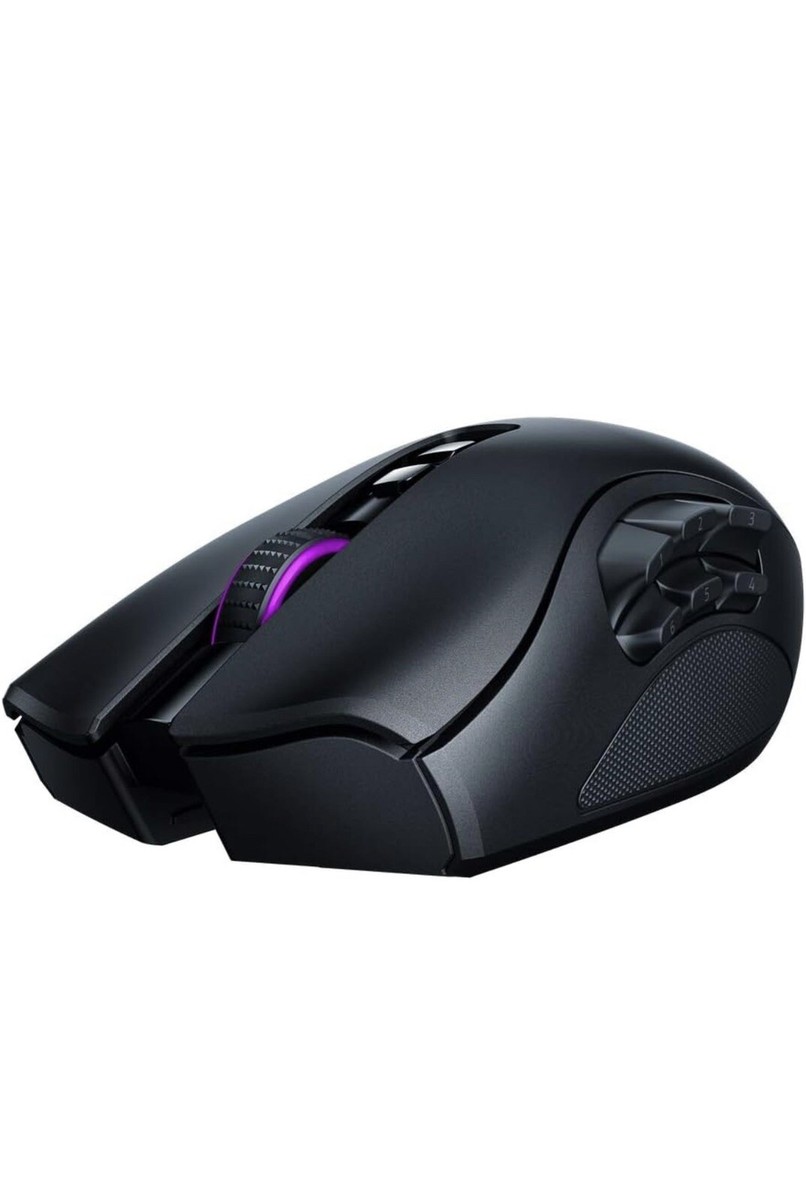
Razer Naga Pro Wireless Gaming Mouse: Interchangeable Side Plate w/ 2, 6, 12 Button Configurations - Focus+ 20K DPI Optical Sensor - Fastest Gaming
Why specialize in one genre, when you can rule them all? Adapt to every game with the Razer Naga Pro—a wireless mouse upgraded with our latest Razer technologies, and equipped with 3 swappable side plates for the button layouts you need to master MMOs, battle-royales and more. Charging Dock Not Included.
Why specialize in one genre, when you can rule them all? Adapt to every game with the Razer Naga Pro—a wireless mouse upgraded with our latest Razer technologies, and equipped with 3 swappable side plates for the button layouts you need to master MMOs, battle-royales and more. Charging Dock Not Included.
Why specialize in one genre, when you can rule them all? Adapt to every game with the Razer Naga Pro—a wireless mouse upgraded with our latest Razer technologies, and equipped with 3 swappable side plates for the button layouts you need to master MMOs, battle-royales and more. Charging Dock Not Included.
Why specialize in one genre, when you can rule them all? Adapt to every game with the Razer Naga Pro—a wireless mouse upgraded with our latest Razer technologies, and equipped with 3 swappable side plates for the button layouts you need to master MMOs, battle-royales and more. Charging Dock Not Included.
in 7 offers
The lowest price for Razer Naga Pro Wireless Gaming Mouse: Interchangeable Side Plate w/ 2, 6, 12 Button Configurations - Focus+ 20K DPI Optical Sensor - Fastest Gaming right now is $159.99 at Kogan.com, compared across 5 retailers.
The all-time low was $22.44 on 12 Feb 2026 — today's price is 613% above the lowest ever. It has been notably cheaper before — worth setting a price alert.
Prices last updated 29 Oct 2026.
Last updated at 29/10/2026 06:27:05
Razer Naga Pro v1 Wireless Mouse - Excellent - Refurbished
Delivery $9.99
Razer Naga Pro v1 Wireless Mouse - Excellent - Refurbished
Delivery $9.99
Razer Naga Pro v1 Wireless Mouse - Excellent - Refurbished
Delivery $9.99
Razer Naga Pro Wireless Bluetooth Gaming Mouse Black Brand
Free delivery
Affiliate Disclosure: We may receive a small commission for purchases made through this link at no extra cost to you. This helps support our site. Thank you!
Naga Pro - Modular Wireless Gaming Mouse with Interchangeable Side Panels (19 + 1 Programmable Buttons, Optical Mouse Switch, 20K DPI Focus+ Optical S
Delivery between 4–7 Nov $29
originally posted on bestbuy.com
Pros:- Glides better than the older wired model. The ‘feet’ on the bottom of the mouse seem to be a different plastic than older models.- Excellent ergonomics for a person with medium to large hands.- Excellent DPI control- Very programmable- All the buttons! (I use the 12 key for all games)- Not too heavy despite the size- Solid ‘clicks’ from the scroll wheel which is very nice in games that use the wheel. Like swapping weapons in an FPS- All buttons are solid quality and feel like what you would expect from a mouse of this price.- The the laser switches ‘should’, in theory, last longer than traditional switches.Cons:- Expensive- Charging micro-usb cable proprietary. You would have to modify a regular cable to make it fit. (Terrible design choice)- ... MorePros:- Glides better than the older wired model. The ‘feet’ on the bottom of the mouse seem to be a different plastic than older models.- Excellent ergonomics for a person with medium to large hands.- Excellent DPI control- Very programmable- All the buttons! (I use the 12 key for all games)- Not too heavy despite the size- Solid ‘clicks’ from the scroll wheel which is very nice in games that use the wheel. Like swapping weapons in an FPS- All buttons are solid quality and feel like what you would expect from a mouse of this price.- The the laser switches ‘should’, in theory, last longer than traditional switches.Cons:- Expensive- Charging micro-usb cable proprietary. You would have to modify a regular cable to make it fit. (Terrible design choice)- Micro-usb on a $150 mouse?!?! Seriously?- The wireless dongle has some range limitations and seems to work best when plugged into a usb hub or extender that is on your desk. I would NOT use this mouse for a home theatre type setup.Overall this is a solid mouse for pretty much any workload or game genre. I love the Naga series and would recommend this mouse if you want to have the versatility of the programable buttons and are not limited by budget.
originally posted on bestbuy.com
Initial:With my normal use of the Basilisk HyperSpeed, I am fairly used to using a slim mouse with a wonderful tech addition on the side of the mouse to slow the cursor for better aim. After some time of use (1-2 + hours of use), my hand will begin to cramp. Rather uncomfortable, so I wanted to venture out and see if there was another Razer Mouse that I found, which is the Naga Pro.Pros:With the naga, you are given a nice wide range of options for different types of games, such as RPG, MMO, and others. Another feature it has is a wide/larger mouse that opens your hand for a more relaxed feel. With its options and nice comfortability, this would offer a great mouse for most gamers.Cons:The only few cons consist of two aspects, one being a personal wish and the ... MoreInitial:With my normal use of the Basilisk HyperSpeed, I am fairly used to using a slim mouse with a wonderful tech addition on the side of the mouse to slow the cursor for better aim. After some time of use (1-2 + hours of use), my hand will begin to cramp. Rather uncomfortable, so I wanted to venture out and see if there was another Razer Mouse that I found, which is the Naga Pro.Pros:With the naga, you are given a nice wide range of options for different types of games, such as RPG, MMO, and others. Another feature it has is a wide/larger mouse that opens your hand for a more relaxed feel. With its options and nice comfortability, this would offer a great mouse for most gamers.Cons:The only few cons consist of two aspects, one being a personal wish and the other a critical error. If I could have this mouse operate how I wanted it, then it would have the tech advantage to slow cursor movement. That is only because I am biased toward the Basilisk. However, the critical issue that I have with this product is latency/loss of connection. Over all of my time using these products I have never run into many issues with connection but since buying the Naga I have had more issues with connection than I have in the past couple of years.Suggestion:If there could be a HyperSpeed model made then I would be more than ecstatic for the product and would promptly buy it. As well, if the product had an additional tech piece similar to the basilisk pro where I can slow cursor movement for aiming in the game. I believe that if this product had this feature then it would be perfect.
originally posted on bestbuy.com
I've rarely done reviews, and honestly I really had to hand it to Razer for this product. I've been playing a lot of Final Fantasy XIV in the past three years, and my daily driver has always been a Logitech G600. I even did some modifications to the cable, swapped out the skates, but the side buttons always wore out on me in the end.I wanted to cut the cord, so I went for a clone of that same mouse: the UtechSmart Venus Pro. It cost a bit more than my first mouse, but it's cheaper than most offerings at the >$50 price point. The buttons felt mushy and honestly the latency was sluggish at times.Then I saw this, the Razer Naga Pro. I've always been a fan of their products, but the price put me off time and time again because when I first started getting into ... MoreI've rarely done reviews, and honestly I really had to hand it to Razer for this product. I've been playing a lot of Final Fantasy XIV in the past three years, and my daily driver has always been a Logitech G600. I even did some modifications to the cable, swapped out the skates, but the side buttons always wore out on me in the end.I wanted to cut the cord, so I went for a clone of that same mouse: the UtechSmart Venus Pro. It cost a bit more than my first mouse, but it's cheaper than most offerings at the >$50 price point. The buttons felt mushy and honestly the latency was sluggish at times.Then I saw this, the Razer Naga Pro. I've always been a fan of their products, but the price put me off time and time again because when I first started getting into gaming, I never really understood why peripherals costs so much. from mousepads, to keyboards, to mice, etc. But then I forgot that it's just like any other hobby, nicer tools are more expensive.So I finally pulled the trigger after sitting on it for over a year, and I was not disappointed. It's just so smooth and precise to anything I've ever used in my life, and the MMO side buttons feel great. I have heard that Nagas were prone to double clicking, but I hope in good faith that Razer's improved their design since then. As for now, I'm impressed as it is, and I'll do my best to take care of it in the hopes that I can have it lasting for a couple of years as I play through my games. The Razer Synapse App isn't too invasive either, it gets straight to the point so you can tinker to your heart's content.At this point, I really do have to give it to the Naga Pro. I know that Logitech has their G604 Lightspeed mouse, but they got rid of the twelve-button layout for a six button layout instead. The ability to swap side plates is such a neat addition as well. I just wished they sold the plates separately because that alone will improve the longevity of the product. The only other thing is lacking now is swappable omron switches, and that would make it one of the best mice out there pound for pound.
| Model year | 2017 |
| RAM Size | 8 GB |
| Flash Memory Installed Size | 512 GB |
| Operating System | Windows 10 |
| Hardware Platform | PC |
Razer Naga Pro v1 Wireless Mouse - Excellent - Refurbished
Delivery $9.99
Razer Naga Pro v1 Wireless Mouse - Excellent - Refurbished
Delivery $9.99
Razer Naga Pro v1 Wireless Mouse - Excellent - Refurbished
Delivery $9.99
Razer Naga Pro Wireless Bluetooth Gaming Mouse Black Brand
Free delivery
Affiliate Disclosure: We may receive a small commission for purchases made through this link at no extra cost to you. This helps support our site. Thank you!
Naga Pro - Modular Wireless Gaming Mouse with Interchangeable Side Panels (19 + 1 Programmable Buttons, Optical Mouse Switch, 20K DPI Focus+ Optical S
Delivery between 4–7 Nov $29
Pros:- Glides better than the older wired model. The ‘feet’ on the bottom of the mouse seem to be a different plastic than older models.- Excellent ergonomics for a person with medium to large hands.- Excellent DPI control- Very programmable- All the buttons! (I use the 12 key for all games)- Not too heavy despite the size- Solid ‘clicks’ from the scroll wheel which is very nice in games that use the wheel. Like swapping weapons in an FPS- All buttons are solid quality and feel like what you would expect from a mouse of this price.- The the laser switches ‘should’, in theory, last longer than traditional switches.Cons:- Expensive- Charging micro-usb cable proprietary. You would have to modify a regular cable to make it fit. (Terrible design choice)- ... MorePros:- Glides better than the older wired model. The ‘feet’ on the bottom of the mouse seem to be a different plastic than older models.- Excellent ergonomics for a person with medium to large hands.- Excellent DPI control- Very programmable- All the buttons! (I use the 12 key for all games)- Not too heavy despite the size- Solid ‘clicks’ from the scroll wheel which is very nice in games that use the wheel. Like swapping weapons in an FPS- All buttons are solid quality and feel like what you would expect from a mouse of this price.- The the laser switches ‘should’, in theory, last longer than traditional switches.Cons:- Expensive- Charging micro-usb cable proprietary. You would have to modify a regular cable to make it fit. (Terrible design choice)- Micro-usb on a $150 mouse?!?! Seriously?- The wireless dongle has some range limitations and seems to work best when plugged into a usb hub or extender that is on your desk. I would NOT use this mouse for a home theatre type setup.Overall this is a solid mouse for pretty much any workload or game genre. I love the Naga series and would recommend this mouse if you want to have the versatility of the programable buttons and are not limited by budget.
Initial:With my normal use of the Basilisk HyperSpeed, I am fairly used to using a slim mouse with a wonderful tech addition on the side of the mouse to slow the cursor for better aim. After some time of use (1-2 + hours of use), my hand will begin to cramp. Rather uncomfortable, so I wanted to venture out and see if there was another Razer Mouse that I found, which is the Naga Pro.Pros:With the naga, you are given a nice wide range of options for different types of games, such as RPG, MMO, and others. Another feature it has is a wide/larger mouse that opens your hand for a more relaxed feel. With its options and nice comfortability, this would offer a great mouse for most gamers.Cons:The only few cons consist of two aspects, one being a personal wish and the ... MoreInitial:With my normal use of the Basilisk HyperSpeed, I am fairly used to using a slim mouse with a wonderful tech addition on the side of the mouse to slow the cursor for better aim. After some time of use (1-2 + hours of use), my hand will begin to cramp. Rather uncomfortable, so I wanted to venture out and see if there was another Razer Mouse that I found, which is the Naga Pro.Pros:With the naga, you are given a nice wide range of options for different types of games, such as RPG, MMO, and others. Another feature it has is a wide/larger mouse that opens your hand for a more relaxed feel. With its options and nice comfortability, this would offer a great mouse for most gamers.Cons:The only few cons consist of two aspects, one being a personal wish and the other a critical error. If I could have this mouse operate how I wanted it, then it would have the tech advantage to slow cursor movement. That is only because I am biased toward the Basilisk. However, the critical issue that I have with this product is latency/loss of connection. Over all of my time using these products I have never run into many issues with connection but since buying the Naga I have had more issues with connection than I have in the past couple of years.Suggestion:If there could be a HyperSpeed model made then I would be more than ecstatic for the product and would promptly buy it. As well, if the product had an additional tech piece similar to the basilisk pro where I can slow cursor movement for aiming in the game. I believe that if this product had this feature then it would be perfect.
I've rarely done reviews, and honestly I really had to hand it to Razer for this product. I've been playing a lot of Final Fantasy XIV in the past three years, and my daily driver has always been a Logitech G600. I even did some modifications to the cable, swapped out the skates, but the side buttons always wore out on me in the end.I wanted to cut the cord, so I went for a clone of that same mouse: the UtechSmart Venus Pro. It cost a bit more than my first mouse, but it's cheaper than most offerings at the >$50 price point. The buttons felt mushy and honestly the latency was sluggish at times.Then I saw this, the Razer Naga Pro. I've always been a fan of their products, but the price put me off time and time again because when I first started getting into ... MoreI've rarely done reviews, and honestly I really had to hand it to Razer for this product. I've been playing a lot of Final Fantasy XIV in the past three years, and my daily driver has always been a Logitech G600. I even did some modifications to the cable, swapped out the skates, but the side buttons always wore out on me in the end.I wanted to cut the cord, so I went for a clone of that same mouse: the UtechSmart Venus Pro. It cost a bit more than my first mouse, but it's cheaper than most offerings at the >$50 price point. The buttons felt mushy and honestly the latency was sluggish at times.Then I saw this, the Razer Naga Pro. I've always been a fan of their products, but the price put me off time and time again because when I first started getting into gaming, I never really understood why peripherals costs so much. from mousepads, to keyboards, to mice, etc. But then I forgot that it's just like any other hobby, nicer tools are more expensive.So I finally pulled the trigger after sitting on it for over a year, and I was not disappointed. It's just so smooth and precise to anything I've ever used in my life, and the MMO side buttons feel great. I have heard that Nagas were prone to double clicking, but I hope in good faith that Razer's improved their design since then. As for now, I'm impressed as it is, and I'll do my best to take care of it in the hopes that I can have it lasting for a couple of years as I play through my games. The Razer Synapse App isn't too invasive either, it gets straight to the point so you can tinker to your heart's content.At this point, I really do have to give it to the Naga Pro. I know that Logitech has their G604 Lightspeed mouse, but they got rid of the twelve-button layout for a six button layout instead. The ability to swap side plates is such a neat addition as well. I just wished they sold the plates separately because that alone will improve the longevity of the product. The only other thing is lacking now is swappable omron switches, and that would make it one of the best mice out there pound for pound.
I was in the market for a new mouse for both my work and gaming needs. This mouse is flat out AMAZING when it comes to both tasks. It's wireless and has fantastic battery life, charge it once and I'm almost a month in of using it every day for at least a couple hours and it's still charged.It's a beautiful mouse, all the LEDS and the ergonomics of the mouse, just seem to really fit my hand. It's great that it has multiple options for side buttons, from the simple 2 button side button mouse, to the super fancy 12 buttons that work great in the WoW / COD games. There's also a 3rd side button option that's only 6 buttons but honestly I think it works best for me.Of course it's a Razer product, so the software is easy to understand and easy to install. It's wireless ... MoreI was in the market for a new mouse for both my work and gaming needs. This mouse is flat out AMAZING when it comes to both tasks. It's wireless and has fantastic battery life, charge it once and I'm almost a month in of using it every day for at least a couple hours and it's still charged.It's a beautiful mouse, all the LEDS and the ergonomics of the mouse, just seem to really fit my hand. It's great that it has multiple options for side buttons, from the simple 2 button side button mouse, to the super fancy 12 buttons that work great in the WoW / COD games. There's also a 3rd side button option that's only 6 buttons but honestly I think it works best for me.Of course it's a Razer product, so the software is easy to understand and easy to install. It's wireless so it pairs well with the USB key that has a home in the mouse.I would highly recommend this mouse to anyone who is looking to upgrade their current mouse and you're looking for a bit of an advantage in your gaming.
This Naga Pro Mouse by Razor is honestly one of a kind. It runs so smoothly on my computer there are absolutely no lags at all. The speed of this mouse is incredibly fast compared to other gaming mouses ive tried in the past and the light weight material makes it even better. Included with this mouse are three sets of side plates for gaming buttons that you can choose from to give you a better experience to customize your control and you dont have to worry about double clicking because the button was specifically designed to prevent this from happening during gameplay. The rgb lighting is incredibly bright and rich in color its completely customizable and can be adjusted to the color setting and tone you want it to be. I even got a matching keyboard and computer mat ... MoreThis Naga Pro Mouse by Razor is honestly one of a kind. It runs so smoothly on my computer there are absolutely no lags at all. The speed of this mouse is incredibly fast compared to other gaming mouses ive tried in the past and the light weight material makes it even better. Included with this mouse are three sets of side plates for gaming buttons that you can choose from to give you a better experience to customize your control and you dont have to worry about double clicking because the button was specifically designed to prevent this from happening during gameplay. The rgb lighting is incredibly bright and rich in color its completely customizable and can be adjusted to the color setting and tone you want it to be. I even got a matching keyboard and computer mat from the brand as well to match with my mouse and it looks amazing! The battery life lasts a long time and its bluetooth which just makes everything so much better. I can tell this mouse was well put together and much time was used to create every cool feature about it. I really beleive this mouse is worth it gameplay is just so much smoother!
I would say this Razer Naga pro modular wireless mouse is designed with some great specs. Which basically means you can customize the number of buttons on it depending on the game you are playing. Whether is could be mobo, mmo,fps and any other super games. One of the highlights of this mouse is 3 swappable side layouts held on with magnets that allow multiple button setups. It has 12 button side plate for mmo, 6 button side plate for battle royal, 2 button side plate for fps. Basically it means you have all the commands you need at your fingertips and enjoy a degree of control that is made for any situation. This mouse has got nice grip to hold and use it for hours with no complaints. Over all it has 19 + 1 programmable buttons for extended control. It’s second ... MoreI would say this Razer Naga pro modular wireless mouse is designed with some great specs. Which basically means you can customize the number of buttons on it depending on the game you are playing. Whether is could be mobo, mmo,fps and any other super games. One of the highlights of this mouse is 3 swappable side layouts held on with magnets that allow multiple button setups. It has 12 button side plate for mmo, 6 button side plate for battle royal, 2 button side plate for fps. Basically it means you have all the commands you need at your fingertips and enjoy a degree of control that is made for any situation. This mouse has got nice grip to hold and use it for hours with no complaints. Over all it has 19 + 1 programmable buttons for extended control. It’s second highlight is it’s focus + 20k DPI optical sensor is a great feature for cutting edge precision. The third highlight is Razer optical mouse switch feature made its performance very faster, more durable that eliminates unintended double-clicking issues. It gives up to 100 hours game play of battery life.I just love it’s light effects which gives the real visual effective feel when gaming. It connects more faster than a wired mouse. Looking forward to get more for gifting purposes for upcoming holidays for my gamer friends.
This mouse is nice, especially when you want buttons, but the shape is hard to get used to and if you like to set your sensitivity low and have to pick your mouse up a bunch to readjust your grip or placement on your mousepad, this mouse might not be for you.I don't have huge hands, but they aren't really tiny either. Either way, it's hard to use this mouse when you have to readjust on your mousepad (while using the 12 button mod) because every time you try to pick it up, it clicks one of the buttons because of the way that the mouse is designed.Maybe if you've got medium sized or small sized hands, get some grip tape that you can buy and place on the mouse to make it "grippier."Pros- A LOT of buttons- Interchangeable modules that allows you to pick how many ... MoreThis mouse is nice, especially when you want buttons, but the shape is hard to get used to and if you like to set your sensitivity low and have to pick your mouse up a bunch to readjust your grip or placement on your mousepad, this mouse might not be for you.I don't have huge hands, but they aren't really tiny either. Either way, it's hard to use this mouse when you have to readjust on your mousepad (while using the 12 button mod) because every time you try to pick it up, it clicks one of the buttons because of the way that the mouse is designed.Maybe if you've got medium sized or small sized hands, get some grip tape that you can buy and place on the mouse to make it "grippier."Pros- A LOT of buttons- Interchangeable modules that allows you to pick how many buttons you want to have on it (2, 6, and 12 buttons).Cons- The 12 button module makes readjusting the mouse hard without clicking one of the buttons on said module, although the 6 button and 2 button module that comes with it doesn't have that problem. I just happened to buy it for the plethora of different buttons you could use.- Not enough LEDS in my opinion. The 12 button module lights up, but the other 2 (the 2 and 6 button modules) don't, so if you want your rig looking shekshy with all those lights, you're pretty much stuck with the 12 button module. The wheel and Razer logo light up, but I would've liked to see the other modules light up as well.Although I would recommend this item, I would definitely let the person know about the design and difficulty picking up the mouse from the mousepad without clicking one of the buttons on the side of the 12 button module.
Y'know I have a charging base for my other mouse. It came with it. Making me buy one for THIS mouse and putting me up over $200 is a jerk move. Sorry, can't pull out that kind of cash on.a.mouse.. No.The mouse itself can be found for cheaper, just look around.Alright, all that out of the way.The features pretty much rock, wireless, wired.. Whatever gets you going. Bluetooth can be a little jittery, no real issue though. The dongle they include and adapter..it's fine, use a dock if you want instead if you're that worried about sucking up a port. Wired, it just works, charges the mouse, the usual. How does it feel, eh, okay. I still prefer my original Naga because they had it right the first time and now they're CHUNKY.. Danged thing developed a double tap ... MoreY'know I have a charging base for my other mouse. It came with it. Making me buy one for THIS mouse and putting me up over $200 is a jerk move. Sorry, can't pull out that kind of cash on.a.mouse.. No.The mouse itself can be found for cheaper, just look around.Alright, all that out of the way.The features pretty much rock, wireless, wired.. Whatever gets you going. Bluetooth can be a little jittery, no real issue though. The dongle they include and adapter..it's fine, use a dock if you want instead if you're that worried about sucking up a port. Wired, it just works, charges the mouse, the usual. How does it feel, eh, okay. I still prefer my original Naga because they had it right the first time and now they're CHUNKY.. Danged thing developed a double tap though and that sorta made that one unusable...Bummer..Anyway, this new one is nice.
Pros:I like this mouse overall for the fact that you can swap out the plates for your own personal taste in game type.You have an FPS panel, a number panel for MMO games, and a shorter number panel I would think for RPG gameplay with M&K. Overall, I do enjoy this mouse and would recommend it.Cons:The mouse is nice to use but it is frustrating when you have to stay hardwired in the whole time. It is a wireless mouse so you shouldn’t have to deal with the constant disconnecting and stutters while wireless.After awhile of game play it constantly has stutters without being hardwired in. I thought maybe it was just my mouse that was having the issue but I noticed more people were reporting it.
I use this mouse for shortcuts in various programs. It's one thing to have a couple of extra buttons for navigation or general use in Windows or Chrome, but having a few extra buttons for cut, copy, paste, and undo is handy. Where this really shines is when you have those nasty "hot keys" where you really need two hands on the keyboard, or where you can frequently use a regular series of shortcuts. This mouse is spectacular in Adobe Illustrator, InDesign, Outlook, Adobe Premiere. Razer Synapse software detects the program you're using and switches your mouse to the appropriate button profile, so you don't have to think about it too much. You can also change the color patterns if you find it helpful to use color to identify the current profile. The two buttons below ... MoreI use this mouse for shortcuts in various programs. It's one thing to have a couple of extra buttons for navigation or general use in Windows or Chrome, but having a few extra buttons for cut, copy, paste, and undo is handy. Where this really shines is when you have those nasty "hot keys" where you really need two hands on the keyboard, or where you can frequently use a regular series of shortcuts. This mouse is spectacular in Adobe Illustrator, InDesign, Outlook, Adobe Premiere. Razer Synapse software detects the program you're using and switches your mouse to the appropriate button profile, so you don't have to think about it too much. You can also change the color patterns if you find it helpful to use color to identify the current profile. The two buttons below the wheel default to changing dpi; one would think that higher dpi would mean more detailed scanning and slower movement, but whatever. The up button makes it faster, the down button slower. You can set these speeds and their intervals manually by program. I find that I need slower movement in Illustrator, but it's nice to move faster when I'm working with text. I am happy to enter the world of smart wireless mice
| Model year | 2017 |
| RAM Size | 8 GB |
| Flash Memory Installed Size | 512 GB |
| Operating System | Windows 10 |
| Hardware Platform | PC |