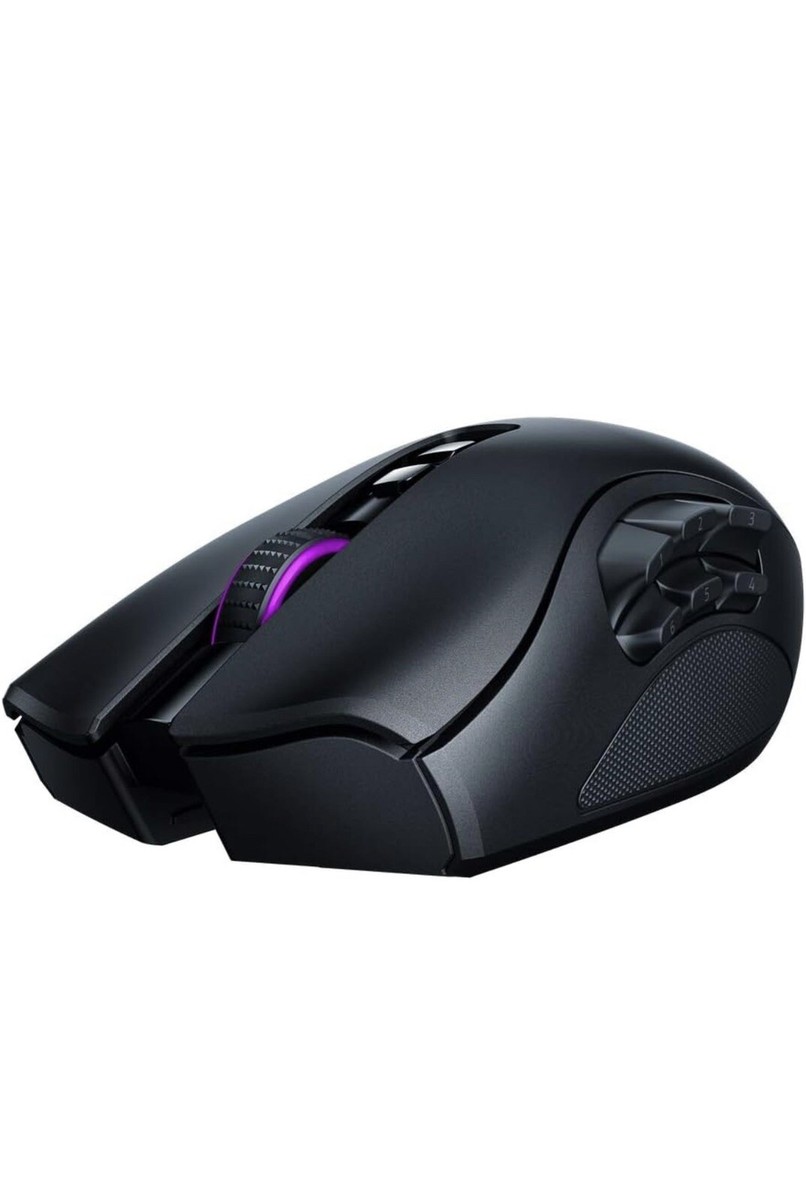
Razer HyperSpeed wireless technology brings together extreme low latency and interference reduction for true wireless freedom. 25 percebtage Faster than Competing Wireless Mice. Offers on the fly sensitivity adjustment through dedicated DPI buttons (reprogrammable) for gaming. Faster Than Traditional Mechanical Switches.
Razer HyperSpeed wireless technology brings together extreme low latency and interference reduction for true wireless freedom. 25 percebtage Faster than Competing Wireless Mice. Offers on the fly sensitivity adjustment through dedicated DPI buttons (reprogrammable) for gaming. Faster Than Traditional Mechanical Switches.
in 2 offers
The lowest price for Razer (RZ01-03420100 ) Naga Pro Wireless Gaming Mouse right now is $159.99 at Paushtikstore, compared across 2 retailers.
The all-time low was $90.00 on 6 Mar 2025 — today's price is 78% above the lowest ever. It has been notably cheaper before — worth setting a price alert.
Prices last updated 16 Oct 2026.
Razer (RZ01-03420100 ) Naga Pro Wireless Gaming Mouse
Razer HyperSpeed wireless technology brings together extreme low latency and interference reduction for true wireless freedom. 25 percebtage Faster than Competing Wireless Mice. Offers on the fly sensitivity adjustment through dedicated DPI buttons (reprogrammable) for gaming. Faster Than Traditional Mechanical Switches.
Razer HyperSpeed wireless technology brings together extreme low latency and interference reduction for true wireless freedom. 25 percebtage Faster than Competing Wireless Mice. Offers on the fly sensitivity adjustment through dedicated DPI buttons (reprogrammable) for gaming. Faster Than Traditional Mechanical Switches.
Last updated at 16/10/2026 12:50:20
Razer Naga Pro v1 Wireless Mouse - Excellent - Refurbished
Free delivery between 20–26 Oct
Razer Naga Pro Wireless Gaming Mouse (RZ01-03420100)
30-day returns
originally posted on pbtech.co.nz
The form factor of this Naga Pro is identical to Naga Trinity so switching from Trinity to Naga Pro was pretty much seamless.This mouse itself is very light and the connectivity via the included 2.4Ghz dongle is exceptionally good - can’t feel any lag, delays or stutters. There’s also a slot for the receiver dongle under the side panel in case you need to bring the mouse with you somewhere.One full charge lasts for about a week of intense use and the recharge time from about 5% to full takes about an hour and a half.Really happy with the purchase!
originally posted on pbtech.co.nz
Great mouse with plenty of customization!You can always swap out the button modules (although I just use the 12 button module), but it helps with productivity and gaming and razer synapse 3 is much better than the first one.Though I would say I still don't like synapse.Only con I have is that you have to buy a magnetic charger for it, even though the older model came with the magnetic charger and this one doesn't fit on the new naga pro
originally posted on bestbuy.com
Perfect in every way except that when I have the 12 button attatchment on, picking the mouse up naturally occasionally leads to my thumb pressing the 1 or 2 button. Im not sure if it needs a lip on the top or what, but it would be nice to have something for the 12 button attachment for my thumb to grab onto when I pick it up. 99% my thumb doesnt press it, but theres just that 1% of the time that it happens. Maybe as I get more used to the mouse, this might happen less. 4 out of 5 stars.
| Hardware Platform | Laptop, Personal Computer |
| Operating System | no OS |
| Product dimensions | 4.74 x 12.7 x 7.26 cm; 106 Grams |
| Item Dimensions L x W x H | 47 x 127 x 73 millimetres |
| Batteries | 1 Lithium Polymer batteries required. (included) |
Razer Naga Pro v1 Wireless Mouse - Excellent - Refurbished
Free delivery between 20–26 Oct
Razer Naga Pro Wireless Gaming Mouse (RZ01-03420100)
30-day returns
The form factor of this Naga Pro is identical to Naga Trinity so switching from Trinity to Naga Pro was pretty much seamless.This mouse itself is very light and the connectivity via the included 2.4Ghz dongle is exceptionally good - can’t feel any lag, delays or stutters. There’s also a slot for the receiver dongle under the side panel in case you need to bring the mouse with you somewhere.One full charge lasts for about a week of intense use and the recharge time from about 5% to full takes about an hour and a half.Really happy with the purchase!
Great mouse with plenty of customization!You can always swap out the button modules (although I just use the 12 button module), but it helps with productivity and gaming and razer synapse 3 is much better than the first one.Though I would say I still don't like synapse.Only con I have is that you have to buy a magnetic charger for it, even though the older model came with the magnetic charger and this one doesn't fit on the new naga pro
Perfect in every way except that when I have the 12 button attatchment on, picking the mouse up naturally occasionally leads to my thumb pressing the 1 or 2 button. Im not sure if it needs a lip on the top or what, but it would be nice to have something for the 12 button attachment for my thumb to grab onto when I pick it up. 99% my thumb doesnt press it, but theres just that 1% of the time that it happens. Maybe as I get more used to the mouse, this might happen less. 4 out of 5 stars.
The Naga V2 Pro is a really fun mouse for gaming. It provides many configurations, wireless and wired, 2, 6, or 12 button side configurations, and an app that allows for customizing lights, button modes, etc. the interchangeable plates on the side that allows for the 2, 6, and 12 button configurations have a solid magnetic connection and are super secure when in place. The buttons have a good click feel and the scroll wheel can be granular or smooth scrolling. There is even a button option to allow for speed control on the cursor. The ergonomic curve of the mouse feels good in the hand. The usb dongle can even be stored inside the mouse under the side plates. It only connects with one device at a time, unlike some mice that have three “slots” for three different ... MoreThe Naga V2 Pro is a really fun mouse for gaming. It provides many configurations, wireless and wired, 2, 6, or 12 button side configurations, and an app that allows for customizing lights, button modes, etc. the interchangeable plates on the side that allows for the 2, 6, and 12 button configurations have a solid magnetic connection and are super secure when in place. The buttons have a good click feel and the scroll wheel can be granular or smooth scrolling. There is even a button option to allow for speed control on the cursor. The ergonomic curve of the mouse feels good in the hand. The usb dongle can even be stored inside the mouse under the side plates. It only connects with one device at a time, unlike some mice that have three “slots” for three different devices. Otherwise this mouse is amazing for gaming as well as for everyday computing. It is compatible with Mac and windows, along with android and iOS/iPadOS.
First time I connected the mouse and used it, my first thought was “this is chonk-tastic”. Its much bigger than my other mouse, almost double the size. I love the interchangable sides, and I’m getti g use to the size. It has taken me a bit ti get use to it though. For me, definitely worth the upgrade
Absolutely game changing mouse!As a big fan of MMO's (World of Warcraft in particular) this mouse is a must! Especially when playing on a MacBook Pro. The flexibility of the panels is also amazing for those who enjoy playing a range of games. I would highly recommend this to anyone who wishes to improve their gaming experience.
I owned a wired Naga years ago when I was into MMOs, so the wireless Naga Pro seemed like a good buy. Unfortunately I've had constant issues with some side buttons that would randomly stop working unless the charger cable is plugged in or Synapse is rebooted. For a mouse with this price tag, I cannot recommend it unfortunately.
The mouse is nice and works how any mouse should.My problem is with the interchangeable side panels. They either execute something different to what you set or, they just don't work at all.My suggestion is either stick with a dedicated mouse with either 2 or 6 buttons. With 12 buttons there is no space to grip your thumb, so just try moving your mouse without your thumb.
The Razer Naga Pro mouse is an ergonomic shape that fits your hand so well. The interchangeable side panels bring gaming function to your finger tips without needing to reach for additional keys on the keyboard. Combined with a good mouse mat it just glides so smoothly.The wifi and blutooth connectivity option means my desk is free from cable clutter.
The mouse from a hardware point of view is great. Almost everything from the feel, ergonomics, scroll wheel, clicked and the signature razer RGB was great, the only thing that was not would be charging cable which normally wouldn't be a big deal on a wireless mouse (foreshadowing). It is a braided cable however the Paracord sleeving on it was slightly too long leading to bunching at one end of the cable. Not huge deal being it is simple cosmetic issue.The massive deal breaker which ruins this mouse for anyone who doesn't want default out of the box functionality is that this is basically un useable. A big selling point and why this version is so expensive is customizing the which side panel you want and what all the buttons do. However in order for this to work it ... MoreThe mouse from a hardware point of view is great. Almost everything from the feel, ergonomics, scroll wheel, clicked and the signature razer RGB was great, the only thing that was not would be charging cable which normally wouldn't be a big deal on a wireless mouse (foreshadowing). It is a braided cable however the Paracord sleeving on it was slightly too long leading to bunching at one end of the cable. Not huge deal being it is simple cosmetic issue.The massive deal breaker which ruins this mouse for anyone who doesn't want default out of the box functionality is that this is basically un useable. A big selling point and why this version is so expensive is customizing the which side panel you want and what all the buttons do. However in order for this to work it must connect with razers software synapse again not ideal but I could deal with it.It falls apart by the implementation of a power saving feature that can't be turned in which the mouse will go to sleep after 5-15 min of being idle. Upon waking up it goes back to default settings until it reconnects to synapse but for whatever reason it cannot reconnect. After spending little over an hour with razer support the work around I have to do is shut down synapse then relaunch for the mouse to connect. They elevated the issue to another team that will look into solving the connection issue. And for those wonder I'm running windows 11 pro, latest synapse 3 version and latest mouse firmware. Needless to say I am returning this and will warn everyone to stay away. If you like the mouse save the $100 and get the wired version.
| Hardware Platform | Laptop, Personal Computer |
| Operating System | no OS |
| Product dimensions | 4.74 x 12.7 x 7.26 cm; 106 Grams |
| Item Dimensions L x W x H | 47 x 127 x 73 millimetres |
| Batteries | 1 Lithium Polymer batteries required. (included) |

