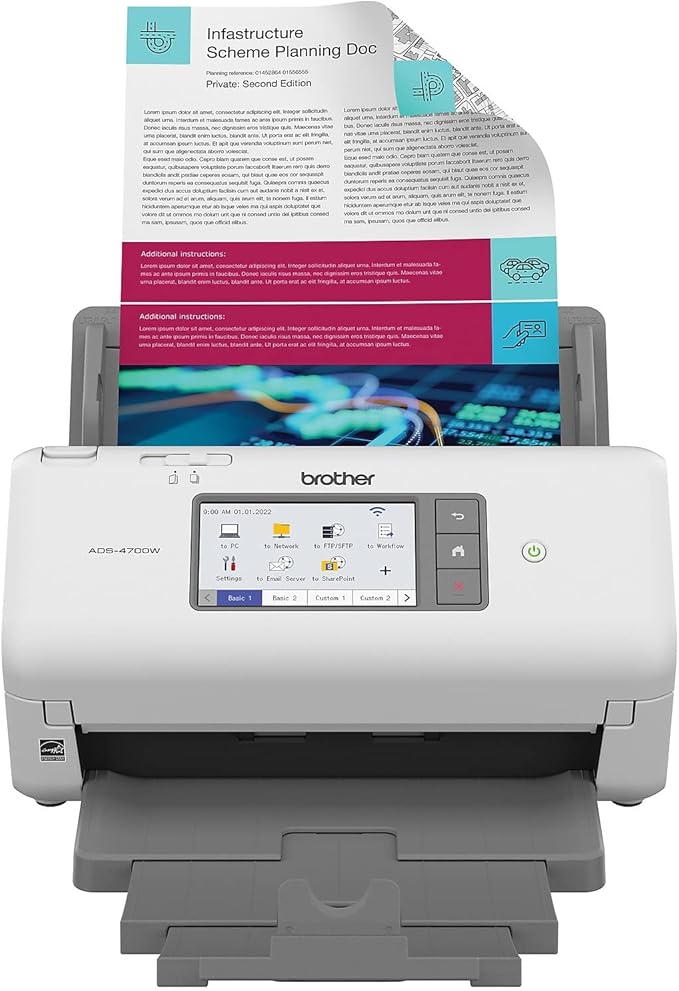
Are you tired of slow and inefficient scanning? Look no further than the Fujitsu ScanSnap iX1600 Large Format ADF Scanner. Featuring a 600 dpi Optical resolution and a jaw-dropping 33% increase in duplex scanning speed, this scanner is the perfect solution for a busy lifestyle. Navigating through the scanner is a breeze with its intuitive 4.3-inch touch screen, allowing for easy end-to-end scanning and data utilization. With the ability to customize up to 30 profiles to suit your scanning needs, you'll be scanning documents left and right in no time. The iX1600 connects via Wi-Fi or USB and can scan anywhere, anytime, without the need for a PC. Perfect for team sharing, the iX1600 can be equipped with up to four user licenses, allowing for customizations for each profile and icon. Its user-friendly interface and Streak Reduction function guarantee consistent, high-quality, and clean images every time, even for tricky documents such as envelopes, receipts, and business cards. But that's not all - the iX1600 comes equipped with ScanSnap Home 2.0 software, the ultimate document management platform. Digitize and organize all your documents, business cards, receipts, and photos with ease and accessibility. Experience stress-free usability and optimized productivity like never before with the Fujitsu ScanSnap iX1600 Large Format ADF Scanner. Don't wait any longer to streamline your scanning processes - invest in this must-have gadget today!
Are you tired of slow and inefficient scanning? Look no further than the Fujitsu ScanSnap iX1600 Large Format ADF Scanner. Featuring a 600 dpi Optical resolution and a jaw-dropping 33% increase in duplex scanning speed, this scanner is the perfect solution for a busy lifestyle. Navigating through the scanner is a breeze with its intuitive 4.3-inch touch screen, allowing for easy end-to-end scanning and data utilization. With the ability to customize up to 30 profiles to suit your scanning needs, you'll be scanning documents left and right in no time. The iX1600 connects via Wi-Fi or USB and can scan anywhere, anytime, without the need for a PC. Perfect for team sharing, the iX1600 can be equipped with up to four user licenses, allowing for customizations for each profile and icon. Its user-friendly interface and Streak Reduction function guarantee consistent, high-quality, and clean images every time, even for tricky documents such as envelopes, receipts, and business cards. But that's not all - the iX1600 comes equipped with ScanSnap Home 2.0 software, the ultimate document management platform. Digitize and organize all your documents, business cards, receipts, and photos with ease and accessibility. Experience stress-free usability and optimized productivity like never before with the Fujitsu ScanSnap iX1600 Large Format ADF Scanner. Don't wait any longer to streamline your scanning processes - invest in this must-have gadget today!
in 1 offers
The lowest price for Ricoh ScanSnap iX1600 A4 Document Scanner right now is $969.00 at Ubuy Australia.
The all-time low was on 10 Mar 2026 — today's price is 57% above the lowest ever. It has been notably cheaper before — worth setting a price alert.
Ricoh ScanSnap iX1600 A4 Document Scanner
Are you tired of slow and inefficient scanning? Look no further than the Fujitsu ScanSnap iX1600 Large Format ADF Scanner. Featuring a 600 dpi Optical resolution and a jaw-dropping 33% increase in duplex scanning speed, this scanner is the perfect solution for a busy lifestyle. Navigating through the scanner is a breeze with its intuitive 4.3-inch touch screen, allowing for easy end-to-end scanning and data utilization. With the ability to customize up to 30 profiles to suit your scanning needs, you'll be scanning documents left and right in no time. The iX1600 connects via Wi-Fi or USB and can scan anywhere, anytime, without the need for a PC. Perfect for team sharing, the iX1600 can be equipped with up to four user licenses, allowing for customizations for each profile and icon. Its user-friendly interface and Streak Reduction function guarantee consistent, high-quality, and clean images every time, even for tricky documents such as envelopes, receipts, and business cards. But that's not all - the iX1600 comes equipped with ScanSnap Home 2.0 software, the ultimate document management platform. Digitize and organize all your documents, business cards, receipts, and photos with ease and accessibility. Experience stress-free usability and optimized productivity like never before with the Fujitsu ScanSnap iX1600 Large Format ADF Scanner. Don't wait any longer to streamline your scanning processes - invest in this must-have gadget today!
Are you tired of slow and inefficient scanning? Look no further than the Fujitsu ScanSnap iX1600 Large Format ADF Scanner. Featuring a 600 dpi Optical resolution and a jaw-dropping 33% increase in duplex scanning speed, this scanner is the perfect solution for a busy lifestyle. Navigating through the scanner is a breeze with its intuitive 4.3-inch touch screen, allowing for easy end-to-end scanning and data utilization. With the ability to customize up to 30 profiles to suit your scanning needs, you'll be scanning documents left and right in no time. The iX1600 connects via Wi-Fi or USB and can scan anywhere, anytime, without the need for a PC. Perfect for team sharing, the iX1600 can be equipped with up to four user licenses, allowing for customizations for each profile and icon. Its user-friendly interface and Streak Reduction function guarantee consistent, high-quality, and clean images every time, even for tricky documents such as envelopes, receipts, and business cards. But that's not all - the iX1600 comes equipped with ScanSnap Home 2.0 software, the ultimate document management platform. Digitize and organize all your documents, business cards, receipts, and photos with ease and accessibility. Experience stress-free usability and optimized productivity like never before with the Fujitsu ScanSnap iX1600 Large Format ADF Scanner. Don't wait any longer to streamline your scanning processes - invest in this must-have gadget today!
Prices last updated 12 May 2026.
Last updated at 12/05/2026 08:42:14
ScanSnap iX1600 Wireless or USB High-Speed Cloud Enabled Document, Photo & Receipt Scanner with Large Touchscreen and Auto Document Feeder for Mac or
Delivery between 16–20 May $15.52
originally posted on bhphotovideo.com
I did extensive research into whether or not to get a printer/scanner combo, or to keep my printer as a stand-alone and get a separate scanner. I am very glad I chose the latter; this is a superb document scanner. Other brands don't do automatic OCR. This scanner does the OCR when you scan it, so it doesn't become a laborious extra step after you've scanned the document. It's very easy to set up the scanner to upload the scans directly to Google Drive, which is one of the primary places where I save my documents. It has a number of customizable destinations that you can program and tap with a button, like specific settings and destinations for receipts, or other settings one might want for a particular type of document. The white version is pretty and has a ... MoreI did extensive research into whether or not to get a printer/scanner combo, or to keep my printer as a stand-alone and get a separate scanner. I am very glad I chose the latter; this is a superb document scanner. Other brands don't do automatic OCR. This scanner does the OCR when you scan it, so it doesn't become a laborious extra step after you've scanned the document. It's very easy to set up the scanner to upload the scans directly to Google Drive, which is one of the primary places where I save my documents. It has a number of customizable destinations that you can program and tap with a button, like specific settings and destinations for receipts, or other settings one might want for a particular type of document. The white version is pretty and has a fold-over cover that stores easily into a cabinet when not in use. This is certainly the scanner to get.
originally posted on bhphotovideo.com
This is my first document scanner and it performs very well. If you have lots of documents to digitize this probably your best value workhorse. There may be much more expensive scanners that do a little better but this the best bang for your buck. It's footprint is rather small, which is nice, it will scan wirelessly and drop the files in the place you specify.Several improvements that would make it perfect for me:1) I wish they made this scanner wider to cover when documents are wider than the typical 8.5 piece of paper.2) I've also had some issues trying to scan papers that are extra long. I wish this was something the scanner did without hassle.3) Occasionally I've needed to scan one side of a pamphlet that had more than one page and because this scanner ... MoreThis is my first document scanner and it performs very well. If you have lots of documents to digitize this probably your best value workhorse. There may be much more expensive scanners that do a little better but this the best bang for your buck. It's footprint is rather small, which is nice, it will scan wirelessly and drop the files in the place you specify.Several improvements that would make it perfect for me:1) I wish they made this scanner wider to cover when documents are wider than the typical 8.5 piece of paper.2) I've also had some issues trying to scan papers that are extra long. I wish this was something the scanner did without hassle.3) Occasionally I've needed to scan one side of a pamphlet that had more than one page and because this scanner is always pulling your papers through one at a time, it will jam the machine. I wish there was a way to get these docs scanned without issues.
originally posted on Target
Effortless, fast, and high quality scans. Gorgeous color touch screen with controls customizable by up to 5 different users. Scanner looks great in either color. Best of all, this scanner works as well on the Mac as it does on Windows. It might be a bit more scanner than I needed, but it is a true pleasure to work with. The install was orderly and painless. No more hassles trying to mix and match different drivers and application software versions. Fujitsu posted software support for MacOS Ventura immediately when released. One button scan directly to Acrobat. Automated sheet feeder is very reliable. What more could I ask for?
| Scanning | |
| ADF scan speed (b/w, A4) | 600 ppm |
| Duplex scanning | Y |
| Colour scanning | Y |
| Optical scanning resolution | 600 x 600 DPI |
ScanSnap iX1600 Wireless or USB High-Speed Cloud Enabled Document, Photo & Receipt Scanner with Large Touchscreen and Auto Document Feeder for Mac or
Delivery between 16–20 May $15.52
I did extensive research into whether or not to get a printer/scanner combo, or to keep my printer as a stand-alone and get a separate scanner. I am very glad I chose the latter; this is a superb document scanner. Other brands don't do automatic OCR. This scanner does the OCR when you scan it, so it doesn't become a laborious extra step after you've scanned the document. It's very easy to set up the scanner to upload the scans directly to Google Drive, which is one of the primary places where I save my documents. It has a number of customizable destinations that you can program and tap with a button, like specific settings and destinations for receipts, or other settings one might want for a particular type of document. The white version is pretty and has a ... MoreI did extensive research into whether or not to get a printer/scanner combo, or to keep my printer as a stand-alone and get a separate scanner. I am very glad I chose the latter; this is a superb document scanner. Other brands don't do automatic OCR. This scanner does the OCR when you scan it, so it doesn't become a laborious extra step after you've scanned the document. It's very easy to set up the scanner to upload the scans directly to Google Drive, which is one of the primary places where I save my documents. It has a number of customizable destinations that you can program and tap with a button, like specific settings and destinations for receipts, or other settings one might want for a particular type of document. The white version is pretty and has a fold-over cover that stores easily into a cabinet when not in use. This is certainly the scanner to get.
This is my first document scanner and it performs very well. If you have lots of documents to digitize this probably your best value workhorse. There may be much more expensive scanners that do a little better but this the best bang for your buck. It's footprint is rather small, which is nice, it will scan wirelessly and drop the files in the place you specify.Several improvements that would make it perfect for me:1) I wish they made this scanner wider to cover when documents are wider than the typical 8.5 piece of paper.2) I've also had some issues trying to scan papers that are extra long. I wish this was something the scanner did without hassle.3) Occasionally I've needed to scan one side of a pamphlet that had more than one page and because this scanner ... MoreThis is my first document scanner and it performs very well. If you have lots of documents to digitize this probably your best value workhorse. There may be much more expensive scanners that do a little better but this the best bang for your buck. It's footprint is rather small, which is nice, it will scan wirelessly and drop the files in the place you specify.Several improvements that would make it perfect for me:1) I wish they made this scanner wider to cover when documents are wider than the typical 8.5 piece of paper.2) I've also had some issues trying to scan papers that are extra long. I wish this was something the scanner did without hassle.3) Occasionally I've needed to scan one side of a pamphlet that had more than one page and because this scanner is always pulling your papers through one at a time, it will jam the machine. I wish there was a way to get these docs scanned without issues.
Effortless, fast, and high quality scans. Gorgeous color touch screen with controls customizable by up to 5 different users. Scanner looks great in either color. Best of all, this scanner works as well on the Mac as it does on Windows. It might be a bit more scanner than I needed, but it is a true pleasure to work with. The install was orderly and painless. No more hassles trying to mix and match different drivers and application software versions. Fujitsu posted software support for MacOS Ventura immediately when released. One button scan directly to Acrobat. Automated sheet feeder is very reliable. What more could I ask for?
I needed to replace a high-capacity $1500 commercial HP duplex scanner that was older tech, ran only under Windows 7 and was buggy. But when it worked, it was pretty fast which was the reason I tolerated it for so long. Since I use only MAC's, I having trouble justifying running Windows 7 thru Bootcamp just for this application. I decided to bite the bullet and I chose this scanner. It is not only faster but automatically figures out what it's scanning and is pretty accurate in its selection. It also removes blank pages and so far I haven't had any mis-feeds. The only problem I have encountered is sometimes the software and scanner un-links (wifi connect) and I have to restart the software and scanner to re-establish the linkup. I'm guessing it my poor wifi signal ... MoreI needed to replace a high-capacity $1500 commercial HP duplex scanner that was older tech, ran only under Windows 7 and was buggy. But when it worked, it was pretty fast which was the reason I tolerated it for so long. Since I use only MAC's, I having trouble justifying running Windows 7 thru Bootcamp just for this application. I decided to bite the bullet and I chose this scanner. It is not only faster but automatically figures out what it's scanning and is pretty accurate in its selection. It also removes blank pages and so far I haven't had any mis-feeds. The only problem I have encountered is sometimes the software and scanner un-links (wifi connect) and I have to restart the software and scanner to re-establish the linkup. I'm guessing it my poor wifi signal in my office (which I need to fix). This doesn't occur with a direct connection. The ScanSnap software is also far superior to PaperPort which I was using with the old system. When there was a glitch with PaperPort I'd often have to reboot the computer and restart the scanner to get it working again. So in summery I am very pleased with this scanner and the ScanSnap software and highly recommend it.
I bought the scanner mainly so I could throw away paper copies and keep scanned ones. The feeder takes multiple pages at at time, and the software is only asking to prompt you for a file name. You can chose if you want multiple pages in a single document or each page in its own file. Unfortunately, it's not clever enough to scan two documents in the feeder and automatically detect that they should be saved under two separate filenames, so you'll need to feed it accordingly.It scans directly to PDF and do some OCR work to make documents searchable if you put them in Google drive. It also comes bundled with Abby FineReader which seems to do a better job with the OCR and supports languages other than English. Using is also easy because it won't ask you for anything, ... MoreI bought the scanner mainly so I could throw away paper copies and keep scanned ones. The feeder takes multiple pages at at time, and the software is only asking to prompt you for a file name. You can chose if you want multiple pages in a single document or each page in its own file. Unfortunately, it's not clever enough to scan two documents in the feeder and automatically detect that they should be saved under two separate filenames, so you'll need to feed it accordingly.It scans directly to PDF and do some OCR work to make documents searchable if you put them in Google drive. It also comes bundled with Abby FineReader which seems to do a better job with the OCR and supports languages other than English. Using is also easy because it won't ask you for anything, it'll just read the file, OCR it, and delete the original with let it, which is what I wanted.The email feature isn't what I thought it does. It just scans and opens your email software with an attachment. That's the only negative point about this scanner. It's smart, but still just a desktop scanner, not a workspace floor level scanner.The WiFi and screen are nice features, but it still need a laptop running the software to receive any image it scans, it's not truly standalone as some other department level devices.Having said that, if you scan a fewer dozen short documents per week this would be perfect for you. If you work in law or need to scan 100 page contracts - you'd want a model with a feeder with a higher capacity.
Pros Product is great, scans very well and is very fast. Can scan drivers license, business card etc in near true color. Cons 1. Scanner is Very pricey. 2. Set up takes a while even on the fastest internet. 3. It cannot connect to a network except through Wifi! So you can scan in to only one computer directly connected though an old style Fujitsu-madeUSB cable (with a weird end to connect to the machine).I called the company and it seems they don't believe in connecting scanner via an Ethernet cable so that it can be made to share in a network. According to them the only way to do it is via Wifi. I did not try that since I have a lot of Scan volume per day. Even if it is USB cable, they should have made provision to share it in a network not depending on WiFi, which ... MorePros Product is great, scans very well and is very fast. Can scan drivers license, business card etc in near true color. Cons 1. Scanner is Very pricey. 2. Set up takes a while even on the fastest internet. 3. It cannot connect to a network except through Wifi! So you can scan in to only one computer directly connected though an old style Fujitsu-madeUSB cable (with a weird end to connect to the machine).I called the company and it seems they don't believe in connecting scanner via an Ethernet cable so that it can be made to share in a network. According to them the only way to do it is via Wifi. I did not try that since I have a lot of Scan volume per day. Even if it is USB cable, they should have made provision to share it in a network not depending on WiFi, which cannot handle a lot of scan volume any way. It is time to think about a better version of the machine.
Hardware is fine but...it cannot be used on any app other than the one that comes with the scanner since it has no Windows driver. You have to purchase a third-party driver such as SnapTwain ( that costs 100 Euros). Go figure why Fujitsu is lowering the usability from what it was in the fi series. They don't mention in the product description the lack of external drivers and make you pay for something that cannot be used out of the box with Acrobat Pro, Paint, Gimp, or Rawtherapee or the thousands of windows apps. The supplied app can save to pdf or jpg, that's it! No Tiff no Raw, no BMP etc. Big mistake. I trusted my previous Fujitsu purhcases when I bought this one. Beware, next scanner i buy, will look at anything but Fujitsu first.
I considered purchasing a Fujitsu ScanSnap for several years. I wish I purchased one earlier! For me, it is totally worth the money. It is compact and quiet and scans incredibly quickly. I love that it is a double-sided scanner. I have a portable scanner that does one-sided scanning only, which has led me to miss a page or two in long, double-sided documents. I almost didn't buy this scanner because of some negative reviews about how difficult it is to set up. It isn't that difficult, but it does take a little bit of time to download the software and link the scanner to your online accounts, such as Dropbox and Evernote, where you want scans to be sent. It is a great product that would benefit any home office. Highly recommend.
I have had Scan Snap products for years--like 15 years. I had a 500 and then a 1500. I used Rack 2 Filer with them, as well as scanning to various folders. This product is way to complicated for a scanner. You have to set up icloud just to scan to Evernote. The old scanners you just picked Evernote and it scanned there. You have to also use the little screen on the front of the scanner instead of a program you can see on the computer. Really disappointed with this updated model. It took hours to set up instead of minutes. Go back to the 1500 model and it's easy and all you need.
If you're looking for a basic scanner that will only scan documents, this will do fine, hence the 2 stars instead of 1. However, if that's all you want to do, there are far cheaper options. If you're scanning anything other than black and white papers, you're going to be severely disappointed. Be prepared for streaking and ghosting all over the place.I have scanned photos and books and magazines and this thing completely falls apart. Streaking and ghosting all over the place. Photos can be color or black and white but it doesn't matter. Some things will scan fine and other things, it will have a major problem with. There's an option to reduce vertical streaks that does absolutely nothing. Be prepared for TONS of them.I tried returning it, figuring I got a bum ... MoreIf you're looking for a basic scanner that will only scan documents, this will do fine, hence the 2 stars instead of 1. However, if that's all you want to do, there are far cheaper options. If you're scanning anything other than black and white papers, you're going to be severely disappointed. Be prepared for streaking and ghosting all over the place.I have scanned photos and books and magazines and this thing completely falls apart. Streaking and ghosting all over the place. Photos can be color or black and white but it doesn't matter. Some things will scan fine and other things, it will have a major problem with. There's an option to reduce vertical streaks that does absolutely nothing. Be prepared for TONS of them.I tried returning it, figuring I got a bum unit. I was sent a replacement unit and, unsurprisingly, same issues. These machines are clearly only made for the most basic of scanning. And, if that's your interest, get a better unit for a lower price. This ain't it.
| Scanning | |
| ADF scan speed (b/w, A4) | 600 ppm |
| Duplex scanning | Y |
| Colour scanning | Y |
| Optical scanning resolution | 600 x 600 DPI |