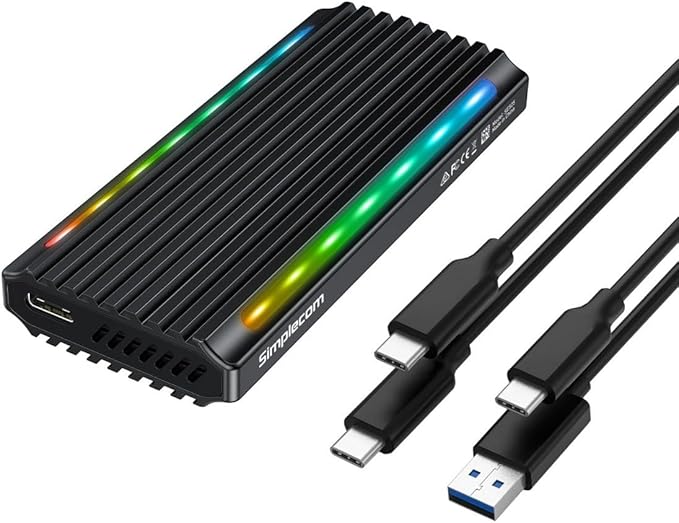
Sabrent USB 3.2 Type-C Tool-Free Enclosure for M.2 PCIe NVMe and SATA SSDs
Tool Free Convenience This USB 3.2 Type-C enclosure is 100% Tool-Free, allowing you to quickly install and remove SSDs without any tools. Portable and Durable Featuring an ultra-slim aluminium case with ABS frame. Sleek, Durable, and Convenient. Portable yet durable, and perfect for travelling! Compatibility M.2 form factor compatible with both SATA and NVME in sizes: 2242/2260/2280. Lightning Fast Speeds USB 3.2 supports data transmission speeds of up to 10Gbps for steady and efficient data transfer. Backward compatible with USB 3.1 and USB 3.0 at respective speed limits. Plug & Play No additional drivers required and bus powered, and therefore does not need an external power supply. Perfect for tech nerds, 4K content designers, and engineers. At up to 1000MB/s, data transferring will be done in in no time.
Tool Free Convenience This USB 3.2 Type-C enclosure is 100% Tool-Free, allowing you to quickly install and remove SSDs without any tools. Portable and Durable Featuring an ultra-slim aluminium case with ABS frame. Sleek, Durable, and Convenient. Portable yet durable, and perfect for travelling! Compatibility M.2 form factor compatible with both SATA and NVME in sizes: 2242/2260/2280. Lightning Fast Speeds USB 3.2 supports data transmission speeds of up to 10Gbps for steady and efficient data transfer. Backward compatible with USB 3.1 and USB 3.0 at respective speed limits. Plug & Play No additional drivers required and bus powered, and therefore does not need an external power supply. Perfect for tech nerds, 4K content designers, and engineers. At up to 1000MB/s, data transferring will be done in in no time.
Tool Free Convenience This USB 3.2 Type-C enclosure is 100% Tool-Free, allowing you to quickly install and remove SSDs without any tools. Portable and Durable Featuring an ultra-slim aluminium case with ABS frame. Sleek, Durable, and Convenient. Portable yet durable, and perfect for travelling! Compatibility M.2 form factor compatible with both SATA and NVME in sizes: 2242/2260/2280. Lightning Fast Speeds USB 3.2 supports data transmission speeds of up to 10Gbps for steady and efficient data transfer. Backward compatible with USB 3.1 and USB 3.0 at respective speed limits. Plug & Play No additional drivers required and bus powered, and therefore does not need an external power supply. Perfect for tech nerds, 4K content designers, and engineers. At up to 1000MB/s, data transferring will be done in in no time.
Tool Free Convenience This USB 3.2 Type-C enclosure is 100% Tool-Free, allowing you to quickly install and remove SSDs without any tools. Portable and Durable Featuring an ultra-slim aluminium case with ABS frame. Sleek, Durable, and Convenient. Portable yet durable, and perfect for travelling! Compatibility M.2 form factor compatible with both SATA and NVME in sizes: 2242/2260/2280. Lightning Fast Speeds USB 3.2 supports data transmission speeds of up to 10Gbps for steady and efficient data transfer. Backward compatible with USB 3.1 and USB 3.0 at respective speed limits. Plug & Play No additional drivers required and bus powered, and therefore does not need an external power supply. Perfect for tech nerds, 4K content designers, and engineers. At up to 1000MB/s, data transferring will be done in in no time.
in 14 offers
The lowest price for Sabrent USB 3.2 Type-C Tool-Free Enclosure for M.2 PCIe NVMe and SATA SSDs right now is $46.95 at eBay.com.au, compared across 4 retailers.
The all-time low was $29.74 on 19 Jan 2026 — today's price is 58% above the lowest ever. It has been notably cheaper before — worth setting a price alert.
Prices last updated 10 June 2026.
Last updated at 10/06/2026 06:55:55
SABRENT USB 3.2 Type-C Tool-Free Enclosure for M.2 PCIe NVMe and SATA SSDs (EC-SNVE)
Free delivery
Affiliate Disclosure: We may receive a small commission for purchases made through this link at no extra cost to you. This helps support our site. Thank you!
Sabrent Usb 3.2 10gbps Type C Tool Free Enclosure For M.2 Pcie Nvme
Delivery $25.76
Affiliate Disclosure: We may receive a small commission for purchases made through this link at no extra cost to you. This helps support our site. Thank you!
Sabrent Usb 3.2 10gbps Type C Tool Free Enclosure For M.2 Pcie Nvme
Delivery $25.76
Affiliate Disclosure: We may receive a small commission for purchases made through this link at no extra cost to you. This helps support our site. Thank you!
Sabrent EC-SNVE USB 3.2 Type-C Tool- Enclosure M.2 PCIe NVME Sata SSD M.2
Affiliate Disclosure: We may receive a small commission for purchases made through this link at no extra cost to you. This helps support our site. Thank you!
Sabrent Usb 3.2 Type-c Tool-free M.2 Nvme/sata Ssd Enclosure (ec-snve)
Free delivery
Affiliate Disclosure: We may receive a small commission for purchases made through this link at no extra cost to you. This helps support our site. Thank you!
Sabrent USB 3.2 Type-C Tool-Free Enclosure for M.2 PCIe NVMe and SATA SSDs
Delivery $13.26
Sabrent USB 3.2 Type-C Tool-Free Enclosure for M.2 PCIe NVMe and SATA SSDs
Delivery $11.67
Sabrent USB 3.2 Type-C Tool-Free Enclosure for M.2 PCIe NVMe and SATA SSDs
Delivery $14.61
Sabrent USB 3.2 Type-C Tool-Free Enclosure for M.2 PCIe NVMe and SATA SSDs
Delivery $10.21
Sabrent USB 3.2 Type-C Tool-Free Enclosure for M.2 PCIe NVMe and SATA SSDs
Delivery $19.19
originally posted on bhphotovideo.com
Enclosure worked fine at first with a 1TB Samsung 970 Evo (although it was annoying that the Samsung Magician software could not see past the enclosure's controller to identify the drive as one of its own, as it can with some other enclosures I use). However, it simply died one day while erasing some data off the drive. Computer would simply not see it connected anymore, despite trying different cables, so I had to move the SSD into another enclosure to continue using it. I contacted Sabrent but never heard anything back from them. This is the first SSD enclosure I've ever had that simply stopped working one day.
originally posted on microcenter.com
I bought the Sabrent USB 3.2 Type-C Enclosure for around $36 to use with an NVMe memory stick. The price was a bit higher than I would have liked, but just about as cheap as I could find it anywhere else. It works flawlessly, and I can definitely say that it’s obvious what you’re spending your money on. It’s crafted from a hefty slab of aluminum and the included cable is short (something I prefer) and substantially thick - not some cheap, thin, low-bandwidth accessory. The “instructions” are minimal, but it’s easy enough to figure out the mechanics of getting things working without them. The only heads up you may need is this: on the inside of the top lid is a thermal pad that contacts the NVMe sick when the lid is shut. Be sure you peel off the copper-colored, ... MoreI bought the Sabrent USB 3.2 Type-C Enclosure for around $36 to use with an NVMe memory stick. The price was a bit higher than I would have liked, but just about as cheap as I could find it anywhere else. It works flawlessly, and I can definitely say that it’s obvious what you’re spending your money on. It’s crafted from a hefty slab of aluminum and the included cable is short (something I prefer) and substantially thick - not some cheap, thin, low-bandwidth accessory. The “instructions” are minimal, but it’s easy enough to figure out the mechanics of getting things working without them. The only heads up you may need is this: on the inside of the top lid is a thermal pad that contacts the NVMe sick when the lid is shut. Be sure you peel off the copper-colored, protective paper to uncover the blue thermal pad. I’m not sure the instructions indicate to do that!
originally posted on bhphotovideo.com
I got this enclosure to dual boot Windows on my iMac with an SSD. The installation of the SSD is incredibly easy and fast, just be careful of when you put the SSD in to do it at an upward angle until the SSD slots in without forcing it. After the SSD was seated the enclosure easily closed up and it was ready for use. There is a thermal pad to transfer heat to the case which acts as a large heat sink. So far with constant use and installing a bunch of software on it all at once, the case has only slightly warmed to the touch. There really is no need to worry about overheating because even under a constant load the case does a good job of drawing the heat away. For the price it is a great option.
| Hardware Platform | Mac |
| Product dimensions | 11.66 x 3.15 x 1.27 cm; 150 Grams |
| Item Dimensions L x W x H | 11.7 x 3.1 x 1.3 centimetres |
| Hard Drive Interface | USB 3.2 |
| Hardware interface | USB 3.2 Gen 2 |
SABRENT USB 3.2 Type-C Tool-Free Enclosure for M.2 PCIe NVMe and SATA SSDs (EC-SNVE)
Free delivery
Affiliate Disclosure: We may receive a small commission for purchases made through this link at no extra cost to you. This helps support our site. Thank you!
Sabrent Usb 3.2 10gbps Type C Tool Free Enclosure For M.2 Pcie Nvme
Delivery $25.76
Affiliate Disclosure: We may receive a small commission for purchases made through this link at no extra cost to you. This helps support our site. Thank you!
Sabrent Usb 3.2 10gbps Type C Tool Free Enclosure For M.2 Pcie Nvme
Delivery $25.76
Affiliate Disclosure: We may receive a small commission for purchases made through this link at no extra cost to you. This helps support our site. Thank you!
Sabrent EC-SNVE USB 3.2 Type-C Tool- Enclosure M.2 PCIe NVME Sata SSD M.2
Affiliate Disclosure: We may receive a small commission for purchases made through this link at no extra cost to you. This helps support our site. Thank you!
Sabrent Usb 3.2 Type-c Tool-free M.2 Nvme/sata Ssd Enclosure (ec-snve)
Free delivery
Affiliate Disclosure: We may receive a small commission for purchases made through this link at no extra cost to you. This helps support our site. Thank you!
Enclosure worked fine at first with a 1TB Samsung 970 Evo (although it was annoying that the Samsung Magician software could not see past the enclosure's controller to identify the drive as one of its own, as it can with some other enclosures I use). However, it simply died one day while erasing some data off the drive. Computer would simply not see it connected anymore, despite trying different cables, so I had to move the SSD into another enclosure to continue using it. I contacted Sabrent but never heard anything back from them. This is the first SSD enclosure I've ever had that simply stopped working one day.
I bought the Sabrent USB 3.2 Type-C Enclosure for around $36 to use with an NVMe memory stick. The price was a bit higher than I would have liked, but just about as cheap as I could find it anywhere else. It works flawlessly, and I can definitely say that it’s obvious what you’re spending your money on. It’s crafted from a hefty slab of aluminum and the included cable is short (something I prefer) and substantially thick - not some cheap, thin, low-bandwidth accessory. The “instructions” are minimal, but it’s easy enough to figure out the mechanics of getting things working without them. The only heads up you may need is this: on the inside of the top lid is a thermal pad that contacts the NVMe sick when the lid is shut. Be sure you peel off the copper-colored, ... MoreI bought the Sabrent USB 3.2 Type-C Enclosure for around $36 to use with an NVMe memory stick. The price was a bit higher than I would have liked, but just about as cheap as I could find it anywhere else. It works flawlessly, and I can definitely say that it’s obvious what you’re spending your money on. It’s crafted from a hefty slab of aluminum and the included cable is short (something I prefer) and substantially thick - not some cheap, thin, low-bandwidth accessory. The “instructions” are minimal, but it’s easy enough to figure out the mechanics of getting things working without them. The only heads up you may need is this: on the inside of the top lid is a thermal pad that contacts the NVMe sick when the lid is shut. Be sure you peel off the copper-colored, protective paper to uncover the blue thermal pad. I’m not sure the instructions indicate to do that!
I got this enclosure to dual boot Windows on my iMac with an SSD. The installation of the SSD is incredibly easy and fast, just be careful of when you put the SSD in to do it at an upward angle until the SSD slots in without forcing it. After the SSD was seated the enclosure easily closed up and it was ready for use. There is a thermal pad to transfer heat to the case which acts as a large heat sink. So far with constant use and installing a bunch of software on it all at once, the case has only slightly warmed to the touch. There really is no need to worry about overheating because even under a constant load the case does a good job of drawing the heat away. For the price it is a great option.
I am using this enclosure with the PNY Technologies CS1030 1TB M.2 NVMe SSD for my Macbook Pro as an external SSD for photo file storage. The enclosure is well built and feels sturdy. Assembly was incredibly easy and took about 30 seconds. I am normally saving 5-10GB of data to the drive at a time and the enclosure barely gets warm. I am extremely happy with both of these products and it was less than buying an off-the-shelf SSD drive. Using the Black Magic disk speed test, I am getting Write/Read speeds of 892Mbps / 528Mbps. This is with the drive about 10% full. The read speed seems to slow down slightly as the memory fills up. I believe it was closer to 800Mbps when the drive was empty.
This worked flawlessly for cloning a SATA M.2 drive that I had. I didn't check that it works with NVMe M.2 drives, but others have said that it does. It got a little warm while running, but it did clone an entire 128G drive in only a few minutes. One minor annoyance is that it doesn't use an M.2 screw, but rather some weird rubber nub that I found hard to use. I would prefer a screw, but it says it's tool-free so that's not exactly a surprise. I like the push-button clamshell thing it's got going on, but the instructions make it clear that it can really mess up your cable if you forget to take it out before opening the enclosure. It also only comes with a (really short) C-to-C USB cable. But I guess it's kind of expected that you're using newer hardware if you have ... MoreThis worked flawlessly for cloning a SATA M.2 drive that I had. I didn't check that it works with NVMe M.2 drives, but others have said that it does. It got a little warm while running, but it did clone an entire 128G drive in only a few minutes. One minor annoyance is that it doesn't use an M.2 screw, but rather some weird rubber nub that I found hard to use. I would prefer a screw, but it says it's tool-free so that's not exactly a surprise. I like the push-button clamshell thing it's got going on, but the instructions make it clear that it can really mess up your cable if you forget to take it out before opening the enclosure. It also only comes with a (really short) C-to-C USB cable. But I guess it's kind of expected that you're using newer hardware if you have M.2 drives. There are a whole bunch of cheap M.2 enclosures that are notorious for using unreliable JMicron controllers that run really hot. This appears to use a Realtek RTL8210b controller, which runs much better and does actually support NVMe and SATA. I didn't physically check that it does have that chip, but others have, and you can see for yourself what firmware is provided for this drive on Sabrent's site.
This is simply an enclosure that your new SSD goes in during the cloning process. Most videos and instructions don't clearly mention how to lock the SSD in place...but it's simple. Once the SSD is in you secure it by a locking mechanism on the bottom. It was tough to move but when I used a small screwdriver to move the lock...it locked! It was a little tough...just needed a bit more umph. Once the cloning is done you switch out the SSD in your computer. You can then take the old SSD and put it in the enclosure and use it as a memory stick. So now I have a 512gb memory stick and 2tb memory in my laptop.
We just made the switch from a desktop PC, which contained several NVME SSD drives, to a Mac Mini M2 Pro. I chose these enclosures so I could continue using those drives for sample loading and audio file storage. If you have spare drives, this allows you to save money because you may not need to spend the extra dough to get larger storage on your Mac product. The form factor and the build quality are both perfect and we get about 900 mb/s transfer using the USB-C/TB4 ports, which is about 25% of what I get with the internal SSD drive on a my Mac Mini, but which is quite acceptable for this kind of drive and the applications for which I use it.
I chose this enclosure because I wanted to use one of my new M.2 drives as a fast transfer and travel drive. What I did not know at the time was that M.2 drives come in two main flavors: SATA and NVMe. Hint: Make sure you understand the difference before you buy drives! The SATA M.2 drives have two slots. This unit is very easy to open and insert drive. The little tab to hold the end of the drive down is a tad stiff, but it works. I like the detachable cable as I prefer that to integrated cables. I find the unit gets a bit hot while in use. The main failure cause for M.2 drives is heat. I am hoping that the heat I feel on the outside of this enclosure is due to the heat being transferred away from the drive. (So I'm hoping it's a designed heat sink)
SSD's make a laptop with a hard drive appear much faster. Some desktops and laptops are fitted with an M.2 SSD that is too small to be practical. Since SSD prices have come down so much over the years, upgrades are economical. When upgrading a laptop, you clone the existing drive onto the new M.2 SSD inserted in this enclosure and swap the two. Or you add the new M.2 SSD into a previously unoccupied slot. This enclosure makes it possible. And in the rare case the drive cloning did not succeed, nothing is lost. An essential part of your computer toolkit.
I am now using the Sabrent EC-SNVE enclosure instead of top end USB Sticks because: 1. With the correct SSD it maintains a very high transfer rate with large files (128GB) - most "sticks" (all?) do not. 2. TRIM is possible 3. Heat transfer "foam" is attached to the folding top of the enclosure and when closed presses on the SSD for cooling. Other devices are slide on devices and the "foam" needs to be attached to the SSD itself. 4. I have PCs that use small 128GB SSD's for the operating system. The enclosure permits a dd copy of the whole SSD to an external backup in less than 5mins. 5. I have an Intel NUC that uses the internal SATA interface for the operating system. The Sabrent can handle SATA & NVMe SSD's.
| Hardware Platform | Mac |
| Product dimensions | 11.66 x 3.15 x 1.27 cm; 150 Grams |
| Item Dimensions L x W x H | 11.7 x 3.1 x 1.3 centimetres |
| Hard Drive Interface | USB 3.2 |
| Hardware interface | USB 3.2 Gen 2 |