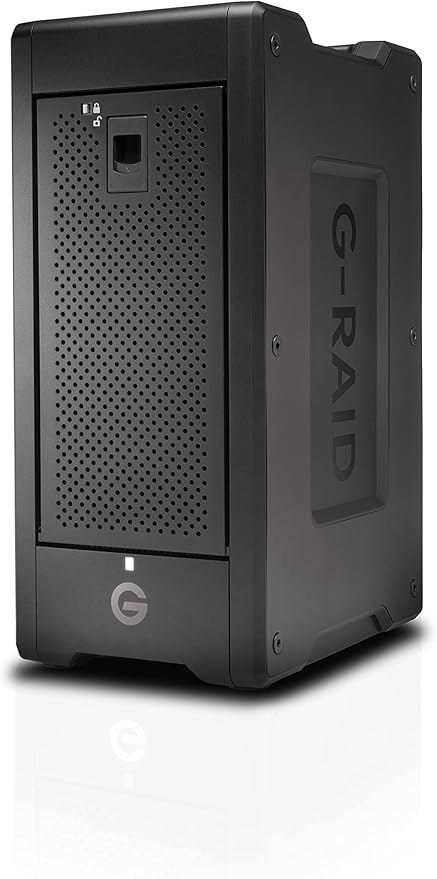
Looking for a storage solution that simplifies your workflow? With four 3.5" drive bays, each housing a 6TB 7200 rpm HDD, this RAID array consolidates your storage seamlessly. It supports various RAID modes and offers lightning-fast read speeds up to 1000 MB/s and write speeds up to 1100 MB/s through Thunderbolt 3. Compatible with macOS 10.15 and later, and easily reformattable for Windows 10 and later. Simplify, streamline, and power up your workflow with the SanDisk G-RAID Shuttle 4!
Looking for a storage solution that simplifies your workflow? With four 3.5" drive bays, each housing a 6TB 7200 rpm HDD, this RAID array consolidates your storage seamlessly. It supports various RAID modes and offers lightning-fast read speeds up to 1000 MB/s and write speeds up to 1100 MB/s through Thunderbolt 3. Compatible with macOS 10.15 and later, and easily reformattable for Windows 10 and later. Simplify, streamline, and power up your workflow with the SanDisk G-RAID Shuttle 4!
in 1 offers
The lowest price for SanDisk Professional (G-Technology) 160TB G-RAID Shuttle 8 8-Bay RAID Array (8 x 20TB, Thunderbolt 3 & USB 3.2 Gen 2) right now is $18,649.99 at Macfixit Australia.
The all-time low was $7,911.33 on 27 Feb 2026 — today's price is 136% above the lowest ever. It has been notably cheaper before — worth setting a price alert.
Prices last updated 11 Aug 2026.
SanDisk Professional (G-Technology) 160TB G-RAID Shuttle 8 8-Bay RAID Array (8 x 20TB, Thunderbolt 3 & USB 3.2 Gen 2)
Looking for a storage solution that simplifies your workflow? With four 3.5" drive bays, each housing a 6TB 7200 rpm HDD, this RAID array consolidates your storage seamlessly. It supports various RAID modes and offers lightning-fast read speeds up to 1000 MB/s and write speeds up to 1100 MB/s through Thunderbolt 3. Compatible with macOS 10.15 and later, and easily reformattable for Windows 10 and later. Simplify, streamline, and power up your workflow with the SanDisk G-RAID Shuttle 4!
Looking for a storage solution that simplifies your workflow? With four 3.5" drive bays, each housing a 6TB 7200 rpm HDD, this RAID array consolidates your storage seamlessly. It supports various RAID modes and offers lightning-fast read speeds up to 1000 MB/s and write speeds up to 1100 MB/s through Thunderbolt 3. Compatible with macOS 10.15 and later, and easily reformattable for Windows 10 and later. Simplify, streamline, and power up your workflow with the SanDisk G-RAID Shuttle 4!
Last updated at 11/08/2026 22:54:41
SanDisk Professional (G-Technology) 160TB G-RAID Shuttle 8 8-Bay RAID Array (8 x 20TB), Thunderbolt 3 & USB 3.2 Gen 2
Delivery between 14–20 Aug $12
originally posted on bhphotovideo.com
I have used smaller G-RAID Shuttles in the past. I've been pretty happy with all of them. This purchase has been great because 160TB at raid 5 still gives me 140TB of usable space. I feel safer with the parity disk and I can still transfer at speed over 1500MB/s or 12Gbps all day long.
originally posted on bhphotovideo.com
We bought the 160TB version. The enclosure died after a few months. We bought a new one so that we could put our drives in, and that all worked out.We sent the faulty enclosure in for a warranty replacement, and after SIX months we're still waiting.At first they told us that it was fine to just send the enclosure. Then they sent it back saying the drives were missing. We asked if it was okay to put in new drives from an identical enclosure we bought. They said fine...And now their customer service has demanded that we sent in the original drives (with 140TB of sensitive data) along with the faulty enclosure. They escalate our case every month, promising a swift resolution, but we never hear anything back.They pretend to cater to professionals, but their ... MoreWe bought the 160TB version. The enclosure died after a few months. We bought a new one so that we could put our drives in, and that all worked out.We sent the faulty enclosure in for a warranty replacement, and after SIX months we're still waiting.At first they told us that it was fine to just send the enclosure. Then they sent it back saying the drives were missing. We asked if it was okay to put in new drives from an identical enclosure we bought. They said fine...And now their customer service has demanded that we sent in the original drives (with 140TB of sensitive data) along with the faulty enclosure. They escalate our case every month, promising a swift resolution, but we never hear anything back.They pretend to cater to professionals, but their customer service and warranty department are woefully inadequate. Avoid.
originally posted on westerndigital.com
I had the same problem as you...the new Apple MAc Studio would not recognize they don't match up with Apple so I guess it's now been fixed cause I was actually writing of you saying it does work now so anyway I got it I got it all fixed my 24T G-raid G-Technology external hard drive. I spent hours trying to fix it. GO DOWNLOAD THE MACOS Driver and it will fix everything. https://support-en.wd.com/app/products/product-detailweb/p/2375
| Storage Capacity | 160 TB |
| Included Drives | 8 x 20 TB 3.5" HDD |
| Initial RAID Configuration | RAID 5 |
| Interface | SATA III |
| Rotational Speed | 7200 rpm |
SanDisk Professional (G-Technology) 160TB G-RAID Shuttle 8 8-Bay RAID Array (8 x 20TB), Thunderbolt 3 & USB 3.2 Gen 2
Delivery between 14–20 Aug $12
I have used smaller G-RAID Shuttles in the past. I've been pretty happy with all of them. This purchase has been great because 160TB at raid 5 still gives me 140TB of usable space. I feel safer with the parity disk and I can still transfer at speed over 1500MB/s or 12Gbps all day long.
We bought the 160TB version. The enclosure died after a few months. We bought a new one so that we could put our drives in, and that all worked out.We sent the faulty enclosure in for a warranty replacement, and after SIX months we're still waiting.At first they told us that it was fine to just send the enclosure. Then they sent it back saying the drives were missing. We asked if it was okay to put in new drives from an identical enclosure we bought. They said fine...And now their customer service has demanded that we sent in the original drives (with 140TB of sensitive data) along with the faulty enclosure. They escalate our case every month, promising a swift resolution, but we never hear anything back.They pretend to cater to professionals, but their ... MoreWe bought the 160TB version. The enclosure died after a few months. We bought a new one so that we could put our drives in, and that all worked out.We sent the faulty enclosure in for a warranty replacement, and after SIX months we're still waiting.At first they told us that it was fine to just send the enclosure. Then they sent it back saying the drives were missing. We asked if it was okay to put in new drives from an identical enclosure we bought. They said fine...And now their customer service has demanded that we sent in the original drives (with 140TB of sensitive data) along with the faulty enclosure. They escalate our case every month, promising a swift resolution, but we never hear anything back.They pretend to cater to professionals, but their customer service and warranty department are woefully inadequate. Avoid.
I had the same problem as you...the new Apple MAc Studio would not recognize they don't match up with Apple so I guess it's now been fixed cause I was actually writing of you saying it does work now so anyway I got it I got it all fixed my 24T G-raid G-Technology external hard drive. I spent hours trying to fix it. GO DOWNLOAD THE MACOS Driver and it will fix everything. https://support-en.wd.com/app/products/product-detailweb/p/2375
Mounting RAIDS to the Apple M1 has been a real mind bender for me. Lots and lots of time on phone with Apple support and Sandisk. I finally figured out a great work around. Daisy chain it via a drive that works with your M1! That's how to make it mount. I'm going through a TB3 12 G-RAID (which does mount) and using that as the conduit to get the 160TB Shuttle XL to mount. It works!!
This is a massive array of disks and the G-RAID software allowed me to configure the storage pretty much as I desired. I';ve been using RAID arrays both professionally (I'm a retired software developer) and at home for almost 2 decades now, so I'm pretty knowledgeable about RAID in all its many variants.I split the disks into 2 4-disk arrays, one for data and the other for Time Machine backups of my four Mac computers. The data array is a single logical drive while the backup array is divided into 4 logical disks, each sized according to the storage on the individual Mac's.All logical drives are configured as RAID 6 because I've had a double drive failure in the past (not on a SanDisk array). This protects against data loss even with two drive failures occurring ... MoreThis is a massive array of disks and the G-RAID software allowed me to configure the storage pretty much as I desired. I';ve been using RAID arrays both professionally (I'm a retired software developer) and at home for almost 2 decades now, so I'm pretty knowledgeable about RAID in all its many variants.I split the disks into 2 4-disk arrays, one for data and the other for Time Machine backups of my four Mac computers. The data array is a single logical drive while the backup array is divided into 4 logical disks, each sized according to the storage on the individual Mac's.All logical drives are configured as RAID 6 because I've had a double drive failure in the past (not on a SanDisk array). This protects against data loss even with two drive failures occurring before the first failed drive can be replaced.So far, my only complaint is that the G-RAID Software Utility could use a local Help facility, and perhaps tooltips, to explain the various constraints on configuring the arrays and logical disks.
The product never worked from the start. I tried to load data on it out of the box and came back the next day to critical array and drive failures. G-Tech support said the RAID sometimes isn't finished being created at the factory so we recreated it and waited 20 hrs for it to finish before trying to load data on it all over again. Came back again to a critical power supply failure that had stopped the data upload to the drive. Restarted everything and tried again. Again, a critical power supply failure. This time G-Tech support gave me the confidence inspiring whoa, we have NEVER seen that before and said I'd need to return it to the manufacturer for a new one. I'll be choosing a RAID array from a different manufacturer this next time.
My Shuttle XL was great for a few years until Monterey when it kept forcing reboot on my computer many times a day. Now in Ventura I cannot even access the drive. I have tried the work arounds and do not know what do do with this otherwise expensive paperweight that hold all of my backed up files. This should work as simply as it always did with full compatibility but it doesn't anymore.
I bought it ! But it is NOT compatible with Mac M1, it requires to reduce the OS security, it is not compatible AT ALL with the newest Mac OS. Super bad support because WD seems not to care about the G-Raid product line ! They bought Sandisk but seems to let go G-Raid. And there is at least 7 main WD/Sandisk/GRaid domains that treat about GRaid issues, but they dont match and are not updated. So you can never find the proper answer to your problem. Probably because there is none. You buy a great product that you cannot use properly, unless you use a previous generation Mac and dont upgrade it.
This thing ships with a ridiculously short cable, no where near long enough to connect my Mac Studio to the drive even if they were sitting right next to each other. The software installation on my Mac Studio (M1) was difficult because the link provided in the printed directions did not include the necessary driver software and the software that was linked to would not display anything, much less a usable message indicting the driver software was missing.Once I managed to get this thing cabled up (expensive cable from Apple after wasting money on cables from Western Digital that are comically way too short for any practical purpose) and figured out the necessary software packages to install in the correct order, if has worked fine.
It could be a great product if the mother company cared about it. But very hard to get proper info, no follow up, no software updates, complicate compatibility with Apple 12.6 and above. After two years painfully using it I didnt see updates from G-Raid>SanDisk>WesterDigital.
| Storage Capacity | 160 TB |
| Included Drives | 8 x 20 TB 3.5" HDD |
| Initial RAID Configuration | RAID 5 |
| Interface | SATA III |
| Rotational Speed | 7200 rpm |


