Last updated at 15/05/2026 19:28:17
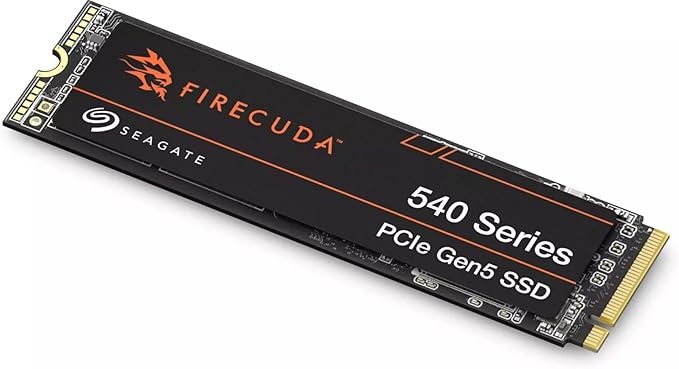
Seagate FireCuda 530 500GB PCIe Gen4 M.2 2280 NVMe SSD with Heatsink (ZP500GM3A023)
30-day returns
originally posted on homeessentialsdirect.com
After researching various PCIe Gen4 SSDs for the PS5 (and discovering this drive had the most votes for ""best performance"" across multiple review/analysis sites) I decided to give it a shot, making sure to get the one with the included heatsink (important!) I was not disappointed, like WOW... For full disclosure, I purchased the 2TB SSD with the included heatsink. # Easy to install: Sony gets points for this category as well for making it so simple to open and add/upgrade the SSD inside the PS5. We simply slid off the white cover, removed the SSD expansion door/shield, and used the already included (with the PS5) hardware to fasten the SSD into the slot. The dimensions of the SSD (including the heatsink it comes with) are a perfect match for the SSD expansion slot ... MoreAfter researching various PCIe Gen4 SSDs for the PS5 (and discovering this drive had the most votes for ""best performance"" across multiple review/analysis sites) I decided to give it a shot, making sure to get the one with the included heatsink (important!) I was not disappointed, like WOW... For full disclosure, I purchased the 2TB SSD with the included heatsink. # Easy to install: Sony gets points for this category as well for making it so simple to open and add/upgrade the SSD inside the PS5. We simply slid off the white cover, removed the SSD expansion door/shield, and used the already included (with the PS5) hardware to fasten the SSD into the slot. The dimensions of the SSD (including the heatsink it comes with) are a perfect match for the SSD expansion slot on the PS5. It fits like a glove (see pictures). Then it was simply a matter of closing the expansion slot, replacing the cover, and booting up the PS5! # Setup: As soon as the PS5 booted up, it recognized the new SSD and gave me the option to ""format"" it (required to set it up to recognize the PS5's file system). The formatting process took about 20 seconds and then it was done! It was ready to use. You must make sure you go into the PS5's 'Storage' settings to make sure you designate your new drive as the installation location for new games, or specific content (if you want to use it that way, of course). Or you can simply transfer files to and from the SSD expansion at your leisure. # Performance: While this drive claims read speeds of around 7,300MB/s your mileage may vary on the PS5. The PS5 reported around 5,700MBs - but keep in mind this is not a limitation of the SSD but the data transfer subsystem of the PS5 itself. Rest assured, it's most likely the drive is capable of up 7,300MB/s on compatible hardware, and you can sleep easy knowing that its bandwidth capabilities are well in excess of what the PS5 needs to run at peak performance. I ran a test by copying Uncharted 4: A Thief's End (57GB of data) from the PS5 local storage to the new SSD. It took around ONE MINUTE to transfer! That's insane. I then installed the new Uncharted: Legacy of Thieves collection to this storage and benchmarked the performance/load times of the game, and they were on par with the PS5's local storage, loading up an entire level in just under 2 seconds! I've read that high performance SSDs like this one can even perform a little faster than the on-board SSD that came with the PS5, but, the performance of either drive (internal or expansion) is so fast already, the differences will be too subtle to notice. Especially on PS5 optimized games that load faster than the time it probably takes to start your stopwatch and benchmark. # Final Thoughts This SSD (with the included heatsink) is clearly designed with PS5 expansion in mind. If that is why you're looking at this SSD then I can strongly recommend it. It's easy to install, fits like a glove, and performs well in excess of what the PS5 requires. It has been going strong in my PS5 for 6 weeks now and I am extremely happy with this purchase.
originally posted on bestbuy.ca
I’ve been researching PS5 options for expanding memory for a few months. Really happy with this choice. It has excellent read/write times and I’ve never had issues with Seagate over the years. The PS5 itself was a major investment so I didn’t want to go with a cheap no-name memory option for this endeavour. Made to fit the PS5 dimensions (even has that mentioned on the box) and comes with a heat sink (a must have). Lots of YouTube’s to see the install but trust me when I say it’s easy. It took me just a few minutes literally. We transferred all our digital downloaded games over in seconds too to organize storage in the settings mode. Also, want to mention BestBuy has been the best price going every time I’ve looked to compare. The PS5 internal memory gives you 667 ... MoreI’ve been researching PS5 options for expanding memory for a few months. Really happy with this choice. It has excellent read/write times and I’ve never had issues with Seagate over the years. The PS5 itself was a major investment so I didn’t want to go with a cheap no-name memory option for this endeavour. Made to fit the PS5 dimensions (even has that mentioned on the box) and comes with a heat sink (a must have). Lots of YouTube’s to see the install but trust me when I say it’s easy. It took me just a few minutes literally. We transferred all our digital downloaded games over in seconds too to organize storage in the settings mode. Also, want to mention BestBuy has been the best price going every time I’ve looked to compare. The PS5 internal memory gives you 667 GB’s but games can range in size from 40 to 100 GB’s each so it won’t take that long to fill. Your PS5 expansion memory slot can technically handle a maximum of 4TB’s. Price-wise, but also practical use-wise, the 2TB size made the most sense for us. 4TB is just too big of a price jump for now. I can easily recommend this for you without hesitation.
originally posted on bestbuy.com
Added this to my PS5 and it provides some needed storage. I do notice that the system runs hotter and louder when using a game installed on the Firecuda SSD. I have noticed some lags on the system. I have also received some crashes i didnt have before the install. When playing a game from the Firecuda and pressing start, i can hear the fan and system get softer but, as soon as i resume the game, it gets louder again. It also does this when holding the PS button. Not sure what that's about. Also, For some reason, putting this in was trickier than adding an ssd to my ps4. It was hard to tell when sliding the SSD in the slot if it was placed completely in correctly as there was no click noise or feedback. The PS5 or the Firecuda did not come with the NVME screw so i ... MoreAdded this to my PS5 and it provides some needed storage. I do notice that the system runs hotter and louder when using a game installed on the Firecuda SSD. I have noticed some lags on the system. I have also received some crashes i didnt have before the install. When playing a game from the Firecuda and pressing start, i can hear the fan and system get softer but, as soon as i resume the game, it gets louder again. It also does this when holding the PS button. Not sure what that's about. Also, For some reason, putting this in was trickier than adding an ssd to my ps4. It was hard to tell when sliding the SSD in the slot if it was placed completely in correctly as there was no click noise or feedback. The PS5 or the Firecuda did not come with the NVME screw so i had to pay $15 for a pack of them as I couldn't just find one at the hardware store. It was extremely hard to remove the bay screw from the PS5 and i had to use a lot of force. Some online searches show others had similar experiences. So far this thing has held up and my ps5 is still alive so for the most part everything seems fine. I prefer to run things on the PS5 ssd because of less fan noise and cooler run. Time will tell if this thing holds up. Sony should have released proprietary SSD's like Xbox.
| General | |
| Device Type | Solid state drive - internal |
| Capacity | 500 GB |
| NAND Flash Memory Type | 3D triple-level cell (TLC) |
| Integrated Heatsink | Yes |
Seagate FireCuda 530 500GB PCIe Gen4 M.2 2280 NVMe SSD with Heatsink (ZP500GM3A023)
30-day returns
After researching various PCIe Gen4 SSDs for the PS5 (and discovering this drive had the most votes for ""best performance"" across multiple review/analysis sites) I decided to give it a shot, making sure to get the one with the included heatsink (important!) I was not disappointed, like WOW... For full disclosure, I purchased the 2TB SSD with the included heatsink. # Easy to install: Sony gets points for this category as well for making it so simple to open and add/upgrade the SSD inside the PS5. We simply slid off the white cover, removed the SSD expansion door/shield, and used the already included (with the PS5) hardware to fasten the SSD into the slot. The dimensions of the SSD (including the heatsink it comes with) are a perfect match for the SSD expansion slot ... MoreAfter researching various PCIe Gen4 SSDs for the PS5 (and discovering this drive had the most votes for ""best performance"" across multiple review/analysis sites) I decided to give it a shot, making sure to get the one with the included heatsink (important!) I was not disappointed, like WOW... For full disclosure, I purchased the 2TB SSD with the included heatsink. # Easy to install: Sony gets points for this category as well for making it so simple to open and add/upgrade the SSD inside the PS5. We simply slid off the white cover, removed the SSD expansion door/shield, and used the already included (with the PS5) hardware to fasten the SSD into the slot. The dimensions of the SSD (including the heatsink it comes with) are a perfect match for the SSD expansion slot on the PS5. It fits like a glove (see pictures). Then it was simply a matter of closing the expansion slot, replacing the cover, and booting up the PS5! # Setup: As soon as the PS5 booted up, it recognized the new SSD and gave me the option to ""format"" it (required to set it up to recognize the PS5's file system). The formatting process took about 20 seconds and then it was done! It was ready to use. You must make sure you go into the PS5's 'Storage' settings to make sure you designate your new drive as the installation location for new games, or specific content (if you want to use it that way, of course). Or you can simply transfer files to and from the SSD expansion at your leisure. # Performance: While this drive claims read speeds of around 7,300MB/s your mileage may vary on the PS5. The PS5 reported around 5,700MBs - but keep in mind this is not a limitation of the SSD but the data transfer subsystem of the PS5 itself. Rest assured, it's most likely the drive is capable of up 7,300MB/s on compatible hardware, and you can sleep easy knowing that its bandwidth capabilities are well in excess of what the PS5 needs to run at peak performance. I ran a test by copying Uncharted 4: A Thief's End (57GB of data) from the PS5 local storage to the new SSD. It took around ONE MINUTE to transfer! That's insane. I then installed the new Uncharted: Legacy of Thieves collection to this storage and benchmarked the performance/load times of the game, and they were on par with the PS5's local storage, loading up an entire level in just under 2 seconds! I've read that high performance SSDs like this one can even perform a little faster than the on-board SSD that came with the PS5, but, the performance of either drive (internal or expansion) is so fast already, the differences will be too subtle to notice. Especially on PS5 optimized games that load faster than the time it probably takes to start your stopwatch and benchmark. # Final Thoughts This SSD (with the included heatsink) is clearly designed with PS5 expansion in mind. If that is why you're looking at this SSD then I can strongly recommend it. It's easy to install, fits like a glove, and performs well in excess of what the PS5 requires. It has been going strong in my PS5 for 6 weeks now and I am extremely happy with this purchase.
I’ve been researching PS5 options for expanding memory for a few months. Really happy with this choice. It has excellent read/write times and I’ve never had issues with Seagate over the years. The PS5 itself was a major investment so I didn’t want to go with a cheap no-name memory option for this endeavour. Made to fit the PS5 dimensions (even has that mentioned on the box) and comes with a heat sink (a must have). Lots of YouTube’s to see the install but trust me when I say it’s easy. It took me just a few minutes literally. We transferred all our digital downloaded games over in seconds too to organize storage in the settings mode. Also, want to mention BestBuy has been the best price going every time I’ve looked to compare. The PS5 internal memory gives you 667 ... MoreI’ve been researching PS5 options for expanding memory for a few months. Really happy with this choice. It has excellent read/write times and I’ve never had issues with Seagate over the years. The PS5 itself was a major investment so I didn’t want to go with a cheap no-name memory option for this endeavour. Made to fit the PS5 dimensions (even has that mentioned on the box) and comes with a heat sink (a must have). Lots of YouTube’s to see the install but trust me when I say it’s easy. It took me just a few minutes literally. We transferred all our digital downloaded games over in seconds too to organize storage in the settings mode. Also, want to mention BestBuy has been the best price going every time I’ve looked to compare. The PS5 internal memory gives you 667 GB’s but games can range in size from 40 to 100 GB’s each so it won’t take that long to fill. Your PS5 expansion memory slot can technically handle a maximum of 4TB’s. Price-wise, but also practical use-wise, the 2TB size made the most sense for us. 4TB is just too big of a price jump for now. I can easily recommend this for you without hesitation.
Added this to my PS5 and it provides some needed storage. I do notice that the system runs hotter and louder when using a game installed on the Firecuda SSD. I have noticed some lags on the system. I have also received some crashes i didnt have before the install. When playing a game from the Firecuda and pressing start, i can hear the fan and system get softer but, as soon as i resume the game, it gets louder again. It also does this when holding the PS button. Not sure what that's about. Also, For some reason, putting this in was trickier than adding an ssd to my ps4. It was hard to tell when sliding the SSD in the slot if it was placed completely in correctly as there was no click noise or feedback. The PS5 or the Firecuda did not come with the NVME screw so i ... MoreAdded this to my PS5 and it provides some needed storage. I do notice that the system runs hotter and louder when using a game installed on the Firecuda SSD. I have noticed some lags on the system. I have also received some crashes i didnt have before the install. When playing a game from the Firecuda and pressing start, i can hear the fan and system get softer but, as soon as i resume the game, it gets louder again. It also does this when holding the PS button. Not sure what that's about. Also, For some reason, putting this in was trickier than adding an ssd to my ps4. It was hard to tell when sliding the SSD in the slot if it was placed completely in correctly as there was no click noise or feedback. The PS5 or the Firecuda did not come with the NVME screw so i had to pay $15 for a pack of them as I couldn't just find one at the hardware store. It was extremely hard to remove the bay screw from the PS5 and i had to use a lot of force. Some online searches show others had similar experiences. So far this thing has held up and my ps5 is still alive so for the most part everything seems fine. I prefer to run things on the PS5 ssd because of less fan noise and cooler run. Time will tell if this thing holds up. Sony should have released proprietary SSD's like Xbox.
I bought this a few days ago. Good storage size, so it minimises the amount of times I need to swap games on the storage. I would advise getting 2 tb if you can afford it, but this does a great job. Also the speeds are blazing fast. Much faster than the PS5 would use, so I know that it will do the job. Also it is housed in the heatsink, so pretty much plug and play. I thought that this replaced the PS5 ssd. Instead, it adds to the storage, as it’s another ssd over and above. So no faffing about downloading the operating system like you had to do on PS4. I had anxiety doing it, as I’m not technical. But this is just plug and play. Watch a YouTube video, it helps explain it better. I did this, and it was a relief to see how to do it. Don’t worry about taking the ... MoreI bought this a few days ago. Good storage size, so it minimises the amount of times I need to swap games on the storage. I would advise getting 2 tb if you can afford it, but this does a great job. Also the speeds are blazing fast. Much faster than the PS5 would use, so I know that it will do the job. Also it is housed in the heatsink, so pretty much plug and play. I thought that this replaced the PS5 ssd. Instead, it adds to the storage, as it’s another ssd over and above. So no faffing about downloading the operating system like you had to do on PS4. I had anxiety doing it, as I’m not technical. But this is just plug and play. Watch a YouTube video, it helps explain it better. I did this, and it was a relief to see how to do it. Don’t worry about taking the faceplate of PS5 off. It’s really robust.I would imagine for PC use. This SSD would be used to it’s full potential.So far it has not missed a beat, and greatly improved the storage adding another 1tb to the original SSD already in the PS5.
I purchased this drive to use as the main OS drive in my desktop PC and the performance is amazing and consistent. It looks great too however the chonky heatsink doesn't really affect performance as read and write tests over an extended period consistently resulted in the same speeds. Drive temps with and without the heatsink were negligible as there was only a 2c difference on average. However it does look pretty slick! Unless a heatsink has fins, grooves, or something to increase surface area they generally dont offer much cooling. However I did notice that the drive heated up to operating temps quicker without the heatsink which makes sense given the heatsink absorbed the heat causing the drive to heat up a lot slower but once max temps were reached they were the ... MoreI purchased this drive to use as the main OS drive in my desktop PC and the performance is amazing and consistent. It looks great too however the chonky heatsink doesn't really affect performance as read and write tests over an extended period consistently resulted in the same speeds. Drive temps with and without the heatsink were negligible as there was only a 2c difference on average. However it does look pretty slick! Unless a heatsink has fins, grooves, or something to increase surface area they generally dont offer much cooling. However I did notice that the drive heated up to operating temps quicker without the heatsink which makes sense given the heatsink absorbed the heat causing the drive to heat up a lot slower but once max temps were reached they were the same as no heat sink. Ultimately either way the performance was the same! Which goes to show the quality of the drive is pretty good! I certainly will buy again!
I purchased this to expand the space in my PS5. Unfortunately, the internal SSD that's built into the system isn't that large. It's approximately 850GB and you can fill that up quite quickly considering the OS for the PS5 etc eats up quite a bit of space. Then add on a few games and those games add-ons and the space dwindles quickly.I already had a 8TB for my PS4 games moving from a PS4 and a PS4 Pro. PS5 games are quite large these days and many gaming studios no longer take the time to compress them. I wanted the 4TB but it was a little out of my budget so I settled for the 2TB. I'm the type I like to put the largest capacity disk in my console so I get some longevity out of it even when the next-gen comes out. I coupled this SSD with the Sabrent Heatsink for ... MoreI purchased this to expand the space in my PS5. Unfortunately, the internal SSD that's built into the system isn't that large. It's approximately 850GB and you can fill that up quite quickly considering the OS for the PS5 etc eats up quite a bit of space. Then add on a few games and those games add-ons and the space dwindles quickly.I already had a 8TB for my PS4 games moving from a PS4 and a PS4 Pro. PS5 games are quite large these days and many gaming studios no longer take the time to compress them. I wanted the 4TB but it was a little out of my budget so I settled for the 2TB. I'm the type I like to put the largest capacity disk in my console so I get some longevity out of it even when the next-gen comes out. I coupled this SSD with the Sabrent Heatsink for PS5 Consoles since it's the heatsink and cover all in one. I notice a negligible difference but I know my games load like they're screaming. You literally can't blink and it's already up and ready to run. It also moves games over super fast. I now don't have to make the decision of deleting something because I lack space. And even though the PS5 is backward compatible with PS4 games, you can only play PS5 games from the SSD's. (i.e. I could move some PS5 games over when I ran out of space, but if I wanted to play them I had to move them back to the internal SSD)I know you may be thinking well why is it so expensive? I wondered the same I looked up some detailed reviews and decided to go with the FireCuda because of its longevity and 5yr warranty. If you look at other drives in this category and similar they don't have the ability to be overwritten for the length this does. If you can remember far back enough, when SSD's first released that was the biggest issue that kept many from switching to them. The overwrite lengths back then were short and the drives were even MORE expensive than they are now. My, how times have changed.
The SSD itself is a 5-star drive and one of the best if you manage to find it on sale. My main issue with this drive is the software, which really didn't work for me for some reason. The Discwizard software used to clone the existing SSD hung every time I tried to use it. The program would just freeze with no indication that it was running and there were no error messages to indicate a failure. I ended up cloning with the free third-party software called Macrium Reflect. I was installing on a Windows 10 desktop PC. Additionally, the SSD Drive tools from Seagate are nowhere as comprehensive as the tools provided with Samsung and WD drives. No doubt this is one of the fastest, well-designed and reliable SSDs on the market. Again, my only complaint is that I wish the ... MoreThe SSD itself is a 5-star drive and one of the best if you manage to find it on sale. My main issue with this drive is the software, which really didn't work for me for some reason. The Discwizard software used to clone the existing SSD hung every time I tried to use it. The program would just freeze with no indication that it was running and there were no error messages to indicate a failure. I ended up cloning with the free third-party software called Macrium Reflect. I was installing on a Windows 10 desktop PC. Additionally, the SSD Drive tools from Seagate are nowhere as comprehensive as the tools provided with Samsung and WD drives. No doubt this is one of the fastest, well-designed and reliable SSDs on the market. Again, my only complaint is that I wish the accompanying software was better. I was looking to buy the WD SN850X 2TB, but it was sold out and not available to ship, so I went with this Seagate Firecuda 530 w/heatsink based on previous reviews and because it was on sale. Switching from a WD 850 1TB drive that I replaced, I sense programs like Adobe Photoshop do seem to load faster.
The best, fastest, largest capacity SSD with built-in heatsink for the PS5 console.If you plan to download and store a good number of PS5 games, many of which are 50-100 GB in size, this 4TB drive is the largest capacity drive currently available right now (it's possible an 8TB drive might be available in the future).This drive is extremely fast (5000 - 7000 GB/second), and with its built-in heatink fits perfectly in the PS5 drive bay.To install:- Remove the cover on the appropriate side of the PS5- Unscrew the small metal drive cover shield- Unscrew the small M.2 retention screw and spacer (don't drop them inside the console!) from the 110mm position- Move the spacer to the circular indent at the 80mm position- Fully insert the M.2 SSD at an angle. ... MoreThe best, fastest, largest capacity SSD with built-in heatsink for the PS5 console.If you plan to download and store a good number of PS5 games, many of which are 50-100 GB in size, this 4TB drive is the largest capacity drive currently available right now (it's possible an 8TB drive might be available in the future).This drive is extremely fast (5000 - 7000 GB/second), and with its built-in heatink fits perfectly in the PS5 drive bay.To install:- Remove the cover on the appropriate side of the PS5- Unscrew the small metal drive cover shield- Unscrew the small M.2 retention screw and spacer (don't drop them inside the console!) from the 110mm position- Move the spacer to the circular indent at the 80mm position- Fully insert the M.2 SSD at an angle. Then push the SSD down flat and add the screw. If the screw doesn't line up with the SSD hole, push the SSD all the way in, as it may take a little additional pressure to get it to seat all the way into the connector slot.
This m.2 is easily the fastest SDD I have ever used. Came from a Samsung m.2 (970 I think) which doesn’t go anywhere near as fast as this baby. Windows loads in about 10 seconds, programs launch in under 1-2 seconds and game loading times are a thing of the past.Another added benefit is it won’t thermal throttle like other m.2s because it has a heat sink built around it.The one thing I’d recommend you check is it will fit your motherboard. My ASUS Z690 TUF GAMING has m.2 heatsinks built into it. Once you remove these I then had to add a second mounting hole with the motherboard’s supplied m.2 kit, to screw it all in place. Once this was done I could screw it down the conventional way.You CANNOT use the Q-latch mechanism included as standard on most newer ASUS ... MoreThis m.2 is easily the fastest SDD I have ever used. Came from a Samsung m.2 (970 I think) which doesn’t go anywhere near as fast as this baby. Windows loads in about 10 seconds, programs launch in under 1-2 seconds and game loading times are a thing of the past.Another added benefit is it won’t thermal throttle like other m.2s because it has a heat sink built around it.The one thing I’d recommend you check is it will fit your motherboard. My ASUS Z690 TUF GAMING has m.2 heatsinks built into it. Once you remove these I then had to add a second mounting hole with the motherboard’s supplied m.2 kit, to screw it all in place. Once this was done I could screw it down the conventional way.You CANNOT use the Q-latch mechanism included as standard on most newer ASUS motherboards to secure this m.2. It took me ages to figure this out. You just need to use the regular m.2 screws, not the Q-latch.
I used a pair of the 1TB version in a RAID1 configuration as the primary--and only--storage for a software development workstation running Win10. After a year of running 24x7, I've had no issues and I rarely if ever notice them being a performance bottleneck in the system (i7-12700K with 32GB DDR5-4800). I'm sure it helps that I don't let them get anywhere near full. Pagefile is enabled, FWIW.I chose this model primarily because it was rated for higher write endurance than most other options short of business-oriented products (with business-oriented prices). Reliability is important, and I actually feel way more confident having a pair of these than a single pro-grade drive, given that I didn't think I could justify a pair of pro drives to my boss. (Ideally I ... MoreI used a pair of the 1TB version in a RAID1 configuration as the primary--and only--storage for a software development workstation running Win10. After a year of running 24x7, I've had no issues and I rarely if ever notice them being a performance bottleneck in the system (i7-12700K with 32GB DDR5-4800). I'm sure it helps that I don't let them get anywhere near full. Pagefile is enabled, FWIW.I chose this model primarily because it was rated for higher write endurance than most other options short of business-oriented products (with business-oriented prices). Reliability is important, and I actually feel way more confident having a pair of these than a single pro-grade drive, given that I didn't think I could justify a pair of pro drives to my boss. (Ideally I would've ordered one at a time a few weeks apart or from different outlets to reduce the odds of simultaneous failure, but I chose convenience instead.) The integral heatsinks are extra peace of mind for PCIe 4.0 speeds under sustained loads.Obviously they could die as soon as I submit this review, but as of now I give them two thumbs up.
| General | |
| Device Type | Solid state drive - internal |
| Capacity | 500 GB |
| NAND Flash Memory Type | 3D triple-level cell (TLC) |
| Integrated Heatsink | Yes |
Sony PlayStation 5 Compatible, 500GB Storage Capacity, M.2 2280 Form Factor, PCIe 4.0 x4 Interface, Built-In Heatsink Included, Up to 7000 MB/s Read Speed, Up to 3000 MB/s Write Speed, 3D TLC NAND Flash Technology, Windows 10 & Linux Support Increase the storage of your PC with the Seagate 500GB FireCuda 530 PCIe 4.0 x4 NVMe M.2 Internal SSD with Heatsink. Utilizing the PCIe 4.0 x4 interface the FireCuda 530 provides up to twice the performance of the previous gen PCIe 3.0 and up to 12 times the performance of SATA SSDs. The FireCuda 530 is designed to handle the power and performance needed for accelerated gaming and content-creation apps. With read speeds up to 7000 MB/s and write speeds up to 3000 MB/s you can experience quick loading times putting you in your games faster. The built-in heatsink is built from a high-grade aluminum block to provide the cooling needed to reduce thermal throttling. This FireCuda 530 with heatsink is also compatible with the Sony PlayStation 5 meeting its specs on performance and dimensions.
Sony PlayStation 5 Compatible, 500GB Storage Capacity, M.2 2280 Form Factor, PCIe 4.0 x4 Interface, Built-In Heatsink Included, Up to 7000 MB/s Read Speed, Up to 3000 MB/s Write Speed, 3D TLC NAND Flash Technology, Windows 10 & Linux Support Increase the storage of your PC with the Seagate 500GB FireCuda 530 PCIe 4.0 x4 NVMe M.2 Internal SSD with Heatsink. Utilizing the PCIe 4.0 x4 interface the FireCuda 530 provides up to twice the performance of the previous gen PCIe 3.0 and up to 12 times the performance of SATA SSDs. The FireCuda 530 is designed to handle the power and performance needed for accelerated gaming and content-creation apps. With read speeds up to 7000 MB/s and write speeds up to 3000 MB/s you can experience quick loading times putting you in your games faster. The built-in heatsink is built from a high-grade aluminum block to provide the cooling needed to reduce thermal throttling. This FireCuda 530 with heatsink is also compatible with the Sony PlayStation 5 meeting its specs on performance and dimensions.
in 1 offers
The lowest price for Seagate FireCuda 530 500GB NVMe M.2 PCIe SSD with Heatsink - Playstation 5 right now is $67.00 at Umart.
The all-time low was $67.00 on 23 Feb 2026. That's the lowest price we've ever tracked — a great time to buy.
Prices last updated 15 May 2026.
Seagate FireCuda 530 500GB NVMe M.2 PCIe SSD with Heatsink - Playstation 5
Sony PlayStation 5 Compatible, 500GB Storage Capacity, M.2 2280 Form Factor, PCIe 4.0 x4 Interface, Built-In Heatsink Included, Up to 7000 MB/s Read Speed, Up to 3000 MB/s Write Speed, 3D TLC NAND Flash Technology, Windows 10 & Linux Support Increase the storage of your PC with the Seagate 500GB FireCuda 530 PCIe 4.0 x4 NVMe M.2 Internal SSD with Heatsink. Utilizing the PCIe 4.0 x4 interface the FireCuda 530 provides up to twice the performance of the previous gen PCIe 3.0 and up to 12 times the performance of SATA SSDs. The FireCuda 530 is designed to handle the power and performance needed for accelerated gaming and content-creation apps. With read speeds up to 7000 MB/s and write speeds up to 3000 MB/s you can experience quick loading times putting you in your games faster. The built-in heatsink is built from a high-grade aluminum block to provide the cooling needed to reduce thermal throttling. This FireCuda 530 with heatsink is also compatible with the Sony PlayStation 5 meeting its specs on performance and dimensions.
Sony PlayStation 5 Compatible, 500GB Storage Capacity, M.2 2280 Form Factor, PCIe 4.0 x4 Interface, Built-In Heatsink Included, Up to 7000 MB/s Read Speed, Up to 3000 MB/s Write Speed, 3D TLC NAND Flash Technology, Windows 10 & Linux Support Increase the storage of your PC with the Seagate 500GB FireCuda 530 PCIe 4.0 x4 NVMe M.2 Internal SSD with Heatsink. Utilizing the PCIe 4.0 x4 interface the FireCuda 530 provides up to twice the performance of the previous gen PCIe 3.0 and up to 12 times the performance of SATA SSDs. The FireCuda 530 is designed to handle the power and performance needed for accelerated gaming and content-creation apps. With read speeds up to 7000 MB/s and write speeds up to 3000 MB/s you can experience quick loading times putting you in your games faster. The built-in heatsink is built from a high-grade aluminum block to provide the cooling needed to reduce thermal throttling. This FireCuda 530 with heatsink is also compatible with the Sony PlayStation 5 meeting its specs on performance and dimensions.