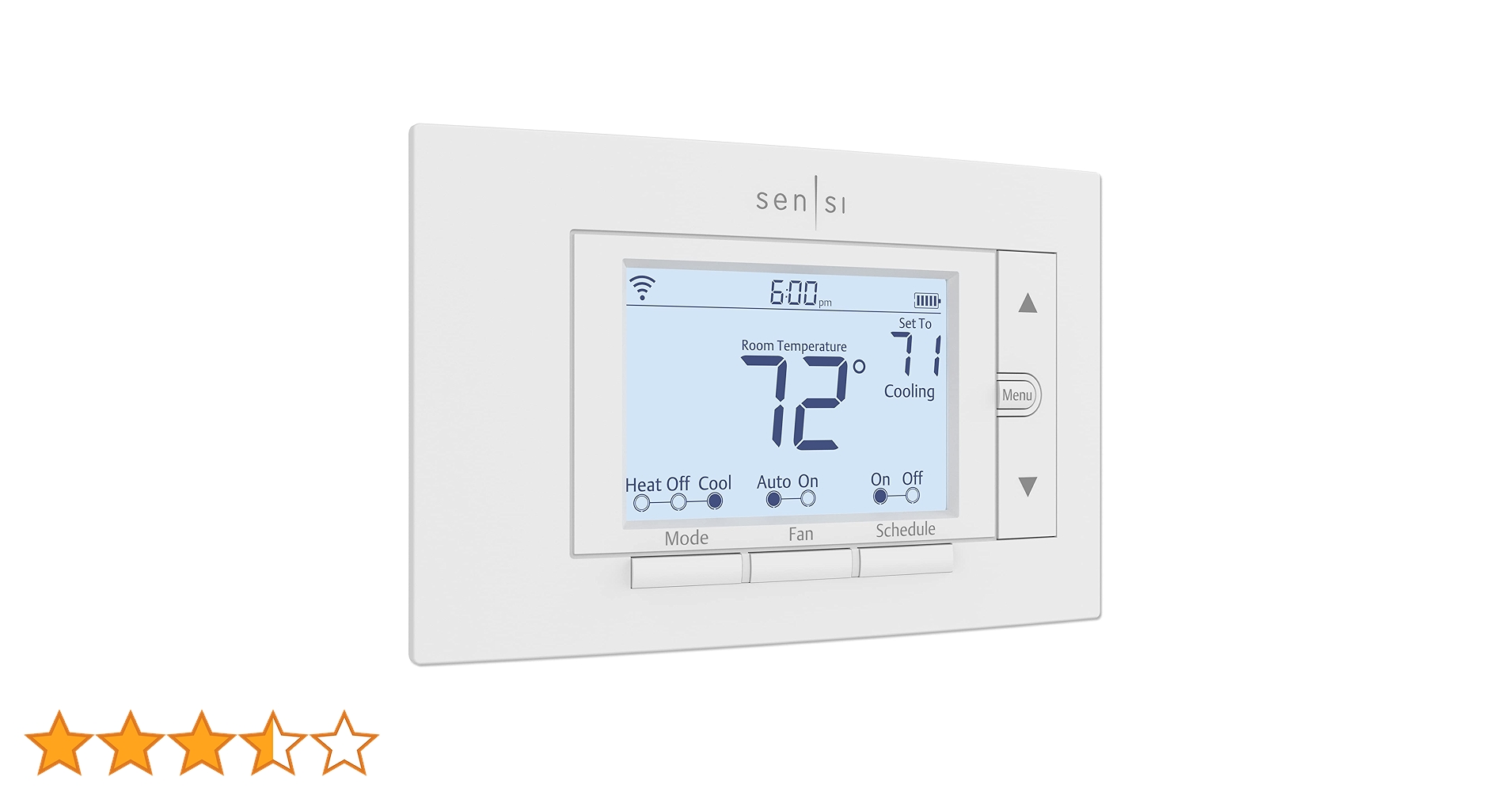
Sensi Wi-Fi Thermostat
Maintain a comfortable atmosphere with this Emerson Sensi thermostat. Wi-Fi connectivity lets you access functions from your smartphone via the free app, and the 5-inch LCD screen offers convenient monitoring of various stats. The smart alert feature of this Emerson Sensi thermostat notifies you when it detects drastic temperature and humidity changes.
Maintain a comfortable atmosphere with this Emerson Sensi thermostat. Wi-Fi connectivity lets you access functions from your smartphone via the free app, and the 5-inch LCD screen offers convenient monitoring of various stats. The smart alert feature of this Emerson Sensi thermostat notifies you when it detects drastic temperature and humidity changes.
Maintain a comfortable atmosphere with this Emerson Sensi thermostat. Wi-Fi connectivity lets you access functions from your smartphone via the free app, and the 5-inch LCD screen offers convenient monitoring of various stats. The smart alert feature of this Emerson Sensi thermostat notifies you when it detects drastic temperature and humidity changes.
Maintain a comfortable atmosphere with this Emerson Sensi thermostat. Wi-Fi connectivity lets you access functions from your smartphone via the free app, and the 5-inch LCD screen offers convenient monitoring of various stats. The smart alert feature of this Emerson Sensi thermostat notifies you when it detects drastic temperature and humidity changes.
in 13 offers
The lowest price for Sensi Wi-Fi Thermostat right now is $84.67 at eBay.com.au, compared across 10 retailers.
The all-time low was $77.81 on 16 Mar 2026 — today's price is 9% above the lowest ever. That's a little above the best price we've seen.
Prices last updated 25 Apr 2026.
Last updated at 25/04/2026 15:54:31
Emerson Sensi Wi-Fi Smart Thermostat for Smart Home, DIY, Compatible with Alexa, Energy Star Certified, ST55
Affiliate Disclosure: We may receive a small commission for purchases made through this link at no extra cost to you. This helps support our site. Thank you!
Emerson Sensi St55 Smart Thermostat
Delivery $49.36
Affiliate Disclosure: We may receive a small commission for purchases made through this link at no extra cost to you. This helps support our site. Thank you!
emerson St55 Sensi Wi-fi Smart Thermostat For Smart Home
Delivery $39.06
Affiliate Disclosure: We may receive a small commission for purchases made through this link at no extra cost to you. This helps support our site. Thank you!
Emerson Sensi Wi-fi Smart Thermostat For Smart Home St55
Delivery $51.13
Affiliate Disclosure: We may receive a small commission for purchases made through this link at no extra cost to you. This helps support our site. Thank you!
Emerson Sensi Wi-fi Smart Thermostat For Smart Home, Diy, Works With
Delivery $36.21
Affiliate Disclosure: We may receive a small commission for purchases made through this link at no extra cost to you. This helps support our site. Thank you!
Copeland Sensi ST55 Smart Wi-Fi Thermostat - Alexa Compatible, White
Delivery $100.03
Sensi Smart Thermostat, 100 Years Of Expertise, Wi-Fi, Data Privacy, Programmable, Easy
Delivery between 30 Apr – 4 May $13.98
Sensi Smart Thermostat, 100 Years Of Expertise, Wi-Fi, Data Privacy, Programmable, Easy
Delivery between 30 Apr – 5 May $12.19
Sensi Smart Thermostat, 100 Years Of Expertise, Wi-Fi, Data Privacy, Programmable, Easy DIY Install, Works With Alexa, Energy Star Certified, Mobile A
Free delivery between 5–8 May
Sensi Smart Thermostat, 100 Years Of Expertise, Wi-Fi, Data Privacy, Programmable, Easy
Delivery between 30 Apr – 4 May $15.22
originally posted on bestbuy.com
I am really excited about this thermostat. As frequently as my wife and I are traveling and on the go, I never paid much attention to what the thermostat was doing during the times we weren’t occupying the house, my old thermostat was always set it and forget it.In this inflationary age we are in, I learned that a Smart Thermostat is a good way to save on energy costs as it allows you to adjust the temperature of the thermostat with the app while you are out and about. This means that while we are on a road trip for example, we can have the house on these hot summer days sitting at 78-85 degrees while unoccupied, but then set the house to cool down to a comfortable temperature when we are a few hours away from being home. This means we don’t have to sit around for ... MoreI am really excited about this thermostat. As frequently as my wife and I are traveling and on the go, I never paid much attention to what the thermostat was doing during the times we weren’t occupying the house, my old thermostat was always set it and forget it.In this inflationary age we are in, I learned that a Smart Thermostat is a good way to save on energy costs as it allows you to adjust the temperature of the thermostat with the app while you are out and about. This means that while we are on a road trip for example, we can have the house on these hot summer days sitting at 78-85 degrees while unoccupied, but then set the house to cool down to a comfortable temperature when we are a few hours away from being home. This means we don’t have to sit around for hours waiting for the house to cool down when we get home, while we are still reaping the energy savings of allowing the house temperature to be higher in the summers while we are gone.This Sensi ST55 is a really great smart thermostat in that I found the instructions with the app to be clear and obvious as to what steps were needed for the install. Additionally, as you can see in my pictures, this thermostat attached precisely in the same position as the back plate of my previous thermostat, so we didn’t even have to drill new holes or use new wall anchors! This was about as plug and play as a piece of equipment like this can be!Altogether, I am highly impressed and think that you should consider this thermostat if you are looking into getting into Smart Thermostat. Thanks for reading and hope this review helps to encourage you!
originally posted on bestbuy.com
I've wanted to change out my AC thermostat for a while with a smart thermostat. When I came across the Emerson SENSI Smart Programable Wi-Fi Thermostat I knew I had to get it. Being from Florida, I wanted something that I could monitor my home for high temperatures while away. I also wanted the ability to control my temps from anywhere inside my home or outside.The install of the Sensi Smart Thermostat was pretty straight forward, but programming took a little bit of work. The only tools that I needed were 2 Phillips head screwdrivers, a number 1 and number 2. Some may need a drill and drill bit to mount their thermostat. Upon taking the old unit off the wall, I easily wired the corresponding wires to their slots and mounted it on the wall. Once wired up and ... MoreI've wanted to change out my AC thermostat for a while with a smart thermostat. When I came across the Emerson SENSI Smart Programable Wi-Fi Thermostat I knew I had to get it. Being from Florida, I wanted something that I could monitor my home for high temperatures while away. I also wanted the ability to control my temps from anywhere inside my home or outside.The install of the Sensi Smart Thermostat was pretty straight forward, but programming took a little bit of work. The only tools that I needed were 2 Phillips head screwdrivers, a number 1 and number 2. Some may need a drill and drill bit to mount their thermostat. Upon taking the old unit off the wall, I easily wired the corresponding wires to their slots and mounted it on the wall. Once wired up and mounted on the wall, utilizing the provided hardware I proceeded to program the unit.Setting up the unit is where I ran into a few snags. I began by downloading the Sensi app on my cellphone and following the instructions from there. My issue came when trying to connect my Emerson Sensi to my home WiFi network and then locating the code needed to link my phone to the thermostat. It took me several tries, but in the end I was able to locate my provided code andget connected.Now that I'm up and running I have used this thermostat for a little over a week now and I'm thoroughly enjoying it. I can now monitor my home temps from afar and if needed, adjust the temps from my smartphone. I also like having the ability to adjust my temps from the comfort of my bed. I really like the Sensi and would definitely use Emerson products in my home in the future. A must for anyone looking to upgrade home connectivity.
originally posted on bestbuy.com
This Sensi thermostat has a component app for your phone that makes it very easy to set up on WiFi once you've wired it. The manual is pretty thorough and guides you through the mechanical parts of installation, pretty easy if you're handy with basic tools and wiring. Even though it's not a touch screen the menu is easy to access with the buttons, and the screen is pretty large and easy to read.The real magic is in the app--it's great to able to check your house from remote locations and switch your AC or heat settings. The schedules and settings are a little tricky but with some trial and error it's not too bad to get things set up for your own lifestyle. You can create separate schedules and temp settings for cooling or heating, and vary the settings by the day ... MoreThis Sensi thermostat has a component app for your phone that makes it very easy to set up on WiFi once you've wired it. The manual is pretty thorough and guides you through the mechanical parts of installation, pretty easy if you're handy with basic tools and wiring. Even though it's not a touch screen the menu is easy to access with the buttons, and the screen is pretty large and easy to read.The real magic is in the app--it's great to able to check your house from remote locations and switch your AC or heat settings. The schedules and settings are a little tricky but with some trial and error it's not too bad to get things set up for your own lifestyle. You can create separate schedules and temp settings for cooling or heating, and vary the settings by the day of the week. You can also let the system turn itself on to counter high humidity, above and beyond the regular schedules. I like the ability to lock the panel so kids or employees can't change the settings on you.What is also a big plus is that you can install the app on more than one phone so others can also check or change settings at will. And you can add other Sensi thermostats to your account so you can manage more than one system. Even set service reminders for check-ups and filter changes.It was also fairly easy to add the thermostat to devices controlled with Alexa. You do the usual matching of your Sensi account to your Alexa Amazon account, enable the skill in the Alexa app, make sure the phone and thermostat are connected to the same wifi access point, and "find" the thermostat. Of course--this now allows others to change the settings on the system so think twice about it if your kids are always messing with the thermostat.This Sensi thermostat cost less than the competing brand I used for a couple years and the features are far superior. I've also managed these same units where I work and they have been very reliable. A great product.
| General | |
| Product Type | Thermostat |
| Functions | Temperature measuring, control heating systems, control cooling systems, fan control, humidity measurement, dual fuel heat pump control |
| Power Source | Hardwired, battery |
| Connectivity Technology | Wireless |
Emerson Sensi Wi-Fi Smart Thermostat for Smart Home, DIY, Compatible with Alexa, Energy Star Certified, ST55
Affiliate Disclosure: We may receive a small commission for purchases made through this link at no extra cost to you. This helps support our site. Thank you!
Emerson Sensi St55 Smart Thermostat
Delivery $49.36
Affiliate Disclosure: We may receive a small commission for purchases made through this link at no extra cost to you. This helps support our site. Thank you!
emerson St55 Sensi Wi-fi Smart Thermostat For Smart Home
Delivery $39.06
Affiliate Disclosure: We may receive a small commission for purchases made through this link at no extra cost to you. This helps support our site. Thank you!
Emerson Sensi Wi-fi Smart Thermostat For Smart Home St55
Delivery $51.13
Affiliate Disclosure: We may receive a small commission for purchases made through this link at no extra cost to you. This helps support our site. Thank you!
Emerson Sensi Wi-fi Smart Thermostat For Smart Home, Diy, Works With
Delivery $36.21
Affiliate Disclosure: We may receive a small commission for purchases made through this link at no extra cost to you. This helps support our site. Thank you!
I am really excited about this thermostat. As frequently as my wife and I are traveling and on the go, I never paid much attention to what the thermostat was doing during the times we weren’t occupying the house, my old thermostat was always set it and forget it.In this inflationary age we are in, I learned that a Smart Thermostat is a good way to save on energy costs as it allows you to adjust the temperature of the thermostat with the app while you are out and about. This means that while we are on a road trip for example, we can have the house on these hot summer days sitting at 78-85 degrees while unoccupied, but then set the house to cool down to a comfortable temperature when we are a few hours away from being home. This means we don’t have to sit around for ... MoreI am really excited about this thermostat. As frequently as my wife and I are traveling and on the go, I never paid much attention to what the thermostat was doing during the times we weren’t occupying the house, my old thermostat was always set it and forget it.In this inflationary age we are in, I learned that a Smart Thermostat is a good way to save on energy costs as it allows you to adjust the temperature of the thermostat with the app while you are out and about. This means that while we are on a road trip for example, we can have the house on these hot summer days sitting at 78-85 degrees while unoccupied, but then set the house to cool down to a comfortable temperature when we are a few hours away from being home. This means we don’t have to sit around for hours waiting for the house to cool down when we get home, while we are still reaping the energy savings of allowing the house temperature to be higher in the summers while we are gone.This Sensi ST55 is a really great smart thermostat in that I found the instructions with the app to be clear and obvious as to what steps were needed for the install. Additionally, as you can see in my pictures, this thermostat attached precisely in the same position as the back plate of my previous thermostat, so we didn’t even have to drill new holes or use new wall anchors! This was about as plug and play as a piece of equipment like this can be!Altogether, I am highly impressed and think that you should consider this thermostat if you are looking into getting into Smart Thermostat. Thanks for reading and hope this review helps to encourage you!
I've wanted to change out my AC thermostat for a while with a smart thermostat. When I came across the Emerson SENSI Smart Programable Wi-Fi Thermostat I knew I had to get it. Being from Florida, I wanted something that I could monitor my home for high temperatures while away. I also wanted the ability to control my temps from anywhere inside my home or outside.The install of the Sensi Smart Thermostat was pretty straight forward, but programming took a little bit of work. The only tools that I needed were 2 Phillips head screwdrivers, a number 1 and number 2. Some may need a drill and drill bit to mount their thermostat. Upon taking the old unit off the wall, I easily wired the corresponding wires to their slots and mounted it on the wall. Once wired up and ... MoreI've wanted to change out my AC thermostat for a while with a smart thermostat. When I came across the Emerson SENSI Smart Programable Wi-Fi Thermostat I knew I had to get it. Being from Florida, I wanted something that I could monitor my home for high temperatures while away. I also wanted the ability to control my temps from anywhere inside my home or outside.The install of the Sensi Smart Thermostat was pretty straight forward, but programming took a little bit of work. The only tools that I needed were 2 Phillips head screwdrivers, a number 1 and number 2. Some may need a drill and drill bit to mount their thermostat. Upon taking the old unit off the wall, I easily wired the corresponding wires to their slots and mounted it on the wall. Once wired up and mounted on the wall, utilizing the provided hardware I proceeded to program the unit.Setting up the unit is where I ran into a few snags. I began by downloading the Sensi app on my cellphone and following the instructions from there. My issue came when trying to connect my Emerson Sensi to my home WiFi network and then locating the code needed to link my phone to the thermostat. It took me several tries, but in the end I was able to locate my provided code andget connected.Now that I'm up and running I have used this thermostat for a little over a week now and I'm thoroughly enjoying it. I can now monitor my home temps from afar and if needed, adjust the temps from my smartphone. I also like having the ability to adjust my temps from the comfort of my bed. I really like the Sensi and would definitely use Emerson products in my home in the future. A must for anyone looking to upgrade home connectivity.
This Sensi thermostat has a component app for your phone that makes it very easy to set up on WiFi once you've wired it. The manual is pretty thorough and guides you through the mechanical parts of installation, pretty easy if you're handy with basic tools and wiring. Even though it's not a touch screen the menu is easy to access with the buttons, and the screen is pretty large and easy to read.The real magic is in the app--it's great to able to check your house from remote locations and switch your AC or heat settings. The schedules and settings are a little tricky but with some trial and error it's not too bad to get things set up for your own lifestyle. You can create separate schedules and temp settings for cooling or heating, and vary the settings by the day ... MoreThis Sensi thermostat has a component app for your phone that makes it very easy to set up on WiFi once you've wired it. The manual is pretty thorough and guides you through the mechanical parts of installation, pretty easy if you're handy with basic tools and wiring. Even though it's not a touch screen the menu is easy to access with the buttons, and the screen is pretty large and easy to read.The real magic is in the app--it's great to able to check your house from remote locations and switch your AC or heat settings. The schedules and settings are a little tricky but with some trial and error it's not too bad to get things set up for your own lifestyle. You can create separate schedules and temp settings for cooling or heating, and vary the settings by the day of the week. You can also let the system turn itself on to counter high humidity, above and beyond the regular schedules. I like the ability to lock the panel so kids or employees can't change the settings on you.What is also a big plus is that you can install the app on more than one phone so others can also check or change settings at will. And you can add other Sensi thermostats to your account so you can manage more than one system. Even set service reminders for check-ups and filter changes.It was also fairly easy to add the thermostat to devices controlled with Alexa. You do the usual matching of your Sensi account to your Alexa Amazon account, enable the skill in the Alexa app, make sure the phone and thermostat are connected to the same wifi access point, and "find" the thermostat. Of course--this now allows others to change the settings on the system so think twice about it if your kids are always messing with the thermostat.This Sensi thermostat cost less than the competing brand I used for a couple years and the features are far superior. I've also managed these same units where I work and they have been very reliable. A great product.
I had a simple manual thermostat and had wanted to upgrade for a while but I was a bit nervous about how complicated it would be to install a new one. If you are an average homeowner like me, you can totally handle the installation of the Sensi Smart Thermostat by yourself. I only needed a couple of screwdrivers. I would like to say that it went off without a hitch but I can’t. The actual physical installation of the unit on the wall was easy. It was even lucky that the mounting screws lined up exactly with my old thermostat, so I didn’t even have to drill new holes for the screws. The installation actually starts with downloading the Sensi app from the Android or Apple App Store. The app steps you through the installation and includes helpful videos to show what ... MoreI had a simple manual thermostat and had wanted to upgrade for a while but I was a bit nervous about how complicated it would be to install a new one. If you are an average homeowner like me, you can totally handle the installation of the Sensi Smart Thermostat by yourself. I only needed a couple of screwdrivers. I would like to say that it went off without a hitch but I can’t. The actual physical installation of the unit on the wall was easy. It was even lucky that the mounting screws lined up exactly with my old thermostat, so I didn’t even have to drill new holes for the screws. The installation actually starts with downloading the Sensi app from the Android or Apple App Store. The app steps you through the installation and includes helpful videos to show what you need to do for each step. Don’t be intimidated by the wiring. The app prompts you to take a photo of your existing wiring that you can refer back to if needed and the kit includes sticker labels to attach to all of your wires (even that was really straight forward since the W wire was White, the Y was Yellow, the G was Green, etc). The app will confirm that your wiring configuration is compatible with the Sensi thermostat.The issue I had was with connecting the thermostat to the app. Again, the app steps you through the process, but when I reached the step to connect to the unit via WiFi on my Android phone, it didn’t seem to be doing anything and the app wouldn’t continue to the next step. So I restarted the app and disconnected and restarted the thermostat, then tried connecting again…same problem. Then I tried installing the app and connecting using my iPad, which actually has a slightly different set of steps, but again had the same problem. The problem is that the app gives no indication that this connection may take several minutes to complete, nor does the app show any progress meter that might indicate something is actually happening. So I cycled back and forth between trying the phone and the iPad, restarting everything each time, for about half an hour, and just when I was considering calling the tech support number, it finally worked (via the iPad). I don’t know what happened to make it work but the lesson here is if it doesn’t work right away, be patient, try again, and give it some time to connect.Having gotten the Sensi Smart Thermostat installed and working, I am quite pleased with it. The thermostat has a nice large, backlight LCD screen that is easy to read, it even shows the humidity level. A lot of “smart” devices these days have only limited manual controls and require an app to fully use, but the Sensi Smart Thermostat is fully functional manually from the unit on the wall. After set up, you really don’t need the app. However, the app is simple and easy to use. Of course, the app allows you to control your thermostat even when you are away from home. The main feature of the thermostat (and app) is the ability to set schedules to control the temperature and AC and furnace. The app makes this easy to set up multiple schedules and switch between them (this can also be done with the thermostat itself, but the app is a bit more convenient). The app and website also directed me to a rebate from my local utility for installing and using the Sensi Smart Thermostat. The thermostat is also compatible with Google, Apple Home, and Alexa if you happen to use those in your home.
I used this to replace the thermostat on the aging thermostat in my cabana. It seems that if you're using a boiler system, you may not need a C-wire, but for an electric HVAC it's required. It took me longer than I'd like to admit to run a new common wire (I had a 4-wire system in place), but I got it done. It worked as a digital thermostat straight out of the box. I did need to pick up a cover plate as the wall where the old thermostat was had some damage, which covered it up nicely.The device interface is extremely simple to use. The screen is bright and clear and displays all the information you need at a glance. The buttons for mode, fan and schedule are clearly labeled. We're planning on moving my mother into the cabana this fall and so an easy-to-read ... MoreI used this to replace the thermostat on the aging thermostat in my cabana. It seems that if you're using a boiler system, you may not need a C-wire, but for an electric HVAC it's required. It took me longer than I'd like to admit to run a new common wire (I had a 4-wire system in place), but I got it done. It worked as a digital thermostat straight out of the box. I did need to pick up a cover plate as the wall where the old thermostat was had some damage, which covered it up nicely.The device interface is extremely simple to use. The screen is bright and clear and displays all the information you need at a glance. The buttons for mode, fan and schedule are clearly labeled. We're planning on moving my mother into the cabana this fall and so an easy-to-read display was important.Installation was super easy with the Sensi app. The mounting plate has a built in-level and the included mounting screws/anchors are fine for installation in drywall. I was able to just use the mounting screws and anchors from my old one. An account is needed for access over the internet, but that's expected.With the app it's easy to set a cooling schedule and monitor/change temperatures. You can choose to enable geofencing to allow the thermostat to tell whether you're home or away and set the temperature accordingly. A temperature offset setting can help keep your house at the right temperature if the thermostat itself is in a particularly cold or warm spot.Works well with Alexa and Google Home for voice control with a little bit of additional setup.I'd definitely recommend this to anyone looking to add smart features to their AC system, just check for a C-wire first if you're running a cooling system.
This thermostat is a game changer for anyone who hasn’t updated to a wifi thermostat. This is my first “smart” thermostat and I have to say I really like it. Installation was pretty easy, and I’ve never really dealt much with AC thermostats before. For my particular house and wiring, the color coding and bracket installation was pretty straightforward. Once I had it hooked up, I began the setup with the app which is also simple. Once I was connected to wifi I had full control from my phone.First off, the look of the thermostat is combination of traditional and modern. I like it because its not too flashy. It has a blacklit screen which is great (an obvious but highly needed feature), and its intuitive to use. Buttons are clearly labeled and there aren’t too many ... MoreThis thermostat is a game changer for anyone who hasn’t updated to a wifi thermostat. This is my first “smart” thermostat and I have to say I really like it. Installation was pretty easy, and I’ve never really dealt much with AC thermostats before. For my particular house and wiring, the color coding and bracket installation was pretty straightforward. Once I had it hooked up, I began the setup with the app which is also simple. Once I was connected to wifi I had full control from my phone.First off, the look of the thermostat is combination of traditional and modern. I like it because its not too flashy. It has a blacklit screen which is great (an obvious but highly needed feature), and its intuitive to use. Buttons are clearly labeled and there aren’t too many of them. Using the app is just as simple if not easier. You setup your schedules if you want them, control temps on the fly, can view your energy usage, and change what is on display of the unit. It also has a built-in AC Protection feature that is supposed to help prevent potential damage by controlling how it turns on and off.My two favorite features are being able control temps from anywhere and being able to lock the thermostat. The former is for obvious reasons, but in my case I don’t use the scheduler (yet) and sometimes if I forgot to turn the AC up I can do it from anywhere basically or I can turn it down when I’m headed home to start getting the house cool. The latter would have been amazing when I had roommates, basically it locks the thermostat so no one can change the temps or settings. I’m sure this would benefit some parents who don’t like their kids fiddling with the temperatures as they please.One thing I do wish it had an option for, was to allow other users to have access to the thermostat through the app. I’m not quite sure if this is an option or not, but I haven’t seen that capability yet. Would be nice to allow others to have access who live there too without sharing a single account. Maybe even have certain roles assignments that allow different levels of access.Overall, I think it’s a fantastic upgrade and a must-have for anyone living in the 21st century. You really can’t go wrong and it seems like it’ll help you save cost through better control and prevent hardware damage done by another thermostat that inefficiently controls its on/off function.
It doesn't take an electrician to put in, as the directions they give you in the app make it a breeze. I had the old one removed and the new one up and running in no time flat. Took me longer to find a small enough flat head screwdriver to remove the old wires. It may seem complex when you first get into it, but they even provide little stickers so you can ensure you keep the wires the way they were when you removed them.The physical device isn’t much different than a normal thermostat. Plain buttons to cycle modes and temp. Where the real features come in is when connected through the app. Simple display at first lance just shows the mode and current set temp. Go in further and you can see local temperature, humidity and additional options for the modes, fan, ... MoreIt doesn't take an electrician to put in, as the directions they give you in the app make it a breeze. I had the old one removed and the new one up and running in no time flat. Took me longer to find a small enough flat head screwdriver to remove the old wires. It may seem complex when you first get into it, but they even provide little stickers so you can ensure you keep the wires the way they were when you removed them.The physical device isn’t much different than a normal thermostat. Plain buttons to cycle modes and temp. Where the real features come in is when connected through the app. Simple display at first lance just shows the mode and current set temp. Go in further and you can see local temperature, humidity and additional options for the modes, fan, schedule and usage. I like the auto mode where it can control the heat and cool based on a min/max setting. That way when the weather starts changing, I’m not wondering why it is 80 during the day but 60 at night because I didn’t change the settings again. Scheduling allows for programmed or geofencing so you can let it get a little more uncomfortable when you aren’t home due to a normal schedule or when you physically leave the area. The usage stats are something new to me as you can see exactly how long your device is cooling/heating or just running the fan. Which is also an option where you can set a percentage of time to let the fan run for every hour of use, just to keep circulation going.The thermostat has even more settings such that it allows you to restrict min/max points or lock out the panel all together so someone isn’t cranking it up to 80 because they feel cold. It has several efficiency settings to either maximize comfort by maintaining a close temperature control or allowing for a couple degrees of fluctuation. It even has a built-in reminder feature where you can set something as simple as reminding to replace the filter in 3 months or schedule service in another year.Another feature that is dependent on your power company are energy savings programs. For example, my power company will give a $50 gift card and $5 a month, up to 5 months (May to Sep), if you allow your thermostat to make small, automatic adjustments during times of peak electric demand. Though it sounds enticing, I like keeping a steady temperature in my house.So far, this has actually kept my house cooler than expected, even to the point I have it set 2 degrees higher than my old thermostat. I am looking forward to how it will work out during the season change and not waking up freezing in the morning because it was 80 during the day in December. Comparing my electric bill over the past week, since I haven’t really enabled any of the efficiency settings, it has looked about the same. Since I am home pretty much all day, every day, this is what I expected. Keeping the temperature right where I like it.
If your home home decorting aesthetics run more toward old school than hi-tech, but you still want lots of the latest functionality, the Emerson Sensi Smart Progammable Wi-fi Thermostat may be just the ticket.This is a just-the-facts approach to keeping your house just the right temperature, with no fancy color touchscreens or clever animations, or learning abilities or weather reports. Or even a full time backlight. The relatively small black and white LCD display on the Emerson Sensi sticks to the basics, with the current temp dominating the screen, and a "set-to" temp in the upper right hand corner. And big physical up and down buttons to change the temp.A small bar across the top of the display shows the current time, state of the wi-fi connection and ... MoreIf your home home decorting aesthetics run more toward old school than hi-tech, but you still want lots of the latest functionality, the Emerson Sensi Smart Progammable Wi-fi Thermostat may be just the ticket.This is a just-the-facts approach to keeping your house just the right temperature, with no fancy color touchscreens or clever animations, or learning abilities or weather reports. Or even a full time backlight. The relatively small black and white LCD display on the Emerson Sensi sticks to the basics, with the current temp dominating the screen, and a "set-to" temp in the upper right hand corner. And big physical up and down buttons to change the temp.A small bar across the top of the display shows the current time, state of the wi-fi connection and battery status. The app allows you to swap out the time for humidity, which is arguably more useful.This simple design means installation is lot simpler too, since there is no need for a dedicated C wire for 24/7 power, which is not standard in a lot of homes. (But C wire is supported and required for heat pumps, natural gas furnaces and other systems) Two included AA batteries power the display and manual backlight on the Emerson Sensi for those with no C wire.Still, that does not mean this is as dead simple as the old mercury switch thermostats of days gone by. The Emerson Sensi is a smart wi-fi device so it requires you to download an app and set up an account to give you remote control with your phone and to provide voice control via Amazon and Google speaker systems. Apple Homekit is also supported.Once you have your account, the app also walks you through the installation process, which is simple enough so almost anyone can do it. Remove the old thermostat, make careful note of how the wires are attached, put those wires in the same place on the new thermostat. (unless instructions tell you otherwise.) Not hard.Be aware that the that you must have a N-class or higher home wi-fi system that supports 2.4 ghz. Most of them do but if you are running a newer system that runs 5ghz only, it will not work with this thermostat. Some dual-band wifi routers running both 5ghz and 2.4ghz at the same time also may have issues connecting. Emerson will provide a list of compatible wi-fi routers.If you can get past that, you should be good to go. Although extra steps are required if you want voice control via Google or Amazon devices. And if you want to set up your system to change temps during certain times or certain days, you will need to do that scheduling programming. (This can only be done via the app)While the display on the Emerson Sensi thermostate is pretty bare bones, the device itself is actually fairly sophisticated. There are far more settings than are apparent, which are accessible only through the app.Using it, you can lock out down the thermostat on the wall completely, too keep you kids from messing with the temps. The app also can fine tune the indoor temperature displayed, if it varies from the actual temp, using the offset tool. Optional maintenance reminders also are included, so you don't forget to change the filer or perform other chores needed to keep your HVAC system running as it should.Overall, the Emerson Sensi is a good choice if you are on a budget or just prefer the look of old-style thermostats. It is less expensive than the fancier looking units but provides pretty much the same functionality via the app.
I actually worked at Emerson while they were developing this thermostat but unfortunately left the company before they released it so now that it's had a decent amount of time on the market I was excited to finally get me hands on a unit.I had been using a Nest for a number of years and I was pretty content with it but the dial navigation seemed a bit clumsy and I always got messages of the wifi dropping. With the current IoT devices it seems you are married to the manufacturer. The Nest was with parent company Alphabet and the Sensi is with Emerson. Pick your poison.Installation was a breeze, just follow the enclosed directions. If you aren't familiar with AC control wiring I highly suggest taking a photo of your current controller's wiring as indicated in the ... MoreI actually worked at Emerson while they were developing this thermostat but unfortunately left the company before they released it so now that it's had a decent amount of time on the market I was excited to finally get me hands on a unit.I had been using a Nest for a number of years and I was pretty content with it but the dial navigation seemed a bit clumsy and I always got messages of the wifi dropping. With the current IoT devices it seems you are married to the manufacturer. The Nest was with parent company Alphabet and the Sensi is with Emerson. Pick your poison.Installation was a breeze, just follow the enclosed directions. If you aren't familiar with AC control wiring I highly suggest taking a photo of your current controller's wiring as indicated in the instructions. They include wire labels if you need to flag any wiring that isn't color matching. I only had to use one of those labels as the wire colors matched what I had. Once your wiring is complete the instructions walk you through the system settings depending on if you have gas or electric furnace. Pairing with the smartphone app is really easy and final setup is a breeze.I do love the straight forward navigation and display on the Sensi. It's really easy to adjust temp on the unit with simple up and down arrow keys... how much simplier can it be? It's really easy to set schedules for run times, easy to switch between heat and cooling (yeah, that Texas weather... if you don't like it wait a minute). I like the app controls as well. If you've set your Sensi higher while away from home you can remotely, through the app, create a schedule to turn down the temp before you get home or simply manually adjust the temp using up and down arrow keys. Easy peasy!The display is a pleasing basic LCD black letters/numbers on a grey background and the back lighting is subtle and only on when you touch a button. The Sensi smartphone app is simple as well. Once paired with the Sensi you can easily adjust temp, fan control, heat/cool, scheduling and it even tells you how much the AC system has been on.Emerson does have a touch screen version for even more convenience. But the simplicity of this unit even makes my wife happy and that goes a long way in my book.Grab one of these if you want a connected AC controller that has lots of features but still very easy to use.
The Sensi WiFi thermostat is very good, combing ease of installation, system versatility and compatibility, and smarts into a package that fills a very needed gap in the market of smart thermostats.Installation is quite simple. This is the first major pro of this device. While your average thermostat installation is easy in theory, many (realistically most) require a common wire, otherwise known as a c-wire. This is fine in applications where you already have that 5th wire run to your thermostat. However, a lot of homes do not have this, requiring a whole new run of wire that can be anywhere from simple to downright impossible. The Sensi eliminates this barrier to entry. The downside is that you'll need to keep track of battery life and periodically replace them, ... MoreThe Sensi WiFi thermostat is very good, combing ease of installation, system versatility and compatibility, and smarts into a package that fills a very needed gap in the market of smart thermostats.Installation is quite simple. This is the first major pro of this device. While your average thermostat installation is easy in theory, many (realistically most) require a common wire, otherwise known as a c-wire. This is fine in applications where you already have that 5th wire run to your thermostat. However, a lot of homes do not have this, requiring a whole new run of wire that can be anywhere from simple to downright impossible. The Sensi eliminates this barrier to entry. The downside is that you'll need to keep track of battery life and periodically replace them, but at least this option exists. Beyond that, connection to my local network was relatively straight forward. The app helps guide you through the process and works well in my experience thus far.While the appearance here is unassuming and barebones (it honestly looks like whatever bulk thermostat your subdivision builder gets at a deal), make no mistake that it has all the internals of a smart thermostat. Scheduling and automation are on tap as expected. That all works well enough. One particular feature that deserves mention here is the customizable cycle rate. I've not seen this before, but this is a great feature. It allows you to set parameters for how immediate your system responds to temperature changes and allows you to help keep your HVAC from firing up too often. This should help quite a bit with system longevity.Overall, if you're looking at this thermostat, you're likely trying to find one that gives you some semblance of smarts without the hassle of having to upgrade your wiring if you don't already have the c-wire many smart thermostats require. The Sensi WiFi is a strong performer and most certainly fills that gap which most others leave.
| General | |
| Product Type | Thermostat |
| Functions | Temperature measuring, control heating systems, control cooling systems, fan control, humidity measurement, dual fuel heat pump control |
| Power Source | Hardwired, battery |
| Connectivity Technology | Wireless |

