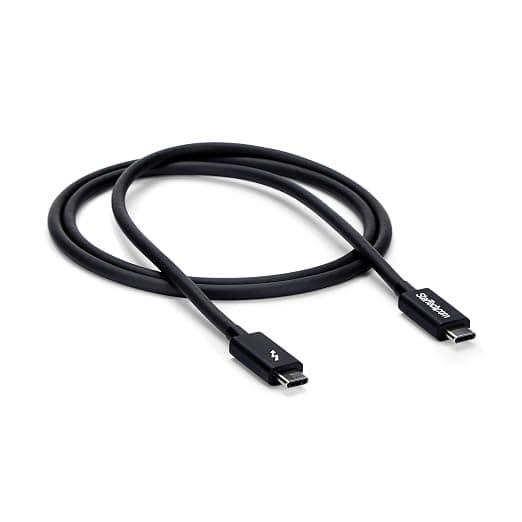
StarTech 1m Thunderbolt 3 (20Gbps) USB-C Cable -
The cable also provides power to charge your devices, and you can connect up to six Thunderbolt 3 devices in series. This cable supports 20 Gbps data transfer rates when connected to a Thunderbolt 3 device, so you can transfer photos and video files at twice the speed of a USB 3.1 Gen 2 cable (10 Gbps). For example, you can transfer 4K movies in less than a minute. When connected to a USB 3.1 device, the cable supports 10 Gbps data transfer rates. The cable supports full 4K 60 Hz video and DisplayPort 1.2 and is compatible with existing DisplayPort displays. It's great for connecting your docking station or laptop to a monitor with amazing resolution, contrast and color depth for stunning detail. This Thunderbolt 3 cable provides up to 60W of power to charge a laptop or power a display and 15W for buspowered devices such as hard drive enclosures. The cable allows you to connect multiple Thunderbolt 3 enabled laptops for peertopeer 10Gb networks. It is ideal for setting up small workgroups and sharing peripherals such as printers and storage devices. You can also connect two Thunderbolt 3 laptops together for PC migrations.
The cable also provides power to charge your devices, and you can connect up to six Thunderbolt 3 devices in series. This cable supports 20 Gbps data transfer rates when connected to a Thunderbolt 3 device, so you can transfer photos and video files at twice the speed of a USB 3.1 Gen 2 cable (10 Gbps). For example, you can transfer 4K movies in less than a minute. When connected to a USB 3.1 device, the cable supports 10 Gbps data transfer rates. The cable supports full 4K 60 Hz video and DisplayPort 1.2 and is compatible with existing DisplayPort displays. It's great for connecting your docking station or laptop to a monitor with amazing resolution, contrast and color depth for stunning detail. This Thunderbolt 3 cable provides up to 60W of power to charge a laptop or power a display and 15W for buspowered devices such as hard drive enclosures. The cable allows you to connect multiple Thunderbolt 3 enabled laptops for peertopeer 10Gb networks. It is ideal for setting up small workgroups and sharing peripherals such as printers and storage devices. You can also connect two Thunderbolt 3 laptops together for PC migrations.
The cable also provides power to charge your devices, and you can connect up to six Thunderbolt 3 devices in series. This cable supports 20 Gbps data transfer rates when connected to a Thunderbolt 3 device, so you can transfer photos and video files at twice the speed of a USB 3.1 Gen 2 cable (10 Gbps). For example, you can transfer 4K movies in less than a minute. When connected to a USB 3.1 device, the cable supports 10 Gbps data transfer rates. The cable supports full 4K 60 Hz video and DisplayPort 1.2 and is compatible with existing DisplayPort displays. It's great for connecting your docking station or laptop to a monitor with amazing resolution, contrast and color depth for stunning detail. This Thunderbolt 3 cable provides up to 60W of power to charge a laptop or power a display and 15W for buspowered devices such as hard drive enclosures. The cable allows you to connect multiple Thunderbolt 3 enabled laptops for peertopeer 10Gb networks. It is ideal for setting up small workgroups and sharing peripherals such as printers and storage devices. You can also connect two Thunderbolt 3 laptops together for PC migrations.
The cable also provides power to charge your devices, and you can connect up to six Thunderbolt 3 devices in series. This cable supports 20 Gbps data transfer rates when connected to a Thunderbolt 3 device, so you can transfer photos and video files at twice the speed of a USB 3.1 Gen 2 cable (10 Gbps). For example, you can transfer 4K movies in less than a minute. When connected to a USB 3.1 device, the cable supports 10 Gbps data transfer rates. The cable supports full 4K 60 Hz video and DisplayPort 1.2 and is compatible with existing DisplayPort displays. It's great for connecting your docking station or laptop to a monitor with amazing resolution, contrast and color depth for stunning detail. This Thunderbolt 3 cable provides up to 60W of power to charge a laptop or power a display and 15W for buspowered devices such as hard drive enclosures. The cable allows you to connect multiple Thunderbolt 3 enabled laptops for peertopeer 10Gb networks. It is ideal for setting up small workgroups and sharing peripherals such as printers and storage devices. You can also connect two Thunderbolt 3 laptops together for PC migrations.
in 25 offers
The lowest price for StarTech 1m Thunderbolt 3 (20Gbps) USB-C Cable - right now is $55.00 at eBay.com.au, compared across 16 retailers.
The all-time low was $19.80 on 14 Aug 2026 — today's price is 178% above the lowest ever. It has been notably cheaper before — worth setting a price alert.
Prices last updated 29 Oct 2026.
Last updated at 29/10/2026 18:26:16
StarTech.com Thunderbolt 3 Cable – 3 ft / 1m – 4K 60Hz – 20Gbps – USB C to USB C Cable – Thunderbolt 3 USB Type C Charger Cable, Black
Affiliate Disclosure: We may receive a small commission for purchases made through this link at no extra cost to you. This helps support our site. Thank you!
Startech 1m Usb-c 3.0 Cable Tb 3 Compatible Black
Free delivery
Affiliate Disclosure: We may receive a small commission for purchases made through this link at no extra cost to you. This helps support our site. Thank you!
Startech Thunderbolt 3 20gbps Cable 1m Black
Delivery $18.99
StarTech.com TBLT3MM1M 20Gbps Thunderbolt 3 Cable - 1m USB-C - 20Gbps
Delivery between 3–8 Nov $9
3.3ft (1m) Thunderbolt 3 Cable, 20Gbps, 100W PD, 4K, Thunderbolt Certified, Compatible with Thunderbolt 4/USB 3.2/DisplayPort
Startech 1M USB-C 3.0 CABLE TB 3 COMPATIBLE BLACK 2YR
Free delivery
Startech 1M USB-C 3.0 CABLE TB 3 COMPATIBLE BLACK 2YR
Delivery between 1–9 Nov $10
Startech 1m Thunderbolt 3 (20Gbps) USB-C Cable
Delivery between Mon – Thu $10
StarTech 1m Thunderbolt 3 Cable, Thunderbolt to Thunderbolt
Delivery $10
StarTech 1m Thunderbolt 3 USB C Cable 20Gbps 4K 60Hz Video Power Delivery
Free delivery between 2–9 Nov
originally posted on bestbuy.com
This cord helped me set up my home office the way I wanted to. The extra length helped me set up 2 monitors via the dock and have my laptop as a 3rd screen in the best position. No issues so far.
originally posted on homeessentialsdirect.com
I bought this to be used for my eGPU (which is a Razer Core X in tandem with my Razer Blade Stealth i7-8550u) just in case I needed a much longer TB3 cable, and it works for that use case. I don't have the know-how in doing performance benchmarks in finding a performance loss if you'll use a much longer cable like this one than the included cable in the Razer Core X (I'm saying this because it's commonly asked). But after testing it out on games I didn't really notice any major performance loss. But I'll say that using the included shorter cable feels more responsive overall, but I think it's just me. The cable quality is good, the cable is sturdy enough to handle a daily in and out bag throw, but I'll strongly advise to still take care of this, why? Because this is ... MoreI bought this to be used for my eGPU (which is a Razer Core X in tandem with my Razer Blade Stealth i7-8550u) just in case I needed a much longer TB3 cable, and it works for that use case. I don't have the know-how in doing performance benchmarks in finding a performance loss if you'll use a much longer cable like this one than the included cable in the Razer Core X (I'm saying this because it's commonly asked). But after testing it out on games I didn't really notice any major performance loss. But I'll say that using the included shorter cable feels more responsive overall, but I think it's just me. The cable quality is good, the cable is sturdy enough to handle a daily in and out bag throw, but I'll strongly advise to still take care of this, why? Because this is too expensive for a cable. Now regarding the TB3 specification, again in the case of using it for an eGPU it does work but if you're looking at this and (NOT JUST) using it for TB3 devices but a "one USB-C cable to rule them all", this is not it. This is relevant because USB-C should simplify the cable & ports specification problem we're having, but with the TB3 specification this isn't helping. This cable is what they specify as an active TB3 cable which means you can only use this at its actual TB3 specs when IT'S connected ON both ends to a TB3 enabled device. This means if you want to use this as a native DP (Display Port) cable for your monitor, this cable will not work. Another thing is if you try to use this as a normal USB cable, it will only WORK AT THE SPEED of A USB 2 (480 Mbit/s) NOT the speed of USB 3.0 (5 Gbps) or 3.1 (10 Gbps). But obviously if you don't plan on using this cable for those cases, then this should do you fine. And lastly, the thing that I don't like the most is the price, these things are just too expensive. So just make the most out of this if you decided to go the TB3 ecosystem. Side note: The TB4 specifications is on the works as of writing, so if you don't really need this but just wanna try out TB3, I would advise to wait until the end of this year or until next year for the TB4 to make its appearance. The TB4 specs seem to address the problems of TB3 standards and also that may hopefully drop the prices of TB3 accessories and cables.
originally posted on homeessentialsdirect.com
I have a 2018 Mac Mini with Dell U2720Q display. I use the USB-C cable that comes with the display, and when using this cable, I have to choose between High Resolution--4K @60Hz, but USB speed is 2.0 DP cable and USB-A to USB-C cable to connect to he display. The apparent build quality seems fine, and the cable is not as stiff as the Dell USB cable. But it will NOT do 60Hz ever. So no other choice but to return for a refund.
| Max Transfer Rate | 40Gbps |
| Resolution Support | 5K 60Hz |
| Connector Type | Thunderbolt 3 USB-C (24-pin) |
| Connection Type | Wired |
| Connector Gender | Male-Male |

StarTech.com Thunderbolt 3 Cable – 3 ft / 1m – 4K 60Hz – 20Gbps – USB C to USB C Cable – Thunderbolt 3 USB Type C Charger Cable, Black
Affiliate Disclosure: We may receive a small commission for purchases made through this link at no extra cost to you. This helps support our site. Thank you!
Startech 1m Usb-c 3.0 Cable Tb 3 Compatible Black
Free delivery
Affiliate Disclosure: We may receive a small commission for purchases made through this link at no extra cost to you. This helps support our site. Thank you!
Startech Thunderbolt 3 20gbps Cable 1m Black
Delivery $18.99
StarTech.com TBLT3MM1M 20Gbps Thunderbolt 3 Cable - 1m USB-C - 20Gbps
Delivery between 3–8 Nov $9
3.3ft (1m) Thunderbolt 3 Cable, 20Gbps, 100W PD, 4K, Thunderbolt Certified, Compatible with Thunderbolt 4/USB 3.2/DisplayPort
This cord helped me set up my home office the way I wanted to. The extra length helped me set up 2 monitors via the dock and have my laptop as a 3rd screen in the best position. No issues so far.
I bought this to be used for my eGPU (which is a Razer Core X in tandem with my Razer Blade Stealth i7-8550u) just in case I needed a much longer TB3 cable, and it works for that use case. I don't have the know-how in doing performance benchmarks in finding a performance loss if you'll use a much longer cable like this one than the included cable in the Razer Core X (I'm saying this because it's commonly asked). But after testing it out on games I didn't really notice any major performance loss. But I'll say that using the included shorter cable feels more responsive overall, but I think it's just me. The cable quality is good, the cable is sturdy enough to handle a daily in and out bag throw, but I'll strongly advise to still take care of this, why? Because this is ... MoreI bought this to be used for my eGPU (which is a Razer Core X in tandem with my Razer Blade Stealth i7-8550u) just in case I needed a much longer TB3 cable, and it works for that use case. I don't have the know-how in doing performance benchmarks in finding a performance loss if you'll use a much longer cable like this one than the included cable in the Razer Core X (I'm saying this because it's commonly asked). But after testing it out on games I didn't really notice any major performance loss. But I'll say that using the included shorter cable feels more responsive overall, but I think it's just me. The cable quality is good, the cable is sturdy enough to handle a daily in and out bag throw, but I'll strongly advise to still take care of this, why? Because this is too expensive for a cable. Now regarding the TB3 specification, again in the case of using it for an eGPU it does work but if you're looking at this and (NOT JUST) using it for TB3 devices but a "one USB-C cable to rule them all", this is not it. This is relevant because USB-C should simplify the cable & ports specification problem we're having, but with the TB3 specification this isn't helping. This cable is what they specify as an active TB3 cable which means you can only use this at its actual TB3 specs when IT'S connected ON both ends to a TB3 enabled device. This means if you want to use this as a native DP (Display Port) cable for your monitor, this cable will not work. Another thing is if you try to use this as a normal USB cable, it will only WORK AT THE SPEED of A USB 2 (480 Mbit/s) NOT the speed of USB 3.0 (5 Gbps) or 3.1 (10 Gbps). But obviously if you don't plan on using this cable for those cases, then this should do you fine. And lastly, the thing that I don't like the most is the price, these things are just too expensive. So just make the most out of this if you decided to go the TB3 ecosystem. Side note: The TB4 specifications is on the works as of writing, so if you don't really need this but just wanna try out TB3, I would advise to wait until the end of this year or until next year for the TB4 to make its appearance. The TB4 specs seem to address the problems of TB3 standards and also that may hopefully drop the prices of TB3 accessories and cables.
I have a 2018 Mac Mini with Dell U2720Q display. I use the USB-C cable that comes with the display, and when using this cable, I have to choose between High Resolution--4K @60Hz, but USB speed is 2.0 DP cable and USB-A to USB-C cable to connect to he display. The apparent build quality seems fine, and the cable is not as stiff as the Dell USB cable. But it will NOT do 60Hz ever. So no other choice but to return for a refund.
I have a 2018 MacBook Pro and a Dell U4320Q monitor. The cable that ships with the Dell monitor is really short and I wanted a longer cable so I could position my laptop to the side of my desk. The StarTech cable charged my laptop and connected USB devices but the display was never detected. I tried various troubleshooting but no luck. Using the Dell-supplied cable in the same configuration worked instantly with no issues. I guess there is some subtle hardware or software compatibility issue, but it's inscrutable from the product description. I know StarTech has a good reputation for quality and the build quality seems high, but it's frustrating that the product description doesn't indicate compatibility issues. At least with DisplayPort or HDMI you can tell if it ... MoreI have a 2018 MacBook Pro and a Dell U4320Q monitor. The cable that ships with the Dell monitor is really short and I wanted a longer cable so I could position my laptop to the side of my desk. The StarTech cable charged my laptop and connected USB devices but the display was never detected. I tried various troubleshooting but no luck. Using the Dell-supplied cable in the same configuration worked instantly with no issues. I guess there is some subtle hardware or software compatibility issue, but it's inscrutable from the product description. I know StarTech has a good reputation for quality and the build quality seems high, but it's frustrating that the product description doesn't indicate compatibility issues. At least with DisplayPort or HDMI you can tell if it works by looking at the connector. With USB-C it's a mystery.
I have a Macbook Pro and I wanted to drive a huge 49" monitor using a single cable while getting the maximum resolution I needed. Now, unless your monitor has a USB-C Thunderbolt 3 compatible output, accomplishing this task could be difficult. I have a Caldigit TS3+ which acts as a middle-man between my MBP and my monitor. I wasn't especially happy that I had to spend this kind of money on a cable, but I did understand that Thunderbolt cables are not cheap. And, you can't just buy any Thunderbolt cable for this purpose. It needs to be 4K 60Hz - 40Gbps. Without that spec, you can't use a single cable. I am surprised to read a few negative reviews about this brand. It came highly recommended from monitor users on the Mac/Apple forums. In fact, this brand was ... MoreI have a Macbook Pro and I wanted to drive a huge 49" monitor using a single cable while getting the maximum resolution I needed. Now, unless your monitor has a USB-C Thunderbolt 3 compatible output, accomplishing this task could be difficult. I have a Caldigit TS3+ which acts as a middle-man between my MBP and my monitor. I wasn't especially happy that I had to spend this kind of money on a cable, but I did understand that Thunderbolt cables are not cheap. And, you can't just buy any Thunderbolt cable for this purpose. It needs to be 4K 60Hz - 40Gbps. Without that spec, you can't use a single cable. I am surprised to read a few negative reviews about this brand. It came highly recommended from monitor users on the Mac/Apple forums. In fact, this brand was specifically mentioned over and over again as one of the more reliable Thunderbolt 3 cable manufacturers. This cable has worked flawlessly for me for several weeks now. Additionally, the plug is very durable as I am constantly moving my laptop from my office monitor to my lap so I am constantly connecting and disconnecting the cable. The connector seems very durable which is a very important factor when considering a product like this. I can confidently tell you from my experience thus far, this is a great cable that works exceptionally well.
It doesn't do a great job of remaining in the socket. I haven't gotten the magnifying glass out, but I'm assuming it's missing a retention mechanism that my other USB type-c cables have. It's possible that is a feature and not a bug; as the cable is quite long and is more likely to get kicked or stepped on. That said, you have few options if you're looking for a cable at this length. The thing does technically work, but if it moves too much you may lose connection for a moment. It DOES handle displayport over USB type C, so if you're as confused as the industry seems to be on how which USB type c cable works with what, that may help you ;D.
Needed a Thunderbolt 3 cable to connect my MacBook Pro to a 4K monitor via USB-C (the one that comes with the MBP from the factory doesn't carry audio and video, just power). Works great, single cable carries 4K video, audio and power from my MacBook Pro to this badass 43" 4K monitor (don't buy the apple one. This one is the same price, same make - LG - and twice the size)LG Electronics 42.5" Screen LED-lit Monitor (43UD79-B)
Decided to buy a decent USB-C /Thunderbolt 3 cable for BlackMagic Recorder and external drives. Serious speed improvements x3 vs just grabbing the most available USB-C cable lying about. Just need to identify better as a good cable.
The cable works with 4K 60Hz screen as was the intention.
FULL wired usb-c. This allows passthru of HDMI, DVI signals if your device supports it.
| Max Transfer Rate | 40Gbps |
| Resolution Support | 5K 60Hz |
| Connector Type | Thunderbolt 3 USB-C (24-pin) |
| Connection Type | Wired |
| Connector Gender | Male-Male |


