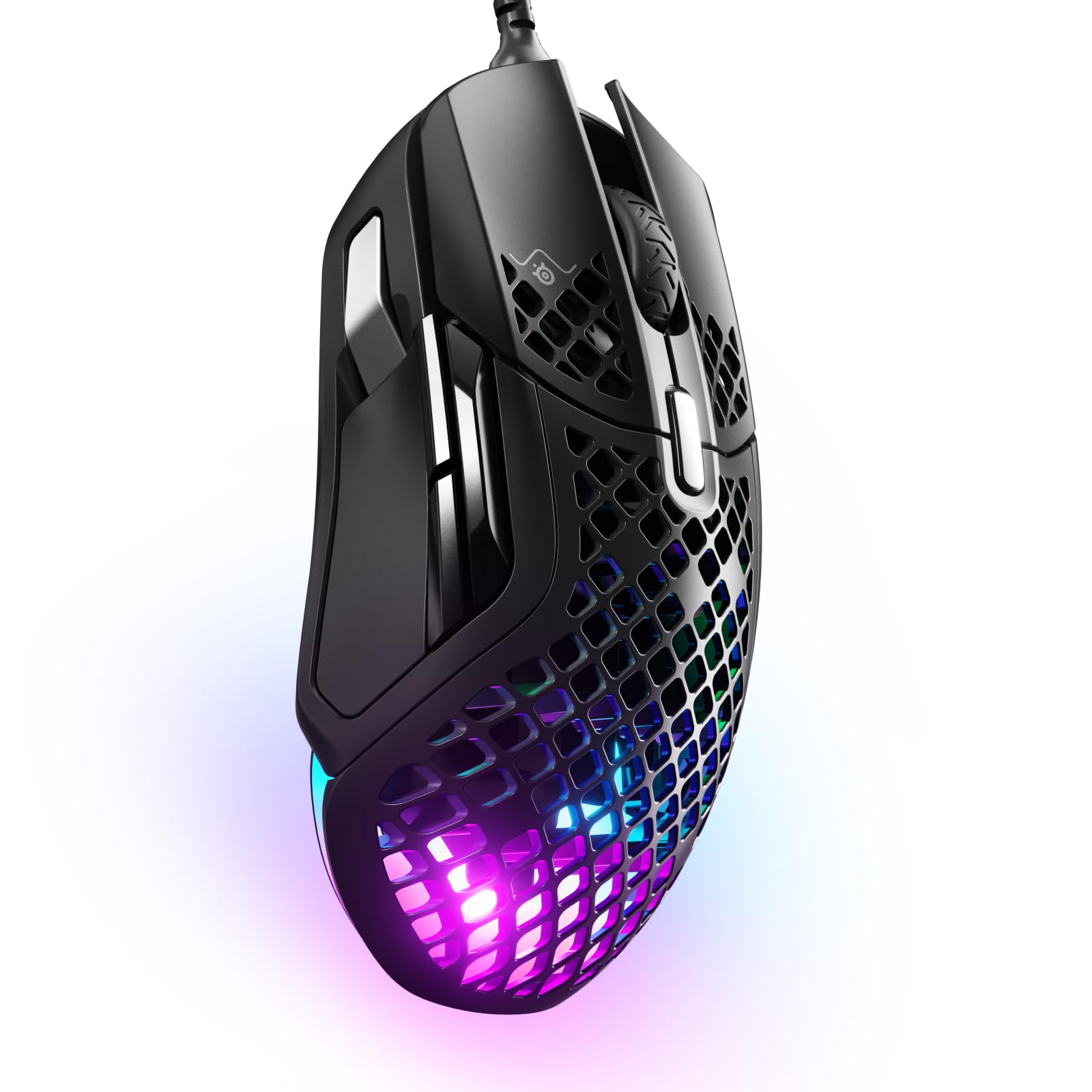
SteelSeries Aerox 5 RGB Wired Gaming Mouse Ultra Lightweight
Fast The Aerox 5 is optimized for the fastest swipes so you beat the competition to the trigger. When milliseconds count speed matters. Ultra-Lightweight Multi-Genre Mouse State-of-the-art engineering gave rise to the Aerox 5 making it 40% lighter than other multi-genre mice. Excel in any game you play with an ultra lightweight 66g build optimized for unmatched agility. Holey Shell Our honeycomb shell reduces weight by up to 20g while maintaining strength and durability for the most intense gaming sessions. Ultra-Thin PCB Re-engineered electronics that boast a 50% slimmer circuit board while maintaining durability. 9 Programmable Buttons The macros you need are at your fingertips and so is victory. Instantly execute game-winning combinations with a 5-button side panel including a custom-built up/down flick switch. Customize the Aerox 5 to your preferred method for glory.
Fast The Aerox 5 is optimized for the fastest swipes so you beat the competition to the trigger. When milliseconds count speed matters. Ultra-Lightweight Multi-Genre Mouse State-of-the-art engineering gave rise to the Aerox 5 making it 40% lighter than other multi-genre mice. Excel in any game you play with an ultra lightweight 66g build optimized for unmatched agility. Holey Shell Our honeycomb shell reduces weight by up to 20g while maintaining strength and durability for the most intense gaming sessions. Ultra-Thin PCB Re-engineered electronics that boast a 50% slimmer circuit board while maintaining durability. 9 Programmable Buttons The macros you need are at your fingertips and so is victory. Instantly execute game-winning combinations with a 5-button side panel including a custom-built up/down flick switch. Customize the Aerox 5 to your preferred method for glory.
Fast The Aerox 5 is optimized for the fastest swipes so you beat the competition to the trigger. When milliseconds count speed matters. Ultra-Lightweight Multi-Genre Mouse State-of-the-art engineering gave rise to the Aerox 5 making it 40% lighter than other multi-genre mice. Excel in any game you play with an ultra lightweight 66g build optimized for unmatched agility. Holey Shell Our honeycomb shell reduces weight by up to 20g while maintaining strength and durability for the most intense gaming sessions. Ultra-Thin PCB Re-engineered electronics that boast a 50% slimmer circuit board while maintaining durability. 9 Programmable Buttons The macros you need are at your fingertips and so is victory. Instantly execute game-winning combinations with a 5-button side panel including a custom-built up/down flick switch. Customize the Aerox 5 to your preferred method for glory.
Fast The Aerox 5 is optimized for the fastest swipes so you beat the competition to the trigger. When milliseconds count speed matters. Ultra-Lightweight Multi-Genre Mouse State-of-the-art engineering gave rise to the Aerox 5 making it 40% lighter than other multi-genre mice. Excel in any game you play with an ultra lightweight 66g build optimized for unmatched agility. Holey Shell Our honeycomb shell reduces weight by up to 20g while maintaining strength and durability for the most intense gaming sessions. Ultra-Thin PCB Re-engineered electronics that boast a 50% slimmer circuit board while maintaining durability. 9 Programmable Buttons The macros you need are at your fingertips and so is victory. Instantly execute game-winning combinations with a 5-button side panel including a custom-built up/down flick switch. Customize the Aerox 5 to your preferred method for glory.
in 12 offers
The lowest price for SteelSeries Aerox 5 RGB Wired Gaming Mouse Ultra Lightweight right now is $37.40 at LWT, compared across 9 retailers.
The all-time low was $33.00 on 4 Feb 2025 — today's price is 13% above the lowest ever. That's a little above the best price we've seen.
Prices last updated 3 Oct 2026.
Last updated at 03/10/2026 08:25:43
KENSINGTON DUO GEL MOUSE MAT WAVE BLUE / BLACK
Delivery $16.50
SteelSeries Aerox 5 Gaming Mouse Ultra Lightweight 66g, 9 Programmable Buttons, IP54 Water Resistant, PC/MAC, FPS, MOBA, Battle Royale, MMO, USB, Blac
Delivery between 10–13 Oct $29
SteelSeries Aerox 5 62401 Ultra-Lightweight Honeycomb Wired RGB Gaming Mouse, Black, 9 Programmable Buttons
Delivery $85.32
SteelSeries Aerox 5 Ultra Lightweight Ergonomic Gaming Mouse - Black
Delivery between 7–12 Oct $11.64
SteelSeries Aerox 5 Ultra Lightweight Honeycomb Water Resistant Wired RGB Optical Gaming Mouse With 9 Programmable Buttons - Wired - Black
SteelSeries Aerox 5 Lightweight 1800CPI Wired RGB Gaming Mouse
Delivery $57.25
SteelSeries Aerox 5 - Holey RGB Gaming Mouse - Ultra-Lightweight Water Resistant Design - 18K DPI TrueMove Air Optical Sensor - 9 Programmable Buttons
Free delivery between 14–16 Oct
SteelSeries Aerox 5 - Holey RGB Gaming Mouse - Ultra-lightweight Water Resistant Design - 18K DPI TrueMove Air Optical Sensor
Delivery between 8–12 Oct $41
Steelseries Aerox 5 Ultra Lightweight Ergonomic Gaming Mouse - Black
Free delivery
Affiliate Disclosure: We may receive a small commission for purchases made through this link at no extra cost to you. This helps support our site. Thank you!
originally posted on bestbuy.com
OverallA solid mouse. At only 3.3 ounces or 95 grams, it’s a very light yet customizable mouse featuring 18 programmable keys and an easily accessible cpi switch. The exterior shell is mostly plastic, almost like a polyurethane material. A fence like mesh coats most of the body’s top side with the only closed portion being at the tip of the clickers.The clickers are very responsive and overall feel very nice. My fingers rest on the solid portion of the buttons. But moving them higher up to the mesh, I can’t say they feel as great. Between them rests the scroll wheel with an interesting texture. The plastic coating with the textured surface makes for an abrasive surface that doesn’t allow for slipping. On the underside, that same mesh texture continues between the ... MoreOverallA solid mouse. At only 3.3 ounces or 95 grams, it’s a very light yet customizable mouse featuring 18 programmable keys and an easily accessible cpi switch. The exterior shell is mostly plastic, almost like a polyurethane material. A fence like mesh coats most of the body’s top side with the only closed portion being at the tip of the clickers.The clickers are very responsive and overall feel very nice. My fingers rest on the solid portion of the buttons. But moving them higher up to the mesh, I can’t say they feel as great. Between them rests the scroll wheel with an interesting texture. The plastic coating with the textured surface makes for an abrasive surface that doesn’t allow for slipping. On the underside, that same mesh texture continues between the slider grips with a reflective, plexiglass like-material below it. I assume the pcb screws into this material.If I’m being totally honest however, I’m not a big fan of the open design as it allows for dirt, sweat, and any other foreign material from resting on the internal electronics of the mouse.In the BoxThis part had me stumped in the beginning. In the box you’ve got the mouse sitting on top. Lifting it reveals the instruction manual and a compartment housing the 6’ Type C to Type A USB cable. In an adjacent compartment you’ve got a Type C USB wireless dongle and a Type C to Type C extender. This extender had me confused thinking it was a Type C to Type A adapter until I picked it up to see both ends. Everything being male connections, except for the extender.Potential IssuesThis is what makes this mouse not so compatible with older systems. I mean, it does work but the setup is more of an eyesore. Plugging in the Type A to Type C cable in the PC then attaching the extender and finally the dongle allows you to use the dongle. Alternatively, you could use Bluetooth but a lot of older systems didn’t come with Bluetooth as a standard feature so you’d have to buy a Bluetooth dongle if you didn’t already have one. My old 2015 custom built system doesn’t offer any Type C or Bluetooth, which was the first system I had planned to test with. But my custom built 2021 system had no issues. Some of my older, not ancient, 2018-2019 desktops that serve as file servers, media servers, or general test environments also do not have a Type C but do offer OEM built-in Bluetooth. So this area will really vary by what you plan to use this mouse with. The last thing I’ll add here is that you’ll need the 6’ cable to charge the mouse so if you went the first route with cable > extender > dongle you’d need to keep the cable available to charge the mouse when needed. Tying it up behind the desktop to keep out of sight isn’t a good option for everyone if you don’t have another Type C to charge the mouse with later.SoftwareTo get full functionality out of the Aerox 9, you need to install the Steelseries Engine software. It allows you to map any of the 18 programmable buttons on the mouse. Create custom lighting profiles using the simple click and set editor to map 3 programmable areas of the mouse. Additionally, it comes bundled with software to clip, edit, and share gaming highlights.ConclusionOver the span of a few days, I made the Aerox 9 a daily driver. During that time the same charge the mouse arrived with was more than enough. This leads me to believe the 150 hour claim on the packaging to be accurate. It is also very responsive, for all tasks I threw at it from productivity to gaming and everything in between. The lighting options are a nice addition to it. This is certainly one of the lighter mice I’ve held before, if not the lightest. I just can’t get used to the feel of the open mesh design on the palm of my hand as I can feel every opening in the material.
originally posted on bestbuy.com
Ok, it may be a little sarcastic, but it was the first thing I thought of when I saw this. What in the crumb catching tarnation is this?A mouse gets pretty grimy as it is, but now it is open and ready to catch everything on the inside. The picture below is an exaggeration, but I can only imagine what this will look like after a year's worth with someone that eats and or smokes while playing. It does however make that mouse feel much lighter and it is IP54 rated, so the main components inside should remain safe. It makes for an interesting mouse too, especially since the LED lights are at the base and shine through.With the connection options, you can technically connect this mouse to 3 different computers, but not all used at the same time. Wired overrides the ... MoreOk, it may be a little sarcastic, but it was the first thing I thought of when I saw this. What in the crumb catching tarnation is this?A mouse gets pretty grimy as it is, but now it is open and ready to catch everything on the inside. The picture below is an exaggeration, but I can only imagine what this will look like after a year's worth with someone that eats and or smokes while playing. It does however make that mouse feel much lighter and it is IP54 rated, so the main components inside should remain safe. It makes for an interesting mouse too, especially since the LED lights are at the base and shine through.With the connection options, you can technically connect this mouse to 3 different computers, but not all used at the same time. Wired overrides the switch on the bottom, so no matter where it is flipped, if it is connected USB to a PC, it takes priority. The other two options are the 2.4Ghz dongle or Bluetooth. With the dongle and wired you get to customize all the options with the SteelSeries GG software. This includes sensitivity, assigning different functions for all the buttons, illuminations, polling angle snapping and acceleration/deceleration. However, in Bluetooth mode you don’t get to adjust all those settings even with the software installed. Another strange thing, if you assign buttons on the wired/dongle computer with the software, but have the software on the Bluetooth connected computer as well, nothing is retained between switching devices. However, if the software is not on the Bluetooth connected device, some button bindings, provided they are normal keyboard/mouse buttons, will remain assigned to the mouse.As for the software GG, it really feels bloated and has lots of excessive advertising of other products. Plus, the Sonar application just takes over your audio input/outputs without you even knowing, so you might want to turn that off unless you are using something other than a mouse. Really would have been nice if I could just have the “Engine” tab and remove everything else.The mouse is pretty responsive on all three connection types. There is however a bit of delay in it reconnecting from it having fallen asleep, a timer that can be changed as well. Besides being lightweight, the main thing about this mouse is being able to have 12 assigned buttons at your thumb. Great for those games that have assignable task bars. I personally found myself constantly trying to feel around which button I was using as only the 5 button, like a number pad, had any tactile feel to it. They also take a little force to push, but are good to prevent accidental pushes. The spacing does feel a little long, like you may really have to move your hand just a bit to go from 1 to 12, but I found myself using the inside knuckle of my thumb to catch the last couple buttons.Besides a weird bug when I first connected this mouse over Bluetooth, which the resolution is to unpair it and pair it again, it has done me nicely. The computer I used it for while on Bluetooth I don’t ever really game on, so losing some of the settings when switching connections didn’t bother me. I just found it odd that the software doesn’t carry over the settings between devices even when logged into the same account on both.Overall, if they could release just the ‘Engine’ part of the software and retain all the settings between wired/dongle and Bluetooth, it would be even more amazing. Otherwise, it is still a nice lightweight customizable mouse that will collect crumbs over time.
originally posted on bestbuy.com
I love first person shooter games. While I in no way belong in the competitive class of players, I do like to think I get along pretty well playing games like Hunt Showdown online and I enjoy Doom Eternal and many other shooters as well.This mouse possesses many qualities that make it excellent for FPS games. It is a palm style mouse, which I approve of as opposed to a claw style mouse for faster and more aggressive movements that help you get your sights on target faster. This is a right-hand oriented mouse and its contours on both the thumb grip region and the mouse buttons themselves feel excellent for maintaining grip during frenetic movements. At first, I thought the ventilated build of this mouth was a little gimmicky, but I am having noticeably less ... MoreI love first person shooter games. While I in no way belong in the competitive class of players, I do like to think I get along pretty well playing games like Hunt Showdown online and I enjoy Doom Eternal and many other shooters as well.This mouse possesses many qualities that make it excellent for FPS games. It is a palm style mouse, which I approve of as opposed to a claw style mouse for faster and more aggressive movements that help you get your sights on target faster. This is a right-hand oriented mouse and its contours on both the thumb grip region and the mouse buttons themselves feel excellent for maintaining grip during frenetic movements. At first, I thought the ventilated build of this mouth was a little gimmicky, but I am having noticeably less occurrences of needing to dry my palm from sweat during extended gaming sessions. Somehow, in spite of this open build, this mouse still manages to be IP54 rated for moisture resistance; awesome! The matte finish of this mouse, while not the most premium feeling, is better for grip on sweaty, high intensity gaming circumstances.The RGB of this mouse is really awesome out of the box and comes with some really great built-in features I haven’t seen to often on other wireless mice. One is that, out of the box, the RGB upon wake up of the mouse indicates how much battery life you have left. Red (flashing) is 0-5% battery, yellow is 6-10% battery, and green is 11-100% battery. It actually has a color assigned to each of the 5 built-in CPI profiles too! Purple for 400, blue for 800, green for 1200, yellow for 2400, and red for 3200. I actually very much prefer this over other options competitors have used like an annoying pop up on the screen. I prefer 1200 CPI for my FPS shooters, and it is nice to verify by pressing mouse button 4 (the one below the scroll wheel) which one I am on.For further RGB settings, it is all in the SteelSeries GG software for you. Of note, I also like that there are settings to turn the RGB off during mouse movement and it also has great settings for battery conversation if you have your computer on all the time like I do and don’t want to worry about having to constantly charge the mouse due to it waking up and staying awake for too long all the time.Something I really liked here is that a firmware update was ready to go when I first installed the software and the update was able to be connected over the 2.4Ghz dongle connection. Another one my high-end wireless mice insisted that you connect the mouse to the computer via the USB-C cable before it would update the firmware. This made things very effortless and easy for the update on the Aerox 5 wireless.It should be noted that this is utilizing a USB-C 2.4Ghz dongle. I was happily able to plug this directly into the USB-C port on my motherboard. If you don’t have a USB-C port as part of your PC build, an extender cable and adapter are included that will allow you to plug the cable into a traditional USB-A port, attach the adapter, and then plug the dongle into that.Altogether, I feel that this is a premium priced mouse, but most definitely offers premium features. The only knock I think I can give it at this point was the SteelSeries GG software for setting up and update the mouse was initially slow to install and update. Also, the mouse is sometimes slower to wake up then other wireless mice I have tested. Nothing too noticeable for the average user, just something I noticed given how many mice I have had now over the years.Thanks for reading this review and I hope it helps to encourage you to purchase this excellent, wireless mouse!
| General | |
| Device Type | Mouse |
| Ergonomic Design | Yes |
| Orientation | Right-handed |
| Gaming | Yes |
KENSINGTON DUO GEL MOUSE MAT WAVE BLUE / BLACK
Delivery $16.50
SteelSeries Aerox 5 Gaming Mouse Ultra Lightweight 66g, 9 Programmable Buttons, IP54 Water Resistant, PC/MAC, FPS, MOBA, Battle Royale, MMO, USB, Blac
Delivery between 10–13 Oct $29
SteelSeries Aerox 5 62401 Ultra-Lightweight Honeycomb Wired RGB Gaming Mouse, Black, 9 Programmable Buttons
Delivery $85.32
SteelSeries Aerox 5 Ultra Lightweight Ergonomic Gaming Mouse - Black
Delivery between 7–12 Oct $11.64
SteelSeries Aerox 5 Ultra Lightweight Honeycomb Water Resistant Wired RGB Optical Gaming Mouse With 9 Programmable Buttons - Wired - Black
OverallA solid mouse. At only 3.3 ounces or 95 grams, it’s a very light yet customizable mouse featuring 18 programmable keys and an easily accessible cpi switch. The exterior shell is mostly plastic, almost like a polyurethane material. A fence like mesh coats most of the body’s top side with the only closed portion being at the tip of the clickers.The clickers are very responsive and overall feel very nice. My fingers rest on the solid portion of the buttons. But moving them higher up to the mesh, I can’t say they feel as great. Between them rests the scroll wheel with an interesting texture. The plastic coating with the textured surface makes for an abrasive surface that doesn’t allow for slipping. On the underside, that same mesh texture continues between the ... MoreOverallA solid mouse. At only 3.3 ounces or 95 grams, it’s a very light yet customizable mouse featuring 18 programmable keys and an easily accessible cpi switch. The exterior shell is mostly plastic, almost like a polyurethane material. A fence like mesh coats most of the body’s top side with the only closed portion being at the tip of the clickers.The clickers are very responsive and overall feel very nice. My fingers rest on the solid portion of the buttons. But moving them higher up to the mesh, I can’t say they feel as great. Between them rests the scroll wheel with an interesting texture. The plastic coating with the textured surface makes for an abrasive surface that doesn’t allow for slipping. On the underside, that same mesh texture continues between the slider grips with a reflective, plexiglass like-material below it. I assume the pcb screws into this material.If I’m being totally honest however, I’m not a big fan of the open design as it allows for dirt, sweat, and any other foreign material from resting on the internal electronics of the mouse.In the BoxThis part had me stumped in the beginning. In the box you’ve got the mouse sitting on top. Lifting it reveals the instruction manual and a compartment housing the 6’ Type C to Type A USB cable. In an adjacent compartment you’ve got a Type C USB wireless dongle and a Type C to Type C extender. This extender had me confused thinking it was a Type C to Type A adapter until I picked it up to see both ends. Everything being male connections, except for the extender.Potential IssuesThis is what makes this mouse not so compatible with older systems. I mean, it does work but the setup is more of an eyesore. Plugging in the Type A to Type C cable in the PC then attaching the extender and finally the dongle allows you to use the dongle. Alternatively, you could use Bluetooth but a lot of older systems didn’t come with Bluetooth as a standard feature so you’d have to buy a Bluetooth dongle if you didn’t already have one. My old 2015 custom built system doesn’t offer any Type C or Bluetooth, which was the first system I had planned to test with. But my custom built 2021 system had no issues. Some of my older, not ancient, 2018-2019 desktops that serve as file servers, media servers, or general test environments also do not have a Type C but do offer OEM built-in Bluetooth. So this area will really vary by what you plan to use this mouse with. The last thing I’ll add here is that you’ll need the 6’ cable to charge the mouse so if you went the first route with cable > extender > dongle you’d need to keep the cable available to charge the mouse when needed. Tying it up behind the desktop to keep out of sight isn’t a good option for everyone if you don’t have another Type C to charge the mouse with later.SoftwareTo get full functionality out of the Aerox 9, you need to install the Steelseries Engine software. It allows you to map any of the 18 programmable buttons on the mouse. Create custom lighting profiles using the simple click and set editor to map 3 programmable areas of the mouse. Additionally, it comes bundled with software to clip, edit, and share gaming highlights.ConclusionOver the span of a few days, I made the Aerox 9 a daily driver. During that time the same charge the mouse arrived with was more than enough. This leads me to believe the 150 hour claim on the packaging to be accurate. It is also very responsive, for all tasks I threw at it from productivity to gaming and everything in between. The lighting options are a nice addition to it. This is certainly one of the lighter mice I’ve held before, if not the lightest. I just can’t get used to the feel of the open mesh design on the palm of my hand as I can feel every opening in the material.
Ok, it may be a little sarcastic, but it was the first thing I thought of when I saw this. What in the crumb catching tarnation is this?A mouse gets pretty grimy as it is, but now it is open and ready to catch everything on the inside. The picture below is an exaggeration, but I can only imagine what this will look like after a year's worth with someone that eats and or smokes while playing. It does however make that mouse feel much lighter and it is IP54 rated, so the main components inside should remain safe. It makes for an interesting mouse too, especially since the LED lights are at the base and shine through.With the connection options, you can technically connect this mouse to 3 different computers, but not all used at the same time. Wired overrides the ... MoreOk, it may be a little sarcastic, but it was the first thing I thought of when I saw this. What in the crumb catching tarnation is this?A mouse gets pretty grimy as it is, but now it is open and ready to catch everything on the inside. The picture below is an exaggeration, but I can only imagine what this will look like after a year's worth with someone that eats and or smokes while playing. It does however make that mouse feel much lighter and it is IP54 rated, so the main components inside should remain safe. It makes for an interesting mouse too, especially since the LED lights are at the base and shine through.With the connection options, you can technically connect this mouse to 3 different computers, but not all used at the same time. Wired overrides the switch on the bottom, so no matter where it is flipped, if it is connected USB to a PC, it takes priority. The other two options are the 2.4Ghz dongle or Bluetooth. With the dongle and wired you get to customize all the options with the SteelSeries GG software. This includes sensitivity, assigning different functions for all the buttons, illuminations, polling angle snapping and acceleration/deceleration. However, in Bluetooth mode you don’t get to adjust all those settings even with the software installed. Another strange thing, if you assign buttons on the wired/dongle computer with the software, but have the software on the Bluetooth connected computer as well, nothing is retained between switching devices. However, if the software is not on the Bluetooth connected device, some button bindings, provided they are normal keyboard/mouse buttons, will remain assigned to the mouse.As for the software GG, it really feels bloated and has lots of excessive advertising of other products. Plus, the Sonar application just takes over your audio input/outputs without you even knowing, so you might want to turn that off unless you are using something other than a mouse. Really would have been nice if I could just have the “Engine” tab and remove everything else.The mouse is pretty responsive on all three connection types. There is however a bit of delay in it reconnecting from it having fallen asleep, a timer that can be changed as well. Besides being lightweight, the main thing about this mouse is being able to have 12 assigned buttons at your thumb. Great for those games that have assignable task bars. I personally found myself constantly trying to feel around which button I was using as only the 5 button, like a number pad, had any tactile feel to it. They also take a little force to push, but are good to prevent accidental pushes. The spacing does feel a little long, like you may really have to move your hand just a bit to go from 1 to 12, but I found myself using the inside knuckle of my thumb to catch the last couple buttons.Besides a weird bug when I first connected this mouse over Bluetooth, which the resolution is to unpair it and pair it again, it has done me nicely. The computer I used it for while on Bluetooth I don’t ever really game on, so losing some of the settings when switching connections didn’t bother me. I just found it odd that the software doesn’t carry over the settings between devices even when logged into the same account on both.Overall, if they could release just the ‘Engine’ part of the software and retain all the settings between wired/dongle and Bluetooth, it would be even more amazing. Otherwise, it is still a nice lightweight customizable mouse that will collect crumbs over time.
I love first person shooter games. While I in no way belong in the competitive class of players, I do like to think I get along pretty well playing games like Hunt Showdown online and I enjoy Doom Eternal and many other shooters as well.This mouse possesses many qualities that make it excellent for FPS games. It is a palm style mouse, which I approve of as opposed to a claw style mouse for faster and more aggressive movements that help you get your sights on target faster. This is a right-hand oriented mouse and its contours on both the thumb grip region and the mouse buttons themselves feel excellent for maintaining grip during frenetic movements. At first, I thought the ventilated build of this mouth was a little gimmicky, but I am having noticeably less ... MoreI love first person shooter games. While I in no way belong in the competitive class of players, I do like to think I get along pretty well playing games like Hunt Showdown online and I enjoy Doom Eternal and many other shooters as well.This mouse possesses many qualities that make it excellent for FPS games. It is a palm style mouse, which I approve of as opposed to a claw style mouse for faster and more aggressive movements that help you get your sights on target faster. This is a right-hand oriented mouse and its contours on both the thumb grip region and the mouse buttons themselves feel excellent for maintaining grip during frenetic movements. At first, I thought the ventilated build of this mouth was a little gimmicky, but I am having noticeably less occurrences of needing to dry my palm from sweat during extended gaming sessions. Somehow, in spite of this open build, this mouse still manages to be IP54 rated for moisture resistance; awesome! The matte finish of this mouse, while not the most premium feeling, is better for grip on sweaty, high intensity gaming circumstances.The RGB of this mouse is really awesome out of the box and comes with some really great built-in features I haven’t seen to often on other wireless mice. One is that, out of the box, the RGB upon wake up of the mouse indicates how much battery life you have left. Red (flashing) is 0-5% battery, yellow is 6-10% battery, and green is 11-100% battery. It actually has a color assigned to each of the 5 built-in CPI profiles too! Purple for 400, blue for 800, green for 1200, yellow for 2400, and red for 3200. I actually very much prefer this over other options competitors have used like an annoying pop up on the screen. I prefer 1200 CPI for my FPS shooters, and it is nice to verify by pressing mouse button 4 (the one below the scroll wheel) which one I am on.For further RGB settings, it is all in the SteelSeries GG software for you. Of note, I also like that there are settings to turn the RGB off during mouse movement and it also has great settings for battery conversation if you have your computer on all the time like I do and don’t want to worry about having to constantly charge the mouse due to it waking up and staying awake for too long all the time.Something I really liked here is that a firmware update was ready to go when I first installed the software and the update was able to be connected over the 2.4Ghz dongle connection. Another one my high-end wireless mice insisted that you connect the mouse to the computer via the USB-C cable before it would update the firmware. This made things very effortless and easy for the update on the Aerox 5 wireless.It should be noted that this is utilizing a USB-C 2.4Ghz dongle. I was happily able to plug this directly into the USB-C port on my motherboard. If you don’t have a USB-C port as part of your PC build, an extender cable and adapter are included that will allow you to plug the cable into a traditional USB-A port, attach the adapter, and then plug the dongle into that.Altogether, I feel that this is a premium priced mouse, but most definitely offers premium features. The only knock I think I can give it at this point was the SteelSeries GG software for setting up and update the mouse was initially slow to install and update. Also, the mouse is sometimes slower to wake up then other wireless mice I have tested. Nothing too noticeable for the average user, just something I noticed given how many mice I have had now over the years.Thanks for reading this review and I hope it helps to encourage you to purchase this excellent, wireless mouse!
Updating my review. So. When I initially got this mouse, it was faulty out of the box. Within two months it would no longer connect over wireless or wired modes. For this reason, I cannot give it a five star, despite having a functional replacement unit. I got in contact with "Chubs (SteelSeries Customer Experience)" over email. Excellent support. We concluded that it was an issue hardware side. For that reason, I struggle to recommend this strongly. I got my replacement unit and I've had it for about two weeks with no issue.This mouse is absurdly lightweight. Plays fantastic in FPS games such as CoD, and I feel like I've played the best that I ever have in years. The side buttons are great for MMORPG too, such as FFXIV. They're customizable too so I have some ... MoreUpdating my review. So. When I initially got this mouse, it was faulty out of the box. Within two months it would no longer connect over wireless or wired modes. For this reason, I cannot give it a five star, despite having a functional replacement unit. I got in contact with "Chubs (SteelSeries Customer Experience)" over email. Excellent support. We concluded that it was an issue hardware side. For that reason, I struggle to recommend this strongly. I got my replacement unit and I've had it for about two weeks with no issue.This mouse is absurdly lightweight. Plays fantastic in FPS games such as CoD, and I feel like I've played the best that I ever have in years. The side buttons are great for MMORPG too, such as FFXIV. They're customizable too so I have some macros set up like auto clicker and app control (Spotify) in a separate profile to when I'm playing games that actually require all 12 buttons. Speaking of which, the buttons take a little getting used to, but it's not too hard to figure out where which buttons are. I will say it could be a little difficult to comfortably reach all buttons if you have small hands.It's an expenny mouse for sure, but if you need a mouse that's great for FPS games and MMORPGs both, from my research and experience, there's nothing better.
The first thing you will notice when you take the Aerox 5 out of the box is how lightweight this gaming mouse it is for the size. At 74 grams, it is not the lightest you can find but it probably is close. For a full-size gaming mouse with LED lights, an IP54 rating against dust and water, wi-fi and Bluetooth and a 180 hour; it probably is the lightest. In review :Box contents –Beyond the obvious, the Aerox 5 includes a nicely braided USB C to USB a cable. You can use this to charge while you play. Also included is the SteelSeries 2.4 GHZ wireless dongle and wireless extension adapter. The adapter is designed t work with older systems that do not have USB C ports ( which you need to use the wireless dongle.) When you open the box, the additional accessories are ... MoreThe first thing you will notice when you take the Aerox 5 out of the box is how lightweight this gaming mouse it is for the size. At 74 grams, it is not the lightest you can find but it probably is close. For a full-size gaming mouse with LED lights, an IP54 rating against dust and water, wi-fi and Bluetooth and a 180 hour; it probably is the lightest. In review :Box contents –Beyond the obvious, the Aerox 5 includes a nicely braided USB C to USB a cable. You can use this to charge while you play. Also included is the SteelSeries 2.4 GHZ wireless dongle and wireless extension adapter. The adapter is designed t work with older systems that do not have USB C ports ( which you need to use the wireless dongle.) When you open the box, the additional accessories are under a flap that says “For Glory.” I just love that tag line.Set up and connectivity –I plugged the unit in with the USB cable and was using the mouse a few seconds later. I expected there to be more set up and only plugged it in to charge. I unplugged it, put the wireless dongle and I was up and running in a few seconds after that. Somehow, I missed that the software was installing and interrupted the process. I could not get my system to continue with the set up, so I had to download the software from the SteelSeries website. Once downloaded, I could adjust the sensitivity, the LED lights, button assignments and more. The software is well done and comprehensive.Build quality and ergonomics–The SteelSeries Aerox 5 has a unique mesh design that reduces the weight and lets the LED lights really shine through. Because of this and the lightweight, I expected the mouse the have some flex and feel fragile. This is not the case, the Aerox is solid and there is zero flex. I have no qualms about the durability. I have Razer top of line wireless mouse and the Aerox 5 definitely feels sturdier. The mouse feels great in a palm grip style and should feel great to most players. It is designed to be used with a claw grip as well, but I never found that to be a comfortable way to hold a mouse.Performance –In all testing, the Aerox 5 had no latency whatsoever whether I was using Bluetooth, 2.4 GHZ or wired. Glide was silky smooth. Aiming and pinpointing was very precise and the buttons with perfectly reactive with just the right amount travel. It is very clear that SteelSeries put a lot a thought into the performance, and they hit it out of the park.The SteelSeries Aerox 5 is the best gaming mouse I ever tested. The 9-button layout is just the right amount buttons to not feel encumbered. I reviewed a competing brand that has 12 buttons and two rollers and I hated the design. The Aerox 5 is just a top performer in all categories except one – the price. At the time writing, the everyday price is just too high. Bestbuy prefers I avoid mentioning price directly but this is a negative factor considering you can get a top of the line SteelSeries keyboard for only a few dollars more. If it was not for the price, this is easily a 5 out of 5 rating. Regardless, this is the best gaming mouse I have ever tested.
SteelSeries Aerox 9 Wireless gaming mouse is one of the lightweight of its class. Weighing at 89g this honeycomb mesh design is very comfortable to work and play without having any stress for complex games on your arm/wrist. It has total of 18 programmable buttons with 12 buttons on the side numbered from 1 to 12 for quick access to macros, left and right click button on top, scroll wheel, tilt click button for right and left and a DPI button.This mouse features dual wireless connection of both 2.4GHz (Quantum 2.0) connection and Bluetooth 5.0 with just toggling the switch at the bottom. To use the 2.4GHz connection, you will need to use the dongle that comes in the package. You will also need the 2.4GHz to update the firmware of the mouse.In the box, you will ... MoreSteelSeries Aerox 9 Wireless gaming mouse is one of the lightweight of its class. Weighing at 89g this honeycomb mesh design is very comfortable to work and play without having any stress for complex games on your arm/wrist. It has total of 18 programmable buttons with 12 buttons on the side numbered from 1 to 12 for quick access to macros, left and right click button on top, scroll wheel, tilt click button for right and left and a DPI button.This mouse features dual wireless connection of both 2.4GHz (Quantum 2.0) connection and Bluetooth 5.0 with just toggling the switch at the bottom. To use the 2.4GHz connection, you will need to use the dongle that comes in the package. You will also need the 2.4GHz to update the firmware of the mouse.In the box, you will find all the accessories needed to get connected. It comes with a long super mesh USB-A to USB-C cable, wireless dongle, USB-C extension adapter.Aerox 9 is rated at IP54 and uses AquaBarrier technology to protect the mouse from dust, oil, dirt, and debris. Battery life is advertised at 180 hours, but this can be achieved only with the RGB lighting turned off. It does come with fast charging capability allowing to quickly charge for 15 minutes to get 40 hours of gaming use when required.I have been using this mouse for few days now for editing videos/pictures, gaming and its very responsive and smooth. Smoothness is due to the SteelSeries Truemove air sensor that delivers great tracking, precision, acceleration, and tracking. RGB lighting provides crisp colors for great gaming experience.Pros• Well-Engineered light weight honeycomb shell design with excellent build quality• 2.4GHZ and Bluetooth option• Sturdy switches• Customizable mappable buttons with competitive feature sets• PTFE Glide skates for smooth swipes and controlsCons• High price point• Button grid on the left is little cluttered and takes time for adoptionOverall, this ultralight fast wireless mouse is a great gaming mouse for anyone who is in the market for a new MBO/MOBA mouse.
This Aerox 5 mouse is really very lightweight, especially compared to a “standard weight” mouse. In fact, I thought at first that it might be *too* light to feel comfortable, but I quickly grew accustomed to it. The waffle-cut shell looks pretty cool, and I’m sure helps cut down weight. It also gives the moues a bit of texture, which is helpful because the plastic exterior is a bit slippery. Movement with this mouse feels fantastic due to the high-quality, super-smooth gliding feet and customizable DPI (which can be quickly toggled with one of the buttons).The buttons are satisfyingly “clicky,” and two of the side buttons (“forward” and “back” on the side) are very convenient. I personally found two of the controls (the up/down rocker, and the silver button, both ... MoreThis Aerox 5 mouse is really very lightweight, especially compared to a “standard weight” mouse. In fact, I thought at first that it might be *too* light to feel comfortable, but I quickly grew accustomed to it. The waffle-cut shell looks pretty cool, and I’m sure helps cut down weight. It also gives the moues a bit of texture, which is helpful because the plastic exterior is a bit slippery. Movement with this mouse feels fantastic due to the high-quality, super-smooth gliding feet and customizable DPI (which can be quickly toggled with one of the buttons).The buttons are satisfyingly “clicky,” and two of the side buttons (“forward” and “back” on the side) are very convenient. I personally found two of the controls (the up/down rocker, and the silver button, both on the side) kind of awkward to use. Thinking about gaming sessions, I’ll end up wanting to map those to something that could save a keystroke or two, but aren’t needed in the middle of fast-paced action.Battery life is also very impressive, especially given the aforementioned lightweight form factor. I haven’t had this long enough to drain the battery, but so far, it looks like I’ll be able to go quite some time in between charges. Also, the high quality cord provided allows for comfortable use while charging.It’s convenient that this mouse works via Bluetooth or its with own proprietary wireless dongle, but do note: when using Bluetooth, most of the custom settings are unavailable.Speaking of those custom settings, they are configured using SteelSeries’s GG software, which is loaded down with all sorts of features that don’t need (like recording and streaming gameplay, among others). I really would have preferred something lightweight like the mouse – just let me map the moues buttons and tweak the moues settings without all that other stuff.I’m impressed with the lightweight design, super-smooth gliding action, and battery life of this wireless mouse. The buttons are a bit of a mixed bag, and the software is functional but a bit annoying. Overall, I think I’ll enjoy using it.
My first SteelSeries purchase, and I will be going back to them. The price had always made me hesitate, being that I was afraid of paying more just for the name. I now know that's not quite the case.The build of the mouse is incredible. It's lightweight, yet does not feel cheap AT ALL.Response time is as good as any wired mouse I've owned.The shape of the mouse looks simple, but when holding it you realize that it is designed with ergonomics in mind.RGB lighting and effects are something that hold the least amount of weight when going into me deciding on a purchase, but I will say that these are great. For a mouse, it seems like it's difficult to get a lot out of RGB but the Aerox 9 is the exception here. (The open lightweight design gives RGB more ... MoreMy first SteelSeries purchase, and I will be going back to them. The price had always made me hesitate, being that I was afraid of paying more just for the name. I now know that's not quite the case.The build of the mouse is incredible. It's lightweight, yet does not feel cheap AT ALL.Response time is as good as any wired mouse I've owned.The shape of the mouse looks simple, but when holding it you realize that it is designed with ergonomics in mind.RGB lighting and effects are something that hold the least amount of weight when going into me deciding on a purchase, but I will say that these are great. For a mouse, it seems like it's difficult to get a lot out of RGB but the Aerox 9 is the exception here. (The open lightweight design gives RGB more exposure).I'll have to mention that SteelSeries GG is great for programming the buttons and setting the lighting effects to how you want, but I still favor Corsair's ICUE (Unpopular position).If I had to recommend any changes, I would have 2.1. Some sort of grip or texture on the Right-outside of the mouse. It is very smooth, and when pressing some of the extra buttons the mouse can be hard to grip.2. Some of the programmable buttons could use a redesign in shape.
The Aerox 9 is the absolute macro champ! The amount of customization available is absolutely wild. Not only are all of the usual mouse buttons present and customizable, but there are 12 additional buttons on the left side all ready to do your bidding. Unfortunately, SteelSeries seems to have made almost no effort to make the 12 extra buttons easy to use. The button labeled 5 does have a raised bump similar to the “F” and “J” home keys on a keyboard - but distinguishing between 12 tiny keys (which are laid out in 3 rows of 4) is very difficult for the thumb. Learning where each button is takes an incredible amount of practice and I struggle to find the appropriate keys at a snail’s pace - and even more so during game-play.…Perhaps instead of 12 buttons lined up in ... MoreThe Aerox 9 is the absolute macro champ! The amount of customization available is absolutely wild. Not only are all of the usual mouse buttons present and customizable, but there are 12 additional buttons on the left side all ready to do your bidding. Unfortunately, SteelSeries seems to have made almost no effort to make the 12 extra buttons easy to use. The button labeled 5 does have a raised bump similar to the “F” and “J” home keys on a keyboard - but distinguishing between 12 tiny keys (which are laid out in 3 rows of 4) is very difficult for the thumb. Learning where each button is takes an incredible amount of practice and I struggle to find the appropriate keys at a snail’s pace - and even more so during game-play.…Perhaps instead of 12 buttons lined up in rows - a better option would have been a D-Pad layout with extra buttons in the diagonal space. This way the thumb could rest on the D-Pad and easily rock to press Up, Down, Left, Right, or Center. Then additional buttons could easily be found Up & Forward, Down & Forward, Up & Back, and Down & Back. This option would, however, only provide 9 additional buttons - But, nearly anything would be better than the current layout.The mouse is impressively light weight - especially considering the 12 extra buttons. The USB-C port is placed appropriately in the front and the super-mesh charging cable is wonderfully flexible. I do wish, however, that the sides of the mouse had texture or rubber grip - fortunately the ergonomic shape does aid in grip and maneuverability. The glide skates are smooth and appropriately functional, but the 2.4G USB-C Wireless Dongle does not store inside of the mouse - so if you take it on the go, make sure you don’t lose it. But, compatibility is not an issue as Bluetooth is also an option.The customization is so good that the Aerox 9 is also an excellent option for productivity. Thankfully, several profiles can be saved so the mouse can be used for work and gaming. I appreciate all of the customization options, but if I were to guess - most users will probably not utilize all 12 side buttons as they are just too difficult to locate with the thumb. Also, be aware that the Aerox 9 is specifically designed for use in the right hand. If you use your mouse in your left hand, the Aerox 9 is not for you. Overall, I do feel that the rather high cost is justified by the build quality, the comfort, and - of course - the customization options.
The design of the mouse is great. The most notable part of the design is how extremely lightweight it is. I like the cutout honeycomb design as it reduces weight and also allows for airflow below the hand. My only fear was spilling on the PCB with having the open back but luckily this mouse offers some serious water/dust resistance at an IP-54 rating. The RGB is a nice addition to the aesthetic; it looks especially cool glowing through the honeycomb cutouts.It moves easily across surfaces and it tracks accurately. The mouse boasts a 18,000 counts per inch (CPI), 400 Inches Per Second (IPS), 40G acceleration, and tilt tracking. The combination of these metrics really provide an accurate tracking experience. Likewise, the buttons feel great. Their clicks are ... MoreThe design of the mouse is great. The most notable part of the design is how extremely lightweight it is. I like the cutout honeycomb design as it reduces weight and also allows for airflow below the hand. My only fear was spilling on the PCB with having the open back but luckily this mouse offers some serious water/dust resistance at an IP-54 rating. The RGB is a nice addition to the aesthetic; it looks especially cool glowing through the honeycomb cutouts.It moves easily across surfaces and it tracks accurately. The mouse boasts a 18,000 counts per inch (CPI), 400 Inches Per Second (IPS), 40G acceleration, and tilt tracking. The combination of these metrics really provide an accurate tracking experience. Likewise, the buttons feel great. Their clicks are satisfying and I like the position of them.I really like the connectivity options offered with the Aerox mouse. I have a MacBook and a gaming computer. For gaming I use the 2.4 ghz wireless dongle and for my macbook I use bluetooth; it’s super nice being able to flip a switch to switch between the two devices. Also, the battery life is great at 180 hours, and the fast charging is also great (estimated 15 minutes for 40 hours of playtime).The SteelSeries Engine app is great. You can update the mouse firmware; customize button assignments, customize sensitivity, and customize illumination settings.I found this mouse to be great for all styles of gaming. The 5 left-side buttons allow for deep customization options. For a game like Fortnite, where there are a bunch of buttons to click for the building mechanic, this comes in handy. There is also 9 button version if you need the extra assignability, but I think 5 buttons will be sufficient for most people.Overall, i’d recommend this mouse if you are looking for something wireless, lightweight, customizable, durable, and well-performing.
| General | |
| Device Type | Mouse |
| Ergonomic Design | Yes |
| Orientation | Right-handed |
| Gaming | Yes |


