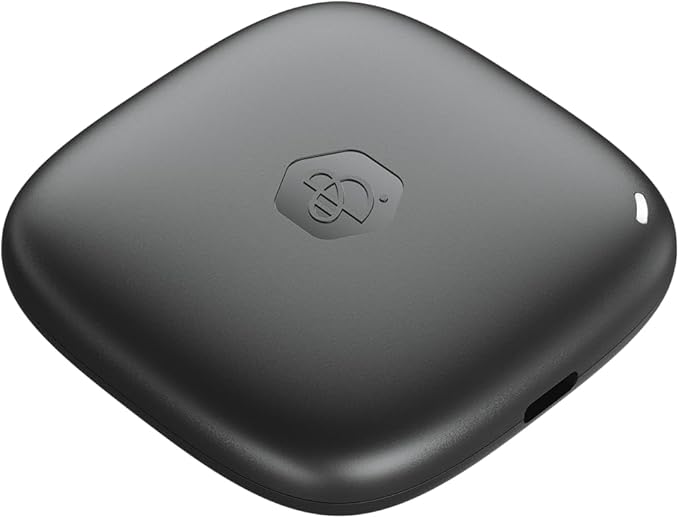
Synology BeeDrive 2TB USB C 3.2 External Portable SSD [BDS70-2T]
BeeDrive is the central place for your data backup, with which you can simplify the backup and synchronisation of your important files and photos from your computer and smartphone. of your important files and photos from your computer and smartphone. When the device is connected, you can also easily synchronise files and transfer them wirelessly from mobile devices to computers. PC backup Take advantage of BeeDrive's ultra-fast transfer rates and never worry about data protection concerns again, as with backups to public clouds. With PC backup, you can even back up selected folders automatically. All you have to do is set up the device once and the backup process starts automatically as soon as you connect BeeDrive. - Folders can be backed up automatically in real time. - Keep up to 5 file versions. So you can access previous versions in case of emergency. - Deleted computer files are stored in the Archived Files folder for effortless recovery. File synchronisation File synchronisation File synchronisation features are ideal for hybrid work models, automatically synchronising recent changes between computers. This allows you to ensure consistent workflows wherever you are. - Folders can be synchronised automatically when BeeDrive is connected to your computer. - Keep up to 5 file versions. So you can access earlier versions in an emergency. - Customise your synchronisation settings with one-way or two-way synchronisation options. Photo backup Store all your photos, free up phone memory and save on rising cloud storage costs. Every time you connect BeeDrive to your computer after the initial setup, your photos are automatically backed up via Wi-Fi. - With the BeeDrive mobile app, you can easily back up photos from up to 5 mobile devices. - For best results, use Concentrated Backup to keep your app open in the foreground. - Use options to back up HEIF or HEVC media as JPEG to ensure compatibility with non-Apple devices. BeeDrop BeeDrop is specially designed for users who want to transfer files and photos from their smartphones to their computers wirelessly. With BeeDrop, you don't need a cable. Similar to Airdrop, you transfer your files from your mobile phone to your computer and can use them immediately. - Easily transfer your photos, videos and files from your phone to BeeDrive, without any cables. - With the "camera" function, you can instantly share pictures of physical work documents with colleagues via email or messaging app. - When you transfer photos and files to BeeDrive, they are immediately available on your computer via File Explorer.
BeeDrive is the central place for your data backup, with which you can simplify the backup and synchronisation of your important files and photos from your computer and smartphone. of your important files and photos from your computer and smartphone. When the device is connected, you can also easily synchronise files and transfer them wirelessly from mobile devices to computers. PC backup Take advantage of BeeDrive's ultra-fast transfer rates and never worry about data protection concerns again, as with backups to public clouds. With PC backup, you can even back up selected folders automatically. All you have to do is set up the device once and the backup process starts automatically as soon as you connect BeeDrive. - Folders can be backed up automatically in real time. - Keep up to 5 file versions. So you can access previous versions in case of emergency. - Deleted computer files are stored in the Archived Files folder for effortless recovery. File synchronisation File synchronisation File synchronisation features are ideal for hybrid work models, automatically synchronising recent changes between computers. This allows you to ensure consistent workflows wherever you are. - Folders can be synchronised automatically when BeeDrive is connected to your computer. - Keep up to 5 file versions. So you can access earlier versions in an emergency. - Customise your synchronisation settings with one-way or two-way synchronisation options. Photo backup Store all your photos, free up phone memory and save on rising cloud storage costs. Every time you connect BeeDrive to your computer after the initial setup, your photos are automatically backed up via Wi-Fi. - With the BeeDrive mobile app, you can easily back up photos from up to 5 mobile devices. - For best results, use Concentrated Backup to keep your app open in the foreground. - Use options to back up HEIF or HEVC media as JPEG to ensure compatibility with non-Apple devices. BeeDrop BeeDrop is specially designed for users who want to transfer files and photos from their smartphones to their computers wirelessly. With BeeDrop, you don't need a cable. Similar to Airdrop, you transfer your files from your mobile phone to your computer and can use them immediately. - Easily transfer your photos, videos and files from your phone to BeeDrive, without any cables. - With the "camera" function, you can instantly share pictures of physical work documents with colleagues via email or messaging app. - When you transfer photos and files to BeeDrive, they are immediately available on your computer via File Explorer.
BeeDrive is the central place for your data backup, with which you can simplify the backup and synchronisation of your important files and photos from your computer and smartphone. of your important files and photos from your computer and smartphone. When the device is connected, you can also easily synchronise files and transfer them wirelessly from mobile devices to computers. PC backup Take advantage of BeeDrive's ultra-fast transfer rates and never worry about data protection concerns again, as with backups to public clouds. With PC backup, you can even back up selected folders automatically. All you have to do is set up the device once and the backup process starts automatically as soon as you connect BeeDrive. - Folders can be backed up automatically in real time. - Keep up to 5 file versions. So you can access previous versions in case of emergency. - Deleted computer files are stored in the Archived Files folder for effortless recovery. File synchronisation File synchronisation File synchronisation features are ideal for hybrid work models, automatically synchronising recent changes between computers. This allows you to ensure consistent workflows wherever you are. - Folders can be synchronised automatically when BeeDrive is connected to your computer. - Keep up to 5 file versions. So you can access earlier versions in an emergency. - Customise your synchronisation settings with one-way or two-way synchronisation options. Photo backup Store all your photos, free up phone memory and save on rising cloud storage costs. Every time you connect BeeDrive to your computer after the initial setup, your photos are automatically backed up via Wi-Fi. - With the BeeDrive mobile app, you can easily back up photos from up to 5 mobile devices. - For best results, use Concentrated Backup to keep your app open in the foreground. - Use options to back up HEIF or HEVC media as JPEG to ensure compatibility with non-Apple devices. BeeDrop BeeDrop is specially designed for users who want to transfer files and photos from their smartphones to their computers wirelessly. With BeeDrop, you don't need a cable. Similar to Airdrop, you transfer your files from your mobile phone to your computer and can use them immediately. - Easily transfer your photos, videos and files from your phone to BeeDrive, without any cables. - With the "camera" function, you can instantly share pictures of physical work documents with colleagues via email or messaging app. - When you transfer photos and files to BeeDrive, they are immediately available on your computer via File Explorer.
BeeDrive is the central place for your data backup, with which you can simplify the backup and synchronisation of your important files and photos from your computer and smartphone. of your important files and photos from your computer and smartphone. When the device is connected, you can also easily synchronise files and transfer them wirelessly from mobile devices to computers. PC backup Take advantage of BeeDrive's ultra-fast transfer rates and never worry about data protection concerns again, as with backups to public clouds. With PC backup, you can even back up selected folders automatically. All you have to do is set up the device once and the backup process starts automatically as soon as you connect BeeDrive. - Folders can be backed up automatically in real time. - Keep up to 5 file versions. So you can access previous versions in case of emergency. - Deleted computer files are stored in the Archived Files folder for effortless recovery. File synchronisation File synchronisation File synchronisation features are ideal for hybrid work models, automatically synchronising recent changes between computers. This allows you to ensure consistent workflows wherever you are. - Folders can be synchronised automatically when BeeDrive is connected to your computer. - Keep up to 5 file versions. So you can access earlier versions in an emergency. - Customise your synchronisation settings with one-way or two-way synchronisation options. Photo backup Store all your photos, free up phone memory and save on rising cloud storage costs. Every time you connect BeeDrive to your computer after the initial setup, your photos are automatically backed up via Wi-Fi. - With the BeeDrive mobile app, you can easily back up photos from up to 5 mobile devices. - For best results, use Concentrated Backup to keep your app open in the foreground. - Use options to back up HEIF or HEVC media as JPEG to ensure compatibility with non-Apple devices. BeeDrop BeeDrop is specially designed for users who want to transfer files and photos from their smartphones to their computers wirelessly. With BeeDrop, you don't need a cable. Similar to Airdrop, you transfer your files from your mobile phone to your computer and can use them immediately. - Easily transfer your photos, videos and files from your phone to BeeDrive, without any cables. - With the "camera" function, you can instantly share pictures of physical work documents with colleagues via email or messaging app. - When you transfer photos and files to BeeDrive, they are immediately available on your computer via File Explorer.
in 65 offers
The lowest price for Synology BeeDrive 2TB USB C 3.2 External Portable SSD [BDS70-2T] right now is $237.60 at LWT, compared across 34 retailers.
The all-time low was $139.95 on 13 Oct 2024 — today's price is 70% above the lowest ever. It has been notably cheaper before — worth setting a price alert.
Prices last updated 28 Oct 2026.
Last updated at 28/10/2026 02:55:34
Synology BeeDrive 1TB 3 Year Warranty Featuring BeeDrop - Transfer files from mobile device to PC over Wi-Fi
Delivery $16.50
[BDS70-1T] Synology BeeDrive 1TB , 3 Year Warranty, Featuring BeeDrop - Transfer files from mobile device to PC over Wi-Fi
7-day returns
Synology BeeDrive 1TB USB C 3.2 External Portable SSD
Delivery between 30 Oct – 4 Nov $10
Synology BeeDrive 1TB USB-C 3.2 External Portable SSD - BDS70-1T
Free delivery between 30 Oct – 6 Nov
Synology BDS70-1T BeeDrive 1TB USB-C 3.2 External Portable SSD
Delivery between Fri – Tue $14.50
Synology BeeDrive 1TB USB Type-C Portable SSD
7-day returns
BDS70-1T Synology Bds70-1TB Bee Drive Personal Backup Hub
Delivery $15
Synology 1TB BeeDrive Portable SSD
Free delivery between Thu – Fri
Synology 1TB BeeDrive Portable SSD
Free delivery between 30 Oct – 9 Nov
Synology BeeDrive 1TB (BDS70-1T)
Delivery between Fri – Tue $9.99
| Type | SSD |
| Use | Portable |
| Read Speed | Up to 1050MB/s |
| Write Speed | 730MB/s (recorded by CrystalDiskMark) |
| NVMe Support | Yes |
Synology BeeDrive 1TB 3 Year Warranty Featuring BeeDrop - Transfer files from mobile device to PC over Wi-Fi
Delivery $16.50
[BDS70-1T] Synology BeeDrive 1TB , 3 Year Warranty, Featuring BeeDrop - Transfer files from mobile device to PC over Wi-Fi
7-day returns
Synology BeeDrive 1TB USB C 3.2 External Portable SSD
Delivery between 30 Oct – 4 Nov $10
Synology BeeDrive 1TB USB-C 3.2 External Portable SSD - BDS70-1T
Free delivery between 30 Oct – 6 Nov
Synology BDS70-1T BeeDrive 1TB USB-C 3.2 External Portable SSD
Delivery between Fri – Tue $14.50
| Type | SSD |
| Use | Portable |
| Read Speed | Up to 1050MB/s |
| Write Speed | 730MB/s (recorded by CrystalDiskMark) |
| NVMe Support | Yes |