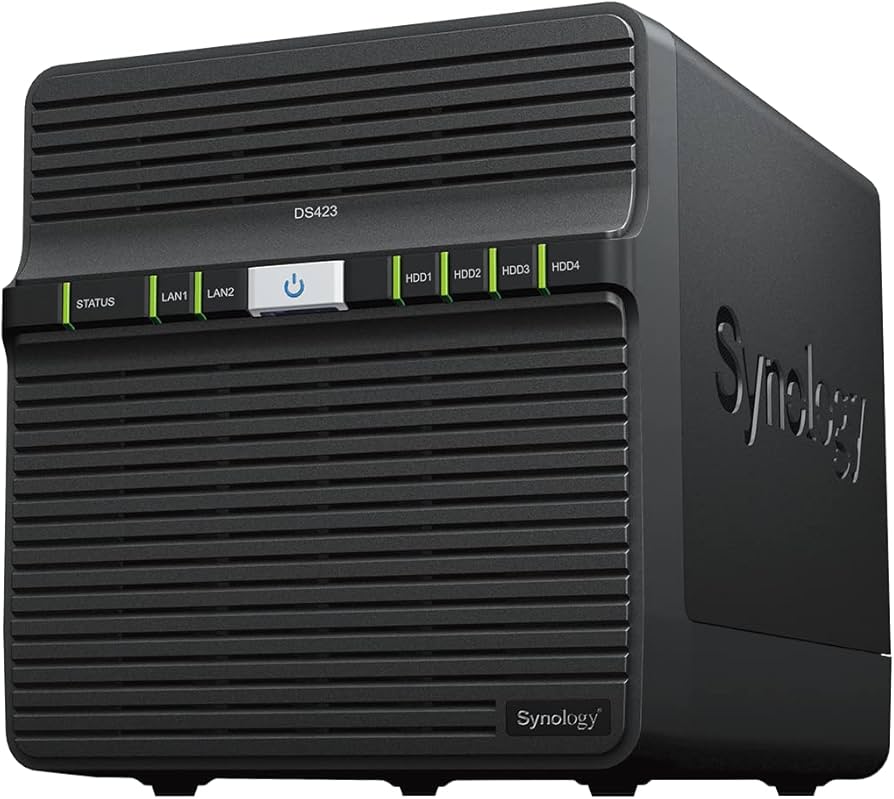
Synology DiskStation DS423+ NAS Diskless 4 Bay
Store all your files and create a powerful server for the office with the Synology DS423+. This Synology NAS has space for 4 hard drives, giving you a total storage capacity of 72TB. You can also insert 2 M.2 SSDs for extra fast cache memory, which allows you to access frequently used files quickly. This is useful when you have a lot of people working on the NAS at the same time, so you get on with your work without slowdowns. With the combination of 2GB of RAM and the Intel J4125 Quad-Core processor, you can work with over 10 people on the server of this NAS at the same time. Tasks and commands are processed quickly, making it easy to keep working. Want an extra powerful internet connection? No problem. With 2 Ethernet ports, the DS423+ offers extra security when one of your ports fails. As with all Synology NAS models, the DS423+ uses Synology Drive Server and allows you to edit the NAS storage space from any connected device. It's ideal when you work from home for a change and still want to access your files.
Store all your files and create a powerful server for the office with the Synology DS423+. This Synology NAS has space for 4 hard drives, giving you a total storage capacity of 72TB. You can also insert 2 M.2 SSDs for extra fast cache memory, which allows you to access frequently used files quickly. This is useful when you have a lot of people working on the NAS at the same time, so you get on with your work without slowdowns. With the combination of 2GB of RAM and the Intel J4125 Quad-Core processor, you can work with over 10 people on the server of this NAS at the same time. Tasks and commands are processed quickly, making it easy to keep working. Want an extra powerful internet connection? No problem. With 2 Ethernet ports, the DS423+ offers extra security when one of your ports fails. As with all Synology NAS models, the DS423+ uses Synology Drive Server and allows you to edit the NAS storage space from any connected device. It's ideal when you work from home for a change and still want to access your files.
Store all your files and create a powerful server for the office with the Synology DS423+. This Synology NAS has space for 4 hard drives, giving you a total storage capacity of 72TB. You can also insert 2 M.2 SSDs for extra fast cache memory, which allows you to access frequently used files quickly. This is useful when you have a lot of people working on the NAS at the same time, so you get on with your work without slowdowns. With the combination of 2GB of RAM and the Intel J4125 Quad-Core processor, you can work with over 10 people on the server of this NAS at the same time. Tasks and commands are processed quickly, making it easy to keep working. Want an extra powerful internet connection? No problem. With 2 Ethernet ports, the DS423+ offers extra security when one of your ports fails. As with all Synology NAS models, the DS423+ uses Synology Drive Server and allows you to edit the NAS storage space from any connected device. It's ideal when you work from home for a change and still want to access your files.
Store all your files and create a powerful server for the office with the Synology DS423+. This Synology NAS has space for 4 hard drives, giving you a total storage capacity of 72TB. You can also insert 2 M.2 SSDs for extra fast cache memory, which allows you to access frequently used files quickly. This is useful when you have a lot of people working on the NAS at the same time, so you get on with your work without slowdowns. With the combination of 2GB of RAM and the Intel J4125 Quad-Core processor, you can work with over 10 people on the server of this NAS at the same time. Tasks and commands are processed quickly, making it easy to keep working. Want an extra powerful internet connection? No problem. With 2 Ethernet ports, the DS423+ offers extra security when one of your ports fails. As with all Synology NAS models, the DS423+ uses Synology Drive Server and allows you to edit the NAS storage space from any connected device. It's ideal when you work from home for a change and still want to access your files.
in 11 offers
The lowest price for Synology DiskStation DS423+ NAS Diskless 4 Bay right now is $576.09 at Made-in-China.com, compared across 11 retailers.
The all-time low was $445.00 on 5 Mar 2026 — today's price is 29% above the lowest ever. It has been notably cheaper before — worth setting a price alert.
Prices last updated 5 Oct 2026.
Last updated at 05/10/2026 08:24:09
High-Capacity Diskstation Ds423+ Fully Optimized 4-Bay Nas Networking Storage System
Free delivery
Synology DS423 DiskStation Realtek 4-Bay 3.5 inch RTD1619B NAS Server - Black
Free delivery between Wed – Thu
SYNOLOGY DS423+ 4-Bay 3.5' Diskless, Intel Celeron 4-core, 2xGbE NAS (SMB) - 2GB RAM - 3 Year Warranty
Delivery $9
SYNOLOGY DS423+ 4-Bay 3.5' Diskless, Intel Celeron 4-core, 2xGbE NAS (SMB) - 2GB RAM - 3 Year Warranty
Delivery $9
SYNOLOGY DS423+ 4-Bay 3.5' Diskless, Intel Celeron 4-core, 2xGbE NAS (SMB) - 2GB RAM - 3 Year Warranty
Delivery between 8–13 Oct $11.49
Synology Ds423+ 4 Bay 3.5' Diskless, Intel Celeron 4 Core, 2x Gb E Nas (Smb) 2 Gb Ram 3 Year Warranty
Delivery $30
Synology DS423+ 4-Bay 3.5" Diskless, Intel Celeron 4-core, 2xGbE NAS (SMB) - 2GB RAM - 3 Year Warranty DS423+
Synology Ds423 Diskstation Realtek 4-bay 3.5 Inch Rtd1619b Nas Server
Free delivery
Affiliate Disclosure: We may receive a small commission for purchases made through this link at no extra cost to you. This helps support our site. Thank you!
SYNOLOGY DS423+ 4-Bay 3.5' Diskless, Intel Celeron 4-core, 2xGbE NAS (SMB) - 2GB RAM - 3 Year Warranty
Free delivery between 12–19 Oct
Synology DiskStation DS423+ 4-Bay Networking Storage Solution 2U Rack File Storage Server Private
Delivery $115.69
originally posted on bhphotovideo.com
First time NAS user and this was easy to setup. Shipping was fast as well. Utilizing as a Plex server and to backup data. Working flawlessly so far.
originally posted on adorama.com
Exactly what I was looking for, at least until Synology makes a better unit with an Intel chip!
originally posted on bhphotovideo.com
Just installed my new DS423 to replace the DS216se I have used for 5 years. Transferred the two (SHR) 4 TB drives from old unit with no data loss simply by moving the drives to bays 1 & 2. Installed an old pair of 1TB drives in bays 3 & 4 as Volume 2 to use as OTA broadcast TV DVR.Gave the new unit the same name I had used for the old one. My Win11 PC, my wife's MacBook Pro, my Android phone, and several TVs all work with the new server with no glitches.Two extra bays, much more memory, much faster processor, same management software I'm used to and painless setup. High expectations. 2023.05.02Ask again in a year.
| Data Transfer Speed | Up to 226/224 MB/s sequential read/write throughput |
| Read Speed | 226 MB/s (Sequential read) |
| Write Speed | 224 MB/s (Sequential write) |
| Hard Drive Spin Speed | 5400 RPM |
| Supported RAID Levels | RAID 6, JBOD, RAID 0, RAID 1, RAID 10 |
High-Capacity Diskstation Ds423+ Fully Optimized 4-Bay Nas Networking Storage System
Free delivery
Synology DS423 DiskStation Realtek 4-Bay 3.5 inch RTD1619B NAS Server - Black
Free delivery between Wed – Thu
SYNOLOGY DS423+ 4-Bay 3.5' Diskless, Intel Celeron 4-core, 2xGbE NAS (SMB) - 2GB RAM - 3 Year Warranty
Delivery $9
SYNOLOGY DS423+ 4-Bay 3.5' Diskless, Intel Celeron 4-core, 2xGbE NAS (SMB) - 2GB RAM - 3 Year Warranty
Delivery $9
SYNOLOGY DS423+ 4-Bay 3.5' Diskless, Intel Celeron 4-core, 2xGbE NAS (SMB) - 2GB RAM - 3 Year Warranty
Delivery between 8–13 Oct $11.49
First time NAS user and this was easy to setup. Shipping was fast as well. Utilizing as a Plex server and to backup data. Working flawlessly so far.
Exactly what I was looking for, at least until Synology makes a better unit with an Intel chip!
Just installed my new DS423 to replace the DS216se I have used for 5 years. Transferred the two (SHR) 4 TB drives from old unit with no data loss simply by moving the drives to bays 1 & 2. Installed an old pair of 1TB drives in bays 3 & 4 as Volume 2 to use as OTA broadcast TV DVR.Gave the new unit the same name I had used for the old one. My Win11 PC, my wife's MacBook Pro, my Android phone, and several TVs all work with the new server with no glitches.Two extra bays, much more memory, much faster processor, same management software I'm used to and painless setup. High expectations. 2023.05.02Ask again in a year.
I'm thoroughly impressed. I'm not going to get into the weeds, as there are plenty of reviews and videos you can wade through if you're looking for technical detail.It just works. DiskStation manager is easy to understand, use, and modify through adding packages as needed. I was buying this to use for storage and Plex, but found many more useful packages to use through Package manager to basically turn it into a baby home lab environment. Great sort of entry point into a slightly more powerful unit with 4 bays and expandability through RAM upgrades and NVMe. If you're on the fence, my recommendation is go for it.
I am not saying this is enterprise ready but for a home NAS under a thousand dollars it is hard to beat. I ended up putting two NVMe drives in it (storage and cache) and maxed out its ram which drove the overall ownership cost up but still worth it. Note: that to use an NVMe drive as a fast storage (and not cache) then you have to buy the Synology NVMe which is a bit pricier. For the cache NVMe I was able to buy a much cheaper drive that was listed as compatible (WD Black SN770) and offered a good price/performance ratio. The DS423+ has the Intel CPU in which has hardware accelerated transcoding that other models with AMD CPUs do not. The hardware transcoding makes it a much better option when using a NAS for anytype of media conversions or servers. Anyway, for some ... MoreI am not saying this is enterprise ready but for a home NAS under a thousand dollars it is hard to beat. I ended up putting two NVMe drives in it (storage and cache) and maxed out its ram which drove the overall ownership cost up but still worth it. Note: that to use an NVMe drive as a fast storage (and not cache) then you have to buy the Synology NVMe which is a bit pricier. For the cache NVMe I was able to buy a much cheaper drive that was listed as compatible (WD Black SN770) and offered a good price/performance ratio. The DS423+ has the Intel CPU in which has hardware accelerated transcoding that other models with AMD CPUs do not. The hardware transcoding makes it a much better option when using a NAS for anytype of media conversions or servers. Anyway, for some reason Synology is moving away from Intel chips to AMD and this is one of the few offerings they currently release that has that. It made purchasing this model a very easy decision for me. The older model was great too and had others features this one doesn't but I wanted the ability to use NVMe as storage so I opted for the DS423+.
I'm only using this for backups for my primary NAS unit, but it's working out great so far. I use a custom ssh script to to the backups and it was fairly straightforward to set up ssh keys and such so rsync could work passwordless from my primary NAS for it's backups.The speed seems great, the UI is responsive, and the apps and features seem like they'll be useful in the future if I change my primary NAS to a Synology as well.I'm using WD RED drives (5400rpm) and the copy speeds are slightly faster than what I got with my old Qnap, which had a drive bay fail. That's why I replaced it with this one. My setup is in a RAID 5 configuration. With four 8TB drives it took about a day and a half to build it's initial raid setup.The company I work for has always used ... MoreI'm only using this for backups for my primary NAS unit, but it's working out great so far. I use a custom ssh script to to the backups and it was fairly straightforward to set up ssh keys and such so rsync could work passwordless from my primary NAS for it's backups.The speed seems great, the UI is responsive, and the apps and features seem like they'll be useful in the future if I change my primary NAS to a Synology as well.I'm using WD RED drives (5400rpm) and the copy speeds are slightly faster than what I got with my old Qnap, which had a drive bay fail. That's why I replaced it with this one. My setup is in a RAID 5 configuration. With four 8TB drives it took about a day and a half to build it's initial raid setup.The company I work for has always used Synology in their labs and I've helped them set them up. The first one was almost 10 years ago and it's still running strong for them (that instance is using the 8 bay model).Great stuff!
| Data Transfer Speed | Up to 226/224 MB/s sequential read/write throughput |
| Read Speed | 226 MB/s (Sequential read) |
| Write Speed | 224 MB/s (Sequential write) |
| Hard Drive Spin Speed | 5400 RPM |
| Supported RAID Levels | RAID 6, JBOD, RAID 0, RAID 1, RAID 10 |