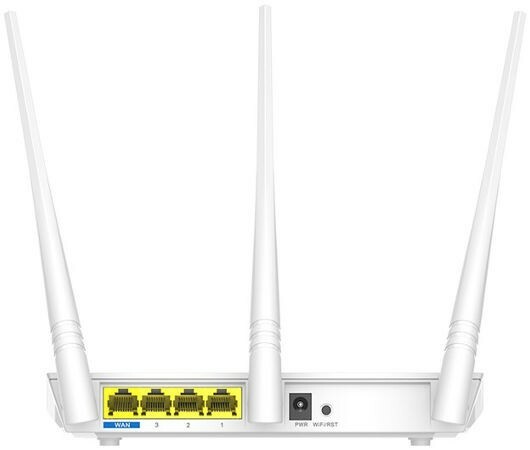
The Tenda F3 has been designed as a 300 MBit/s router specifically for your smart home network. Its 3 x 5dBi high-performance antennas provide Wi-Fi coverage of up to 200 m². The easy setup allows you to enjoy seamless Wi-Fi right away. It doesn't matter if you're a tech enthusiast or a beginner; the F3 is super easy to set up without time-consuming configurations.
The Tenda F3 has been designed as a 300 MBit/s router specifically for your smart home network. Its 3 x 5dBi high-performance antennas provide Wi-Fi coverage of up to 200 m². The easy setup allows you to enjoy seamless Wi-Fi right away. It doesn't matter if you're a tech enthusiast or a beginner; the F3 is super easy to set up without time-consuming configurations.
in 3 offers
The lowest price for Tenda F3 300Mbps Wireless Router right now is $30.45 at TechBuy.com.au, compared across 3 retailers.
The all-time low was $4.65 on 13 Feb 2026 — today's price is 555% above the lowest ever. It has been notably cheaper before — worth setting a price alert.
Prices last updated 18 Sept 2026.
Tenda F3 300Mbps Wireless Router
The Tenda F3 has been designed as a 300 MBit/s router specifically for your smart home network. Its 3 x 5dBi high-performance antennas provide Wi-Fi coverage of up to 200 m². The easy setup allows you to enjoy seamless Wi-Fi right away. It doesn't matter if you're a tech enthusiast or a beginner; the F3 is super easy to set up without time-consuming configurations.
The Tenda F3 has been designed as a 300 MBit/s router specifically for your smart home network. Its 3 x 5dBi high-performance antennas provide Wi-Fi coverage of up to 200 m². The easy setup allows you to enjoy seamless Wi-Fi right away. It doesn't matter if you're a tech enthusiast or a beginner; the F3 is super easy to set up without time-consuming configurations.
Last updated at 18/09/2026 11:59:18
Tenda F3 / Router / 300Mbps wireless router
Delivery between 23 Sept – 2 Oct $12
Tenda F3 300Mbps 2.4Ghz Wireless N Router Range Extender Access Point
Free delivery between 24 Sept – 2 Oct
Tenda F3 Router Access Point Extender Wifi 3 Antennas Repeater Wireless WLAN
Affiliate Disclosure: We may receive a small commission for purchases made through this link at no extra cost to you. This helps support our site. Thank you!
originally posted on walmart.com
Doesn't work with Chromecast. Signal strength varies greatly. As far as I can tell, 802.11g strength goes up to 20 Mbps. 802.11n I get up to 35 Mbps on an iPhone 5s and 6. Works good enough with everything except Windows 10 PC and Chromecast.
originally posted on walmart.com
This router has made all the difference in the world. My internet is now fast, clean and I have no wireless challenges from neighbors' competing networks. I only wish I had bought it months ago. It was easy to set up and as good as others that cost way more.
originally posted on walmart.com
Wow Its hard to believe how simple this was to set up. If it took us more than three minutes I would be shocked it does all the work. This router covers the whole house with reception to spare. The price makes it even more attractive. You won't be disappointed.
| General | |
| Device Type | Wireless router - 3-port switch (integrated) |
| Enclosure Type | Desktop |
| Connectivity Technology | Wireless, wired |
| Data Link Protocol | Ethernet, Fast Ethernet, IEEE 802.11b, IEEE 802.11g, IEEE 802.11n |
Tenda F3 / Router / 300Mbps wireless router
Delivery between 23 Sept – 2 Oct $12
Tenda F3 300Mbps 2.4Ghz Wireless N Router Range Extender Access Point
Free delivery between 24 Sept – 2 Oct
Tenda F3 Router Access Point Extender Wifi 3 Antennas Repeater Wireless WLAN
Affiliate Disclosure: We may receive a small commission for purchases made through this link at no extra cost to you. This helps support our site. Thank you!
Doesn't work with Chromecast. Signal strength varies greatly. As far as I can tell, 802.11g strength goes up to 20 Mbps. 802.11n I get up to 35 Mbps on an iPhone 5s and 6. Works good enough with everything except Windows 10 PC and Chromecast.
This router has made all the difference in the world. My internet is now fast, clean and I have no wireless challenges from neighbors' competing networks. I only wish I had bought it months ago. It was easy to set up and as good as others that cost way more.
Wow Its hard to believe how simple this was to set up. If it took us more than three minutes I would be shocked it does all the work. This router covers the whole house with reception to spare. The price makes it even more attractive. You won't be disappointed.
Installation and setup was easy, taking only a few minutes. It is providing WIFI that seems as good as my old router, which died. And this Tenda router was much cheaper. We use relatively little bandwidth, so I can't say how it would do in a very heavy usage household.
Honest review. I am a network administrator with a CCNA. I work with this kind of stuff every day. This product is perfect for home use. Very simple to setup and you cannot beat the price. I took off the router feature and am using four of these as access points around my house. The connection is flawless.
I got the router because of the price and I thought I had a problem with my previous Belkin router which was not that old. However it turned out to be my internet providers outdated modem. After the new modem was hooked up I hooked up the tenda. It was ok initially however with my phone it seemed to be very slow in pulling up my favorite apps like Instagram. Also, my magicjack did not work. I hooked up my old Belkin and all worked fine. I am not happy with the purchase but am not pursuing it because it is not worth the trouble.
I just purchased this router today and set it up in about 10 minutes. So far I am loving this product. The online set up was a breeze!!! And the website is very user friendly, it let me know that my devices were connected to the wireless router but that there was a problem from the router to the internet box and it told me to contact my internet service provider. (Knowing that my internet provider would first tell me to turn it off and back on again, I unplugged it and plugged it back in and all issues were resolved) The Tenda website gives lot of information on your router like the number of connected devices, download and upload speeds, the ability to reboot and reset the router from the website.The best part is parental controls!!!! You can go in and see the ... MoreI just purchased this router today and set it up in about 10 minutes. So far I am loving this product. The online set up was a breeze!!! And the website is very user friendly, it let me know that my devices were connected to the wireless router but that there was a problem from the router to the internet box and it told me to contact my internet service provider. (Knowing that my internet provider would first tell me to turn it off and back on again, I unplugged it and plugged it back in and all issues were resolved) The Tenda website gives lot of information on your router like the number of connected devices, download and upload speeds, the ability to reboot and reset the router from the website.The best part is parental controls!!!! You can go in and see the connected devices and set them all up with different parameters for the time of day you will allow them to be connected. All that with a super budget friendly router!!! My internet provider was going to charge me $7 a month to rent one from them. This will save me tons over the course of time.
I thought I might review this router given there is only 1 review so far. First off, you need to do some internet research on the wifi alliance neighborhood policy (https://www.smallnetbuilder.com/wireless/wireless-features/31743-bye-bye-40-mhz-mode-in-24-ghz-part-1). Doing the research is only necessary if you care that you might steal all the bandwidth in the neighborhood and your neighbors having none or little internet access. This router has a 40mhz only setting on it. 3 different settings (20 only,20/40, and 40 only). I currently have mine set on the 20/40. It increased the bandwidth on my laptop from 54 mbps to 150 mbps. I live in a not so saturated part of california and it has never dropped from 40 mhz to 20 mhz. It has all the bells and whistles except for ... MoreI thought I might review this router given there is only 1 review so far. First off, you need to do some internet research on the wifi alliance neighborhood policy (https://www.smallnetbuilder.com/wireless/wireless-features/31743-bye-bye-40-mhz-mode-in-24-ghz-part-1). Doing the research is only necessary if you care that you might steal all the bandwidth in the neighborhood and your neighbors having none or little internet access. This router has a 40mhz only setting on it. 3 different settings (20 only,20/40, and 40 only). I currently have mine set on the 20/40. It increased the bandwidth on my laptop from 54 mbps to 150 mbps. I live in a not so saturated part of california and it has never dropped from 40 mhz to 20 mhz. It has all the bells and whistles except for the logging capability. One thing I did notice that if you login to the router page and hit the wireless tab the router will revert to wpa-psk, not wpa2-psk, security. It does keep your wireless security key in memory though, but you need to reset it to wpa2-psk before you exit your browser. If you do not all your devices will lose their connection. In fact the last thing I do before exiting the router configuration page is check the wireless security page and making sure it is set to wpa2-psk. On that router configuration page with the wpa2 setting showing I close my browser. Exiting the browser seems to be the only way to log out of the router. If you do not close your browser your router configuration page will not close. You can not just close the tab. you will still be logged into the router. For a fairly inexpensive router it gets the job done. I have disabled all settings on the router( let me see, Qos,Wps,Upnp,Bandwidth management,Wmm,remote management,and the gosh almighty do I need that enabled? tab), probably forgot a couple. I do have url restrictions with the login router address that does not allow anyone but me from my main computer (hardwired to it) to login to the router. Anyway I brought this up about the security of the router. I have tested it numerous times for open ports through the use of software and from places on the internet which test for open ports. Has done an excellent job so far. It does not stealth most of the ports but reports every one of them as closed with a few ports stealthed. I have absolutely no open ports. I must point out that I also use a software firewall just in case. For those of you that want wireless management there are options to do it. In closing I am happy with it. It sure is faster than the old 56mbps b/g router that I had.
At the beginning i thought it will be crappy, slow because i always use fancy brands like Cisco, Fortinet, Ubiquity, etc, but then i realized i was wrong. It took me 2 min to set it up and dang!!! Its working and doing what i want flawlessly, The embedded features are great and easy to plug. I recommend this item, you will not get another to do the job like this and cheaper.
One of the best routers I ever had. Super easy to set up and a friendly and easy to understand manager menu. Long range and no hiccups at all. It was supposed to be a temporary solution while relocating but I believe that this little guy may become the main one now.
| General | |
| Device Type | Wireless router - 3-port switch (integrated) |
| Enclosure Type | Desktop |
| Connectivity Technology | Wireless, wired |
| Data Link Protocol | Ethernet, Fast Ethernet, IEEE 802.11b, IEEE 802.11g, IEEE 802.11n |

