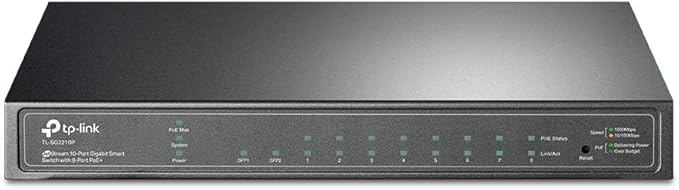
TP-Link 8-Port Gigabit Smart PoE Switch with 2 SFP Slots - TL-SG2210P
The TL-SG2210P has 8 Gigabit LAN ports that provide a total power of 53W to power PoE-enabled devices such as access points or IP-based surveillance cameras. Two SFP slots provide additional flexibility in your network. In addition to numerous QoS mechanisms, the PoE switch provides advanced security mechanisms and layer 2 management functions. This makes it the ideal choice for small and medium-sized companies that value simple and efficient management. The TL-SG2210P is packed with features such as Link Aggregation Group, 802.1Q VLAN, Access Control List (ACL), Quality of Service (QoS L2 to L4), Storm Control and IGMP Snooping. A quick and easy configuration is provided by the web menu. In addition, the switch can be easily administered via the web interface for faster maintenance and shorter downtime. The TL-SG2210P has 8 Gigabit LAN ports that support the IEEE802.3af PoE standard and provide a total power of 53W to power PoE-enabled devices. This provides an efficient and cost-effective solution to power access points, surveillance cameras, IP phones or other PoE-compatible devices. Multiple QoS policies enable the integration of voice and video applications that allow uninterrupted transmission (based on IP or MAC address, TCP or UDP port, etc.). The administrator can control the priority of various applications according to specific criteria such as port priority, 802.1p priority and DCSP priority to ensure smooth and jerk-free data transmission. The voice VLAN can be used especially for voice applications.
The TL-SG2210P has 8 Gigabit LAN ports that provide a total power of 53W to power PoE-enabled devices such as access points or IP-based surveillance cameras. Two SFP slots provide additional flexibility in your network. In addition to numerous QoS mechanisms, the PoE switch provides advanced security mechanisms and layer 2 management functions. This makes it the ideal choice for small and medium-sized companies that value simple and efficient management. The TL-SG2210P is packed with features such as Link Aggregation Group, 802.1Q VLAN, Access Control List (ACL), Quality of Service (QoS L2 to L4), Storm Control and IGMP Snooping. A quick and easy configuration is provided by the web menu. In addition, the switch can be easily administered via the web interface for faster maintenance and shorter downtime. The TL-SG2210P has 8 Gigabit LAN ports that support the IEEE802.3af PoE standard and provide a total power of 53W to power PoE-enabled devices. This provides an efficient and cost-effective solution to power access points, surveillance cameras, IP phones or other PoE-compatible devices. Multiple QoS policies enable the integration of voice and video applications that allow uninterrupted transmission (based on IP or MAC address, TCP or UDP port, etc.). The administrator can control the priority of various applications according to specific criteria such as port priority, 802.1p priority and DCSP priority to ensure smooth and jerk-free data transmission. The voice VLAN can be used especially for voice applications.
The TL-SG2210P has 8 Gigabit LAN ports that provide a total power of 53W to power PoE-enabled devices such as access points or IP-based surveillance cameras. Two SFP slots provide additional flexibility in your network. In addition to numerous QoS mechanisms, the PoE switch provides advanced security mechanisms and layer 2 management functions. This makes it the ideal choice for small and medium-sized companies that value simple and efficient management. The TL-SG2210P is packed with features such as Link Aggregation Group, 802.1Q VLAN, Access Control List (ACL), Quality of Service (QoS L2 to L4), Storm Control and IGMP Snooping. A quick and easy configuration is provided by the web menu. In addition, the switch can be easily administered via the web interface for faster maintenance and shorter downtime. The TL-SG2210P has 8 Gigabit LAN ports that support the IEEE802.3af PoE standard and provide a total power of 53W to power PoE-enabled devices. This provides an efficient and cost-effective solution to power access points, surveillance cameras, IP phones or other PoE-compatible devices. Multiple QoS policies enable the integration of voice and video applications that allow uninterrupted transmission (based on IP or MAC address, TCP or UDP port, etc.). The administrator can control the priority of various applications according to specific criteria such as port priority, 802.1p priority and DCSP priority to ensure smooth and jerk-free data transmission. The voice VLAN can be used especially for voice applications.
The TL-SG2210P has 8 Gigabit LAN ports that provide a total power of 53W to power PoE-enabled devices such as access points or IP-based surveillance cameras. Two SFP slots provide additional flexibility in your network. In addition to numerous QoS mechanisms, the PoE switch provides advanced security mechanisms and layer 2 management functions. This makes it the ideal choice for small and medium-sized companies that value simple and efficient management. The TL-SG2210P is packed with features such as Link Aggregation Group, 802.1Q VLAN, Access Control List (ACL), Quality of Service (QoS L2 to L4), Storm Control and IGMP Snooping. A quick and easy configuration is provided by the web menu. In addition, the switch can be easily administered via the web interface for faster maintenance and shorter downtime. The TL-SG2210P has 8 Gigabit LAN ports that support the IEEE802.3af PoE standard and provide a total power of 53W to power PoE-enabled devices. This provides an efficient and cost-effective solution to power access points, surveillance cameras, IP phones or other PoE-compatible devices. Multiple QoS policies enable the integration of voice and video applications that allow uninterrupted transmission (based on IP or MAC address, TCP or UDP port, etc.). The administrator can control the priority of various applications according to specific criteria such as port priority, 802.1p priority and DCSP priority to ensure smooth and jerk-free data transmission. The voice VLAN can be used especially for voice applications.
in 40 offers
The lowest price for TP-Link 8-Port Gigabit Smart PoE Switch with 2 SFP Slots - TL-SG2210P right now is $159.00 at Amazon.com.au, compared across 34 retailers.
The all-time low was $96.48 on 23 Feb 2026 — today's price is 65% above the lowest ever. It has been notably cheaper before — worth setting a price alert.
Prices last updated 1 Aug 2026.
Last updated at 01/08/2026 02:53:04
TP-Link Omada SG2210P Gigabit PoE Switch, 61 W PoE Budget, 8-Port, VLAN
Affiliate Disclosure: We may receive a small commission for purchases made through this link at no extra cost to you. This helps support our site. Thank you!
TP-Link TL-SG2210P JetStream 8-Port Gigabit Smart PoE+ Switch with 2 SFP Slots
Free delivery between Tue – Fri
TP Link 8 Port Gigabit Smart PoE Switch with 2 SFP Slots SG2210P - Switches
Delivery $16.57
TP Link 8 Port Gigabit Smart PoE Switch with 2 SFP Slots SG2210P - Switches
Delivery $15
Tp-link TL-SG2210P 8-port Gigabit Smart PoE Switch with 2 SFP slots - switch - 8 ports - managed
Free delivery
TP-LINK 8-PORT MANAGED GIGABIT SWITCH POE+(8) SFP(2) 5YR WTY
Delivery $16.50
TP-LINK TL-SG2210P Omada 8-Port Gigabit Smart PoE+ Switch with 2 SFP Slots
Delivery $11.99
TP-Link JetStream SG2210P - 8-Port Gigabit Smart PoE+ Switch with 2 SFP Slots
Delivery between 4–13 Aug $19.98
TP-Link TL-SG2210P 8-Port Gigabit Smart PoE Switch with 2 SFP Slots L2/L3/L4 QoS and IGMP Snooping Web/CLI Managed 53W, Fanless, Omada SDN
Delivery between Tue – Thu $11
Tp-Link OMADA 8-PORT Managed GIGABIT Rack SWITCH POE+(8) SFP(2) 61W
Delivery $16.95
originally posted on homeessentialsdirect.com
After months of assuming we had a bad PoE camera (professional grade Hikvision), we finally swapped it for a new one. The issue we were having, of intermittent connection loss, still continues. I had tried a different port, as well as testing the CAT6 cable that I crimped myself from a commercial spool. The old/new cameras and cable are all perfect. Turns out it is the switch. I am not quite sure what is causing it to malfunction-it may have not even been noticeable with basic switch functionality or possibly other PoE devices... it is definitely noticeable with a live PoE camera that constantly loses signal (intermittently). I should have checked my main Cisco enterprise switch log and would have seen this: Jun 18 17:54:08.325: %LINEPROTO-5-UPDOWN: Line protocol on ... MoreAfter months of assuming we had a bad PoE camera (professional grade Hikvision), we finally swapped it for a new one. The issue we were having, of intermittent connection loss, still continues. I had tried a different port, as well as testing the CAT6 cable that I crimped myself from a commercial spool. The old/new cameras and cable are all perfect. Turns out it is the switch. I am not quite sure what is causing it to malfunction-it may have not even been noticeable with basic switch functionality or possibly other PoE devices... it is definitely noticeable with a live PoE camera that constantly loses signal (intermittently). I should have checked my main Cisco enterprise switch log and would have seen this: Jun 18 17:54:08.325: %LINEPROTO-5-UPDOWN: Line protocol on Interface GigabitEthernet2/0/42, changed state to up Jun 18 17:54:41.979: %LINEPROTO-5-UPDOWN: Line protocol on Interface GigabitEthernet2/0/42, changed state to down Jun 18 17:54:42.977: %LINK-3-UPDOWN: Interface GigabitEthernet2/0/42, changed state to down Jun 18 17:54:45.812: %LINK-3-UPDOWN: Interface GigabitEthernet2/0/42, changed state to up Jun 18 17:54:46.819: %LINEPROTO-5-UPDOWN: Line protocol on Interface GigabitEthernet2/0/42, changed state to up Jun 18 17:54:55.383: %LINEPROTO-5-UPDOWN: Line protocol on Interface GigabitEthernet2/0/42, changed state to down Jun 18 17:54:56.381: %LINK-3-UPDOWN: Interface GigabitEthernet2/0/42, changed state to down Jun 18 17:55:02.849: %LINK-3-UPDOWN: Interface GigabitEthernet2/0/42, changed state to up Jun 18 17:55:03.855: %LINEPROTO-5-UPDOWN: Line protocol on Interface GigabitEthernet2/0/42, changed state to up Jun 18 17:55:14.164: %LINEPROTO-5-UPDOWN: Line protocol on Interface GigabitEthernet2/0/42, changed state to down Jun 18 17:55:15.163: %LINK-3-UPDOWN: Interface GigabitEthernet2/0/42, changed state to down Jun 18 17:55:17.528: %LINK-3-UPDOWN: Interface GigabitEthernet2/0/42, changed state to up Jun 18 17:55:18.535: %LINEPROTO-5-UPDOWN: Line protocol on Interface GigabitEthernet2/0/42, changed state to up As can be seen from the above, the link is constantly going down and back up again. Shame on me for not looking at the log before swapping out the camera. There is only 1 device connected to this switch, the PoE camera. I wouldn't recommend this switch for professionals. If you are an amateur and don't really care if it works.. might be a good solution. Stick with the brands that represent quality .. Cisco/Netgear/Linksys/etc.
originally posted on ebay.com
This is an excellent POE switch with 8 POE ports to replace the well known TL-SF1008P. The only thing to be careful with is this is a managed switch, with an default IP of 192 dot 168 dot 0 dot 1 Very similar to modems/routers, the IP will need to be changed prior to adding it to the network.
originally posted on bhphotovideo.com
I used four of these to create a distributed network in an office suite for VoIP telephones and data connectivity. Having the SFP slots allowed for a fiber backbone leaving all the copper ports available. Be cautioned, though, that they come with a default IP address that you should change so as not to have any conflicts.
| General | |
| Device Type | Switch - 8 ports - Managed |
| Enclosure Type | Desktop |
| Subtype | Gigabit Ethernet |
| Ports | 8 x 10/100/1000 + 2 x SFP |
TP-Link Omada SG2210P Gigabit PoE Switch, 61 W PoE Budget, 8-Port, VLAN
Affiliate Disclosure: We may receive a small commission for purchases made through this link at no extra cost to you. This helps support our site. Thank you!
TP-Link TL-SG2210P JetStream 8-Port Gigabit Smart PoE+ Switch with 2 SFP Slots
Free delivery between Tue – Fri
TP Link 8 Port Gigabit Smart PoE Switch with 2 SFP Slots SG2210P - Switches
Delivery $16.57
TP Link 8 Port Gigabit Smart PoE Switch with 2 SFP Slots SG2210P - Switches
Delivery $15
Tp-link TL-SG2210P 8-port Gigabit Smart PoE Switch with 2 SFP slots - switch - 8 ports - managed
Free delivery
After months of assuming we had a bad PoE camera (professional grade Hikvision), we finally swapped it for a new one. The issue we were having, of intermittent connection loss, still continues. I had tried a different port, as well as testing the CAT6 cable that I crimped myself from a commercial spool. The old/new cameras and cable are all perfect. Turns out it is the switch. I am not quite sure what is causing it to malfunction-it may have not even been noticeable with basic switch functionality or possibly other PoE devices... it is definitely noticeable with a live PoE camera that constantly loses signal (intermittently). I should have checked my main Cisco enterprise switch log and would have seen this: Jun 18 17:54:08.325: %LINEPROTO-5-UPDOWN: Line protocol on ... MoreAfter months of assuming we had a bad PoE camera (professional grade Hikvision), we finally swapped it for a new one. The issue we were having, of intermittent connection loss, still continues. I had tried a different port, as well as testing the CAT6 cable that I crimped myself from a commercial spool. The old/new cameras and cable are all perfect. Turns out it is the switch. I am not quite sure what is causing it to malfunction-it may have not even been noticeable with basic switch functionality or possibly other PoE devices... it is definitely noticeable with a live PoE camera that constantly loses signal (intermittently). I should have checked my main Cisco enterprise switch log and would have seen this: Jun 18 17:54:08.325: %LINEPROTO-5-UPDOWN: Line protocol on Interface GigabitEthernet2/0/42, changed state to up Jun 18 17:54:41.979: %LINEPROTO-5-UPDOWN: Line protocol on Interface GigabitEthernet2/0/42, changed state to down Jun 18 17:54:42.977: %LINK-3-UPDOWN: Interface GigabitEthernet2/0/42, changed state to down Jun 18 17:54:45.812: %LINK-3-UPDOWN: Interface GigabitEthernet2/0/42, changed state to up Jun 18 17:54:46.819: %LINEPROTO-5-UPDOWN: Line protocol on Interface GigabitEthernet2/0/42, changed state to up Jun 18 17:54:55.383: %LINEPROTO-5-UPDOWN: Line protocol on Interface GigabitEthernet2/0/42, changed state to down Jun 18 17:54:56.381: %LINK-3-UPDOWN: Interface GigabitEthernet2/0/42, changed state to down Jun 18 17:55:02.849: %LINK-3-UPDOWN: Interface GigabitEthernet2/0/42, changed state to up Jun 18 17:55:03.855: %LINEPROTO-5-UPDOWN: Line protocol on Interface GigabitEthernet2/0/42, changed state to up Jun 18 17:55:14.164: %LINEPROTO-5-UPDOWN: Line protocol on Interface GigabitEthernet2/0/42, changed state to down Jun 18 17:55:15.163: %LINK-3-UPDOWN: Interface GigabitEthernet2/0/42, changed state to down Jun 18 17:55:17.528: %LINK-3-UPDOWN: Interface GigabitEthernet2/0/42, changed state to up Jun 18 17:55:18.535: %LINEPROTO-5-UPDOWN: Line protocol on Interface GigabitEthernet2/0/42, changed state to up As can be seen from the above, the link is constantly going down and back up again. Shame on me for not looking at the log before swapping out the camera. There is only 1 device connected to this switch, the PoE camera. I wouldn't recommend this switch for professionals. If you are an amateur and don't really care if it works.. might be a good solution. Stick with the brands that represent quality .. Cisco/Netgear/Linksys/etc.
This is an excellent POE switch with 8 POE ports to replace the well known TL-SF1008P. The only thing to be careful with is this is a managed switch, with an default IP of 192 dot 168 dot 0 dot 1 Very similar to modems/routers, the IP will need to be changed prior to adding it to the network.
I used four of these to create a distributed network in an office suite for VoIP telephones and data connectivity. Having the SFP slots allowed for a fiber backbone leaving all the copper ports available. Be cautioned, though, that they come with a default IP address that you should change so as not to have any conflicts.
Awesome hub with expandability! The PoE works as intended. It's powering my TP Link wifi extender outside with zero issues.
Let's set the record straight. The latest POE version for the United States is 1.0, and it works perfectly with the latest software controller. The latest "NON" POE version is 3.0. Please make sure you are reviewing the correct product. Contrary to several reviews, v1 of the POE switch is NOT end of life. I have 2 of the POE US models, both version 1, and they adopted and work just fine. No connection issues, and no issues with the software controller. My new Omada system works better than my Unifi system did, and costs nearly half as much. I highly recommend the Omada SDN setup.
This was an excellent purchase with a good price. The lights quickly let you know if an issue exists. The switch has helped me expand my POE network with minimal effort.
So far so good, it's not a bottle neck of data transfer with gigabit speeds 10/100/1000, and half of the 16 ports (8) are POE. Technically it's a 15 port switch since 1 port is required to transfer datst with the router. So far I'm running 5 devices POE and it has no issue powering them, not even at night when the IR LEDs kick on. I'm going to be adding a WiFi access point that is POE, and possibly running 2 WiFi cameras from this POE using all 8 POE ports to see if it has the wattage to run everything. BONUS it pays for itself from the savings ~$40 for each POE injector! WARNING this isn't a router or modem or WiFi access point! You'll need a modem to get your internet signal, some modems have a couple of ports and WiFi, but I don't like devices that claim to do ... MoreSo far so good, it's not a bottle neck of data transfer with gigabit speeds 10/100/1000, and half of the 16 ports (8) are POE. Technically it's a 15 port switch since 1 port is required to transfer datst with the router. So far I'm running 5 devices POE and it has no issue powering them, not even at night when the IR LEDs kick on. I'm going to be adding a WiFi access point that is POE, and possibly running 2 WiFi cameras from this POE using all 8 POE ports to see if it has the wattage to run everything. BONUS it pays for itself from the savings ~$40 for each POE injector! WARNING this isn't a router or modem or WiFi access point! You'll need a modem to get your internet signal, some modems have a couple of ports and WiFi, but I don't like devices that claim to do everything, multitasking devices typically suck! You'll need a router to direct internet traffic to the correct device, but they usually only have ~4 ports, some have WiFi antennas for an access point, but I don't like them because the best location for your router is not typically the best location for WiFi coverage. You should get a secondary WiFi access point that is dedicated to that job, it will give better connection speeds, and you can locate it in the best stop for covering your home and property (I can move my lawn and snowblow the sidewalk without losing connection). However your WiFi is going to slow down if you try to run everything wirelessly. So you'll want a good switch to hard wire anything you can. Desktop computers, printers, digital storage, game consoles, security cameras, WiFi access point, smart home controller. You'll get less WiFi interference, and better security if devices aren't WiFi connected with the default password for any drive-by hacker to steal, or neighbor to leach off your internet.
I ordered an SG2210P but received a T1500G-10PS - the new replacement. This new product has a design problem in that all tagged VLAN traffic is marked as undersized packets (the original SG2210P did not have this problem). With no firmware updates for over a year, TP Link show no sign of fixing this problem.
This is a great little POE switch that provides Power Over Ethernet to ports 1-4. However upon receiving the switch I adopted it into my network and updated the firmware and everything seemed fine, so I took my other devices and plugged them into ports 5-7 (8 being the uplink to the LAN port on the TL-R605). When I started running speed tests the upload test on speedtest.net was freezing up and bogging down my whole network. I switched everything that was plugged into ports 5-7 back into the LAN ports of the TL-R605 and my speedtests went back to normal. At first, I thought it might be a hardware issue so I started a replacement return through Home Essentials Direct. I woke up the next morning after being up all night trying to figure it out, and it dawned on me to ... MoreThis is a great little POE switch that provides Power Over Ethernet to ports 1-4. However upon receiving the switch I adopted it into my network and updated the firmware and everything seemed fine, so I took my other devices and plugged them into ports 5-7 (8 being the uplink to the LAN port on the TL-R605). When I started running speed tests the upload test on speedtest.net was freezing up and bogging down my whole network. I switched everything that was plugged into ports 5-7 back into the LAN ports of the TL-R605 and my speedtests went back to normal. At first, I thought it might be a hardware issue so I started a replacement return through Home Essentials Direct. I woke up the next morning after being up all night trying to figure it out, and it dawned on me to just go ahead and revert the firmware back down to 1.0.0 and so I did. I then plugged everything back into the POE switch (TL-SG2008P) and boom the speedtests ran just fine as if I was plugged into the LAN ports on the R605. If you do purchase this switch, or are having issues with upload connectivity on your 1Gbps connection try reverting the firmware back to 1.0.0 until they come out with a fix.
This is an excellent and compact switch that is loaded with features. Having eight Gigabit Ethernet ports plus two SFP ports makes this a hugely useful bit of kit in a mixed copper/fibre network environment. Each of the Ethernet ports can be set to provide PoE at 48Vdc with is handy for powering Wi-Fi APs, IP cameras, or (in my case) VOIP 'phones. My only issue is that the DC input connector is a 5.5mm diameter connector like most of my other kit - the problem being that the PSU for this unit runs at 48V.
| General | |
| Device Type | Switch - 8 ports - Managed |
| Enclosure Type | Desktop |
| Subtype | Gigabit Ethernet |
| Ports | 8 x 10/100/1000 + 2 x SFP |

