Last updated at 01/03/2026 11:32:59
Tp-link Archer Ax50 Ax3000 Dual-band Gigabit Wi-fi 6 Router
Delivery $60.26
Affiliate Disclosure: We may receive a small commission for purchases made through this link at no extra cost to you. This helps support our site. Thank you!
originally posted on shopee.com.my
Performance:ExcellentVery decent router. Wide coverage, good speed and stable connection. Got this to replace an aging C1200 router which came with the Unifi Broadband service. Hardware setup was easy, just replace old unit with this new one. TP-Link's Tether app downloaded from Play Store easily recognises this AX53 unit and when setting up the Internet Connection, need to select PPPoE as connection type and input the ISP username+password (found this on the Unifi installation service receipt, otherwise have to contact them to get it). Also, select Malaysia-Unifi as the ISP (under the IPTV/VLAN option) then Save, and it is good to go! Tether app enables management of wifi SSID, password and monitoring of all connected devices. Unit was shipped out fast by ... MorePerformance:ExcellentVery decent router. Wide coverage, good speed and stable connection. Got this to replace an aging C1200 router which came with the Unifi Broadband service. Hardware setup was easy, just replace old unit with this new one. TP-Link's Tether app downloaded from Play Store easily recognises this AX53 unit and when setting up the Internet Connection, need to select PPPoE as connection type and input the ISP username+password (found this on the Unifi installation service receipt, otherwise have to contact them to get it). Also, select Malaysia-Unifi as the ISP (under the IPTV/VLAN option) then Save, and it is good to go! Tether app enables management of wifi SSID, password and monitoring of all connected devices. Unit was shipped out fast by TP-Link's official store and arrived in real fine condition, as it is bubblewrapped. All good.👍
originally posted on bestbuy.com
I purchased the TP Link Archer AX3000 Pro to replace my Starlink Gen 1 router. It was super easy to set up with the included instructions and was able to get it to connect to the starlink right away without any issues. If you have a gen 2 or gen 3 I believe you still have to use the starlink router that came with your dish but should be able to add this router as an access point.Right away, I noticed a significant difference in range and also speeds. I was having trouble maintaining a constant connection with the stock router when I was only about 25 feet away in a different room. Now I have a reliable wifi connection and in turn much faster speeds. Went from an average of about 50 to 80 mbps and I now have steady speeds that are usually around 120 to 160mbps. ... MoreI purchased the TP Link Archer AX3000 Pro to replace my Starlink Gen 1 router. It was super easy to set up with the included instructions and was able to get it to connect to the starlink right away without any issues. If you have a gen 2 or gen 3 I believe you still have to use the starlink router that came with your dish but should be able to add this router as an access point.Right away, I noticed a significant difference in range and also speeds. I was having trouble maintaining a constant connection with the stock router when I was only about 25 feet away in a different room. Now I have a reliable wifi connection and in turn much faster speeds. Went from an average of about 50 to 80 mbps and I now have steady speeds that are usually around 120 to 160mbps. Sometimes even in the 200s. I highly recommend this router to anybody that is having issues with poor wifi range, especially if you are into online gaming.This is also a mesh router, so you can add mesh nodes to even further increase your wifi range if needed. These are sold seperately. Overall, this was a great purchase and I am pretty satisfied with the router.
originally posted on bestbuy.com
This router is awesome! My old gaming router kept dropping out during games and wasn't getting a signal all over this 1300 square foot house. I bought the Archer AX 3000 Pro. It has an app that allows me to manage it very easily! My wife is an epileptic, so the lights on the old router could trigger her seizures. This router allows you to turn them off and they don't blink. I have the lights set to turn off at night and you can configure the hours the way you like! The router also has an auto-update feature! I can manage all of this from my art phone and even remotely! The kids love that they no longer have connectivity issues. We have 3 gaming boys ages 17 to 21. All three love to game and go to college. They used to complain about the Internet being crap but now ... MoreThis router is awesome! My old gaming router kept dropping out during games and wasn't getting a signal all over this 1300 square foot house. I bought the Archer AX 3000 Pro. It has an app that allows me to manage it very easily! My wife is an epileptic, so the lights on the old router could trigger her seizures. This router allows you to turn them off and they don't blink. I have the lights set to turn off at night and you can configure the hours the way you like! The router also has an auto-update feature! I can manage all of this from my art phone and even remotely! The kids love that they no longer have connectivity issues. We have 3 gaming boys ages 17 to 21. All three love to game and go to college. They used to complain about the Internet being crap but now they are recommending this to their friends! This router is literally a game changer!
Tp-link Archer Ax50 Ax3000 Dual-band Gigabit Wi-fi 6 Router
Delivery $60.26
Affiliate Disclosure: We may receive a small commission for purchases made through this link at no extra cost to you. This helps support our site. Thank you!
Performance:ExcellentVery decent router. Wide coverage, good speed and stable connection. Got this to replace an aging C1200 router which came with the Unifi Broadband service. Hardware setup was easy, just replace old unit with this new one. TP-Link's Tether app downloaded from Play Store easily recognises this AX53 unit and when setting up the Internet Connection, need to select PPPoE as connection type and input the ISP username+password (found this on the Unifi installation service receipt, otherwise have to contact them to get it). Also, select Malaysia-Unifi as the ISP (under the IPTV/VLAN option) then Save, and it is good to go! Tether app enables management of wifi SSID, password and monitoring of all connected devices. Unit was shipped out fast by ... MorePerformance:ExcellentVery decent router. Wide coverage, good speed and stable connection. Got this to replace an aging C1200 router which came with the Unifi Broadband service. Hardware setup was easy, just replace old unit with this new one. TP-Link's Tether app downloaded from Play Store easily recognises this AX53 unit and when setting up the Internet Connection, need to select PPPoE as connection type and input the ISP username+password (found this on the Unifi installation service receipt, otherwise have to contact them to get it). Also, select Malaysia-Unifi as the ISP (under the IPTV/VLAN option) then Save, and it is good to go! Tether app enables management of wifi SSID, password and monitoring of all connected devices. Unit was shipped out fast by TP-Link's official store and arrived in real fine condition, as it is bubblewrapped. All good.👍
I purchased the TP Link Archer AX3000 Pro to replace my Starlink Gen 1 router. It was super easy to set up with the included instructions and was able to get it to connect to the starlink right away without any issues. If you have a gen 2 or gen 3 I believe you still have to use the starlink router that came with your dish but should be able to add this router as an access point.Right away, I noticed a significant difference in range and also speeds. I was having trouble maintaining a constant connection with the stock router when I was only about 25 feet away in a different room. Now I have a reliable wifi connection and in turn much faster speeds. Went from an average of about 50 to 80 mbps and I now have steady speeds that are usually around 120 to 160mbps. ... MoreI purchased the TP Link Archer AX3000 Pro to replace my Starlink Gen 1 router. It was super easy to set up with the included instructions and was able to get it to connect to the starlink right away without any issues. If you have a gen 2 or gen 3 I believe you still have to use the starlink router that came with your dish but should be able to add this router as an access point.Right away, I noticed a significant difference in range and also speeds. I was having trouble maintaining a constant connection with the stock router when I was only about 25 feet away in a different room. Now I have a reliable wifi connection and in turn much faster speeds. Went from an average of about 50 to 80 mbps and I now have steady speeds that are usually around 120 to 160mbps. Sometimes even in the 200s. I highly recommend this router to anybody that is having issues with poor wifi range, especially if you are into online gaming.This is also a mesh router, so you can add mesh nodes to even further increase your wifi range if needed. These are sold seperately. Overall, this was a great purchase and I am pretty satisfied with the router.
This router is awesome! My old gaming router kept dropping out during games and wasn't getting a signal all over this 1300 square foot house. I bought the Archer AX 3000 Pro. It has an app that allows me to manage it very easily! My wife is an epileptic, so the lights on the old router could trigger her seizures. This router allows you to turn them off and they don't blink. I have the lights set to turn off at night and you can configure the hours the way you like! The router also has an auto-update feature! I can manage all of this from my art phone and even remotely! The kids love that they no longer have connectivity issues. We have 3 gaming boys ages 17 to 21. All three love to game and go to college. They used to complain about the Internet being crap but now ... MoreThis router is awesome! My old gaming router kept dropping out during games and wasn't getting a signal all over this 1300 square foot house. I bought the Archer AX 3000 Pro. It has an app that allows me to manage it very easily! My wife is an epileptic, so the lights on the old router could trigger her seizures. This router allows you to turn them off and they don't blink. I have the lights set to turn off at night and you can configure the hours the way you like! The router also has an auto-update feature! I can manage all of this from my art phone and even remotely! The kids love that they no longer have connectivity issues. We have 3 gaming boys ages 17 to 21. All three love to game and go to college. They used to complain about the Internet being crap but now they are recommending this to their friends! This router is literally a game changer!
Hardware performance is fantastic, but any kind of usage or client information is non-existent. Compared to a mesh system that this replaced I’m very happy with the coverage in my house, and the speeds to all 40+ devices connected. What I’m very displeased with is that TP Link provides very little (and largely useless) information about those connected devices, particularly how much data they are each using. Through TP Link’s Tether app they claim to provide that in real-time and via two separate subscriptions. I have paid for both additional subscriptions, but still do now have useful information regarding basics like data usage. TP Link appears to be forcused on “parental controls” such as setting time limits and website tracking, but only through a poorly ... MoreHardware performance is fantastic, but any kind of usage or client information is non-existent. Compared to a mesh system that this replaced I’m very happy with the coverage in my house, and the speeds to all 40+ devices connected. What I’m very displeased with is that TP Link provides very little (and largely useless) information about those connected devices, particularly how much data they are each using. Through TP Link’s Tether app they claim to provide that in real-time and via two separate subscriptions. I have paid for both additional subscriptions, but still do now have useful information regarding basics like data usage. TP Link appears to be forcused on “parental controls” such as setting time limits and website tracking, but only through a poorly implemented “profiles” feature that tries to fit each profile into traditional “mom”, “dad”, “son”, “daughter” canned profiles. I would not buy this router again.
I'm a computer tech and installed this in a single story 1,700 sq. ft house. It was very easy to log into and setup the wireless network name and password. I used the same one as the old router so everything would connect back automatically. The router was located about mid point in the house so it had a great signal throughout the house. The incoming internet speed was 600Mbps and when checking it on my phone I was getting 550Mbps. The customer previously had an issue with an LG TV buffering, along with an HP laptop and Amazon kindle device that would not see the Century Link router but this router solved all of the problems. We set this up with an Arris Surfboard SB6019 modem with Sparklight as the internet provider. This new setup solved all of the problems and ... MoreI'm a computer tech and installed this in a single story 1,700 sq. ft house. It was very easy to log into and setup the wireless network name and password. I used the same one as the old router so everything would connect back automatically. The router was located about mid point in the house so it had a great signal throughout the house. The incoming internet speed was 600Mbps and when checking it on my phone I was getting 550Mbps. The customer previously had an issue with an LG TV buffering, along with an HP laptop and Amazon kindle device that would not see the Century Link router but this router solved all of the problems. We set this up with an Arris Surfboard SB6019 modem with Sparklight as the internet provider. This new setup solved all of the problems and worked great. This is a very good router for a smaller house. The wireless connections were solid.
After three months, it has become very inconsistent… At first, it was an issue where once every other week it would drop in speed significantly. It would go down to about 10 megs download. And I would have to restart it once or twice to get it back up to speed. Now it’s doing it multiple times a day. As far as my online research Suggest that it is or it could be a bad heat sink. Therefore, Bouncing it on the wall or in a position that gets the best airflow helps a little, but does not solve it. Reaching out to the company today and will be updating this review as soon as possible. If it is a heat sink, there’s no easy solution other than the manufacturer will offer one.I also live in an apartment complex, so there is the idea that something could be interfering ... MoreAfter three months, it has become very inconsistent… At first, it was an issue where once every other week it would drop in speed significantly. It would go down to about 10 megs download. And I would have to restart it once or twice to get it back up to speed. Now it’s doing it multiple times a day. As far as my online research Suggest that it is or it could be a bad heat sink. Therefore, Bouncing it on the wall or in a position that gets the best airflow helps a little, but does not solve it. Reaching out to the company today and will be updating this review as soon as possible. If it is a heat sink, there’s no easy solution other than the manufacturer will offer one.I also live in an apartment complex, so there is the idea that something could be interfering with the signals, but it doesn’t seem like this is the case.
I think this router is over priced for the lack of features. My last Asus router cost mean around $60 bucks, and did a lot more.This router lacks MAC filtering, which would allow me to allow, or block the MAC addresses from accessing the network . With this one, you can only block machines from accessing the network. My little $60 Asus router had this by default, before it died on me after 4 years.Plus, with my Asus router, I could specify which devices could access the network at what time. I know, I should have just bought the outdated Asus router made 8 years ago. I didn't because it doesn't support the new WiFi standards. Apples and oranges, I know!I would suggest going with the cheaper version of this router (TP-Link - Archer AX20 AX1800), unless you just ... MoreI think this router is over priced for the lack of features. My last Asus router cost mean around $60 bucks, and did a lot more.This router lacks MAC filtering, which would allow me to allow, or block the MAC addresses from accessing the network . With this one, you can only block machines from accessing the network. My little $60 Asus router had this by default, before it died on me after 4 years.Plus, with my Asus router, I could specify which devices could access the network at what time. I know, I should have just bought the outdated Asus router made 8 years ago. I didn't because it doesn't support the new WiFi standards. Apples and oranges, I know!I would suggest going with the cheaper version of this router (TP-Link - Archer AX20 AX1800), unless you just like using apps. The app allows you to check basic functions right away. Why pay for it, if you have your tablet in your hands, and you can log into the web browser. You don't get anything extra.I would also advise to reserve an IP address for those dumb devices that don't know how to obtain a new IP address when the power goes out. You know, your TV, your PS4, etc. Powered off my PS4 for an hour, and it couldn't connect to Internet when I powered it back on. Logged into the router, and saw that my MAC had took it's IP. I know this because I wrote down the MAC and IP address of the PS4 day 1, when I setup the router. It wasn't smart enough to request a new one. I had to give my MAC the static IP address that it originally had, and then the PS4 was able to connect. If I didn't, it would never had connected. Same thing happened to my TV. After a week, it would never connect. Had to statically give it an unused address. It wasn't smart enough to clear it's IP table.It's just an FYI, because it will come up in the future.Whenever I setup a new router, I write down the address, and MAC addresses of all my devices. I also re-subnet the address space, and never use the default. That way, troubleshooting is 5 minutes, instead of an hour.I paid $129 for this router. It's currently $99, which is an okay price, I guess in this economy.I get a lot of signal drops whenever I close the door to a room. Never got that with my old router, but could be due to all of the other neighbor's WiFi signals stepping on my. These signals do have to go through walls. They are strongest if they don't have to compete with other networks.I know too long, but I work as a network engineer by profession, so couldn't help it. So basi
We finally upgraded an old router and had no idea how much faster the new technology is. This thing even has the ability to mesh with Wi-Fi devices to create a much larger Wi-Fi umbrella. The speed of the Wi-Fi is 10 times faster than what we were used to. We used the standalone set up to avoid using their server and the Tether app. The Tether app is pretty interesting and you might try it out, but I ended up unbinding it and operating it myself by using the 192.168.0.1 address in my browser. Amazing upgrade and I’m so happy that I am getting back into the streaming services like Amazon video because everything is so fast, it’s even driven me to go find a new TV because of the speed now I can really watch some good quality movies at 120 MHz speed. The LG 48 inch ... MoreWe finally upgraded an old router and had no idea how much faster the new technology is. This thing even has the ability to mesh with Wi-Fi devices to create a much larger Wi-Fi umbrella. The speed of the Wi-Fi is 10 times faster than what we were used to. We used the standalone set up to avoid using their server and the Tether app. The Tether app is pretty interesting and you might try it out, but I ended up unbinding it and operating it myself by using the 192.168.0.1 address in my browser. Amazing upgrade and I’m so happy that I am getting back into the streaming services like Amazon video because everything is so fast, it’s even driven me to go find a new TV because of the speed now I can really watch some good quality movies at 120 MHz speed. The LG 48 inch oled TV is on sale right now for close to $700 off which is close to half off. I just bought one of those to enjoy the benefit of the increased speed.
I have always appreciated TP-Link's products--at least for me, they always simply *worked*. As an IT professional, I have never been very intimidated by home networking equipment though I admit I am not an uber-tweaker or power user--for my home gaming, streaming, surfing, and IoT needs, I favor speed, reliability, value for the dollar, and ease of setup/maintenance (who wants to tend to the constant care and feeding of home networking equipment after dealing with the same stuff at work all day?). In these regards, TP-Link has always been a go-to brand for me--their gear tend to be sensibly designed with fairly straight-forward setup and configuration requirements, and network performance and reliability have always been rock-solid. Although my main router is a ... MoreI have always appreciated TP-Link's products--at least for me, they always simply *worked*. As an IT professional, I have never been very intimidated by home networking equipment though I admit I am not an uber-tweaker or power user--for my home gaming, streaming, surfing, and IoT needs, I favor speed, reliability, value for the dollar, and ease of setup/maintenance (who wants to tend to the constant care and feeding of home networking equipment after dealing with the same stuff at work all day?). In these regards, TP-Link has always been a go-to brand for me--their gear tend to be sensibly designed with fairly straight-forward setup and configuration requirements, and network performance and reliability have always been rock-solid. Although my main router is a rather showy tri-band ASUS ROG GT-AX11000, we have two TP-Link Ethernet switches on separate floors of our house and one of their pocket-sized portable routers that has proven to be a handy little gadget for extending, repeating, and multiplying network connections when the host service provider limits the number of endpoints they'll allow online. Lately, I've been hankering to cut the PC link cable to my Quest 2 so I could wirelessly enjoy my extensive Oculus Rift library--I jumped at the chance to see if this TP-Link WiFi 6 router was worthy of some of the praise I've seen for similar models on Reddit.Unlike the trend in some home network hardware to go chic or ultra-futuristic in design, the AX3000 Pro simply looks like a svelte, if not slightly stylish router. No, there are no RGB LEDs or red racing car accents, and it doesn't unfold on your counter like a huge mechanical spider or resemble some kind of stealth flying wing or sexy white soda can; it's just a plain black rectangular router with a big shiny (fingerprint magnet) plastic "X" across top and four big adjustable antennas sticking out the back. Unless you are running your own LAN party over copper, you should find the back well-appointed with a 2.5Gig WAN/LAN port, a 1Gig WAN/LAN port (though sadly the AX3000 Pro does not seem to support link aggregation at this time), three other 1Gig LAN ports, a USB3 port for attached storage and file sharing, and a power switch (which is always nice for those occasional power cycles and reboots after a storm).Basic capabilities include dual-band 2.4GHz and 5GHz network channels which can run separate SSIDs, or they can work in tandem for a single network operating on two channels with Smart Connect that seamlessly adjusts endpoint connections between the 2.4GHz and 5GHz radios depending on connection quality/signal strength. Unlike some of TP-Link's earlier AX routers, this one does support mesh operation with additional OneMesh-capable TP-Link routers, and features some of the latest pro-level features to improve efficiency and device capacity including OFDMA and 5GHz DFS channel selection/operation (for those of you with particularly dense home networks or who operate in very WiFi-congested neighborhoods or apartments).Setup was straightforward and took me less than 2 minutes to get online using the graphical wizard in the TP-Link Tether app downloaded to my phone. Yes, you will have to establish a TP-Link account if you don't have one already, but doing so opens up the ability for remote management of your router and activating the Homeshield utility which includes a multitude of security and family-safety oriented features (though some functions require an additional subscription to TP-Link's Homeshield Pro service). Once you're logged in and online, you can use the Tether app to monitor network clients and connections, control guest network access, manage secure VPN access, turn on/off the status LEDs (handy if your router is in the same room someone sleeps in), check firmware, and basically monitor or adjust most of the features that the majority of home users will likely care about. And if you want, that's where you can stop--the Tether app does just enough to get most of the basic and important configuration duties out of the way so you can get online as quickly as possible.But if you're hungry for granular control over your network, head into the web interface on a connected computer and dig into the advanced features. Here, the TP-Link definitely earns its "PRO" branding as the as the array and depth of features, options, and adjustments easily traded blows with my GT-AX11000 router costing 3x as much. Some features include IPTV/VLAN for Internet TV and VoIP; IGMP support; wireless network scheduling; Samba, FTP & Time Machine USB support; NAT forwarding, QoS prioritization, VPN client & server configuration, router skills for Alexa...the list of controls/options is quite extensive and, again, is probably more than most typical home users will likely ever need or care for. Suffice it to say that if you're a tweaker, streamer, gamer, network hobbyist, or professional who needs/wants excruciatingly detailed control over every network parameter possible, you'll be hard-pressed not to find them here in the deep advanced configuration menus.I'll leave the particulars of all those advanced network configuration options to the experts--when it comes down to the wire, the real question is: how does the TP-Link AX3000 perform? In theory (or at least based on price), my GT-AX11000 should trounce the AX3000...it sports an 8-antenna array and was purpose-built to maximize network speed and throughput for serious gamers/streamers. I have 400Mbps service from my ISP. On my GT-AX11000, I have one of the two available 5Ghz bands dedicated to gaming on my main PC and Quest2 HMD; all other network traffic is cordoned off on the 2.4 and second 5GHz bands. Our cul-de-sac only has a few houses near us, so network congestion/interference was not a player. This test was all about speed, so I configured the 5GHz channel on the TP-Link AX3000 to operate on an adjacent but non-overlapping 5GHz UNII-2 channel with bandwidth set at 80MHz (ideal settings for the Quest 2).What I found surprised me. In straight line-of-sight, through open doors, and out to about 3 rooms away, the TP-Link consistently yielded 70-100Mbps BETTER Speedtest performance than the much pricier ASUS router--even in the same room just 5 feet away! It was only when I started going around corners or up/down stairs that the beefier GT-AX11000 turned in better numbers, but typically only about 20-50Mbps faster--that trend continued for testing on the second floor and down into our basement. When I moved the router into my home-office and dedicated it to my Oculus Air Link/Virtual Desktop connection, I could max out details and the resolution slider (RTX 3080 Ti) at 80-90Hz without any appreciable stutter or lag...playing those high-fidelity VR games without wires is simply a sublime experience--mission accomplished!For the money, this router packs some serious horsepower and advanced capabilities under the hood and definitely holds its own against some much pricier and well-regarded competition. Bottom line, if you have a smaller house/apartment or direct line-of-sight to the router, my testing suggests you definitely don't need to spend several hundred dollars more to still get truly exceptional high-speed WiFi with flexible and extensive network management and controls on tap if you want/need them. Definitely recommended!
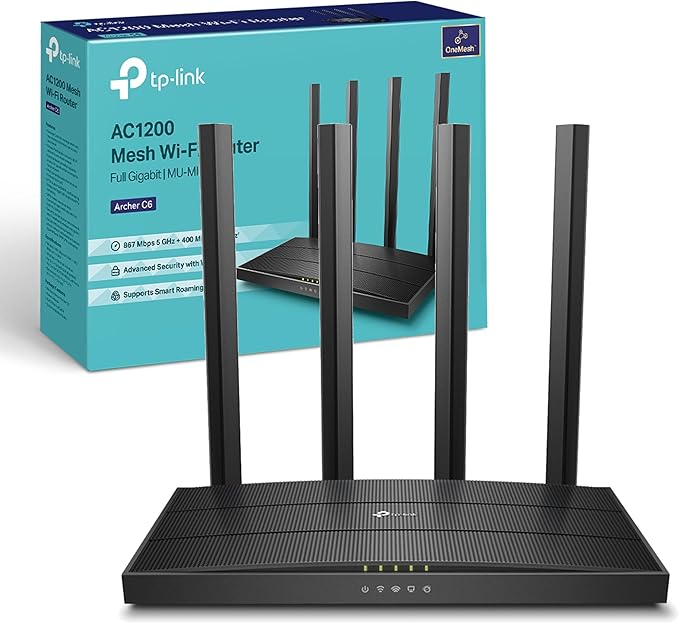
With blazing-fast Wi-Fi 6, the TP-LINK Archer AX50 router empowers your home with cutting-edge connectivity for super smooth 4K streaming, online gaming, and more. This dual band router delivers speeds up to 3Gbps across your devices using the latest 802.11ax standard, while 4 fixed external antennas provide expansive coverage throughout your home. The dual-core CPU enables low latency and reliable performance even when multiple devices are connected. With 6 Gigabit ports, the Archer AX50 offers versatile wired connectivity. Advanced security protocols like WPA3 keep your network and data safe. Parents can manage content and control access through flexible controls. With a sleek black design that blends into any decor, the Archer AX50 brings next-gen wireless performance home. Experience the future of Wi-Fi now with the Archer AX50. The manufacturer's part number for this product is ARCHER AX50.
With blazing-fast Wi-Fi 6, the TP-LINK Archer AX50 router empowers your home with cutting-edge connectivity for super smooth 4K streaming, online gaming, and more. This dual band router delivers speeds up to 3Gbps across your devices using the latest 802.11ax standard, while 4 fixed external antennas provide expansive coverage throughout your home. The dual-core CPU enables low latency and reliable performance even when multiple devices are connected. With 6 Gigabit ports, the Archer AX50 offers versatile wired connectivity. Advanced security protocols like WPA3 keep your network and data safe. Parents can manage content and control access through flexible controls. With a sleek black design that blends into any decor, the Archer AX50 brings next-gen wireless performance home. Experience the future of Wi-Fi now with the Archer AX50. The manufacturer's part number for this product is ARCHER AX50.
in 1 offers
The lowest price for TP-Link Archer AX50 Wireless Router Dual-Band (2.4 GHz / 5 GHz) Gigabit Ethernet Black right now is $30.90 at eBay.com.au.
The all-time low was $30.90 on 1 Mar 2026. That's the lowest price we've ever tracked — a great time to buy.
Prices last updated 1 Mar 2026.
TP-Link Archer AX50 Wireless Router Dual-Band (2.4 GHz / 5 GHz) Gigabit Ethernet Black
With blazing-fast Wi-Fi 6, the TP-LINK Archer AX50 router empowers your home with cutting-edge connectivity for super smooth 4K streaming, online gaming, and more. This dual band router delivers speeds up to 3Gbps across your devices using the latest 802.11ax standard, while 4 fixed external antennas provide expansive coverage throughout your home. The dual-core CPU enables low latency and reliable performance even when multiple devices are connected. With 6 Gigabit ports, the Archer AX50 offers versatile wired connectivity. Advanced security protocols like WPA3 keep your network and data safe. Parents can manage content and control access through flexible controls. With a sleek black design that blends into any decor, the Archer AX50 brings next-gen wireless performance home. Experience the future of Wi-Fi now with the Archer AX50. The manufacturer's part number for this product is ARCHER AX50.
With blazing-fast Wi-Fi 6, the TP-LINK Archer AX50 router empowers your home with cutting-edge connectivity for super smooth 4K streaming, online gaming, and more. This dual band router delivers speeds up to 3Gbps across your devices using the latest 802.11ax standard, while 4 fixed external antennas provide expansive coverage throughout your home. The dual-core CPU enables low latency and reliable performance even when multiple devices are connected. With 6 Gigabit ports, the Archer AX50 offers versatile wired connectivity. Advanced security protocols like WPA3 keep your network and data safe. Parents can manage content and control access through flexible controls. With a sleek black design that blends into any decor, the Archer AX50 brings next-gen wireless performance home. Experience the future of Wi-Fi now with the Archer AX50. The manufacturer's part number for this product is ARCHER AX50.

