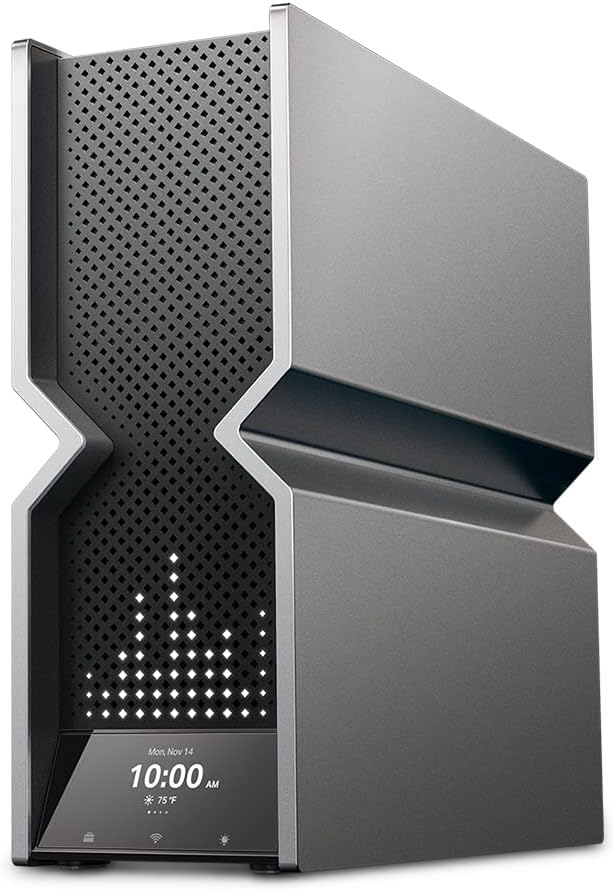
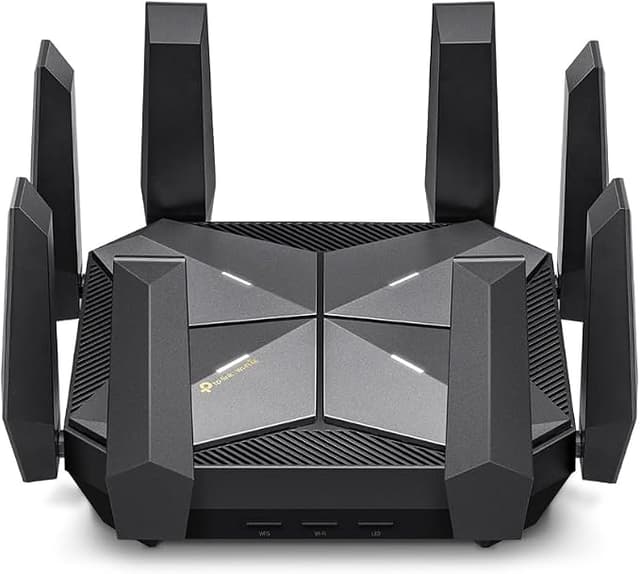
TP-Link Archer BE900 BE24000 Quad-Band Wi-Fi 7 Router
The TP-Link Wi-Fi 7 Router, featuring 802.11be Wi-Fi technology and the brand-new 6 GHz band, achieves top-level Wi-Fi performance. The new features of Wi-Fi 7 and 4k QAM drastically improve throughput and increase the capacity and efficiency of the entire network. Access to the 6 GHz band provides more bandwidth, higher speeds, and lower latency, opening up resources for future innovations. With the upcoming 7th generation of Wi-Fi, the ultimate online experience becomes possible. Wi-Fi 7 brings higher speeds with accelerated throughput, reduced latency, stronger protection against interference, and greater efficiency. Experience the world's first Quad-Band Wi-Fi 7 router with blazing speeds of up to 24.4 Gbps. Every device in your home network will operate at peak performance. The brand-new 6 GHz band offers exceptional bandwidth and congestion-free channels exclusively for your devices. Equipped with two 10G WAN/LAN ports – one RJ45 and one SFP+ Fiber/RJ45 combo port – the Archer BE900 provides flexible support for fiber and copper connections. The additional four 2.5G ports, one 1G port, and two USB ports make it an ideal solution for future-proofing your home network.
The TP-Link Wi-Fi 7 Router, featuring 802.11be Wi-Fi technology and the brand-new 6 GHz band, achieves top-level Wi-Fi performance. The new features of Wi-Fi 7 and 4k QAM drastically improve throughput and increase the capacity and efficiency of the entire network. Access to the 6 GHz band provides more bandwidth, higher speeds, and lower latency, opening up resources for future innovations. With the upcoming 7th generation of Wi-Fi, the ultimate online experience becomes possible. Wi-Fi 7 brings higher speeds with accelerated throughput, reduced latency, stronger protection against interference, and greater efficiency. Experience the world's first Quad-Band Wi-Fi 7 router with blazing speeds of up to 24.4 Gbps. Every device in your home network will operate at peak performance. The brand-new 6 GHz band offers exceptional bandwidth and congestion-free channels exclusively for your devices. Equipped with two 10G WAN/LAN ports – one RJ45 and one SFP+ Fiber/RJ45 combo port – the Archer BE900 provides flexible support for fiber and copper connections. The additional four 2.5G ports, one 1G port, and two USB ports make it an ideal solution for future-proofing your home network.
The TP-Link Wi-Fi 7 Router, featuring 802.11be Wi-Fi technology and the brand-new 6 GHz band, achieves top-level Wi-Fi performance. The new features of Wi-Fi 7 and 4k QAM drastically improve throughput and increase the capacity and efficiency of the entire network. Access to the 6 GHz band provides more bandwidth, higher speeds, and lower latency, opening up resources for future innovations. With the upcoming 7th generation of Wi-Fi, the ultimate online experience becomes possible. Wi-Fi 7 brings higher speeds with accelerated throughput, reduced latency, stronger protection against interference, and greater efficiency. Experience the world's first Quad-Band Wi-Fi 7 router with blazing speeds of up to 24.4 Gbps. Every device in your home network will operate at peak performance. The brand-new 6 GHz band offers exceptional bandwidth and congestion-free channels exclusively for your devices. Equipped with two 10G WAN/LAN ports – one RJ45 and one SFP+ Fiber/RJ45 combo port – the Archer BE900 provides flexible support for fiber and copper connections. The additional four 2.5G ports, one 1G port, and two USB ports make it an ideal solution for future-proofing your home network.
The TP-Link Wi-Fi 7 Router, featuring 802.11be Wi-Fi technology and the brand-new 6 GHz band, achieves top-level Wi-Fi performance. The new features of Wi-Fi 7 and 4k QAM drastically improve throughput and increase the capacity and efficiency of the entire network. Access to the 6 GHz band provides more bandwidth, higher speeds, and lower latency, opening up resources for future innovations. With the upcoming 7th generation of Wi-Fi, the ultimate online experience becomes possible. Wi-Fi 7 brings higher speeds with accelerated throughput, reduced latency, stronger protection against interference, and greater efficiency. Experience the world's first Quad-Band Wi-Fi 7 router with blazing speeds of up to 24.4 Gbps. Every device in your home network will operate at peak performance. The brand-new 6 GHz band offers exceptional bandwidth and congestion-free channels exclusively for your devices. Equipped with two 10G WAN/LAN ports – one RJ45 and one SFP+ Fiber/RJ45 combo port – the Archer BE900 provides flexible support for fiber and copper connections. The additional four 2.5G ports, one 1G port, and two USB ports make it an ideal solution for future-proofing your home network.
in 27 offers
The lowest price for TP-Link Archer BE900 BE24000 Quad-Band Wi-Fi 7 Router right now is $960.80 at 友和 Yoho, compared across 25 retailers.
The all-time low was $256.76 on 1 Mar 2026 — today's price is 274% above the lowest ever. It has been notably cheaper before — worth setting a price alert.
Prices last updated 2 Nov 2026.
Last updated at 02/11/2026 02:14:21
Mastercard $100 OFF | TP-Link Archer BE900 BE24000 Quad-Band WiFi 7 Router
Delivery $90.66
TP-Link BE24000 Quad-Band Wi-Fi 7 Router
Delivery between 5–10 Nov $6.95
TP-Link Archer BE900 BE24000 MU-MIMO OFDMA Quad-Band WiFi 7 Router
7-day returns
TP Link Archer BE24000 Quad Band Wi Fi 7 Router Archer BE900 - Routers
Delivery $38.50
TP Link Archer BE24000 Quad Band Wi Fi 7 Router Archer BE900 - Routers
Delivery $23
Tp-link Archer Be900 Be24000 Quad-band Wi-fi 7 Router (wifi7) 1376
Free delivery
Affiliate Disclosure: We may receive a small commission for purchases made through this link at no extra cost to you. This helps support our site. Thank you!
TP-LINK Archer BE900 BE24000 Quad-Band Wi-Fi 7 Router
Delivery $12.99
TP-Link Archer BE900 BE24000 Quad-Band Wi-Fi 7 Router, Lightning-Fast 24.4 Gbps
Delivery between Wed – Sat $10
TP-Link Archer BE900 BE24000 Quad-Band Wi-Fi 7 Router
Free delivery between 4–11 Nov
TP-Link Archer BE900 BE24000 Quad-Band Wi-Fi 7 Router | Best Online Computer Store
Delivery $12.12
originally posted on bestbuy.com
Just purchased and have spent the better part of a day fighting with this. Setup is easy, Tether app is intuitive and works well. It's an absolute beast of a router, but...Constantly reboots. Anywhere from 15 minutes to the longest of 2.5 hours. Updated firmware, setup and then factory reset and started over all to no avail. Only have around 25-30 connections so it shouldn't even be close to breaking a sweat. The log is useless, doesn't record all events and gets wiped at each reboot so you can only see the startup events, nothing gets retained from the prior "session."At this price point, and being the flagship of the line, should be dead reliable, especially right out of the box. TP-Link, ya need to do better on this one.
originally posted on bestbuy.com
I purchased this router to upgrade from the TPLink Archer AX11000. The AX max out at 40 Ip.s and needed more, so got the BE900. SO far so good, one thing I found out is that TwT does not seem to work properly, unless I am missing something, but changes my internal DNS to 10.10.10.1 to 10.10.10.4 this causing all the WiFI to disconnect. Other then that, extremely fast, well design, great support.
originally posted on bestbuy.com
Overall, this router is one of the best routers out there. Very strong signal strength and with a wifi 7 adapter, the speeds almost doubled for me. With an old Netgear router which served me almost 6 years, I was getting around 300 / 350 MBPS (Verizon Fios 1GBPS connection). Now, with this router, I am almost getting 600 / 700 MBPS. Streaming Netflix 4K movies look fabulous with the newer speeds.
| Connectivity | Wireless |
| Encryption Type | WPA, WPA2, WPA3 |
| Modem Type | DSL Modem |
| Gigabit Ethernet | Yes |
| IPv6 Compatible | Yes |
Mastercard $100 OFF | TP-Link Archer BE900 BE24000 Quad-Band WiFi 7 Router
Delivery $90.66
TP-Link BE24000 Quad-Band Wi-Fi 7 Router
Delivery between 5–10 Nov $6.95
TP-Link Archer BE900 BE24000 MU-MIMO OFDMA Quad-Band WiFi 7 Router
7-day returns
TP Link Archer BE24000 Quad Band Wi Fi 7 Router Archer BE900 - Routers
Delivery $38.50
TP Link Archer BE24000 Quad Band Wi Fi 7 Router Archer BE900 - Routers
Delivery $23
Just purchased and have spent the better part of a day fighting with this. Setup is easy, Tether app is intuitive and works well. It's an absolute beast of a router, but...Constantly reboots. Anywhere from 15 minutes to the longest of 2.5 hours. Updated firmware, setup and then factory reset and started over all to no avail. Only have around 25-30 connections so it shouldn't even be close to breaking a sweat. The log is useless, doesn't record all events and gets wiped at each reboot so you can only see the startup events, nothing gets retained from the prior "session."At this price point, and being the flagship of the line, should be dead reliable, especially right out of the box. TP-Link, ya need to do better on this one.
I purchased this router to upgrade from the TPLink Archer AX11000. The AX max out at 40 Ip.s and needed more, so got the BE900. SO far so good, one thing I found out is that TwT does not seem to work properly, unless I am missing something, but changes my internal DNS to 10.10.10.1 to 10.10.10.4 this causing all the WiFI to disconnect. Other then that, extremely fast, well design, great support.
Overall, this router is one of the best routers out there. Very strong signal strength and with a wifi 7 adapter, the speeds almost doubled for me. With an old Netgear router which served me almost 6 years, I was getting around 300 / 350 MBPS (Verizon Fios 1GBPS connection). Now, with this router, I am almost getting 600 / 700 MBPS. Streaming Netflix 4K movies look fabulous with the newer speeds.
I will finally be attempting to begin a RMA of this router tomorrow. It has been this bad since i first installed it. A little background. I am a natural tech, in that I am of a natural engineering type. I focused that towards computers around 23+ years ago when I began building my own PC's. Now I am an AI developer with a history in IT.Thats out of the way. Typing this on my phone since, once again, BE900, has rebooted itself. Mine is a V1. I have had nothing but problems during configuation, which was all done manually (reduce processor stress). This was also a nightmare. Not due to difficulty, but hardware issues. Still ANY configuration, or check box related to wifi, will definitly crash the system, at which point I do the full reset procedure and start from ... MoreI will finally be attempting to begin a RMA of this router tomorrow. It has been this bad since i first installed it. A little background. I am a natural tech, in that I am of a natural engineering type. I focused that towards computers around 23+ years ago when I began building my own PC's. Now I am an AI developer with a history in IT.Thats out of the way. Typing this on my phone since, once again, BE900, has rebooted itself. Mine is a V1. I have had nothing but problems during configuation, which was all done manually (reduce processor stress). This was also a nightmare. Not due to difficulty, but hardware issues. Still ANY configuration, or check box related to wifi, will definitly crash the system, at which point I do the full reset procedure and start from scratch again. Also, there is no such thing as backup configuration, as it cannot be restore without losing full accessibility, including direct lan cable. This leads to a, once again, system configuration from scratch.I have tried to set up a daily reboot to hopefully avoid all of the random self-reboots (about 15 minutes offline or longer) unless you go to the router and turn the power off and on to get it back faster, but that has had no effect.It is having symptoms that would best be descibed as complete mainboard failure. I would love the $400 giftcard as the IT time Ive wasted should easily be billed.Sorry about any spelling or grammar mistakes, I only jave internet on my phone. 5G
Had a Netgear Wi-Fi 6E router that had less antennas and better range. Speeds are about the same on both routers but this one has shorter range. It does have cooler features with a cool display but if you want better range go for a high end nighthawk thats 3,500sq feet.
Great when it works, but very unstable. The IoT network doesn't work (the SSID appears, but nothing connects). There are times when the whole WiFi network disappears, but it isn't from it rebooting since wired devices still have Internet. The tether app and the web interface have some differences. Ipv6 setup had issues.It'll probably get better over time, but this shouldn't be considered for mission critical environments.
High hopes for this but let down. This is supposed to hook up to another router to work as a mesh system. I bought 2 of these to use and it was not good. Individually great but linking them together not so good. Tech support said that they can't link up together. Ended up going with the TP-Link deco BE95 and that's great
So I've been having this up and running for about I want to say for about 2 weeks now despite buying it a month and a half ago or so and I would say that it has been okay. It hasn't been super fast like how I am expecting it to be or how it should be. I recently upgraded my Cable Modem to a Netgear Nighthawk 3.1 DOC CM2050V and also upgraded my Internet Plan from 400 to 1GB and I was only getting a little over 900mb with both the Cable modem and this router. Not sure if this is normal but this is what I was getting. Lately I've been getting between 930Mb and 940Mb and That's only because I decided to change my Cable Splitter to a much more powerful one. Not sure if I am missing something but, this shouldn't be the normal speed for such have powerful Combo that I ... MoreSo I've been having this up and running for about I want to say for about 2 weeks now despite buying it a month and a half ago or so and I would say that it has been okay. It hasn't been super fast like how I am expecting it to be or how it should be. I recently upgraded my Cable Modem to a Netgear Nighthawk 3.1 DOC CM2050V and also upgraded my Internet Plan from 400 to 1GB and I was only getting a little over 900mb with both the Cable modem and this router. Not sure if this is normal but this is what I was getting. Lately I've been getting between 930Mb and 940Mb and That's only because I decided to change my Cable Splitter to a much more powerful one. Not sure if I am missing something but, this shouldn't be the normal speed for such have powerful Combo that I have. Not sure right now if I could recommend the BE900 until I start seeing some better results. My service provider by the way is Spectrum. I plan on changing my current Cat8 Cables to newer ones and possibly my Coaxial Cable as well to see if that gets me to over 1GB as I should be.
I first went with the Deco BE95 mesh pair, and it was pretty decent, but for some reason, both of the Deco BE95 units ran unusually hot. The mesh setup was fairly decent, and definitely better (by a decent margin) than my previous Netgear RAXE500, which is a pretty high end router. Even so, it's pretty clear that the hardware internals are higher quality in the Archer line.The Archer BE900 is much faster than the Deco BE95. I currently have 5gbps fiber, and it beat the Deco mesh in all wireless band testing, as well as in wired speed tests on my desktop. I am easily getting 2gbps/2gbps on my s23 Ultra phone, and this phone is not even Wi-Fi 7. Also, I have an 8,000 sq property, and even without an extender or mesh, I get coverage everywhere.I have used ASUS and ... MoreI first went with the Deco BE95 mesh pair, and it was pretty decent, but for some reason, both of the Deco BE95 units ran unusually hot. The mesh setup was fairly decent, and definitely better (by a decent margin) than my previous Netgear RAXE500, which is a pretty high end router. Even so, it's pretty clear that the hardware internals are higher quality in the Archer line.The Archer BE900 is much faster than the Deco BE95. I currently have 5gbps fiber, and it beat the Deco mesh in all wireless band testing, as well as in wired speed tests on my desktop. I am easily getting 2gbps/2gbps on my s23 Ultra phone, and this phone is not even Wi-Fi 7. Also, I have an 8,000 sq property, and even without an extender or mesh, I get coverage everywhere.I have used ASUS and Netgear routers for as long as I can remember, and the user interface from TP-Link has been a pleasant surprise, and very intuitive. I actually prefer it. Not to mention that the touchscreen on the unit is beautiful and easy to use.I am enjoying the Archer BE900 so much that I plan on adding a second BE900 in my home via the EasyMesh setup as soon as they go back in stock. I could write more, but I'm even boring myself at this point.Plainly put, get this router if you have the means to do so. You will not regret it, and it will enhance even your current devices in the meantime until new WiFi 7 devices begin slowly roll out.P.S. This thing is huge, so you need to make sure you have to requisite space house this thing. It looks like a mini-PC, and in the best way possible. For a tech geek like me, this has very a very gratifying experience.
While this is quite expensive, you so get what you pay for. Simple setup (technically you don't need to run any setup to work, just plug it in). Notice an improvement over my Asus AXE11000 with my laptop (both hardwiered and with wierless intel killer wifi6e). Speedtest on my gigabit ISP is above 900/900 constantly.
| Connectivity | Wireless |
| Encryption Type | WPA, WPA2, WPA3 |
| Modem Type | DSL Modem |
| Gigabit Ethernet | Yes |
| IPv6 Compatible | Yes |