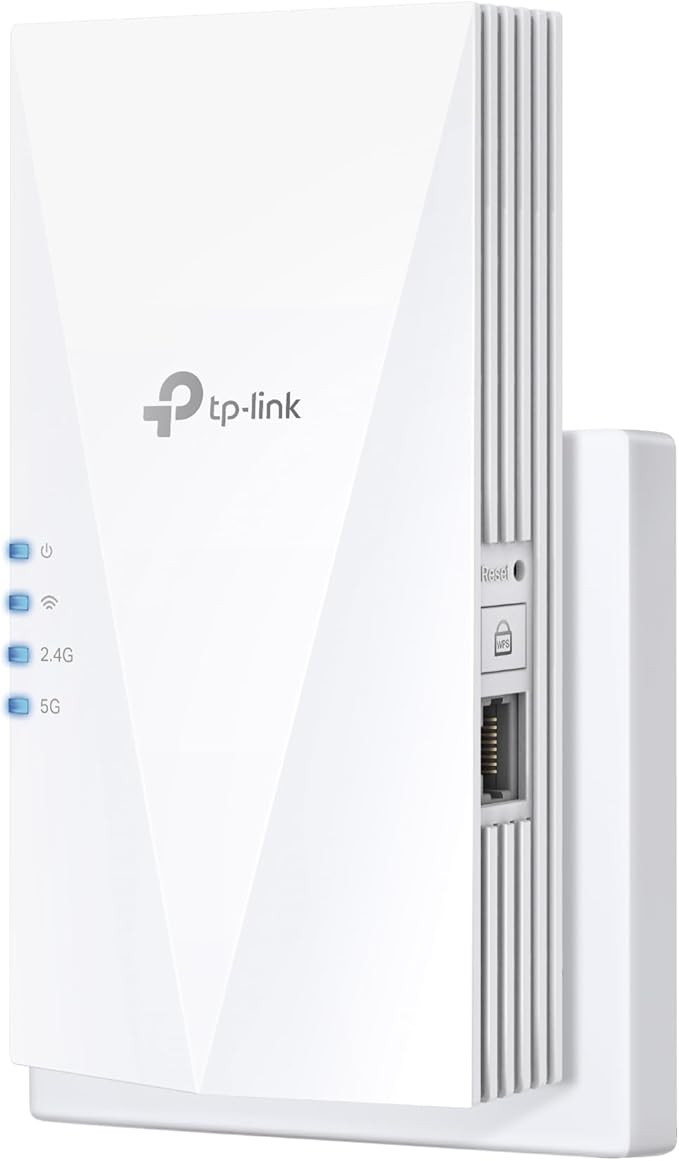
TP-Link RE550 Overview 1Description 2Fast Wi-Fi 3Adaptive Path Selection 4High Speed Mode 5Access Point Mode Eliminate Wi-Fi dead spots from your home for smooth video streaming and online game experiences by plugging the TP-Link RE550 AC1900 Dual-Band Wireless Mesh Wi-Fi Range Extender into an available power outlet. Designed to work with almost any router, this dual-band 802.11ac Wi-Fi range extender can be integrated into your network at the push of a button and delivers up to 1900 Mb/s throughput over the 2.4 GHz and 5 GHz frequencies. An Intelligent signal light helps you to position the range extender for maximum performance. Using the RE550 alongside a TP-Link OneMesh compatible router allows you to create and expand a mesh network, which operates under one network ID (SSID) to help provide a smooth online experience as you move from room to room. You can also use the RE550 to upgrade your wired network with 802.11ac connectivity by connecting it directly to your network router or switch through its Gigabit Ethernet port so that it can operate as an access point. Use the TP-Link Tether app to for Android and iOS to quickly configure, maintain, and monitor your device. Fast Wi-Fi Featuring three powerful external antennas, the RE550 is designed to deliver up to 1300 Mb/s over the 5 GHz frequency and 600 Mb/s on the 2.4 GHz signal. Adaptive Path Selection The RE550 optimizes your connection by automatically choosing the fastest path to the router, which makes it ideal for crowded network environments with multiple devices. High Speed Mode Configure the RE550 to dedicate a Wi-Fi band as a backhaul to the router while the other works as a Wi-Fi access point to maximize the bandwidth on the extended connection. Access Point Mode Connect the RE550 to your wired internet connection through its Gigabit Ethernet port to convert it into an 802.11ac wireless access point. Use of them does not imply any affiliation with or endorsement by them.
TP-Link RE550 Overview 1Description 2Fast Wi-Fi 3Adaptive Path Selection 4High Speed Mode 5Access Point Mode Eliminate Wi-Fi dead spots from your home for smooth video streaming and online game experiences by plugging the TP-Link RE550 AC1900 Dual-Band Wireless Mesh Wi-Fi Range Extender into an available power outlet. Designed to work with almost any router, this dual-band 802.11ac Wi-Fi range extender can be integrated into your network at the push of a button and delivers up to 1900 Mb/s throughput over the 2.4 GHz and 5 GHz frequencies. An Intelligent signal light helps you to position the range extender for maximum performance. Using the RE550 alongside a TP-Link OneMesh compatible router allows you to create and expand a mesh network, which operates under one network ID (SSID) to help provide a smooth online experience as you move from room to room. You can also use the RE550 to upgrade your wired network with 802.11ac connectivity by connecting it directly to your network router or switch through its Gigabit Ethernet port so that it can operate as an access point. Use the TP-Link Tether app to for Android and iOS to quickly configure, maintain, and monitor your device. Fast Wi-Fi Featuring three powerful external antennas, the RE550 is designed to deliver up to 1300 Mb/s over the 5 GHz frequency and 600 Mb/s on the 2.4 GHz signal. Adaptive Path Selection The RE550 optimizes your connection by automatically choosing the fastest path to the router, which makes it ideal for crowded network environments with multiple devices. High Speed Mode Configure the RE550 to dedicate a Wi-Fi band as a backhaul to the router while the other works as a Wi-Fi access point to maximize the bandwidth on the extended connection. Access Point Mode Connect the RE550 to your wired internet connection through its Gigabit Ethernet port to convert it into an 802.11ac wireless access point. Use of them does not imply any affiliation with or endorsement by them.
TP-Link AC1900 Dual Band Wi-Fi Range Extender w/ Gigabit Ethernet Port, Extends Wifi to Smart Home & Alexa Devices, 3x3 MU-MIMO (RE500)
TP-Link RE550 Overview 1Description 2Fast Wi-Fi 3Adaptive Path Selection 4High Speed Mode 5Access Point Mode Eliminate Wi-Fi dead spots from your home for smooth video streaming and online game experiences by plugging the TP-Link RE550 AC1900 Dual-Band Wireless Mesh Wi-Fi Range Extender into an available power outlet. Designed to work with almost any router, this dual-band 802.11ac Wi-Fi range extender can be integrated into your network at the push of a button and delivers up to 1900 Mb/s throughput over the 2.4 GHz and 5 GHz frequencies. An Intelligent signal light helps you to position the range extender for maximum performance. Using the RE550 alongside a TP-Link OneMesh compatible router allows you to create and expand a mesh network, which operates under one network ID (SSID) to help provide a smooth online experience as you move from room to room. You can also use the RE550 to upgrade your wired network with 802.11ac connectivity by connecting it directly to your network router or switch through its Gigabit Ethernet port so that it can operate as an access point. Use the TP-Link Tether app to for Android and iOS to quickly configure, maintain, and monitor your device. Fast Wi-Fi Featuring three powerful external antennas, the RE550 is designed to deliver up to 1300 Mb/s over the 5 GHz frequency and 600 Mb/s on the 2.4 GHz signal. Adaptive Path Selection The RE550 optimizes your connection by automatically choosing the fastest path to the router, which makes it ideal for crowded network environments with multiple devices. High Speed Mode Configure the RE550 to dedicate a Wi-Fi band as a backhaul to the router while the other works as a Wi-Fi access point to maximize the bandwidth on the extended connection. Access Point Mode Connect the RE550 to your wired internet connection through its Gigabit Ethernet port to convert it into an 802.11ac wireless access point. Use of them does not imply any affiliation with or endorsement by them.
TP-Link RE550 Overview 1Description 2Fast Wi-Fi 3Adaptive Path Selection 4High Speed Mode 5Access Point Mode Eliminate Wi-Fi dead spots from your home for smooth video streaming and online game experiences by plugging the TP-Link RE550 AC1900 Dual-Band Wireless Mesh Wi-Fi Range Extender into an available power outlet. Designed to work with almost any router, this dual-band 802.11ac Wi-Fi range extender can be integrated into your network at the push of a button and delivers up to 1900 Mb/s throughput over the 2.4 GHz and 5 GHz frequencies. An Intelligent signal light helps you to position the range extender for maximum performance. Using the RE550 alongside a TP-Link OneMesh compatible router allows you to create and expand a mesh network, which operates under one network ID (SSID) to help provide a smooth online experience as you move from room to room. You can also use the RE550 to upgrade your wired network with 802.11ac connectivity by connecting it directly to your network router or switch through its Gigabit Ethernet port so that it can operate as an access point. Use the TP-Link Tether app to for Android and iOS to quickly configure, maintain, and monitor your device. Fast Wi-Fi Featuring three powerful external antennas, the RE550 is designed to deliver up to 1300 Mb/s over the 5 GHz frequency and 600 Mb/s on the 2.4 GHz signal. Adaptive Path Selection The RE550 optimizes your connection by automatically choosing the fastest path to the router, which makes it ideal for crowded network environments with multiple devices. High Speed Mode Configure the RE550 to dedicate a Wi-Fi band as a backhaul to the router while the other works as a Wi-Fi access point to maximize the bandwidth on the extended connection. Access Point Mode Connect the RE550 to your wired internet connection through its Gigabit Ethernet port to convert it into an 802.11ac wireless access point. Use of them does not imply any affiliation with or endorsement by them.
originally posted on groupon.com
I recently purchased this WiFi extender, easy to setup and works awesome. I would definitely recommend this WiFi extender to anyone having problems with a weak WiFi signal.
originally posted on bhphotovideo.com
Even though my router is the same brand getting the extender set up was problematic and I ended up needing outside help. It could have been because the router network has been renamed by my ISP. But now I've got it running and it's working quite well
originally posted on bestbuy.ca
Range is quite poor . If you leave your room the speed drops even through it’s supposed to stay stable . Trash extender don’t recommend. Speeds only go up to 100 MBPS.
| Wireless Data Rates | Up to 1.9Gbps |
| Security | 64/128-bit WEP, WPA-PSK, WPA2-PSK |
| WPA/WPA2 | WPA2 |
| Antenna | 3 x External Antenna |
| Transmit Power | <20dBm (2.4GHz) , <23dBm (5GHz) |
I recently purchased this WiFi extender, easy to setup and works awesome. I would definitely recommend this WiFi extender to anyone having problems with a weak WiFi signal.
Even though my router is the same brand getting the extender set up was problematic and I ended up needing outside help. It could have been because the router network has been renamed by my ISP. But now I've got it running and it's working quite well
Range is quite poor . If you leave your room the speed drops even through it’s supposed to stay stable . Trash extender don’t recommend. Speeds only go up to 100 MBPS.
It does it's job.The bad thing about it is that it comes fromthe country whiCH persecutes millions & everyImport from there helps them to coNtinue.I should hAve asked before making the order.
Not sure why it gets such bad reviews. But for me, the setup is easy, and it works quite well. Give it 4 star because the 5G isn't that great but I guess it's due to the nature of how 5G works.
Extender works very well, easy to configure using the app from Google Play store.Since it was installed and configured it has work perfectly with no issues.
Finally, after 3 attempts for finding a suitable extender and spending more than 300 chf I bought this one which is doing the job in a 4bed. apartment
Not sure what’s up with the low rating but I’ve had no issues whatsoever using two of these to expand my mesh network with the Archer AX20 router, and I honestly get wicked wireless performance for the money. Maybe there are better options if you’re not using these extenders in a TP-Link mesh setup, but two of these are with an AX20 can match the performance of an integrated mesh network system that costs triple the price. The only thing you miss out on is WiFi 6 with the extender specifically but hard to complain about that for the price.
I was having problems with reception on virgin Media on the other side of the house upstairs so I went for this extender and I must say that it works very well. I went to the bottom of my garden to test how far it would reach about 100 feet away and it works really well and gives strong signal. I am very pleased with my purchase.
I was using a powerline extender in my basement, and was not getting great speed largely due to how the wiring was done (an older house and speed based on length of wiring from base to extender). This wi-fi range extender solved my wi-fi issue and works great - key is placing it strategically. Not sure why the bad review from others.
| Wireless Data Rates | Up to 1.9Gbps |
| Security | 64/128-bit WEP, WPA-PSK, WPA2-PSK |
| WPA/WPA2 | WPA2 |
| Antenna | 3 x External Antenna |
| Transmit Power | <20dBm (2.4GHz) , <23dBm (5GHz) |